

 16 min read

TL;DR
- Zapier offers a quick route for linking well-known SaaS applications; however, a task may be used up every time an action succeeds.
- Make provides a visual canvas for branching workflows, although its credits may accumulate across module actions.
- Pricing for Cloud on n8n is based on complete workflow executions, and self-hosting is available too—an option that swaps a vendor invoice for owning your infrastructure.
- When your process is already running in Microsoft 365, Power Automate tends to be the best fit — yet what gets included is determined by connector and license rules.
- At Activepieces, you get a cheap hosted starting option, plus self-hosting — just verify the Free credit-reset policy and the added expense for AI steps.
- Workato suits managed enterprise integrations, yet the overall contract cost stays unspecified under its public pricing; the amounts shown here mirror the terms published as of November 18, 2026.
Workflow automation software moves data or actions between apps when a trigger fires, using rules, transformations, and optional approvals. Cross-app platforms connect forms, email, spreadsheets, CRMs, and internal systems. They differ in branching, error recovery, deployment, and billing; project-suite rules and RPA screen bots handle adjacent needs.
At a glance
Zapier works for standard app integrations and invoices completed operations; Make manages visual workflows, n8n counts executions, Power Automate supports Microsoft applications, and Activepieces and Workato serve open-core and enterprise requirements.
| Tool | Best for | Billing unit to watch | Main limitation |
|---|---|---|---|
| Zapier | Getting common apps connected quickly | Successful action tasks | Multi-step volume raises the task tier |
| Make | Visual branching and data mapping | Module-action credits | More steps mean more usage to forecast |
| n8n | Technical teams that want execution-based pricing or self-hosting | Whole Cloud executions | Self-hosting adds maintenance and infrastructure |
| Power Automate | Microsoft-centric work and desktop flows | User or process license; connector/action limits | Premium connectors and unattended RPA need the right license |
| Activepieces | Open-core automation with a low-cost hosted plan | Flow-run credits plus AI credits | Free reset cadence is unclear; team governance is higher tier |
| Workato | Enterprise orchestration and governance | Platform edition plus usage credits | No public dollar price for a standard enterprise plan |
What makes the best workflow automation software?
Zapier, Make, n8n, Power Automate, Activepieces, and Workato vary most when it comes to the app actions they support, how workflows branch, who owns recovery, and what data controls they offer you.
- Your actual app and actions. Verify that a connector supports the trigger, search, or update action your process needs, then confirm its authentication method and any premium-plan requirement.
- Workflow shape. A flow that has branches, loops, approvals, retries, or code differs from a straight trigger-and-action chain. Draw the process first, and then verify how each platform handles failed or skipped steps and how it bills.
- Ownership and recovery. Determine who's going to examine a failed run, rotate credentials, and alter a workflow whenever an app's API changes. Although a self-hosted tool can reduce subscription costs, it makes that upkeep your job.
- Control and scale. Verify audit history, access roles, data location, concurrency, and retention against the workflow's risk. For sales or support automations, test routing and spam filtering as separate requirements instead of assuming a connector solves them.
1. Zapier: Best for getting common apps connected quickly
For a familiar two-app handoff, my pick is Zapier when the team doesn’t have a developer building the integration. Its Free plan supports 100 tasks per month and two-step Zaps; multi-step workflows, premium apps, and webhooks require paid plans. Watch the task count: each successful action in a Zap run may consume one task, so a three-action flow triggered 2,000 times could require roughly 6,000 tasks before special AI or code usage.
I examined the plan controls and the annual selector on the pricing page. Professional and Team prices are labeled as starting prices there, so that entry figure isn't a quote for a busy workflow. The estimate changes: a five-step workflow consumes the same task allowance far quicker than a one-action notification.
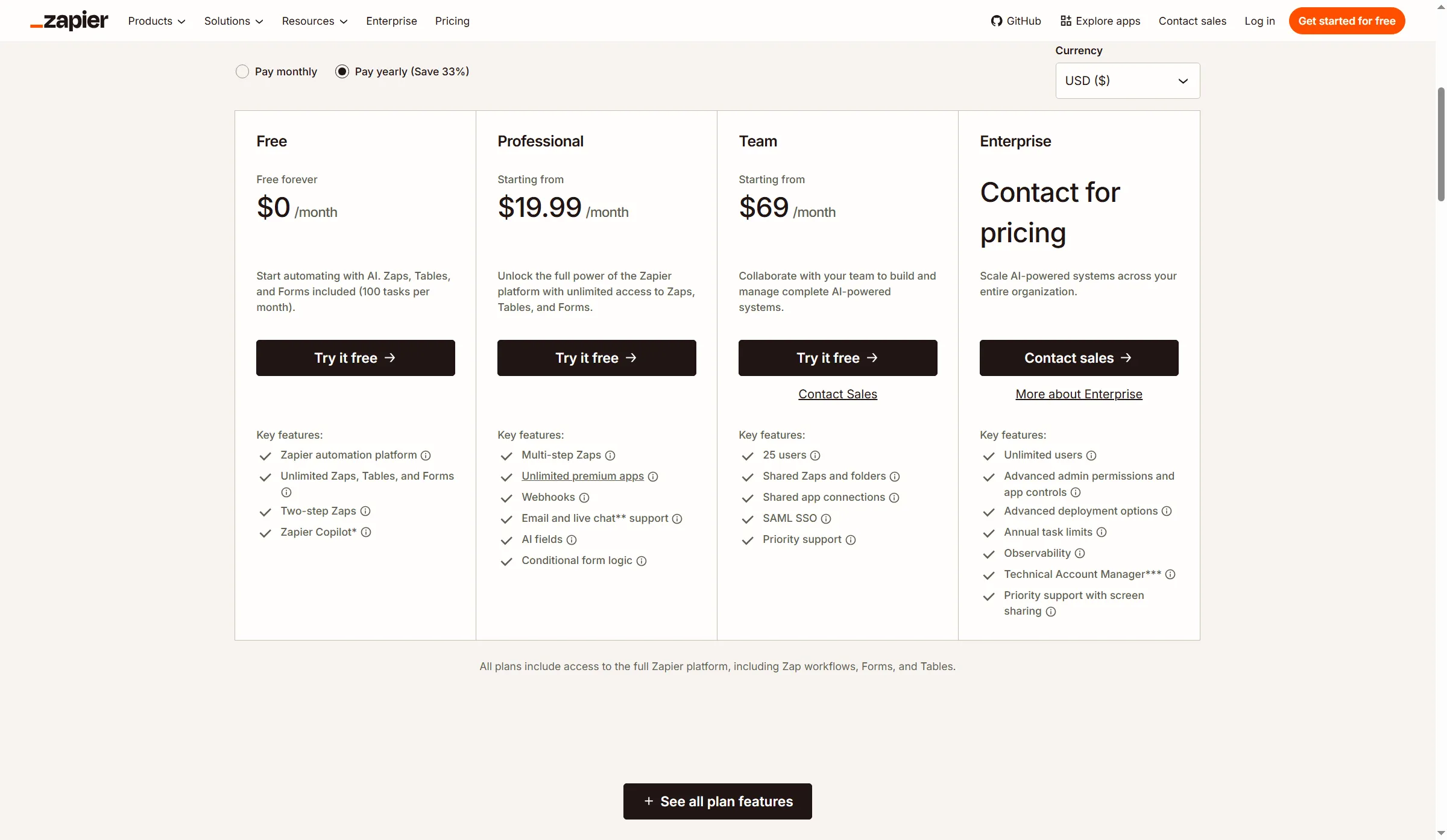
Zapier’s starting prices do not budget a multi-step flow.
Pros — Zapier
- Zapier’s editor is approachable, and its app selection covers common sales, marketing, and operations handoffs.
- Tables, forms, and AI actions sit in the same platform, so simple workflows can keep related steps together.
- I could compare plans and task limits on the pricing page before creating an account.
Cons — Zapier
- Typically, tasks get used up by successful action steps, and a workflow may be moved into a higher tier by branching or repeated actions.
- The Free plan is limited to 100 tasks per month and two-step Zaps.
- Reviewers report surprise charges when tests or loops use more tasks than expected. Trustpilot reviewer Ben Johnson, who rated the product highly, said support waived an accidental test-loop charge (Ben Johnson, May 8, 2026).
Product pricing — Zapier
Free plan: 100 tasks/month; Professional starts at $19.99/month and Team at $69/month when billed annually; higher task tiers cost more. See the scenario table for annualized workload prices.
2. Make: Best for visual branching and data mapping
I like Make for branched workflows: its canvas makes routing and data mapping easy to inspect, though the learning curve is longer. Its free plan includes a 15-minute minimum interval between scheduled runs and up to 1,000 credits per month; most module actions take one credit, though certain AI-provider actions consume more.
I selected annual billing and 10,000 credits on Make’s pricing page. Core showed $12 per month and Teams $38; the selector lets you change either the plan or the credit allowance. A scenario that runs several modules can use multiple credits, so 10,000 credits won’t cover 10,000 complete workflows. Joel M. and Dovier R., two five-star seller-invited G2 reviewers, discuss webhook/API troubleshooting, credits consumed during testing, and the learning curve for iterators, aggregators, and data mapping.
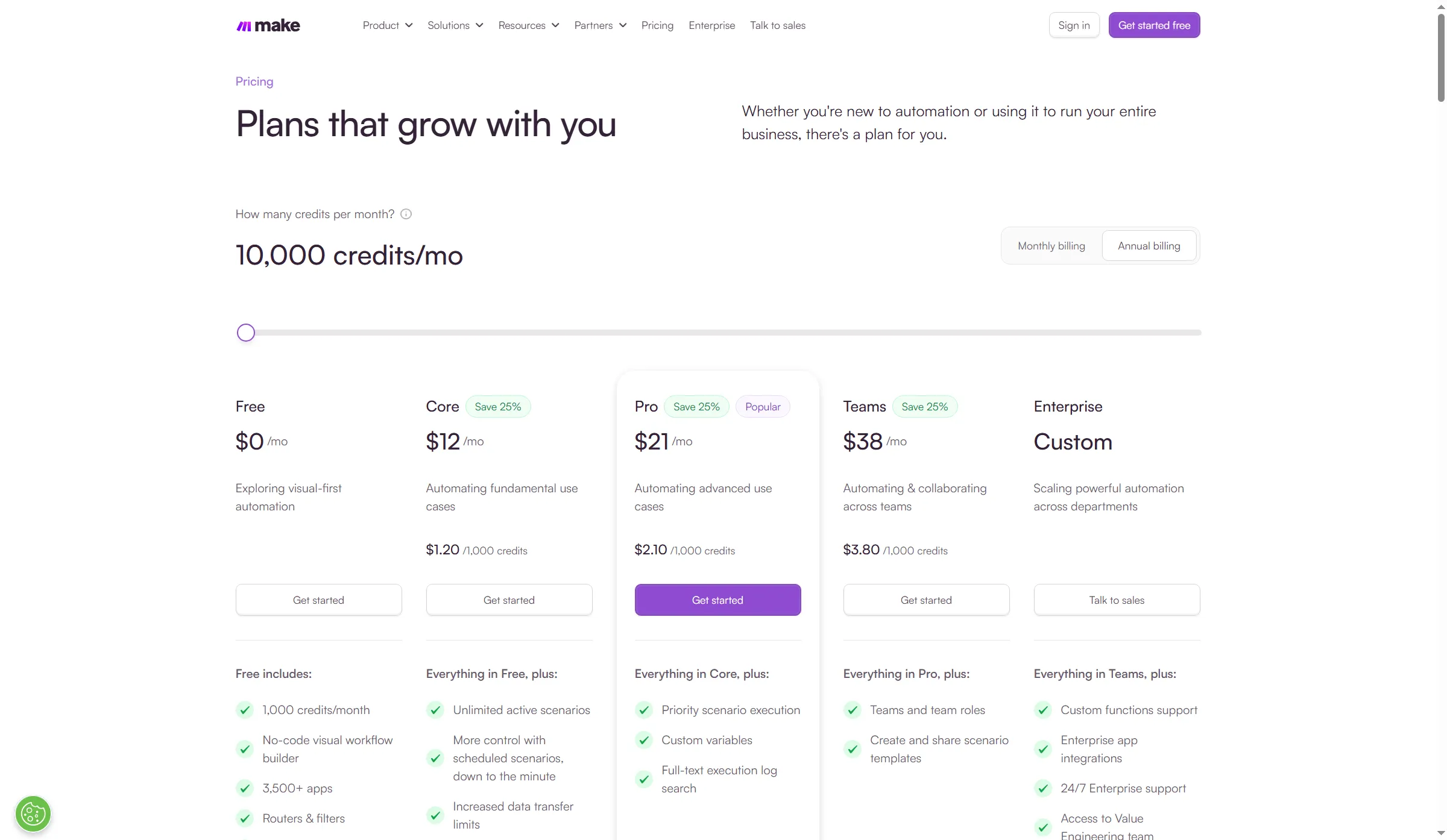
Make pairs a 10,000-credit selection with plan prices and per-1,000-credit rates.
Pros — Make
- The canvas shows routing plus data transformations instead of concealing each step inside a linear list.
- Core allows unlimited active scenarios and scheduled runs as often as every minute.
- At the same annual credit allowance, Make’s entry tiers cost less than many task-based plans.
Cons — Make
- Any module action may use credits; therefore, to get a realistic estimate, you need to account for retries, polling, and branches.
- Iterators, error paths, and aggregators introduce concepts that a basic two-step automation doesn't require.
- Reviewers' complaints about testing and debugging reveal an actual setup expense: allocate time for learning the canvas before placing a fragile process on it.
Product pricing — Make
Free: up to 1,000 credits/month; Core starts at $12/month for 10,000 credits with annual billing. Plan and credit volume affect the total; see the scenario table.
3. n8n: Best for technical teams that want execution-based pricing
n8n Cloud counts a complete workflow execution regardless of how many steps it contains, which can make a multi-step flow easier to forecast than per-action billing. Cloud plans include unlimited users and workflows. With annual billing, Starter costs $20 a month for 2,500 executions, and Pro costs $50 for 10,000. The hosted trial doesn’t require a payment card.
Self-hosting puts deployment, upgrades, credentials, backups, and uptime on your team. G2 reviewer Pawan M. praised local control and complex workflows, while noting Docker updates and production setup as maintenance work. Another reviewer wanted easier debugging and credential management. Execution pricing doesn't cover that operations work.
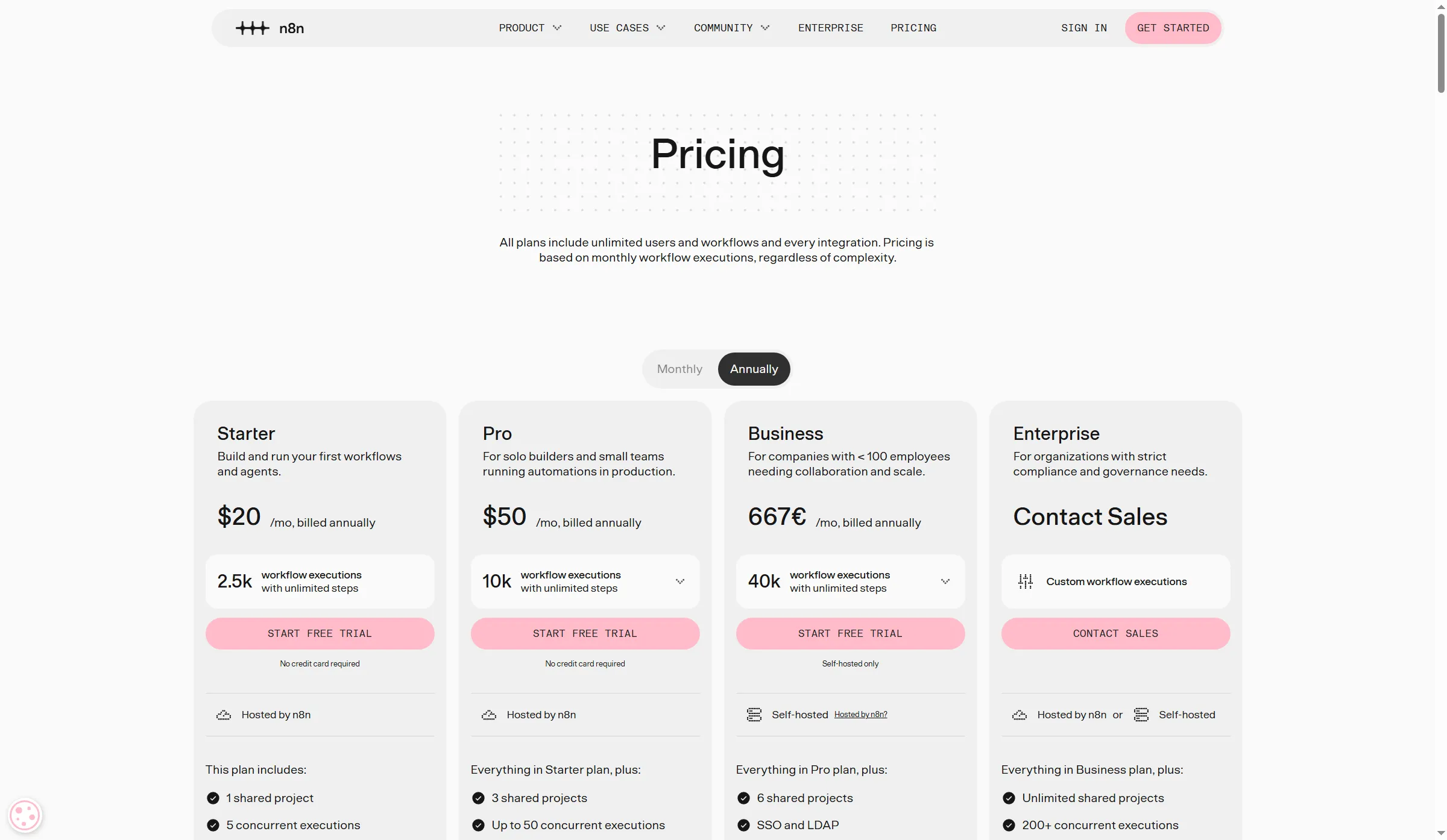
n8n counts whole Cloud executions, while self-hosting shifts infrastructure and updates to your team.
Pros — n8n
- Pricing for the cloud relies on complete executions; within every run, steps are unlimited.
- Self-hosting gives technical teams more control over where the workflow engine and its data run.
- Pro provides larger execution-history limits, greater concurrency, and shared projects relative to Starter.
Cons — n8n
- If you run a self-hosted setup, you take responsibility for upgrades, secrets, backups, monitoring, and recovery; you must count that labor in the total cost.
- Starter caps usage at 2,500 executions a month and five concurrent executions. Pro raises those limits, but still has caps.
- The experience of building and maintaining becomes less forgiving when nobody on the team is at ease with APIs, containers, and debugging. I like n8n’s execution meter, but the team needs someone who can own those technical chores.
Product pricing — n8n
Starter: $20/month billed annually for 2,500 executions; Pro: $50/month billed annually for 10,000 executions. Self-hosted infrastructure and labor are extra.
4. Power Automate: Best for Microsoft-centered workflows
I prefer Power Automate for workflows built around Microsoft 365 apps and desktop automation. Limited personal use with standard connectors is included in eligible Microsoft 365 plans; separate licenses might be required for premium or custom connectors, gateways, and advanced scenarios. Premium bills per user, Process bills per bot, and Hosted Process bills per Microsoft-hosted bot. Each user gets 40,000 actions daily under Premium.
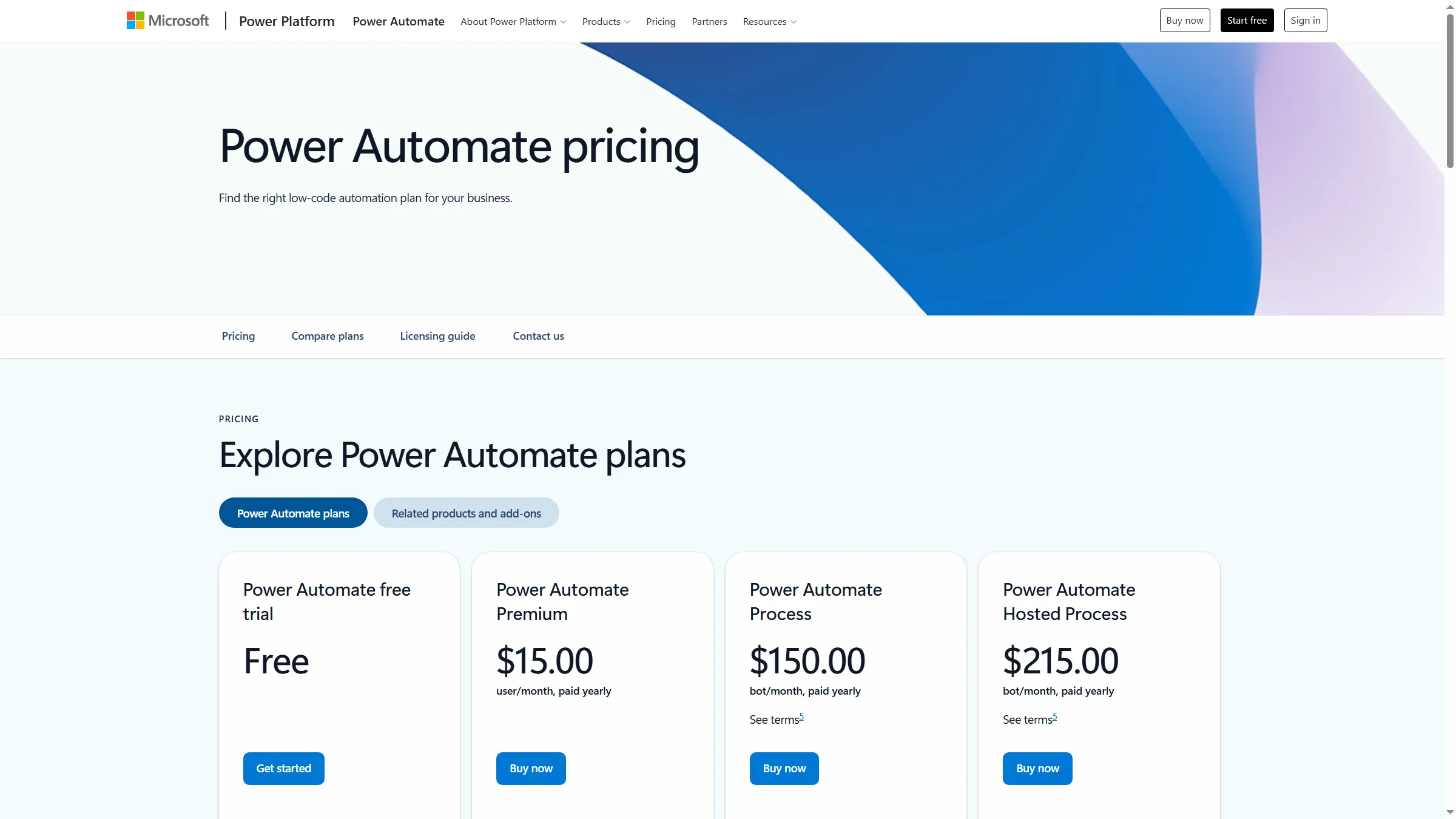
Power Automate’s per-user and per-bot plans cover different work, so compare licenses only after defining the workflow.
Pros — Power Automate
- Eligible Microsoft 365 users may already have limited rights for cloud flows with standard connectors.
- Power Automate covers cloud and desktop flows. Premium includes an attended bot; Process plans cover unattended use.
Cons — Power Automate
- A plan name alone won’t price a workflow. Connector type, flow ownership, process capacity, and action limits all affect the license.
- A five-star Capterra reviewer who identifies as a Director of Franchise Operations likes an Outlook-to-SharePoint approval flow but reports permission and trigger problems. Power Automate suits work anchored in Microsoft apps; desktop RPA raises the cost for an adjacent use case.
Product pricing — Power Automate
Premium: $15/user/month paid yearly; Process: $150/bot/month; Hosted Process: $215/bot/month. Microsoft 365 entitlements vary by plan and connector.
5. Activepieces: Best for open-core automation with a low-cost hosted tier
Activepieces pairs a low-cost hosted Plus tier with an open-source self-hosting option for teams that want to run the software themselves. Activepieces says a standard flow run consumes one credit regardless of the number of steps, though AI steps consume credits. Free includes 1,000 credits a month. Plus includes 10,000 credits and up to five users; Team includes 50,000 credits, 25 seats, SSO, and roles.
The pricing page lists monthly billing at $20 for Plus and $200 for Team. With annual billing, the monthly equivalents fall to $16 and $166. The pricing matrix says Free’s 1,000 credits reset daily, but the FAQ says they renew monthly and unused runs pause until that reset. Resolve that inconsistency before relying on Free. You’ll also need to check whether deployment and governance belong to self-serve or a sales tier.
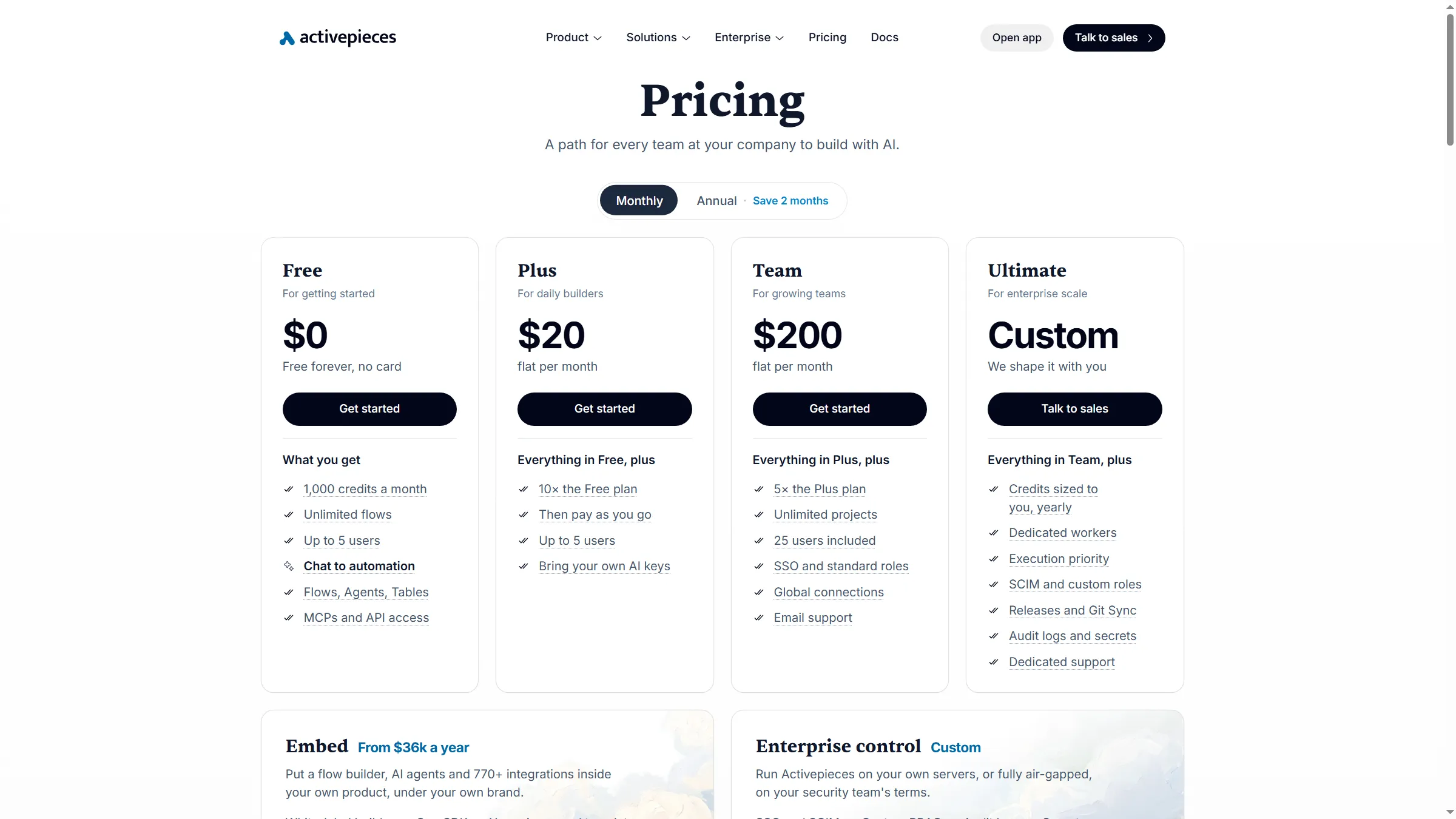
Activepieces separates the Free credit allowance from paid monthly plans; annual billing is a separate pricing option.
Pros — Activepieces
- I prefer the one-credit run model from Activepieces, since estimating it is simpler than per-step billing.
- Every month Free comes with 1,000 credits, yet the page is inconsistent regarding how often they reset.
- Team adds shared projects and governance capabilities, while Plus supports up to five users.
Cons — Activepieces
- The page gives conflicting reset schedules for Free, which makes the 1,000-credit allowance harder to budget.
- On paid plans, overages cost $0.007 for each credit; additional credits get consumed by AI steps.
Product pricing — Activepieces
Free: 1,000 credits/month; Plus: $16/month billed annually for 10,000 credits/month; Team: $166/month billed annually for 50,000 credits/month. Paid overages are $0.007/credit.
6. Workato: Best for enterprise integration governance
Workato is aimed at organizations managing shared integrations, reusable recipes, and several business systems. Its pricing documentation sets a platform-edition fee plus usage, with one common credit model spanning capabilities; recipe jobs may rely on differing metrics — API calls or tasks, for instance. No standard dollar price for a comparable enterprise plan is published by Workato. Pricing it requires a quote.
There’s no public starting price to compare. Before a demo, ask about the annual minimum and how teams trace failed recipes. Julian C. and Pramod S., two seller-invited, five-star G2 reviewers, praise integration and recipe reuse, but mention small-project cost and ask for clearer tracing across connected assets.
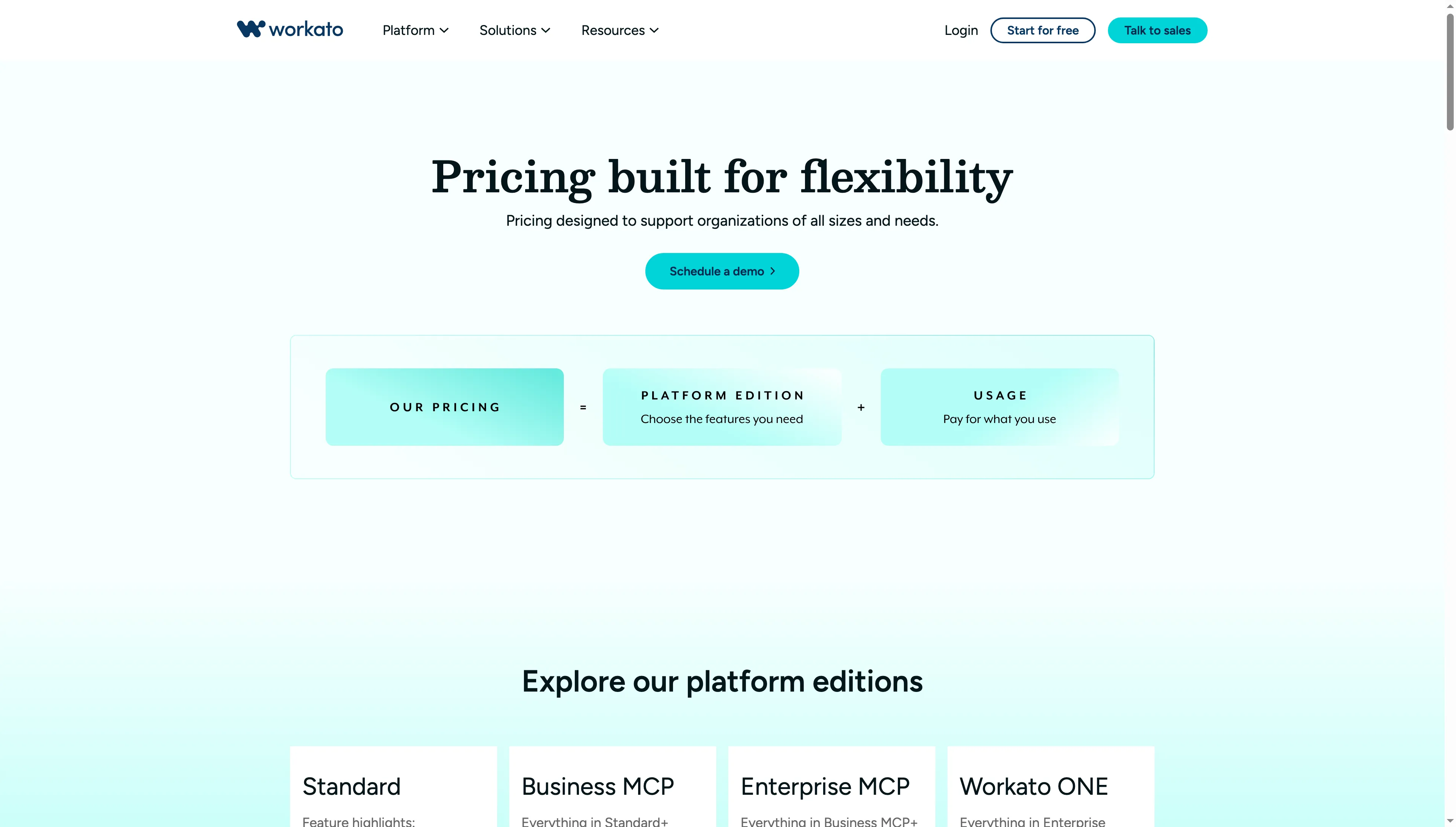
Workato’s edition and usage model means the quote should spell out both capabilities and expected consumption.
Pros — Workato
- Workato centers on reusable workflow assets and integrations shared across departments.
- The shared credit system lets enterprise buyers allocate usage across supported capabilities.
- Editions, plus add-ons, can be matched to requirements for governance, orchestration, and support.
Cons — Workato
- Workato doesn’t publish a standard enterprise rate. Ask for the full annual commitment and the usage assumptions behind it.
- The usage charge and the edition fee are distinct, and metrics for usage vary by capability.
- Selected reviewers mention high costs for smaller projects and difficulty tracing failures across dependent recipes. Include observability and recovery in the demo. I prefer Workato when cross-system governance justifies a sales-led contract.
Product pricing — Workato
Quote-based; Workato pricing includes an edition fee plus usage credits and optional add-ons. Ask for annual minimums, overage rules, included support, and renewal terms.
What does the same workflow cost across tools?
The solo workflow costs $144–$588 per year across tools with public pricing; the five-person workflow costs $192–$2,988, whereas Workato requires a quote. These prices assume annual billing before tax. Every path works, writes into two apps for the solo user or three apps per team run, and employs no AI, retries, loops, or extra infrastructure.
One-person workflow: 1,000 runs a month
For 1,000 two-write runs a month, Make’s 10,000-credit Core tier costs $144 a year. Zapier’s 2,000-task Professional tier costs $588. The table shows each tool’s annual plan for this solo workload.
| Tool | Billable workload | Plan and annual cost | Constraint to price |
|---|---|---|---|
| Zapier | 2,000 successful action tasks/month | Professional, 2,000-task tier: $588/year | Extra actions or special usage can raise the tier. |
| Make | About 2,000 module credits/month | Core, 10,000-credit tier: $144/year | More modules, retries, and polling use credits. |
| n8n Cloud | 1,000 whole executions/month | Starter, 2,500 executions: $240/year | Starter includes up to five concurrent executions. |
| Power Automate | One Premium user | Premium: $180/year | Connector rights determine whether the workflow needs Premium. |
| Activepieces | 1,000 flow-run credits/month | Plus, 10,000 credits: $192/year | Free’s reset wording conflicts; AI steps and overages change usage. |
| Workato | Usage depends on recipe and platform edition | Quote required | No public price for an equivalent package. |
Five-person workflow: 5,000 runs a month
For 5,000 three-write runs a month, Activepieces Plus costs $192 a year for up to five users. Zapier Team’s 20,000-task tier costs $2,988 a year and includes 25 seats. The table uses Make Teams for team roles and shared templates, while Power Automate Premium serves five named users.
| Tool | Billable workload | Plan and annual cost | Constraint to price |
|---|---|---|---|
| Zapier | 15,000 successful action tasks/month | Team, 20,000-task tier: $2,988/year | More actions, loops, or special usage can raise the tier. |
| Make | About 15,000 module credits/month | Teams, 20,000-credit tier: $828/year | The calculation uses team roles/templates; extra modules consume more credits. |
| n8n Cloud | 5,000 whole executions/month | Pro, 10,000 executions: $600/year | The Pro tier includes shared projects; operations work is extra if self-hosted. |
| Power Automate | Five Premium users | Premium: $900/year | A separate productivity-suite subscription may be needed beyond existing entitlements. |
| Activepieces | 5,000 flow-run credits/month | Plus, up to five users: $192/year | Team governance is separate: Team is $1,992/year. |
| Workato | Usage depends on recipe and platform edition | Quote required | Ask for annual minimums, included units, overage, and support terms. |
Pricing relies on distinct meters: successful actions get counted by Zapier and Make; full runs are tallied by n8n and Activepieces; users are licensed by Microsoft; edition plus usage fees are combined in Workato. An actual flow may use more units, and existing productivity-suite licenses may lower the incremental Microsoft cost for eligible standard-connector flows.
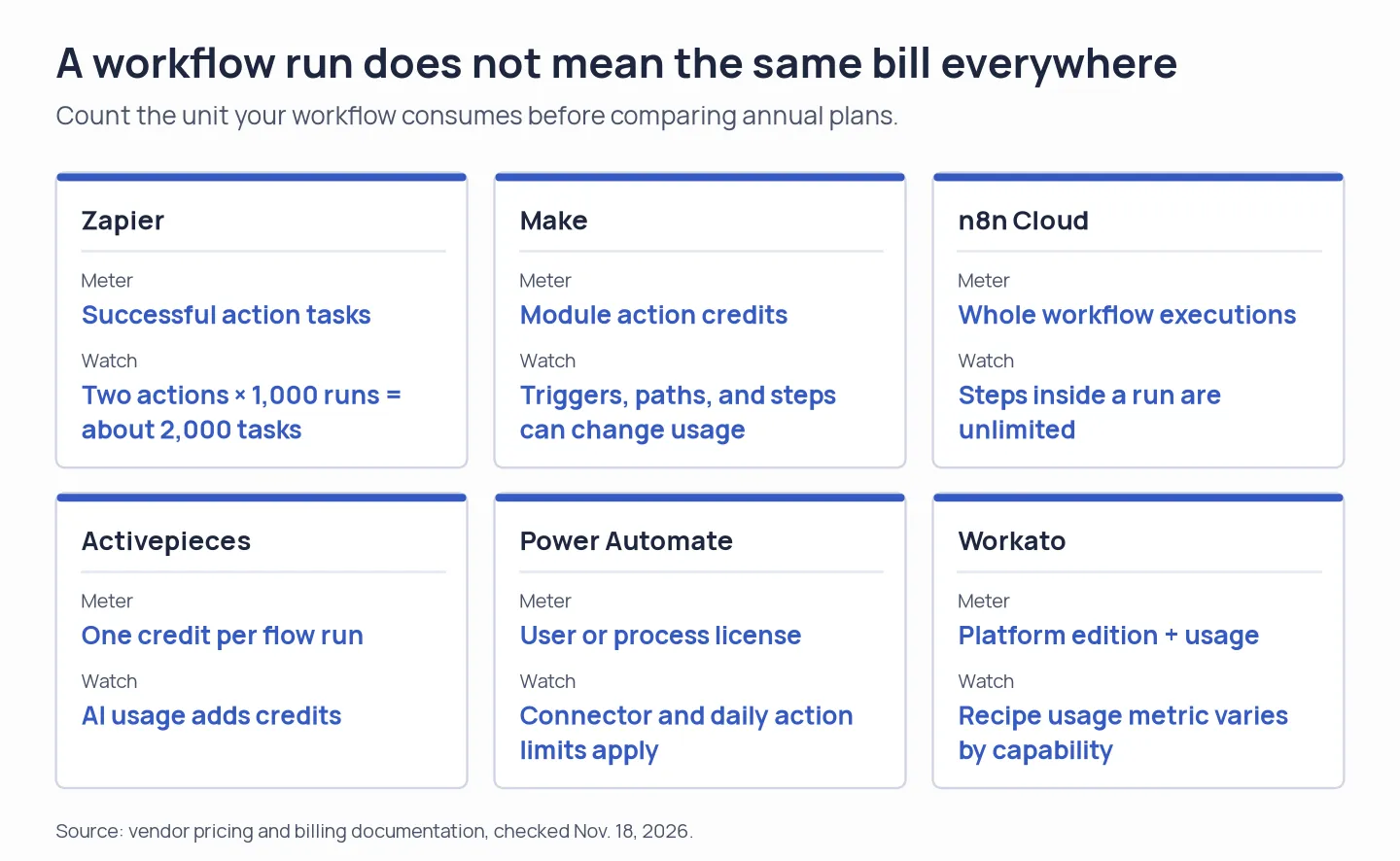
The unit on the invoice changes with the tool, even when the business event is the same.
Which workflow automation software should you choose?
- Pick Zapier if the precise apps and actions are on hand, and when the time saved through a familiar no-code setup counts for more than minimizing per-action cost.
- Pick Make when someone can take on the added debugging and a workflow requires visible branching, iterators, or meticulous data mapping.
- Pick n8n if a technical team wants whole-execution pricing, needs control over its own deployment, or both—and factor operations labor into that call.
- Pick Power Automate if Microsoft apps already serve as the work's foundation, and the connectors required match your existing licenses. Connectors carrying a premium, along with unattended desktop work, get priced on their own.
- Select Activepieces if a budget-friendly managed tier or on-premises setup suits your capacity, and you're after an open-core/self-hosting route.
- When governance and cross-system orchestration warrant an enterprise purchasing process, request from Workato a scoped quote. Look past a demo: compare the contract's support terms and usage definitions.
When a process needs to click through an old desktop interface, compare an RPA product such as UiPath as a neighboring category. Should your automations largely reside within Jira, Asana, ClickUp, or a CRM, begin with the rules bundled in that suite before adding another integration layer. Pipedream’s legacy Workflows product is not a new-buyer alternative: the company says it is closing on March 31, 2027; developers embedding integrations in their own products are served by Pipedream Connect.