LinkedIn Identity Verification Guide for Brands, Sales, and Marketers

Veracity is of paramount importance in business networking! As per statistics from July-December 2022, LinkedIn eliminated spam or fraudulent content 90.95 million times, and blocked 44.7 million illegitimate accounts during the registration procedure.

As this social media platform actively advances AI mechanisms to uphold a dependable community, we can breathe a sigh of relief.

Users now have an additional opportunity to get their account on LinkedIn publicly verified. This badge exhibits reliability; look at a current depiction of how it appears:
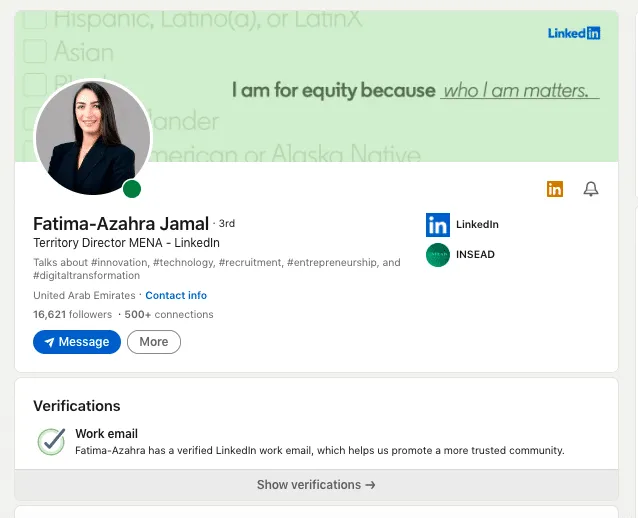
LinkedIn account verification example on a LinkedIn director account

An example of how a verified work email looks when you view your profile.

The new LinkedIn account verification has its own peculiarities compared with the method used for recovering an account after restrictions have been imposed. Let’s delve deeper.
Key points

  • LinkedIn suggests three ways to prove the account is authentic: by SMS code on signing up, submitting your state ID to un-restrict suspicious users, and voluntary validation. Only the last method gets you the visible icon
  • One of the ways to voluntary verify you belong to a certain company is to verify your corporate email address.
  • Some users have access to validation via CLEAR.
  • LinkedIn has taken a major step forward by collaborating with Microsoft to offer its users free access to digital workplace IDs.
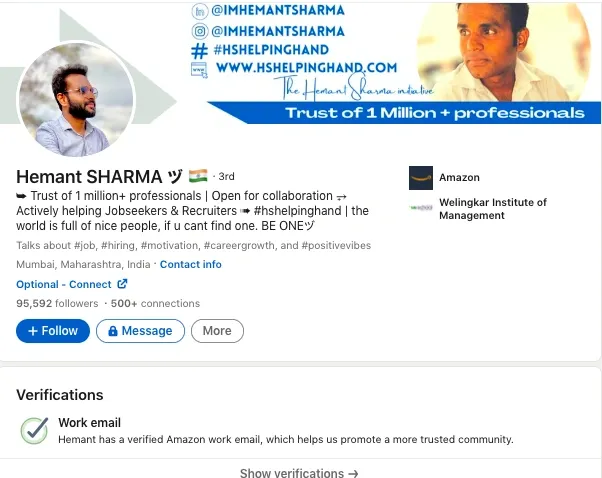
  • After the verification process is successfully completed, a verification icon can be seen by anyone who opens your account under the “Connect” and “Message” buttons.

How to verify a LinkedIn account

  1. Determine the type of verification you want: Look for the details and distinctions between the verifications in the table above.

Tip: If you have access to a work email address or belong to a workplace that supports validation, it is advisable to begin with this option.

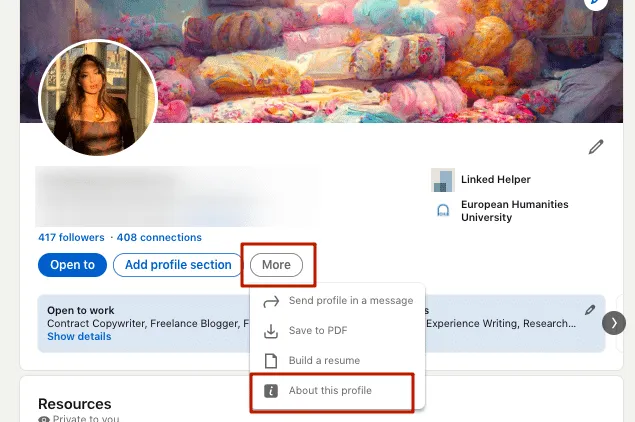
  1. Access the verification section: Log in to your LinkedIn account and navigate to the appropriate verification section. To do this, go to your profile and click on “Me.” Then select “About this profile.” Here, you will find the available options for becoming a verified member in your region.

How to verify a LinkedIn account from your page

To undergo verification, open your profile settings, and you will see the available options.

  1. Follow the instructions for the chosen confirmation method: These will be different methods for different services or for email confirmation.

CLEAR

  • This type of proof is only available on mobile applications. Therefore, you need to open your profile through the app.
  • For confirmation, you will need your document, phone number, and account on the CLEAR service (if you have one already).
  • If you don’t have a CLEAR account, you will get a free account by signing up with your email and phone number.
  • Take a photo of yourself and your document. It is possible to verify your LinkedIn account without a driver’s license as it is just one of the document options, along with a passport or other government ID.
  • When you provide your LinkedIn data, and your name and profile name match, as well as the photo, you will receive a checkmark.

If you encounter difficulties, refer to the help guide.

Verify your work email

This can only be done for an email with a corporate domain, meaning it matches the company’s website. Approval will not be granted before you receive (and enter in LinkedIn) the code via your work email. If not, it is possible that in the future, when the social network adds this organization, you will immediately see a checkmark.

If you encounter any issues, refer to this guide.

Verify your workplace

This process can also be completed only through the app. To have this option available or to have access to workplace verification, your company may need to configure the feature. The company itself decides what steps the user needs to take for proof. It is important that the company’s name matches exactly the same language as on your profile.

When everything is ready, you can share your data with the social network and see the desired checkmark.

If you encounter any issues, refer to the help guide.

How to get a verified status with a badge on LinkedIn

To attain a visible verification status on your profile, you must confirm either your ID (limited to the USA and India), your work email, or your workplace (available for select companies via Microsoft Entra). If you have the option to undergo any of these verifications, you will receive a visible checkmark on your profile.

The LinkedIn verification badge is only visible when visiting the profile and is not displayed on the search results page. Additionally, there is no filter for it. LinkedIn only recently introduced this feature, so its capabilities are currently limited.

How to get a verified status with a badge on LinkedIn

Your status will only be visible when opening your profile and will not be visible in search results.

How to verify a restricted LinkedIn account

Why does LinkedIn ask for identity verification? This precautionary measure is taken to combat scams and ensure a safe and reliable environment.

If LinkedIn requests ID proof, the process typically unfolds as follows:

  1. You will need to provide your ID to the support team. Capture clear photos of the document and upload them (1-2 photos). Once submitted, you will receive a prompt notification informing you that your ID is under review.
  2. Within a span of 3-5 days, you can expect a response. The validation process is usually completed within this timeframe, and various outcomes are possible. Here are some scenarios that may occur:
  • Your document is approved, granting you full access to your profile. Unfortunately, if the support team determines that you have violated LinkedIn’s policies, your account may face permanent suspension.
  • In cases where the support team suspects impersonation or the use of a fake identity, immediate action may be taken to ban the respective profile.
  • Should the country indicated in your profile not align with the IP location, you might be requested to update your location to match your actual residency in order to reinstate your account.

Violation of any rules can lead to serious repercussions such as permanent suspension of account, making it important for users to comply with all regulations in order to protect their accounts.

For more details, we encourage you to consult this LinkedIn post.

Frequently Asked Questions

Based on Federal Trade Commission data, imposter scams rank at the top of the list known as the “Fraudulent Five” with the highest number of reported fraud cases. These scams involve someone imitating another person, using deceptive tactics to exploit victims and obtain personal information or financial resources. The verification icon provides reassurance to others that you are indeed the person you claim to be, making it easier for them to place confidence in your online presence.

Try Linked Helper free for 14 days

The most technically advanced platform for LinkedIn automation with a focus on security, a wide range of features, and exceptional customer support. Trusted by over 10,000 businesses worldwide.