The 6 best waterfall enrichment tools in 2026
Waterfall enrichment tools suit different jobs: FullEnrich for email and mobile lists, BetterContact for small budgets, and Clay for custom workflows. Compare 6 options by billing and control.

18 min read

 18 min read

-
Starting point: FullEnrich handles focused email-and-mobile lists. BetterContact suits smaller managed jobs, while Clay gives you control over provider order and validation.
-
Observed billing: In the October 2026 BetterContact check, two email lookups consumed one credit: the Deliverable result billed, and the Undeliverable result didn't.
-
Repeat work: When I explicitly reran two stored email rows in Cleanlist, the balance fell from 58 to 56, despite its guide's free stored-field rerun wording.
-
Budget: BetterContact starts at $15/month. FullEnrich starts at $29/month, and Clay has a free plan with separate limits for Actions and Data Credits.
-
Existing tools: Apollo makes sense inside an existing prospecting workflow. Cleanlist combines enrichment with contact management, and Waterfall.io starts with a benchmark before a custom quote.
Quick comparison
FullEnrich and BetterContact manage the lookup sequence, while Clay lets you configure it. The October 2026 comparison of waterfall enrichment tools covers starting prices and trade-offs:
| Tool | Best for | Standout feature | Starting price | Main trade-off |
|---|---|---|---|---|
| FullEnrich | Email and mobile lists | Separate email quality statuses | $29/month, monthly | Catch-all emails also consume credits |
| BetterContact | Small managed lookup jobs | Provider selection handled for you | $15/month, monthly | CSV and API billing guidance differs |
| Clay | Custom enrichment workflows | Configurable validation and stopping rules | Free; Launch $185/month, monthly | Two usage meters to manage |
| Apollo | Existing Apollo teams | Ordered fallbacks inside prospecting | Seat plus variable usage | Apollo must remain first |
| Cleanlist | Enrichment plus CRM workflows | Shared credits and retained balances | $37/seat/month, annual | API and CRM sync need Pro |
| Waterfall.io | Procurement-led API buying | Benchmark before a custom quote | Custom | Rate and term need negotiation |
Linked Helper publishes this blog and offers LinkedIn automation and data enrichment. I explain my product checks and source review in How we tested.
What is waterfall enrichment?
Waterfall enrichment searches several data providers in sequence, moving on when a source fails to return an acceptable result. FullEnrich and BetterContact manage that search for you. Clay lets you configure it. The stopping rule can require a verified email, a mobile number, or simply a populated field.
You've got names and companies, but the email column still has gaps. A second provider may fill some of them, and that's useful, provided you can tell which returned addresses are ready for your workflow and which need another check. I look at these criteria before comparing provider counts:
-
Accepted status. A returned address can be deliverable, uncertain, or invalid. Decide which statuses you'll keep before buying a large credit allowance.
-
Billable action. Finding an address, validating it, and trying another source can each have a charge. A single row can cost more than a single lookup.
-
Provider control. A managed sequence saves maintenance. Configurable steps are useful when you already have data contracts or need a specialist source for one segment.
-
Destination. CSV export, a CRM push, continuous sync, and an API solve different jobs. Choose the plan that reaches the destination your team uses.
-
Repeat handling. Deduplication, cached answers, and API retries affect both the bill and the age of the data you receive.
1. FullEnrich: Best for focused email and mobile enrichment
FullEnrich is my starting point when you've already got a list and need email addresses or mobile numbers. Give it a LinkedIn URL or identifying name and company details, choose the fields you need, and it handles the search. Pro includes CSV and API access, so you won't have to negotiate an enterprise contract just to automate a manual process that's working.
FullEnrich pros
-
Separate email and mobile requests
-
CSV and API access on Pro
-
History can prevent repeat charges
FullEnrich cons
-
Catch-all and probably-valid emails consume credits
-
Same-batch duplicates can be billed twice
-
Cancellation shortens subscription-credit life
I like FullEnrich's separation of the best email found from its quality status. The API distinguishes deliverable, high-probability, catch-all, and invalid results. Keep the status beside the exported address (it's easy to lose that context in a spreadsheet), because the colleague who opens the file later shouldn't have to guess which rows are ready to send.
An email costs one credit even when it's catch-all or probably valid. If your team accepts only deliverable addresses, you'll pay for some rows you can't use. I wouldn't connect an unfiltered export straight to a sending tool.
A Reddit user made a similar point about filtering results in an account of layering Apollo, Lusha, and FullEnrich:
“the catch-all handling was the thing i didn't expect to matter as much as it did.”
— u/LevelDisastrous945, r/b2bmarketing, April 2026, discussing a roughly 1,200-contact SaaS list
Things I Noted — FullEnrich
FullEnrich's history can save you from paying again for a completed lookup, provided you use matching identifiers. It won't rescue a file containing two copies of the same person in one batch, though, and simultaneous requests can also bill twice. Deduplicate before uploading.
The history window lasts three months. Export the results you need to retain, too: the help guide says enriched contacts are deleted after that period.
FullEnrich pricing
FullEnrich's monthly Pro plans include 500 credits for $29, 1,000 for $55, or 5,000 for $255. The annual packages used in the workload comparison supply a yearly pool. Bring-your-own provider keys require Enterprise.
Monthly credits normally last three months, but if you cancel, your subscription credits expire at the end of the billing cycle. I prefer a monthly start until the share of results you accept is clear.
FullEnrich pricing: From $29/month, billed monthly. A 50-credit free trial is available.
2. BetterContact: Best for small managed enrichment jobs
BetterContact suits a small list when you don't want to configure the providers yourself. I selected email-only enrichment in the free workspace, where the form showed one credit for an email and ten for a mobile before I submitted anything. It's a useful place to put the price: you can change the field choice while it still costs nothing.
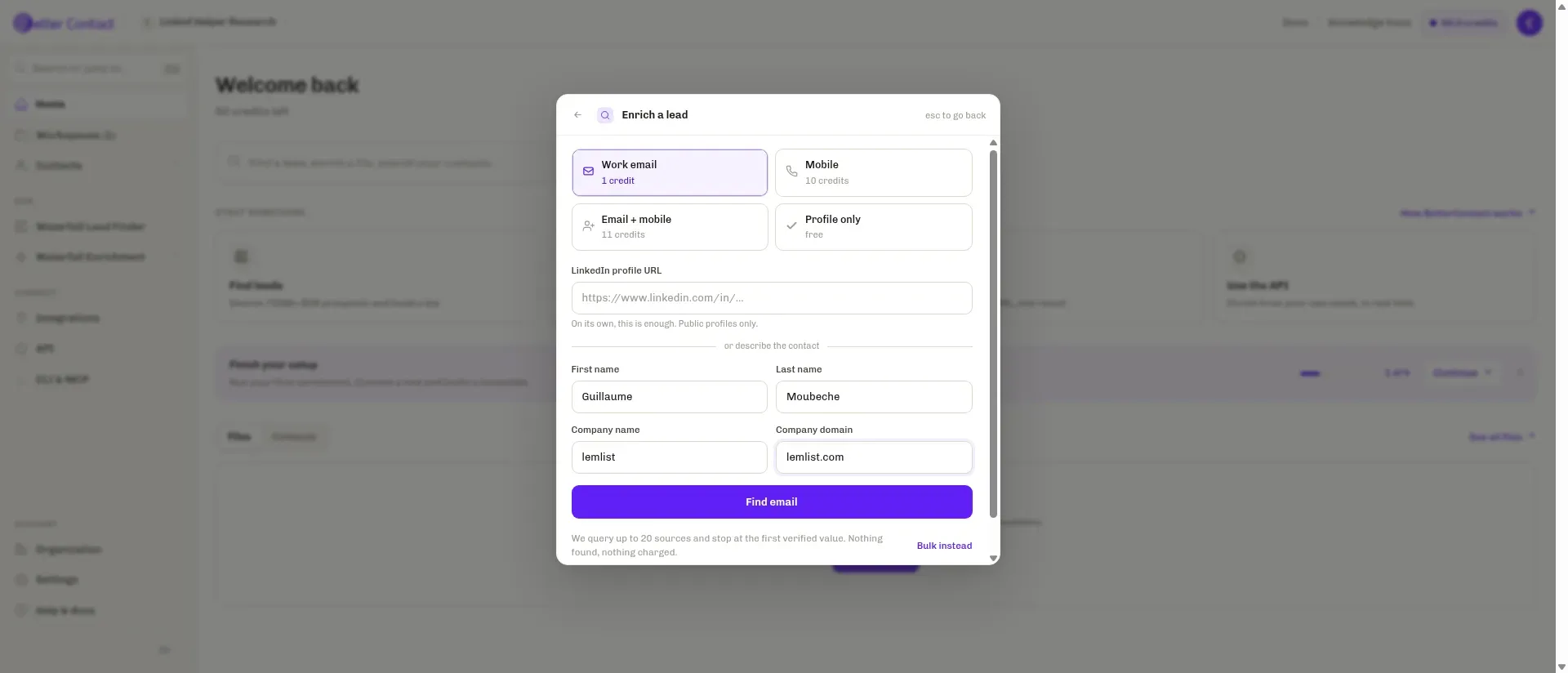
Inside BetterContact, the lookup form shows the credit cost and accepts a name plus company details.
BetterContact pros
-
Starter includes 200 monthly credits
-
Chooses the provider sequence for you
-
Shows result status separately from discovery
BetterContact cons
-
Official pages disagree on catch-all charges
-
API retries can create duplicate paid jobs
-
Non-renewal terms can lock unused credits
My two individual lookups both returned Found, but the results weren't equivalent. The Deliverable address consumed one credit, while the Undeliverable address consumed none, leaving the balance at 49 from a starting 50. I found the status and debit more useful than the Found label alone.
BetterContact's API selects providers from the lead's inputs and returns a job identifier. You don't have to maintain the sequence (that's the attraction of a managed service), but you also won't get Clay's control over each fallback.
The CSV setup screen said catch-all verification was mandatory and included without a separate charge. Its FAQ and API billing guide give different charging rules. Before moving a CSV process into an integration, settle which rule applies to that route.
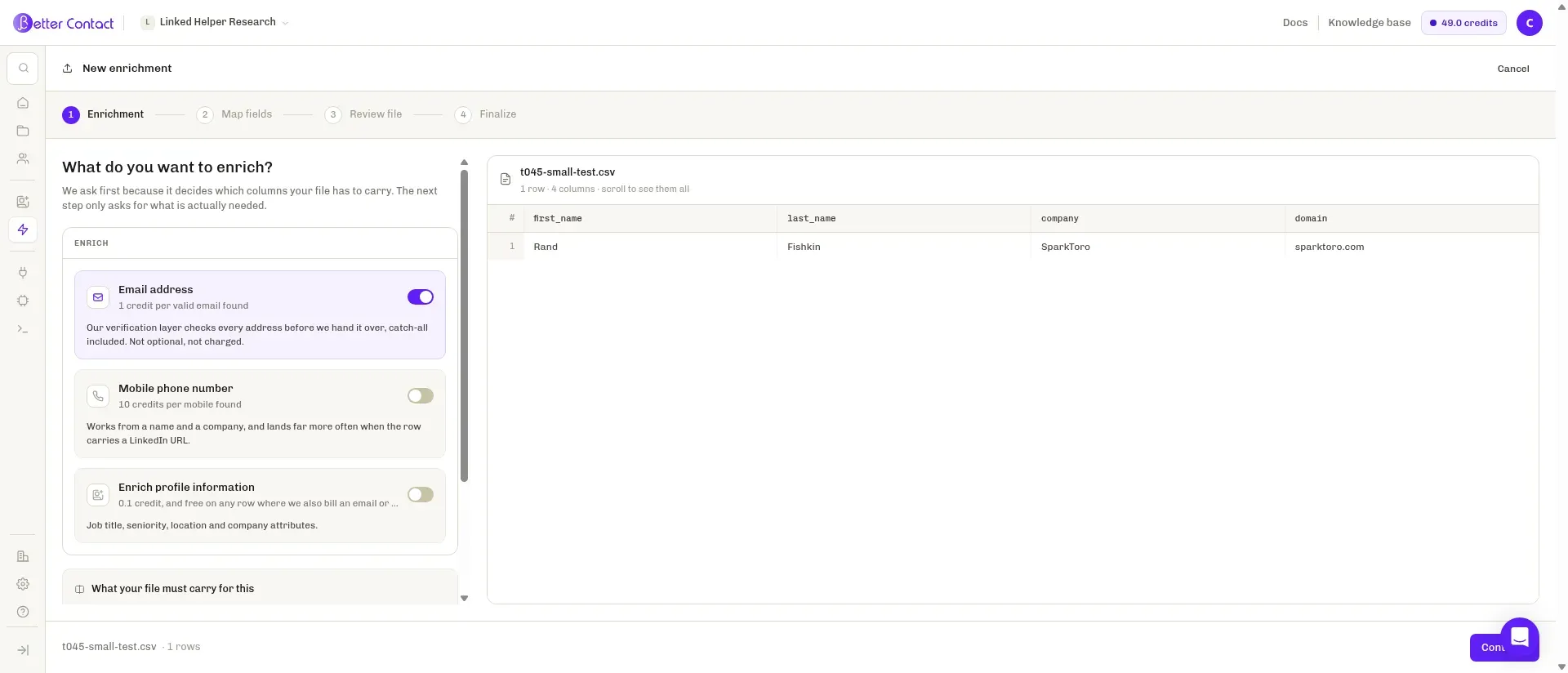
Inside BetterContact's CSV setup, the screen labels catch-all verification as mandatory and included.
Things I Noted — BetterContact
BetterContact treats a repeated API submission as a new request. If a job pauses because credits run out, keep its original request ID and top up the account so it can resume, rather than sending the same contacts through again. Otherwise, you'll risk paying twice for contacts it has already processed.
BetterContact pricing
BetterContact's Pro options include 1,000 credits for $49/month and 5,000 for $199/month. Enterprise starts at $799/month and allows your own provider keys.
The cancellation wording deserves attention before you build up unused credits. The terms require written non-renewal at least one month before renewal and say credits lock when notice is given. That restriction sits uneasily beside “cancel anytime” marketing.
BetterContact pricing: From $15/month, billed monthly, for Starter with 200 credits. Signup includes 50 free credits.
3. Clay: Best for controlling provider order and validation
Clay gives you the most control in this shortlist over how a lookup proceeds. You can arrange providers and add validation, then decide when the result is good enough to stop. I like that flexibility when different segments need different sources, especially if you've already paid some of the suppliers directly and don't want another subscription to duplicate the work.
Clay pros
-
Configurable provider and validation steps
-
Bring your own provider API keys
-
Duplicate-result threshold can stop waste
Clay cons
-
Actions and Data Credits are separate
-
HTTP integrations and CRM sync need Growth
-
Free plan excludes phone enrichment
In Clay's Work Email guide, Require validation success is the setting to check first. It determines whether inconclusive validation can end the search. Conservative, Balanced, Aggressive, and Advanced strategies give you different levels of tolerance for uncertain results. For a sending list, a conservative starting point makes sense.
Clay can infer an email pattern before using paid finders. The guess is free, but checking it isn't. A predictable company naming convention helps, as long as you've budgeted for validation too.
Who's going to maintain those choices? If you're only uploading a monthly CSV with the same requirements each time, Clay can be overkill.
Things I Noted — Clay
Clay's duplicate-result threshold defaults to zero (disabled). Set it to two or more and the waterfall can stop after repeatedly receiving the same address that fails validation. When a workflow keeps returning duplicates, I'd check this setting before paying another provider to try again.
Clay pricing
Clay has a free plan, and Launch costs $185/month or $167/month with annual billing. It meters work in Actions and Data Credits. Your own provider keys avoid its Data Credit charge for that source, while Actions and the supplier's bill remain. Price a sample workflow before estimating the cost of a whole list.
Clay's plans combine these allowances and billing terms:
| Plan | Monthly price | Annual monthly equivalent | Included capacity and access |
|---|---|---|---|
| Free | Free | Free | 100 Data Credits, 500 Actions/month, 200 rows/table; no phone enrichment |
| Launch | $185 | $167 | 2,500 Data Credits and 15,000 Actions/month; phone enrichment |
| Growth | $495 | $446 | HTTP integrations, CRM sync, and webhooks |
Clay pricing: Free plan available. Paid access starts with Launch, with usage depending on the recipe you run.
4. Apollo: Best for teams already prospecting in Apollo
Apollo lets an existing sales team add fallback data sources inside its prospecting workflow. Its own data runs first, followed by the providers an admin enables. You can reorder those later sources, but Apollo stays at the front.
Apollo pros
-
Reorder third-party fallback sources
-
Bring existing provider accounts
-
Review source-level enrichment usage
Apollo cons
-
Apollo always runs first
-
Returned candidates and validation can both bill
-
External provider spending stays outside Apollo reports
I like having the enrichment decision close to where reps work their leads. An admin sets the lineup centrally, but individual activities can opt in or out, and you can connect a validator to keep searching when the first returned address doesn't pass.
A long lineup can be expensive. Each provider that returns data can charge, and a validator can charge after each candidate too (even within the same contact's search). Don't enable the full sequence for everyone until you've checked which sources add useful contacts.
Apollo is a weaker standalone choice if you need neutral provider ordering or a fixed price per accepted result. The reason to choose it is the existing sales workspace.
Things I Noted — Apollo
Apollo's waterfall spending report leaves out charges from providers connected with your own keys. You'll need those suppliers' invoices alongside it, or a source that looks cheap in Apollo may simply be billing you elsewhere.
Apollo pricing
Apollo's waterfall cost combines an eligible subscription with usage. Native sources consume Apollo credits when they return data, and your API-key sources bill their own accounts. CSV enrichment requires a paid plan.
Apollo pricing: Eligible seat plus provider and validation usage. A generic email-reveal allowance won't price the full waterfall.
5. Cleanlist: Best for enrichment alongside CRM workflows
Cleanlist combines contact-list management, enrichment, and CRM handoff in one workspace. It offers email-only, phone-only, and fuller enrichment paths, with different provider sequences for different modes. You can request the missing field without rebuilding the whole record.
Cleanlist pros
-
Workspace credits pool across seats
-
Unused credits survive cancellation to Free
-
Pro adds REST API and CRM sync
Cleanlist cons
-
Annual credits still arrive monthly
-
Cached results may skip fresh verification
-
Phone lookup doesn't guarantee a mobile number
Cleanlist's Starter plan can push to a CRM, while Pro adds ongoing sync and REST API access. I prefer Pro for an unattended handoff. If you're moving a list manually, you don't need to buy that automation just because it's available.
You'll also want to retain the lookup date. Cleanlist may reuse a result from the previous 30 days at the normal price without checking it again. That's a concern when you're looking up people who've recently changed jobs.
Phone enrichment finds a number. As a separate action, Phone Validation checks details such as carrier and line type. A direct dial can be useful, but if your reps need mobiles, you'll have to filter the output before counting usable contacts.
Things I Noted — Cleanlist
Cleanlist returned business emails marked Verified for the two public LinkedIn profile URLs I submitted. The initial balance rose from 50 to 58 for an unexplained reason. Then I chose Primary Email → Run all rows on the same stored rows, and the balance fell to 56.
That explicit repeat consumed two credits despite the guide's wording about free stored-field reruns. I'd check the particular action before budgeting repeat work as free. The Pro trial also asked for a card, so I continued on Free.
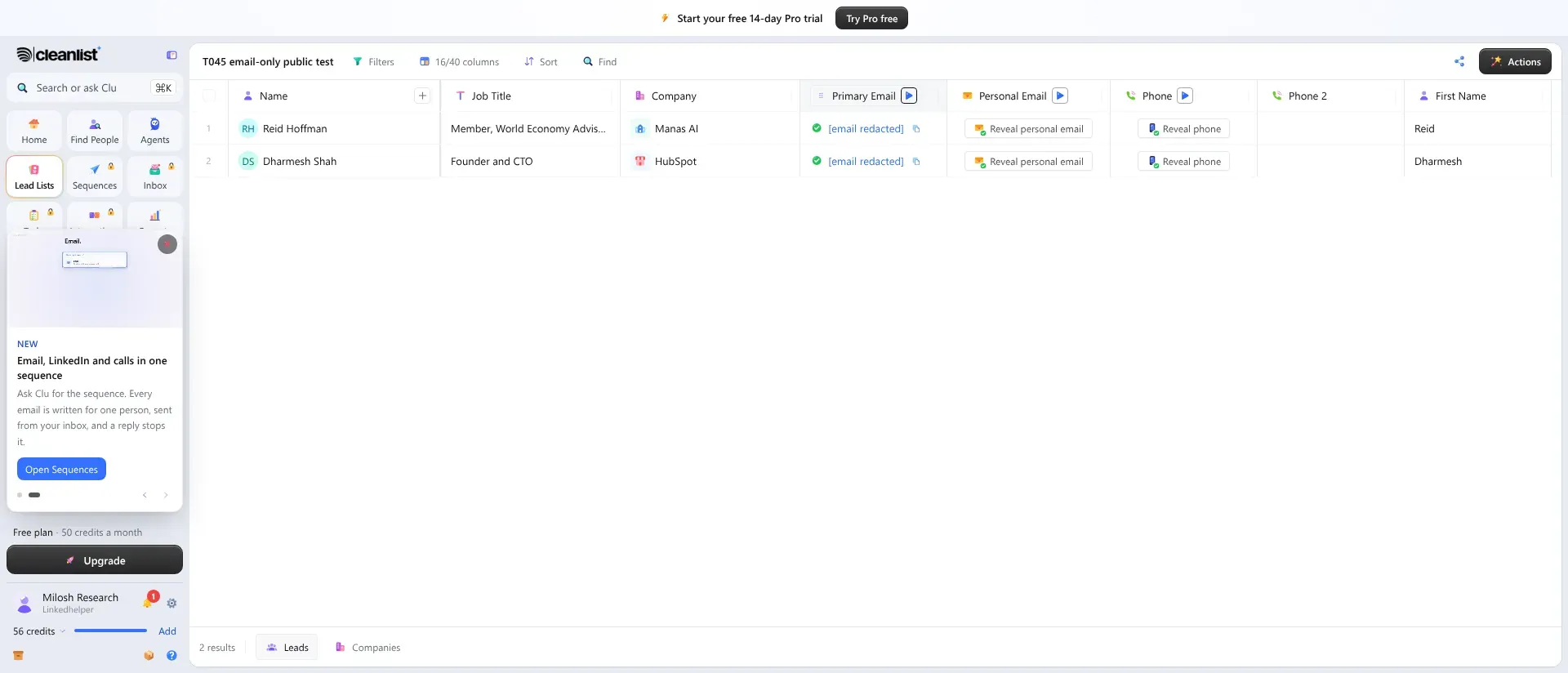
Inside Cleanlist, green icons mark the email results after the repeat. The remaining balance appears in the sidebar, and the email addresses are redacted.
Cleanlist pricing
Cleanlist has a free plan, and Starter costs $49/seat monthly or $37/seat/month annually. Paid seats pool credits across the workspace. Annual subscribers still receive credits monthly. For a workload that stops and starts, I like that a downgrade to Free ends paid features but preserves unused credits.
Cleanlist offers these subscriptions and the Pro add-on used in the cost comparison:
| Plan | Monthly billing | Annual monthly equivalent | Credits each month |
|---|---|---|---|
| Free | Free | Free | 50 per workspace |
| Starter | $49/seat | $37/seat | 750 per seat |
| Pro | $89/seat | $67/seat | 1,500 per seat |
| Pro add-on | $140 | $140 | 3,500 additional credits |
Cleanlist pricing: Free plan available, with Starter as the first paid tier. Paid seats add access and credit capacity together.
6. Waterfall.io: Best for a benchmark before a larger commitment
Waterfall.io starts with a benchmark on your records, then quotes for the endpoints and volume you need. I like that approach for a difficult list. Give it the contacts your current stack missed, so you're paying attention to the extra coverage you'll buy rather than watching a demonstration of easy matches.
Waterfall.io pros
-
Benchmark on your missed records
-
Outcome billing across the waterfall
-
API includes usage for reconciliation
Waterfall.io cons
-
No public dollar rate card
-
Minimums and term depend on contract
-
Email and phone outcomes have different rates
Waterfall.io charges for a verified result across the waterfall as a whole, rather than once per supplier consulted. A lookup that finds nothing is free. Its API usage data let an engineering team reconcile results with consumption.
Keep your current identifiers and acceptance rules when preparing the sample, then compare the extra accepted records with the proposed cost. Don't blend every field into a single match rate (the expensive mobile searches can disappear inside a larger email total).
If you're a solo operator trying to buy a small allowance today, you probably don't need this negotiation.
Things I Noted — Waterfall.io
Waterfall.io's rates depend on the endpoint. “One credit per result” can sound simple until you're comparing email, phone, and job-change checks, each with its own definition of an outcome. Keep them separate when you evaluate the benchmark.
Waterfall.io pricing
Waterfall.io pricing is custom, quoted after a benchmark. The amount depends on endpoints, committed volume, contract term, and resale use. The minimum commitment and each endpoint's rate belong in the same cost calculation.
Waterfall.io pricing: Custom, after a benchmark. There is no public dollar rate card for a self-serve comparison.
Waterfall enrichment pricing for the same workload
FullEnrich and BetterContact both reach $588 for a year of capacity for 1,000 monthly work-email requests, but the payment schedules differ. The comparison assumes one operator, a deduplicated input list, and a manual list workflow. It excludes tax, sending tools, labour, paid sourcing, AI research, independent validation, automated CRM sync, and separately contracted providers.
Adding 250 monthly mobile requests takes a one-credit email and ten-credit mobile model to a maximum of 3,500 credits each month: 1,000 × 1 plus 250 × 10. That's 42,000 potential credits over a year. Vendors still have to find the requested fields, and their accepted-status rules apply.
The table compares annual capacity costs for email-only and combined requests:
| Tool | 1,000 emails/month | 1,000 emails + 250 mobiles/month | Configuration and limits |
|---|---|---|---|
| FullEnrich | $588 prepaid | $2,784 prepaid | Pro annual pools of 12,000 or 60,000 credits respectively |
| BetterContact | $588, paid monthly | $2,388, paid monthly | Pro 1,000 or 5,000 credits/month respectively |
| Clay | $2,004 baseline | Same baseline; total varies | Launch annual provides 30,000 Data Credits/year; recipe determines required extra usage |
| Apollo | Variable | Variable | Eligible seat, returning providers, and validation determine the bill |
| Cleanlist | $804 prepaid | $2,484 prepaid/annualized | Pro alone, or Pro plus the add-on for 5,000 credits/month; found phones can include non-mobile numbers |
| Waterfall.io | Custom | Custom | Separate email/mobile endpoint rates and minimum commitment |
The Cleanlist configuration covers the requested finding actions, but a found phone and an accepted mobile are different outputs. Filter for the number type your reps need before comparing cost per contact.
For an existing-provider setup, Clay's Launch baseline is the same as in the table (custom HTTP needs Growth). Apollo adds your eligible seat cost to the connected suppliers' bills. FullEnrich requires an Enterprise agreement, while BetterContact's Enterprise entry price annualizes to $9,588 before your own provider bills and negotiated terms.
Which waterfall enrichment tool should you choose?
FullEnrich is the simplest starting point here for a focused email-and-mobile list. BetterContact fits a smaller managed lookup budget. Clay earns its extra setup when someone on the team will maintain the provider sequence and validation rules.
For an existing Apollo team, try its fallbacks before adding another workspace. Cleanlist fits teams that also need to manage the contact list and CRM handoff. Waterfall.io is the option for a benchmark-led purchase with a negotiated volume agreement.
Before buying, keep the contacts you can already resolve from your own data and send only missing fields into a new lookup. You can then compare cost per additional contact you can use, without paying to rediscover records that were already complete. Preserve suppression rules and check a person's current employer before treating a returned address as ready for outreach. Finding contact data doesn't replace your opt-out handling or channel policies.
Other tools I considered
Persana's old plans are unsuitable for a new purchase. I considered it among the waterfall enrichment tools, but its March 2026 announcement said the platform would be sunset as the team joined Rox. Datagma remains a supplier you can use within a waterfall rather than an equivalent orchestration platform.
How we tested
I tested email lookups in BetterContact and Cleanlist free workspaces and reviewed waterfall enrichment tools in October 2026. I didn't send emails, so these tests don't establish deliverability.
Yes, the fields can resolve separately. For a FullEnrich or BetterContact list, preserve each field's status with the result so a usable phone doesn't make an uncertain email look ready to send.
Spotted an inaccuracy? Email webmaster@linkedhelper.com and tell us which section needs updating.
Try Linked Helper free for 14 days
The most technically advanced platform for LinkedIn automation with a focus on security, a wide range of features, and exceptional customer support. Trusted by over 10,000 businesses worldwide.