

 13 min read

TL;DR: Skylead in October 2026
- Verdict: Skylead requires accepting a cloud service's access to your accounts and checking that the purchased seat exposes the channels you need.
- Trial test: On October 28, 2026, our Skylead seat exposed email controls but no LinkedIn connection. Two synthetic contacts imported only after we replaced a custom email header.
- Price: Skylead All-in-one cost $100 per seat monthly at the October 28 check. The Agency price card offered 25 seats for $999 monthly in the first year, while its FAQ said 50.
- Account risk: In the team's June 2026 Skylead test, two accounts shared an exit IP rated 100/100 for fraud risk by IPQualityScore.
- Cancellation: The October 28 Skylead cancellation control sent a request to support automatically. It didn't confirm that cancellation was complete.
Verdict: who Skylead fits and who should skip it
Skylead only fits teams willing to give a cloud service access to their accounts and check the channels in their own seat before paying. If you need local control of your LinkedIn session or immediate self-service cancellation, skip it. We couldn't get as far as connecting LinkedIn in our October trial.
Before you commit to an annual or agency plan, run the campaign you need, starting with the list import and following a contact all the way into your CRM after they've replied to a message. We got a saved draft and a contact list. That's too early to commit to a full outreach subscription when the LinkedIn controls are missing.
Linked Helper publishes this review and sells a competing LinkedIn automation product; How we tested explains the evidence and its scope.
What Skylead is in 2026: cloud outreach with separate usage costs
Skylead combines LinkedIn and email sequencing in a cloud workspace, with a separate bill for AI. Its documentation covers prospect lists, conditional follow-ups, a shared inbox, email finding and verification, and CRM connections. The campaigns run remotely through accounts you connect.
A sending seat and a team member's management access are different things. Add AI credits and your own mailbox to the calculation (neither is another sending seat). And before you connect LinkedIn, check who'll be able to act through your session.
Skylead trial test: LinkedIn access was missing from our seat
Skylead exposed email connection and actions for email sequences in our October trial, but we couldn't find a LinkedIn connection control. We'd activated the trial and created an entitled seat. We reloaded the workspace with owner access, checking for the missing connection controls even though our permissions already allowed us to view and edit the LinkedIn settings for the seat. Still no control.
So we saved a synthetic campaign draft using the email actions in the sequence palette. On the seat's Tasks page, we found “Feature Implementation In Progress” (a different page from the team-level AI Tasks area).
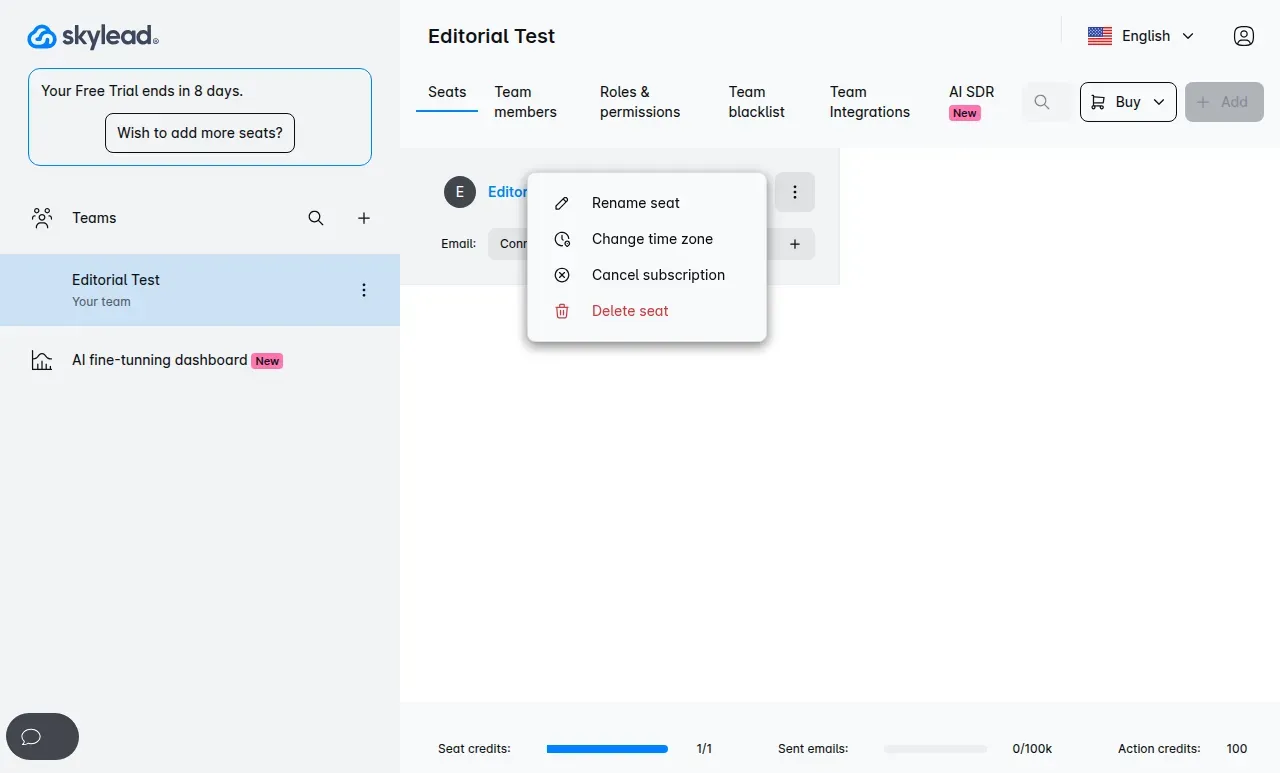
Inside Skylead, our trial seat showed Email Connect without a LinkedIn connection control.
Before paying, make sure you can open the LinkedIn connection controls in your own seat.
Skylead CSV import: a custom email header blocked two contacts
Skylead rejected our two synthetic contacts when we used ContactEmail as the CSV header, then accepted the same rows after we changed it to email. The error asked for a profileUrl or email value. On the second import, we got two unique contacts and zero duplicates. We reopened the list and found both rows, along with our custom Editorial Note field.
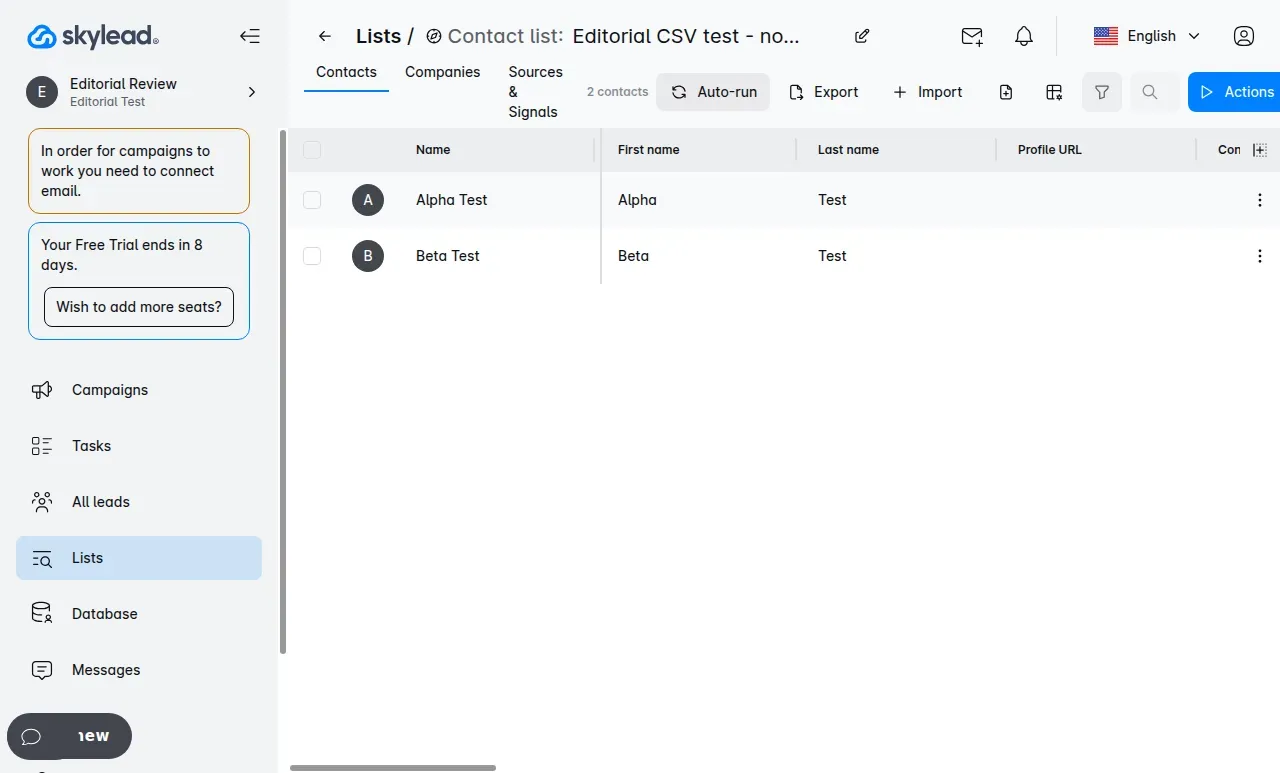
Inside Skylead, the list retained both synthetic contacts after the canonical email header was used.
Skylead checks those required headers before you reach its list-to-campaign mapping. That later step saves mappings for a list, but it won't get you past the initial file check. Use the required import headers from the start.
Skylead pricing: $100 per seat and conflicting Agency capacity
Skylead All-in-one cost $100 per seat per month when we checked pricing in October. That's for a connected outreach account. Inviting someone to manage your team doesn't buy another sending seat.
The Agency price card offered a first-year promotion of $999 monthly for 25 seats, or $1,999 monthly for unlimited seats. It lists a client dashboard, Unibox, granular client access, and a white-label option. For annual billing, the offer says you'll pay for ten months and get two free, but you have to ask sales for the total.
These subscription calculations use monthly billing and exclude taxes, mailboxes, external CRM subscriptions, and AI credits:
| Scenario | Configuration | Monthly subscription | Twelve months at that rate |
|---|---|---|---|
| Solo seller | 1 All-in-one seat | $100 | $1,200 |
| Five sellers | 5 All-in-one seats | $500 | $6,000 |
| Agency with 20 accounts | 25-seat Agency promotion | $999 | $11,988 during the promotional year |
At 20 accounts, the promotion comes to $1,001 less each month than twenty individual seats. We've multiplied the monthly rates for the twelve-month column (an annual checkout quote may differ).
But Skylead's white-label FAQ said the $999 package included up to 50 seats, while the price card said 25. We've used the price card in the calculation. Which capacity would you actually get? Ask for it in writing, along with the promotional term and renewal price, because the card didn't say what you'd pay afterward.
AI usage adds a separate credit bill
Skylead bills AI SDR and AI enrichment separately, even on Agency. Action Credits cost $1 per 100 credits, and the enrichment guide lists a 50-credit minimum purchase. How much outreach will that buy? It depends on the provider and action, so you can't convert the balance into a fixed number of conversations. Check the provider's per-row cost in the enrichment setup and use its test on the first ten rows.
Unlimited connected inboxes still have sending limits
Skylead All-in-one allows unlimited connected email accounts, but caps email at 100,000 messages per month. Agency lists its allowance as Custom. Get the quota in your quote before adding mailboxes.
There's also a fair-use cap of 100 email warm-up slots per team, with larger setups directed to support. You'll pay for domains and mailboxes outside the subscription.
Skylead free trial: adding another account starts billing
Add a second account to Skylead and, under the terms, you've ended the trial: your subscription starts and the first seat is charged before you buy any additional seats. Its published trial lasts seven days and covers only your first account. The onboarding guide asks for card details.
Our activated seat initially showed eight days remaining. Don't plan around that extra day—the published offer is shorter.
The warm-up periods are longer than the trial. Email warm-up runs for 14, 30, or 60 days, and LinkedIn warm-up increases activity over three weeks. You can use the trial to find setup and access problems, as we did, but you won't finish those ramp-up periods before it ends.
Skylead account safety: credentials, proxies, and an IPQS score of 100
Skylead runs LinkedIn activity through cloud sessions and proxies. The team's June 2026 test found two France-registered accounts using the same exit IP, which IPQualityScore classified as a data-center address with a fraud score of 100/100. LinkedIn saw that exit address instead of the user's local IP. The automation security study describes the team's investigation.
Skylead's connection guide offers the following access methods. Each asks you to select a proxy country:
| Method | Access supplied | Account-control consequence |
|---|---|---|
| Password & 2FA | LinkedIn email, password, and authenticator setup secret | Gives the service credentials and the reusable authentication secret |
| Password only | LinkedIn email and password, plus security checks when prompted | Hands LinkedIn credentials to the service |
| Connect manually | LinkedIn login followed by detection of the authenticated session | Skylead says it does not save the password through this route; it still uses the session in its cloud |
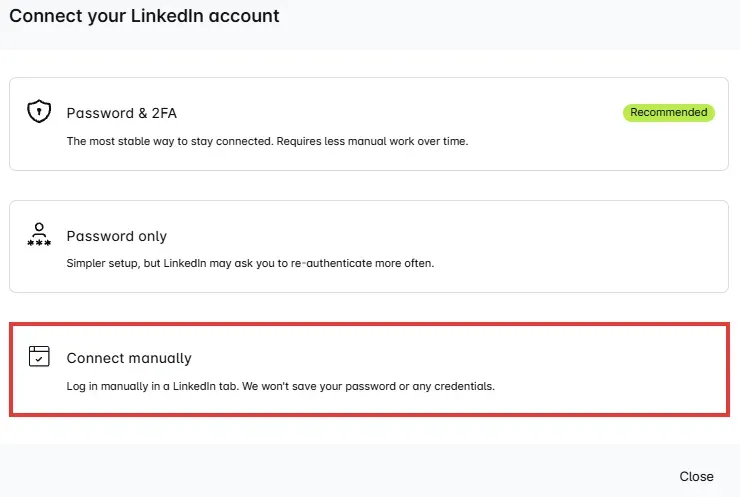
Inside Skylead, Connect manually changes how the session is authenticated. (Image source: Skylead)
Even if you connect manually, your LinkedIn session runs in Skylead's cloud. Daily Global Limits and working schedules control activity, and active campaigns share the daily allowances. But LinkedIn prohibits third-party software that automates activity on its website. That prohibition still applies. You're still using prohibited automation when you set a limit or select a proxy.
Skylead does not require a Chrome extension
Skylead's connection guide uses cloud authentication and doesn't require a Chrome extension. In the team's June 8, 2026 audit, we found no public official Skylead extension. Your account is accessed through the cloud session and proxy.
Skylead sequences: a reply does not always end automation
Skylead stops normal sequence progression when a lead replies. But enabling Auto-return or AI SDR can keep the automated conversation going. Smart Sequence conditions branch on connection status, imported or verified email, opens, clicks, and free InMail availability. A custom condition can have up to five outputs (separate paths for a lead to take).
We checked the reply controls against the configuration saved in our trial:
| Control | Documented behavior | Observed configuration on October 28 |
|---|---|---|
| Normal reply handling | A Replied lead stops progressing | Campaign option to include replied leads was off |
| Auto-return | Short acknowledgments can return to the next campaign step | Off in Global settings |
| AI SDR | Drafts replies for approval or sends them automatically | Don't use AI SDR selected |
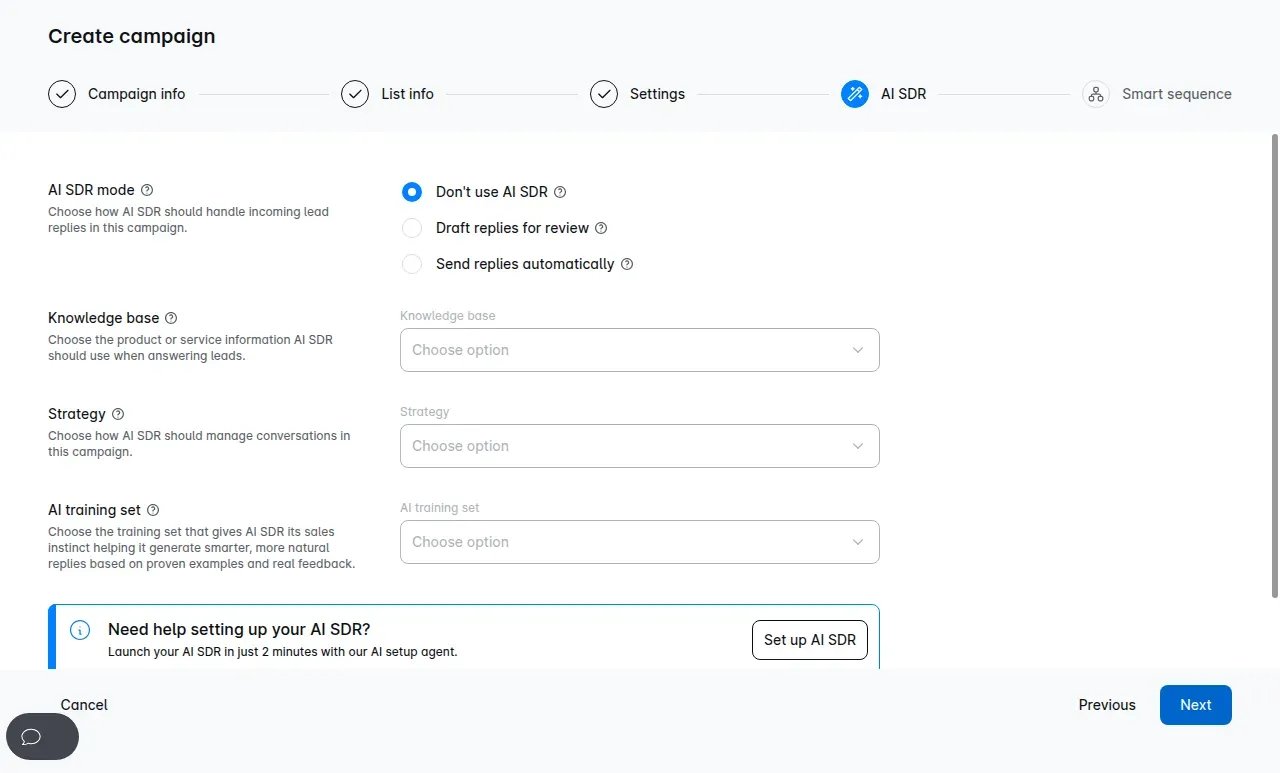
Inside Skylead, the trial campaign offered disabled AI, drafts for review, or automatic sending.
With Auto-return enabled, a polite acknowledgment can send someone back into the campaign. Check it alongside your AI settings before you connect a sender. AI SDR uses a Knowledge Base, Strategies, and an AI Training Set, while semi-automatic mode leaves review and sending to a person. And if you're managing a client team, Skylead's documentation limits the Tasks dashboard to teams you've created—you'll need support for access to a specific client team.
Skylead integrations: check the event and team behind the CRM logo
Skylead lists HubSpot, Pipedrive, Salesforce, and Raynet in setup guides and connector cards, but you'll need to check the actions for your CRM. HubSpot automations can create or update contacts and add notes after replies, emails, LinkedIn messages, or invitations (you select those automations for a particular team). Raynet asks for an instance name, username, and API key, with options to push leads and create deals from Messages.
In the team settings, we saved an unassigned custom role with Lists permission and a synthetic company blacklist rule. According to the guide, the Team Blacklist applies across accounts within that team. If you keep each client in a separate team, you can't assume that blacklist suppresses contacts across the whole agency.
Before buying, specify what should reach your CRM and which team should trigger it. Then check those records in a trial handoff.
Skylead cancellation: the menu sends a support request
Skylead's Cancel subscription control opened support and automatically sent a cancellation request when we clicked it in our October trial. We hadn't typed a message or pressed Send, yet a request had already gone out and the chat was asking us to contact support to cancel the seat.
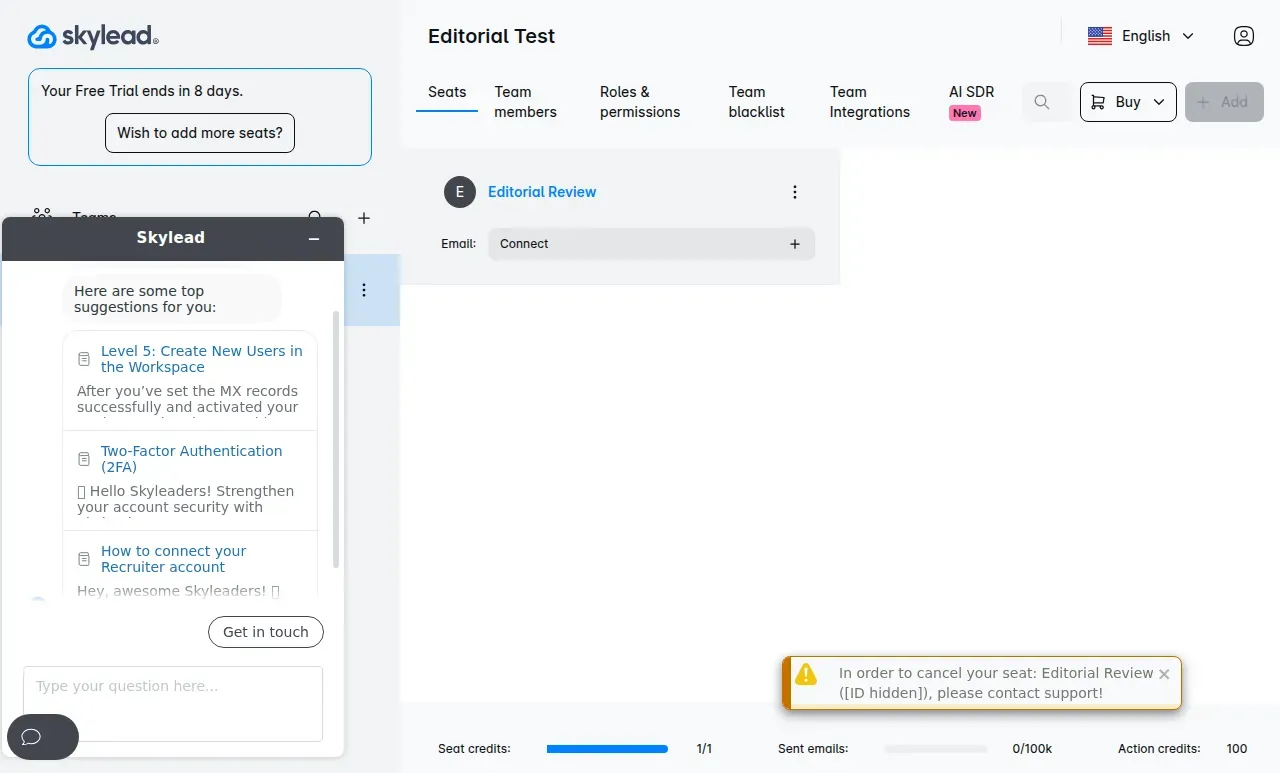
Inside Skylead, selecting Cancel subscription triggered the support flow; the internal seat identifier is hidden.
We found the automatic messages in the mailbox transcripts. Support asked for a reason, then closed the chats when we didn't respond. We later sent a corrective message asking to keep the trial active. But the correspondence never confirmed a completed cancellation. The click had submitted a request. It hadn't finished cancellation.
Under the terms, your subscription renews automatically unless you notify the company before the period ends. You keep access through the paid period after cancellation, and payments are final except where the law requires a refund. Get written confirmation of your end date.
Skylead offers CSV export for campaign and lead data. We opened the list export dialog and could select columns, including our custom field. Before your access ends, check that the export contains the records you'll need when you leave.
Skylead reviews: sparse recent evidence and data-sync complaints
Skylead's review profiles had only one new review across the six full months from April through September 2026. Most of the reviews behind the overall ratings are older, so there's little recent feedback to compare with the current product.
We checked the overall ratings and counted reviews in that six-month window:
| Platform | Overall metric | Reviews in April–September 2026 |
|---|---|---|
| G2 | 4.5/5 from 127 reviews | 1, rated 3/5 in April |
| Capterra | 4.8/5 from 17 reviews | 0 |
| Trustpilot | TrustScore 2.9/5 from 2 reviews | 0 |
G2's Most Recent view reached past April on the first page. We could see every Capterra review and both Trustpilot reviews in its all-language view. TrustScore has its own calculation (it isn't the simple average of those visible ratings).
Rishabh J.'s April 17, 2026 G2 review reported unpredictable behavior and data-sync issues. G2 marked it incentivized and collected through an invitation. So check your exact CRM handoff before relying on it for client work.
On September 29, 2024, a one-star Trustpilot reviewer reported continuing invoices and difficulty deleting the account. That's one customer's billing complaint. On March 11, 2025, Nidhi J. criticized Skylead's missing native CRM integration on G2, but the setup guides and connector cards have since made that criticism outdated.
How we tested
We tested Skylead's trial in October 2026 and drew on the team's June 2026 two-account cloud test. We didn't connect a sender in the trial or test live sending.
Skylead alternatives: start with account control
Linked Helper is a desktop alternative to Skylead with safety first: it runs on your computer, using your IP and LinkedIn session, so your LinkedIn password stays out of another company's cloud.
You can also compare smaller players such as Octopus CRM and Meet Alfred. Check their account access and trial channels, then work through the total bill and cancellation process before choosing.