

 16 min read

A low monthly price may conceal a different billing unit or a feature gate. If you send only the occasional agreement, you don't need the same plan as a sales team building proposals.
TL;DR
For everyday contracts coming out of cloud storage, Dropbox Sign is the plainest option. PandaDoc covers sales proposals, and Zoho Sign suits low-cost manual use. Prices on vendors' plan pages were verified on Nov. 18, 2026.
- Best for familiar, simple signing: Dropbox Sign, if its seat minimums and template limits fit.
- Best for proposals as well as signatures: PandaDoc, but the plan that adds sales workflows costs more than basic e-signing.
- Best if your team already uses Zoho: Zoho Sign, with per-user envelope limits and separate automation credits.
- Best low-cost option for a growing sender team: BoldSign, after checking the shared envelope allowance and business-email verification.
- Best if you want to compare shared invite costs: signNow, though its public pages describe invite allowances differently.
- Best if you mainly work with PDFs: Adobe Acrobat Sign, provided you confirm which Acrobat plan and transaction allowance apply to your account.
At a glance
For everyday agreements from cloud storage, Dropbox Sign fits most cleanly—even though its Standard tier begins at two seats, and any team with five or more has to reach out to sales.
| Scenario | Tool | Why it may fit | Main catch |
|---|---|---|---|
| Simple signing from cloud storage | Dropbox Sign | Familiar upload-and-send workflow | Two-user minimum for Standard, 5+ teams contact sales |
| Quotes and proposals with e-signature | PandaDoc | Combines document creation and signing | Sales features require a higher plan, some integrations use credits |
| Low-cost manual signing in an existing suite | Zoho Sign | Low annual per-user entry price | Envelope limits are per sender, automation can consume credits |
| Many senders with predictable volume | BoldSign | Growth seat price or flat Premium plan | Shared limits, add-ons, and free-plan verification conditions |
| A shared sending workspace | signNow | Annual Business price starts low | Verify the shared invite pool, official help and pricing copy conflict |
| PDF editing plus signature collection | Adobe Acrobat Sign | Fits teams already working in Acrobat | Acrobat plans and Acrobat Sign Solutions are not interchangeable |
What is a DocuSign alternative?
A DocuSign alternative is an electronic-signature service that prepares an agreement, routes it to one or more signers, and keeps a record of completion. Certain tools concentrate on uploaded PDFs; others, however, add form intake, proposals, automation, or PDF editing. Since “unlimited” may leave out API use or advanced features, you’ll want to compare billing units.
Why teams look for DocuSign alternatives: price and workflow fit
The public discussions I reviewed in November point to renewal cost and workflow fit as reasons to compare DocuSign alternatives, but a few posts can't show how widespread either concern is. One r/legaltech discussion begins with a purchaser assessing a renewal. One small-business thread calls DocuSign workable but increasingly expensive. When you compare plans, check whether the billing unit fits your workflow and whether proposals, forms, or signature collection cost extra.
What makes the best DocuSign alternative?
The best DocuSign alternative is the one whose billing unit, sending volume, signer steps, templates, routing, integrations, and audit records match your workflow and current subscriptions.
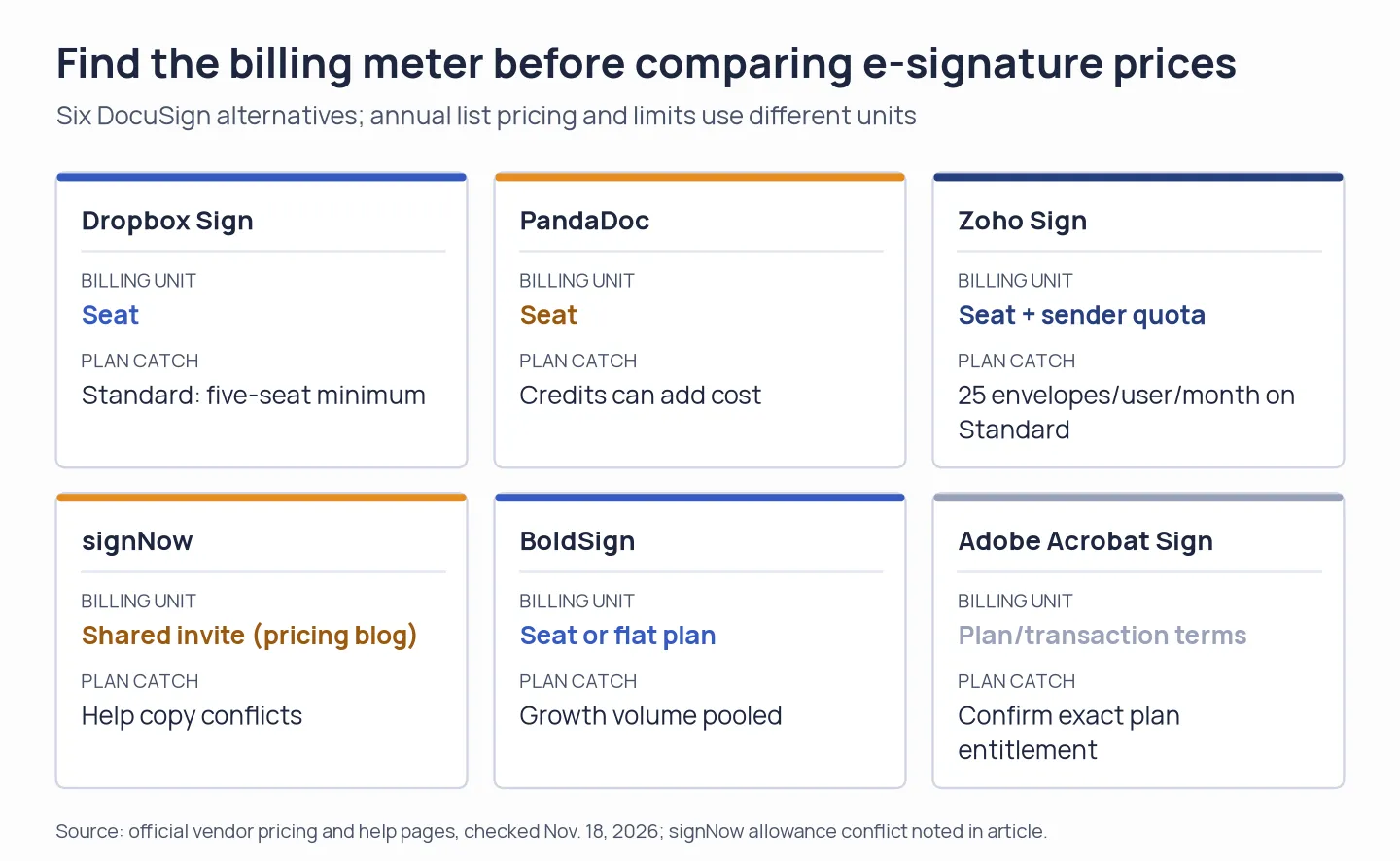
Find the billing meter before comparing e-signature prices.
Contrast the billing unit, volume, signer experience, templates, routing, integrations, and audit records, and then verify if one request can bundle multiple files and signers, as that may alter which plan fits. Should you use SMS, identity checks, or CRM automation, those could add fees. A low headline price rises when each sender requires a seat or paid credits.
You also need to decide if a tool for document workflows or a signature tool is required. PandaDoc is designed for quotes, proposals, and gathering signatures. Acrobat combines signing and PDF editing. When a signature forms part of an intake form created with an online form builder, Jotform Sign fits better. Check the signing or approval features included in any Microsoft 365, Google Workspace, or CRM subscription your company already pays for before you add another subscription.
1. Dropbox Sign: Best for familiar, straightforward signing
For everyday upload-and-send tasks — particularly when your files are already stored in Dropbox — Dropbox Sign works well. Unlimited signature requests are what its paid web plans promote. Free allows three signature requests a month. One request can contain multiple files and signers, so the limit isn't three pages or signatures.
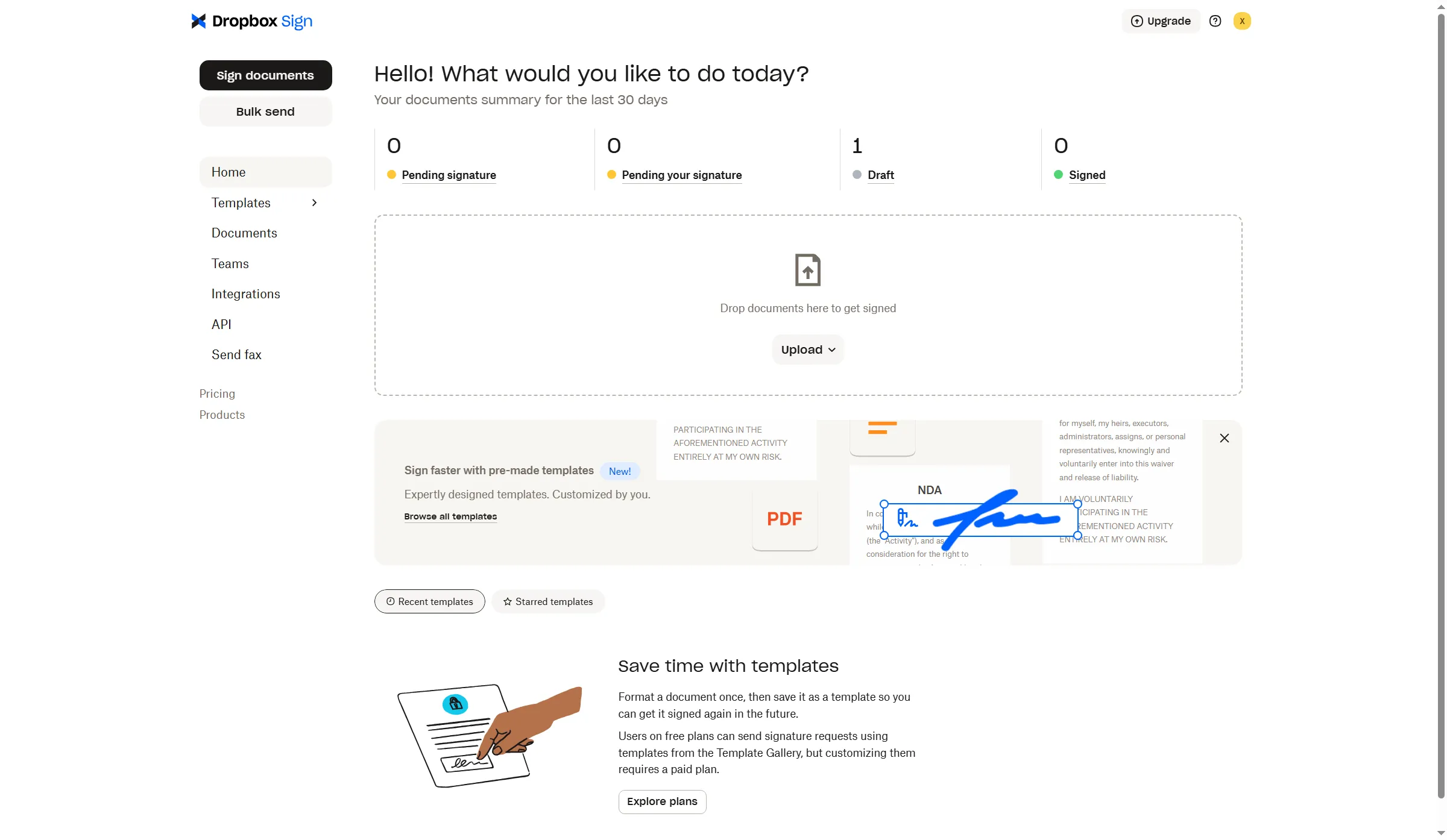
Dropbox Sign keeps document and template navigation in the same workspace.
Dropbox Sign pros
- On paid web plans, signature requests are listed as unlimited.
- Essentials includes five templates. Standard raises that to 15.
- Signers can finish a request without needing a Dropbox Sign profile.
Dropbox Sign cons
- Standard requires at least two users ($600/year), and Dropbox directs teams with Five or more users to sales.
- Essentials caps templates at five. Bulk sending requires Standard or Premium.
- Costs for API usage are billed separately from sending over the web.
I switched the pricing page between billing cycles. Essentials changed from $15 to $20 a month, while Standard changed from $25 to $30 per user. Standard begins at two users. Dropbox directs teams with Five or more users to sales. For standard agreements, I'd pick Dropbox Sign when your files already live in Dropbox. A one-sender team is a poor match because of its Standard seat minimum.
I opened the free workspace and reached the signing step, but the placement controls failed to load, so I couldn't complete a document. Dropbox Sign fits routine web requests, but I couldn't verify the full signing workflow in my test.
Product pricing — Dropbox Sign
Essentials, $15/month billed annually. Standard, $25/user/month billed annually, two-user minimum. Prices exclude tax and may differ by promotion.
2. PandaDoc: Best for proposals that need signatures
PandaDoc suits groups producing quotations and sales proposals before gathering signatures. Its Free tier allows five agreements per month across the workspace. Unlimited uploads plus e-signatures come with Starter. Business brings CRM integrations, approvals, and a content library. The plan comparison also lists credits and add-ons. Those sales features aren't necessary if you just sign completed PDFs.
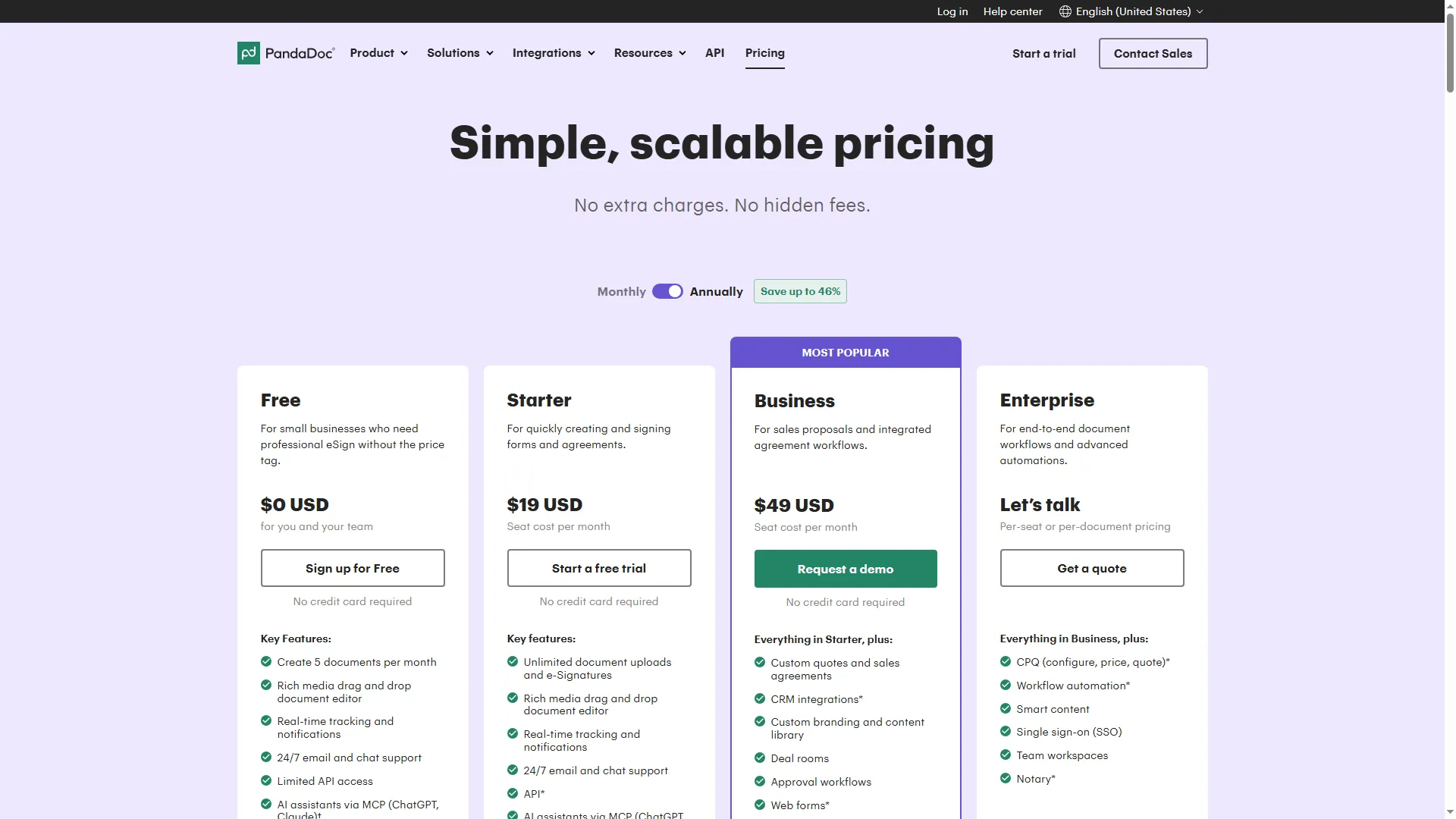
PandaDoc displays the shared Free allowance beside the paid per-seat plans.
PandaDoc pros
- Free covers five agreements created in the UI each month, and you can start without a card.
- Starter includes five templates, unlimited uploads, and e-signatures.
- Business delivers proposal and quote workflows, which a signing-only service lacks.
PandaDoc cons
- Business costs $49 per seat each month, billed yearly, whereas Starter runs $19/seat/month, billed annually.
- Web forms, bulk sending, and CRM integrations, along with API, might need an add-on or usage credits.
- You don't need this many tools when all you do is upload completed PDFs for signing — it's overkill.
I started the Free signup without a card and reached goal-selection onboarding. I couldn't get past workspace setup, so I couldn't verify the in-account document flow. I like PandaDoc when proposals justify the higher seat cost. If you only need signature collection, those sales features are overkill, and you should price any required credits.
Product pricing — PandaDoc
Free, $0. Starter, $19/seat/month billed annually ($228 per seat/year). Business, $49/seat/month annually ($588 per seat/year). Usage credits or add-ons may apply.
3. Adobe Acrobat Sign: Best for teams already working in PDFs
Adobe Acrobat Sign works well when your work already involves editing PDFs. There's no need to switch between a separate editor and a signing app. With annual billing, Acrobat Standard is listed by the US individual pricing page at $14.99/month, and Pro runs $19.99/month. Acrobat Sign Solutions is a separate business offering. Adobe's product terms cap licensed Acrobat Sign users at 150 transactions over 12 months unless a contract says otherwise; check whether that limit applies to the Acrobat plan you're considering.
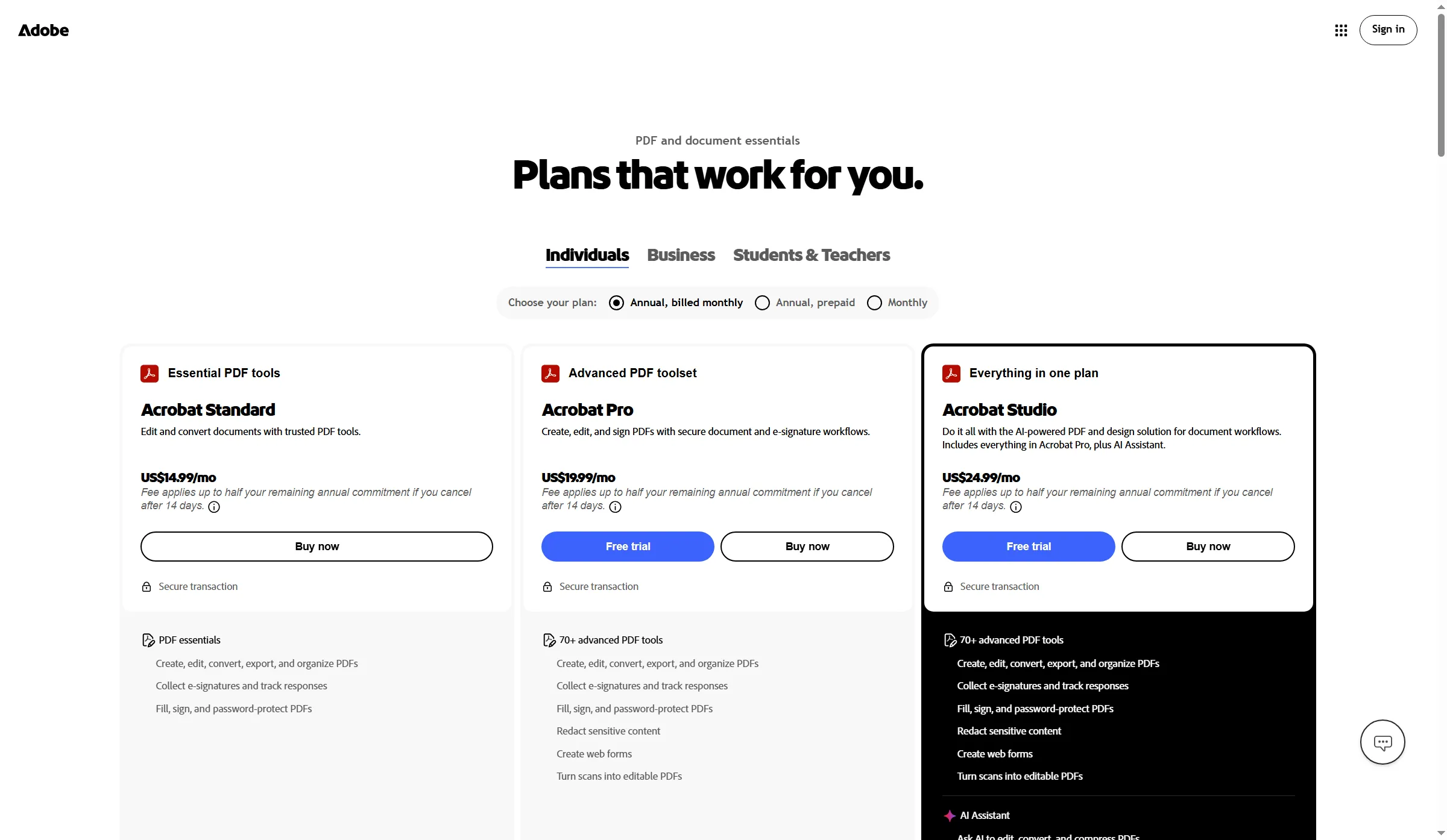
The individual Acrobat plans pair PDF tools with different signing features.
Adobe Acrobat Sign pros
- Integrates signature gathering with PDF modification inside the Acrobat process.
- Beyond simple signing, Pro includes capabilities like web forms.
- An existing Acrobat license can reduce tool switching.
Adobe Acrobat Sign cons
- The free Acrobat signing page allows two transactions per rolling 30 days; paid user licenses typically allow 150 transactions per year unless the contract says otherwise. Acrobat plans don't all include the same team controls.
- A single Acrobat subscription won't guarantee centralized admin, API entry, or all controls in Acrobat Sign Solutions. Before moving a team over, check the business-tier plan.
- To get Business integrations along with enterprise-level controls, you may need Acrobat Sign Solutions instead of a personal Acrobat subscription.
I'd go with Acrobat when a one-user plan is suitable and PDF editing sits at the core of the work. Its individual price isn't a quote for a shared team workspace or an enterprise workflow.
Product pricing — Adobe Acrobat Sign
Acrobat Standard, $14.99/month billed annually ($179.88/year). Pro, $19.99/month billed annually ($239.88/year). Individual plans. Verify transaction allowance and team terms. Acrobat Sign Solutions is quote-based.
4. Zoho Sign: Best for teams already using Zoho
If your team already relies on Zoho apps, Zoho Sign offers a budget-friendly route to manual signing. The economics shift, though, when your senders require paid automation credits. Manual envelopes are kept apart from credit-consuming automations by its pricing page. A key constraint: its envelope allowance tracks each sender individually—Standard bundles 25 envelopes per user each month. Unlimited manual envelopes come with Professional, yet automation and third-party integrations may still draw credits, meaning that per-user cap won't span every workflow.
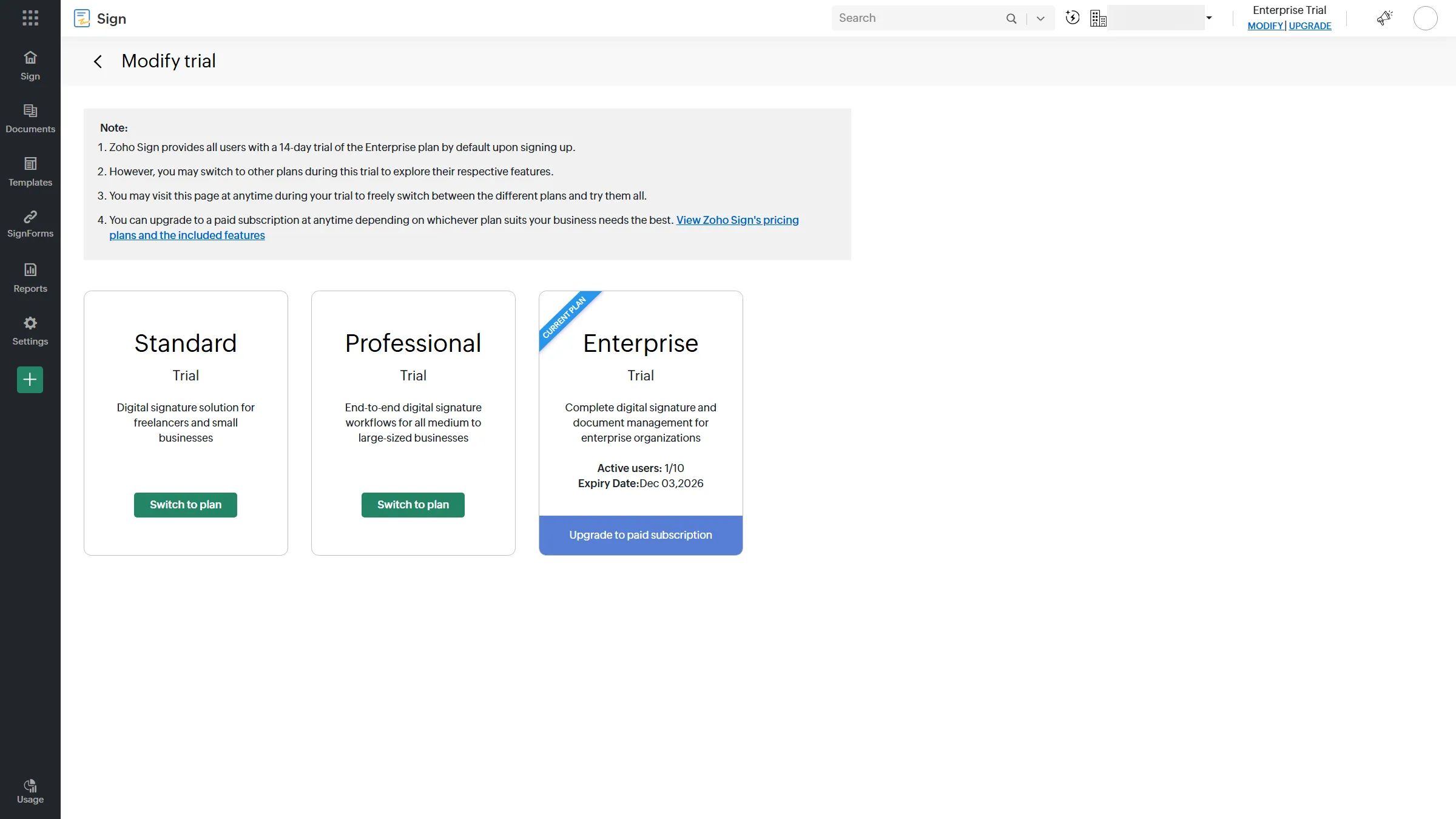
The trial selector shows which Zoho Sign plans are available to the workspace.
Zoho Sign pros
- Standard costs $10/user/month, billed yearly, and covers 25 envelopes monthly for every sender. For a high-volume seat, that's insufficient; still, it's enough for 10 routine agreements per sender.
- Annually, $16 per user each month is the professional rate and it covers unlimited manual envelopes.
- An Enterprise trial lasting 14 days is available, and no card is required. The Free plan supports one user and five envelopes per month.
Zoho Sign cons
- API, automation, SMS, identity checks, and other actions can use up credits.
- Enterprise costs $22 per user each month, billed yearly. Certain capabilities need credits bought separately.
- While I was checking, the editor canvas in my account failed to finish loading; as a result, I wasn't able to complete a signing action.
I prefer Zoho Sign for manual signing inside its suite, although its editor canvas failed during my test. I set up and confirmed an account. Onboarding offered an Enterprise trial or the Free plan and didn't require a phone number. I opened the self-sign editor after uploading a synthetic file, but the canvas stayed stuck loading. Should you be automating, budget for the credits at first. Not every workflow action is included in the low seat price.
Product pricing — Zoho Sign
Free, $0 for one user and five envelopes/month. Standard, $10/user/month annually. Professional, $16/user/month annually. Enterprise, $22/user/month annually, plus credits where required.
5. signNow: Best for teams that can budget by shared invite volume
signNow can fit a team if checkout confirms how its invite limit works. You can't treat an invite as one agreement or one signer. Per its pricing page, annual plans list unlimited users, plus up to 100 invites per account — though the help center phrases this differently. Business begins at $8/month, with extra invites listed at $0.96 each. On one annual-billing page I saw Business Premium at $15 and $18 on a different one; $30 appeared for Enterprise. An invite can include multiple documents and recipients, so it doesn't always equal one agreement or one signer.
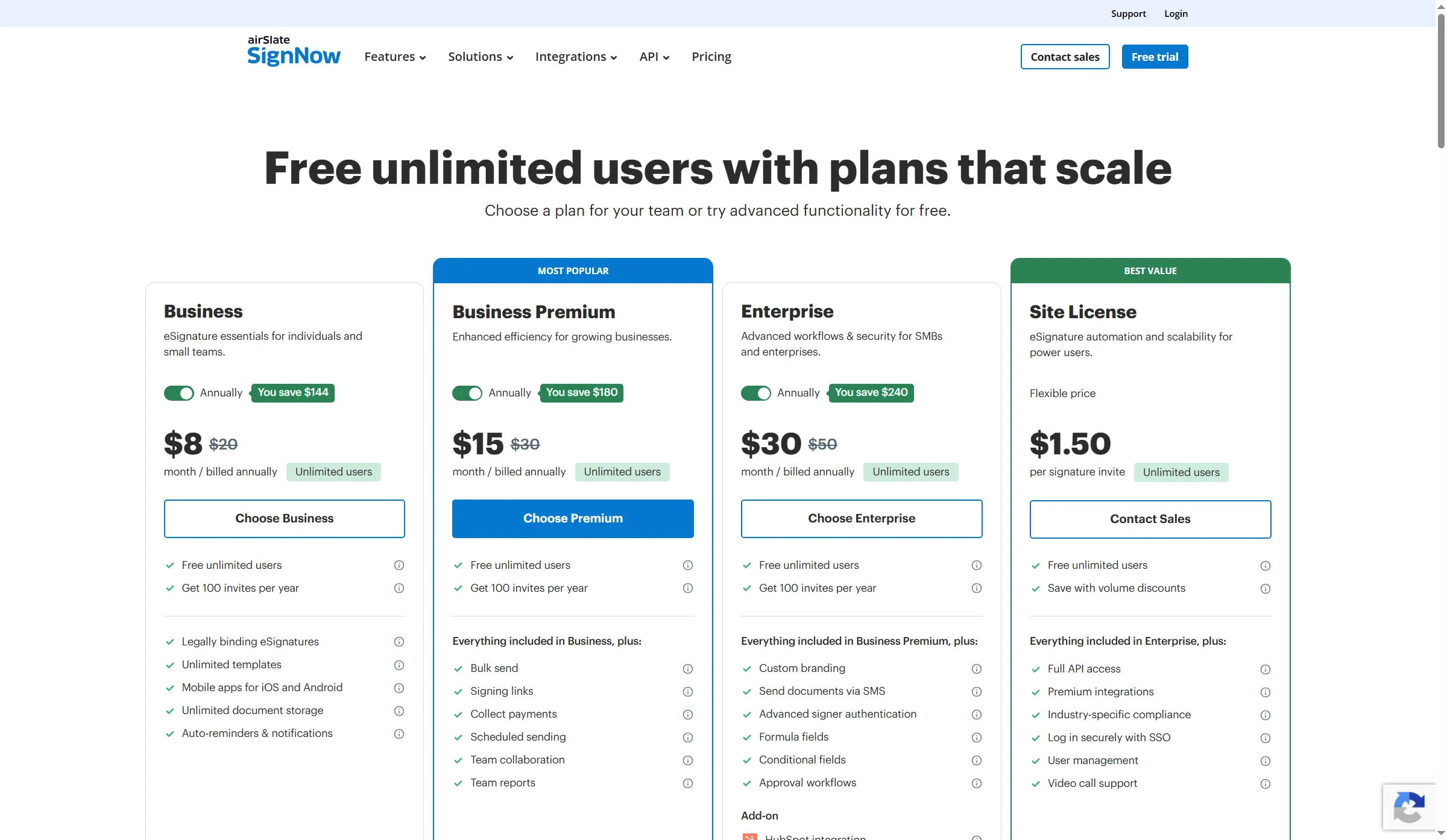
The annual plan page shows invite limits alongside unlimited users.
signNow pros
- Business begins at $96 per year and includes a stated allowance of 100 invites.
- Each extra Business invitation costs $0.96; confirm the current rate before scaling.
- Higher tiers include capabilities like bulk sending and signing links.
After I verified my email, the workspace was still empty, although I'd registered for a no-card trial. I could check the public pricing and help pages, but couldn't verify how checkout applies the invite limit.
signNow cons
- The pricing FAQ says the 100 invitations are per account each year, but the help center says the allowance applies per user.
- The pricing FAQ states that the $96 annual base cost covers the account. Check how the invite pool applies at checkout.
- Extra invitations, along with advanced workflows, can alter the yearly total.
I would choose signNow for a team only after checkout confirms how it counts invitations. If you can't verify the invite pool, compare another plan first.
Product pricing — signNow
Business, $8/month billed annually ($96/year). Business Premium, $15–$18/month ($180–$216/year) across annual-billing pages. Enterprise, $30/month. Check the checkout total.
6. BoldSign: Best for low-cost teams with predictable volume
BoldSign fits growing teams that can forecast envelope volume. Growth pools each user's allowance across the organization, while Premium sets one flat cap, so the total cost can differ. Its web-app pricing lists Growth at $5/user/month billed annually, with 50 envelopes per user per month pooled across the organization. Premium runs $99/month billed annually for 250 envelopes plus unlimited users, and additional envelopes are listed at $0.50 apiece.
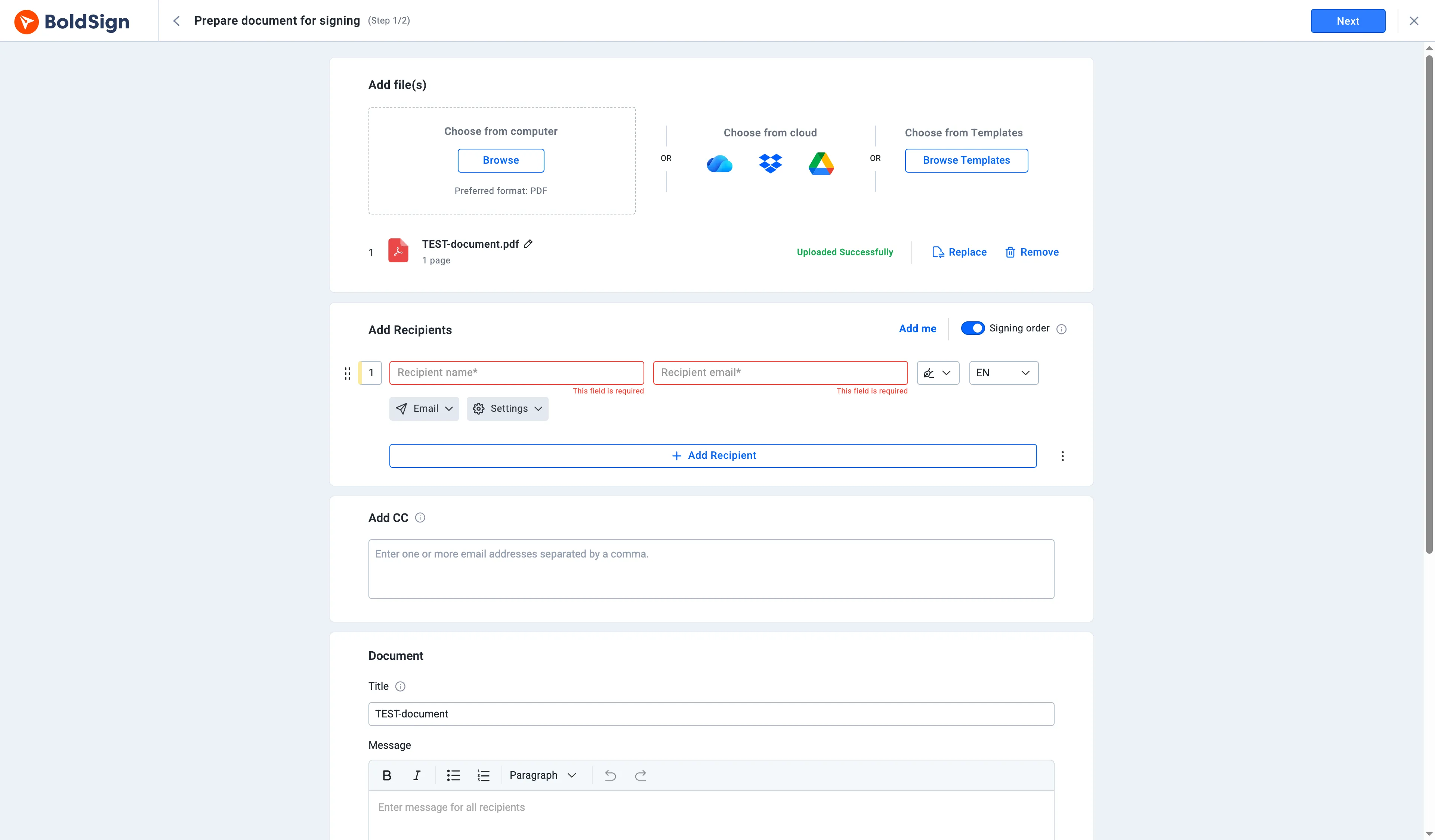
The document is prepared with no recipient details entered and no signature request sent.
BoldSign pros
- Eligible Essential accounts include two templates and allow 25 requests each month.
- Growth may cost less for a small sender team, while Premium may suit a larger team.
- When comparing yearly prices, first check the in-account toggle: for Growth the monthly rate it displayed was $15/user; for Business, $25/user; and for Premium, $138.
BoldSign cons
- Until business details get verified, Free signups that use personal email are limited to five envelopes.
- The allowance for Growth is pooled organization-wide, so distribute volume with care.
- Extra fees may apply for advanced actions and add-ons.
I signed up for Free with email and no card or phone verification. The account listed 25 monthly requests and two templates. I uploaded a synthetic PDF and reached document preparation, but didn't send or sign it. The annual/monthly toggle changes Growth from $5 to $15 per user each month. Growth is my pick for five senders at 50 envelopes a month, while Premium costs less for 20 senders handling 200 envelopes. In the scenario table, you'll find both annual totals.
Product pricing — BoldSign
Essential, $0 for eligible accounts. Growth, $5/user/month annually. Business, $15/user/month annually. Premium, $99/month annually. Verify business-email eligibility and pooled envelope limits.
What the same signing workload costs
For one sender handling 10 agreements a month, annual cost ranges from $0 on eligible BoldSign Essential to $228 on PandaDoc Starter. The table scales the same workload to 5 and 20 senders. Each scenario assumes manual web sending, one agreement per document, email delivery, and an audit trail. API, bulk automation, SMS, identity checks, CRM connections, proposal creation, taxes, and custom enterprise terms are out. “Transaction,” “request,” “envelope,” and “invite” aren’t interchangeable units, so check how each vendor counts before using the totals as a quote.
| Configuration | 1 sender, 10/month | 5 senders, 50/month | 20 senders, 200/month | Assumptions and limits |
|---|---|---|---|---|
| Dropbox Sign Essentials / Standard | $180/year | $1,500/year | Quote | Standard starts at 2 users, 5+ teams contact sales |
| PandaDoc Starter | $228/year | $1,140/year | $4,560/year | Starter only, no credits/add-ons included |
| Adobe Acrobat Standard | $179.88/year* | Verify | Quote | *Individual price, US page lists $14.99/month billed annually. Confirm team terms and transaction allowance before using for a shared workspace |
| Zoho Sign Standard | $120/year | $600/year | $2,400/year | At 10 envelopes/user/month, below 25/user cap |
| signNow Business | $115.20 indicative | $576 indicative | $2,304 indicative | $96 base + (annual invites − 100) × $0.96, FAQ says the 100-invite pool is account-wide, but help wording differs |
| BoldSign Essential / Growth / Premium | $0* | $300/year | $1,188/year | Free requires verified business details for full allowance, Premium covers 200/month |
*BoldSign Free qualifies for $0 only when the account is eligible for the 25-envelope allowance; if not, its cap for accounts registered with a personal email address is five envelopes. The signNow examples rely on the live pricing FAQ’s 100-invite account-wide annual allowance, plus its published extra-invite rate. These estimates shouldn’t be used as a quote.
Other DocuSign alternatives we considered
SignWell offers a focused choice, featuring a free three-document monthly tier plus an annual Light plan. If your intake is form-led, Jotform Sign works well, though its paid self-serve plans are single-user. DocuSeal merits consideration if you want open-source self-hosting and can handle email delivery, hosting, and maintenance yourself. These tools use different pricing units from the six main options, so their costs aren't included in the comparison table.
Which DocuSign alternative should you choose?
Choose BoldSign for predictable team volume, Dropbox Sign for focused requests, PandaDoc for proposals, or Zoho Sign for manual signing inside the Zoho suite. Choose signNow only if checkout confirms how its invite pool works. Acrobat Sign suits teams that already edit PDFs, provided the individual plan covers their signing and administration needs.
Examine the signing capabilities of any Google Workspace, Microsoft 365, or CRM subscription you already pay for before adding another subscription. Those capabilities may suffice for occasional internal approvals, but they won't necessarily manage external signers, reminders, audit records, or your document volume.