

 15 min read

TL;DR
- Jotform gives you a broad field and workflow toolkit; check monthly submissions, saved responses, and file storage separately.
- Typeform suits a one-question-at-a-time survey; its free tier is small, and paid response caps apply across the account.
- Tally is my free-first pick: I built and previewed an intake without an account, and its upload block showed a 10 MB limit.
- Fillout can update an existing Airtable record when the link includes that record's unique ID.
- Google Forms is the low-friction choice for simple collection in a Google workflow, but file-upload questions require respondents to sign in to Google.
- For one editor and 1,000 monthly responses without builder branding, annual prices run from $290 for Tally Pro to $600 for Typeform Core Plus. The plans include different features.
An online form builder lets you create a web form, share or embed it, and collect structured answers without writing code. People use forms for surveys, lead and project intake, registrations, and payments. The tricky part comes after you pick the fields: uploads, routing, team permissions, and recurring payments can change whether the form fits.
I paired current vendor pricing and help pages with reviewer pages and a U.S. search sample, then built and previewed forms in Jotform and Tally.
At a glance: which form builder fits your workflow?
Tally is the free-first pick, Typeform suits conversational surveys, Jotform works for broad workflows, Google Forms covers basic Google collection, and Fillout handles Airtable record updates.
| Form builder | Best for | Why it stands out | Watch for |
|---|---|---|---|
| Jotform | Broad forms and workflow add-ons | Large field set and an editor you can preview before signing in | Monthly submissions, total stored responses, and upload space are separate limits |
| Typeform | Conversational surveys and intake | One question at a time keeps the respondent focused | Response caps apply across the account; the free allowance is 10/month |
| Tally | A generous free form builder | Unlimited forms and submissions on Free subject to fair use; clean block editor | File uploads need a paid plan for more than the displayed 10 MB; no recurring payments |
| Fillout | Forms connected to a database | Can update an existing Airtable record with a unique record ID | A missing ID can create a new record; granular roles are not on Free or Pro |
| Google Forms | Basic collection already in Google | Free with a Google account and straightforward Sheets handoff | Respondents must sign in to upload files; design and advanced logic are limited |
What makes the best form builder worth choosing?
Start with who can submit. An upload field can look ready in the editor and still ask respondents to sign in. For a public intake, check that respondent path and the file-size limit before you build around uploads.
Separate collection from retention. “Responses” can mean this month's allowance, total saved answers, or upload storage. Those limits affect different parts of the workflow: a monthly cap can close a form, while a storage ceiling can affect older records.
Test the handoff you need. A form that adds a row works differently from one that updates an existing customer record. For routing, payments, or a CRM sync, check the destination and matching rule before you choose a plan.
Price the access your team needs. Five seats only tell you how many people can get in. Check whether they can edit forms, see responses, and export data; role controls may require a higher plan.
Look for the point where “free” stops fitting. Branding removal, response volume, role controls, and payment rules can change the price more than the number of forms. The cost comparison holds a workload constant so the annual figures have a clear meaning.
1. Jotform: Best for broad forms and workflow add-ons
Choose Jotform if you need more than basic fields and may add workflow features later. I opened its anonymous editor, added a Full Name element, and switched to Preview. It created separate first- and last-name inputs, and I could preview phone, tablet, and desktop layouts before signing in.
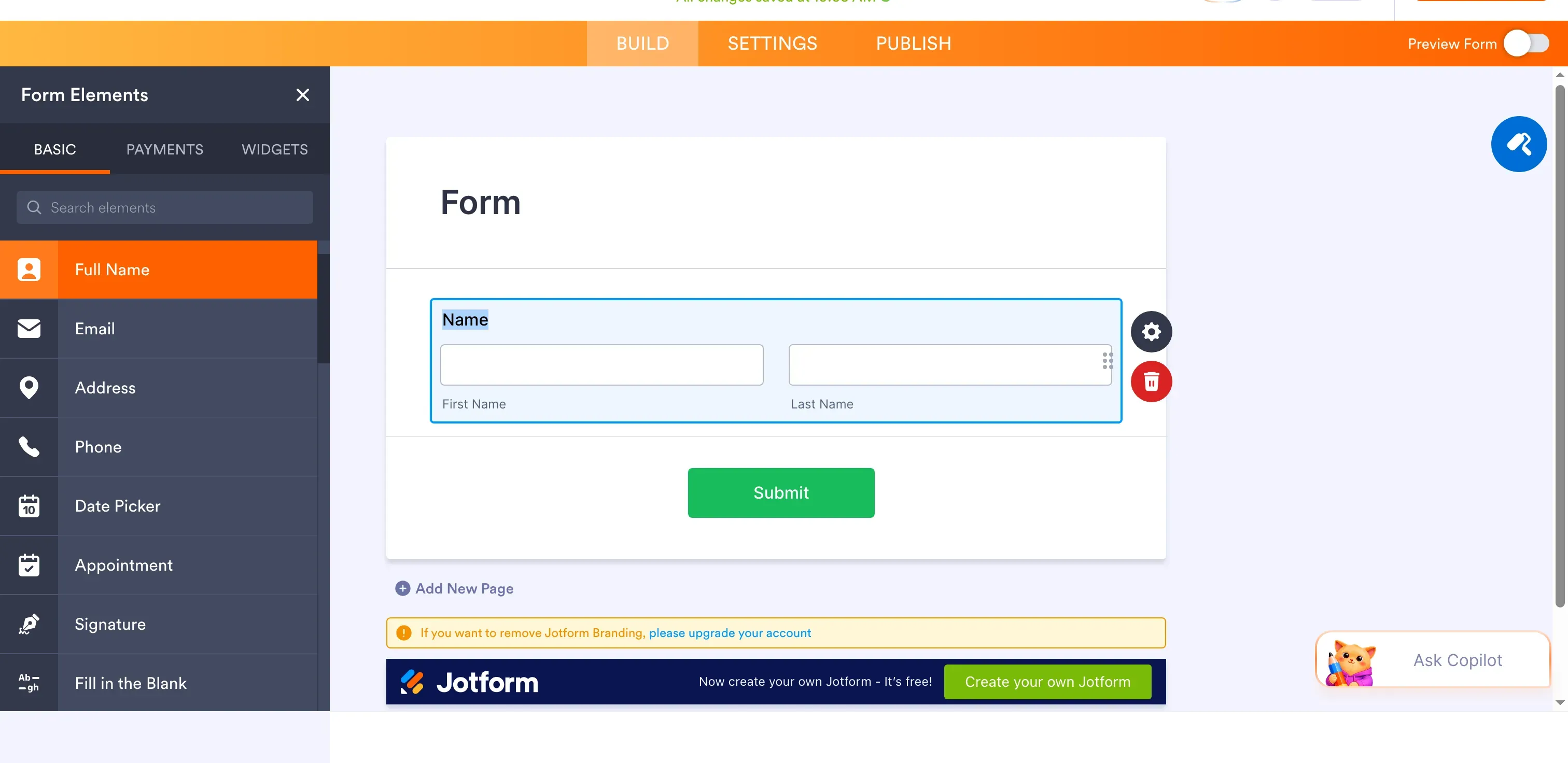
Inside Jotform, adding Full Name creates separate First Name and Last Name inputs. (Image source: Jotform)
My Preview showed the Name field, and the editor flagged branding as a paid feature.
Jotform's capacity limits cover three different things: monthly submissions, stored responses, and file storage. Bronze allows 1,000 submissions a month and stores up to 10,000 responses total. If that storage ceiling is reached, Jotform may remove the oldest response. I'd plan exports before it happens.
Pros
- Anonymous editor and device preview before account creation
- Bronze: 25 forms, 1,000 monthly submissions, one user
- Separate monthly, stored-response, and upload-storage limits
Cons
- Bronze has one user; Enterprise requires a quote for multiuser access
- 10,000 total stored submissions, separate from monthly submissions and file storage
- One recent reviewer reported intermittent trouble with Zoom automation; test critical handoffs
Jotform suits a solo operator who needs varied fields and can manage response storage. It gets expensive for a small team: Bronze allows one user, and Enterprise requires a quote. I'd also keep an export schedule if you need a long-term archive.
Product pricing — Jotform
Starter is free for up to five forms and 100 monthly submissions. Bronze is $34/month billed annually, with 25 forms, 1,000 monthly submissions, one user, and no Jotform branding.
2. Typeform: Best for conversational, one-question-at-a-time forms
Typeform fits a short survey or intake when the respondent flow matters more than squeezing value from a free plan. Core shows one question at a time, which feels lighter than a page of fields. Typeform sells Core and AI Forms as separate plan families, so compare prices within the right family.
The Free plan allows 10 responses a month; Core Basic starts at 100. Core Plus adds branding removal, three users, and 1,000 responses a month. Core Business raises the cap to 10,000 and allows five users. The response cap is shared across the account, so every form draws from the same allowance. At 100% of the limit, forms go private. Deleting old answers won't restore this month's responses. Typeform also offers auto-upgrade, so check billing before you share a high-traffic form.
Pros
- One-question-at-a-time flow for respondent-facing surveys and intake
- Core Plus: 1,000 responses/month, three users, branding removal
- Documented account-wide response cap with a defined private-form consequence
Cons
- Free: 10 responses/month across the account
- Deleting responses does not restore the current month's allowance; auto-upgrade can change billing
- One recent five-star reviewer reported unexpected charges before support resolved the case
I like Typeform for short, customer-facing surveys where presentation matters. I wouldn't use its free plan for a high-volume intake: once the account hits its shared cap, every form can go private.
Product pricing — Typeform
Free allows 10 responses/month. Core Basic starts at $25/month billed annually; Core Plus is $50/month for 1,000 responses/month, three users, and branding removal; Core Business is $83/month for five users and 10,000 responses/month.
3. Tally: Best for free form building with generous collection
Tally is my free-first choice for a simple intake, as long as its fair-use rules fit your volume. I built a “Project intake” form in Tally's anonymous editor, added a long-answer field and a file-upload question, then opened Preview. The upload block showed a 10 MB limit in both places, so you can see the size cap before publishing.
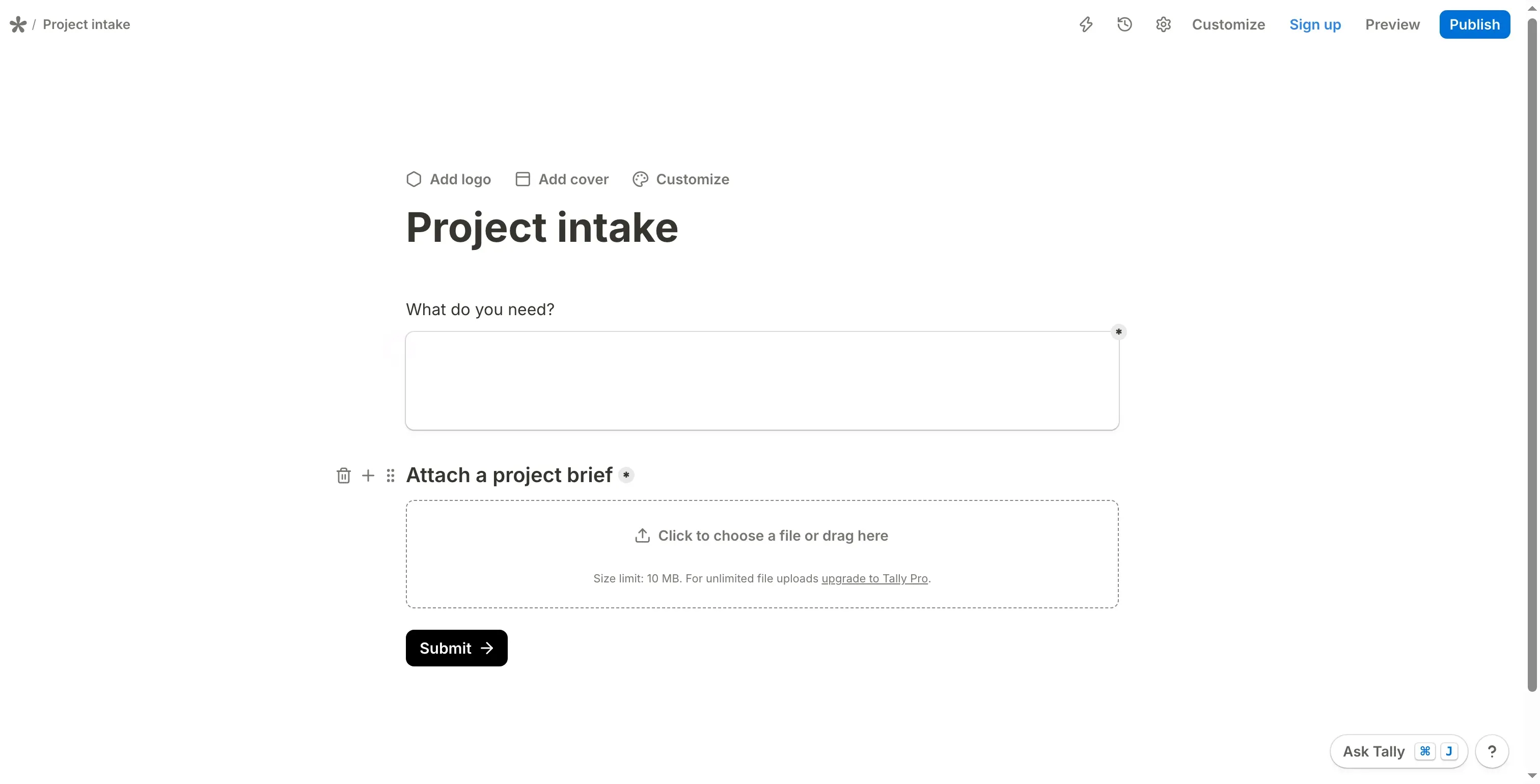
Inside Tally, the file-upload block shows a 10 MB limit in the editor. (Image source: Tally)
Everyone in a shared Tally workspace can create, edit, view, and delete forms and responses. That works for a small team that trusts everyone with the same access; it gets awkward when people need different roles. Pro removes Tally branding and includes unlimited team members.
Tally's Stripe block accepts one-time payments, and Tally adds no fee on top of Stripe's processing charge. It doesn't handle recurring payments, subscriptions, or invoicing by itself.
Pros
- Anonymous editor and Preview for a short intake before signup
- Free: unlimited forms and submissions, subject to fair use
- Pro: branding removal and unlimited team members
Cons
- 10 MB upload limit shown in Preview
- Members share create, edit, view, and delete rights in shared workspaces
- Stripe payment forms do not support recurring payments
Tally works well for a solo user or a small team that wants a quick, free form and can live with fair use and shared permissions. I'd choose another tool for larger uploads, role-based access, or subscription payments.
Product pricing — Tally
Free includes unlimited forms and submissions subject to fair use. Pro is $29/month or $290/year, removes Tally branding, and includes unlimited team members.
4. Fillout: Best for database-connected forms and record updates
Fillout can update an existing Airtable record instead of adding a new one. Turn on Update record and include the record's unique ID in the link. Without that ID, Fillout may create a new row, so the link matters on a correction or renewal form.
Fillout Free allows 1,000 responses a month and unlimited seats. Pro raises the cap to 5,000 and removes Fillout branding. Seats don't mean separate permissions: granular controls are on Team and Enterprise. Fillout's public pricing page presents its announced Team bundle differently from the self-serve plans, so check current availability and role rules before pricing a restricted-access workflow.
I'd use Fillout for an Airtable correction form when the team can keep each record ID in the link. That behavior applies to this Airtable workflow; don't assume every integration works the same way.
Pros
- Airtable Update record mode relies on a distinct record ID.
- Free: 1,000 responses/month and unlimited seats with equal access
- Pro: 5,000 responses/month and no Fillout branding
Cons
- Missing record ID can create a new Airtable record instead of updating one
- Free and Pro lack granular permissions despite unlimited seats
- Role-controlled Team pricing needs a current package check before purchase
Fillout fits Airtable workflows when the team can preserve record IDs and share the same access. If people need different response permissions, check the current Team or Enterprise price before counting seats.
Product pricing — Fillout
Free includes 1,000 responses/month and unlimited seats. Pro is $40/month billed annually, with 5,000 responses/month and no Fillout branding.
5. Google Forms: Best for simple forms already inside Google
Google Forms is a practical default for simple collection when your team already uses Google. The current help page allows up to 500,000 responses per form and gives each form a separate 1 GB storage cap; uploaded files don't count toward that storage. That covers plenty of text answers, though file access and workflow needs may point elsewhere.
Respondents have to sign in to Google to upload files. That's a hurdle for a public form where people should be able to send a file without logging in. Collaborators can also get access to the linked response Sheet, so you may need to set permissions on both the form and the Sheet.
Pros
- Free with a Google account for basic collection
- Linked Google Sheets responses, suited to a familiar spreadsheet workflow
- 500,000-response per-form ceiling, with a separate 1 GB storage limit
Cons
- File-upload respondents must sign in to Google
- Basic visual and branching controls for branded or complex forms
- Form and linked Sheet permissions must be managed separately
I'd choose a dedicated builder for branded customer journeys, anonymous file uploads, or database updates that depend on a matching rule. For internal requests, classroom forms, and simple signups already managed in Google, Forms is hard to beat.
Product pricing — Google Forms
Free with a Google account. Google Workspace may have a separate subscription cost; this article does not treat that as a form-builder charge when the organization already pays for it.
What do these form builders cost for the same workload?
For one editor handling 1,000 monthly responses without builder branding, the lowest listed plans cost $290 to $600 a year. For five editors sharing one form and its results, prices run from $0 to $996, while Jotform Enterprise requires a quote. These are the lowest public plans that fit each scenario. The solo setup requires branding removal; the team setup allows branding and assumes everyone has equal access.
One editor, 1,000 monthly responses, no builder branding
Tally has the lowest listed price for this solo workload.
| Product | Minimum configuration | Annual cost | Conditions that change the decision |
|---|---|---|---|
| Tally | Pro annual | $290 | Unlimited submissions subject to fair use; no Tally branding |
| Jotform | Bronze | $408 | 1,000 monthly submissions, one user, 10,000 total stored submissions |
| Fillout | Pro annual | $480 | 5,000 monthly responses; no custom domain included (not required here) |
| Typeform | Core Plus annual | $600 | 1,000 monthly responses; three users; Core plan family |
| Google Forms | Not comparable | — | Free basic forms; the branding-removal requirement does not map to its basic configuration |
Tally costs the least here. Its logic, response retention, and permissions differ from the other plans, so choose by the limit that matters to your form.
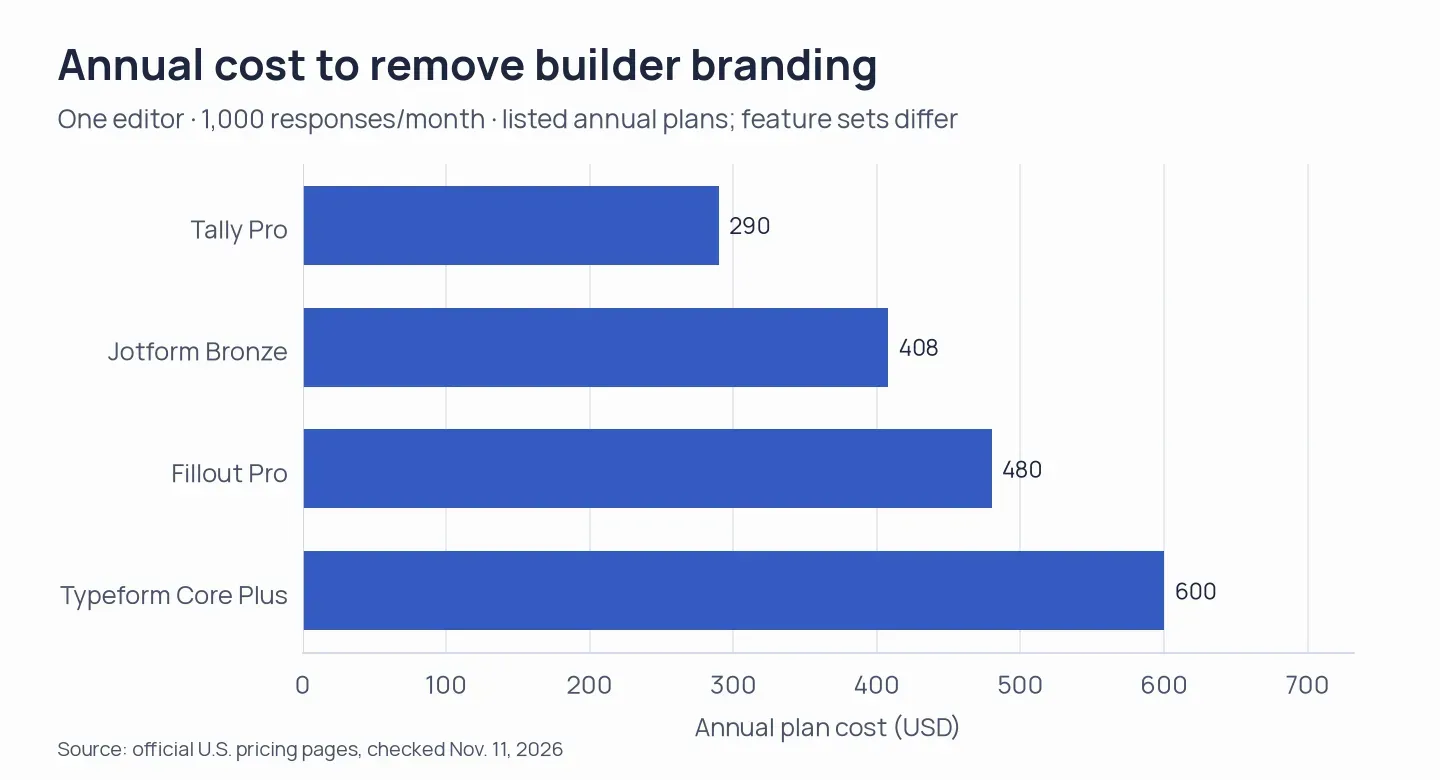
Tally is the lowest-cost eligible plan; Google Forms doesn't offer the branding-removal setup this scenario requires.
Five editors, a shared form and results, 1,000 monthly responses
For five people sharing a form and its results, Google Forms and Fillout Free add no cost. Tally Pro is $290/year, Typeform Core Business is $996/year, and Jotform Enterprise requires a quote.
| Product | Minimum configuration | Annual cost | Access caveat |
|---|---|---|---|
| Google Forms | Free Google accounts | $0 incremental | Manage linked Sheet access separately after sharing |
| Fillout | Free | $0 | Unlimited seats, but equal access; no granular permissions |
| Tally | Pro annual | $290 | Unlimited members share broad workspace rights |
| Typeform | Core Business annual | $996 | Five users and 10,000 responses/month; more capacity than this scenario needs |
| Jotform | Enterprise | Quote required | No public annual price; do not treat the quote-only plan as $0 |
The $0 rows assume the organization already has the needed accounts and can accept equal collaborator access. Fillout also announced a separate Team bundle, though the current pricing page presents it differently from its self-serve plans. Check its availability and permissions before relying on it for role-controlled work.
Already paying for a platform? Check its built-in form first
- Google Workspace: Google Forms may already cover a basic workflow. Keep the sign-in requirement in mind for respondent uploads.
- Microsoft 365: Microsoft Forms can be enough for internal surveys and quizzes. Limits vary between personal and organizational accounts, so check the account type rather than relying on a generic “free” claim.
- HubSpot: If the goal is to create or update CRM records, HubSpot forms may fit without adding a standalone builder. Some multi-step form features depend on the HubSpot plan.
- Pipedrive: Web Forms are part of LeadBooster. LeadBooster is included in Premium and above and can be an add-on on lower plans, so check the subscription before buying another form tool.
Which form builder should you choose?
Choose Jotform for varied fields and workflow add-ons, Typeform for short surveys, Tally for free intake, Fillout for Airtable updates, and Google Forms for simple collection in Google. Then check the constraint most likely to break your workflow. Public file intake means checking Google's sign-in requirement and Tally's 10 MB cap. An Airtable correction needs the record ID in Fillout's link. Teams should compare permissions as well as seats: Tally shares broad workspace rights, and Fillout Free and Pro don't split roles. Typeform earns its response-cap cost when its one-question flow matters; Forms may be enough if you already work in Google. Jotform is the flexible pick when you can manage separate submission, storage, and upload limits.
How we tested
I checked vendor pricing and help pages, review profiles, and a U.S. search sample, then built anonymous forms in Jotform and Tally through Preview. I assessed Typeform, Fillout, and Google Forms through public sources. I didn't publish a form, collect responses, connect production integrations, submit a file, or make a payment. Some review histories were incomplete.