

 17 min read

TL;DR
- Freshservice suits cloud-first teams, but the $19 Starter plan lacks the change and problem workflows needed for this comparison.
- ManageEngine ServiceDesk Plus Cloud Enterprise is the lowest confirmed five-technician, 500-asset setup at $3,895 a year. Cloud and on-premises editions differ in features and price.
- HaloITSM makes the licensing trade-off clear: five concurrent agents cost twice as much as five named agents, before custom onboarding.
- For change workflows, InvGate Service Management requires the Pro tier, and a separate subscription covers its asset product.
- ServiceNow ITSM Advanced fits enterprise governance needs, but licensing and implementation both require a quote.
- SysAid Professional includes 250 assets, but a 500-asset total is unknown. SolarWinds Service Desk publishes technician rates and quotes asset pricing separately.
At a glance
ManageEngine has the lowest verified 500-asset annual total; Freshservice Pro adds an unpriced Asset Unit pack, while HaloITSM requires quoted onboarding. The table compares all seven alternatives by fit, price, and trade-off.
| Jira Service Management alternative | Best fit | Standout | Starting price relevant to this guide | Main trade-off |
|---|---|---|---|---|
| Freshservice | Cloud-first IT teams | Clear tier ladder and a service desk with IT asset features | Pro: $99/agent/month, billed annually | Asset-unit cost is additional. Lower tiers don't meet this guide’s change-management baseline |
| ManageEngine ServiceDesk Plus | Teams comparing cloud and self-managed deployments | Distinct Cloud plans and a five-tech/500-asset price row | Cloud Enterprise: $3,895/year for 5 technicians and 500 assets | Deployment and feature matrix takes careful reading |
| HaloITSM | IT teams that can choose named or concurrent seats | Broad ITSM modules and explicit seat options | $99/named agent/month, billed annually | Concurrent billing doubles the shown per-seat rate. Onboarding is extra |
| ServiceNow ITSM | Large organizations with governed enterprise workflows | Change and problem management in Advanced | Custom quote | No public price or verified small-team implementation total |
| SysAid | Teams seeking ITSM with included asset tracking | Professional includes 250 assets and change/problem workflows | Five- and ten-agent prices not verified | A 500-asset setup needs extra assets. Price is unknown |
| InvGate Service Management | Teams that need configurable workflows and approvals | Pro adds change, release, workflow builder, and API | $500/agent/year for Pro | Asset Management is licensed separately |
| SolarWinds Service Desk | IT teams that want published per-technician tiers | Change and CMDB appear in Essentials | $39/technician/month, billed annually | Asset pricing is quote-only |
What counts as a Jira Service Management alternative?
A Jira Service Management alternative is an IT service management (ITSM) platform for handling internal incidents and service requests, with service catalog, SLA, asset, or change workflows. Seven options in this guide are Freshservice, ManageEngine ServiceDesk Plus, HaloITSM, ServiceNow ITSM, SysAid, InvGate Service Management, and SolarWinds Service Desk. “Jira Service Desk alternatives” is an older search phrase for these replacements. Check each plan’s change workflows and asset or configuration-record limits; similar ticket screens do not make two tools equivalent.
What makes the best Jira Service Management alternative?
The best Jira Service Management alternative matches your deployment model, asset count, and change workflow at a verifiable cost. Entry-level plans can look similar until those needs push one option into a higher tier.
Change management is a plan gate
For change management, choose Freshservice Pro, ManageEngine Cloud Enterprise, ServiceNow Advanced, or InvGate Pro; HaloITSM, SysAid Professional, and SolarWinds Essentials include it in the compared setups. Each option also covers incident or request intake and a service catalog or SLA workflow. Halo charges separately for required onboarding.
Asset units aren't interchangeable
No. ManageEngine’s calculator row counts 500 assets, while InvGate’s Asset Management Starter prices 500 IP devices and includes two non-IP devices per IP device. Freshservice sells Asset Units in 500-unit packs without a public pack price, and SysAid Professional includes 250 assets. SolarWinds quotes asset pricing separately, so these allowances do not give every buyer the same comparison basis.
Compare the full year-one bill
Use annual billing where a vendor publishes it. Add required onboarding and separate asset subscriptions, exclude taxes because vendors use different tax bases, and leave the total unknown when a page doesn't price your seat count.
Decide who will operate the platform
On-premises tools leave hosting and maintenance to your team; cloud tools reduce that infrastructure work. Price the seats you need, then decide who will manage configuration, daily changes, escalations, and request templates. More workflow controls can also mean more setup. A low license price may cost more staff time if a small IT team has to administer it. An entry tier also loses its appeal if it leaves a required change workflow out.
Annual cost for two ITSM team sizes
ManageEngine’s 500-asset Cloud Enterprise setup costs $3,895 for five technicians and $7,795 for ten. The annual cost table compares five- and ten-agent ITSM teams with 500 assets, 500 CMDB objects, and a required change workflow. Annual, pre-tax USD rates reflect public prices available November 17, 2026. The table shows each product’s five- and ten-agent configuration and the costs still needing a quote.
| Product and configuration | 5 agents/technicians, 500 tracked items | 10 agents/technicians, 500 tracked items | Conditions and missing costs |
|---|---|---|---|
| Freshservice Pro + 500 Asset Units | $5,940 + Asset Unit cost | $11,880 + Asset Unit cost | Pro is $99/agent/month billed annually. Cost of an Asset Unit pack isn't public in the reviewed material. |
| ManageEngine ServiceDesk Plus Cloud Enterprise, 500 assets | $3,895 | $7,795 | Official annual Cloud table shows these exact technician/asset configurations. Standard and Professional don't provide the verified change-management match used here. |
| HaloITSM, named agents | $5,940 + onboarding | $11,880 + onboarding | $99 per named agent/month billed annually. Onboarding is required and priced by quote. Concurrent seats double the displayed agent rate (before onboarding). |
| ServiceNow ITSM Advanced | Quote required | Quote required | Change management is in Advanced. License and implementation totals weren't public. |
| SysAid Professional, 250 included assets | Unknown | Unknown | Current calculator showed $59/agent/month only at 70 agents. Small-team seat pricing and the cost of 250 additional assets are unknown. |
| InvGate Service Management Pro + Asset Management Starter | $3,999 | $6,499 | Calculated from $500/agent/year for Pro plus $1,499/year for 500 IP devices in Asset Management Starter. Taxes and any negotiated fees excluded. |
| SolarWinds Service Desk Essentials | $2,340 + asset quote | $4,680 + asset quote | $39/technician/month billed annually. Asset pricing is quote-only. Essentials lists change and CMDB. |
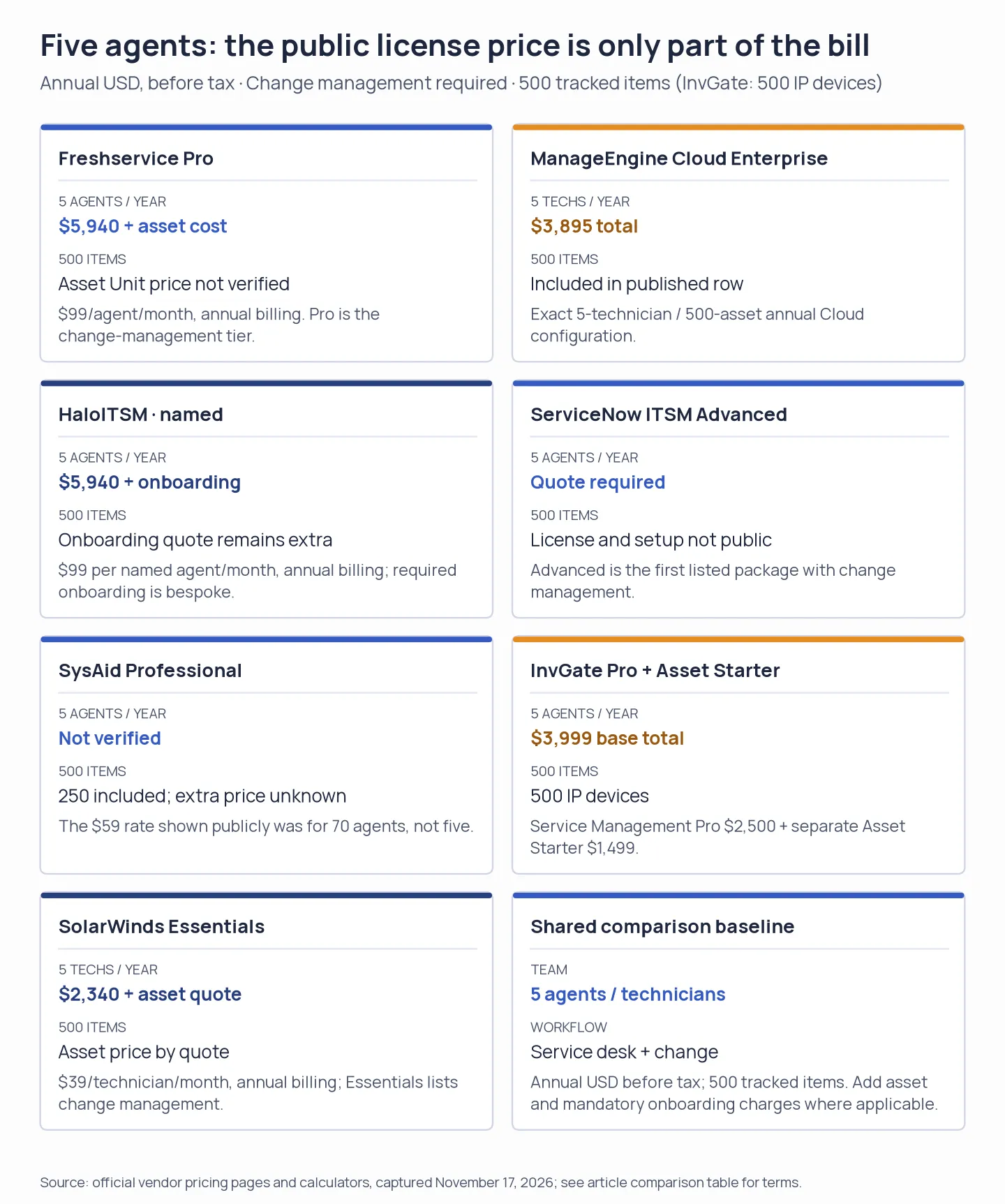
Published seat rates aren't always the full first-year cost.
The table shows seven annual configurations. Freshservice and SolarWinds need asset quotes. Halo's onboarding is extra. SysAid and ServiceNow require a quote for a comparable total. For InvGate, the 500-unit reference means 500 IP devices. Asset Management Pro, which adds automatic CMDB mapping, changes that line item from $1,499 to $2,500: five agents total $5,000, while ten agents total $7,500.
1. Freshservice: Best for cloud-first IT teams
Freshservice Pro is the cloud-first pick when you need change management alongside incident and request handling, a service catalog, SLA workflows, and IT asset features. Its tier ladder is easy to follow; the catch is that the asset allowance doesn't map neatly to this comparison.
Pros
- Freshservice Pro comes with problem, change, release, and major-incident management.
- I switched the pricing page from annual to monthly billing and saw the rates change from $19/$49/$99 to $29/$59/$119 per agent/month.
- You can try it for 14 days without a card.
Cons
- The $19 Starter and $49 Growth plans don't include the Pro change-management configuration used in this comparison.
- Asset Units are sold in 500-unit packs, but the public pricing page doesn't show the extra pack price.
- Freshservice Pro starts at $99 per agent/month with annual billing. A five-agent team pays $5,940 a year before asset costs and optional Copilot.
Freshservice draws a useful line between the everyday service desk and Pro's change workflows. One 5/5 Capterra reviewer praised adoption, integrations, and automation, but found advanced administration fragmented and some deeper integrations required middleware or API work. That trade-off makes me wary of custom connections on a small IT team. Freshservice pricing · Capterra reviews
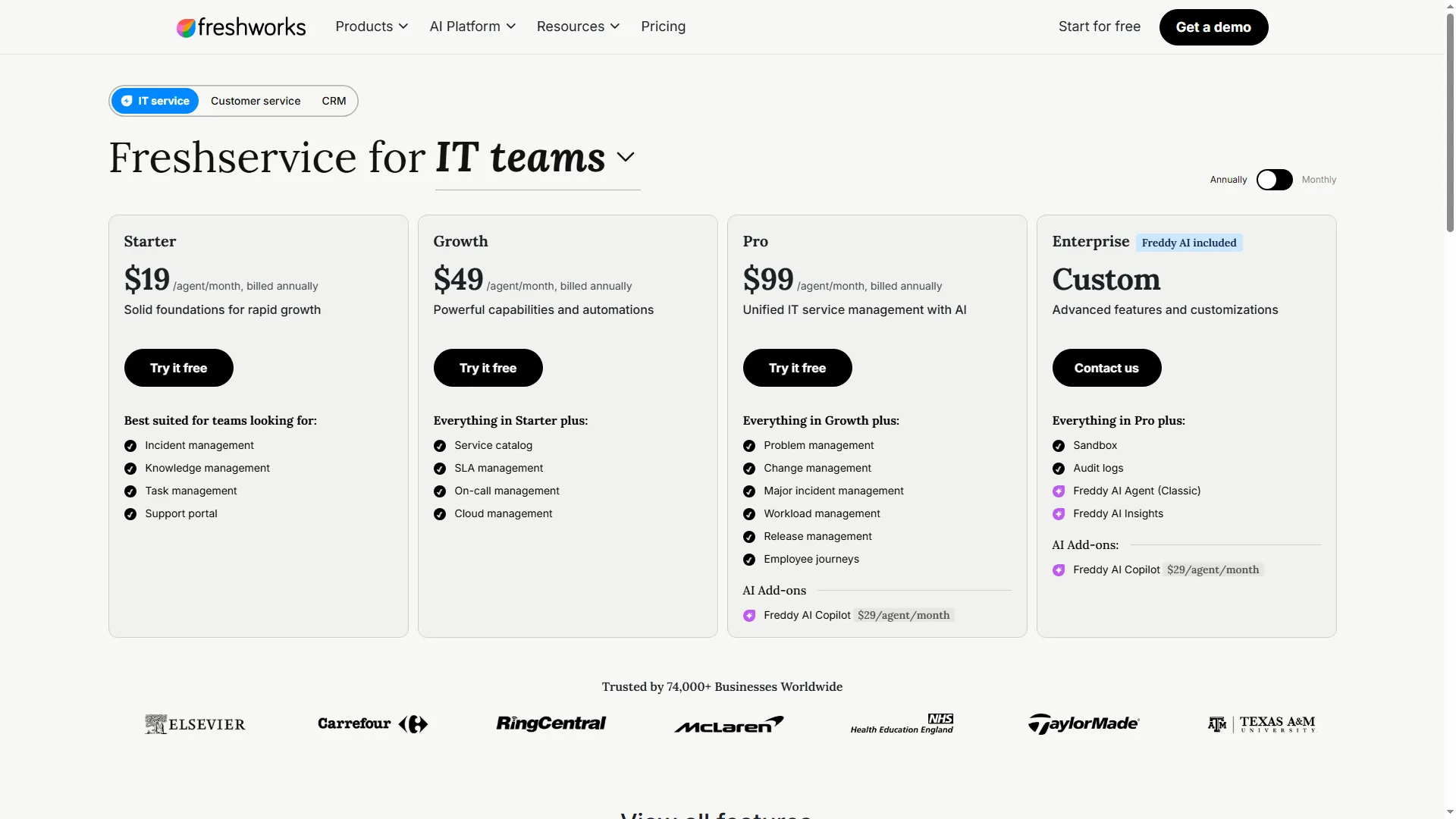
Freshservice’s annual price ladder makes the Pro tier jump visible.
Product pricing — Freshservice
Starter $19, Growth $49, or Pro $99 per agent/month, billed annually, 14-day trial, no card.
2. ManageEngine ServiceDesk Plus: Best for deployment and budget choice
ManageEngine ServiceDesk Plus Cloud Enterprise is a strong deployment and budget fit for five technicians and 500 assets: the required change workflow costs $3,895/year, while self-managed editions use separate feature and price rows. Check the edition matrix before buying.
Pros
- ManageEngine Cloud Enterprise costs $3,895 a year for five technicians and 500 assets; the ten-technician, 500-asset row is $7,795 a year.
- ManageEngine lists separate Cloud and self-managed editions instead of blending their prices.
- Professional, along with Enterprise, provides a 30-day trial with no card required.
Cons
- ManageEngine Standard doesn't match the 500-asset scenario because asset management isn't included.
- The trial signup form requests a company phone number. I noticed that field, but I didn't create a workspace.
- On-premises and cloud differ in feature packaging and price, so you shouldn't carry a result from the one edition over to the other.
The Cloud/self-managed split makes ManageEngine easier to compare than vendors that blur deployment models. One G2 reviewer hit custom-field limits and needed a third-party connector during migration; that would give me pause if your request forms rely on custom fields. Cloud pricing · G2 reviews
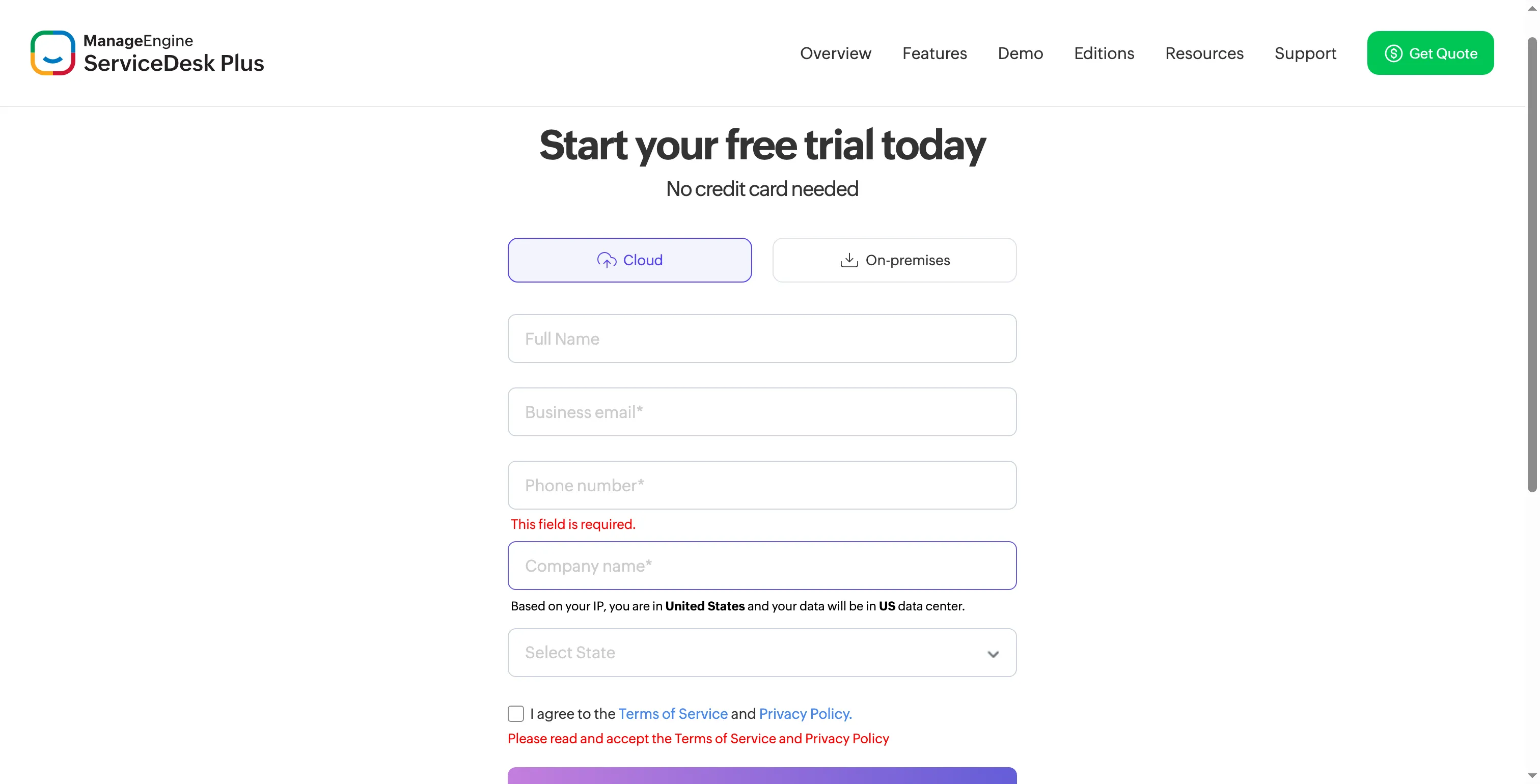
The trial form asks for a company phone number before workspace access.
Product pricing — ManageEngine ServiceDesk Plus
Cloud Standard is free for up to five technicians but excludes asset management; Cloud Professional and Enterprise are priced by technician and asset configuration. The 30-day trial doesn't require a card.
3. HaloITSM: Best for teams that can optimize seat licensing
HaloITSM lets you compare named seats, assigned to specific agents, with concurrent seats shared across a pool and counted by simultaneous logins. The US calculator shows five named agents at $99 per agent/month and five concurrent agents at $198 per agent/month, billed annually in either case. Size a shared pool against peak simultaneous use, then compare its cost with licensing the full roster; required onboarding costs extra.
Pros
- HaloITSM covers incident, knowledge, asset/CMDB, problem, change, major-incident, and SLA workflows.
- The public calculator offers an explicit choice between named and concurrent licensing.
- The 30-day trial provides access to every module.
Cons
- HaloITSM costs $11,880 a year for five concurrent agents, twice its $5,940 named-agent total.
- The license figure excludes required onboarding, which is priced separately; it isn't the full first-year cost.
- Ten named agents cost $11,880 a year before onboarding. Choose concurrent licensing only after counting how many people need access at the same time.
My pick is named seats unless shift overlap leaves a meaningful share of the roster idle. Halo makes that choice unusually clear, and the trial covers every module. Required onboarding sits outside the license, while the review profiles offer little recent signal: the newest G2 review I recorded dates to spring 2026, and Capterra had no recent posts. HaloITSM pricing · Capterra reviews · G2 reviews
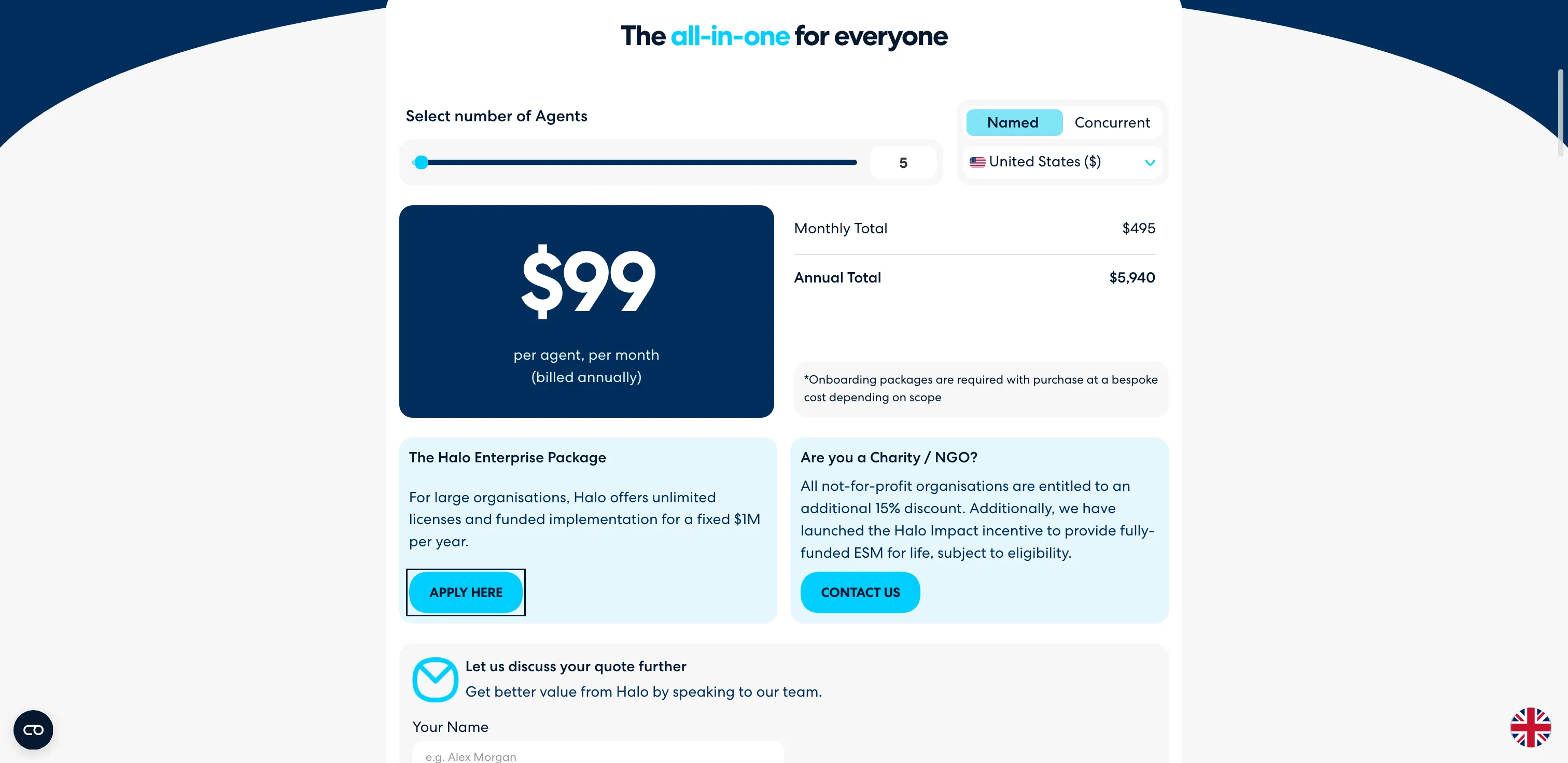
The named-seat rate shown is the starting point for the annual cost comparison.
Product pricing — HaloITSM
$99 per named agent/month or $198 per concurrent agent/month, billed annually in the US calculator. Bespoke onboarding is extra, 30-day trial.
4. ServiceNow ITSM: Best for governance of enterprise processes
ServiceNow ITSM fits organizations that need connected process governance and can scope a custom implementation. I wouldn’t treat it as a small-team service-desk swap without a wider platform plan and implementation budget. Foundation covers core service workflows; Advanced adds change and problem management. The public pricing page gives no license rate, so there’s no list-price total to compare for a small team.
Pros
- ServiceNow makes the Foundation-to-Advanced workflow boundary clear: Advanced adds change and problem management.
- Advanced encompasses problem management, change, major-incident, and on-call capabilities.
- This product is built for organizations seeking to link IT workflows with a wider enterprise service platform.
Cons
- ServiceNow pricing is quote-based, and no five- or ten-agent annual total is public.
- Advanced includes more than change management, which may be more platform than a small IT desk needs.
- On the public pricing page, implementation costs and ongoing administration costs aren't listed.
Advanced fits a mature IT organization that wants change and problem management inside a wider enterprise platform. I wouldn't buy it as a standalone ticket desk: the package reaches beyond service requests, and the implementation sits behind a quote. I inspected the public package grid, but I haven't used a commercial Advanced workspace.
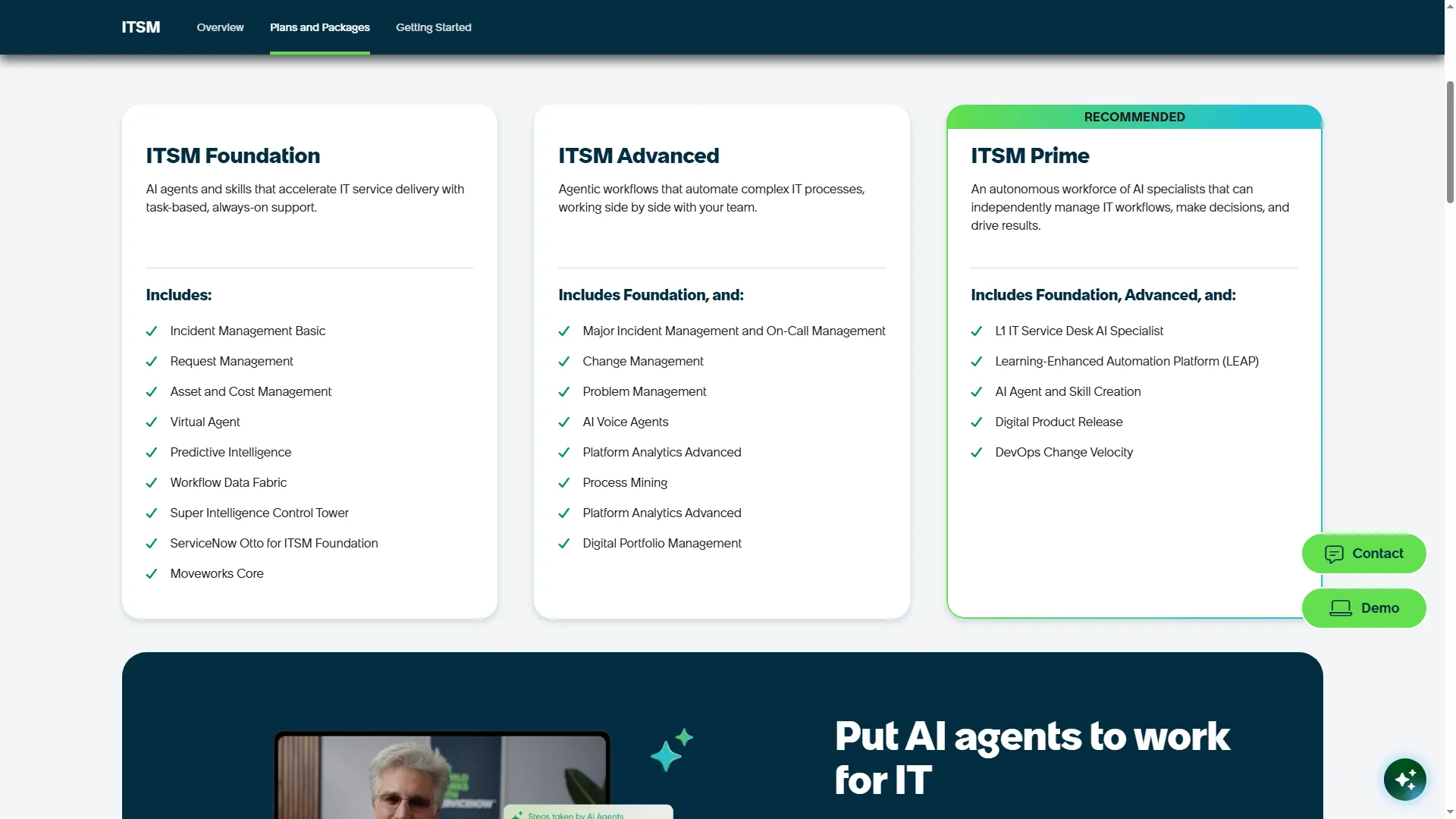
The package grid separates core, advanced, and enterprise-level tiers.
Product pricing — ServiceNow ITSM
Foundation, Advanced, and Prime are quote-based. Advanced is the first listed tier with change and problem management.
5. SysAid: Best for an ITSM suite with included asset tracking
SysAid Professional combines incident, request, change, and problem workflows with an included asset allowance. The 250 assets with CMDB and monitoring fall short of this guide’s 500-asset baseline. The pricing calculator showed $59 per agent/month at 70 agents; a small-team seat rate and the cost of extra assets are still needed.
Pros
- SysAid Professional covers requests, incidents, changes, and problem management, along with asset monitoring and CMDB.
- SysAid Professional includes 100,000 Workato credits and 250 assets.
- For 30 days, you can try it with all features and no card is needed.
Cons
- A 500-asset team needs additional SysAid capacity at an unlisted price.
- The calculator showed $59 per agent/month with 70 agents specified, so that rate shouldn't be projected onto a five-agent team.
- SysAid Enterprise pricing starts at 20 agents; paid support or onboarding packages can add to Professional costs.
SysAid's 250-asset allowance covers half the 500-asset target. I wouldn't apply its bulk-team calculator price to a smaller deployment; get one quote that names the seats and asset capacity. Dex is a separate product, so its starting price doesn't help estimate this service desk. SysAid pricing · G2 reviews
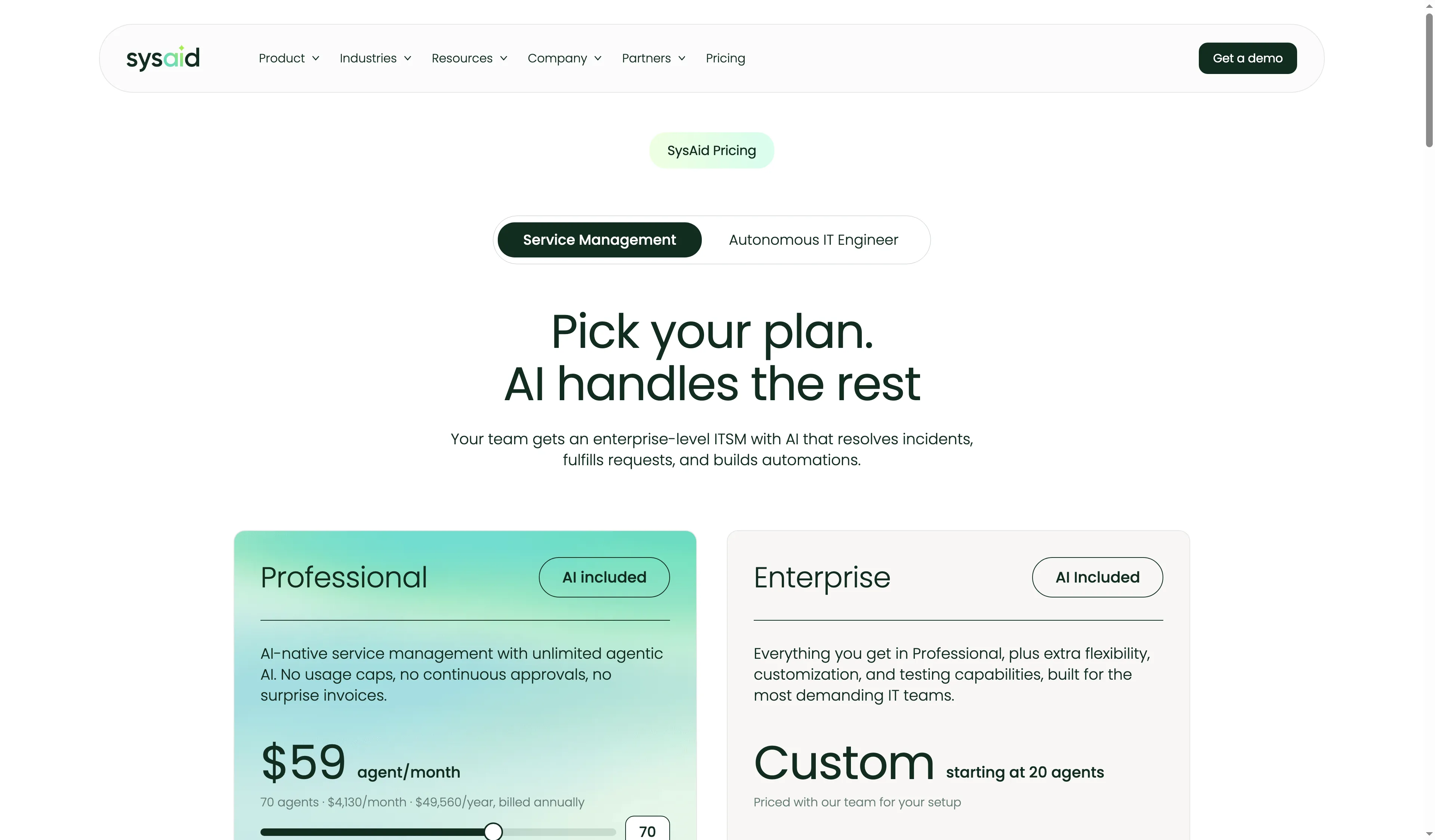
Set the seat calculator to your team size before comparing the annual total.
Product pricing — SysAid
Service Management Professional pricing varies by seat count. The reviewed calculator showed $59/agent/month at 70 agents. Enterprise is custom-priced from 20 agents.
6. InvGate Service Management: Best for configurable workflows and approvals
InvGate Service Management stands out when a team needs configurable approvals across departments. The workflow builder is the payoff for managing two subscriptions; it suits teams whose approval flows need that flexibility. Change management starts with Pro at $500 per agent/year; Asset Management is separate, and Starter adds $1,499/year for 500 IP devices.
Pros
- InvGate Pro includes API, messaging integrations, a workflow builder, release, and change; Starter lacks these features.
- The Pro per-agent rate stays the same for teams from five to 100 agents.
- InvGate Service Management Pro and Enterprise offer onboarding and training.
Cons
- InvGate Asset Management is a distinct license; its Starter setup brings the five-agent scenario to $3,999 annually.
- InvGate’s 500-unit reference means 500 IP devices; each has a separate non-IP allowance.
- InvGate requires Enterprise pricing for on-premises deployment with concurrent seats; Pro doesn't cover that setup.
InvGate's workflow builder is its strongest argument: it gives approval-heavy teams room to shape handoffs across departments. I'd choose it when that control removes real process friction; otherwise, splitting service and asset management into separate products feels like extra admin. Asset Management Pro adds automatic CMDB mapping, while each IP device also covers two non-IP devices. G2's 20 reviews average 4.6/5, but the newest captured review dates to 2025, so the profile offers little recent signal. Service Management pricing · Asset Management pricing · G2 reviews
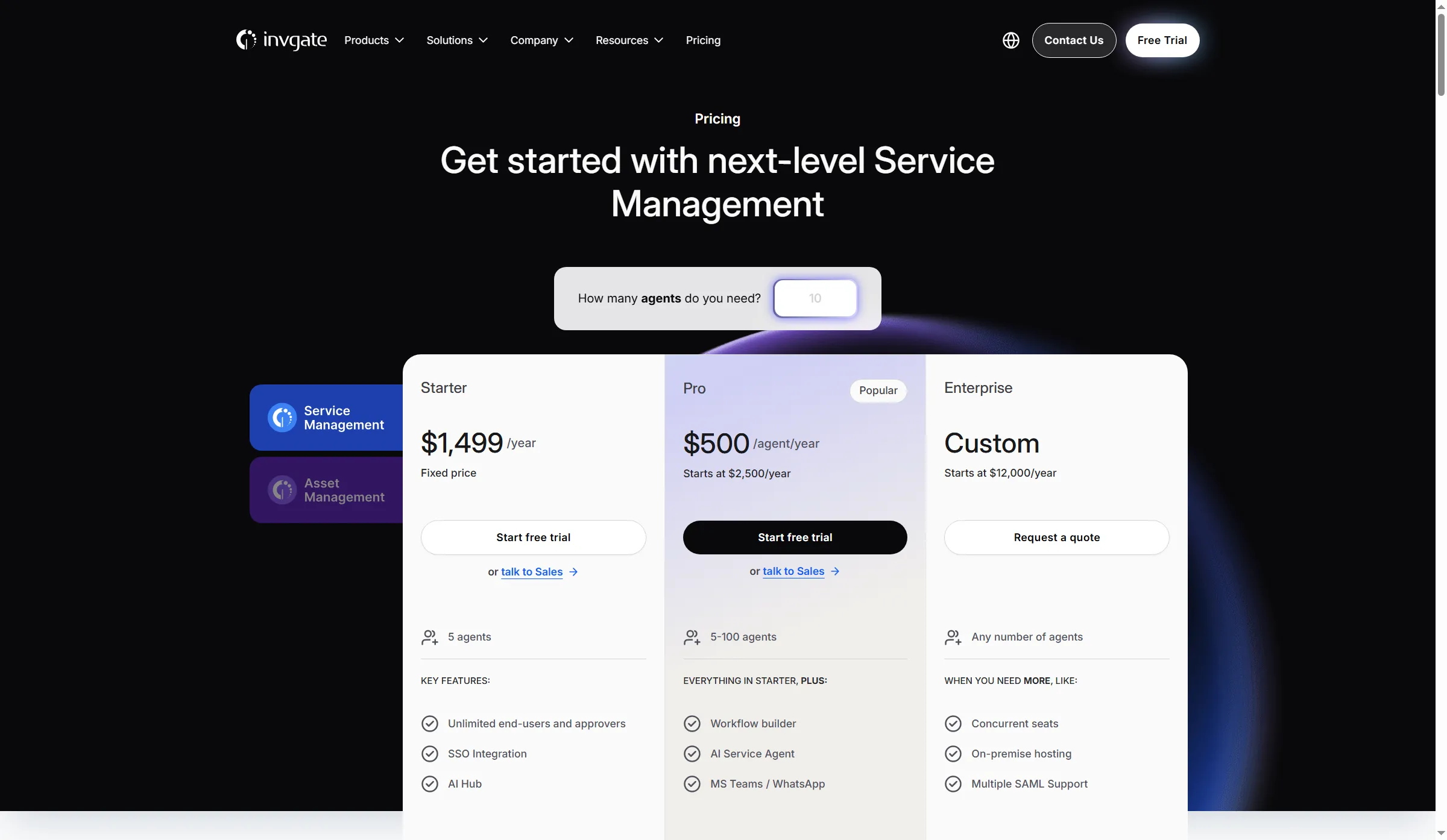
The Pro price is per agent, while Starter uses a fixed annual fee.
Product pricing — InvGate Service Management
Service Management Starter is $1,499/year for five agents; Pro is $500/agent/year, from $2,500/year. Asset Management Starter is separate at $1,499/year for 500 IP devices.
7. SolarWinds Service Desk: Best for published technician tiers
SolarWinds Essentials is the relevant tier for teams that need incident, catalog, SLA, change, and CMDB features. Its technician rate is easy to compare; the asset quote decides whether the complete setup fits your budget.
Pros
- SolarWinds Essentials lists incident management, service catalog, SLA, change management, CMDB, and asset management.
- SolarWinds publishes annual rates for all three tiers: Essentials ($39), Advanced ($99), and Premier ($124) per technician/month.
- The 30-day trial requires no card and includes Premier features, so it won't show exactly what a paid Essentials account includes.
Cons
- SolarWinds leaves the 500-item annual total incomplete because its asset pricing is quote-only.
- Advanced and Premier cost more than Essentials and add automation, runbooks, audit features, expanded API access, and visual CMDB mapping.
- The 30-day trial runs Premier; compare its features with the Essentials list before buying.
The Premier trial is a poor stand-in for the Essentials buyer's experience. I wouldn't judge the lower tier by it. G2 reviewers raised two practical checks—expected integration results and ticket linking—that I'd verify before making SolarWinds the team's standard desk. SolarWinds pricing · G2 reviews
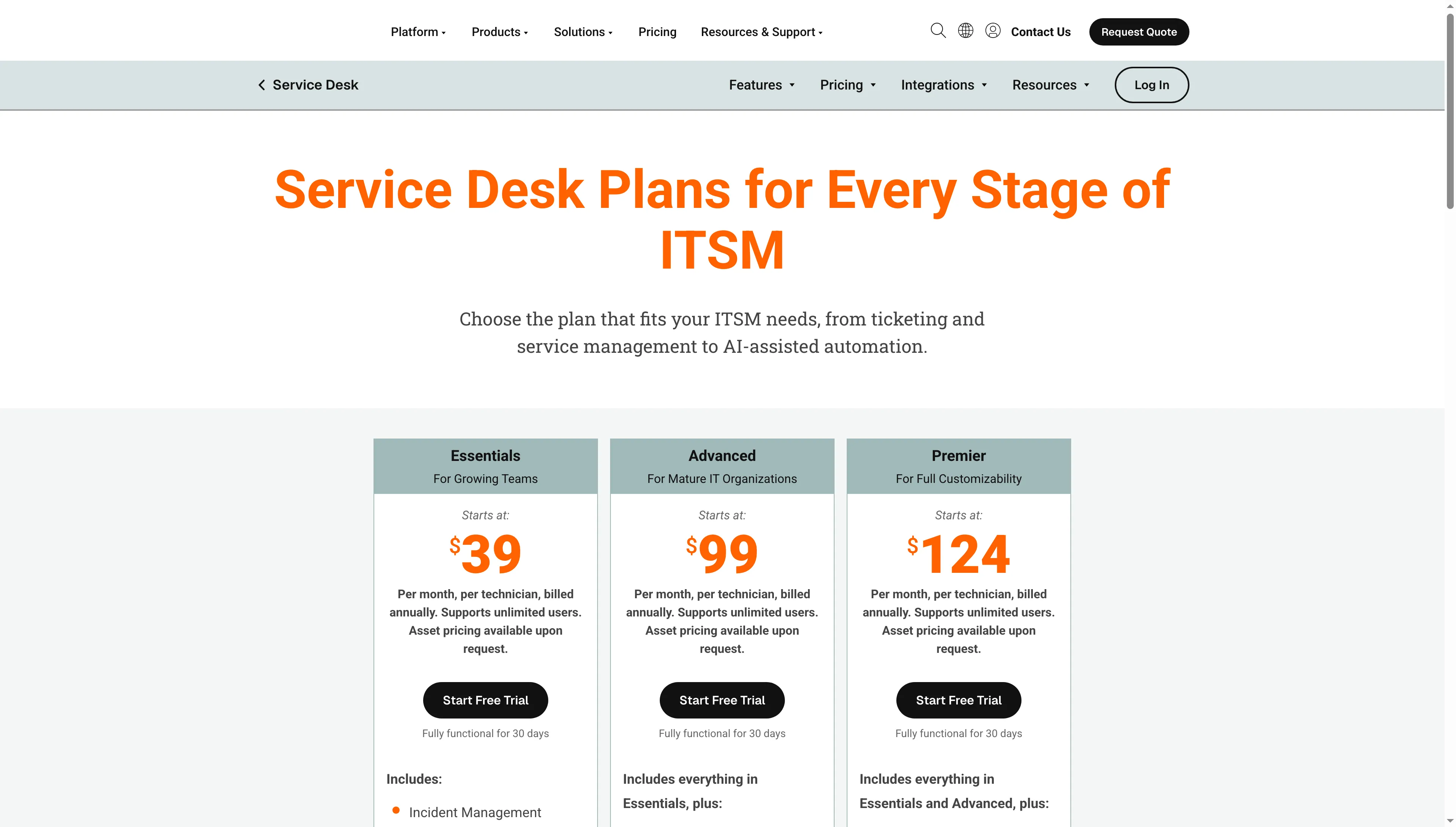
SolarWinds publishes the technician rates and lists asset pricing separately.
Product pricing — SolarWinds Service Desk
Essentials $39, Advanced $99, or Premier $124 per technician/month, billed annually. Asset pricing is quote-only, 30-day trial.
Support-led tools are a different category boundary
Zendesk and Zoho Desk focus on customer-support tickets, help centers, and channels, while this Jira Service Management alternatives list compares ITSM tools by asset/CMDB and change workflows rather than pricing equivalent setups for support-led plans. Zendesk or Zoho Desk may suit a customer-facing support team, but I wouldn't count either as a direct ITSM replacement here.
Which Jira Service Management alternative should you choose?
Pick ManageEngine ServiceDesk Plus Cloud Enterprise for a five- or ten-technician team that matches its 500-asset row; choose another alternative when its workflows, licensing, or enterprise scope better fits.
- Pick Freshservice Pro when you're after a cloud-first service desk that has a distinct change-management tier, and you can afford to price the additional asset units.
- Pick ManageEngine ServiceDesk Plus Cloud Enterprise when your five- or ten-technician team matches a published 500-asset row and the edition matrix fits.
- Pick HaloITSM when concurrent or named seats match real usage and onboarding expenses can be included in the quote.
- Pick ServiceNow ITSM Advanced when enterprise process governance justifies custom pricing and a wider platform scope.
- If 250 assets included with SysAid Professional suffice, pick it; otherwise, get a complete quote covering the extra assets and your seat count.
- Pick InvGate Service Management Pro when configurable workflows matter and separate asset subscriptions suit your budget.
- Pick SolarWinds Service Desk Essentials when its published technician rate fits and the asset quote keeps the total competitive.