

 17 min read

TL;DR
- Zoom Phone is a strong fit if your team already uses Zoom and wants to choose between metered calling, unlimited calling, or a wider Workplace bundle. Check the meeting limit and trial cart before you buy.
- Dialpad Connect combines calling, messaging, meetings, and AI call summaries, but its signup path and annual commitment deserve a check before you invite the team.
- Nextiva NEXT Core includes phone service, 100 business texts per user, routing, video, and a shared inbox at its annual small-business rate. That rate requires a 12-month term.
- Ooma Office Pro Plus is the Ooma tier to compare when you need call queues; its monthly price is higher than Essentials, and texts have a monthly cap.
- Quo is built around business calling and shared team messaging. Its carrier registration and messaging fees change the real cost beyond the per-user price.
- Vonage Business Communications has phone, SMS, and video plans, but its promotional pricing comes with a one-year contract and taxes and fees.
Prices and plan terms reflect the vendor pages available on November 17, 2026.
What counts as a RingCentral alternative?
RingCentral alternatives are cloud phone services for businesses that give a company phone numbers or extensions and let employees handle calls through mobile, desktop, or desk-phone apps. Some also bundle SMS, video meetings, team chat, call routing, and AI summaries, but these extras don't work the same way across providers. This comparison focuses on small-business phone services and unified communications as a service (UCaaS), which bundles cloud communication tools such as calling, messaging, and video meetings. Contact-center platforms are a different purchase.
RingCentral alternatives at a glance: six picks by team need
Zoom Phone fits existing Zoom users, Dialpad fits teams that value call summaries, Nextiva fits teams that need routing and texting, Ooma fits small offices, Quo fits shared-number teams, and Vonage fits businesses that need video or desk phones.
| Scenario | Pick | Why it fits | Limitation |
|---|---|---|---|
| Existing Zoom customer | Zoom Phone | US & Canada Unlimited includes domestic calling; longer meetings are available in Pro Plus | Basic meetings last 40 minutes; international calls are metered |
| Team that values call summaries | Dialpad Connect | Standard combines calls, messaging, meetings, and AI recaps | CRM integrations and 24/7 support require Pro |
| Small team with defined routing and SMS needs | Nextiva NEXT | Core includes skills-based routing and 100 texts/user; Engage raises that to 500 | Core's qualifying annual rate requires a 12-month term |
| Small office with a virtual receptionist | Ooma Office | Essentials includes a receptionist and one toll-free number | Call queues require Pro Plus |
| Five-person shared-number team | Quo | Starter supports shared call/text history for up to 10 paid users | Business texting needs carrier registration and fees |
| Business with desk phones and video | Vonage Business Communications | Premium adds VoIP desk-phone support and meetings up to 200 people | New-account promotion requires a one-year contract |
Prices are US dollars before taxes and usage or add-on charges. Annual prices require the listed billing term; Vonage's current promotion is shown separately from its standard monthly rates.
RingCentral alternatives: five checks before switching
Compare direct numbers and extensions, the behavior of call routing, fees for business texting, meeting and software bundles, and contract terms. A plan name alone doesn't show whether its queue, shared number, or SMS registration matches your RingCentral setup.
- Numbers and users: Check whether each person gets a direct business number or shares a main number through extensions.
- Call handling: Confirm whether you need a ring group, a queue, skills-based routing, or a contact center; vendors use similar labels for different controls.
- Texting: Price your monthly message volume, shared inbox needs, and any carrier registration or usage fees.
- Meetings and integrations: Count external meeting length, desk phones, CRM connections, and AI summaries only if your team uses them.
- Billing: Compare the same number of users, annual versus monthly terms, promotion end dates, taxes, and required add-ons.
RingCentral alternatives: renewal terms can trigger a switch
Before comparing prices for alternatives to RingCentral, check your renewal date, seat minimum, and notice window. In a November 11, 2026, Trustpilot review, Richard Dalton said he wanted a lower price and later learned his account was under contract through the following July, despite believing he had only agreed to one year. His review is one customer account, but it gives a concrete reason to verify your own renewal terms. (RingCentral reviews on Trustpilot)
1. Zoom Phone: Best for Zoom-heavy teams that need flexible calling
For a small business already using Zoom, Zoom Phone adds calling without another meeting platform. US & Canada Unlimited costs $16 per user monthly on an annual term; the $10.50 metered option appears at checkout only. Workplace Basic meetings last 40 minutes, while Pro Plus raises the limit to 30 hours. (Zoom Phone pricing)
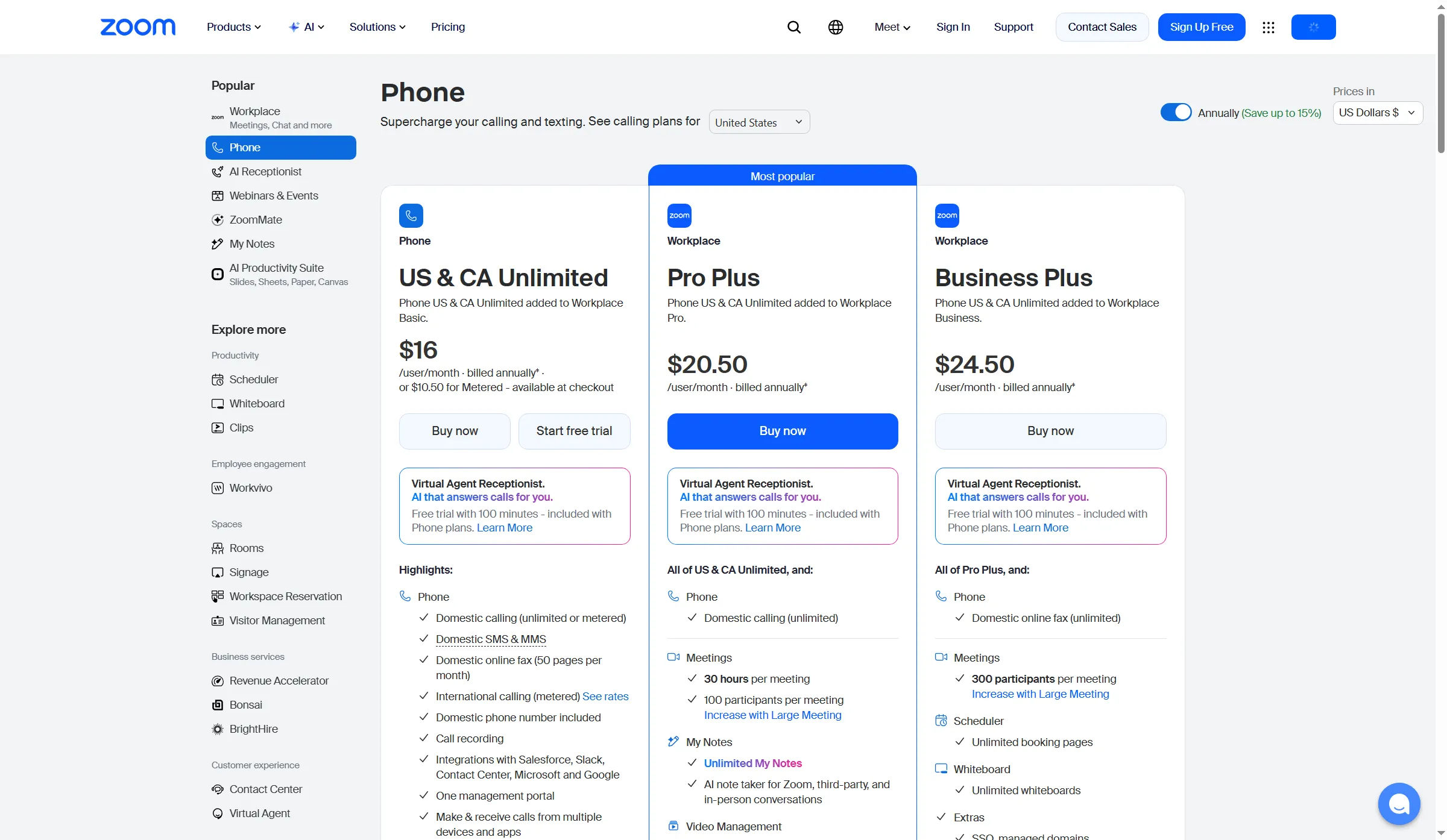
Zoom Phone’s standalone calling plan sits below its longer-meeting Workplace bundles.
Zoom Phone pros
- Unlimited US/Canada calling and a domestic number from $16/user/month annually
- 30-hour Workplace meetings are available with Pro Plus
- One admin portal covers supported apps and devices
Zoom Phone cons
- International calls are metered, and SMS requires registration
- The $10.50 metered option appears at checkout only
- Trial cart preselects a 100-minute receptionist add-on that converts to $0.30/minute
I switched Zoom's billing selector: US & Canada Unlimited rose from $16 annually to $18 monthly, and Pro Plus moved from $20.50 to $24. The billing gap is $24 per user each year for Unlimited, or $120 for five seats; Pro Plus adds $42 per user, or $210 for five. In the seven-day trial cart, SMS and international calls were excluded; I also removed a receptionist add-on that would convert to $0.30 per minute. I like the plan choice, but that per-minute add-on is easy to miss.
Who should skip it: Avoid Zoom Phone if your team needs bundled international calling or uses meetings longer than 40 minutes but doesn't want the wider Workplace plan.
Product pricing — Zoom Phone
US & Canada Metered: $10.50 per user/month, shown as available at checkout. US & Canada Unlimited: $16/user/month annually or $18 monthly. Pro Plus: $20.50 annually or $24 monthly. These prices exclude taxes and optional add-ons. International calling is metered.
2. Dialpad Connect: Best for teams that want calls and AI recaps together
Consider Dialpad Connect if your team wants call recaps with business calling. Standard bundles calls, messaging, meetings, and AI recaps. It costs $15 per user monthly when billed annually; Pro adds CRM integrations, 24/7 support, and multi-office management. Support and Sell are separate product families. (Dialpad Connect pricing)
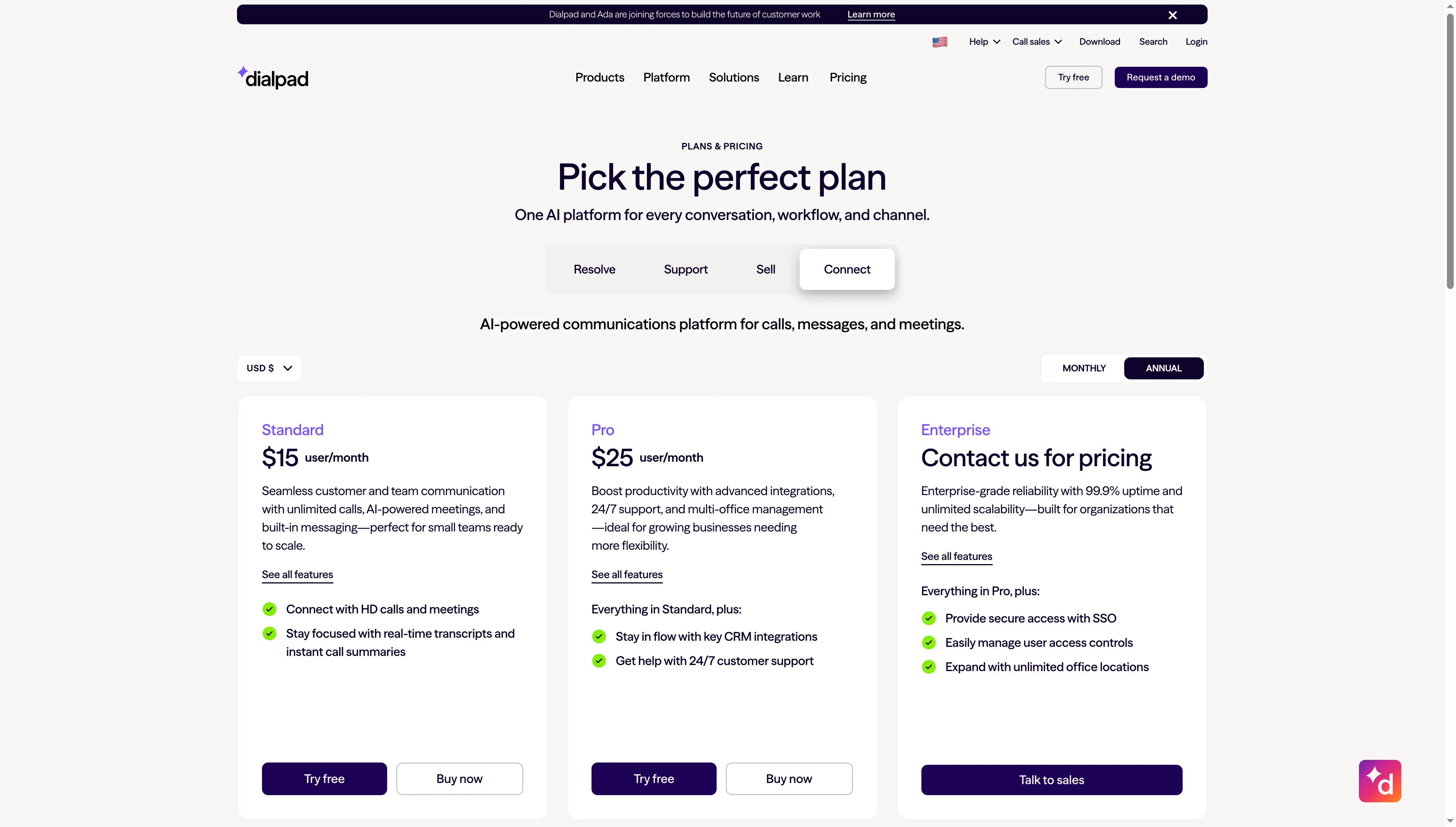
Dialpad Connect separates calling and meeting plans from its Support and Sell contact-center plans.
Dialpad Connect pros
- Standard includes unlimited calls, messaging, AI meetings, and call summaries
- Pro adds CRM integrations and multi-office management for $25/user/month
- A 14-day Connect trial is advertised
Dialpad Connect cons
- The $15 Standard price is the annual rate
- CRM integrations and 24/7 support start on Pro
- When you sign up, you may see a request to join an existing domain workspace
I followed Dialpad's advertised trial to the email form, where the test address opened a request to join an existing office. Check who controls that workspace before inviting colleagues. I'd treat that join screen as a setup checkpoint, not proof the trial is ready. Connect's separate Support and Sell product families make Standard easier to assess, but the entry tier only fits if your team can do without Pro's CRM integrations and round-the-clock support.
Who should skip it: Dialpad is a poor fit if your company can't confirm who administers its email-domain workspace or needs CRM integrations at the lowest tier.
Product pricing — Dialpad Connect
Connect Standard: $15/user/month annually; Pro: $25/user/month annually; Enterprise: quote. 14-day trial advertised. Regional pricing may vary.
3. Nextiva NEXT: Best for small teams that need texting and routing
Small teams can use Nextiva NEXT Core if they need basic routing and a shared inbox and stay under 100 business texts per user monthly. Qualifying new customers with 1–100 employees pay $15 per user monthly on a 12-month-or-longer annual term; month-to-month billing is $23. (Nextiva plans and pricing)
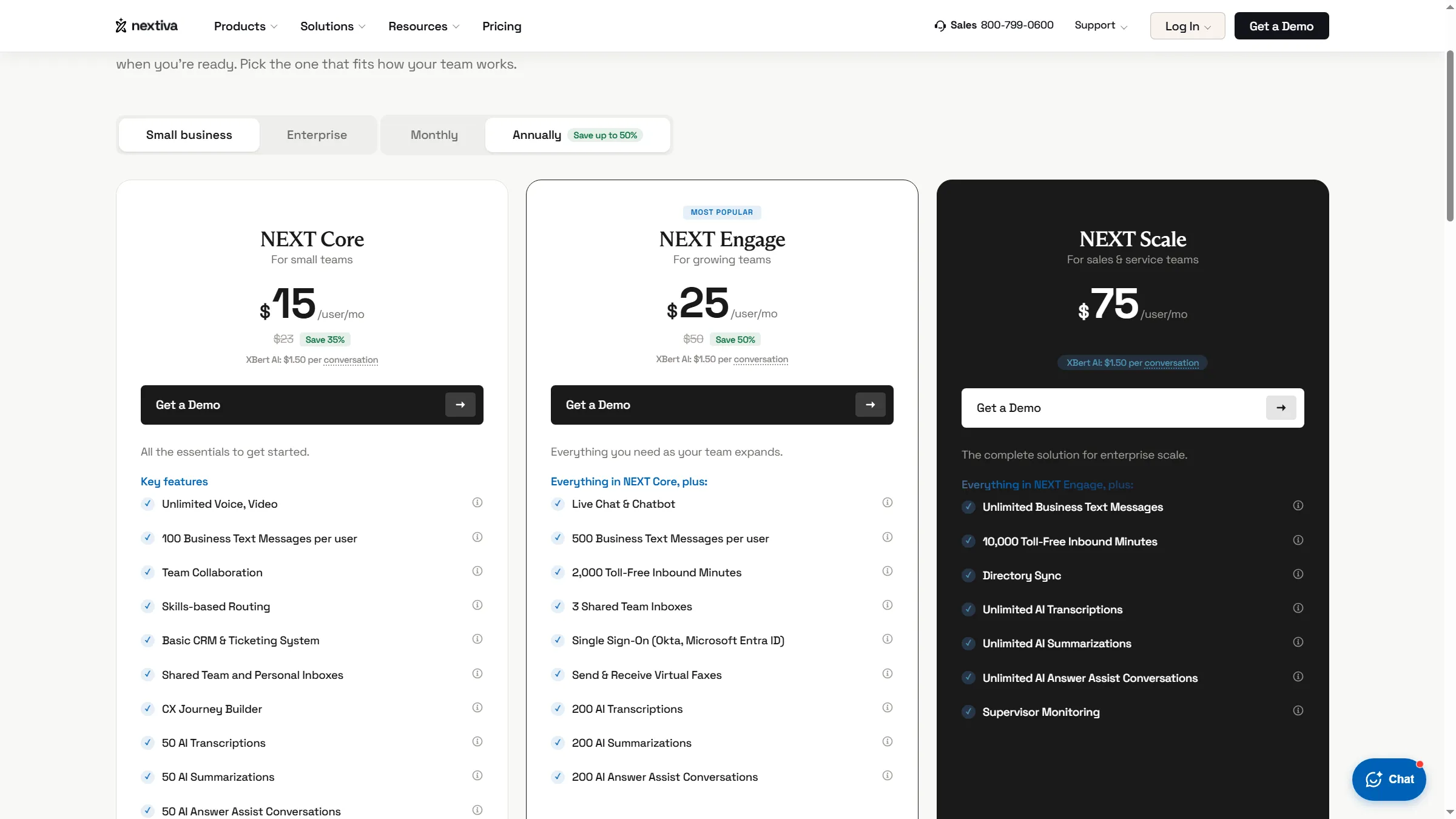
Nextiva separates its annual small-business tiers by plan and text allowance.
Nextiva NEXT pros
- Core combines voice, video, skills-based routing, and shared team inboxes
- Engage raises the SMS allowance to 500/user and includes three shared inboxes
- Core includes 50 AI transcriptions, summaries, and answer-assist conversations
Nextiva NEXT cons
- The $15 annual price requires a qualifying 12-month agreement
- Core stops at 100 business texts per user per month
- XBert AI costs $1.50 per conversation beyond the bundled AI tools
Nextiva's feature grid spells out Core's text and AI allowances. Nextiva's $15 entry rate is easier to judge with those limits in view. The catch is scope: 100 texts per user can be tight for customer-facing teams, and skills-based routing isn't a full contact-center queue. Engage raises the text allowance to 500 and adds three shared inboxes, at a higher price. I'd check the team's text count before shortlisting Core; that cap is the deciding detail.
Who should skip it: Skip Core if your team regularly sends more than 100 texts per user each month or needs advanced queue supervision without a higher plan.
Product pricing — Nextiva NEXT
NEXT Core: $15/user/month with annual billing or $23 monthly, subject to the qualifying 12-month annual-plan term. NEXT Engage: $25 annual rate; NEXT Scale: $75 annual rate. Add-ons, usage, taxes, and terms may change the total.
4. Ooma Office: Best for small offices that want simple calling
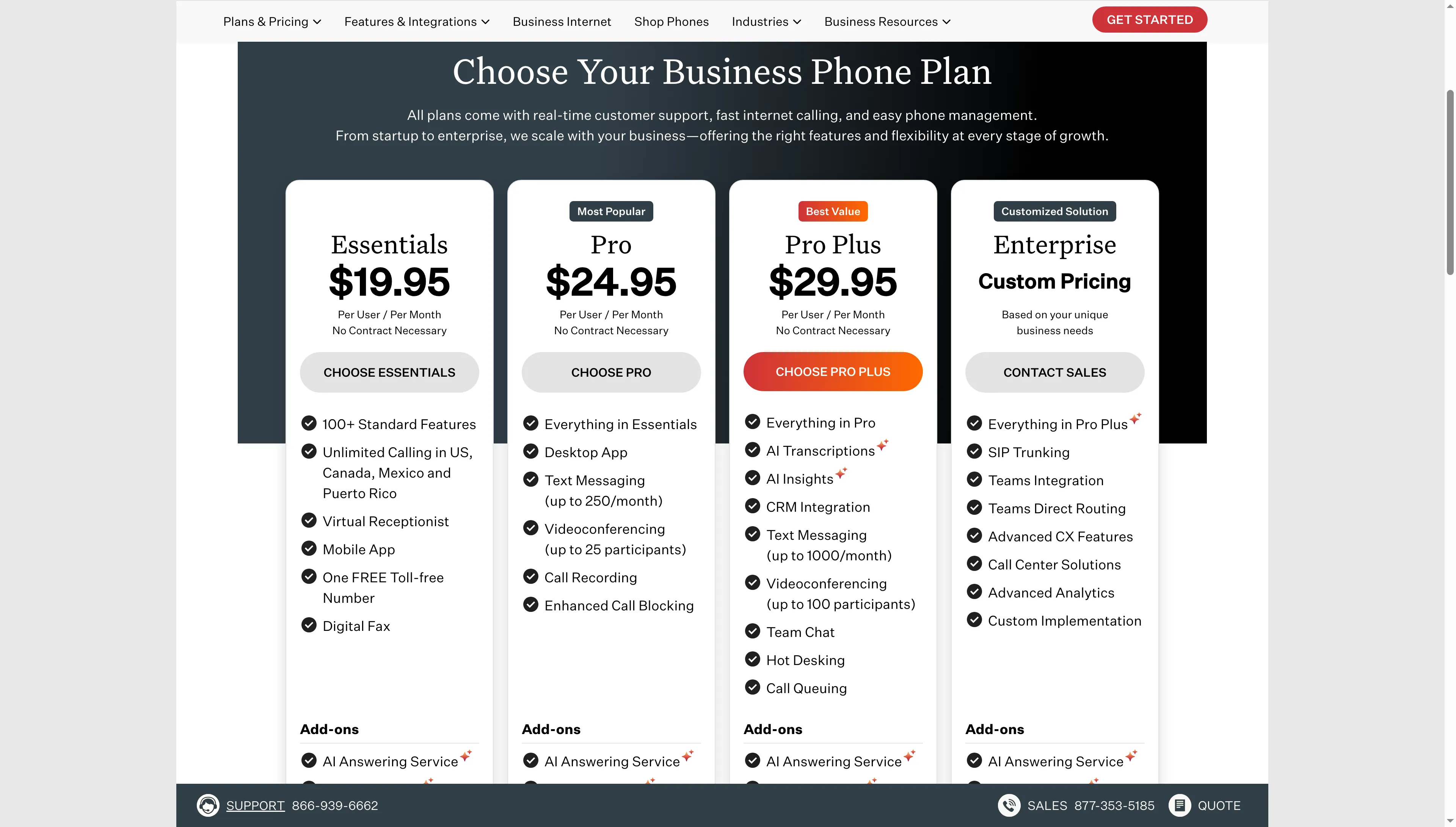
Ooma Office includes call queuing on Pro Plus, not Essentials.
Ooma Essentials fits a small office that wants a virtual receptionist and ring groups without business texting or call queues. It costs $19.95 per user per month and includes a local number; unlimited calls in the US, Canada, Mexico, and Puerto Rico; a virtual receptionist; and a toll-free number. (Ooma Office plans)
Ooma Office pros
- Essentials includes a local number, virtual receptionist, and one toll-free number
- All three public plans are billed monthly, and Ooma says there is no contract
- Pro Plus adds queues, CRM integration, and up to 1,000 texts per month
Ooma Office cons
- Essentials has no business texting; Pro caps texts at 250/month
- Before taxes and fees, additional numbers cost $9.95/month
- Queuing requires Pro Plus at $29.95/user/month
Ooma's tier names make the upgrade boundary easy to spot: Essentials has neither business texting nor queues, while Pro Plus adds both. Ooma's $19.95 entry price is therefore out of reach for teams that depend on either feature. No hardware is required, so a small office can start with the apps and add desk phones only if needed. I appreciate the clear tiers, though queue-dependent offices should compare the higher plan's price instead.
Who should skip it: Avoid Essentials if your phone workflow depends on texting or queuing, or if you need international calling beyond the four countries listed.
Product pricing — Ooma Office
Essentials costs $19.95, Pro costs $24.95, or Pro Plus costs $29.95 per user/month, billed monthly. Applicable taxes and fees are excluded. Additional numbers can cost $9.95/month.
5. Quo: Best for teams sharing a business number and messages
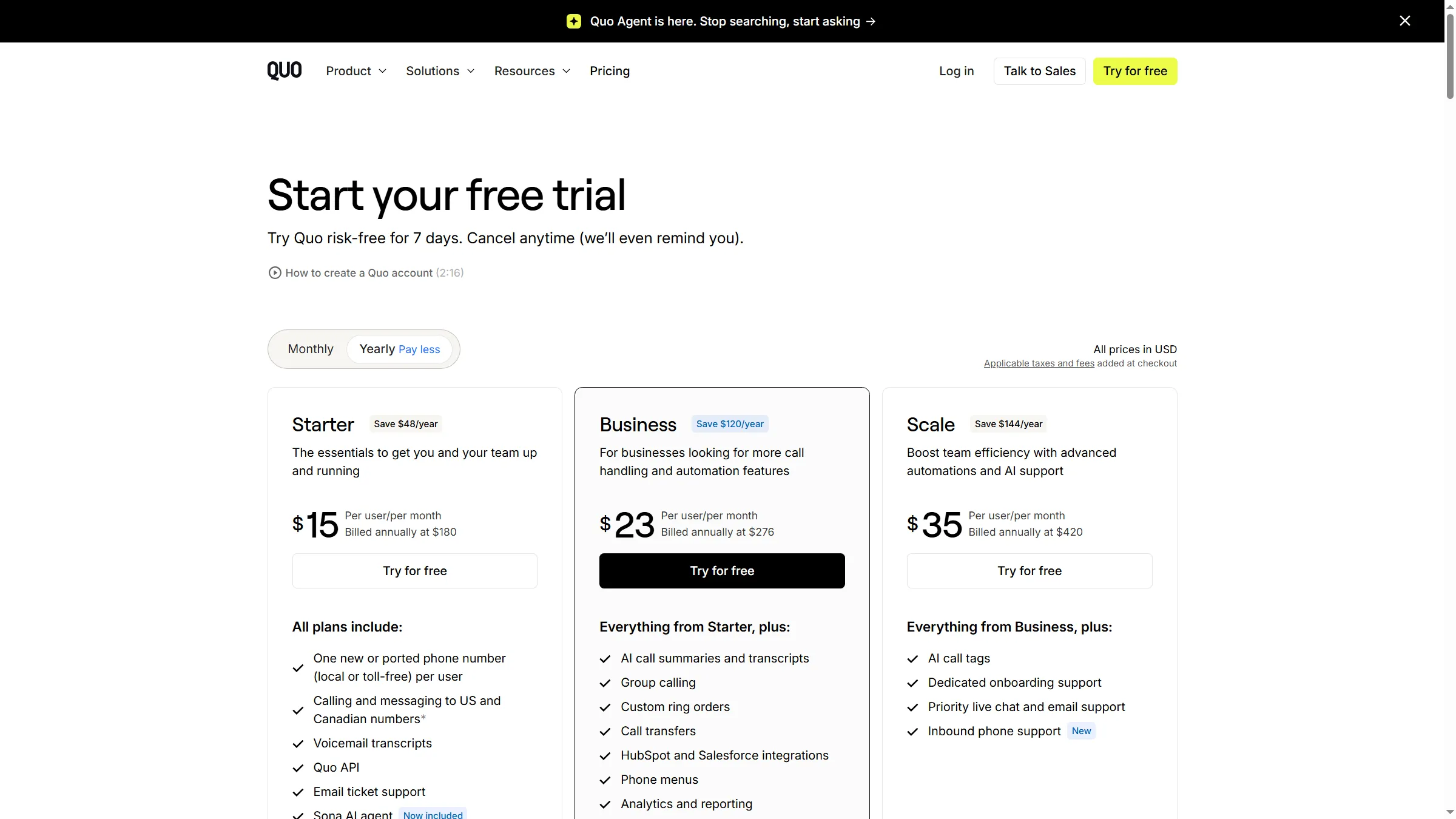
Quo Starter handles a shared business number for teams of up to 10 paid users.
Quo fits a small team that shares a business number, call history, and customer messages. Starter supports up to 10 paid users on a shared number; Business and Scale support unlimited users. Starter costs $15 per user monthly on the annual plan or $19 month to month; Business costs $23 or $33, and Scale costs $35 or $47. (Quo pricing)
Quo pros
- Starter shares call and text history with up to 10 paid users
- Business adds group calling, call transfers, and phone menus
- US/Canada calling and texting are included after carrier registration
Quo cons
- Business texting requires a $19.50 carrier review plus $1.50–$3/month
- Extra numbers cost $5/month each
- International calls and messages are billed at destination rates
Quo's shared-number limit is unusually clear: five people fit on Starter, while Business adds group calling and phone menus. The pricing page also lists one local or toll-free number per user and free number porting. Add carrier registration and messaging fees to the seat price before comparing Quo with a plan that bundles SMS charges. I find Starter easier to price than to compare until those messaging fees match your volume.
Who should skip it: Look elsewhere if you need routing at the scale of a contact center, desk-phone support, or international calling without per-minute charges.
Product pricing — Quo
Starter $15/user/month annually or $19 monthly; Business $23 annually or $33 monthly; Scale $35 annually or $47 monthly. Carrier review: $19.50 one-time; carrier messaging fee: $1.50–$3/month; extra number: $5/month.
6. Vonage Business Communications: Best for teams that want apps and video
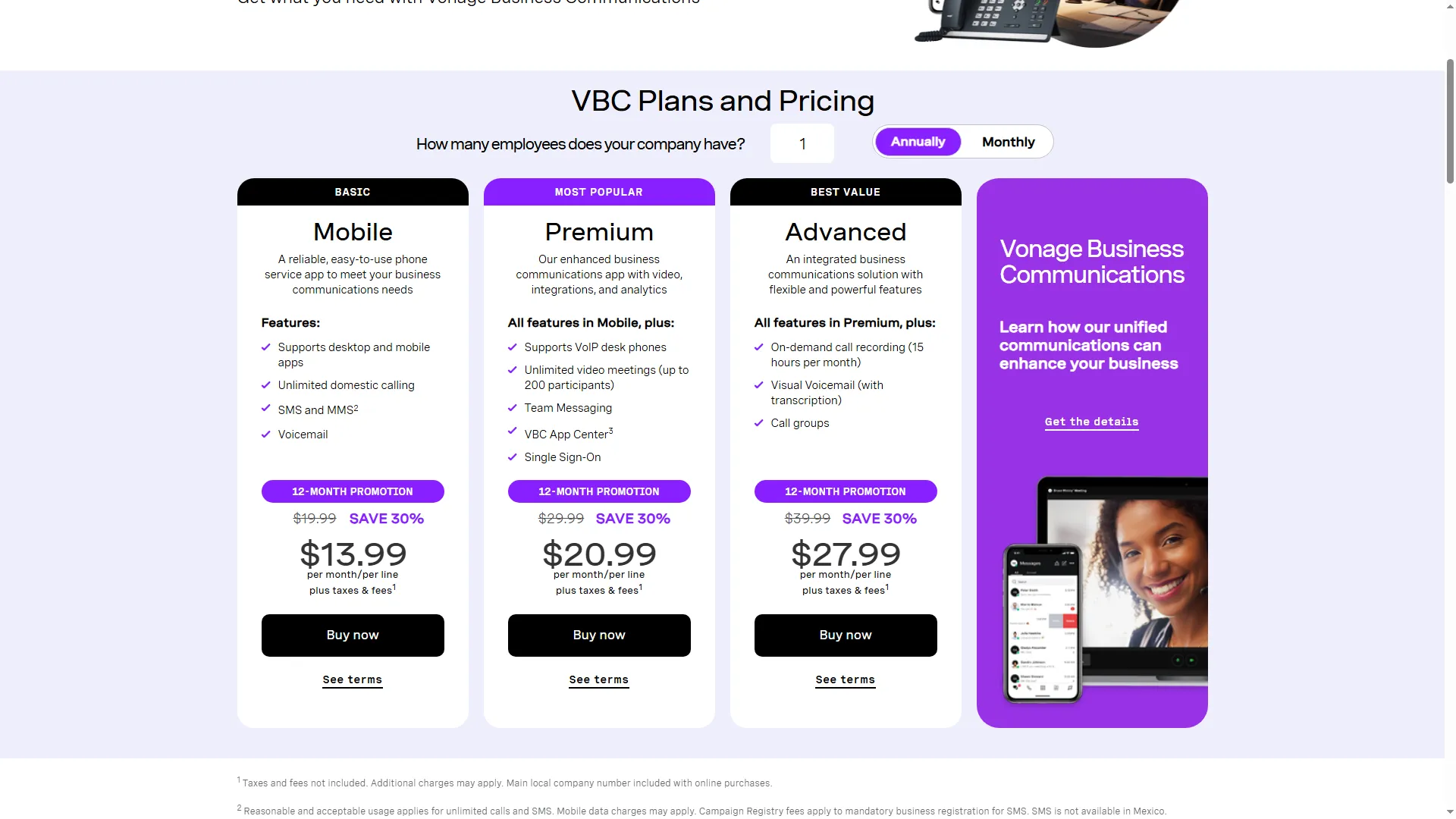
Vonage’s entry plan is cheaper on promotion but requires a 12-month term.
Vonage Business Communications fits small teams that want phone, SMS/MMS, and apps, with video and desk-phone support on higher tiers. For new online accounts, the current 12-month promotion sets Mobile at $13.99 per line per month after a 30% discount from $19.99. Premium is $20.99, and Advanced is $27.99. (Vonage Business Communications pricing)
Vonage Business Communications pros
- Mobile includes domestic calls, SMS/MMS, voicemail, and desktop/mobile apps
- Premium adds desk-phone support and video meetings for up to 200 participants
- Advanced adds 15 hours of on-demand recording and call groups
Vonage Business Communications cons
- The new-account promotion requires a one-year contract
- Early termination charges can reach the contract's total price
- Per-line and per-extension prices differ; taxes and fees are extra
Vonage lists the new-account promotion through December 31, 2026: Mobile drops from $19.99 to $13.99 per line for the one-year term. Check the quote's billing unit before switching. Vonage displays both per-line and per-extension prices, so a five-person estimate can change when the quote counts extensions instead of lines. I'd ask for that five-seat total in writing before comparing it with a per-user plan.
Who should skip it: Skip the promotion if you may cancel before the contract ends or need desk phones and video on the entry Mobile tier.
Product pricing — Vonage Business Communications
Mobile $13.99/line/month with the 12-month promotion (standard $19.99); Premium $20.99; Advanced $27.99. The page also offers per-extension prices. Taxes and fees are extra; new accounts require a one-year contract.
Compare the annual cost for the same team size
Dialpad Connect and qualifying Nextiva are the lowest clean five-user options; Quo adds carrier fees, while Vonage needs a quote for five direct numbers.
Annual cost of RingCentral alternatives for one user and five users:
| Provider/configuration | One user: annual cost | Five users: annual cost | Conditions outside the phone-only workload |
|---|---|---|---|
| RingCentral RingEX Core, annual baseline | $240 | $1,200 | 25 SMS/user/month; 100 toll-free minutes; US/Canada calling |
| Zoom Phone US & CA Unlimited, annual | $192 | $960 | 40-minute meetings; international calls metered; SMS registration |
| Dialpad Connect Standard, annual | $180 | $900 | Annual plan; verify actual contract term and setup for team messaging |
| Nextiva NEXT Core, qualifying annual plan | $180 | $900 | New customer, 1–100 employees, 12-month minimum; 100 texts/user/mo |
| Ooma Office Essentials, monthly | $239.40 | $1,197 | Virtual receptionist; queues and business texting require a higher tier |
| Quo Starter, annual | $180 + fees | $900 + fees | Carrier review and monthly messaging fees apply; see the Quo card for amounts |
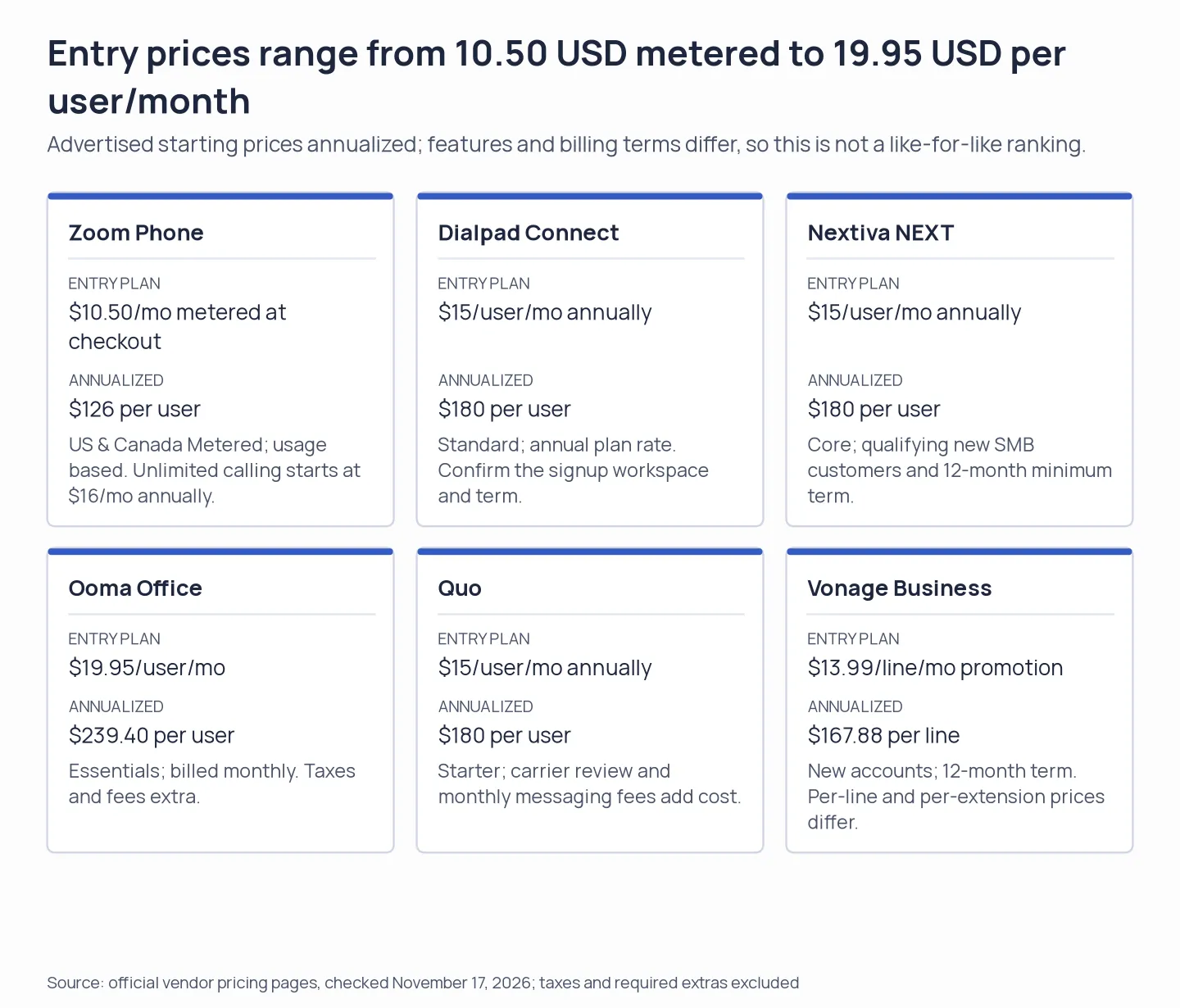
The lowest advertised rate is only a price floor; plan features, billing terms, and required fees change the comparable setup.
How to read the RingCentral alternatives cost table
The table prices one or five licensed users, one direct business number per seat, US and Canada calling, and voicemail.
I calculated each annual total by multiplying monthly seat rates by 12 and adding mandatory charges shown in the last column. Taxes and optional hardware are excluded. SMS, queues, toll-free extras, international calling, and long meetings are outside this phone-only scenario.
For RingCentral alternatives, Vonage is omitted from the cost rows because its calculator switches from per-line to per-extension prices as employee count changes. Online checkout also includes one main local company number, not a direct number for every seat, so request a quote for that setup.
Adjust RingCentral alternative costs for your call workflow
The rows stop being comparable if your workload needs shared texting, call queues, or meetings longer than 40 minutes. Move to the appropriate tier and add carrier fees first: for example, Ooma needs Pro Plus for call queuing, Nextiva Engage raises Core’s 100-text cap to 500 per user, and Zoom Pro Plus replaces Basic’s 40-minute meetings with 30-hour meetings.
If you already pay for Google Workspace, Teams, or a CRM
For a business already paying for an office suite, Google Voice or Teams Phone may cover calling without a separate UCaaS package. Check the matching license and calling plan first. Google Voice is a Workspace add-on with Starter, Standard, and Premier tiers; Standard includes auto attendants and ring groups. Microsoft Teams Phone can add calls to and from regular phone numbers to an existing Teams setup, but licensing and calling plans depend on the organization and country. HubSpot and Pipedrive may also offer meeting scheduling features or calling features inside a CRM, but those don't automatically replace a business number, call queues, or carrier-compliant texting. Compare the incremental phone license and calling charges against a new RingCentral alternative rather than counting your existing subscription as free.
Which RingCentral alternative should you choose?
- Choose Zoom Phone if your team already uses Zoom and wants to tune phone-only cost against longer meetings and Workplace features.
- Choose Dialpad Connect if call transcription and recaps matter and you can verify the workspace signup and annual-plan terms.
- Choose Nextiva NEXT if your team needs a shared inbox and basic routing and can live within the Core text cap or pay for a higher tier.
- Choose Ooma Office if you want a simple small-office phone setup and can identify whether you need Pro or Pro Plus before comparing prices.
- Choose Quo if your main job is team calling and shared customer texting, and its registration and messaging fees fit your volume.
- Choose Vonage if the plan’s app, video, and phone features suit you and you accept the contract and promotional-price conditions.
Other tools I considered
Beyond these six RingCentral alternatives, 8x8 Work and GoTo Connect are worth a quote if you need broader UCaaS features, international calling, or an existing relationship with either vendor. Their public pricing is quote-led or not directly comparable, so I wouldn't rank them against self-serve seat prices without a written quote for the same five-user configuration.