

 23 min read
TL;DR: The Best Zendesk Alternatives in November 2026
- A lower seat price doesn’t guarantee an equivalent help desk. Compare channels, public knowledge base, routing, SLAs, and onboarding on the plan your team would actually buy.
- Zoho Desk is the lowest-cost fit in the modeled email-only workloads; for ten agents, its cap moves the calculation from Express to Standard.
- If you already pay for a CRM or office suite, check its support inbox before adding a tool. Those inboxes can handle email intake, but they don’t replace a multichannel help desk.
- AI costs use different meters—sessions, resolutions, outcomes, credits, or provider usage—so compare expected volume alongside per-seat pricing.
What is a Zendesk alternative?
A Zendesk alternative is a support platform capable of replacing part or all of Zendesk's help center, routing, ticket queue, and customer channels. Some tools also sell AI agents, CRMs, or shared inboxes. Without replacing the entire service desk, those may address one portion of support, so before you move your tickets, compare the specific plan and component.
At a glance
Freshdesk is the closest email-ticketing replacement; Zoho Desk has the lowest paid entry price. Use the starting price to shortlist, then check the plan boundary before switching.
These US list prices were checked November 14–15, 2026. Annual rates are monthly equivalents paid on an annual term.
| Product | Starting price | Useful when you need | Check before switching |
|---|---|---|---|
| Freshdesk | $19/agent/month | A conventional email-first ticket queue | Multiple SLA policies and skill routing sit on higher plans. |
| Zoho Desk | Free; paid from $7/agent/month | A low-cost queue with tiered channel options | Assignment rules have precedence and reset behavior to check. |
| Help Scout | Free; paid from $25/user/month | A smaller team’s shared inbox and knowledge base | Free caps contacts and articles. Routing differs between Plus and Pro. |
| Intercom | $29/seat/month | Messaging-led support with optional AI automation | Fin outcomes and messaging channels add usage charges beyond seats. |
| Front | $25/seat/month | Shared customer conversations across email or multiple channels | Starter is single-channel; Professional is the omnichannel tier. |
| HubSpot Service Hub | Free; paid from $20/seat/month | Support attached to HubSpot CRM records | Public knowledge base and Professional onboarding change first-year cost. |
| Salesforce Service Cloud | $25/user/month | Case management inside a Salesforce CRM setup | Starter Suite bundles several CRM functions; enterprise editions cost more. |
| LiveAgent | $15/agent/month | A small team that needs ticketing, chat, and a knowledge base | Starter stops at five agents and excludes calls, social, and reporting. |
What makes the best Zendesk alternative?
Compare Zendesk alternatives using the factors that change the plan or migration decision: channel coverage, access to a knowledge base, routing and SLAs, AI billing, and setup costs. A low seat price helps only when the tier covers your agents’ actual channels, controls, and workload.
- Channel coverage: Can the queue handle email, chat, phone, and social in one place, or does the entry plan allow just one channel type? Check whether a channel is native, connected through an integration, or billed by usage.
- Knowledge base and portal: Does the selected tier publish customer-facing help articles and a ticket portal? HubSpot, Zoho Desk, and Front put these capabilities on different plans, so a low starting price may not match a Zendesk configuration with a help center.
- Routing and SLAs: How are tickets assigned when a workflow, direct owner, round-robin rule, or unavailable agent overlaps? Confirm the order and eligibility rules, then check how many SLA policies the plan includes.
- AI billing: Is AI priced per seat, session, resolution, outcome, credit, or through a separate provider? These units measure different things; estimate expected usage from the vendor’s definition instead of comparing headline prices.
- Setup and exit work: Does the plan require onboarding, an annual commitment, or a higher minimum seat count? Price data migration, integrations, and admin time separately when the public seat price does not cover them.
If you already pay for a CRM or office suite, consider its shared inbox before adding another support tool.
Taxes, optional add-ons, telecom usage, and AI consumption are excluded unless a card says otherwise.
Why teams consider Zendesk alternatives
Teams look for Zendesk replacements when its seat tier, channel mix, AI charges, or configuration no longer fits the support job. Its pricing page lists a 14-day free trial. With annual billing, Support Team starts at $19 per agent per month; Suite Team starts at $55. A lower seat price elsewhere can still cost more after you add phone support, a public knowledge base, onboarding, multiple SLA rules, or AI usage.
A few tradeoffs show up in recent reviews: one Freshdesk reviewer raised a seat-commitment question; Zoho Desk reviewers praised the value but flagged configuration work; and Front reviewers liked team collaboration while asking about routing and message participants. They are individual experiences, so they show what happened to those buyers without showing how common each issue is.
I left Zendesk’s overall Trustpilot rating out of the comparison: many prominent reviews discuss online stores or apps that use Zendesk, not companies judging it as customer-support software.
1. Freshdesk: Best for replacing Zendesk with an email-first help desk
Freshdesk is the closest fit if you want a conventional email-first ticket queue.
Freshdesk Growth includes a knowledge base, customer portal, shared inbox, ticketing, and 500 Freddy AI Agent sessions. Additional Freddy sessions are billed separately. Pro adds intelligent routing, and Enterprise adds skill-based routing. You shouldn't transfer Omni's channel claims into any Freshdesk comparison because Freshdesk and Freshdesk Omni aren't the same product.
I spotted one operational detail while reading the SLA guide: the first-response SLA clock keeps running after Freshdesk's automated “Send Reply” action. The guide counts a public note or an agent reply as a response, so I wouldn't count an automated reply as an agent response.
Katrina G. gave Freshdesk five stars on Capterra in November 2026. She liked the automation, SLA workflows, and ticket fields, but found portal and widget changes—and dependent dropdowns—harder to manage. Test those settings before moving a busy queue.
Pros — Freshdesk
- Growth covers the basics for email-led support in one package.
- Pro adds SLA policies for teams that need more than one response target.
- Enterprise routes by skill when a general queue won't suffice.
Cons — Freshdesk
- Growth won't fit a team that needs several support channels.
- AI sessions and Copilot cost extra beyond the seat plan.
- Freshdesk Omni and standalone Freshdesk have different channels and prices.
Product pricing — Freshdesk
Growth is $19/agent/month billed annually; Pro is $55 and Enterprise is $89. Freddy AI Agent includes 500 sessions, then $49 per 100; Copilot is a separate $29/agent/month add-on.
Things I Noted
Freshdesk starts signup through Omni, then offers an email-only trial in the same account. That split matters: standalone Freshdesk and Freshdesk Omni have different channels and prices.
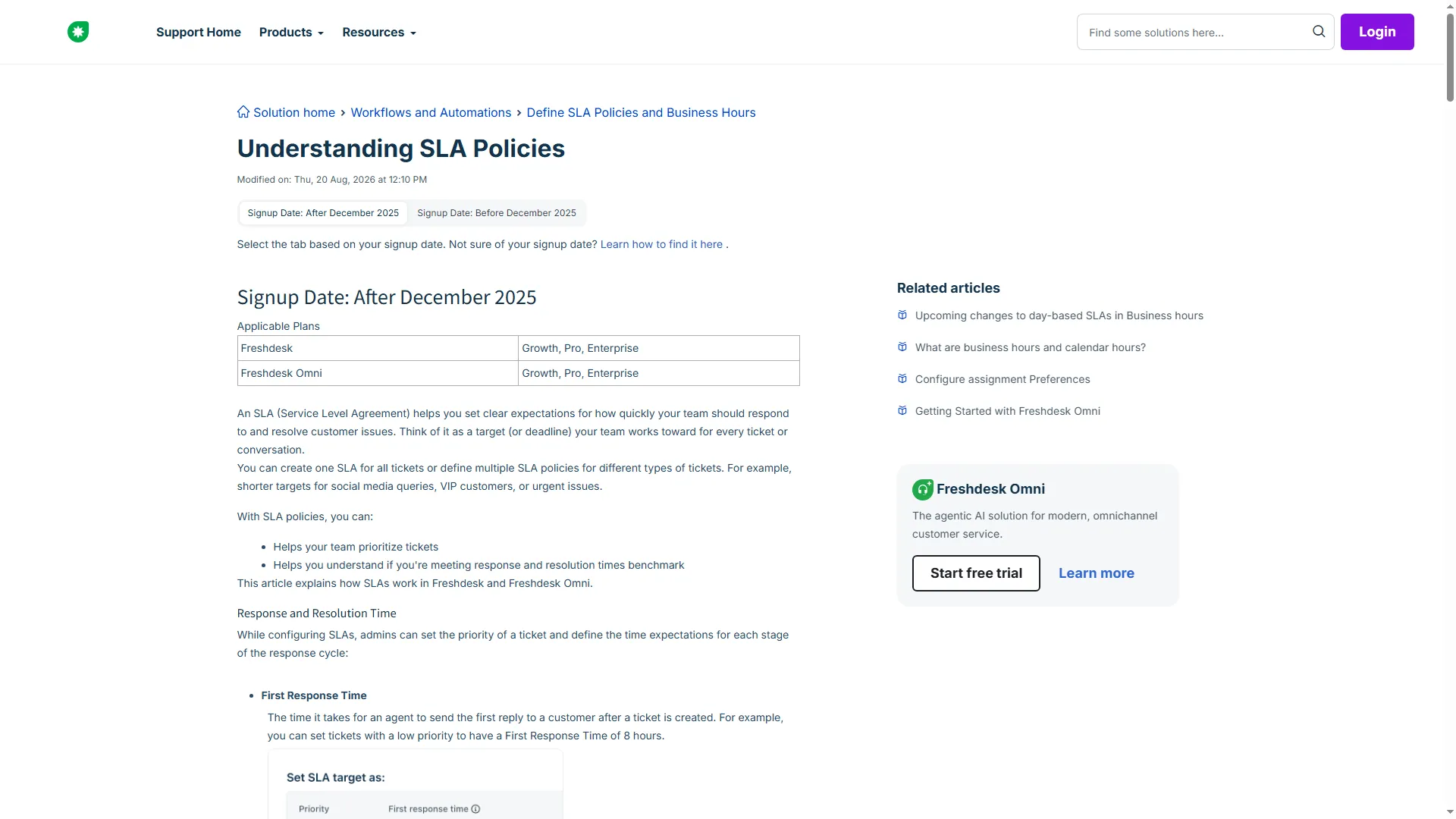
Freshdesk defines first response time as the time until an agent sends the first reply after ticket creation.
2. Zoho Desk: Best for a lower-cost Zendesk alternative with configurable tiers
Zoho Desk is a low-cost pick, but each channel and routing feature belongs to a specific tier. Express is the paid entry plan; Standard, Professional, and Enterprise add more support options.
Express covers email, social tickets, and web forms. Standard adds business messaging and a public knowledge base; Professional adds telephony integrations and round-robin assignment. Enterprise adds Zoho SalesIQ live chat, skill-based assignment, and IVR. Free is limited to one support email, so it’s not a five-agent replacement for a busy queue.
Zoho’s assignment guide makes “round robin” less simple than the label suggests. A direct assignment or workflow owner takes precedence, so a ticket may never reach the round-robin rule. I’d check the rule order before moving a busy queue; the setting matters more than the low entry price.
On G2, Rma Corbal gave Zoho Desk five stars in September 2026 for its centralized communication and value, while noting extra clicks in a spacious layout. A second five-star review also mentioned dense configuration. I like Zoho's visible rule precedence, but a low seat price won't fix a confusing workflow.
Pros — Zoho Desk
- Express keeps the entry price low when email, social, and forms are enough.
- A public knowledge base starts on Standard.
- Enterprise adds skills and IVR when basic routing won't suffice.
Cons — Zoho Desk
- Free caps out at three agents and one support email; it suits a low-volume queue.
- Direct and workflow assignments can bypass round robin.
- Phone integrations and SalesIQ live chat are separate capabilities.
Product pricing — Zoho Desk
Free supports up to 3 users. Express is $7/agent/month annually ($9 monthly), Standard $14 ($20 monthly), Professional $23 ($35 monthly), and Enterprise $40 ($50 monthly).
Things I Noted
I switched the USD pricing selector from Yearly to Monthly and saw the rate rise at every tier. Annual billing lowers the per-user monthly equivalent throughout the range.
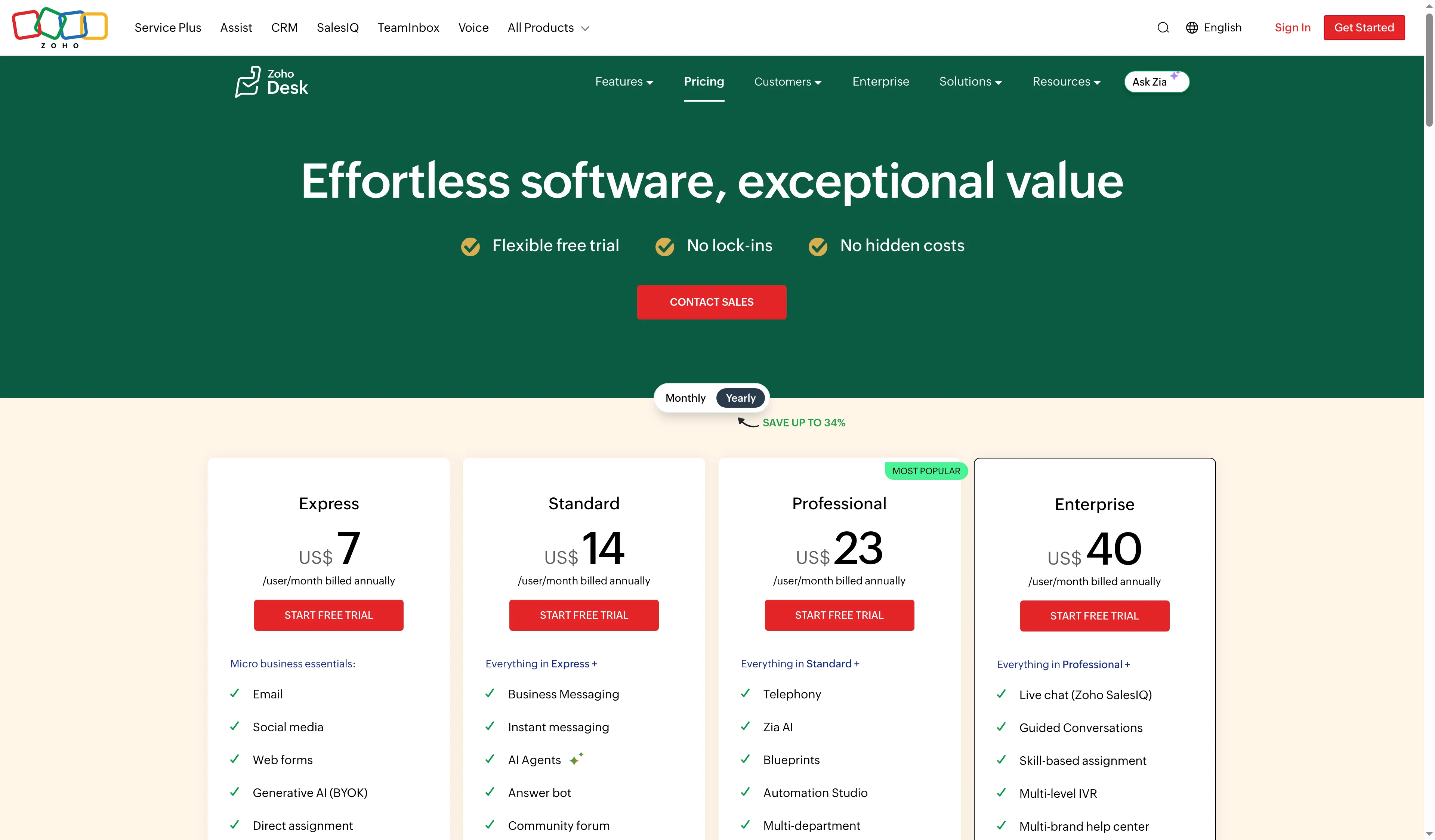
Zoho Desk lists annual per-user prices for Express, Standard, Professional, and Enterprise.
3. Help Scout: Best for Zendesk teams with an email-first shared inbox
Help Scout suits a compact support crew seeking a shared inbox plus help content, and it doesn't require beginning with a big CRM suite. A free tier includes five users, one inbox, and 10 articles in the knowledge base—yet monthly support is limited to 100 contacts.
Standard includes one basic SLA. Plus adds two advanced SLA policies and round-robin routing. Pro adds scale and security options, but requires at least 10 users. Phone isn’t built in; Help Scout connects it through an integration.
Help Scout’s routing guide shows a key difference: Plus round robin assigns alphabetically, while Pro’s Balanced routing sends each conversation to the teammate with the fewest active assignments. Both skip away teammates and users who've hit their assignment limit. Routing eligibility can be bypassed by manual or workflow assignment — meaning an assignment method isn't a permission boundary. Map assignment precedence before you move a busy queue.
On G2, Milos J. praised Help Scout’s compact interface in May 2026, but said its wider calls and chat ecosystem felt limited for his needs. Help Scout’s paid-plan pages list chat and social; phone remains an integration. I prefer current plan coverage to that older review when comparing phone and chat needs.
Pros — Help Scout
- Inbox and Docs bring conversations and help content into one support setup.
- Routing choices suit teams that want more than manual assignment.
- Envoy separates AI usage from agent-seat pricing.
Cons — Help Scout
- Free caps support at 100 contacts per month and the knowledge base at 10 articles.
- Pro's 10-user minimum makes it costly for a five-person team.
- Phone requires an integration.
Product pricing — Help Scout
Free supports up to 5 users. Standard is $25/user/month, Plus $45, and Pro $75 on annual billing. Pro has a 10-user minimum; Envoy is $0.75/resolution after the trial.
Things I Noted
I flipped the billing toggle and saw annual and monthly options for all three paid plans. The public signup page also offers a free account.
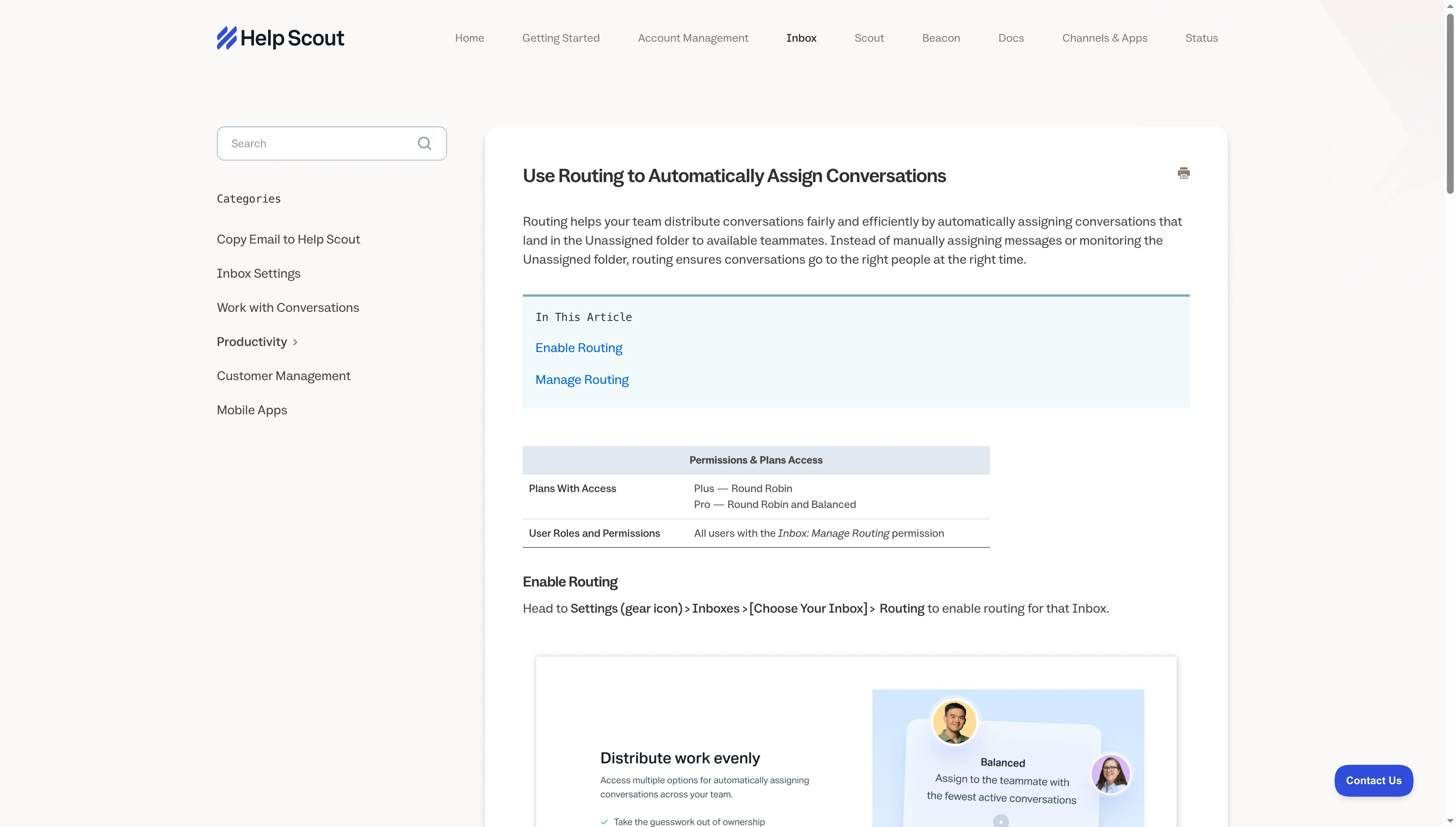
Help Scout lists Round Robin on Plus and adds Balanced routing on Pro.
4. Intercom: Best for replacing Zendesk with messaging-led support
Intercom combines messaging and ticketing, with Fin AI available as an add-on. Compare seat pricing separately from Fin outcomes and channel usage. The pricing page shows an introductory Essential offer for new customers; I use the regular list price for comparisons.
Essential covers a shared inbox, ticketing, live chat, inbound support email, and a public help center. More inboxes, workflow automation, and round-robin assignment arrive with Advanced; SLAs and multibrand support come with Expert. Fin charges at most one outcome per conversation. As Intercom defines it, an outcome is one qualifying result per conversation, including a resolution, particular procedure handoffs, qualification, or disqualification. Separate usage costs may apply for SMS, WhatsApp, and phone.
You can also use Fin alongside an existing help desk, Zendesk included, without purchasing Intercom seats. So Fin is an AI layer that can sit alongside Zendesk without replacing its ticket queue. If you’re replacing the entire queue, compare Intercom’s seat plan with its channel charges too.
Public review identities call for care: G2's Intercom profile now redirects to Fin and employs an AI Agents category. Intercom.com and intercom.io profiles exist separately on Trustpilot. I kept them separate instead of merging their scores or treating each Fin end user as a help-desk buyer.
Pros — Intercom
- The shared inbox connects messaging and ticket work.
- Fin can sit over Zendesk when you only want to replace the AI layer.
- One conversation generates at most one Fin outcome.
Cons — Intercom
- Usage charges sit outside the seat price.
- SLAs start on Expert.
- Essential's introductory rate applies to new customers; use list price for renewal estimates.
Product pricing — Intercom
Essential is $29/seat/month annually ($19 new-customer price shown); Advanced is $85 and Expert is $132. Fin is $0.99 per outcome; channel usage and optional add-ons can add charges.
Things I Noted
In Intercom’s trial inbox, I switched List view to Table view and saw Next SLA, Status, Team, and Assignee columns. When I opened a conversation, the table narrowed, so I had to scroll horizontally to see later columns. I didn’t send a message or invoke Fin.
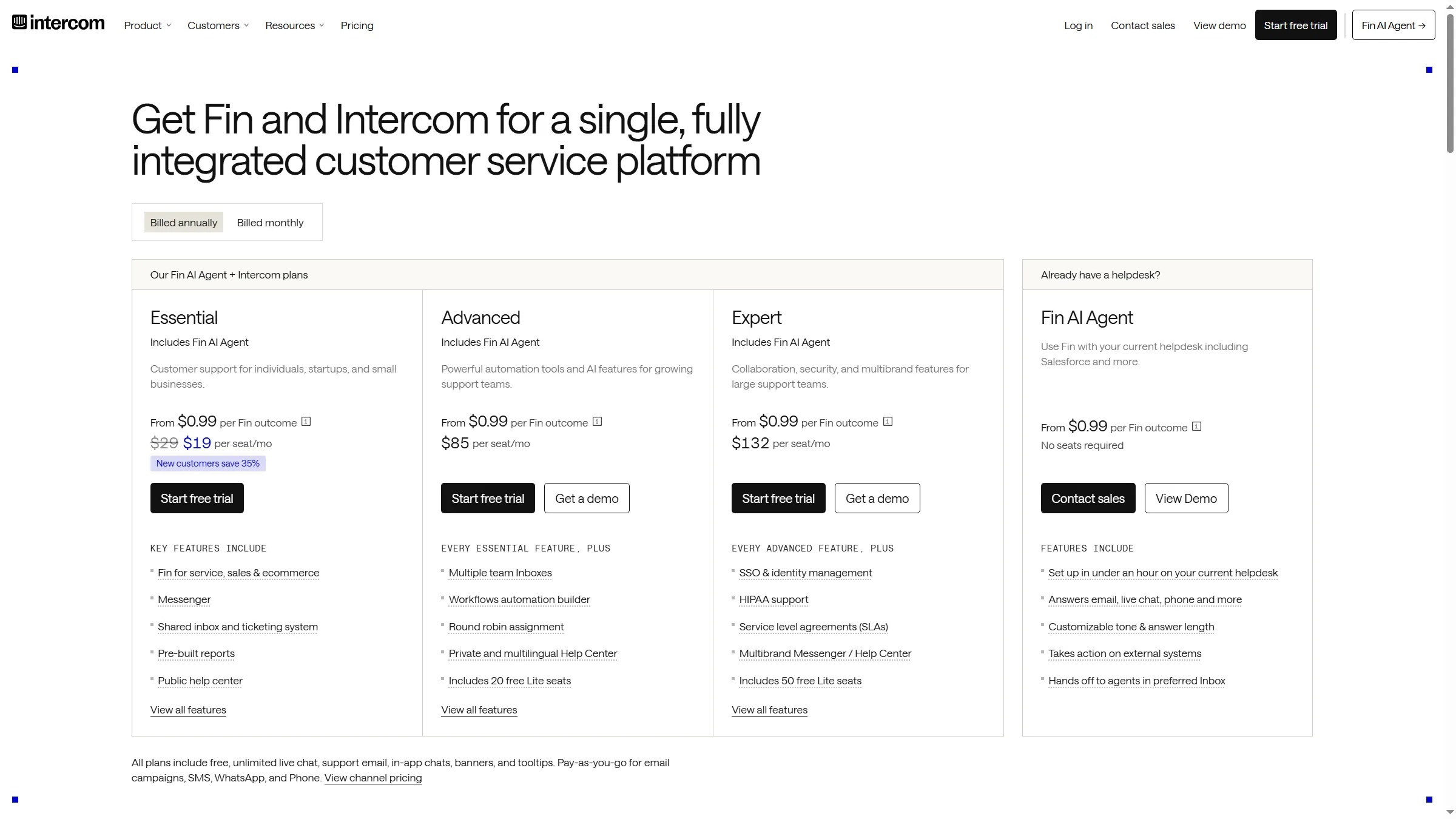
Intercom’s pricing grid separates seat prices from the $0.99 Fin outcome charge.
5. Front: Best for replacing Zendesk with a collaborative inbox
Front combines a shared inbox, ticketing, rules, and team context. Starter covers up to 10 seats and one channel type: email, SMS, or Front Chat.
Professional supports up to 50 seats and adds omnichannel coverage, advanced analytics, and more automation rules. Enterprise adds unlimited rules and macros, plus AI Copilot, QA, and CSAT. The 14-day, no-card Professional trial still caps messages at 5,000 and keeps some features locked.
Starter isn't an omnichannel plan: the pricing page lists one channel type at a time, with a wider mix starting on Professional. I like Front only when shared context justifies the higher multi-channel price for your team.
Front reviews praise shared context but flag workflow details. Antonio G. gave it five stars on G2 in October 2026, liking the internal notes while finding mailbox rules hard to follow for routing. Another five-star reviewer warned about choosing the right conversation participant. Put both on a checklist for a workflow demo, especially whether agents can tell an internal note from a customer reply.
Pros — Front
- Shared conversations keep team context visible beside customer messages.
- Professional suits teams that need more than one channel type.
- The no-card trial lets you preview the paid workflow.
Cons — Front
- Starter's channel limit makes an upgrade necessary for omnichannel support.
- Contracts over $25,000 require paid onboarding.
- AI Copilot adds to the bill.
Product pricing — Front
Starter is $25/seat/month (up to 10 seats), Professional $65 (up to 50), and Enterprise $105 on annual billing. Professional onboarding is required for contracts over $25,000.
Things I Noted
Front lists a 14-day Professional trial with no card required. Its guide spells out teammate, workspace, channel, recipient, and message caps before you sign up.
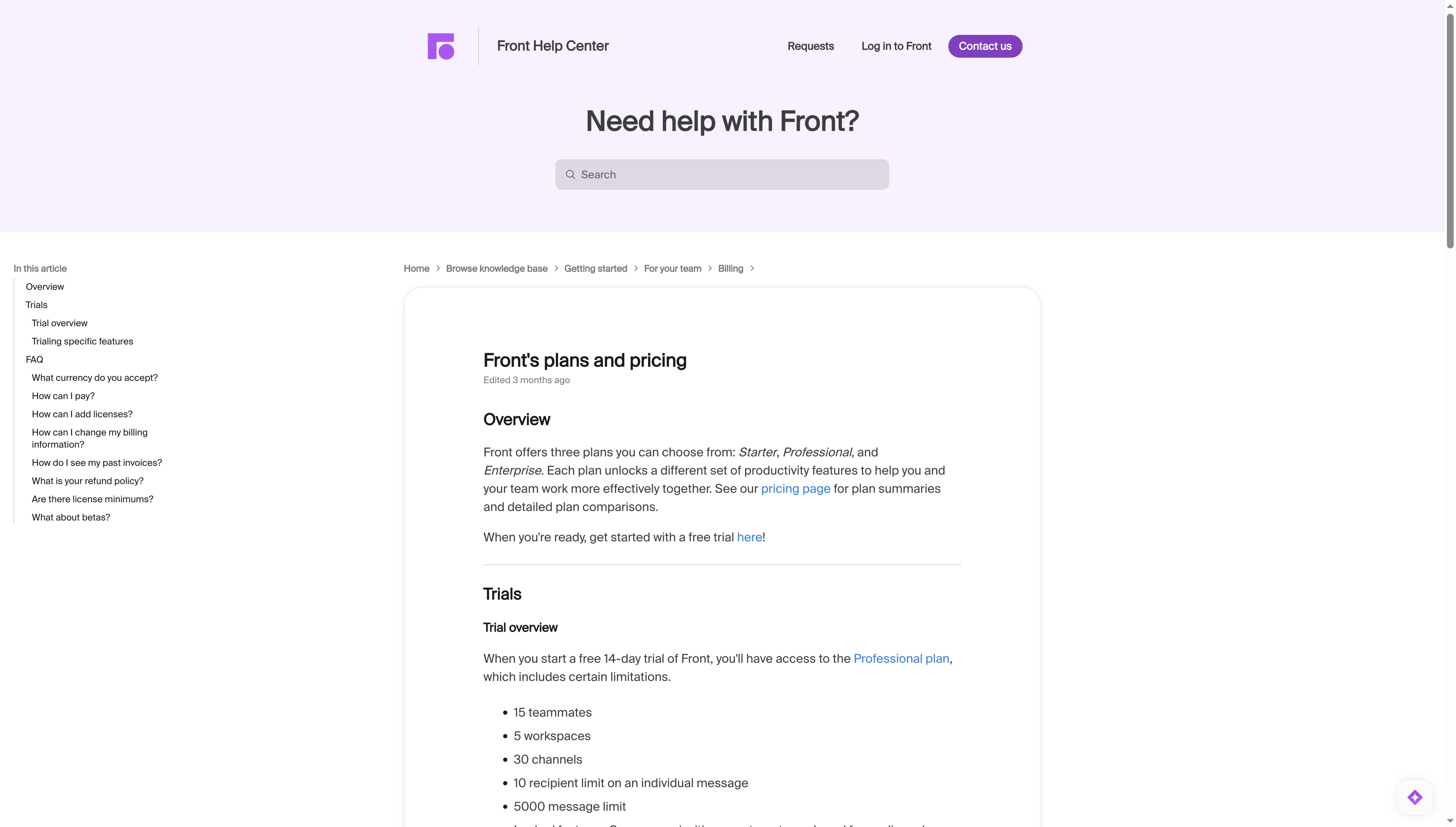
Front lists the Professional trial period and the limits that apply before signup.
6. HubSpot Service Hub: Best for teams using HubSpot CRM to replace Zendesk
HubSpot Service Hub makes the most sense when support should live alongside CRM records. Free gives two users ticketing and a shared team inbox; Starter adds ticket automation and multiple pipelines. The pricing page labels its introductory offer for new customers only.
A public knowledge base requires Professional, which also adds SLAs and a required one-time onboarding fee. Enterprise raises the onboarding charge and includes the same monthly-credit model. Professional and Enterprise credits expire at the end of each month. I use list prices in the cost model; new-customer offers don't set renewal rates.
The plan boundary is easy to miss: Starter has no public knowledge base, while Professional adds one and requires a $1,500 onboarding fee. These tiers don't provide equivalent support scope, so I wouldn't compare their seat totals as a like-for-like replacement.
A five-star Capterra reviewer in September 2026 liked Service Hub's automation and ticketing, but said advanced features cost more and reporting takes work to set up. I like HubSpot for support when customer records already live in its CRM. An existing subscription only saves money if its current plan includes the support features your team needs.
Pros — HubSpot Service Hub
- Support tickets stay beside customer records in HubSpot CRM.
- Free lets two users try ticketing before a paid upgrade.
- Professional suits teams that need a public knowledge base.
Cons — HubSpot Service Hub
- Starter won't match a Zendesk setup that includes a public knowledge base.
- Professional and Enterprise add onboarding in year one.
- Monthly credits expire, so include expected usage in the budget.
Product pricing — HubSpot Service Hub
Free supports 2 users. Starter list price is $20/seat/month; the page showed $7 for new customers only. Professional list price is $100/seat/month plus $1,500 onboarding; the page showed $90 for new customers. Enterprise is $150 plus $3,500 onboarding.
Things I Noted
The public price grid labels the introductory Starter offer as available to new customers only; I use list prices for the workload calculation.
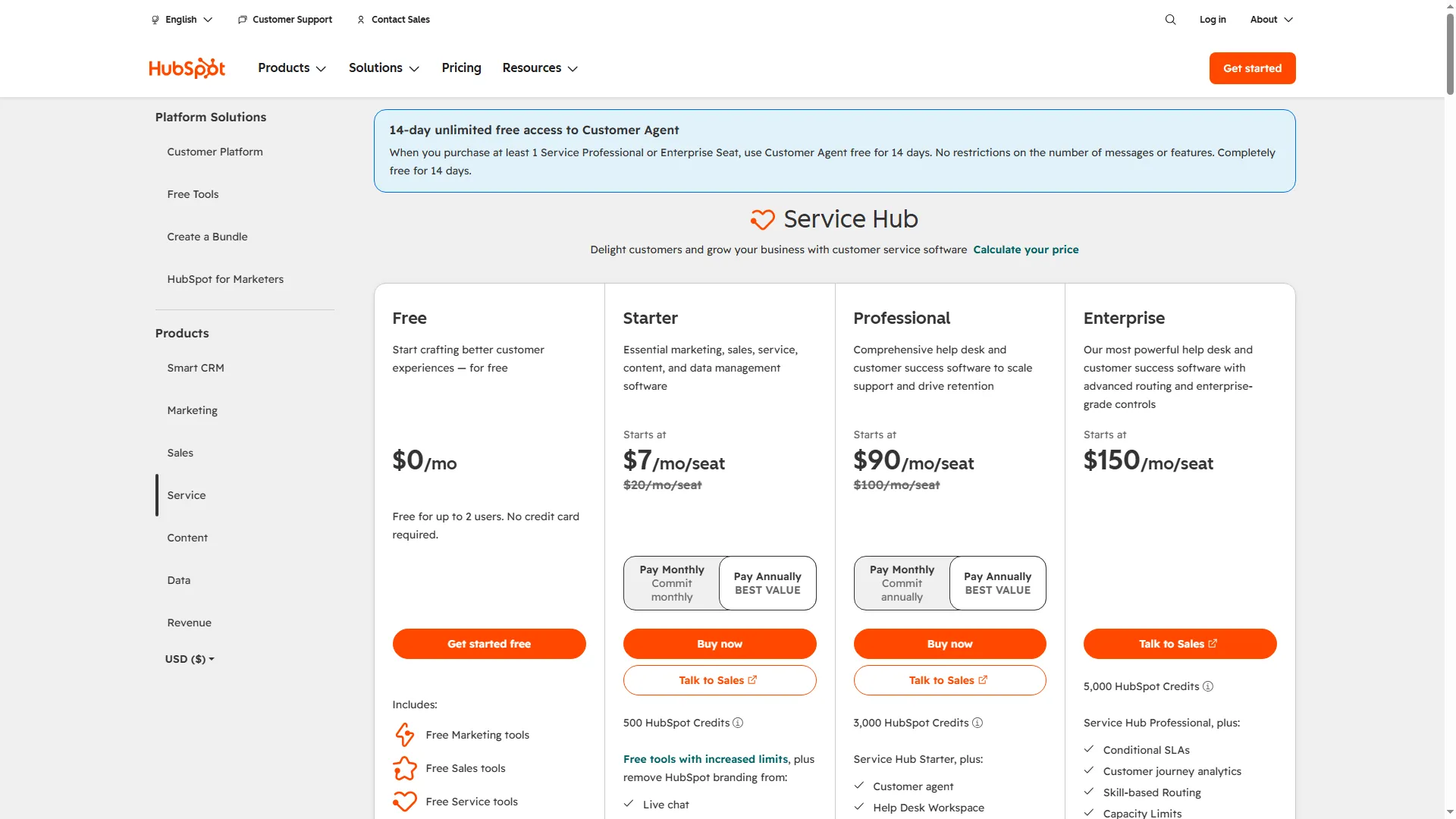
Service Hub separates its Free, Starter, Professional, and Enterprise prices.
7. Salesforce Service Cloud: Best for Salesforce teams replacing Zendesk
Salesforce fits if support forms part of a broader CRM deployment and your team has the administrative bandwidth to set it up. I’d skip it if all you need is a straightforward email queue. Starter Suite bundles sales, service, marketing, and commerce tools. Pro Suite adds more advanced service capabilities; the separate Service Cloud table lists its own higher editions, including Core.
The Starter feature matrix includes case management, knowledge management, and integrated email. Pro adds macros, omnichannel routing, and in-app and web messaging. Starter also bundles CRM features; it doesn't include the enterprise service controls listed for higher Service Cloud editions. Salesforce makes sense when your organization already runs its CRM there and can budget for an administrator to own the setup.
A five-star Capterra reviewer in August 2026 praised Service Cloud’s consolidated customer history, but said complex workflows took a learning curve and many clicks. A second five-star reviewer in September mentioned Jabber integration for call management. If your team relies on Jabber, check its fit with your call workflow before switching.
Pros — Salesforce Service Cloud
- Salesforce teams keep support beside their CRM customer records.
- The trial gives a preview of the separate Core edition.
- Pro suits teams that need macros and online messaging.
Cons — Salesforce Service Cloud
- The Starter bundle includes CRM tools you may not need for support.
- Pro Suite requires an annual contract.
- Budget for Salesforce admin time and channel setup.
Product pricing — Salesforce Service Cloud
Starter Suite is $25/user/month; Pro Suite is $100/user/month with an annual contract. Separate Service Cloud editions currently begin at $195/user/month.
Things I Noted
The 30-day trial page points to Service Cloud Core Edition. Salesforce separates that offer from Starter Suite, so check which product edition your support workflow needs.
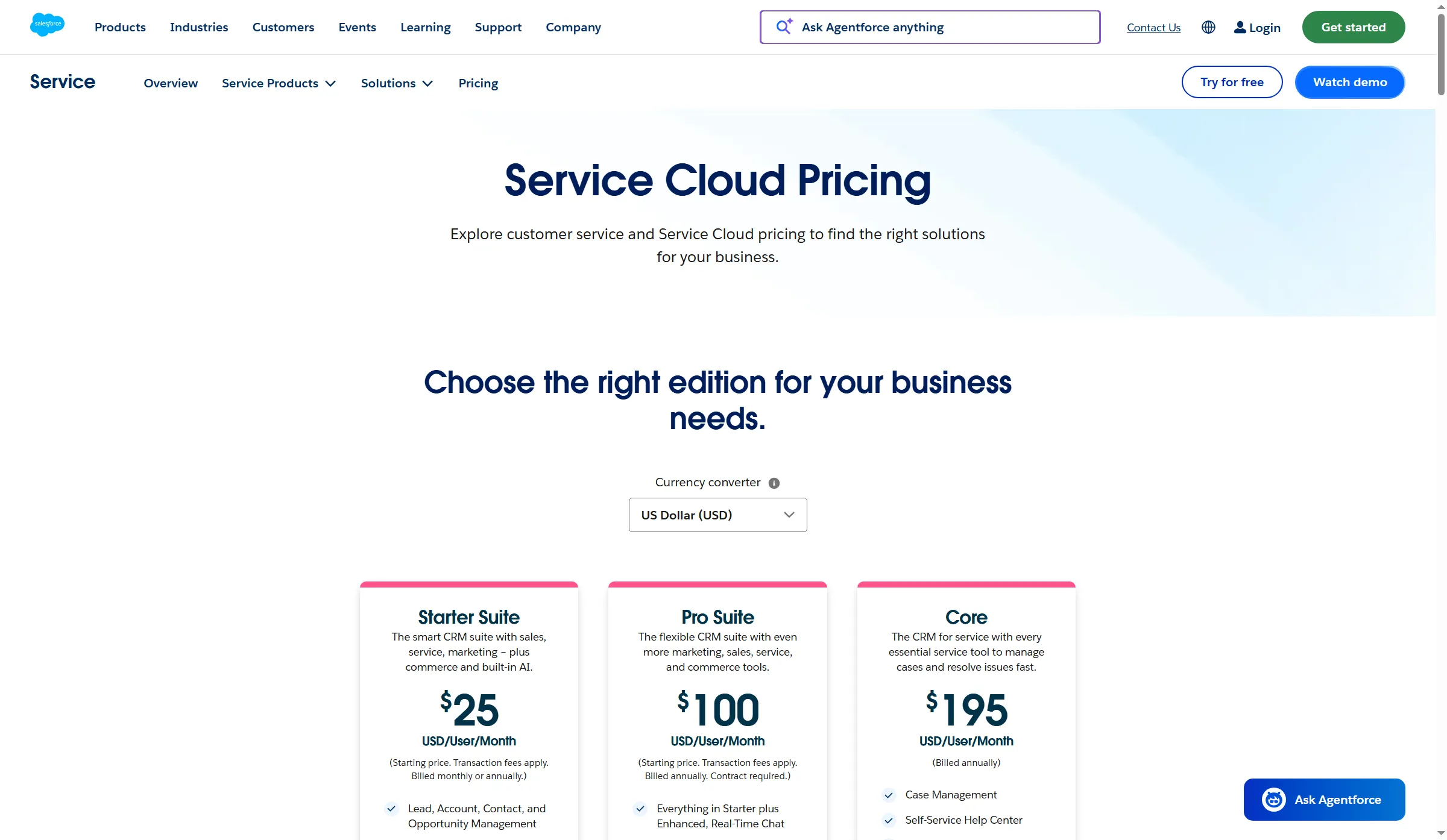
Salesforce lists Starter Suite separately from its Service Cloud editions.
8. LiveAgent: Best for small Zendesk teams needing email and chat
LiveAgent Starter covers up to five agents and includes ticketing, email, live chat, contact forms, and a knowledge base. Social channels, a call center, and reporting start on higher tiers.
Team caps the queue at 15 agents and adds calls, social, and messaging channels, reports, SLA rules, and custom roles. Business removes that cap. LiveAgent connects AI to your provider account, which bills any usage separately from the seat plan.
LiveAgent now lists Starter, Team, and Business; older pages use Small, Medium, and Large. Through November 22, 2026, annual plans have promotional rates; use the regular prices in the pricing line for renewal budgeting. I wouldn't shortlist Starter for a six-person team: its five-agent cap makes a Team upgrade unavoidable. In October 2026, G2 reviewer Kevin D. gave LiveAgent 4.5 stars and praised its rules and SLA handling, but said overlapping time rules required an exclusion rule in his workflow.
Pros — LiveAgent
- Low entry pricing suits a compact service team.
- Team adds more channel and reporting options as support grows.
- The 30-day trial needs no card.
Cons — LiveAgent
- Starter's five-agent cap forces an upgrade when the team grows.
- Teams above 15 agents need Business or flat-fee Enterprise.
- AI usage is billed by the provider account.
Product pricing — LiveAgent
Starter is $15/agent/month annually (up to 5 agents, $11 promotional rate through November 22, 2026); Team is $29 (up to 15 agents, $22 promotional rate); Business is $49 ($38 promotional rate). AI is billed by your provider when enabled.
Things I Noted
LiveAgent let me save an internal note while Customer was blank on a ticket assigned to a generated Visitor4 requester. The note stayed internal, so no outbound email was sent.
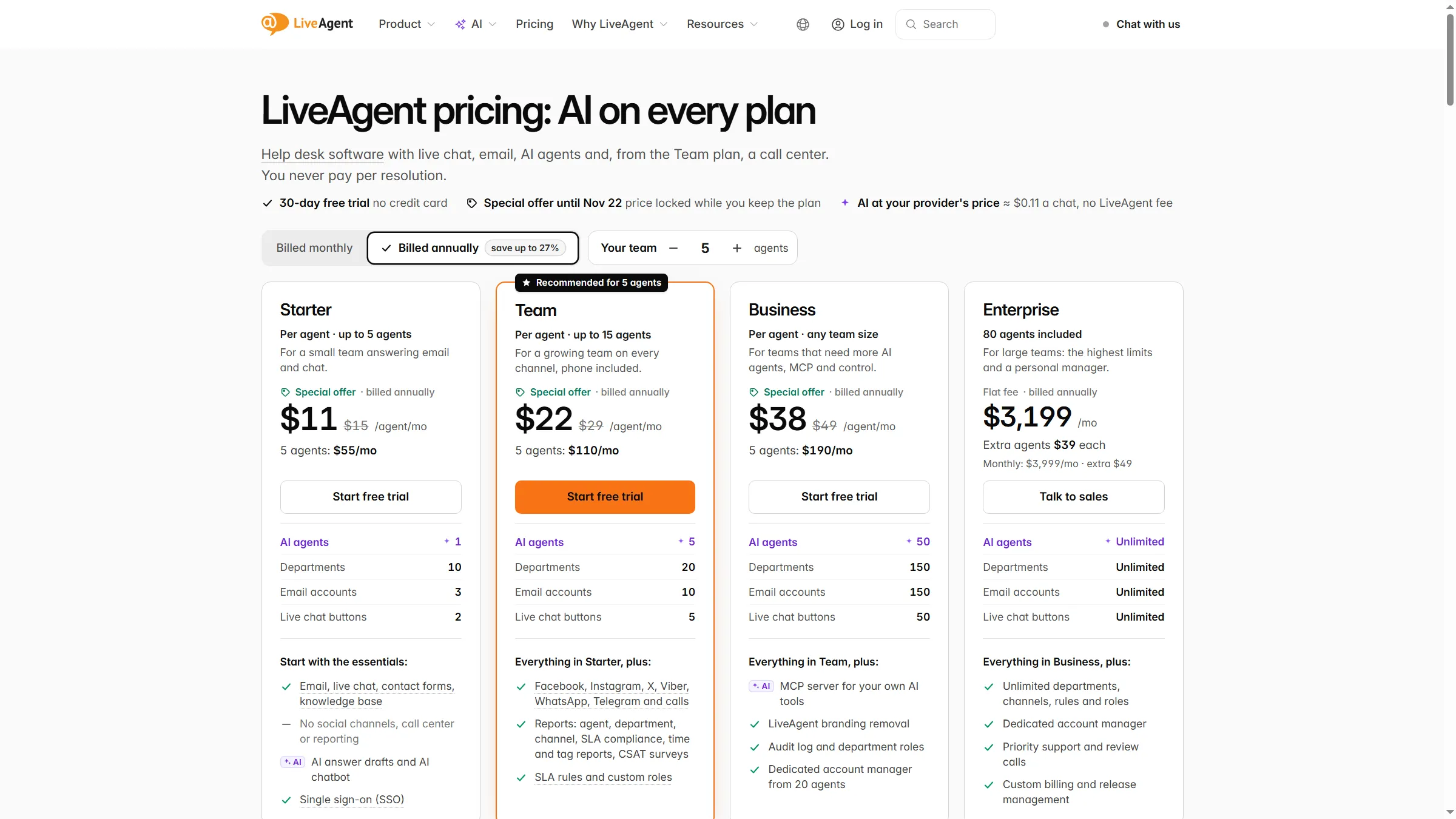
LiveAgent lists annual per-agent prices and team-size limits across four plans.
What does the same email-ticketing workload cost?
I modeled an email-only queue for teams of one, five, and ten agents. Each agent handles 150 customer contacts a month, with one email ticket per contact. The table uses the lowest paid public tier that fits each team; free plans remain relevant where agent and contact limits fit, though several vendors don't publish a comparable ticket-volume cap. This scenario excludes a public knowledge base, chat, phone, advanced routing, SLAs, AI, and optional channel charges.
The table shows the annual seat totals for each workload.
| Product / selected plan | 1 agent / year | 5 agents / year | 10 agents / year | Limit that affects the comparison |
|---|---|---|---|---|
| Zendesk Support Team | $228 | $1,140 | $2,280 | Email ticketing; this is not the Suite Team channel/KB bundle. |
| Freshdesk Growth | $228 | $1,140 | $2,280 | Multiple SLA policies require Pro; skill routing requires Enterprise. |
| Zoho Desk Express (Standard at 10) | $84 | $420 | $1,680 | Express supports up to 5 users; the 10-agent calculation uses Standard at $14. |
| Help Scout Standard | $300 | $1,500 | $3,000 | Free is limited to 100 contacts/month, below the one-agent workload. |
| Intercom Essential | $348 | $1,740 | $3,480 | This includes seat fees only. Optional Fin outcomes and channel use are excluded. |
| Front Starter | $300 | $1,500 | $3,000 | Up to 10 seats and one channel type. |
| HubSpot Service Hub Starter | $240 | $1,200 | $2,400 | This includes annual seats only. Starter has no public knowledge base. |
| Salesforce Starter Suite | $300 | $1,500 | $3,000 | Bundled CRM suite; not a standalone support-only license. |
| LiveAgent Starter (Team at 10) | $180 | $900 | $3,480 | Starter is capped at 5 agents; ten agents require Team at $29. |
I multiplied each monthly seat price by team size and 12. At ten agents, Zoho moves to Standard and LiveAgent to Team because their entry tiers cap at five. For a public knowledge base and one SLA, HubSpot Professional lists at $100 per seat monthly plus $1,500 onboarding; the page also showed a $90 introductory rate for new customers. Zendesk Suite Team is $55 per agent monthly.
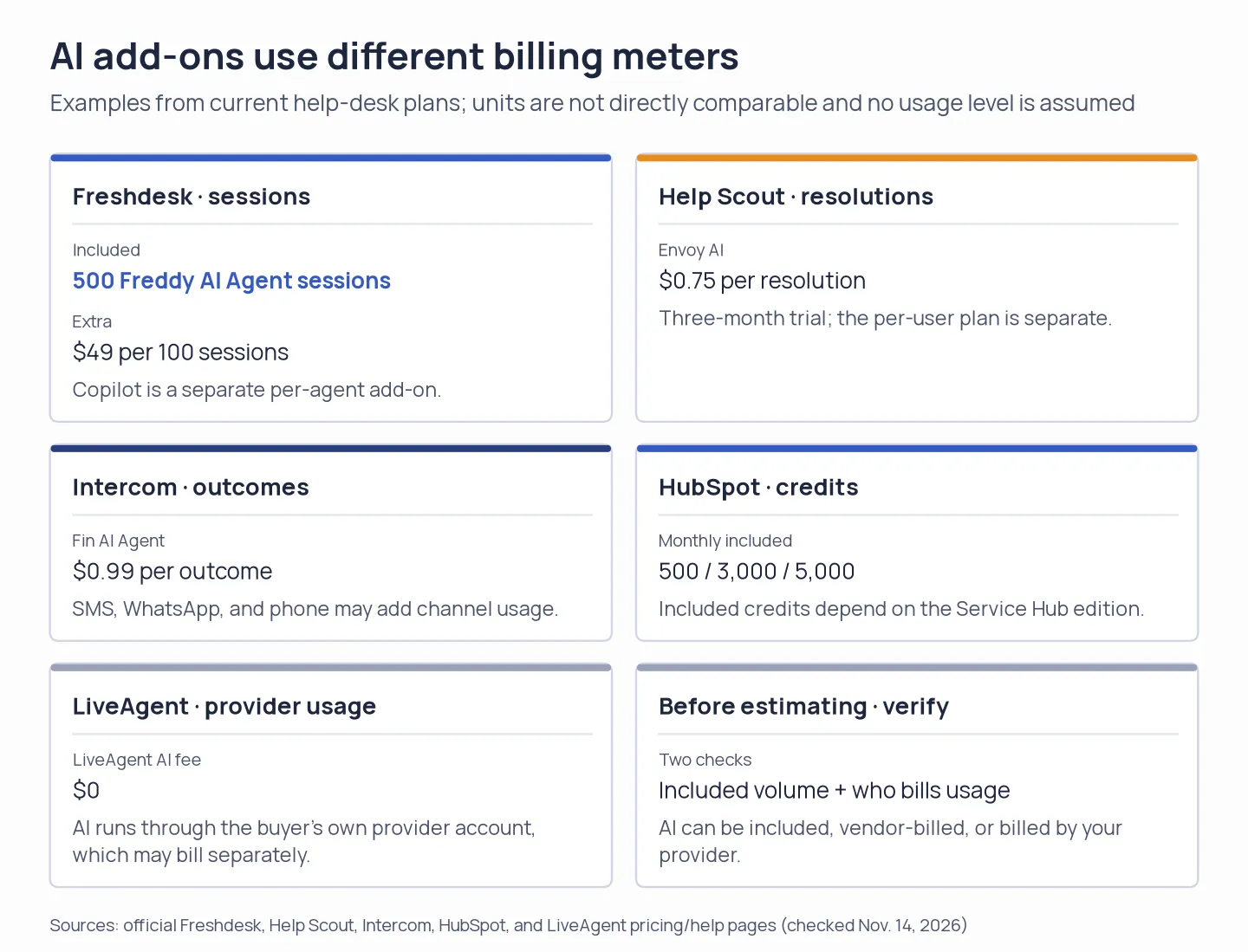
AI costs use different counters across help desks, so seat prices alone do not reveal the full bill.
Already paying for Google Workspace or Microsoft 365?
If you only need a shared support address, start with the tools you already pay for. Google Groups can act as a Collaborative Inbox, where members assign and complete conversations if permissions allow. Microsoft 365 shared mailboxes can stay unlicensed up to 50 GB, though your business still needs an eligible Exchange Online subscription.
These options handle basic email intake and manual assignment. They don't add a public knowledge base, cross-channel ticketing, or an SLA dashboard; that's where a dedicated help desk earns its seat fee.
Which Zendesk alternative should you choose?
- Pick Freshdesk if one SLA policy on Growth covers your team and you want a straightforward ticketing replacement.
- Choose Zoho Desk when a low paid seat price is important and you’re ready to map assignment and channel rules to the correct tier.
- Pick Help Scout if your team mainly handles email and the contact limit or higher-tier seat minimum fits your workload.
- Pick Intercom if messaging and AI results count enough to warrant the distinct usage model.
- When team collaboration is the priority, choose Front, provided that Professional’s omnichannel price matches your needs.
- Pick HubSpot Service Hub if you want support in your CRM and have budgeted Professional onboarding for a public knowledge base.
- Pick Salesforce Service Cloud if your company already runs on Salesforce and has an admin for support workflows.
- Pick LiveAgent if your team fits within Starter's five-agent cap and email/chat suffice; switch to Team for phone, social, reporting, and SLA rules.