

 19 min read

TL;DR: Best AI form builders in November 2026
- Best free AI form builder: Tally. In my test, its AI made an editable 18-block intake form and a follow-up prompt changed a field while preserving the conditional branch.
- Best for importing or routing forms: Fillout. Its Form Agent builds and revises forms with pages and logic. Free includes 1,000 responses a month and unlimited seats.
- Best for complex form workflows: Jotform. The AI builder creates and refines a form, while the product adds a broad set of fields, templates, and workflow tools. Bronze is $408 a year at the listed regular annual rate.
- Best for polished, conversational forms: Typeform. Its AI can create and refine a whole form, but the Free plan pools only 10 responses a month across forms.
- Best for branded forms and e-signatures: Paperform. Free is permanent, Pro starts at $588 a year, and AI chat can revise a draft before you enter the manual editor.
- Best for lead-generation funnels: involve.me. Its AI Agent builds forms, quizzes, calculators, and outcome paths. Start is $348 a year for one user and three live funnels.
- Best for survey research: SurveyMonkey. Build with AI drafts a complete survey, though AI-generated paid question types can block sending on Basic.
I tested Tally’s prompt-and-edit flow, checked current product, Help, and pricing pages for all seven, and read accessible customer reviews and Reddit discussions.
An AI form builder can generate or modify a reusable, editable form for tasks like gathering client details or routing a survey to the right team, using a prompt, source file, or conversational assistant. Other tools use AI during a live conversation or to analyze responses. Choose the AI function your task needs, then check how it affects plan limits and pricing.
At a glance: which AI form builder fits?
The table compares what each AI builder creates and its lowest annual price; it's worth checking the response cap on the free plan, too.
| Tool | Best fit | AI job | Lowest paid annual tier |
|---|---|---|---|
| Tally | Free intake and lead forms | Build and edit forms in chat | Pro: $290/year |
| Fillout | Imported forms and conditional workflows | Build and update forms with Form Agent | Starter: $180/year |
| Jotform | Feature-rich operational forms | Create a form and refine it in chat | Bronze: $408/year |
| Typeform | Guided surveys and branded experiences | Create and refine full forms | Basic: $336/year* |
| Paperform | Branded forms, e-signatures, and payments | Draft and revise before editor | Pro: $588/year |
| involve.me | Quizzes and lead qualification | Generate and edit funnels and outcomes | Start: $348/year |
| SurveyMonkey | Survey drafting and research | Draft or regenerate surveys | Advantage: $468/year |
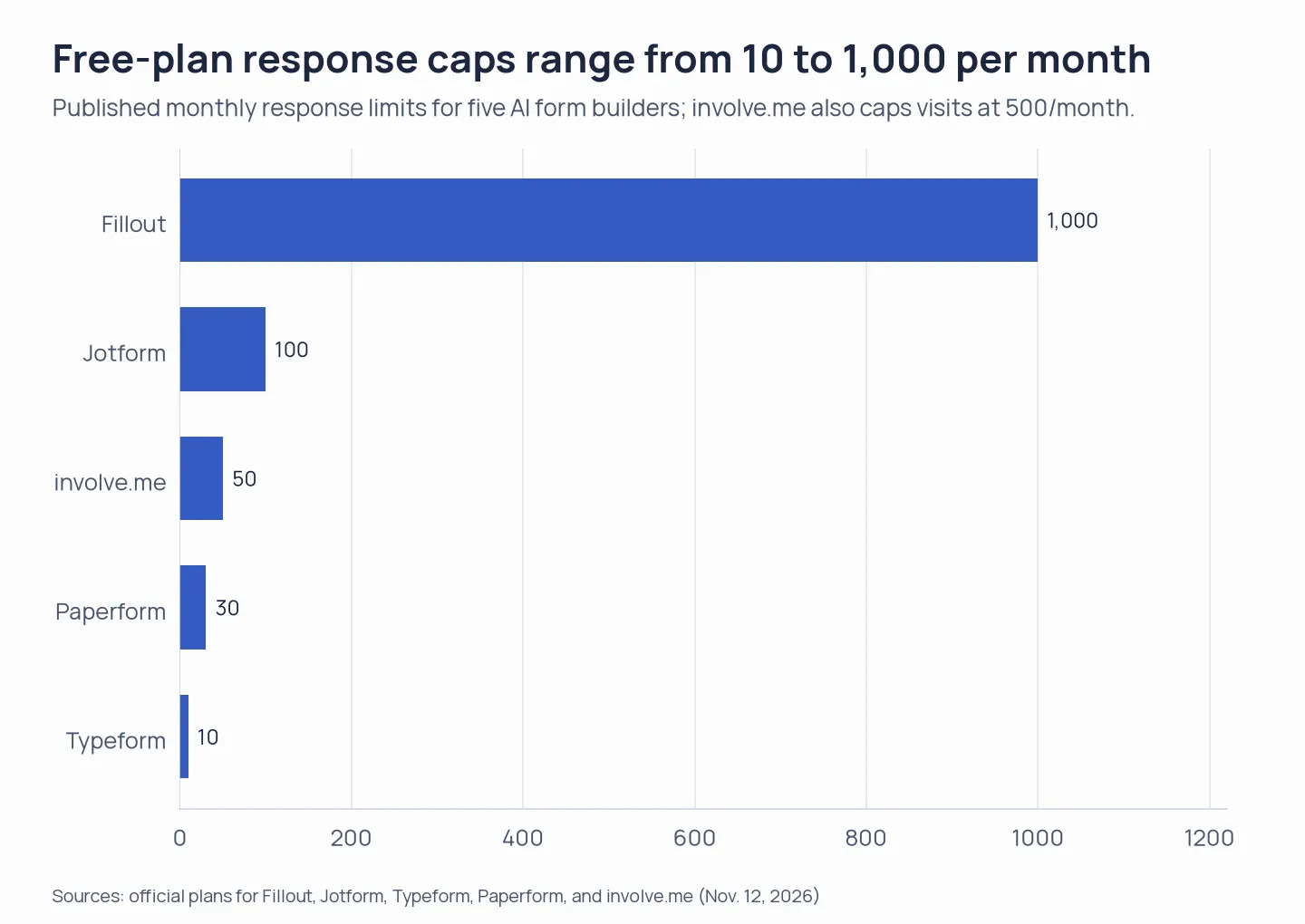
Annual prices are entry paid tiers; Typeform shows conflicting price blocks. Free response limits range from 10 to 1,000 among tools with a fixed monthly figure; involve.me also limits visits to 500. Tally and SurveyMonkey use different terms.
Quick picks: the best AI form builders by job
Choose Tally for free intake edits, Fillout for imported conditional forms, or involve.me for scored lead funnels; the table pairs each task with its main constraint.
| Scenario | Tool | Why it fits | Main constraint |
|---|---|---|---|
| Build and edit an intake form without paying | Tally | Tested prompt edits changed the field while retaining the branch | Fair-use policy applies to Free submissions |
| Import existing questions and build conditional forms | Fillout | Form Agent supports pages, fields, logic, and later changes | Free excludes premium fields and CAPTCHA |
| Handle a specialized form or workflow | Jotform | Specialized fields and a large template catalog | Bronze is one user; five-editor pricing was not confirmed |
| Create a guided survey with AI | Typeform | Whole-form creation and follow-up editing | Free pools just 10 responses across forms |
| Create a branded form with payments | Paperform | Forms, signatures, and workflow tools share one account | Free has 30 monthly submissions. Pro branding and a custom domain cost extra |
| Turn answers into a scored funnel | involve.me | AI covers forms, quizzes, scoring, and outcomes | Published pricing doesn't show paid response limits |
| Draft market or customer surveys | SurveyMonkey | Survey-specific AI and analysis features | AI can add paid question types. Basic response entitlement varies |
What makes the best AI form builder for your workflow?
Separate AI creation from response analysis
AI form creation happens before respondents fill out a form; response analysis starts after they submit. Tally, Fillout, Typeform, Paperform, and Jotform use AI to build or edit forms, while SurveyMonkey starts with survey drafting and also offers paid analysis. When you compare them, start with the part of your workflow that needs AI. involve.me adds scoring and funnel outcomes. Formless is an adjacent conversational tool: its AI agent interviews respondents, and pricing is based on conversations rather than standard form submissions.
Check where the AI draft becomes a real form
After generation, check whether fields are editable, required, and conditional, then preview the respondent view. A public prompt can yield another product surface: the public AI entry point from Fillout launches a Zite app flow, whereas its Form Agent serves as the route for Fillout forms. AI chat in Paperform stops once you proceed into the editor. Ordinary file import and the AI file workflow in Tally are distinct. Regular import doesn't recreate conditional rules.
Price the response volume and team, not just the builder
For an AI form builder, match the plan to your expected response volume, seats, permissions, custom domains, and branding needs before comparing annual prices. Free response limits may be fixed, fair-use-based, or account-specific, so check what counts as a response and what happens at the cap.
Check whether a subscription you already pay for includes the AI
Google's AI form builder requires an eligible Workspace or Google AI plan; ordinary free Forms access doesn't include Gemini creation. Gemini can create a new form, but applying it to an existing form replaces that form and can't currently create multiple sections. Microsoft Forms Copilot also requires an eligible Copilot license, so your existing suite subscription might not cover it. If you're already paying for either suite, check what's included before buying another builder. You may already have enough for basic intake.
Check where response data goes
Before using an AI form builder for customer or lead data, check response access, retention, deletion controls, and the terms for your plan. Don't assume AI drafting includes privacy safeguards.
1. Tally: Best for free use of an AI form builder
My pick for a free intake form is Tally: its AI builds and edits forms in chat, and Free has no fixed response cap to monitor. In my test, a follow-up prompt changed the launch-month field to a dropdown. In preview, the website-only question still appeared only on the Website path after the edit.
Pros — Tally
- Every plan includes AI creation, edits, logic, and file-based reconstruction, so the core builder remains available without an upgrade.
- Free includes conditional logic and integrations, too.
- Pro adds collaboration, custom domains, and branding removal.
Cons — Tally
- The Free plan caps each file upload at 10 MB, so large questionnaires won't fit as source files.
- Tally's Free submissions follow fair use; the plan sets no monthly volume commitment.
- Annual billing is paid upfront; $24 is only the rounded monthly equivalent.
Conditional logic and support guidance
A Capterra reviewer praised Tally support but found calculation order and conditional-logic guidance difficult to follow. I'd preview nested rules before relying on a form that routes answers by several conditions.
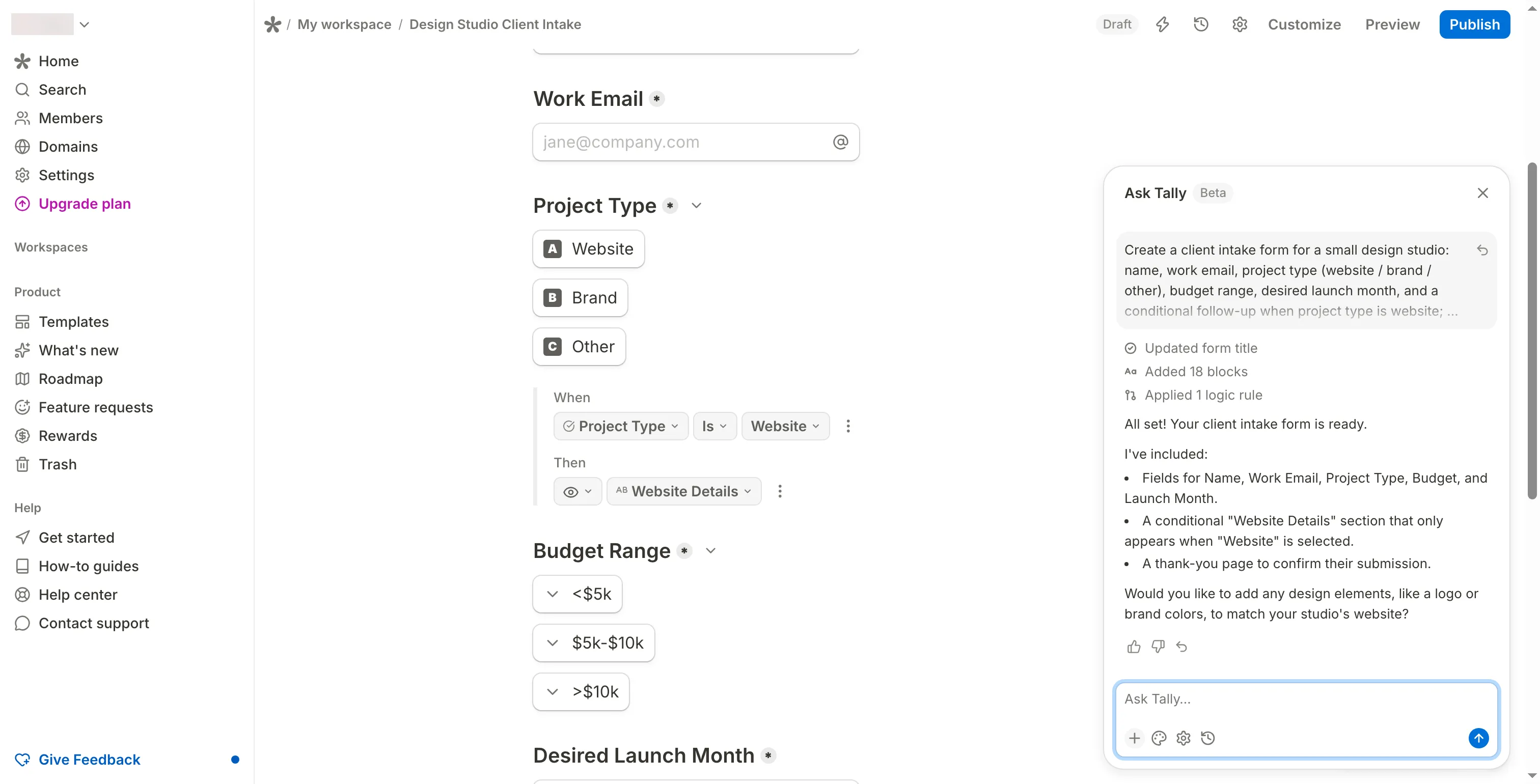
Inside Tally, the AI-generated form uses a conditional rule for website projects.
Product pricing — Tally
Free ($0), Pro ($290/year or $29/month), and Business ($890/year or $89/month). Annual billing is paid upfront. Taxes may apply.
2. Fillout: Best for importing and routing forms
I prefer Fillout when a team needs imported questions, conditional logic, and multiple editors. Its Free plan includes 1,000 responses a month, but premium fields and CAPTCHA aren't included. The AI prompt on the public homepage opens a Zite app flow; use Form Agent when you need a regular Fillout form.
Pros — Fillout
- Free provides unlimited forms and seats, conditional logic, integrations, and 1,000 responses each month.
- The Form Agent can start from a description, pasted questions, an existing form, or a PDF. You can apply follow-up changes after the first draft. If you're importing a form, check that its conditional paths came across.
- Starter costs $180 a year and includes 2,000 responses a month. Pro costs $480 a year for 5,000 monthly responses, while Business costs $900 a year for unlimited responses.
Cons — Fillout
- The public AI builder and the in-product Form Agent produce different product types. If you need a Fillout form, choose the Form Agent.
- Free forms carry Fillout branding and exclude premium fields and CAPTCHA, so the published experience can differ from the editor preview. CAPTCHA starts with Starter; branding removal starts with Pro.
- Team and Enterprise list granular permissions and access controls; Free's unlimited seats don't include those role settings.
Reviewer feedback on language options
A G2 reviewer praised Fillout's field variety and workflow connections but asked for more language options. That gap matters if your forms need localization.
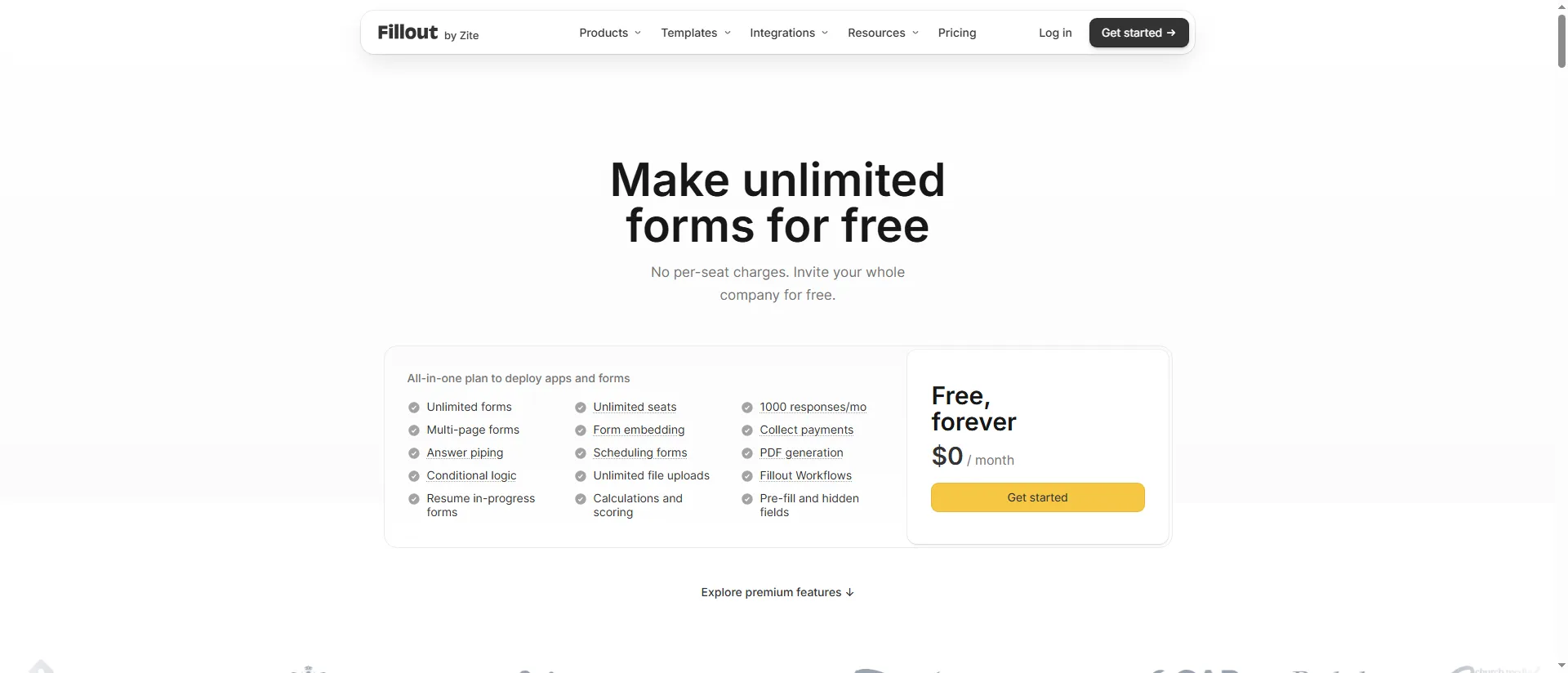
Fillout’s free plan pairs 1,000 monthly responses with unlimited seats.
Product pricing — Fillout
Free ($0), Starter ($180/year), Pro ($480/year), and Business ($900/year), before tax. Their annual-billing monthly equivalents are $15, $40, and $75.
3. Jotform: Best for specialized workflows with an AI form builder
Jotform earns its place when an AI draft needs specialized fields or payment steps afterward. A basic contact form won't need much of that catalog; I wouldn't pay for Jotform if a free builder covers the same job. Jotform's AI starts with a natural-language request, and you'll refine the content and design in chat. Templates and integrations add options, but they can make plan selection harder.
Pros — Jotform
- The AI builder creates a full form from a plain-language prompt, then lets you refine its content and design in chat.
- Free allows five forms and 100 submissions a month. Bronze raises those limits to 25 forms and 1,000 submissions, but caps access at one user.
- Jotform lists Bronze at $34/month, billed annually at $408.
Cons — Jotform
- Bronze is limited to one user, so it doesn't cover a five-editor workflow.
- Bronze caps submissions at 1,000 per month, so it misses the 5,000-response team scenario.
- Jotform's public pricing page didn't show a team tier in this check, so the five-editor configuration remains unpriced.
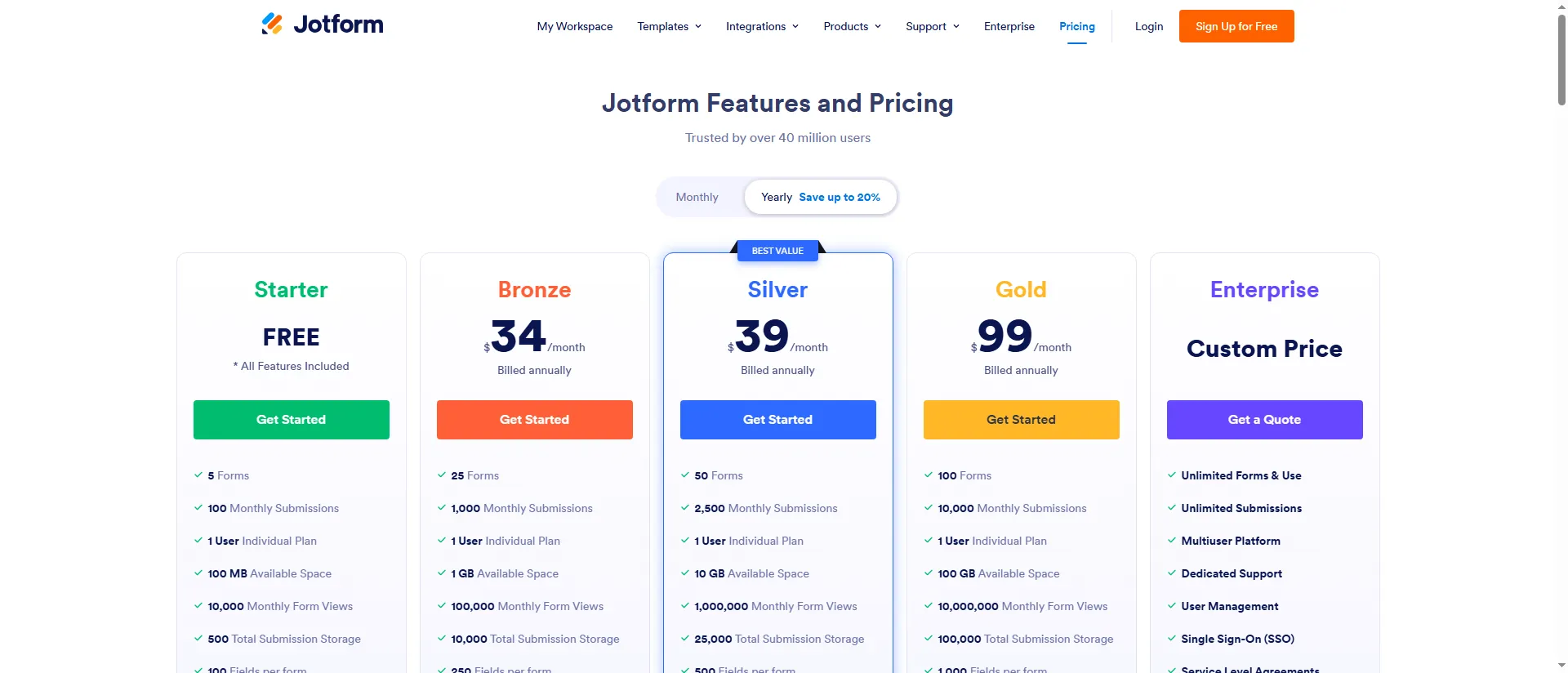
Jotform’s Bronze plan pairs 1,000 monthly submissions with one user.
Product pricing — Jotform
Free ($0), Bronze ($408/year, or $34/month equivalent) at the official regular annual rate. I couldn't confirm a five-editor price.
4. Typeform: Best for guided, polished surveys
I like Typeform for guided surveys when the respondent experience matters as much as drafting speed. Its AI can build a whole form and refine the questions, logic, and settings. Free pools just 10 responses across all forms—enough to explore the editor, not enough for a busy live survey.
Pros — Typeform
- Typeform takes written or spoken prompts, drafts the whole form, and lets you keep editing it.
- Free includes unlimited forms and logic, but only 10 pooled responses per month.
- Business lists five users and 10,000 responses a month, making it the closest plan match for a high-volume team.
Cons — Typeform
- Typeform's pricing page shows conflicting price blocks and warns that prices can vary during experiments. Check your checkout total before you commit.
- The free response allowance is pooled across forms, so a small test uses part of the monthly total. Help pages disagree on which accounts can use AI file uploads, so you'll need to check your account before building around that route.
- AI can't manage each specialized result, such as quiz endings that depend on score.
A May 2026 Capterra reviewer praised Typeform's front-end and back-end experience but criticized tier gating and the relevance of AI follow-up questions.
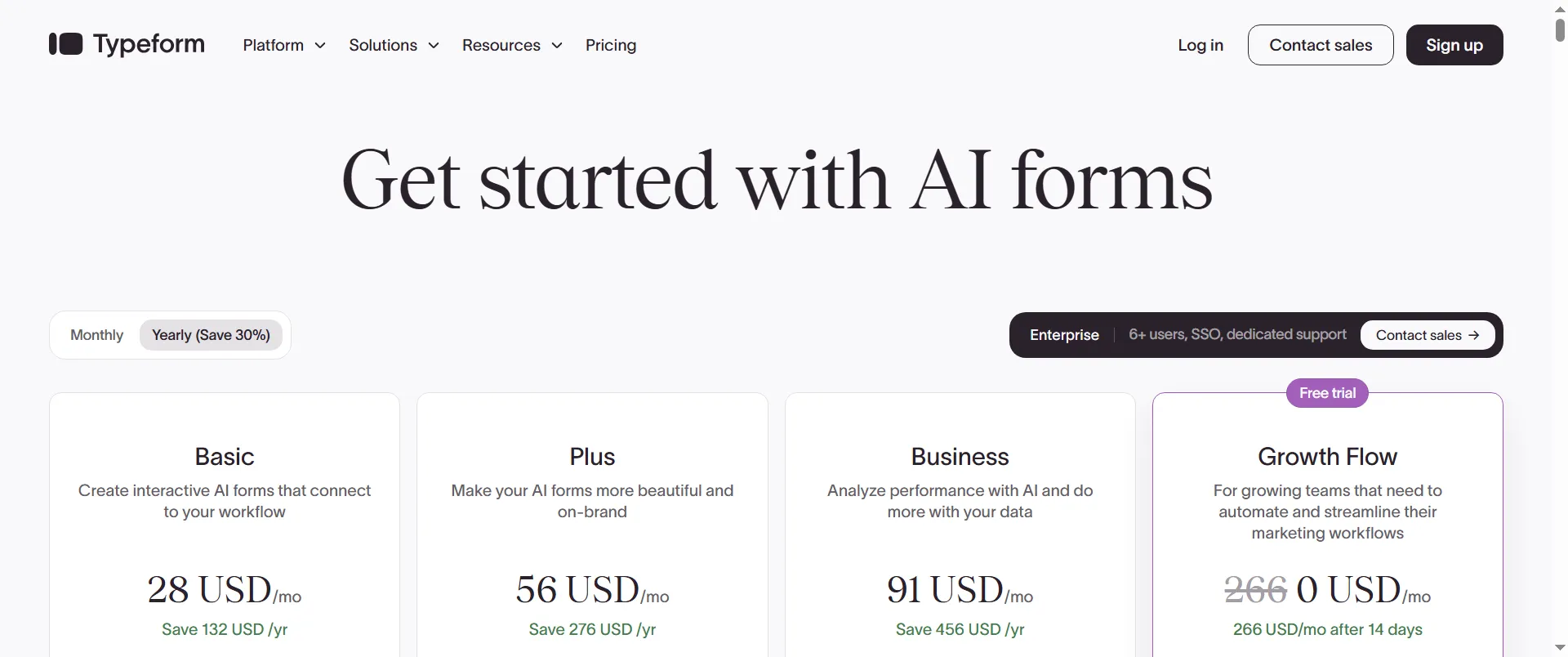
Typeform shows annual billing for Basic, Plus, Business, and Growth Flow.
Product pricing — Typeform
Free ($0), Basic $28/month ($336/year), Plus $56/month ($672/year), and Business $91/month ($1,092/year) on annual billing. The page also shows a second, lower price block. Confirm your checkout total before you buy.
5. Paperform: Best for branded forms, payments, and e-signatures
Paperform is worth paying for when forms, payments, e-signatures, and workflow steps belong in one account. It drafts from a prompt or uploaded file, then hands the form to a manual editor. I wouldn't add it for a simple contact form that doesn't need those extras.
Pros — Paperform
- Free is permanent and has unlimited users. New accounts start with a seven-day Pro trial, and you won't need a card.
- At $588 a year, Pro covers unlimited users, unlimited submissions within fair use, and advanced form features. It's a lot for a simple form.
- Paid plans combine Paperform forms, Papersign, and Stepper workflows in one account.
Cons — Paperform
- Free's 30 monthly submissions can be tight for a form with steady traffic. If you need a custom domain, Pro plus the $20 monthly add-on totals $828/year; Business costs $1,488 and includes other plan features.
- The Pro custom-domain add-on is the cheaper route when the domain is your only reason to upgrade.
- Once you move into the manual editor, you can't reopen the AI conversation, so finish the prompt edits first. Free also can't publish forms using paid field types.
Pricing and calculation feedback
Paperform lists Free, Pro, and Business on one pricing page; Pro costs $49/month with annual billing or $59 month to month.
Chandan D. on G2 (July 7) praised Paperform's prefilled links and piping but found calculations difficult. The current limits have since changed, so I checked the present plan details separately.
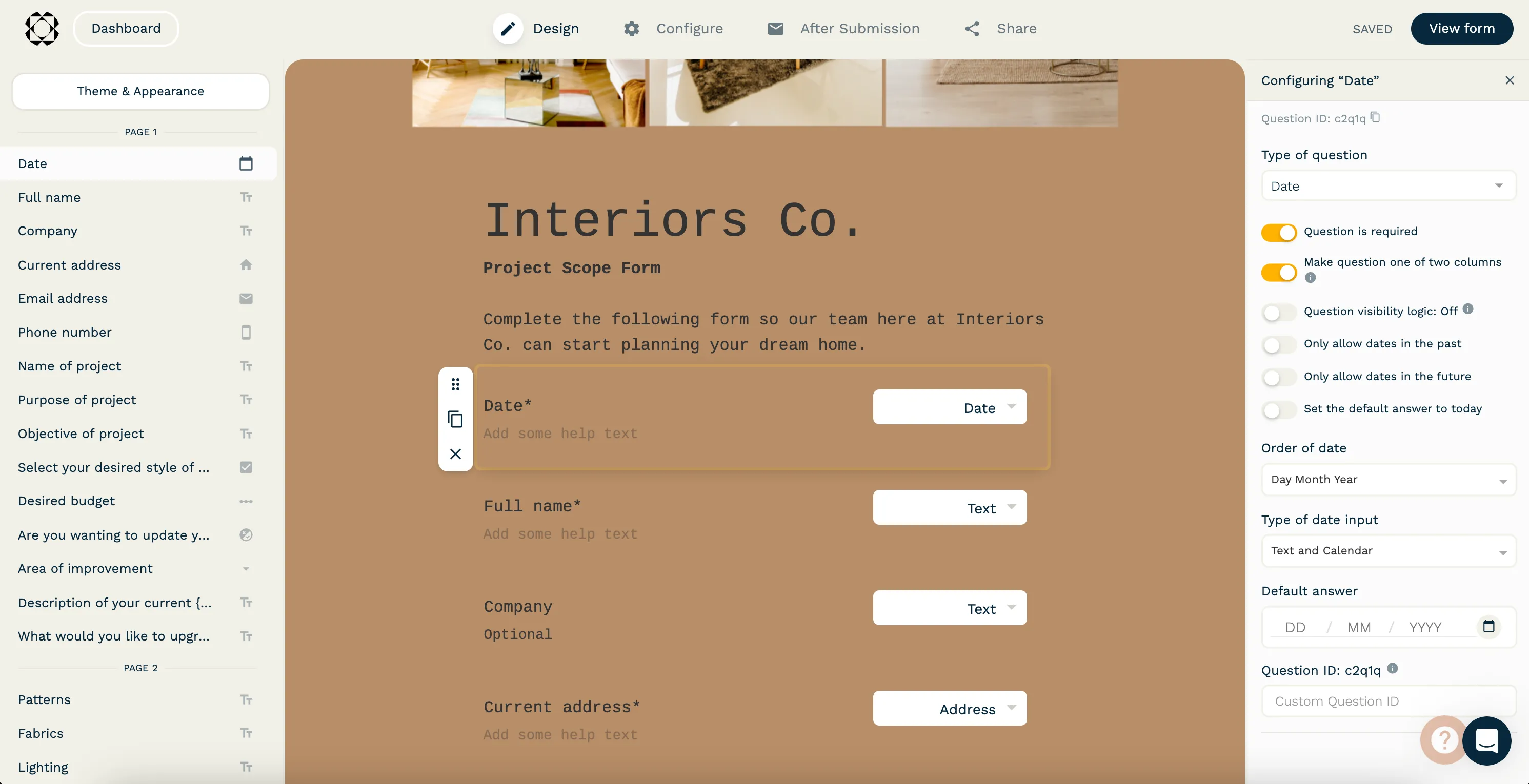
Inside Paperform’s editor, the question list, form canvas, and field settings stay visible together.
Product pricing — Paperform
Free ($0), Pro $588/year ($49/month billed annually), and Business $1,488/year ($124/month billed annually). Pro's custom domain adds $240/year. Taxes are extra, and fair-use terms apply.
6. involve.me: Best for scored lead funnels
involve.me is my pick for quizzes and lead funnels when its CRM and email sequences should keep follow-up in one workflow. Its AI can build pages, copy, design, calculations, and outcome logic. A separate Agent can use existing score tiers as context, but can't create or change them.
Pros — involve.me
- No-cost access covers AI creation plus as many as 50 submissions or 500 visits each month.
- Start includes three active funnels, one user, and 100 AI credits monthly — all for $348 annually.
- Grow provides custom domains, branding removal, and two users, at $828 annually.
Cons — involve.me
- involve.me doesn't list its paid submission allowance, so you can't price a 1,000- or 10,000-response workload from the public plans.
- Start is one user. Five-user access starts at Scale, listed at $1,668/year.
- Free forms stop accepting responses when you hit the monthly threshold and resume next month unless you upgrade.
Alden S. on G2 (September 3) praised involve.me's branded funnels and integrations but found complex branching busy and felt its AI copy needed tone edits.
Free signup reached a blank welcome screen
I completed involve.me's email confirmation for a fresh Free account, but a blank welcome overlay kept me out of the editor.
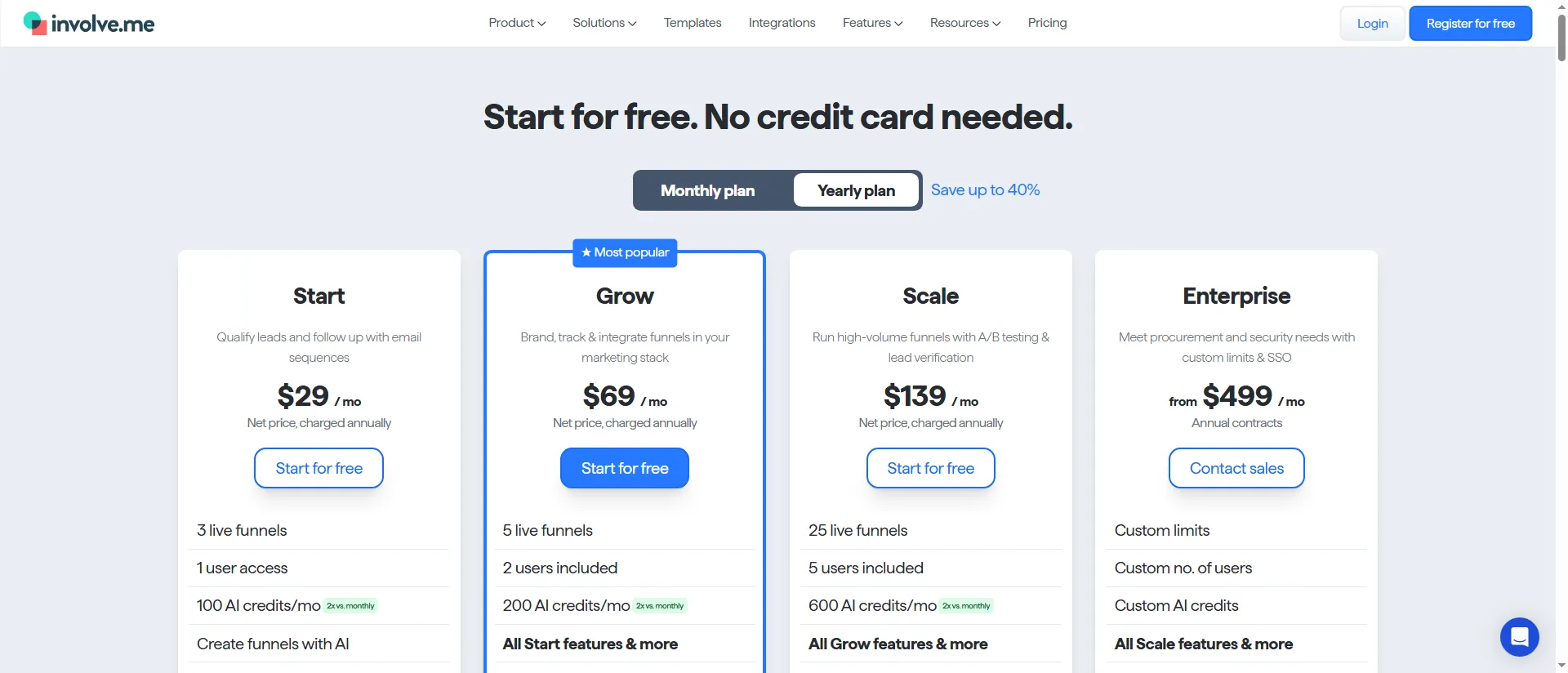
involve.me’s Start plan includes three live funnels and one user; higher tiers increase those limits.
Product pricing — involve.me
Free ($0), Start ($348/year), Grow ($828/year), and Scale ($1,668/year), billed annually before VAT. Paid response quotas aren't published, so you won't know the allowance from the price page alone.
7. SurveyMonkey: Best for AI-assisted survey research
I'd choose SurveyMonkey for survey research over general intake: Build with AI drafts a survey, and paid plans add analysis. Because AI can add paid question types, check the Basic draft before you send it.
Pros — SurveyMonkey
- Build with AI drafts a full survey, which you can edit or regenerate.
- Advantage Annual costs $468/year and includes 15,000 responses.
- SurveyMonkey keeps survey creation, response collection, and analysis in the same product.
Cons — SurveyMonkey
- Basic response visibility depends on the account and survey; the public price alone doesn't reveal the exact cap.
- Basic users may need to remove AI-generated paid question types before they can send the survey.
- Team plans start at three seats and use shared response allowances. You shouldn't multiply an individual rate; compare the organization plan instead.
Cathy Dwulet on Trustpilot said a short survey left her surprised by its visible-response allowance. SurveyMonkey says over-limit responses can't be viewed and are deleted after one year.
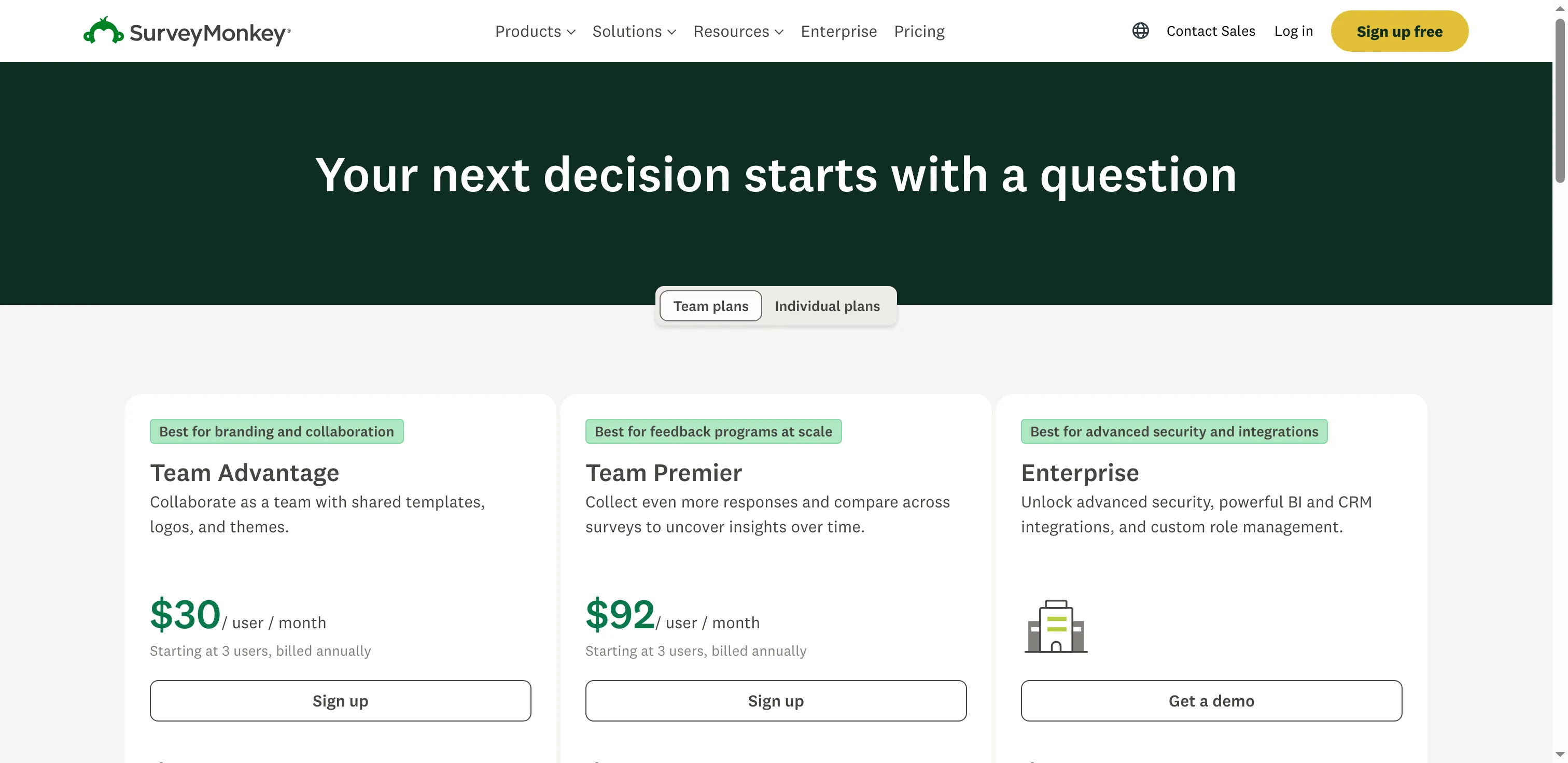
SurveyMonkey’s listed team plans start at three users.
Product pricing — SurveyMonkey
Basic is free with account-specific response limits. Advantage Annual costs $468/year ($39/month equivalent) and includes 15,000 responses/year.
What does the same form workload cost?
Fillout Free publishes a 1,000-response monthly cap. Tally Free allows unlimited submissions under fair use but sets no monthly volume commitment, so I wouldn't treat it as a 1,000-response guarantee. I couldn't verify a plan that covers five editors with separate permissions and 5,000 responses. The table shows annual subscription prices before tax, plus the requirements each plan misses.
| Scenario | Lowest evidenced configuration | Annual cost | What the price includes / misses |
|---|---|---|---|
| One editor, conditional lead form, 1,000 responses/month | Fillout Free | $0 | Publishes 1,000/month; premium field types and CAPTCHA are excluded. Tally Free is another $0 option but has no fixed volume commitment. |
| Five named editors, distinct permissions, shared form, conditional routing, 5,000 responses/month | No verified common configuration | — | Fillout Pro costs $480/year and allows unlimited seats, but granular permissions are listed for Team/Enterprise. Typeform Business is $1,092/year for five users and 10,000 responses/month, but its pricing page doesn't specify separate editor roles. Jotform Bronze is one user. |
| One workspace, 10,000 responses/month, custom domain, integrations | Fillout Business | $900 | Unlimited responses, seats, custom domain, and integrations. Typeform Business lists five users and exactly 10,000 monthly responses for $1,092/year, with a custom subdomain. Paperform Business is $1,488/year with a custom domain, but its annual high-volume fit should be confirmed under fair use. |
Tally Pro costs $290 a year and adds a custom domain and team collaboration, but fair-use terms don't promise Fillout Business's 10,000 responses each month. involve.me doesn't publish a paid response cap. I'd price either high-volume plan only after checking its quota.
Other tools to consider
If you already pay for Google Workspace or Microsoft Copilot, check whether its forms cover the job before buying another tool. HubSpot or Pipedrive customers should also check their existing forms and routing features; they may cover basic collection without the same AI-generation workflow.
Formless is made for conversational intake: respondents get interviewed by its AI agent, and conversations form the basis of pricing. When an intake calls for a back-and-forth interview, it's a fit. Standard builders charge around forms respondents submit; this difference in pricing models makes the two hard to compare.
Makeform creates forms with AI and lets you edit them in chat. Unlimited submissions are permitted, under fair use, on its hosted Free forms.
Which AI form builder should you choose?
Choose Tally for a small intake form when a fixed Free response quota matters less than a low-cost start. Pick Fillout when you need to import existing questions and route answers; its Free tier lists 1,000 submissions a month. Jotform suits forms with specialized fields or payment workflows, while its Bronze plan keeps a five-person team off the table.
For guided surveys, Typeform puts the respondent experience first but Free's 10-response pool is small. It won't stretch far for live research. Paperform is the cleaner fit when signatures, payments, and workflow steps belong together. Choose involve.me when you need a scored quiz or funnel; ask yourself whether the CRM and follow-up tools will earn their place. SurveyMonkey is the survey-first choice if drafting and analysis matter more than general-purpose intake.
Before you buy, compare the same response volume, separate editor roles, and any plan you already pay for. No single starting price tells that whole story.