

 17 min read

TL;DR: AI LinkedIn post generators in October 2026
-
Free starting point: Buffer AI Assistant produced an 86-word revision on Free in the October 26 test, without a connected LinkedIn channel.
-
Editing check: MagicPost's October sample kept the supplied counts but added participant feedback. Its later 94-word edit still exceeded the requested limit.
-
Voice and teams: Supergrow's October plans separate author context through Content DNA; Teams includes five accounts. Check the writing allowance before budgeting production.
-
Credit budget: Taplio Growth's October allowance was 250 Expert credits monthly, with writing, edits, hooks, and replies sharing the pool.
-
Approval workflow: SocialPilot Standard included three users and internal approvals at the October price check. Client approvals required Premium.
The quick comparison separates a writing subscription from the workflow around it. Prices are USD monthly equivalents with annual billing, checked October 26, 2026; tax is excluded.
| Tool | What it offers | Starting plan for AI writing | Main buying constraint |
|---|---|---|---|
| Buffer AI Assistant | Best for free drafting in Ideas | Free | Supply your own context |
| MagicPost | Dedicated LinkedIn editor and style inputs | Creator, $39/month | Generated details need checking |
| Supergrow | Interview-led writing and stored author context | Pro, $31/month | Voice setup needs source material |
| Taplio | Inspiration library and Expert/Faster writing modes | Growth, $49/month | Editing shares the Expert allowance |
| SocialPilot AI Assistant | Best for multichannel team writing | Essentials, $17/month | Every AI action consumes credits |
Linked Helper publishes this comparison; How we tested explains the checks behind it.
AI LinkedIn post generators turn notes into drafts, with a factual review still needed
An AI LinkedIn post generator turns your topic, notes, or source material into a LinkedIn draft. Buffer and MagicPost also let you change the result; I found the more useful differences between these tools in those editing options.
A polished first paragraph can hide a factual error. Give the writer a count of people who completed a task and a separate count who liked it, and the draft may quietly decide they're the same people. The numbers survive. The meaning changes.
Keep the brief beside the output. Check whether you can revise one passage, carry your own writing examples into the next draft, and copy a useful version before replacing it. A Shorten button can help, but an explicit word limit asks for something more precise. Those are practical reasons to choose an editor; likes, impressions, and a vendor's AI score don't tell you how much correction your post needs.
Related reading:
1. Buffer AI Assistant: Best for free drafting
Buffer AI Assistant lets you write in Ideas before connecting a social channel, so it's the first tool I'd try when all you need is a draft you can edit and copy. I opened the free Ideas editor, supplied the workshop brief, and inserted the revised text without connecting LinkedIn.
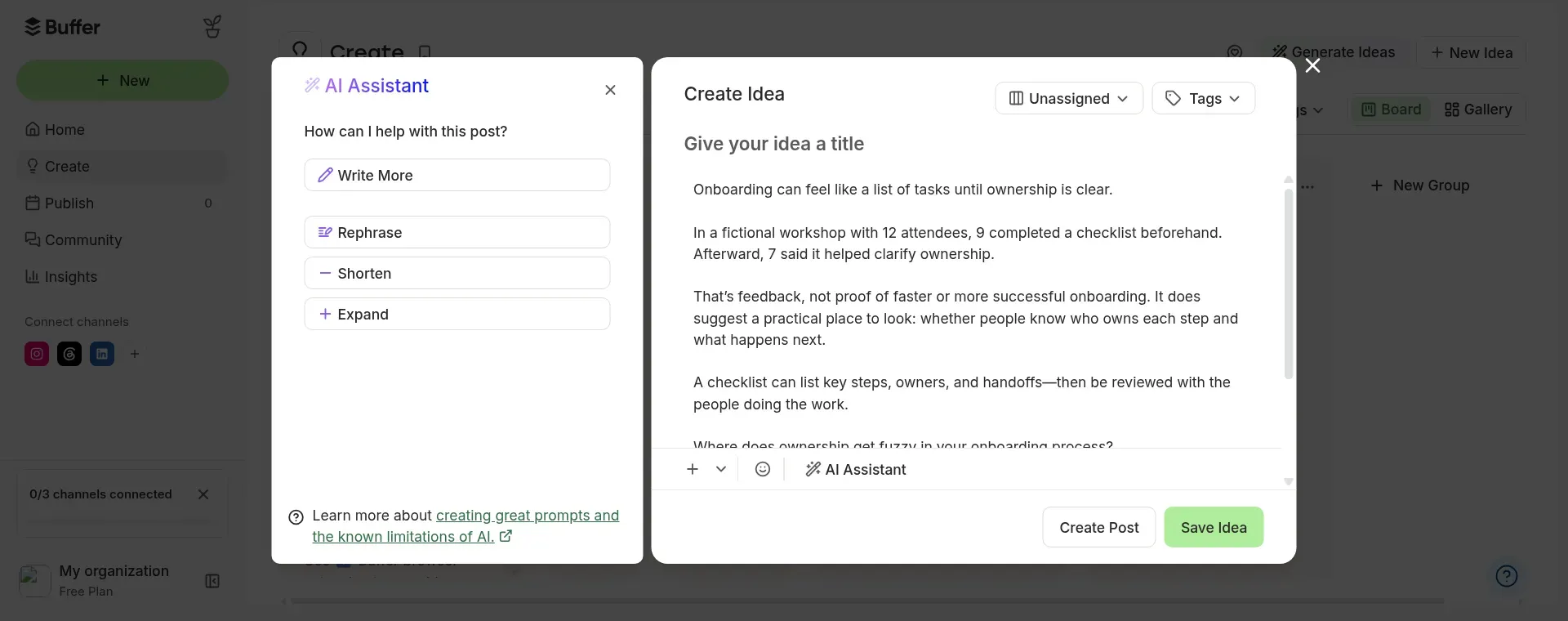
Inside Buffer, I inserted the shortened draft into Ideas with the workshop counts and feedback caveat intact.
Buffer AI Assistant pros
Buffer AI Assistant includes its writing controls on Free, so I could try the editor before choosing a publishing plan.
-
Unlimited AI credits on Free
-
Ideas works before you connect a channel
-
Rephrase, Shorten, Expand, and tone controls
Buffer AI Assistant cons
-
Free allows one user
-
Ideas needs explicit LinkedIn context
-
Long responses sit in a narrow scrolling panel
Buffer kept the supplied counts and the distinction between feedback and business results in my first draft. Buffer's factual restraint is useful when you're writing about a small piece of work and don't want the editor to inflate it into a success story. The tone controls and shorter/longer options also make small changes easy to request.
Ideas isn't assigned to a social channel, though. I had to ask for a LinkedIn post explicitly. For a precise revision, I reopened the prompt and pasted the previous draft with my new instructions. Someone handling occasional posts can work that way; someone writing for several executives may prefer saved context for each author.
Things I Noted — Buffer AI Assistant
Buffer AI Assistant's Shorten preset returned 99 words without receiving a numerical limit. When I separately requested 90 words or fewer, the new generation returned 86 words while retaining the counts. I like having both routes: a quick trim when length is flexible, and an explicit instruction when the post has to fit a limit.
Buffer AI Assistant pricing
Buffer AI Assistant is included on Free, which allows one user, three channels, and 100 ideas. Essentials adds publishing capacity; Team adds unlimited members and approvals. Buying a publishing plan doesn't improve the free writer's allowance.
Buffer AI Assistant pricing: Free with unlimited AI credits; Essentials from $5/channel/month and Team from $10/channel/month, billed annually.
2. MagicPost: a dedicated LinkedIn editor from $39/month, billed annually
MagicPost puts source material and targeted AI edits close together. But the trial draft added details I hadn't supplied. It kept the workshop counts, then invented an explanation about overlapping responsibilities and treated positive respondents as people who completed the checklist.
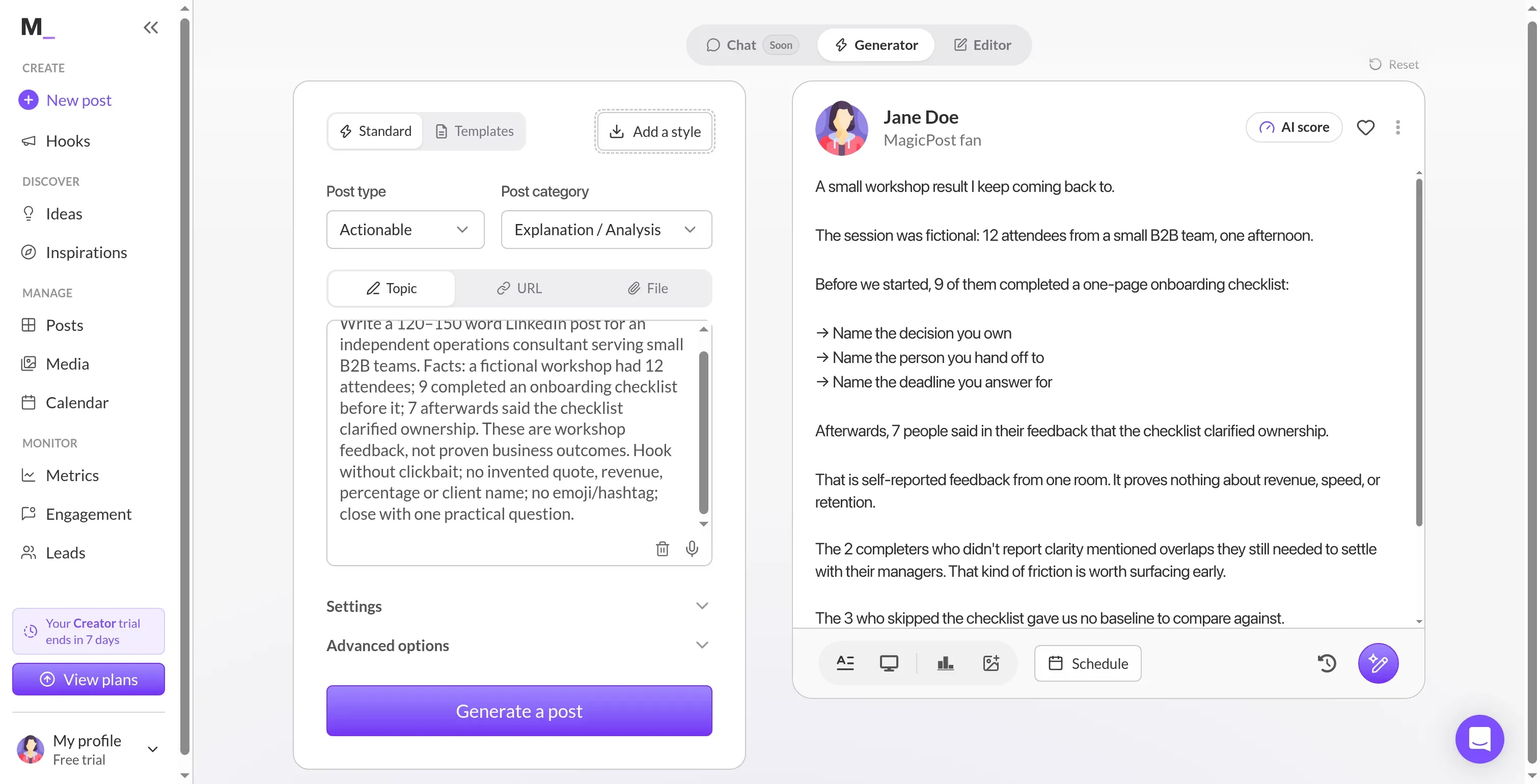
Inside MagicPost, I could compare the prompt with the draft, including participant feedback absent from my brief.
MagicPost: Where it falls short
-
Growth doesn't include AI generation
-
My sample added unsupported participant feedback
-
Paid purchases are nonrefundable under its terms
I started the Creator trial without a card and skipped the LinkedIn connection. The source prompt stayed on the left, with a post preview on the right. That arrangement made the added story easy to spot, and it gave me a reason to keep the brief open while editing.
The generator accepts a topic, URL, or file. You can choose a post type and category, add a style input, and request a specific change through Edit with AI. Its writing settings also support a style imported from a LinkedIn profile. Use examples of your own work: a familiar rhythm is useful, but somebody else's experience shouldn't appear under your name.
Eva Santos's April 8, 2026 Trustpilot review called out a similar irritation: “Sometimes the post writer is a little corny.” She still valued the time saved and the calendar, engagement, and metrics tools. Her account puts the calendar and editing workspace alongside the writer in the buying decision.
Things I Noted — MagicPost
MagicPost's AI edit panel returned a 94-word revision after I requested 90 words or fewer. It removed the invented two-person complaint but retained other added details. I wouldn't treat targeted edits or Undo as a substitute for comparing the edited text with the original brief.
MagicPost pricing
MagicPost pricing: Creator costs $69 monthly or $39/month billed annually. A no-card trial is available. Paid purchases are nonrefundable.
MagicPost Creator includes unlimited post generation. The seven-day trial shown in my account had a limited generation allowance, so the trial balance and paid plan need separate reading. Agency and Team start at two seats and add separate account workspaces; the team calculation appears in the workload section.
3. Supergrow: stored voice context from $31/month, billed annually
Supergrow stores an author's identity, voice, audience, and content themes in Content DNA. That can save repeated briefing, but the profile needs useful source material before it can shape a draft worth publishing.
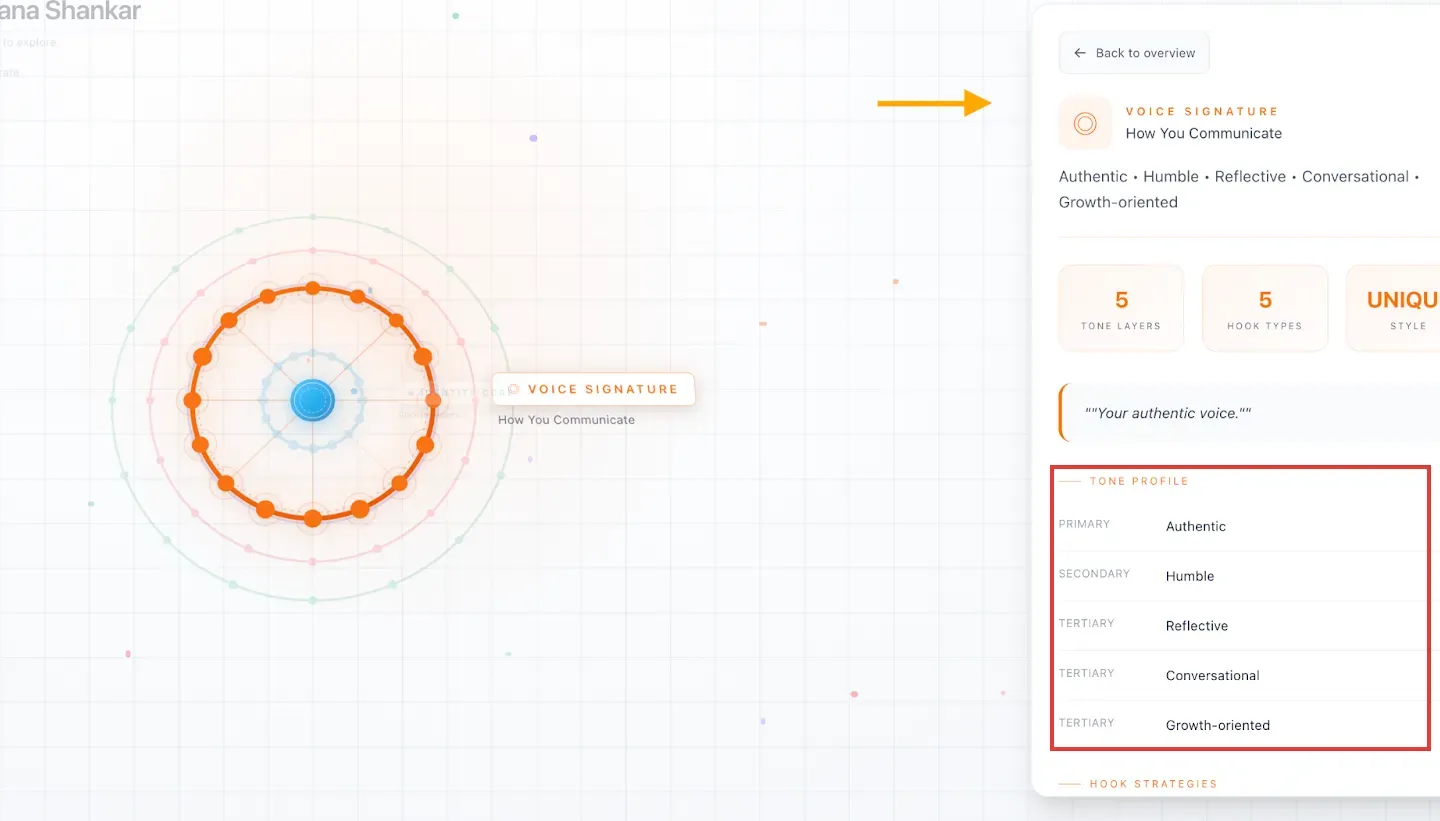
Inside Supergrow, Voice Signature separates a primary tone from supporting tones. This annotated vendor example shows saved context. (Image source: Supergrow)
Supergrow: Where it falls short
-
Teams includes five accounts even if you need three
-
A voice profile needs useful source material
-
Unlimited interviews leave the broader generation allowance unclear
Postcast gathers ideas through an interview, while Content DNA holds the context used for writing. For someone who explains their work more easily aloud, the interview supplies a starting point. I wouldn't buy it for an occasional paragraph from notes already written. The distinction is practical: an interview collects material, and a voice profile organizes how that material should sound.
For a team, separate author context is more consequential than another tone selector. Teams adds member-specific Content DNA, feedback and approvals, and shared organization controls. An editor can work with each person's examples instead of maintaining a single generic company voice. Pro also brings repurposing from articles, YouTube, and PDFs into the workflow.
The interview still needs factual review. A detailed account of a project gives the generator more to work with, including more opportunities to infer relationships you never stated. Check the output against the source, especially when the draft turns a participant's comment into an outcome for the whole group.
Supergrow pricing
Supergrow pricing: Pro costs $39 monthly or $31/month billed annually for one account; Teams costs $199 monthly or $189/month billed annually for five accounts and workflows for member approval.
Supergrow's pricing page says an unselected plan pauses after the trial; its terms allow a selected trial plan to convert to paid. Read the plan and billing choices in your account before relying on the promise of a free trial. Pro's advertised unlimited Postcast interviews also leave a separate question about the allowance for other writing actions.
4. Taplio: inspiration and credit-metered writing from $49/month, billed annually
Taplio combines an inspiration library with writing tools. But its public Post Booster turned my fictional brief into a claim about work I'd personally done. After a revision restored the fictional label, unsupported consulting experience remained in the draft.
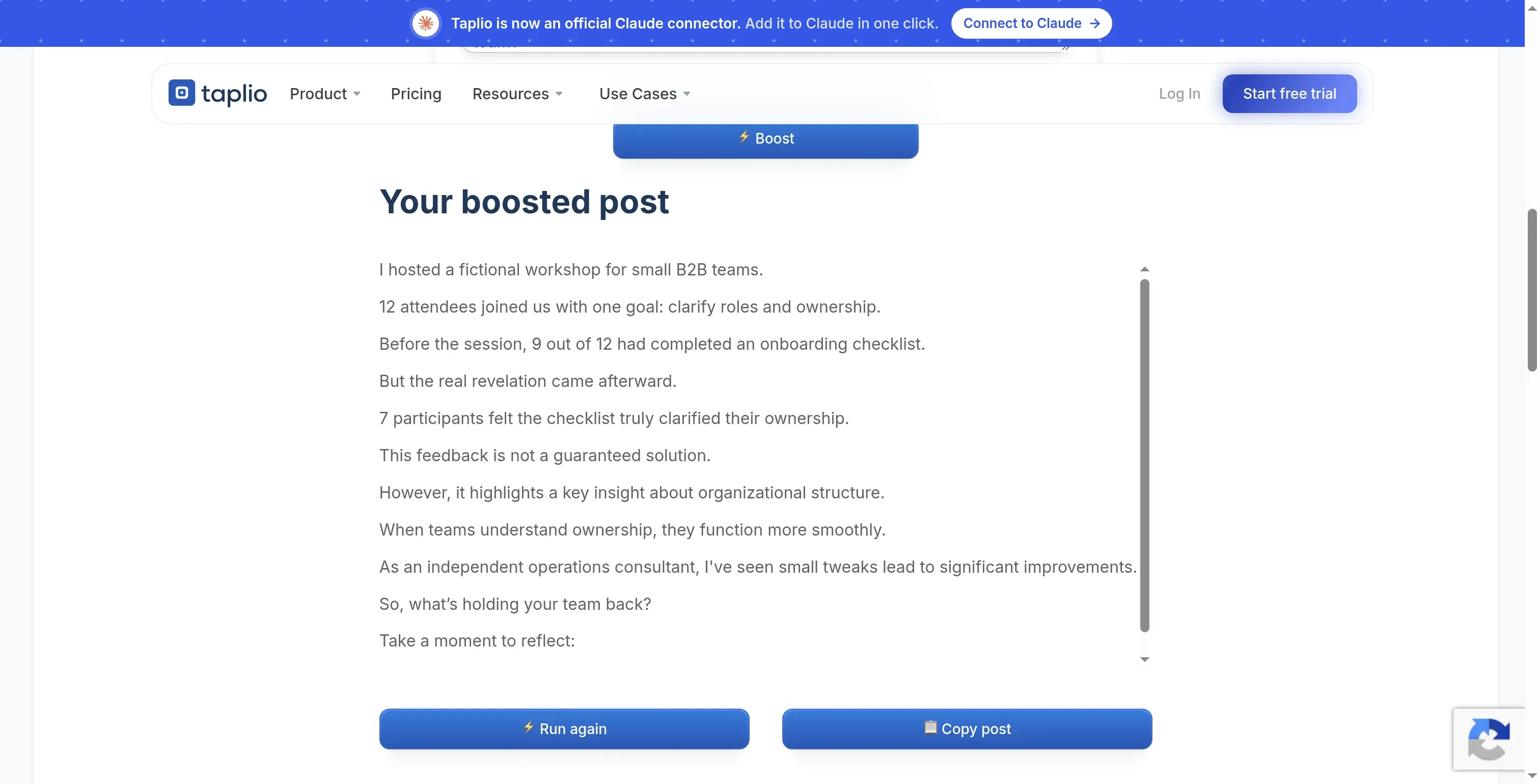
Inside Taplio's separate public Post Booster, the revised text restored the fictional label but still needed factual and length editing.
Taplio: Where it falls short
-
Growth costs more than the scheduling entry plan
-
Hooks, edits, and replies share Expert credits
-
Trial billing needs attention before conversion
The Post Booster starts with a rewrite field. I gave it the workshop brief and later asked for a shorter, explicitly fictional version. The first response had 130 words; the revision had 108. That left both a length edit and a source check before the text could be used.
The paid writer's allowance takes some care to budget. Growth includes 250 Expert-mode credits monthly. A generation, rewrite, hook, AI Edit message, or reply uses one, and the writer switches to unlimited Faster mode after Expert credits run out. If you expect a lot of back-and-forth editing, count the conversation as well as the finished posts.
The inspiration library supplies formats and angles, then the writing tools help turn your idea into a draft. I'd skip it for someone who already knows what to write and only needs text to copy into LinkedIn. The wider subscription buys work they may never use.
Alexander's May 20, 2026 Trustpilot review reported support refunding an annual charge after a cancellation problem: “The customer support was extremely helpful when I explained the situation.” That outcome is useful context, but complete cancellation in Billing before a trial or subscription renews.
Taplio pricing
Taplio pricing: Growth costs $69 monthly or $49/month billed annually; Pro starts at $149/month billed annually with unlimited AI.
Taplio offers a seven-day trial, and its pricing FAQ gives a 30-day window after payment to request a refund. Check renewal in the account rather than assuming that leaving the editor ends the subscription.
5. SocialPilot AI Assistant: Best for multichannel team writing
SocialPilot AI Assistant fits teams that already write and review content across several networks. AI Pilot sits beside the composer, where you can generate, rewrite, translate, or adapt text without handing the draft to another writing tool.
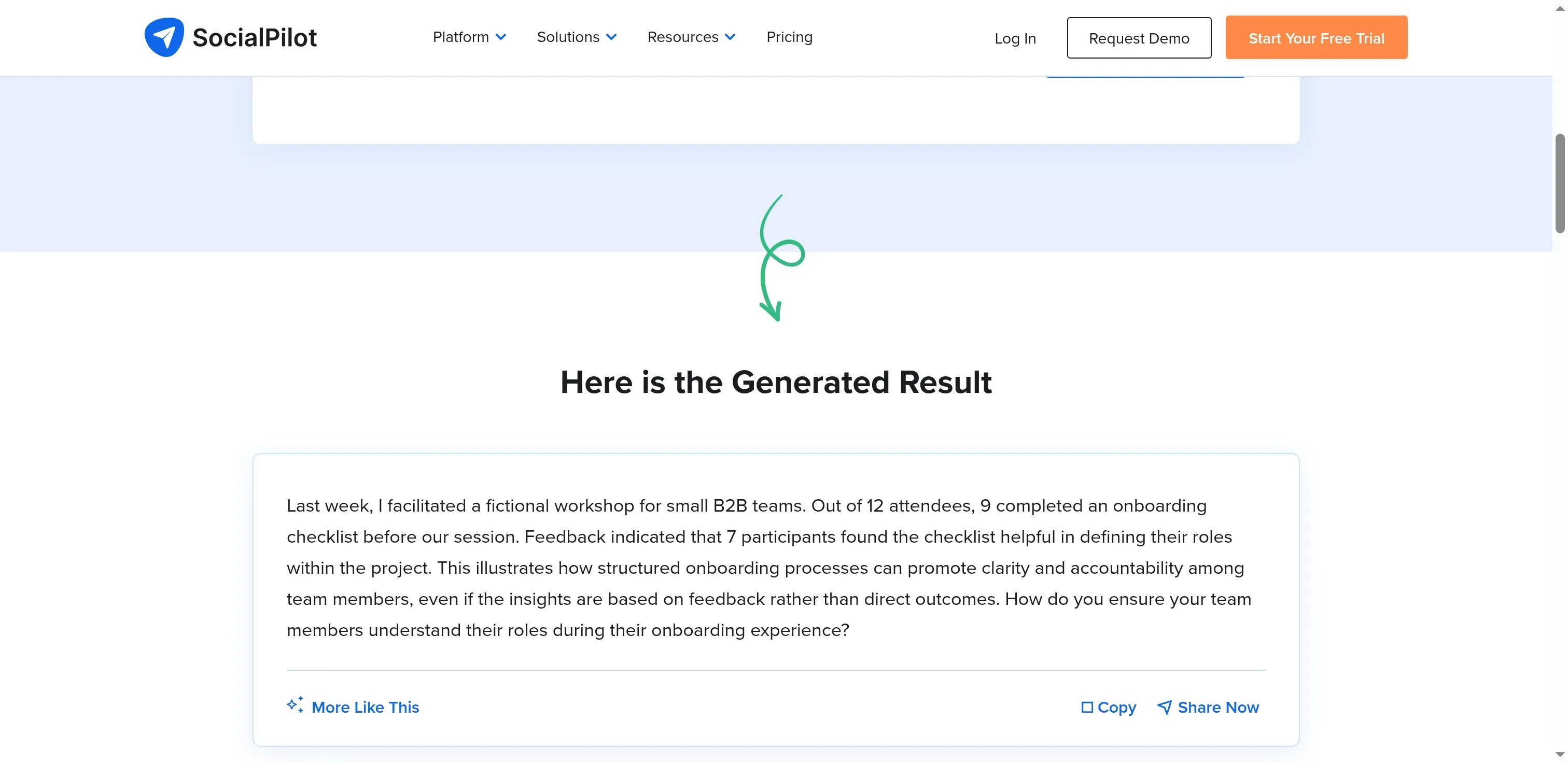
SocialPilot's free generator restored the fictional framing in its revision but kept an unsupported reference to the previous week.
SocialPilot AI Assistant pros
SocialPilot AI Assistant keeps writing beside the publishing workflow, with internal review controls available on Standard.
-
AI Pilot sits beside the composer
-
Standard includes three users and internal approvals
-
Platform rewrites and selected-text edits
SocialPilot AI Assistant cons
-
Rewriting and tone changes consume credits
-
Earlier sidebar generations aren't retained
-
Annual subscriptions are nonrefundable under its terms
SocialPilot's separate free generator kept all the workshop counts in a 105-word draft, but it dropped the fictional framing, added hashtags, and claimed the event happened the previous week. My more explicit correction request returned 79 words and removed the hashtags. But the invented timing and project claim survived.
For paid AI Pilot, copy or insert a useful result before closing the sidebar or generating again. Its guide says previous outputs aren't retained. The public page kept both of my results, so a successful public-tool experiment won't teach you that paid-editor habit.
Generating, rephrasing, changing tone, translating, and adding hashtags all consume credits. How many changes will your team make between the first draft and approval? Include those changes in a trial brief rather than budgeting as if every credit produces a finished post. A tone selector also gives you less author-specific context than a separate saved profile.
SocialPilot AI Assistant pricing
SocialPilot AI Assistant pricing: Essentials is $17/month, Standard $34/month, and Premium $85/month, billed annually. A fourteen-day no-card trial is available. Annual purchases are nonrefundable.
SocialPilot Essentials includes one user, five social accounts, and 500 AI credits. Standard adds internal approvals, while Premium adds client approvals. I like the internal review controls for a team already publishing across networks. The account capacity will largely sit unused for a solo writer who only needs LinkedIn text.
AI LinkedIn post generator costs depend on drafts, revisions, and author context
Buffer AI Assistant has the lowest subscription cost for a solo copy-out workflow; paid tools have to justify their bill through editing controls or saved context. The following calculations use the checked list prices, annual upfront billing where specified, and USD before tax.
Buffer, MagicPost, and Taplio: one author publishing 12 posts a month
Buffer Free has no subscription charge; the subscription comparison gives the annual totals for MagicPost Creator and Taplio Growth at this workload. Allow up to three writing actions per finished post: 36 monthly, or 432 yearly. Publishing and a stored voice profile are outside this scenario.
These annual subscription totals compare the three plans, with their different allowances kept explicit.
| Tool | Plan | Annual subscription | What the allowance covers |
|---|---|---|---|
| Buffer AI Assistant | Free | $0 | Unlimited AI; supply your own context |
| MagicPost | Creator, annual | $468 | Unlimited post generation |
| Taplio | Growth, annual | $588 | The planned text actions fit the monthly Expert pool; other AI work shares it |
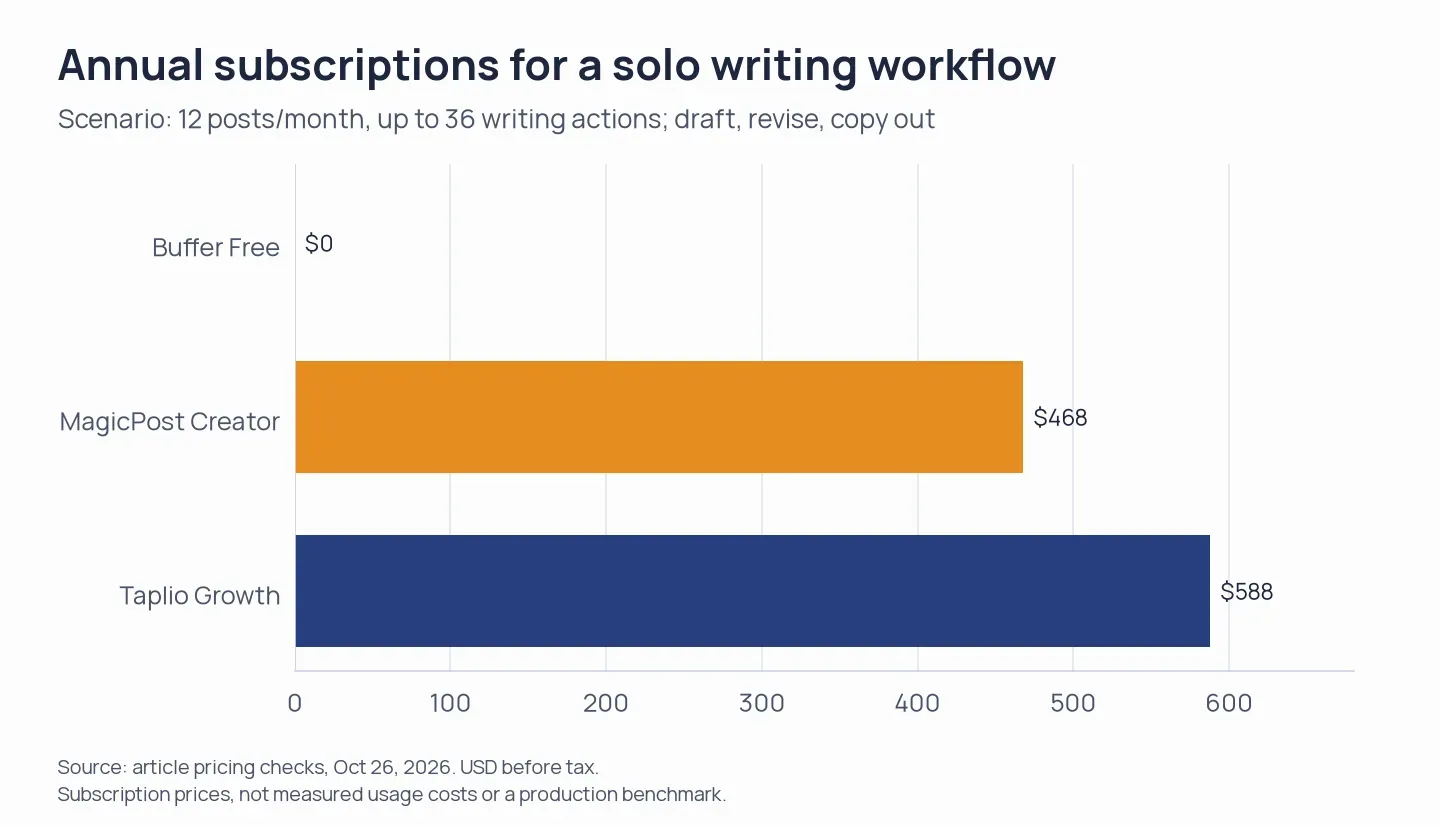
Annual subscription prices for the solo workflow, using the October price check. The chart compares subscription charges; the table keeps the different allowances explicit.
Check Supergrow's total writing-action allowance and SocialPilot's per-action debit before adding either to this calculation. MagicPost's unlimited post generation covers generating drafts; a separate edit-action cap would need its own check. These totals price subscriptions rather than measured production over a year.
MagicPost and Supergrow: 40 posts with reusable voice context
Supergrow Pro costs $372 annually for this scenario; MagicPost Creator uses the Creator annual subscription in the solo-workflow comparison. Both combine generation with stored writing context, the additional requirement at this workload. Three actions per post mean 120 monthly actions; a saved prompt elsewhere changes the workflow being compared.
Supergrow's broader generation allowance remains a purchase-time check. Taplio has credit headroom for the planned text actions, but saved author context is a separate requirement. Buffer and SocialPilot can use a reusable brief you maintain elsewhere.
Supergrow and MagicPost: three authors with shared approval
Supergrow Teams costs $2,268 annually; MagicPost Team costs $2,124 for three seats paid monthly over a year. Both provide separate author contexts and a review workflow. For three authors producing 12 posts apiece, allow 108 writing actions monthly; confirm the relevant action allowances before treating a subscription total as the whole production budget.
The team calculation prices accounts and the approval workflow. MagicPost uses monthly billing because its displayed annual monthly rate is rounded.
| Tool | Configuration | Annual subscription calculation | Capacity |
|---|---|---|---|
| Supergrow | Teams, annual | $2,268 | Five accounts, member voices, and approvals |
| MagicPost | Team, three seats, monthly billing | 3 × $59 × 12 = $2,124 | Separate contexts and team workflow |
If you keep author briefs outside the tool, Buffer Team for three channels totals $360 yearly and SocialPilot Standard totals $408. Both provide review controls. Their workflow still differs from storing a separate profile for every author.
Which AI LinkedIn post generator should you choose?
Buffer is my starting choice for occasional LinkedIn posts on a tight budget. SocialPilot makes more sense when several people already manage content for several networks and need an approval handoff.
A dedicated editor has to remove work you currently do by hand. MagicPost brings the source and targeted edits together; Supergrow organizes expertise into reusable author context. Taplio bundles inspiration with the writer. Trial those workflows with an ordinary post before paying for an annual plan, and keep a copy of the original brief so you can identify what the generator added.
Your existing writing assistant may already do enough. Give it your audience, examples of your own work, and the facts it can use. Keep client names and confidential figures out unless you're authorized to share them, and review the service's data controls before uploading interview transcripts. A request for a more casual style should change the wording without borrowing somebody else's credentials or stories.
Check the publishing tool you're already paying for, too. Buffer includes AI on Free, and SocialPilot plans include credits. The wider guide to LinkedIn marketing tools separates writing and publishing from outreach and analytics. LinkedIn's former native AI post writer is no longer available according to its help notice, so buying Premium for that older feature won't solve the writing job.
EasyGen stays outside the main list because its public pricing was unclear and its scheduling statements conflicted. Resolve those points before comparing it with the priced options.
Once your post is ready, consider Linked Helper's Post Booster if you want to mention selected profiles in comments and invite relevant contacts into the discussion.
How we tested
In October 2026, I tested drafting and editing with free and trial AI LinkedIn post generators and reviewed the five products' pricing and documentation. I didn't publish posts live, so I didn't measure their performance on LinkedIn.