
 Updated: October 23, 2026
 27 min read
Every AI SDR vendor sells the same movie: an agent finds the right people, writes the email, answers the reply and drops a meeting on your rep's calendar while you sleep. The products behind that trailer are very different, and the differences show up in three places—how far the agent carries the conversation before a human steps in, what unit you're billed in, and what changes when you'd rather pay by the month than by the year.
I set up free workspaces in HubSpot and Salesforge to see how far each agent goes before the paywall, walked through AiSDR's signup screen and both of Reply's pricing selectors, read the docs and pricing pages for the rest, priced three real workloads against every tool, and read what people running these agents say on Reddit. Linked Helper, which publishes this blog, makes a LinkedIn automation tool and isn't one of the picks.
Here are my picks.
What is an AI SDR?
An AI SDR is software that does a sales development rep's job: it researches prospects, starts the outreach, reads the replies, qualifies interest and arranges the meeting, with a person stepping in at a point you choose. Products differ in how far they carry the conversation and what you're billed for along the way.
The best AI SDR tools at a glance
| Tool | Best for | Standout feature | Starting price | Main trade-off |
|---|---|---|---|---|
| AiSDR | Usage-based outbound | Answers replies, then hands off a scheduling link | $1.50 per person prospected, billed daily | Mailbox and managed services cost extra |
| Reply.io Jason AI | Supervised multichannel outreach | Copilot queue for AI replies | From $500/month, billed annually | Active contacts, not new prospects, set the tier |
| Salesforge Agent Frank | Outbound on mailboxes you already own | Bring your own infrastructure or rent theirs | From $499/month, billed annually | No free trial; infrastructure is separate |
| Artisan Ava | Managed outbound rollout | Banned phrases, locked CTA, escalation rules | Custom | No dollar figure until the sales call |
| 11x Alice | Explicit new-prospect allowances | 2,000 new prospects a month on Growth | From $3,750/month, billed annually | Pricing page contradicts itself |
| Qualified Piper | Website qualification and follow-up | Text, voice and video chat with meeting routing | Custom | Sessions and email contacts both cap you |
| HubSpot Prospecting Agent | Teams already living in HubSpot | Plays with review-or-auto-send per audience | About $1 per lead in credits, plus a paid seat | Doesn't read or answer replies |
What makes the best AI SDR tool?
Some of these agents run the whole conversation from first email to booked slot; others stop after the first draft and hand the thread to a rep. Here's what I looked for.
-
Where the hand-off happens: Does the agent read the reply and answer it, or does it write the first email and leave? An agent that only drafts is a research assistant with a send button, and it should be priced like one.
-
A reply-approval switch: Campaign autopilot and conversation autopilot are separate decisions. I wanted a setting that queues AI replies for a rep's sign-off, not just a toggle that sends follow-ups on schedule.
-
A billing unit you can forecast: A person prospected, an active contact, a website session and a credit all buy different capacity. I priced the same three workloads against every tool so you can see which unit fits your volume.
-
What you can see before you pay: A trial workspace, a public configurator, or nothing but a demo button. The more a vendor lets you click before the call, the fewer surprises on the invoice.
-
What lands in the CRM: Follow one lead to the end. Which qualification answers arrive, who owns the record, and what happens when the assigned rep is out?
-
Guardrails and opt-outs: Banned phrases, escalation rules, and a suppression list that covers the whole workspace. The agent will write thousands of emails; the question is what it's not allowed to say.
If there's a tool you'd expect to see here that isn't, it's either in the "check your existing stack" section or it isn't a pure AI SDR by my criteria.
1. AiSDR: Best for usage-based outbound
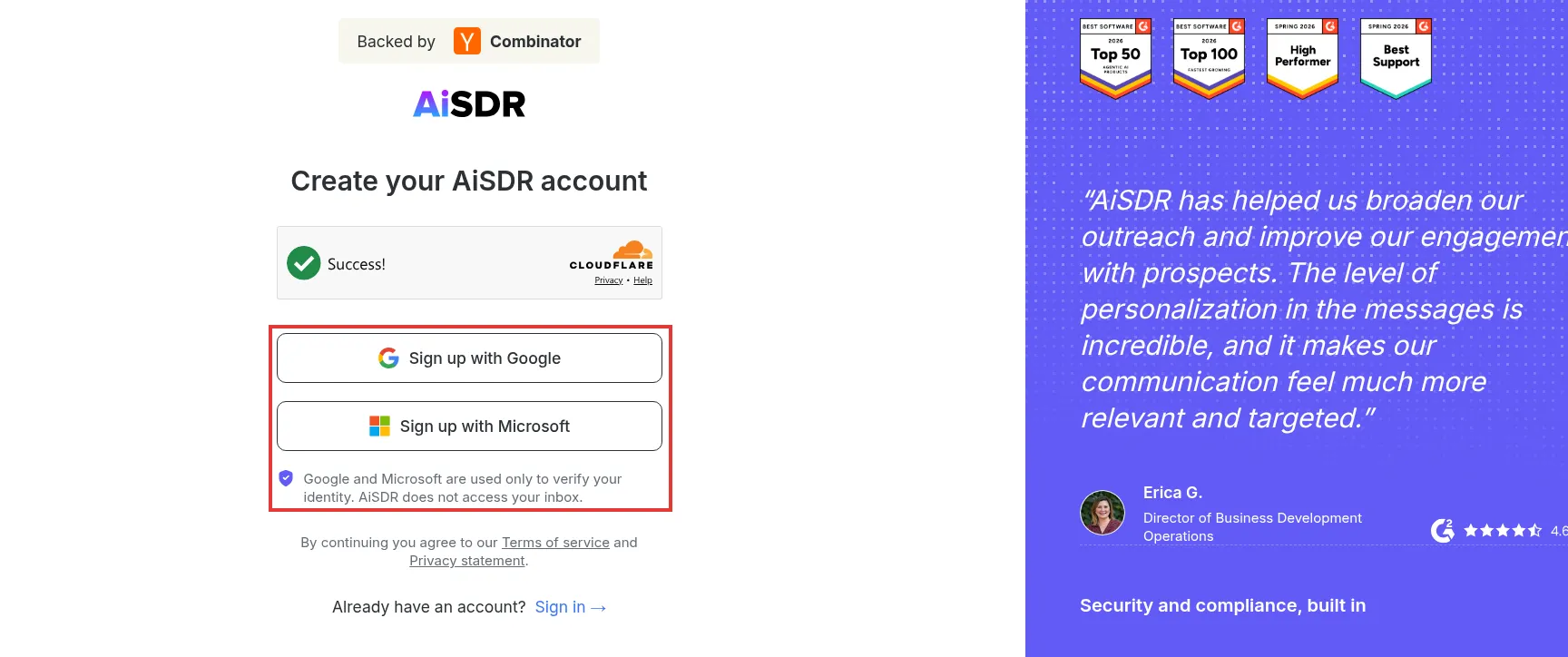
Inside AiSDR's signup, the only way in is a Google or Microsoft login—no email-and-password form, no self-serve trial, and a promise that the login is used only to verify your identity, not to read your inbox. (Image source: AiSDR)
AiSDR pros
-
$1.50 per person prospected, charged daily, with no monthly package to fill
-
Email and LinkedIn touches in one sequence, with a unified inbox
-
Two-way HubSpot sync on the self-serve offer; Salesforce on the team offer
AiSDR cons
-
Signup is Google or Microsoft only, and the Microsoft route wants a work account
-
Warmed-up mailbox costs extra, and the page doesn't say per what period
-
Managed campaigns cost $149 each; the full managed service is $2,500/month
AiSDR is the tool I'd point a small team at if they want a full outbound agent without a contact package they'll never fill. Ami, the agent, finds the prospects, enriches them, writes the email and LinkedIn touches and handles the replies, and you pay for every person it prospects, charged daily. Research, lists and copy cost nothing extra.
The signup page told me who AiSDR expects before I read a word of the docs. You get exactly two buttons, Google and Microsoft, and no email-and-password form; when I tried the Microsoft button with a personal address, it was turned away and asked for a work or school account instead. That's a company-domain product, not something you evaluate from a side-project mailbox on a Sunday, and I'd rather know that from the door than from an invoice.
The part I like most is the hand-off. When a prospect bites, Ami doesn't negotiate a time—it answers questions until it senses interest, then drops a scheduling link and gets out of the way. That's a humbler design than an agent that books a slot itself, and I think it's the right one for a first deployment, because the AI has fewer chances to embarrass you. Switch AI replies off and the conversations wait for you instead.
The catch is everything around the per-person rate. A warmed-up mailbox is $33 extra, and the pricing page never says whether that's per month—the one number I'd settle before the first campaign. Above 1,000 people a month you're into volume terms anyway, and that's where I'd put AiSDR next to Agent Frank's flat pool. Skip it if your list is small and static: paying per person makes sense when the people keep changing.
Things I Noted — AiSDR
Five hundred new people a month works out to $750 in usage, or $9,000 over twelve identical months, before a mailbox or any managed service. That's list price multiplied out, not a quote.
AiSDR pricing
$1.50 per person prospected, billed daily; no self-serve trial.
-
Warmed-up mailbox — $33 extra; the page doesn't say per what period
-
Managed campaign — $149 each
-
Full managed service — $2,500/month
2. Reply.io Jason AI: Best for supervised multichannel outreach
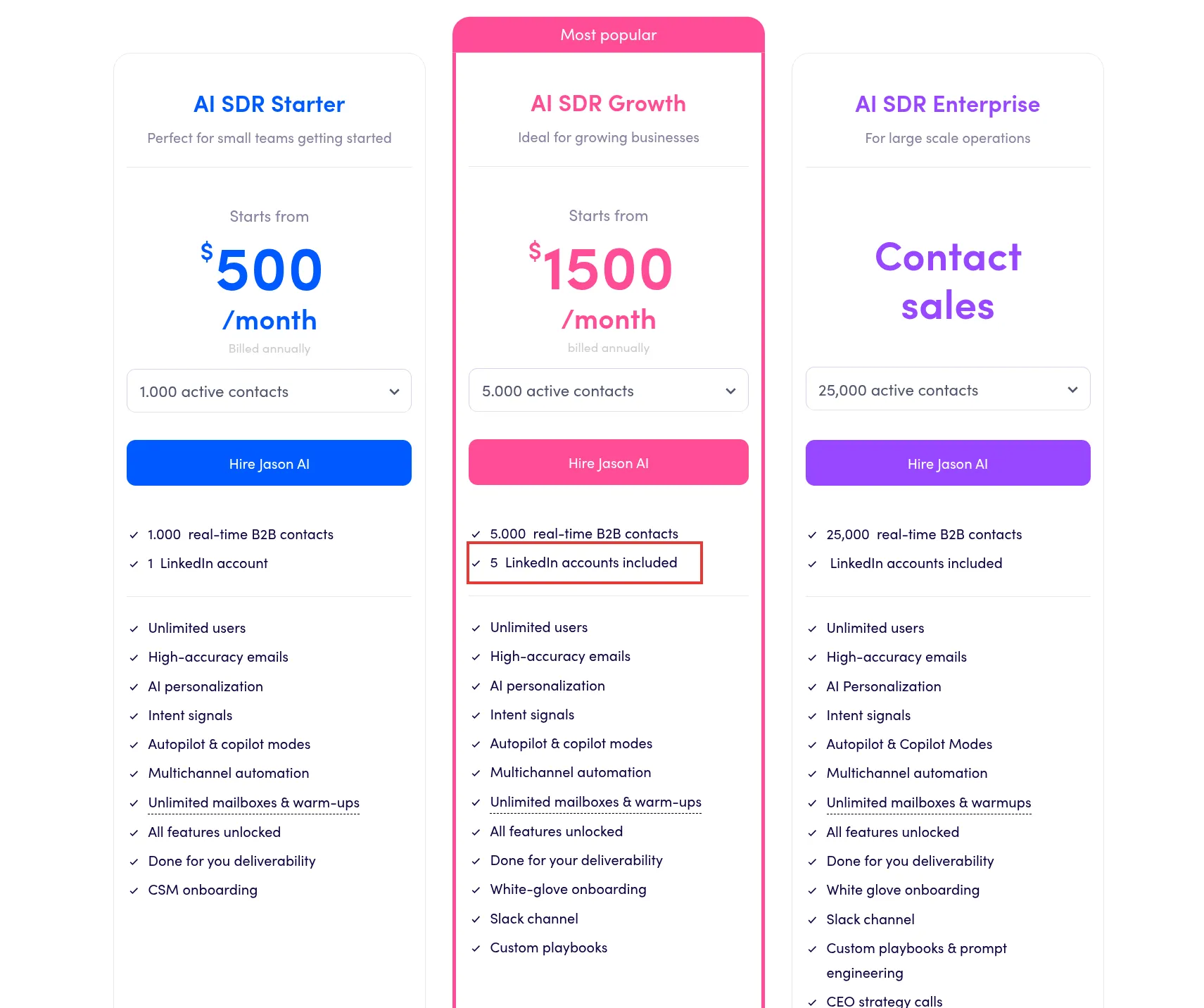
Inside Reply.io's pricing configurator, annual Growth is the only tier that carries five LinkedIn accounts; flip the toggle to monthly and the same plan drops to one. (Image source: Reply.io)
Reply.io Jason AI pros
-
Copilot mode queues every AI reply for a rep's approval
-
Books after the prospect confirms, then handles reschedules and cancellations
-
Unlimited users, mailboxes and warm-ups, even on Starter
Reply.io Jason AI cons
-
Tiers count active contacts, not new prospects per month
-
Monthly billing raises the price and cuts Growth to one LinkedIn account
-
Every button on the pricing page books a sales call; there's no checkout
Jason AI is my pick if you want an agent to run the outbound but you're not ready to let it talk to prospects unsupervised. Reply's agent sources prospects, researches them, writes the sequence, handles replies and books meetings across email and LinkedIn, and the feature page splits each stage into autopilot and copilot.
That split is the detail that matters. The campaign can run on autopilot while every reply waits in a queue for your sign-off: Jason drafts the answer to an objection, and a rep approves it before it leaves. The booking flow is also more specific than most—check availability, propose times, book once the prospect confirms, handle the reschedule. I'd run copilot for the first month and hand over autopilot once you've read a few hundred drafts.
The catch is the tier math: an active contact isn't a new prospect.
Skip Reply.io Jason AI if
-
you want an agent that makes phone calls
-
you count new prospects, not active contacts: a contact stays in the pool while its sequence runs, so the number that matters is how long your sequences take, not how many reps you have
Things I Noted — Reply.io Jason AI
I clicked every call to action on the pricing page—"Hire Jason AI" on the annual view, "Get started" on the monthly one—and each lands on the same sales-call booking page, so budget a demo into your timeline even for the entry plan. Reply is also running SCARY15 through October 31: 15% off a new annual Jason plan, applied by a sales rep and not stackable with another promo. My tables use list prices.
Reply.io Jason AI pricing
From $500/month, billed annually, for the AI SDR Starter plan; no self-serve checkout.
-
AI SDR Starter — $500/month, billed annually — 1,000 active contacts, one LinkedIn account
-
Growth — $1,500/month, billed annually — 5,000 active contacts, five LinkedIn accounts
-
Monthly billing — $800 for Starter, $2,500 for Growth — Growth drops to one LinkedIn account
3. Salesforge Agent Frank: Best for outbound on mailboxes you already own
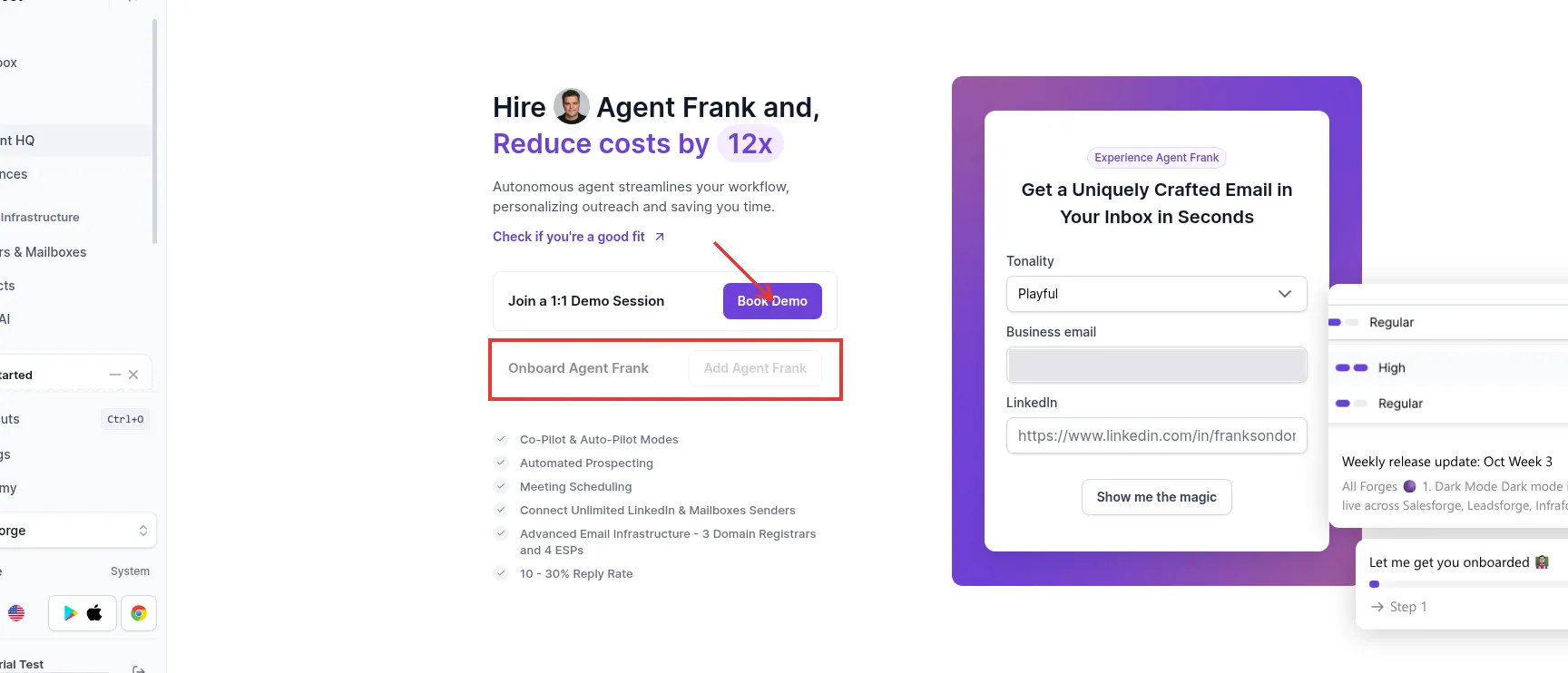
Inside Salesforge, the trial workspace shows you where Agent Frank lives, but the Add Agent Frank button is greyed out and the only live button is Book Demo. (Image source: Salesforge)
Salesforge Agent Frank pros
-
Connect your own mailboxes, or rent Infraforge from $33/month for ten
-
Co-pilot mode lets you accept or edit each piece of Frank's work
-
Public pricing slider from 1,000 to 10,000 active contacts
Salesforge Agent Frank cons
-
No free trial for Frank; the Salesforge trial won't let you hire him
-
Quarterly billing is $599/month
-
Two-week mailbox warm-up before real sending starts
When I first opened a Salesforge trial workspace, I was met with a "Let's get started" checklist—connect infrastructure, start warm-up, find and export leads, launch a sequence—and a sidebar counting down 13 days of trial. No card needed. Agent Frank is the agent I'd pick if you've already spent months warming up domains and mailboxes: Salesforge lets you plug those mailboxes into Frank, and Frank handles prospecting, research, outreach, replies and booking by calendar link, in Autopilot or Co-pilot.
I went straight to AI Agent HQ, where Frank lives, and that's where the trial ends: the "Add Agent Frank" button is greyed out and the only live button is Book Demo. You can read the feature list, but you can't switch him on, and there's no Co-pilot or Autopilot toggle anywhere in the app until you've hired him. The screen I liked most is the mailbox dialog, which lists Primeforge, Infraforge and Mailforge next to Google Workspace, Microsoft 365 and IMAP/SMTP—bring-your-own versus rent-theirs is a real choice here, not a sales-call promise. My one gripe with the trial is the ceiling: 50 contacts and 100 emails, enough to click around and nowhere near enough to learn anything about deliverability.
Co-pilot is where I'd start once Frank is hired. The help doc shows it as a mode where you accept or edit everything Frank proposes—the same approval queue Reply calls copilot—and it turns a scary "autonomous agent" into a fast drafting assistant for the first few weeks.
The catch is that you can't try that first: you book a demo, then pay, and the shortest commitment on the configurator is a quarter, not a month—and infrastructure is separate even when you buy it from Salesforge. Skip Agent Frank if you're a solo founder who wants to send tomorrow; the two-week warm-up alone rules that out. If you're replacing an outbound stack you've already built, it's worth a close look.
Things I Noted — Salesforge Agent Frank
I stress-tested the public pricing slider: 2,000 active contacts is $948/month billed annually ($1,138 quarterly), 5,000 is $2,162 ($2,595) and 10,000 is $3,991 ($4,790), so the per-contact price slides from about $0.50 to about $0.40. The trial's Usage page also prices the human-led Salesforge plans at $48/month (Pro) and $96/month (Growth)—the baseline Frank has to beat. And active contacts are people being processed at any given time, not people added per month: a four-step sequence over six weeks keeps a week-one contact in a slot through week six, so 500 new prospects a month can occupy 750 to 1,000 slots at once. Size the tier to your sequence length, and ask Salesforge how long a finished contact stays "active."
Salesforge Agent Frank pricing
From $499/month, billed annually, for 1,000 active contacts; no free trial.
-
Annual — $499/month — 1,000 active contacts on mailboxes you connect yourself
-
Quarterly — $599/month — the shortest commitment on the configurator
-
Infraforge — from $33/month, billed annually — ten rented mailboxes, domains on top
4. Artisan Ava: Best for a managed outbound rollout
Artisan Ava pros
-
Guardrails: locked tone and CTA, banned phrases, escalation rules
-
Approval before sending, if you want it
-
Bidirectional Salesforce and HubSpot sync
Artisan Ava cons
-
Quote-only; no dollar figure on the pricing page
-
The AI dialer is a per-seat add-on
-
Package size depends on contacted leads, mailboxes and dialer seats
Ava is my pick if you want the vendor in the room for the rollout and you're OK not seeing a price until the call. Artisan bundles sourcing, outreach, reply handling and booking into one managed platform, and sells it in packages sized by how many leads you contact a month: Team around 2,500, Scale around 6,000, Enterprise whatever you negotiate.
What stood out to me is the guardrail list. You can lock the tone and the call to action, ban specific phrases, require approval before anything sends, and write escalation rules for the replies Ava shouldn't touch. That's the set of controls I'd want before letting an agent speak for my company, and most vendors on this list make you ask for them one at a time. If your legal or brand team has opinions about what an email may say, Ava gives you something concrete to hand them.
The trade-off is that a consolidated platform makes Artisan's data coverage in your market the whole bet. If Ava can't find your buyers, the guardrails are moot. This isn't for a solo operator who wants to swipe a card and send this week; it's for a five-rep team that wants someone else to run the machine. When you take the demo, make Ava answer three replies: an interested one, a product question outside the approved material, and a "please stop." That tells you how much work your team keeps.
Artisan Ava pricing
Custom; no dollar figure on the pricing page.
-
Team — sized around 2,500 contacted leads a month
-
Scale — sized around 6,000 contacted leads a month
-
Enterprise — whatever you negotiate
-
AI dialer — per-seat add-on
5. 11x Alice: Best for explicit new-prospect allowances
11x Alice pros
-
Growth includes 2,000 new prospects a month and up to five users
-
Managed Gmail infrastructure, onboarding and bidirectional CRM sync included
-
Handles objections and escalates sensitive replies
11x Alice cons
-
The Growth page's plan card and its FAQ disagree on the annual price
-
Pro (5,000 prospects, ten users) is custom-priced
-
The dialer is rep-led; Alice doesn't make voice calls
Alice is the only outbound agent here that tells you, in plain numbers, how many new people it'll go after each month, and that's the number most buyers actually want. Growth covers 2,000 new prospects a month for up to five users, with managed Gmail infrastructure, onboarding and CRM sync in the box. Pro lifts that to 5,000 prospects and ten users.
I like a new-prospect allowance a lot more than an active-contact pool. "Two thousand new prospects" maps straight onto a monthly acquisition target; "one thousand active contacts" makes you guess at occupancy. Alice's workflow runs from account research through email and social outreach, reply interpretation, objection handling and escalation, with meeting scheduling included in the price. For a team that plans outbound by quota, this is the easiest tool on the list to size.
The catch is a Growth pricing page that disagrees with itself, and a plan that fits a five-rep team but has no public price at all.
What the same team really pays per year
-
Growth, plan card → the monthly price billed annually comes to $45,000 a year
-
Growth, FAQ on the same page → starts at $36,000 a year; that's a $9,000 gap on one URL, so get the figure that applies to you in writing before you compare 11x with anyone else
-
Pro → custom; my five-rep scenario of 2,500 new prospects a month needs Pro, because Growth doesn't cover it
Skip 11x Alice if
-
you want an AI that talks on the phone—the rep-led dialer isn't one
-
you're shopping for Julian, a separate 11x product; keep the products straight, Alice does outbound
Expect a tuning period before any of that pays off. Two 11x customers on r/SaaS show the range:
"It took some tuning at the beginning but once it was dialed in the pipeline activity became pretty steady."
— u/Massive_Airport_993, r/SaaS, March 18, 2026.
"the lead sourcing seems to be on point. Very little responses mostly asking to be removed from the list"
— u/Head_Ad_2, r/SaaS, November 8, 2024. That user supplied their own email copy and ran the campaign in Germany; a March 2025 follow-up was still disappointed.
Put the two together and you get the buying question for every tool here: sourcing, clicks and activity can all coexist with weak sales outcomes, so judge a pilot on qualified conversations in your segment, not on volume.
11x Alice pricing
From $3,750/month, billed annually, for the Growth plan; Pro and Enterprise are custom.
-
Growth — $3,750/month, billed annually (the same page's FAQ says Growth starts at $36,000 a year) — 2,000 new prospects a month, up to five users
-
Pro — custom — 5,000 new prospects a month, ten users
-
Enterprise — custom
6. Qualified Piper: Best for website qualification and follow-up
Qualified Piper pros
-
Text, voice and video conversations on your site, with meeting routing
-
Proactive email sequences for prospecting, re-engagement and event follow-up
-
Premier covers 250,000 web sessions and 2,500 active email contacts a month
Qualified Piper cons
-
Quote-only on every plan
-
Two caps to watch: web sessions and active email contacts
-
Agent handoff and Salesforce sandbox access are Enterprise features
Piper is the pick when leads are already showing up and nobody's talking to them fast enough. Qualified's agent greets website visitors in text, voice or video, answers their questions, qualifies them and routes the meeting to the right rep, using the sales systems you already run.
The feature I'd lean on is the follow-up email. Piper also runs proactive email sequences—prospecting, re-engagement, event follow-up—but inbound is where it earns its keep, and the event use case is the one I'd test first in a demo: a thousand badge scans the week after a conference is exactly the job a human SDR team hates. That's how one Qualified customer runs it. u/throwawaysalad42069 laid out their setup on r/SaaS on June 6, 2025: "we mainly use it for event follow up and demo requests. we let our SDRs handle the prospecting with some AI tools that support them." That's the pattern I'd copy—give the agent the follow-up, where speed matters and the context is known, and keep humans on net-new prospecting until the agent earns it. Don't mistake Piper for a prospect database, though. It works the people who arrive and the contacts you hand it.
The trade-off is that you're buying two capacities at once. Premier lists 250,000 monthly web sessions and 2,500 monthly active email contacts, and the quote depends on both; a thousand new leads a month is not a thousand sessions, and a long nurture sequence eats the email allowance the same way active contacts do elsewhere. Enterprise raises both caps and adds agent handoff and Salesforce sandbox access. If outbound sourcing is your bottleneck, skip Piper and go back to the top of the list.
Qualified Piper pricing
Custom; quote-only on every plan.
-
Premier — sized around 250,000 monthly web sessions and 2,500 monthly active email contacts
-
Enterprise — raises both caps — agent handoff and Salesforce sandbox access
7. HubSpot Prospecting Agent: Best for teams already living in HubSpot
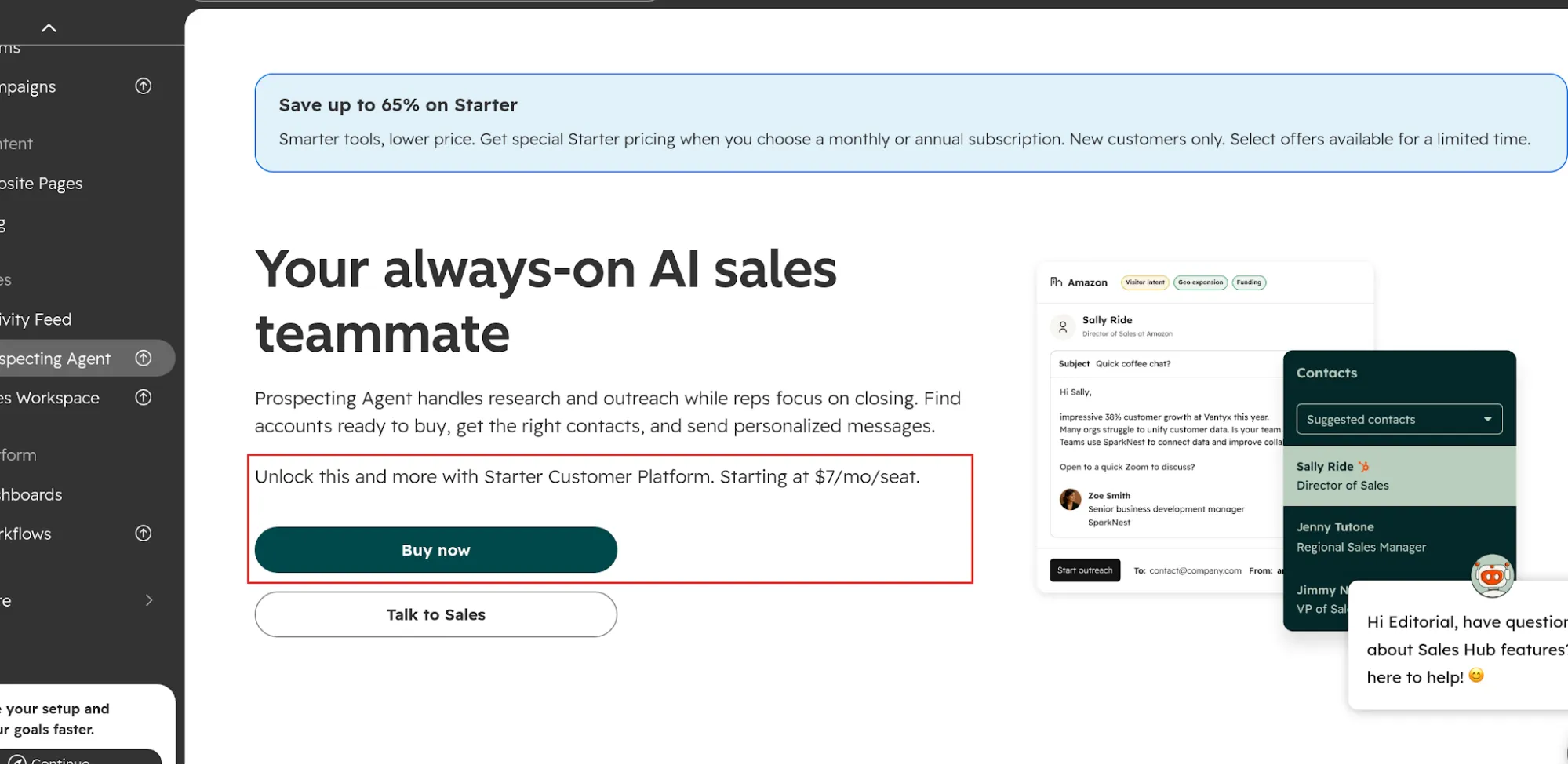
Inside a free HubSpot workspace, the Prospecting Agent page is an upgrade page: the buttons are Buy now and Talk to Sales, and the only price on it is a new-customer Starter offer. (Image source: HubSpot)
HubSpot Prospecting Agent pros
-
Uses the CRM records you already have, with no second data sync
-
Plays let you choose review-before-send or auto-send per audience
-
One outreach recommendation costs 100 credits, on a public credit catalog
HubSpot Prospecting Agent cons
-
Needs a paid seat; the free CRM shows an upgrade wall
-
Recommends outreach and shares a meeting link; your reps handle replies
-
Editing a play doesn't touch contacts already enrolled
I set up a free HubSpot workspace to try the Prospecting Agent, and the first thing I hit was an upgrade wall: it sits behind a paid Sales Hub seat, Starter and up, not the free CRM. The gate itself is honest—Buy now, Talk to Sales, and a "starting at $7/mo/seat" new-customer offer that covers the seat, not the agent's credits. That tells you who it's for. If your pipeline already lives in HubSpot, the gate is cheap and the agent gets everything the CRM knows about a contact. If it lives elsewhere, don't come here for the agent alone.
The part I like is the play. You define an audience, the selling context, the outreach and the guardrails once, then decide per play whether emails wait for a rep's review or go out on their own. That's the same copilot/autopilot split Reply and Salesforge sell as a headline, and here it's a dropdown.
The catch is scope. The agent researches a lead and drafts the outreach, and it can drop in your meeting link, but it doesn't read the reply or negotiate a time. Your reps still own the conversation. The credits buy one outreach recommendation, not a meeting, and you're paying for Sales Hub on top—so count the rep hours before you compare it with a full agent's seat.
Things I Noted — HubSpot Prospecting Agent
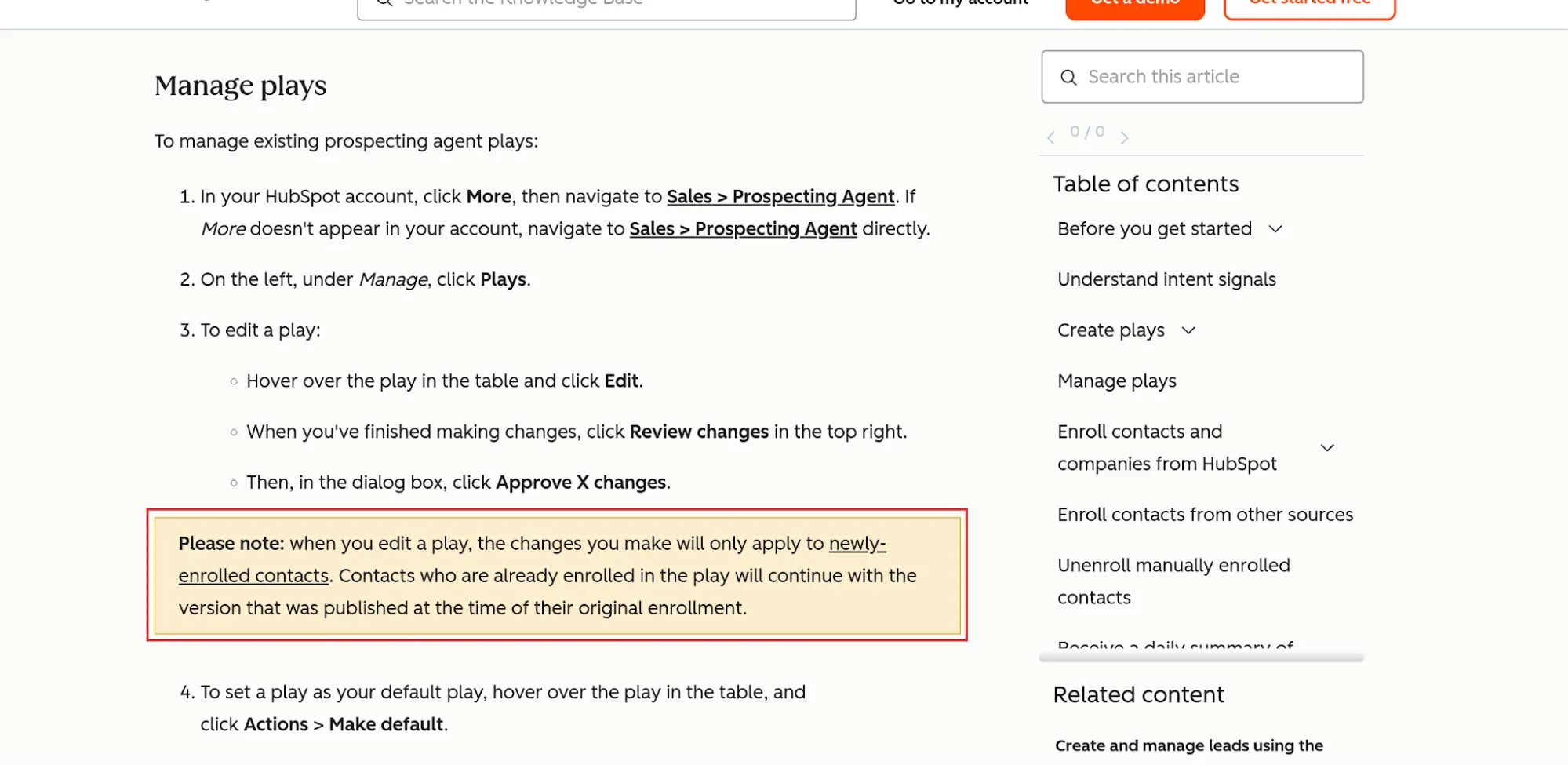
Inside HubSpot's play settings guide, the note that matters: edits apply to new enrollments only, so contacts already in flight keep the old version. (Image source: HubSpot)
One easy trap to fall into with HubSpot's plays: if you fix a messaging problem mid-campaign, the contacts already enrolled keep running the old version, so review existing enrollments as part of any edit. The per-lead figure in my tables assumes the conventional credit catalog, not the flexible seats-and-credits rate sheet.
HubSpot Prospecting Agent pricing
About $1 per lead in credits, plus a paid seat; not in the free CRM.
-
Seat — Sales Hub Starter or above — unlocks the Prospecting Agent page
-
Credits — 100 per outreach recommendation; extra credits at $0.01 each, about $1 per lead beyond your included allowance
-
Flexible seats-and-credits terms — a different rate sheet
What the same workload costs
The cheapest tool on this list changes depending on which workload you run through it, so I priced three. These are list prices multiplied out, before tax, not quotes, and they cover the subscription or usage line only.
One operator: 500 new prospects a month
| Tool | Plan | Annual cost | What still sets the real budget |
|---|---|---|---|
| AiSDR | Pay as you go | $9,000 (6,000 people × $1.50) | One chargeable event per new person; mailbox and optional management on top |
| Reply.io Jason AI | AI SDR Starter | From $6,000, billed annually | 1,000 active contacts must hold overlapping sequences; data allowance and infrastructure |
| Salesforge Agent Frank | Entry, 1,000 active contacts | $5,988, billed annually | Infrastructure is separate |
| Salesforge Agent Frank | Entry plus base Infraforge | $6,384 subtotal | Assumes the ten-mailbox package fits; domains on top |
| Artisan Ava / 11x Alice | Quote | Custom | Artisan lists no dollar price; 11x's Growth page carries two annual figures |
I wouldn't pick Agent Frank over AiSDR just because $5,988 is less than $9,000. One figure buys a 1,000-slot pool you have to keep draining; the other buys people prospected, full stop. Short sequences and a fast-turning list make Frank's pool the bargain; long, slow sequences fill the pool and make AiSDR's meter look honest.
Five reps: 2,500 new prospects a month with CRM sync
| Tool | Plan | Annual cost | What decides eligibility |
|---|---|---|---|
| AiSDR | Team | Custom | Volume terms above 1,000 people a month, five-user access, your CRM |
| Reply.io Jason AI | Growth | From $18,000, billed annually | 5,000 active contacts and unlimited users; occupancy and data allowance |
| Salesforge Agent Frank | 5,000 active contacts | $25,944, billed annually | $2,162/month on the public slider; infrastructure separate |
| Artisan Ava | Team | Custom | Sized around 2,500 contacted leads; exact allowance and users to settle |
| 11x Alice | Pro | Custom | Pro's 5,000 new prospects cover the target; Growth's 2,000 don't |
The number that matters here is occupancy. If 2,500 new contacts a month stay active for roughly two months, you're sitting on about 5,000 slots at the peak—exactly Reply's Growth ceiling, with no headroom. Real peaks depend on launch timing, replies and pauses, so I'd treat 5,000 as the floor for this workload, not a comfortable fit. Frank's 5,000-contact tier costs more than Reply's for the same pool, but it's the only one of the two with a public price for the next step up: 10,000 contacts at $3,991/month. 11x's Pro tier sidesteps the question by counting new prospects instead.
Inbound: 1,000 new leads a month routed to five reps
| Tool | Plan | Annual cost | Inputs you need before comparing a quote |
|---|---|---|---|
| Qualified Piper | Premier or Enterprise | Custom | Total web sessions, active email-contact overlap, five-rep routing, qualification fields, CRM, implementation |
One thousand leads is not one thousand website sessions; the visitors who never fill a form still count toward the session cap. Keep this quote away from the outbound tables—it buys a different workflow and measures capacity differently.
For a HubSpot account on the conventional credit model, one outreach recommendation per lead is 50,000 credits a month in the solo scenario and 250,000 in the team scenario—$500 or $2,500 a month at the extra-credit rate, before included credits and excluding the subscription. Cheap per lead, but it's a different product.
Check your existing stack first
Before you buy a seventh tool, check what the ones you already pay for can do. None of these four enter my count of seven.
-
Regie.ai: The current workspace bundles agents, research, outreach and calling tools, with Free, Pro and Team plans; Team adds shared workflows and integrations. Map what the credits buy and what your reps still do before comparing its seat price with a full outbound agent.
-
Salesforce Agentforce: Prospecting and engagement are separate agents. Check which one your account includes and its usage model before assuming it covers sourcing to booking.
-
Salesloft: Its agents help with research, buyer identification, prioritization and email tasks. An existing subscription may cover part of the job without giving you an autonomous sourcing-to-booking workflow.
-
Linked Helper: Our own LinkedIn automation product, and the reason this blog exists. It runs LinkedIn workflows and it isn't an AI SDR. Use it when LinkedIn execution is the task; don't expect the full agent workflow above.
Related reading:
Which AI SDR tool should you choose?
| How I would choose |
|---|
| If you want to pay per person and keep the bill tied to volume, pick AiSDR. If you'd rather approve every AI reply before it goes out, pick Reply.io Jason AI or Salesforge Agent Frank and run copilot until you trust the drafts—Frank if you already own warmed-up mailboxes, Jason if you want unlimited users and LinkedIn in the same plan. |
| If you want someone else to run the machine and you plan outbound by monthly prospect counts, pick 11x Alice and get the Growth price in writing. If you want the same managed model with the strongest guardrails, pick Artisan Ava and accept that the price arrives on the call. |
| If inbound is the bottleneck, none of the outbound agents help; pick Qualified Piper and size it on sessions and email contacts together. If your CRM is HubSpot and your reps are happy handling replies, the Prospecting Agent is the cheapest way to try the idea—about $1 a lead plus the seat you may already have. |