

 17 min read

TL;DR: HR help desk software in November 2026
- For a service catalog and employee journeys: Freshservice for Business Teams keeps catalog, workspaces, and workflows in one HR service desk; budget for separately priced add-ons.
- For shared HR and IT intake: Zendesk Employee Service is the clearer fit when HR needs a joint portal, approvals, and SLAs; its Team tier stops short of that setup.
- For an existing Atlassian stack: Jira Service Management gives up to three agents a free request desk, but paid plans are bundled and sensitive case notes have a documented access limit.
- For Slack- or Teams-first intake: Siit connects employee requests to chat, but confirm its unpublished requester allowance before treating per-admin pricing as a bargain.
- For current Zoho People customers: Zoho People keeps employee queries beside HR records; confirm the applicable Help Desk entitlement because its US pricing pages conflict.
Four tools charge by HR agent or admin; Zoho People can charge by employee. I compared three team sizes and kept unlike privacy setups out of a direct cheapest-plan ranking.
The software choice affects both how quickly HR responds and who can see the record if a routine policy question lands in HR’s inbox and a grievance goes to the same queue. A polished portal isn’t enough: the plan needs the right access model, and an integration must do more than display a logo.
I compared current pricing pages and help docs, reviewed available G2 and Capterra feedback, and attempted free-trial signups where vendors offered them. Prices were checked November 14, 2026. These five options cover different HR service models, billing units, and privacy needs.
What is HR help desk software?
HR help desk software, also called an HR ticketing system, centralizes employee questions, requests, and cases so HR can route work, track ownership, share policies, and restrict sensitive records. Some tools extend an HRIS with case management; others adapt IT service management or deliver broader HR service delivery. Plans may be priced per agent, per employee, or by custom quote.
The best HR help desk software at a glance
Freshservice for Business Teams leads with a service catalog; Zendesk Employee Service covers shared services; Jira Service Management extends an Atlassian stack; Siit centers chat-first intake; Zoho People fits current HRIS users.
| Tool | Best for | Standout feature | Billing model | Main trade-off |
|---|---|---|---|---|
| Freshservice for Business Teams | HR service catalog | Employee journeys | Per agent | Add-ons cost extra |
| Zendesk Employee Service | HR and shared services | Employee portal and approvals | Per agent | Portal and approvals start above Team |
| Jira Service Management | Existing Atlassian teams | Case-management work category | Free tier or bundled seat bands | Bundle and case-note limits |
| Siit | Slack/Teams-first intake | HRIS and chat integrations | Per admin | Requester limits aren’t on the plan card |
| Zoho People | Existing Zoho HRIS users | Employee queries and HR records | Per employee; conflicting routes | Confirm Help Desk entitlement |
What makes the best HR help desk software?
Look for an HR help desk with employee intake, access rules for sensitive cases, clear routing and reporting, useful HRIS integrations, and pricing that matches its billing unit.
- Intake and adoption: Can employees use email, a portal, Slack, or Teams without learning a second process? A channel logo tells you little about whether employees can submit the fields HR needs and follow the request through to an answer.
- Confidentiality and access: Can you separate employee-relations cases from ordinary leave or benefits questions? For investigations, check access at the record and note level, not only who can open the HR project.
- Routing and service levels: Look for categories, named owners, approvals, reusable answers, and SLAs. A ticket queue without workload views can still leave HR managers updating statuses by hand.
- Employee context and integrations: Confirm whether an HRIS connector retrieves an employee record, synchronizes updates, or simply sends a ticket to another tool. Those are different jobs.
- Full annual cost: Count paid agents and employee licenses separately. Add recurring fees for required portals, privacy controls, AI, connector actions, or support; don’t treat every “from” price as a working HR configuration.
1. Freshservice for Business Teams: Best for teams that need HR help desk software with a service catalog
Freshservice’s Business Teams edition is the clearest fit here when HR needs its own catalog and guided journeys. I like that it separates employee service from Freshservice ITSM, but the base Pro price excludes several paid add-ons.
Pros — Freshservice for Business Teams
- The Business Teams plan is distinct from Freshservice ITSM, so you can price the employee-service product instead of assuming the $19 IT Starter plan covers HR.
- The Pro card brings service catalog, journeys, workspaces, and document generation together for onboarding and repeatable HR requests.
- The 14-day trial page says access is unrestricted and no credit card is required.
Cons — Freshservice for Business Teams
- The public Business Teams page lists Pro at $49 per agent/month; it doesn’t show a lower-priced Business Teams tier.
- Freddy AI Copilot, e-signatures, connector tasks, orchestration packs, day passes, and business projects are separate add-ons, so integration-heavy workflows can add costs.
- Capterra feedback is largely about Freshservice IT service management. A Service Desk Manager (3/5, June 2, 2026) liked low-code setup but raised limits on deeper customization. That concern is worth checking in an HR configuration.
Things I Noted
Freshservice for Business Teams Pro is my pick for a steady HR roster. I switched the billing selector from annual to monthly; the annual option saves $120 per full-time agent over a year before add-ons. Day passes are worth checking for occasional coverage.
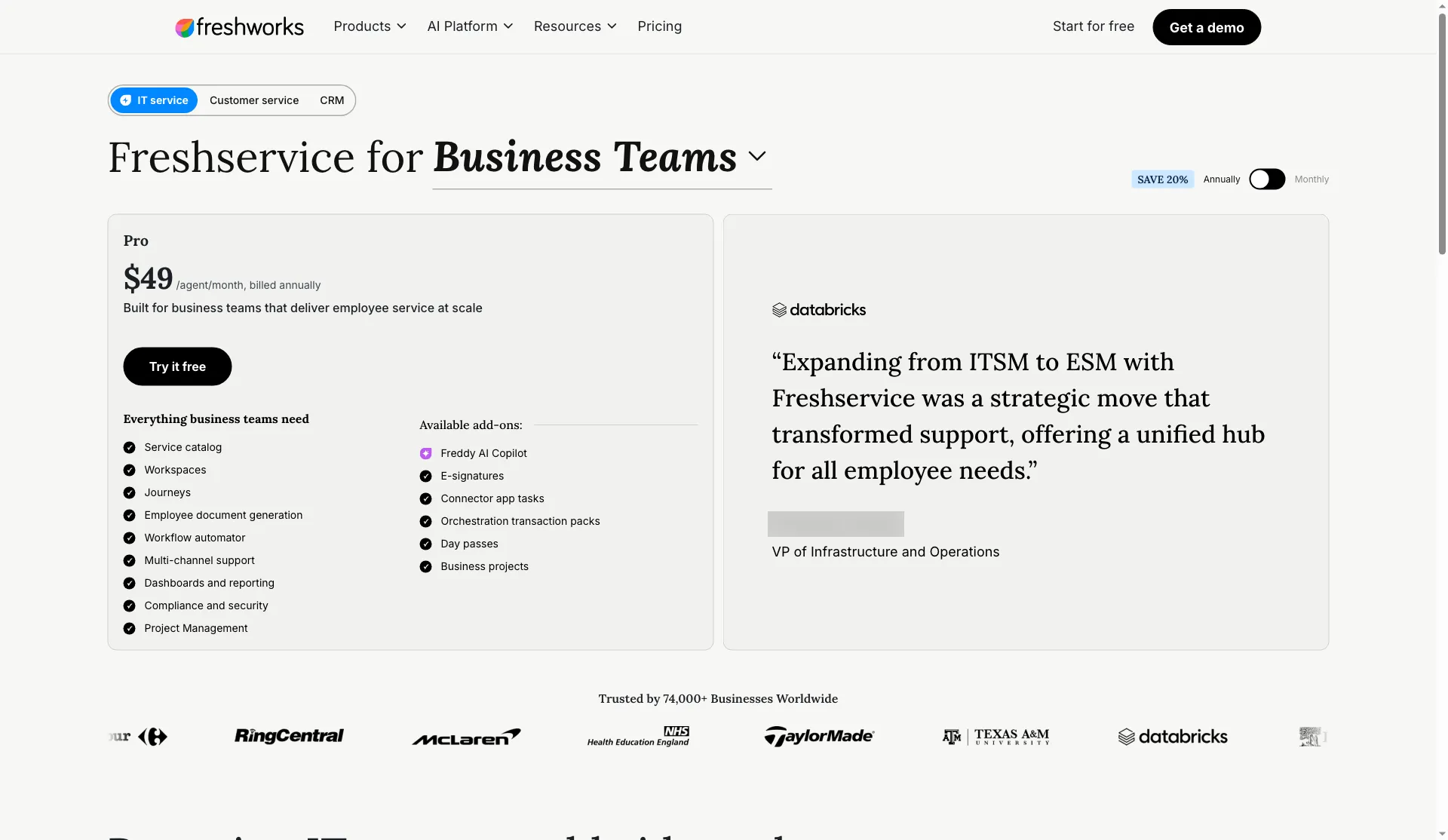
Freshservice lists the Business Teams Pro tier and separates its optional add-ons.
Product pricing — Freshservice for Business Teams
$49 per full-time agent/month, billed annually; $59 when billed monthly. Optional add-ons are extra.
2. Zendesk Employee Service: Best for shared services that need HR help desk software
Zendesk earns the shortlist when HR shares intake with IT or facilities and needs a common portal, approvals, and SLAs. Growth is the first displayed tier with that employee-service setup; Team stops at a knowledge base.
Pros — Zendesk Employee Service
- Growth gives employees a place to find answers, submit requests, and track existing tickets while HR manages tasks and approvals in the same service suite.
- According to Zendesk’s pricing page, the 14-day trial defaults to Professional and requires no credit card.
- A shared service platform can help when HR, IT, and facilities already need cross-team routing; Zendesk lists integrations such as Slack, Microsoft Teams, and Workday.
Cons — Zendesk Employee Service
- The $29 Team price is an easy headline to misread: a service catalog, employee portal, tasks, approvals, and SLAs start at $59 Growth.
- Quality Assurance ($35/agent/month) and Advanced Data Privacy and Protection ($50/agent/month) are separate options; confirm whether a specific control is included before adding either to a budget.
- On G2, Andrzej P. (3/5, October 2, 2026) valued organized requests and knowledge but raised permissions, licensing, setup, and AI-supervision complexity.
Things I Noted
Zendesk Employee Service’s trial signup asked for a phone number, employee-size band, and intended support use before the password step. That’s more setup information than a one-field email form; its trial page still says no card is needed. Zendesk is my pick for HR teams sharing the employee portal with IT; smaller HR teams may prefer the less expensive Team tier.
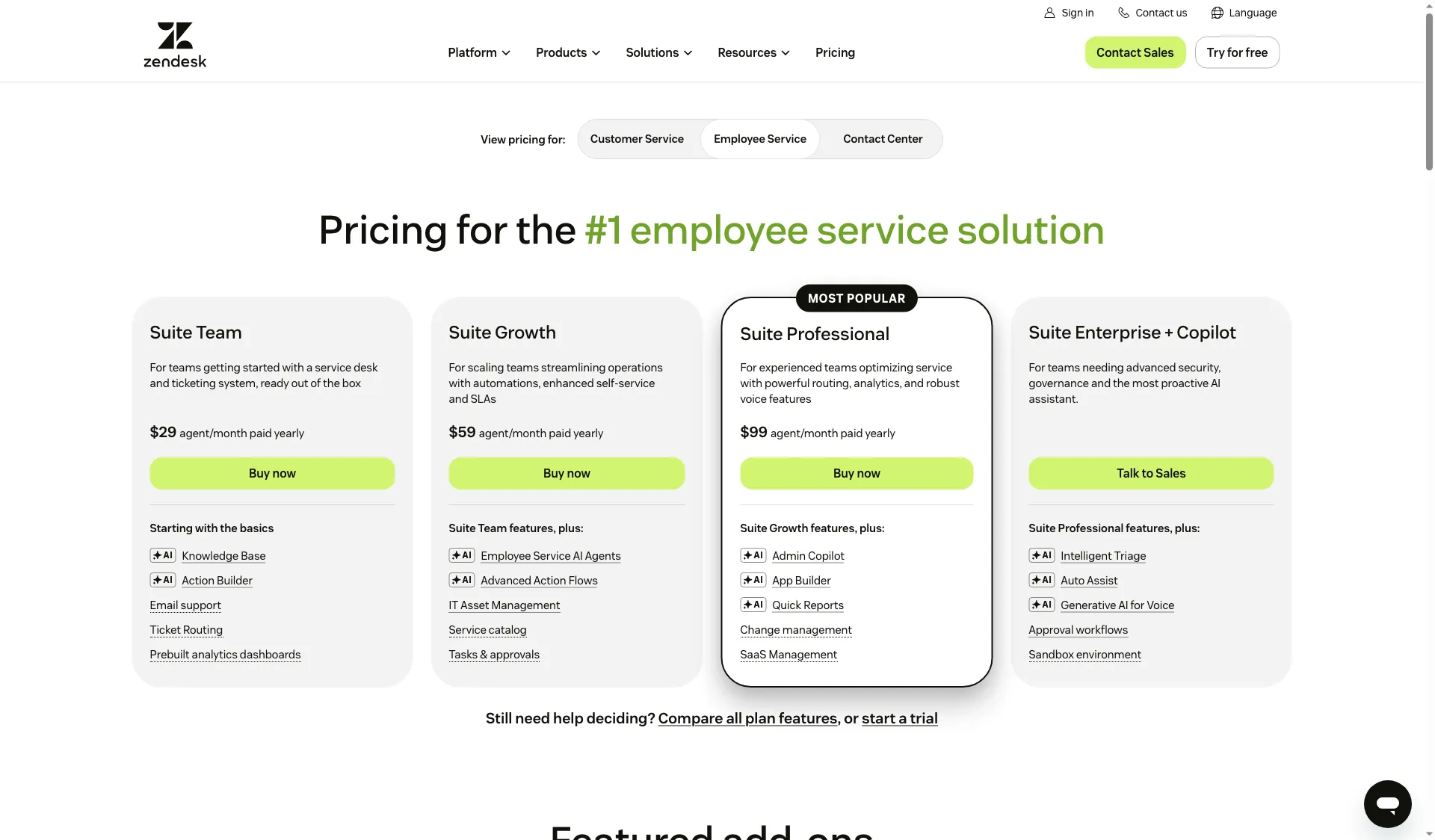
Zendesk’s Employee Service page lists separate Team, Growth, and Professional tiers.
Product pricing — Zendesk Employee Service
$29–$99 per agent/month, billed annually; budget $59 for the employee portal, catalog, approvals, and SLAs.
3. Jira Service Management: Best for Atlassian users who need HR help desk software
Jira Service Management gives Atlassian teams a ready-made route for HR requests and sensitive cases, with workplace-concern, performance, and wellbeing request types. Employees can also submit through email, Slack, Microsoft Teams, or the portal. Check the case-note permissions before moving confidential work there.
Pros — Jira Service Management
- Free supports up to three agents and unlimited customers, making it a low-cost way to handle routine employee intake.
- The case-management work category separates investigations and performance matters from ordinary leave or benefits requests.
- Atlassian’s annual calculator groups paid Standard access into seat bands within Service Collection; requesters don’t need a paid JSM license.
Cons — Jira Service Management
- Paid pricing is now presented as Service Collection, which bundles Jira Service Management with Customer Service Management, Assets, and Rovo.
- Case access follows work item security. Atlassian says more granular restrictions for information in case notes aren’t available yet, so this is not a substitute for testing who can see sensitive notes.
- A Capterra reviewer, Adam M. (5/5, October 5, 2026), liked Jira context and escalation but noted admin complexity. My take: I’d treat Free as a bridge for routine intake; growing HR workflows need an owner for request types, roles, and changes.
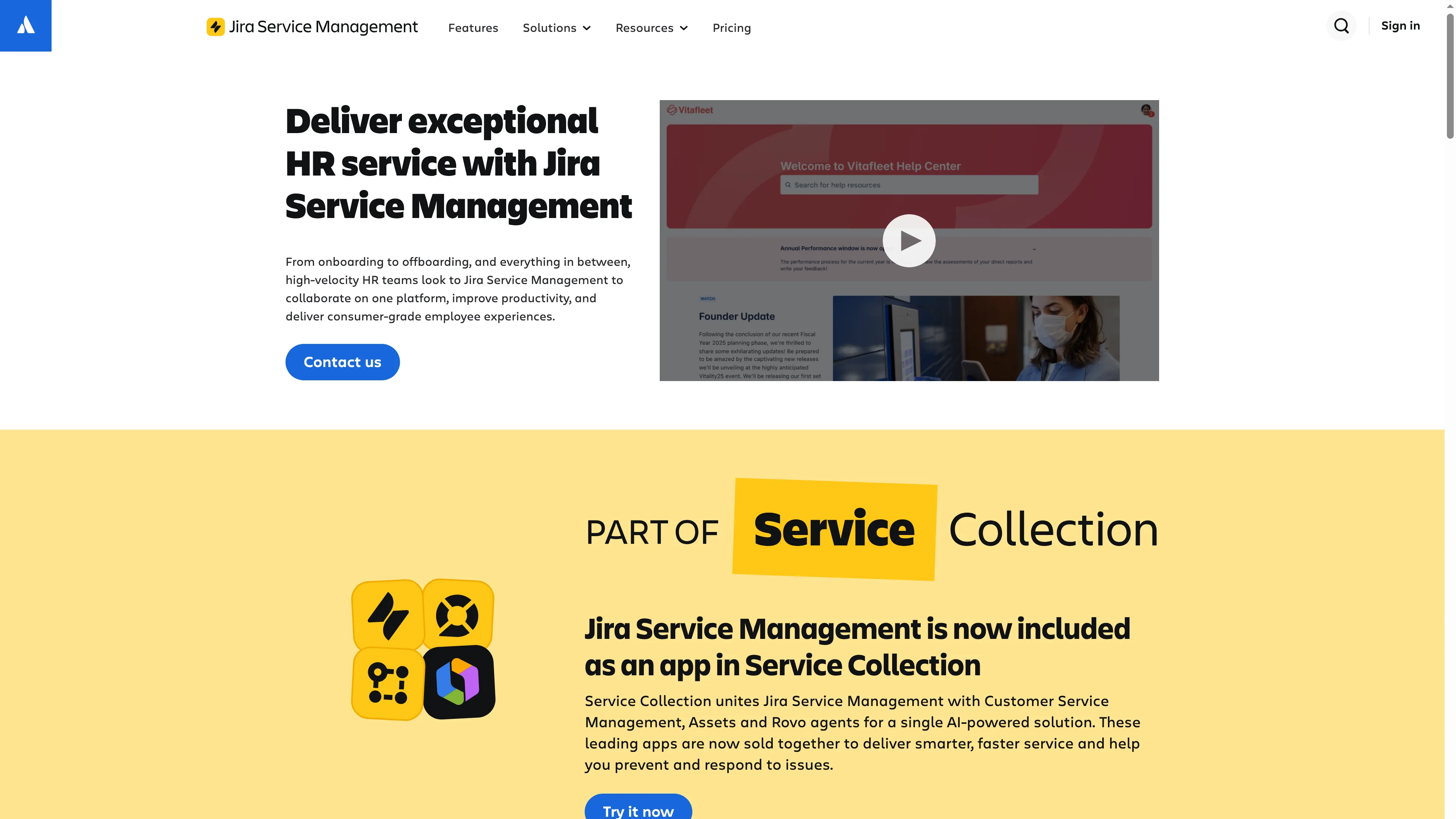
Atlassian positions Jira Service Management as an HR service desk from onboarding through offboarding.
Product pricing — Jira Service Management
Free for up to 3 agents; paid Standard pricing uses seat bands within Service Collection.
4. Siit: Best for teams adding HR help desk software to Slack or Teams
Siit brings HR and workplace requests into Slack, Microsoft Teams, or email. These channels suit a team that wants employees to start where they already work. Standard adds structured forms, automated workflows, HRIS/MDM/ticketing integrations, and reporting; check the requester allowance before choosing a tier.
Pros — Siit
- Essentials puts common employee channels, a catalog, approvals, and knowledge integrations in its entry tier.
- Standard adds forms and workflow automation for requests that need structured intake, HRIS context, or reporting.
- Siit’s admin-based price can be attractive for a company with many requesters and a small support team if the requester terms fit its usage.
Cons — Siit
- Siit’s $23-per-admin price looks low, but the card omits its requester cap and overage rate; I wouldn’t treat it as a bargain until the covered employee count is clear.
- G2 reviewers raised practical wrinkles even in five-star records: Gatien D. (May 7, 2026) liked Notion-cited answers but noted new pages could take time to appear; Callista R. (May 6) valued Teams but flagged mobile-form and notification issues; Nathan M. (May 6) noted reporting limits.
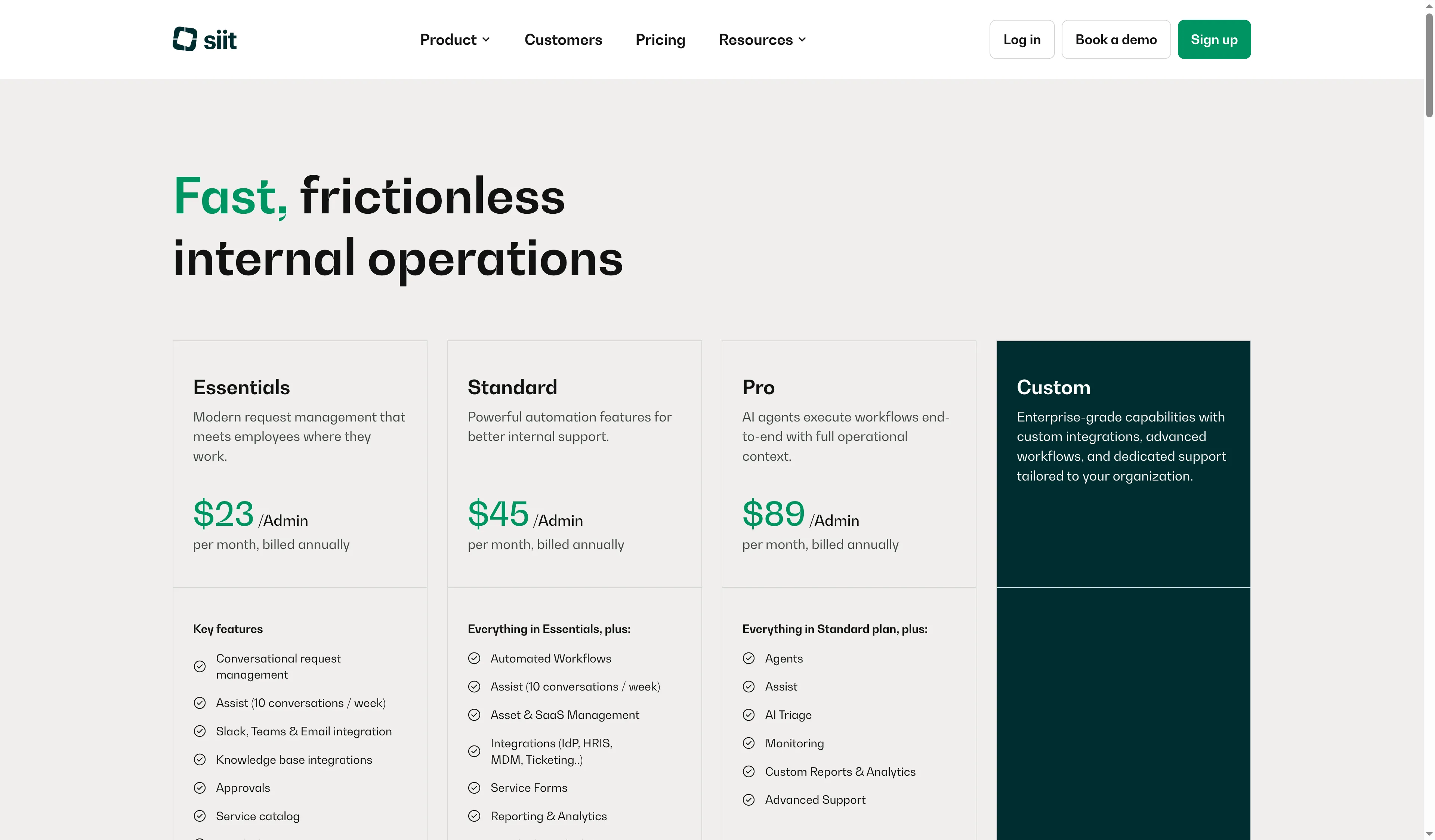
Siit separates Essentials, Standard, Pro, and Custom plans.
Product pricing — Siit
$23–$89 per admin/month, billed annually; Standard is $45.
5. Zoho People: Best for Zoho People users adding HR help desk software
Zoho People adds employee query handling to HR records already managed in the system. That makes it a reasonable choice for current Zoho customers, but the US plan pages disagree about its Help Desk entitlement.
Pros — Zoho People
- The help desk is built around managing employee queries, so HR can route questions by category instead of maintaining a separate inbox.
- I found FAQs, case-agent roles, category administrators, SLAs, and case restrictions in Zoho’s Help Desk help pages.
- Keeping an existing Zoho People subscription may be simpler than adding a separate service desk if employees already use its HR portal.
Cons — Zoho People
- Zoho’s official pages show conflicting US prices and entitlements. One plan comparison lists Essential HR at $3/user/month plus a $0.58/user/month HR Help Desk add-on, while another pricing page lists Enterprise at $4.50/user/month with HR Help Desk included. I wouldn’t shortlist Zoho until that mismatch is resolved; a per-employee HRIS license is a different budget from five support-agent seats.
- The per-user unit matters: a help desk attached to 1,000 employee licenses costs differently from a tool charging only five HR agents.
- Capterra feedback covers Zoho People broadly, not just the help desk; a Director of People and Culture (3/5, August 24, 2026) valued price and support but raised a technical learning curve.
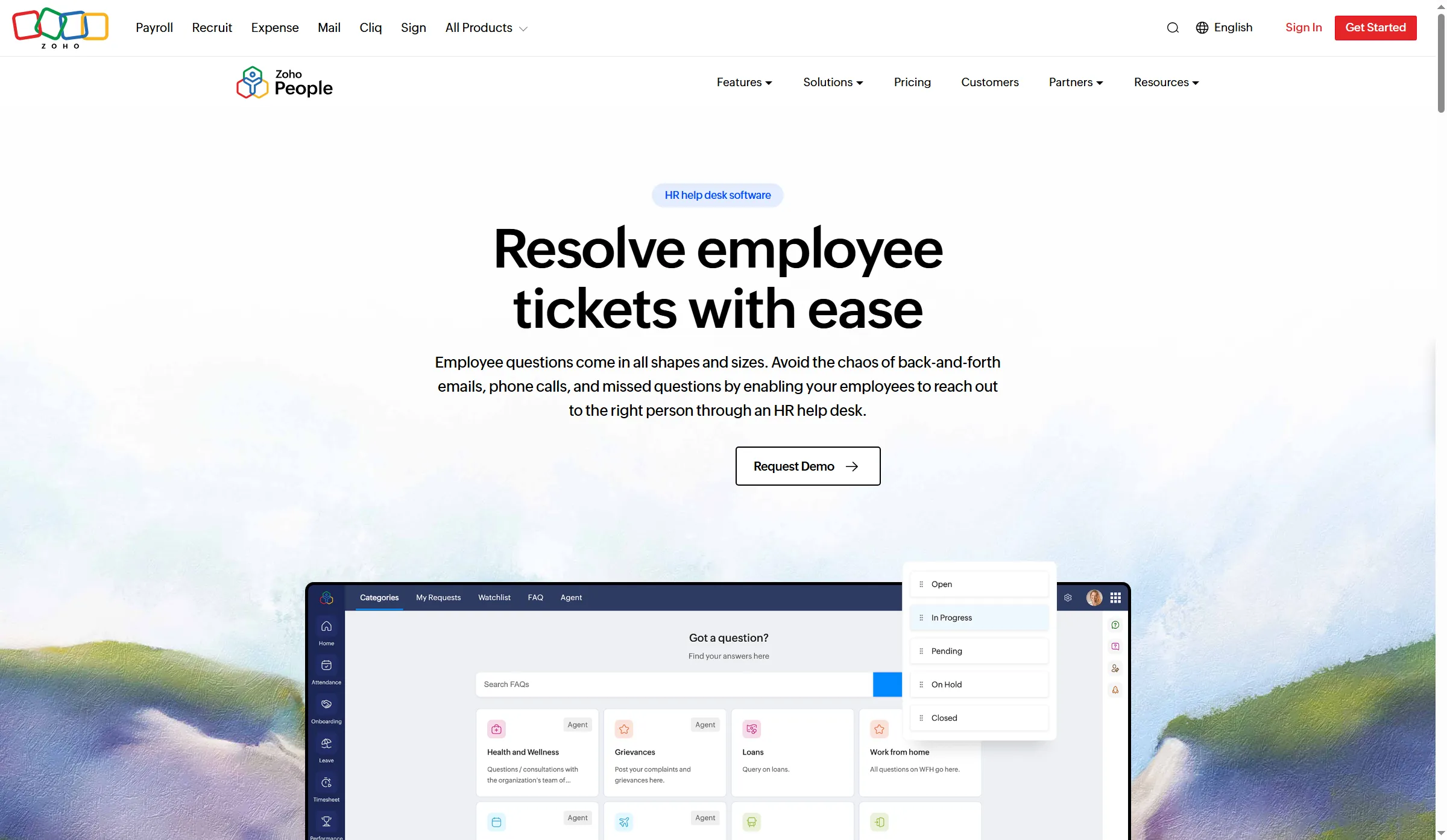
Zoho People’s HR Help Desk page shows employee case categories and request statuses.
Product pricing — Zoho People
One US comparison lists $3–$8 per user/month billed annually, with HR Help Desk at $0.58/user/month on three paid plans. Another Zoho page lists $1.25–$4.50 and includes Help Desk in Enterprise.
What the same HR workload costs
For five HR agents, Jira Service Management Standard costs $1,350/year and Zendesk Growth costs $3,540. Zoho People is priced by employee, so its estimate is separate. I calculated annual list prices in USD before tax.
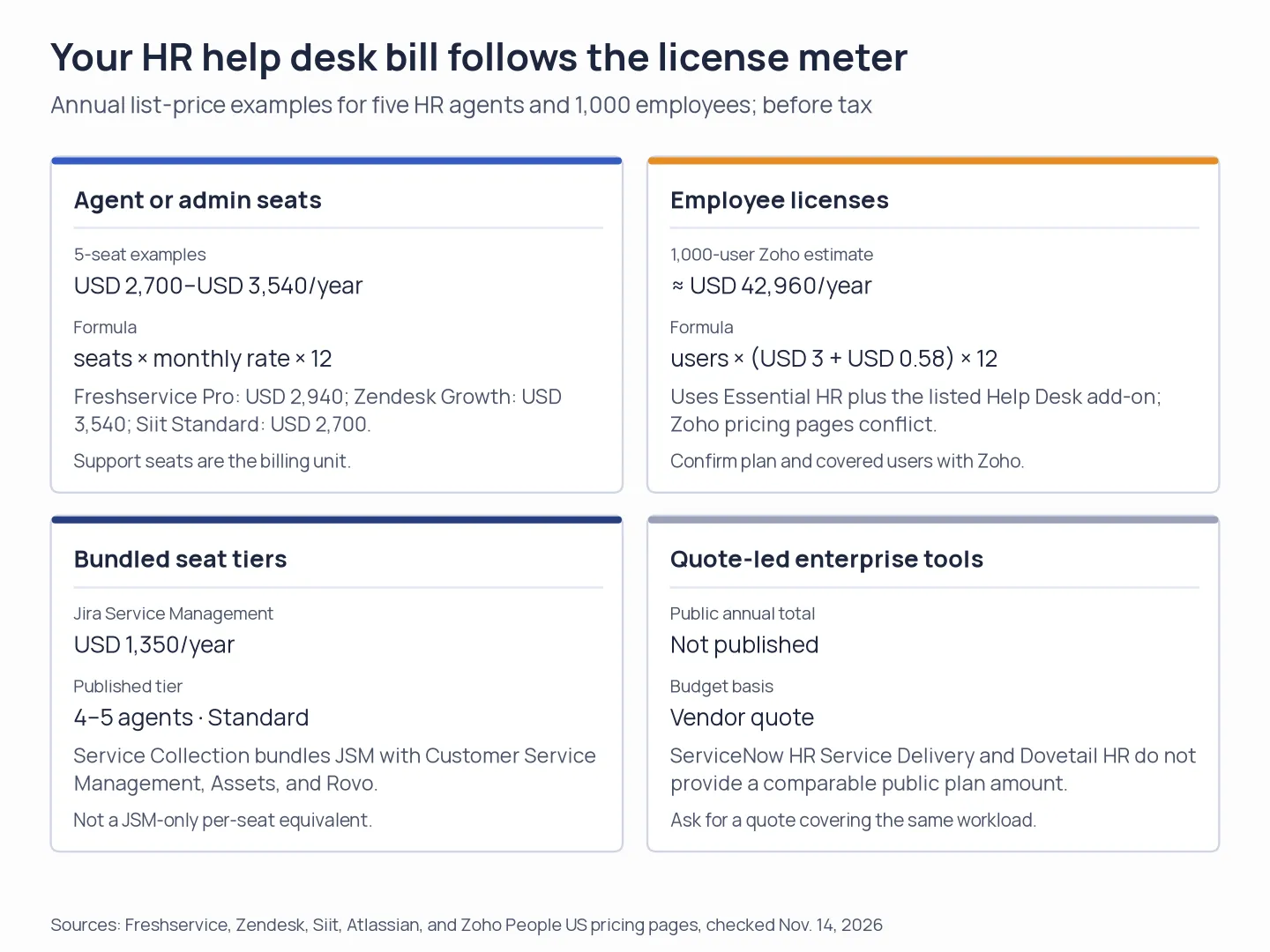
The billing unit drives the estimate: agent or admin seats, employee licenses, bundled seat tiers, or a custom quote.
Scenario 1: Two HR agents supporting 250 employees
For a two-agent HR help desk serving 250 employees, Jira Service Management Free is the least expensive option. The table shows annual costs, required extras, and each plan’s main limit.
| Tool | Plan | Annual cost | Mandatory extras | Limit that bites |
|---|---|---|---|---|
| Freshservice for Business Teams | Pro, 2 agents | $1,176 | None shown; connectors and e-signatures are optional add-ons | Full-time agent price; day passes cost extra |
| Zendesk Employee Service | Team, 2 agents | $696 | None for basic intake | Employee portal/catalog/approvals/SLAs require Growth |
| Jira Service Management | Free, 2 agents | $0 | None | 3-agent cap; use for routine requests, not as proof of sensitive-case fit |
| Siit | Essentials, 2 admins | $552 | None shown | Requester/employee limits aren’t on the pricing card |
| Zoho People | Essential HR + HR Help Desk, 250 users | ~$10,740* | Employee licenses plus Help Desk add-on | Official pricing routes conflict; confirm coverage |
Scenario 2: Five HR agents supporting 1,000 employees
For five HR agents serving 1,000 employees, Jira Service Management Standard is the lowest listed paid seat plan. The table separates Zoho People’s employee-license estimate.
| Tool | Plan | Annual cost | Mandatory extras | Limit that bites |
|---|---|---|---|---|
| Freshservice for Business Teams | Pro, 5 agents | $2,940 | None shown; integration tasks may be extra | Connector and e-signature add-ons are separate |
| Zendesk Employee Service | Growth, 5 agents | $3,540 | None for portal/catalog/approvals/SLAs | QA and advanced privacy are extra options |
| Jira Service Management | Standard, 4–5-agent tier | $1,350 | Service Collection bundle includes CSM, Assets, and Rovo | This is a tiered bundle price, not JSM-only |
| Siit | Standard, 5 admins | $2,700 | None shown | Employee/requester cap isn’t published in the plan card |
| Zoho People | Essential HR + HR Help Desk, 1,000 users | ~$42,960* | Employee licenses plus Help Desk add-on | Help desk feature depth and pricing route need confirmation |
Scenario 3: Ten HR agents supporting 5,000 employees with restricted cases
For ten HR agents and 5,000 employees, Jira Service Management Standard has the lowest agent-seat price, but its case-note limit may rule it out for restricted cases.
| Tool | Plan | Annual cost | Mandatory extras | Limit that bites |
|---|---|---|---|---|
| Freshservice for Business Teams | Pro, 10 agents | $5,880 | No mandatory add-on listed | Verify the required case-level access rules before use |
| Zendesk Employee Service | Growth, 10 agents | $7,080 | Optional Advanced Data Privacy and Protection would add $6,000/year if needed | The add-on price alone doesn’t prove case-note isolation |
| Jira Service Management | Standard, 6–10-agent tier | $2,700 | Service Collection bundle | Work item security applies; finer case-note security isn’t available |
| Siit | Standard, 10 admins | $5,400 | No required extra shown | Case-level privacy and employee limits need confirmation |
| Zoho People | Enterprise, 5,000 users | ~$480,000* | Enterprise employee licenses | Other official pages show different base rates/add-on structure |
The small-team view makes free and per-admin pricing look compelling. But the workload changes the math: Zoho People’s 1,000-employee estimate is roughly twelve times Zendesk Growth’s five-agent cost because it counts employee licenses. The billing unit is different, so the ratio does not mean one tool delivers twelve times the value.
Jira’s annual calculator uses seat bands, so the 4–5 and 6–10-agent totals matter more than multiplying the monthly view by twelve. For restricted cases, compare the permissions model before choosing the lowest seat price. Jira’s case-note limit is explicit, while the other tools still need a configuration check.
Zoho estimates use the live comparison route’s $3/$8 plan rates and $0.58 HR Help Desk add-on where shown. Another official pricing page gives different prices and entitlements. Confirm in writing before purchase.
Check your existing stack first
If you already pay for an HRIS with employee queries, case categories, or policy FAQs, check its entitlement before buying a second HR portal. A shared inbox and existing policy library may be enough for a small team that only needs simple questions and manual ownership.
If employees already work in Slack or Teams, compare whether your HR team needs a separate portal or only a structured request form in the channel. Siit and Jira Service Management list those channels, but an integration label doesn’t tell you whether it can look up a leave balance, trigger an approval, or sync a change back to your HRIS.
Google Workspace or Microsoft 365 can cover basic forms, mail, and document sharing, but they won’t automatically give you a case-access model. Add a dedicated help desk when the team needs a searchable request history, category ownership, approvals, or repeatable privacy controls.
Which HR help desk software should you choose?
Choose Freshservice for Business Teams if you need a catalog, journeys, and workflows for employee service. Choose Zendesk Growth if HR works alongside IT or facilities and needs an employee portal, approvals, and SLAs.
Choose Jira Service Management when your team already runs Atlassian and can administer the case permissions; the Free plan works for up to three agents handling routine intake. Choose Siit if employees expect to use Slack or Teams and its admin-based license covers your requester count. Choose Zoho People if you already use its HRIS and can confirm which help-desk price and employee licenses apply.
For investigations, grievances, or health-related matters, compare case-note permissions before comparing dashboards. Jira’s documented work item security may fit some teams, but its current notes limit rules it out when notes need their own finer access boundary.
Other HR help desk software we considered
I also considered two other HR help desk options: ServiceNow HR Service Delivery and Dovetail HR. Both target organizations buying dedicated enterprise HR case management and have quote-led pricing that made a public-plan comparison harder.