

 17 min read

TL;DR
- RingCentral RingEX offers a wide-ranging hosted solution; however, once you exceed five users, its trial and self-serve purchasing process shift.
- Nextiva has a low advertised yearly starting cost — yet because of today's plans and demo-driven purchasing, an equivalent quote matters.
- For a small office using desk phones or analog phones, Ooma Office fits most clearly; you'll need Pro Plus for queues.
- Zoom Phone is worth a comparison when your team already relies on it—yet phone service remains a separate license, and queue analytics may cost extra.
- Dialpad Connect reserves numeric extensions for Enterprise, so its $15 and $25 plans are a poor fit if staff expect to dial coworkers by extension.
- GoTo Connect and 8x8 Work do publish helpful call-routing information, yet they need a quote for the system's price.
- Phone.com posts pricing per user and permits staff members to be on separate tiers, with taxes and fees charged separately.
What is a hosted PBX phone system?
A hosted PBX is a business phone service where the provider runs call routing in the cloud. Employees answer shared or direct numbers on desk phones, computers, or mobile apps, use extensions, and route callers through menus, ring groups, or queues.
This list covers eight conventional cloud PBXs. Quo and Grasshopper use an app-first virtual-phone model, while 3CX and FreePBX are self-managed PBX options.
At a glance
RingCentral gives teams room to add locations and integrations; Ooma is easier to price for a small physical office. GoTo Connect and 8x8 Work require a quote, so their call-routing strengths come with a cost you cannot compare from public seat prices.
| System | Best fit | Public starting price | Main trade-off |
|---|---|---|---|
| RingCentral RingEX | Teams that need a broad hosted phone platform | $20/user/month, annual | 1–5 seat trial; larger-band buying is sales-led |
| Nextiva | Small teams comparing bundled voice and customer tools | $15/user/month, annual | New-customer annual agreement; demo-led purchase |
| Ooma Office | A physical small office with desk or analog phones | $19.95/user/month | Queues and CRM integration require Pro Plus |
| Zoom Phone | Teams already working in Zoom | $16/user/month, annual | Separate phone license; add-on for advanced queue analytics |
| Dialpad Connect | Teams that want calling and AI-assisted conversation tools | $15/user/month, annual | Numeric extensions require Enterprise |
| GoTo Connect | Teams needing configurable menus and queues | Quote | No public per-seat price |
| 8x8 Work | Distributed teams that need multi-site queue controls | Quote | No public per-seat price |
| Phone.com | Small teams that want transparent, mixed user tiers | $15/user/month, annual | Public-number, device, and CRM needs affect the bill |
Starting price alone won't show the full bill: providers charge for seats, numbers, add-ons, and phone hardware in different ways.
What makes the best small-business PBX?
Count users, extensions, and public numbers separately
Hosted PBX providers may bill service seats, extensions, and phone numbers separately, so check what the advertised seat rate includes. Your team might share a main number or get a direct number for every user.
Check what “routing” actually does
Trace the no-answer, after-hours, and no-agent paths during a demo; note whether callers hear hold music, ringing, voicemail, or a transfer. An auto attendant plays a menu, a ring group sends a call to several phones, and a queue holds callers until an agent becomes available. Hosted PBX combines call routing with telephony administration, while app-first virtual numbers typically offer a simpler business number and messaging service.
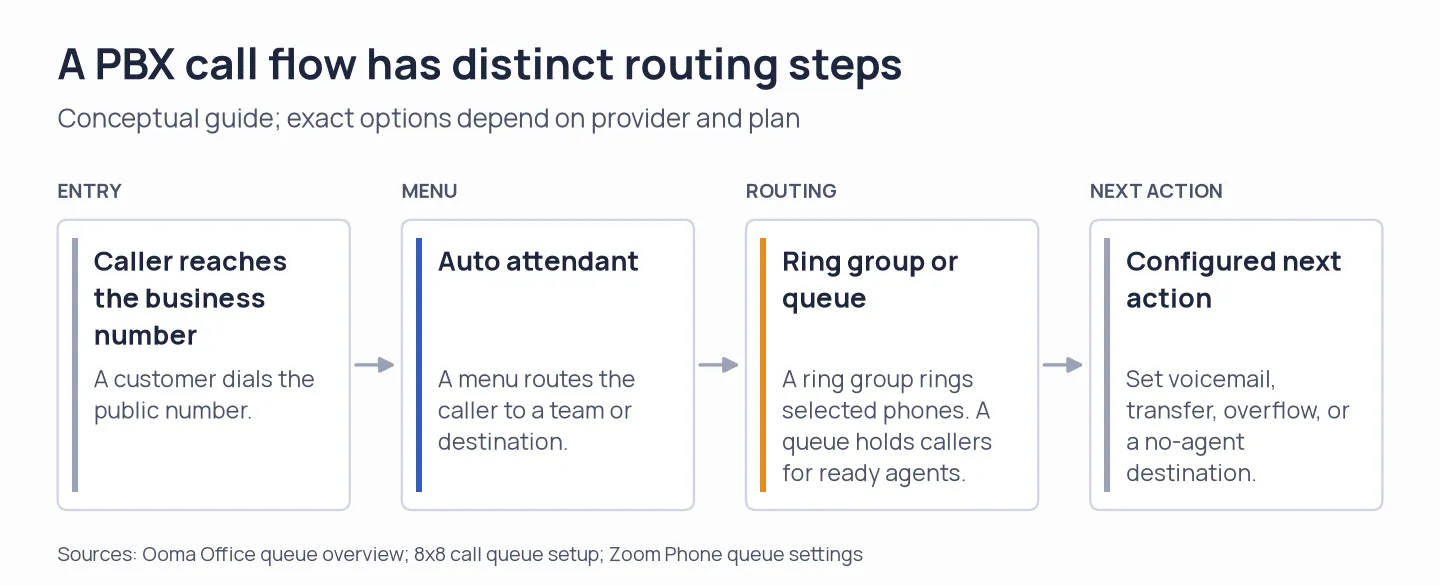
Menus, ring groups, and queues do different jobs; verify the no-answer path in the quoted plan.
Match the plan to your device and CRM needs
Plan gates matter more than the entry price when you need a queue, CRM integration, or desk phone. Ooma puts queues and CRM on Pro Plus; Phone.com adds desk phones on Plus and CRM on Pro; Dialpad reserves numeric extensions for Enterprise. Zoom includes domestic calling and a phone number, but charges extra for enhanced queue analytics.
Price the whole call flow
A hosted PBX invoice has to cover seats, additional numbers, toll-free minutes, queue or analytics add-ons, taxes, regulatory fees, and desk phones. If you choose a quote-led vendor, obtain those same line items in an annual total (an unpublished price doesn't mean you'll pay $0).
Check what your team already pays for
Zoom Phone US & Canada Unlimited is a phone license that you add to Zoom Workplace Basic. Microsoft sells Teams Phone Standard as an add-on, and even if you're already using Microsoft 365, you'll still need connectivity to the public switched telephone network (PSTN) via a Calling Plan, Operator Connect, or Direct Routing. You can make the switch easier by staying with Microsoft or Zoom. Don't assume that a public phone number and calling are included in your collaboration license.
1. RingCentral RingEX: Best for teams that need room to configure
RingCentral suits teams that need multi-site controls or integrations and can handle sales-led buying above five seats. I compared its billing and user-band selectors: rates stay visible from six to 100 users, while the trial and checkout stop at five. Core is $20/user/month annually or $30 month to month; Advanced is $25 and Ultra is $35/user/month billed annually.
Pros — RingCentral RingEX
- Core, Advanced, and Ultra show the available upgrade path.
- The pricing page shows monthly and annual rates side by side.
- Its 14-day trial covers up to five users and includes two desk phones.
Cons — RingCentral RingEX
- SMS isn't available during the trial, and you won't see trial or buy actions in the 6–100 user band—instead, sales and demo actions appear.
- Business SMS Booster costs $25, while Call Queues Booster costs $35. Before you compare totals, verify how each is billed and whether either one is needed.
I find the 100-seat selector misleading when checkout stops at five; that's a frustrating handoff for a small team.
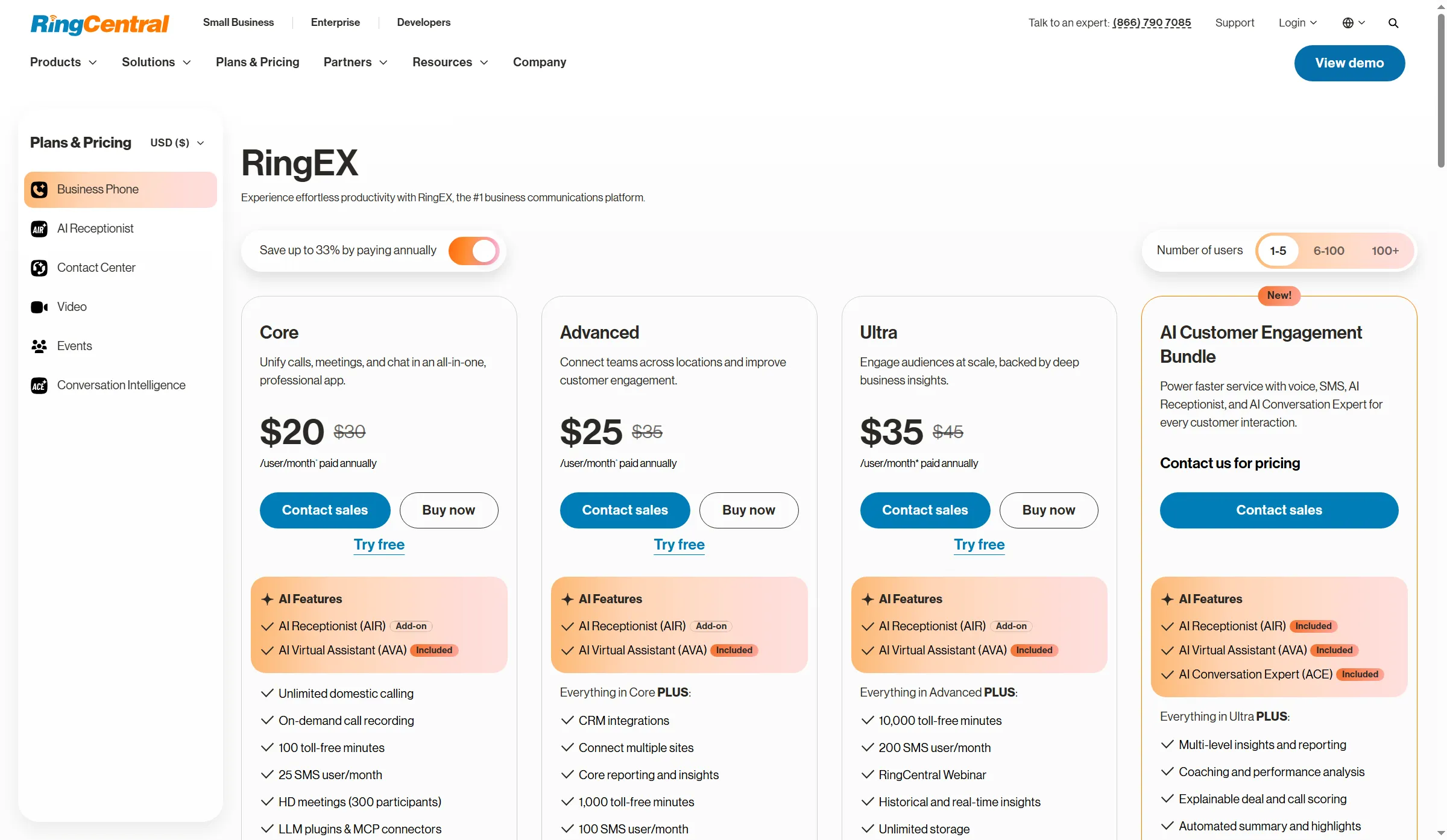
RingCentral’s RingEX page lets buyers switch billing terms and team size.
Product pricing — RingCentral RingEX
Core starts at $20/user/month with annual billing or $30/user/month month to month. Check add-ons, taxes, and quote terms.
2. Nextiva: Best for teams comparing voice with customer tools
Nextiva bundles basic CRM and ticketing with calling, but new customers start with a demo and a paid 12-month agreement. Core also has a simple IVR and skills-based routing; Engage adds a toll-free number and 2,000 inbound minutes at $25 per user monthly.
Pros — Nextiva
- The NEXT page lists Core, Engage, and Scale as separate packages with separate features.
- Engage includes a toll-free number and 2,000 inbound minutes.
- Core includes CRM/ticketing and skills-based routing.
Cons — Nextiva
- New customers need a paid agreement of at least 12 months to receive the annual price.
- Core lists skills-based routing, but its public plan details do not settle every queue or multi-site requirement. Check the quote against the workflow you need.
The CRM/ticketing bundle is Nextiva's clearest case. I wouldn't let that headline rate into a budget until the 12-month term and setup charges are on paper.
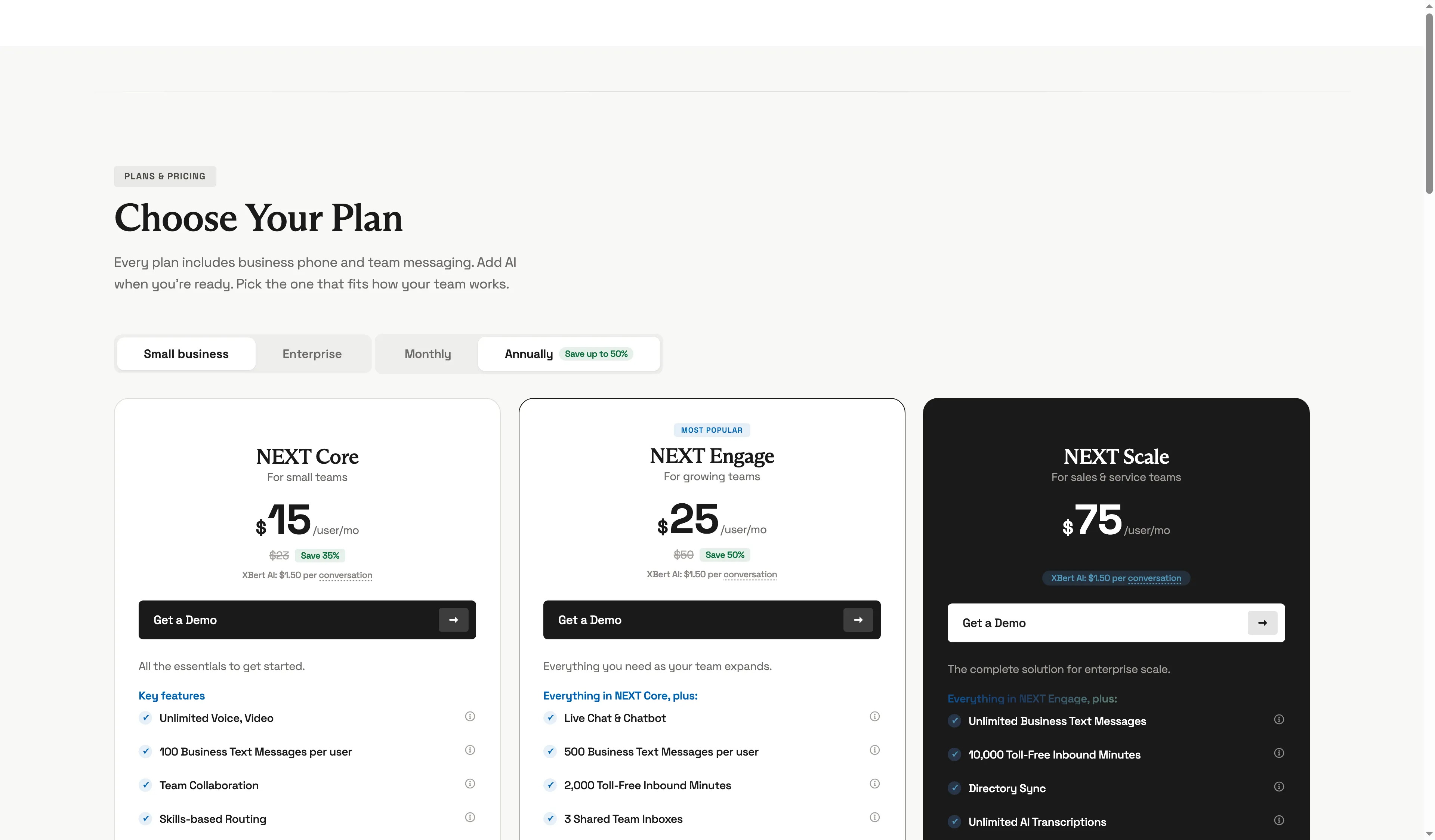
Nextiva shows annual NEXT Core, Engage, and Scale rates side by side.
Product pricing — Nextiva
NEXT Core starts at $15/user/month on annual pricing, with Engage at $25 and Scale at $75. New customers must confirm agreement and setup terms.
3. Ooma Office: Best for a small office with physical phones
Ooma suits small offices where desk or analog phones and queues matter. Its public chart starts Essentials at $19.95 and Pro at $24.95 per user monthly; queues and CRM are on Pro Plus, and local taxes and fees vary by location.
Pros — Ooma Office
- On the Office chart, there are three per-user tiers, along with one local number included for an extension.
- You may verify extra-number charges, along with taxes and fees, on its published rates page.
- Pro Plus includes a queue featuring agent states of ready and not-ready, along with configurable destinations for when no agent is available.
Cons — Ooma Office
- To get the queue plus CRM workflow, you'll need Pro Plus; an entry-level ring group won't cover it.
- Additional local numbers cost $9.95 monthly. Taxes and fees, which vary by location, will also apply.
Ooma makes the queue upgrade unusually easy to price. I like that clarity, though $29.95 per user feels steep if your office only needs basic calling. Local fees still add up.
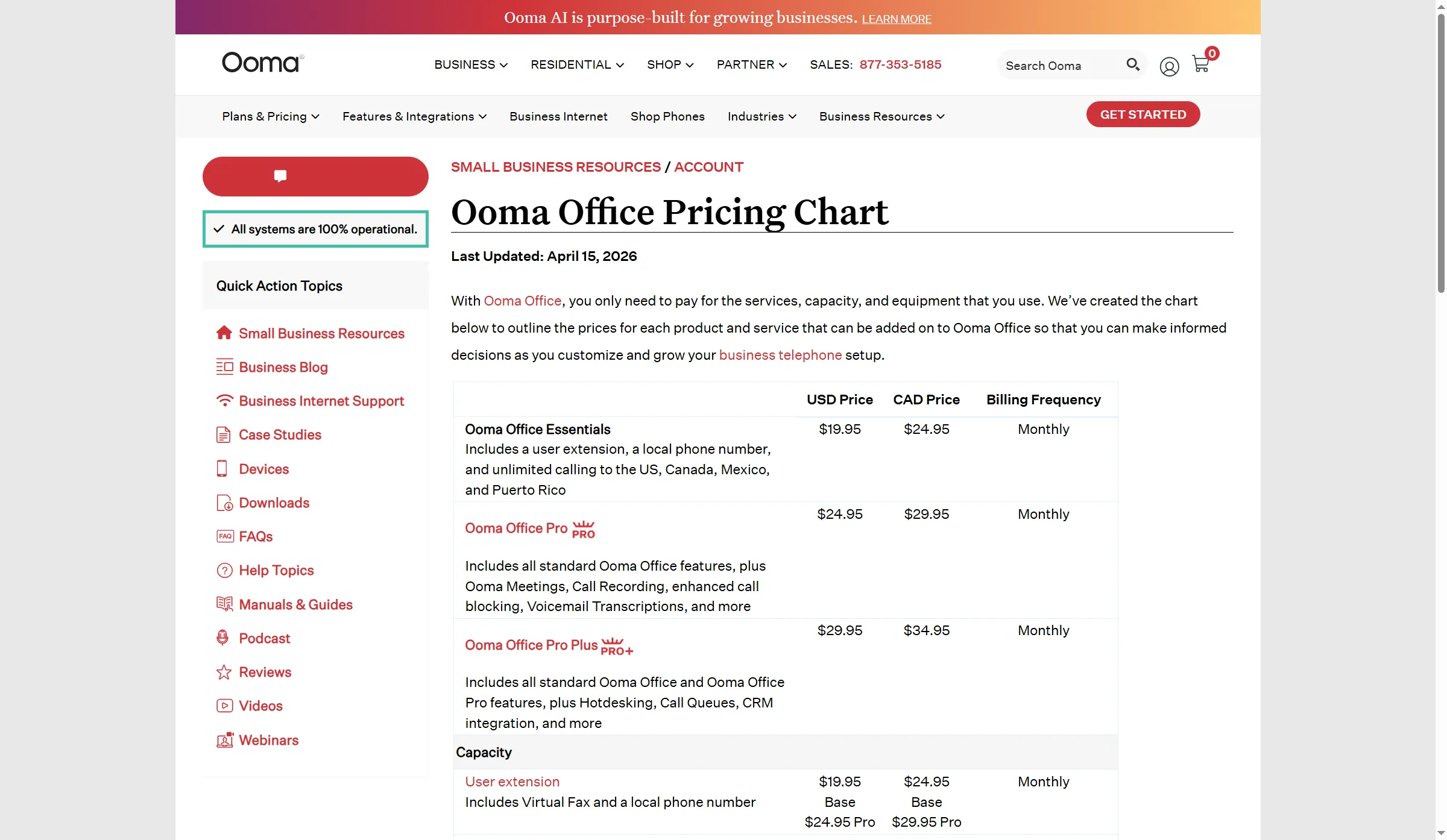
Ooma’s plan table includes Call Queues in Office Pro Plus.
Product pricing — Ooma Office
Essentials $19.95/user/month; Pro Plus $29.95/user/month for queues and CRM. Taxes and fees vary by location.
4. Zoom Phone: Best for an existing Zoom team
Zoom Phone fits teams already using Zoom that want domestic business calling in the same admin environment. It is a separate license alongside Zoom Workplace Basic, with a metered option or US & Canada Unlimited at $16 per user monthly with annual billing and $18 month to month. Enhanced queue analytics require the $25 monthly Customer Engagement Pack.
Pros — Zoom Phone
- Zoom lists the calling region, included domestic number, recording, and integrations on its pricing page.
- You can add Phone to Workplace Basic and keep your team in Zoom.
- Zoom separates analytics from queue hours, member-hour overrides, and overflow settings.
Cons — Zoom Phone
- Business calling needs a paid Phone license; SMS/MMS also requires registration.
- The Customer Engagement Pack unlocks enhanced real-time and historical queue analytics.
I would keep the analytics add-on off the quote unless supervisors will use those reports; Phone already needs its own license.
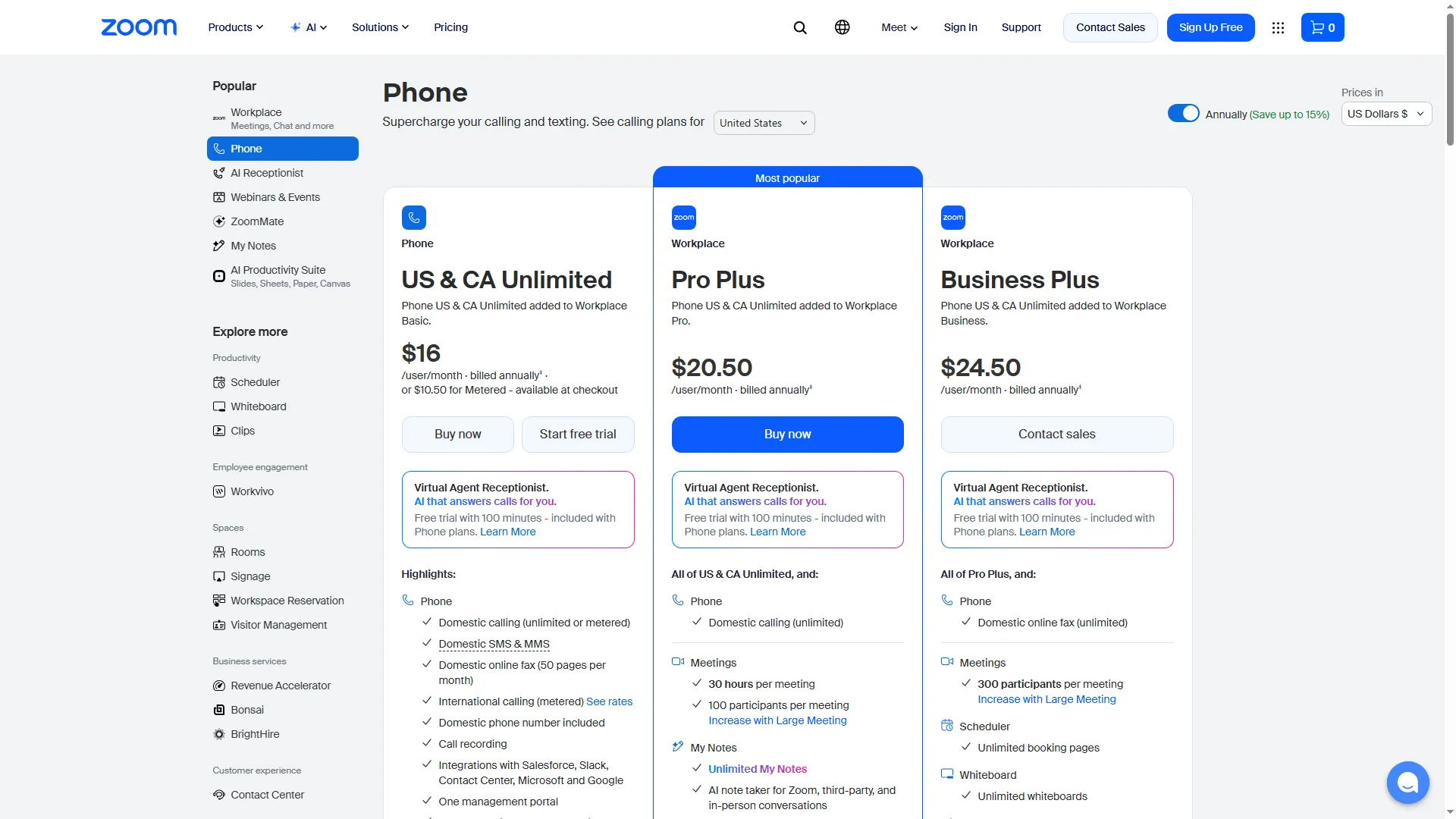
Zoom Phone is an annual per-user license added to Workplace Basic.
Product pricing — Zoom Phone
US & Canada Unlimited $16/user/month billed annually or $18 month to month, plus $25/month for the Customer Engagement Pack. Confirm whether an existing Workplace plan changes the quote.
5. Dialpad Connect: Best for AI-assisted calling if extensions are not a must
AI summaries are Dialpad Connect's hook; the catch is numeric extensions, which are gated to quote-led Enterprise. Standard is $15/user/month and Pro is $25 with annual billing; Pro adds CRM integrations and multi-office support.
Pros — Dialpad Connect
- Dialpad offers a 14-day trial and publishes annual per-user rates for Standard and Pro.
- On the official Connect page, Dialpad distinguishes Connect from the Support and Sell products.
- The listing on HubSpot names the actions for calls, voicemails, summaries, and contact profiles, and it specifies Pro or Enterprise.
Cons — Dialpad Connect
- Numeric extension dialing requires Enterprise and is enabled through Customer Care.
- The HubSpot app listing marks automatic contact syncing “Coming soon”; don't build a workflow around it until the connector is available.
I'd hold off building an automatic HubSpot sync around Dialpad until the connector marks contact sync available.
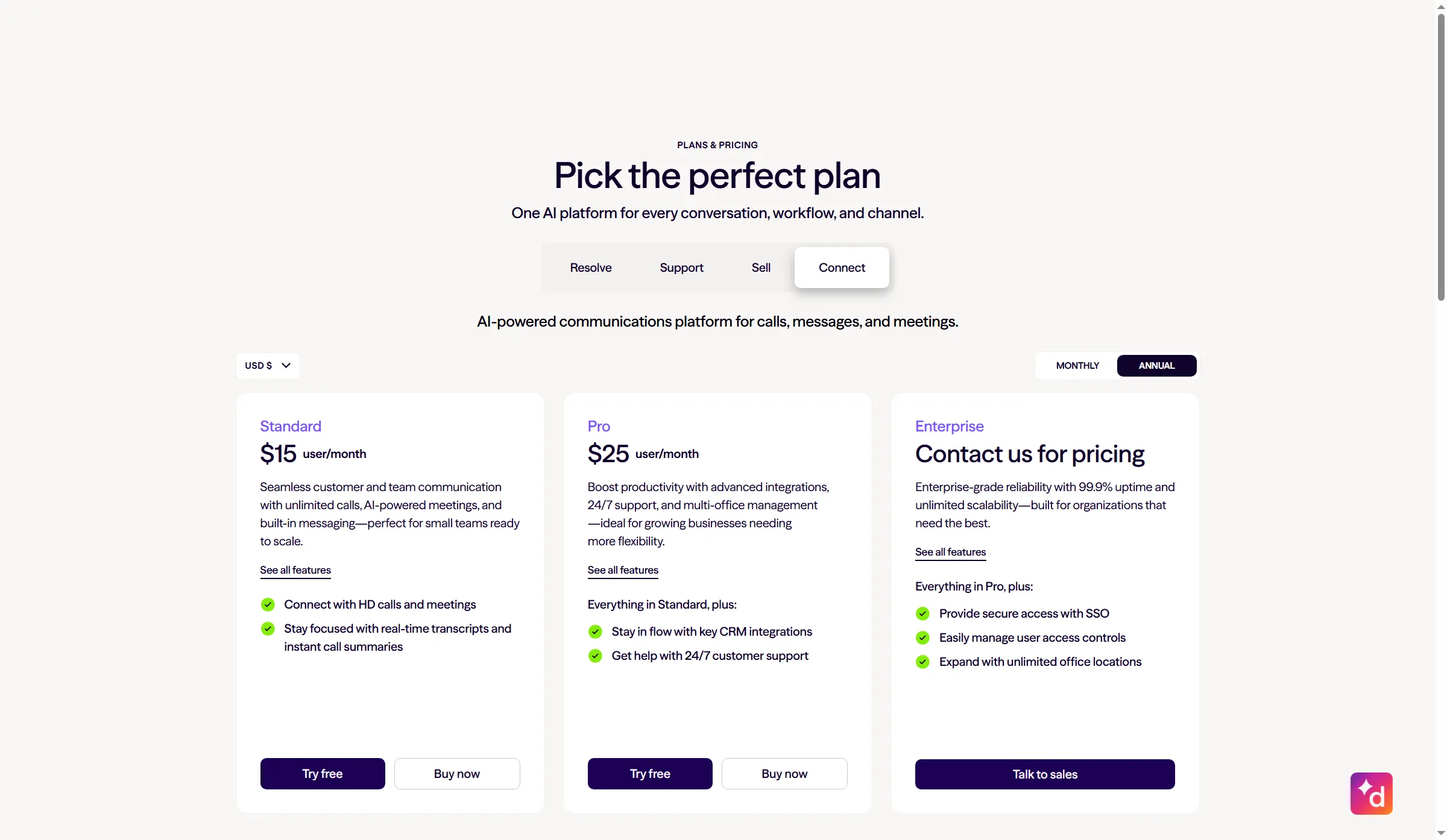
Dialpad’s public Connect pricing separates Standard and Pro from quote-led Enterprise.
Product pricing — Dialpad Connect
Standard $15/user/month and Pro $25/user/month billed annually. Enterprise pricing requires a quote (that's the tier you'll need for numeric extensions).
6. GoTo Connect: Best for teams that want configurable call flows
GoTo Connect gives multi-department teams menus, queues, and customizable dial plans, plus calls to 50-plus countries. Its public pricing page offers no seat rate; a small team needs a sales quote before it can estimate the annual bill.
Pros — GoTo Connect
- I switched GoTo's public pricing page to Phone System; it lists unlimited auto attendants and queues as well as customizable dial plans, and it sends buyers to sales for a quote.
- GoTo advertises 24/7 support and number porting with Phone System.
- Its dial-plan and queue model can handle more complex routing than a single forwarded business number needs.
Cons — GoTo Connect
- GoTo publishes no per-seat starting rate; you need a quote to compare annual cost.
- Before you compare offers, make sure the quote names Phone System rather than CX and spells out toll-free minutes, international regions, and number fees.
For a one-location office with a simple call menu, I'd skip GoTo's quote-only sales path and compare visible plans first.
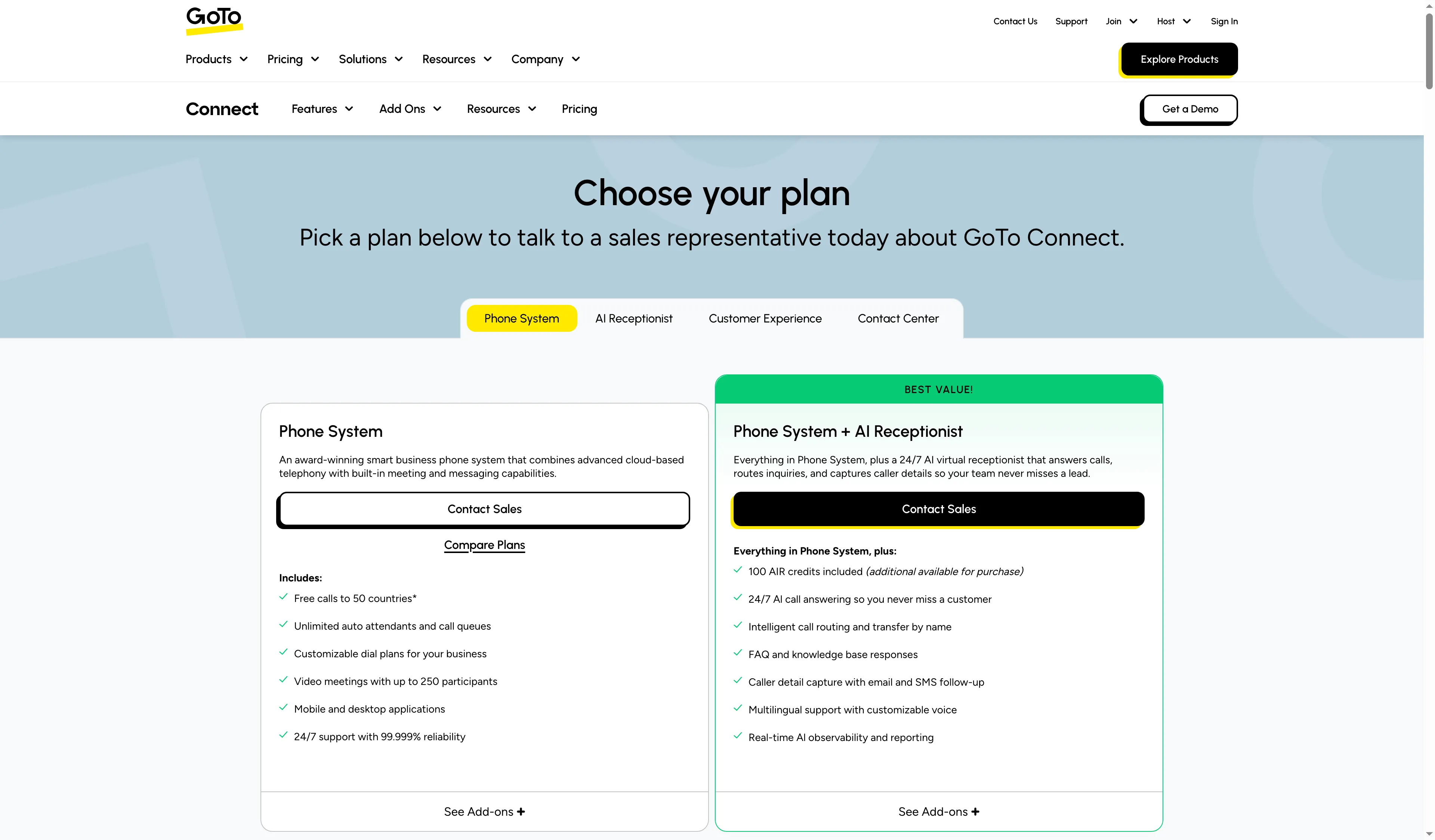
GoTo lists unlimited auto attendants and queues in its Phone System package.
Product pricing — GoTo Connect
Quote required. The current Phone System page doesn't publish a per-seat price.
7. 8x8 Work: Best for distributed teams that need queue controls
8x8 Work suits distributed teams that need precise handling of queue failures. Its guide covers what happens when agents log out, a queue fills, or service fails. The public plans page gives no SMB seat price, so the package needs a quote before you can estimate an annual total.
Pros — 8x8 Work
- The queue guide distinguishes ring groups from queues and sets the waiting limit at 20 callers—enough to check whether a busy office can hold its typical call spike.
- Administrators can route calls differently when agents log out, when agents turn on DND, when a queue fills, or when a service outage occurs.
- If you leave the forwarding destination blank, callers hear ringing; set a fallback before opening the queue.
Cons — 8x8 Work
- 8x8 gives no per-seat figure on its public plans page, so buyers need a quote to estimate a small-business deployment.
- A quote should identify the Work tier, queue, transcription, CRM, and any separately priced contact-center package.
Without a public seat price, I wouldn't prioritize 8x8 for a small office that only needs basic forwarding. Get a quote when its queue fallback rules matter enough to justify the extra comparison work.
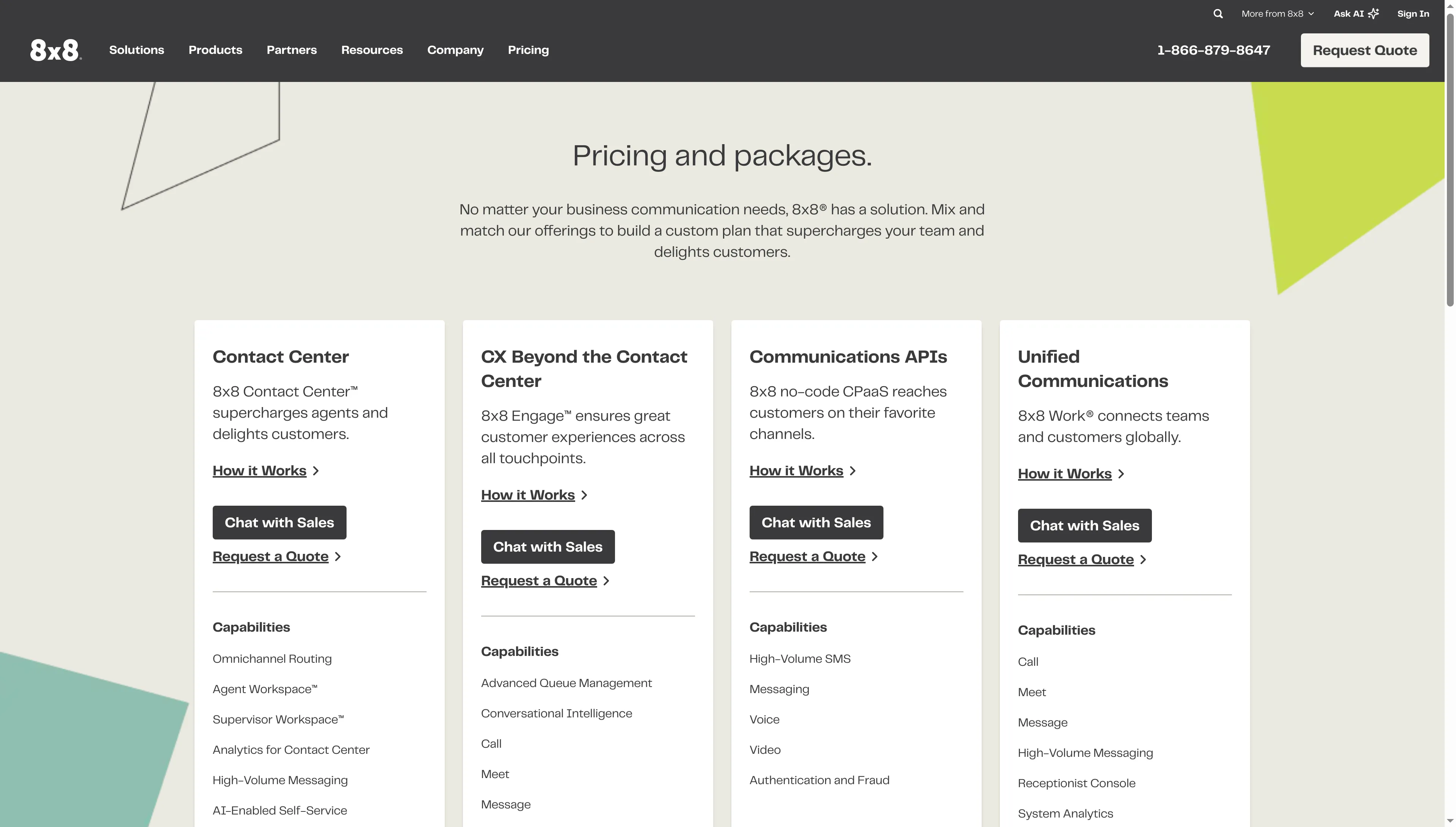
8x8 directs buyers to a quote for its hosted communications packages.
Product pricing — 8x8 Work
Quote required. There's no public per-seat price.
8. Phone.com: Best for small teams that assign different tiers by role
Phone.com's annual per-user plans fit role-split teams: Basic is $15, Plus is $22.50, and Pro is $33.33 per user monthly. The amount is charged upfront, plus taxes and fees.
Pros — Phone.com
- Assign Pro to an owner and Basic to field staff instead of buying the highest tier for every employee.
- The base plan provides one number for each account and user, IVR, unlimited minutes, along with mobile and web apps.
- Compatibility with IP desk phones comes with Plus. Meanwhile, recording, analytics, integration with CRM, and retention of ten-year data arrive with Pro.
Brooks L. praised Phone.com's “call forwarding, voicemail-to-email, texting, and virtual receptionist tools” in a verified Capterra review (June 11, 2026). It reflects one user's report of everyday basics rather than an independent call-quality comparison.
Cons — Phone.com
- You'll pay upfront for the annual amount, and taxes/fees vary. Premium numbers and hardware are excluded from the 30-day money-back guarantee.
- Your tier determines whether you can use desk phones and access CRM. When you're combining plans, check which features follow each user and which apply account-wide.
The tier split makes sense, but I wouldn't give every user Pro; check which CRM features follow each seat before you commit.
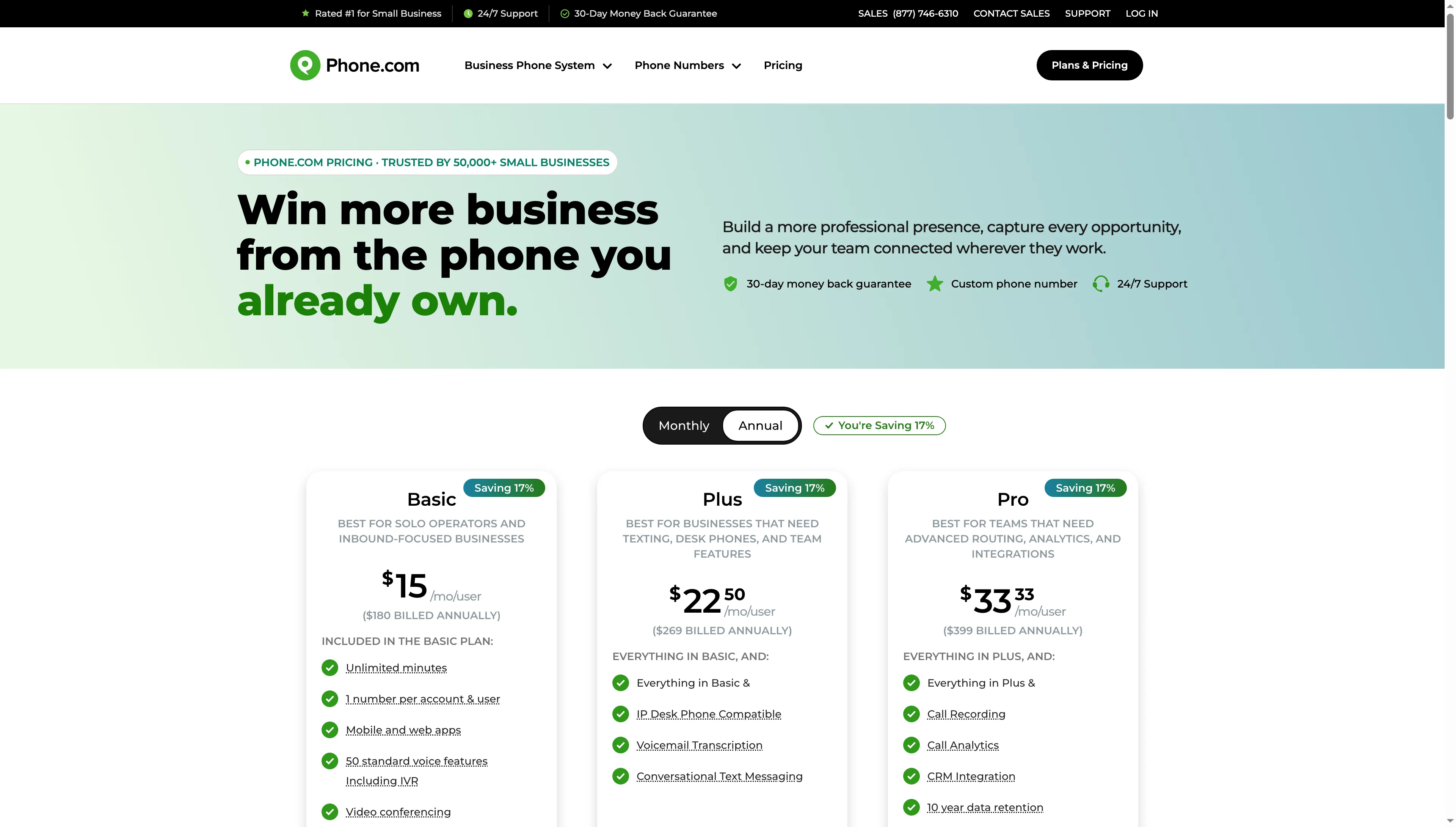
Phone.com shows the annual price and included features for Basic, Plus, and Pro.
Product pricing — Phone.com
Basic $15, Plus $22.50, and Pro $33.33/user/month billed annually. You'll pay the annual amount upfront, before taxes and fees.
What does a small-business PBX cost per year?
For a basic calling setup, one seat totals $180–$240 a year and five seats total $900–$1,200 before fees. I calculated those totals over twelve months for one direct number per user, voicemail, and domestic calling, with no queue or CRM. Queue and CRM builds can require a quote, as the final scenario shows.
| Provider and plan | 1 user/year | 5 users/year | Conditions and limits |
|---|---|---|---|
| RingCentral Core | $240 | $1,200 | Annual billing; taxes and add-ons excluded |
| Nextiva NEXT Core | $180 | $900 | New customers need a paid term of at least 12 months; demo-led purchase |
| Ooma Office Essentials | $239.40 | $1,197 | Billed monthly; taxes and fees vary by location |
| Zoom Phone US & Canada Unlimited | $192 | $960 | Annual Phone license; taxes and fees excluded |
| Dialpad Connect Standard | $180 | $900 | Annual billing; numeric extensions require Enterprise |
| Phone.com Basic | $180 | $900 | Annual amount billed upfront, before taxes and fees |
| GoTo Connect Phone System | Quote | Quote | No comparable public per-user rate |
| 8x8 Work | Quote | Quote | No comparable public per-user rate |
Ten users, two locations, and a queue with CRM
Ooma Pro Plus has a $3,594 annual seat subtotal for this workload ($29.95 × 10 × 12), before taxes and fees. You still need to confirm location charges and the exact feature fit. The other providers do not expose enough public detail to price the same setup.
| Provider | Public annual base | What still needs confirmation |
|---|---|---|
| Ooma Office Pro Plus | $3,594 | Location and additional-number charges; confirm the required CRM workflow |
| RingCentral, Nextiva, Zoom Phone, Dialpad, GoTo Connect, 8x8 Work, and Phone.com | Quote or no comparable total | Ask for two locations, two public numbers, extensions, queue behavior, CRM features, and mandatory fees in one annual quote |
Which PBX system should you choose?
- Pick Ooma Office Pro Plus if you need a compact office queue and physical-phone options, and its $29.95 monthly per-user tier fits your budget.
- Pick Zoom Phone if your team needs calling to the US and Canada and already pays for Zoom; add the package for queue analytics only if supervisors need those reports.
- Pick Phone.com when staff require varying feature levels and if its desk-phone, number, and CRM gates fit your configuration.
- When your call flow crosses several teams or sites, compare RingCentral, Nextiva, GoTo Connect, and 8x8 Work via a written quote.
- Choose Dialpad if AI call notes matter more than numeric extensions; teams that require extensions need the Enterprise quote.
When texting plus a shared app number are all you need, a service built app-first—Quo or Grasshopper, say—might fit your team. Such options sit outside this hosted-PBX ranking. Another deployment model is to run the phone stack with 3CX or FreePBX if an IT administrator prefers that approach. You'll need a separate budget for hosting, SIP service, hardware, security, and continuing administration.