

 18 min read

TL;DR: Best Round Robin Scheduling Software in 2026
- Calendly lets teams choose between showing more available slots and hiding a host who is getting too far ahead.
- Cal.com gives teams more control over priorities, weights, fixed hosts, and multi-role pools, but the price and feature level rise for organization-wide routing.
- SavvyCal is the clearest fit for strict turns and per-host booking limits; its evenness mode shows only the next person’s open times.
- YouCanBookMe checks equal distribution over a rolling 28-day window, while Chili Piper adds lead qualification and CRM routing for teams that can justify its 15-seat, $15,000-a-year entry plan.
What round-robin meeting scheduling means
A round-robin meeting scheduler assigns each new booking to one available person in a team. Depending on the product, it may take strict turns, prioritize people with fewer recent bookings, weight the split, or show any available host to maximize bookable times. A collective meeting is different: every required host attends the same call. If you need one-to-one booking links or group polls rather than team rotation, see our broader meeting scheduler comparison.
At a glance: choose the assignment rule your team needs
Choose Calendly or YouCanBookMe for fairness controls, SavvyCal for strict turns, Cal.com for adjustable pools, or Chili Piper for CRM-qualified routing.
| Best for | Tool | How it assigns meetings | Main tradeoff |
|---|---|---|---|
| Choosing between more slots and closer balance | Calendly | Availability-first or equal distribution; equal mode hides a host who is three or more bookings ahead | Equal distribution can remove slots; changing the host pool resets its counts |
| Custom priorities, weights, and multi-role pools | Cal.com | Load balancing or maximum availability, with optional priorities and weights | Round robin starts on Teams; some routing controls require Organizations |
| Strict turns and per-host caps | SavvyCal | Evenness mode books the next person in order and shows only that person’s open times | Fewer visible slots; no form-answer routing |
| Fairness over a defined window | YouCanBookMe | Availability-first or equal distribution based on a rolling 28-day count | A canceled meeting still counts in the 28-day total |
| Qualified inbound leads and CRM routing | Chili Piper | Strict or flexible distribution with weights, caps, and calibration rules | 15-seat annual minimum; sales-led setup |
How to choose round-robin scheduling software
Start with the decision the scheduler is making: Should it offer the most bookable times, keep turns even, or send a qualified lead to the right rep? Fairness and availability overlap, but they aren't interchangeable.
Decide how much fairness can reduce availability
Strict-evenness can keep host turns closer, but it may show fewer bookable times by displaying only the next person's availability. Availability-first modes offer any slot when a team member is free, which can capture more bookings but lets host shares drift when schedules or lead choices differ.
Check what the counter measures
A counter may follow one link, several links, a rolling time window, or all of a rep’s assigned meetings. Ask whether cancellations, no-shows, vacations, and manual reassignments change the next person. I wouldn't call a rotation fair until I knew its counter and reset rule.
Check routing, qualification, and spam screening
Round robin picks the available host; it doesn't decide whether a lead is a fit or a form submission is genuine. If the scheduler must check a CRM owner, territory, account, or qualification answer before showing times, confirm the plan can route on those details. Check spam screening separately: verify which controls stop bots or low-quality submissions before they reach a rep. A basic rotation may only choose among a fixed team.
Price every host seat and minimum commitment
A three-person rotation usually needs three paid host seats, even if the booker is free. Chili Piper starts at 15 seats and bills annually, so its minimum isn't directly comparable with a three- or five-seat calendar plan. Include mandatory onboarding or routing tiers where applicable.
Decide what should happen when a meeting moves
Some tools reassign a rescheduled meeting; others can keep the original host. If maintaining an existing customer relationship matters, you'll want to check the reschedule setting and whether a changed assignment also updates the CRM record and calendar invite.
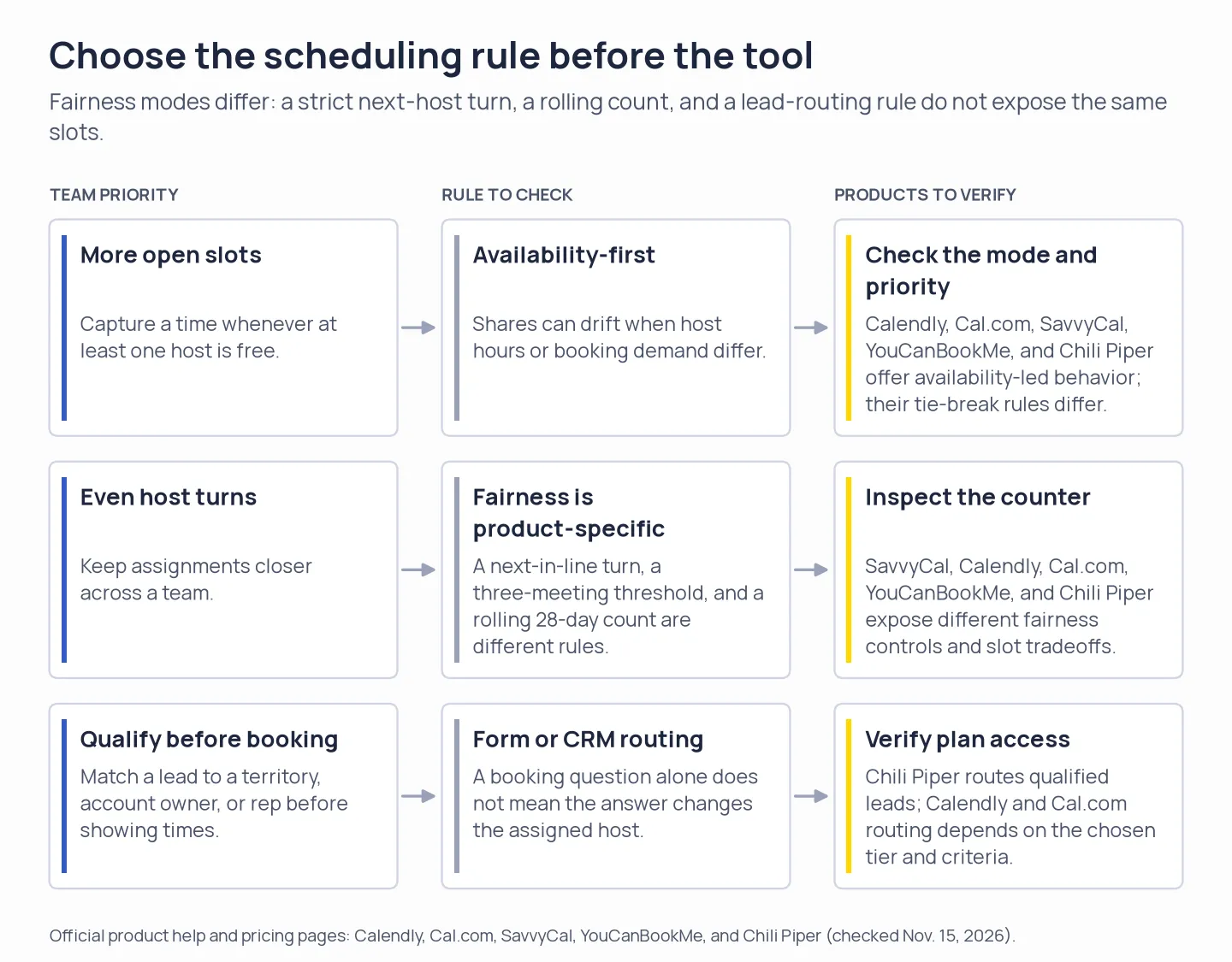
Pick the assignment goal first, then check how each tool’s mode affects available times and which plan unlocks routing.
1. Calendly: Best for teams that need a choice between slot coverage and balance
Start Calendly on Maximize for Availability when open slots matter; choose Optimize for Equal Distribution when closer host shares are worth a smaller menu. Maximize for Availability books any available host according to priority, recency, and then a random tie-break; Optimize for Equal Distribution hides a host once that person is at least three meetings ahead.
I like that Calendly makes the choice explicit, though equal distribution has a cost: it can hide otherwise bookable slots. Changing the host pool resets the event count. By default, a rescheduled meeting goes through the rules again; an admin can keep the original host instead.
The team feature is behind Calendly Teams, Teams Plus, or Enterprise. Every host needs a seat. Teams includes team scheduling and lead qualification/routing; Salesforce lookup routing requires Enterprise, so the entry rate is not an Enterprise routing quote.
Team onboarding and equal-distribution tradeoffs
Calendly asks admins to invite teammates before shared-event setup, and equal distribution can hide slots when a host gets three meetings ahead. I saw the invitation prompt when I opened the Round Robin flow after signup and onboarding.
A Capterra reviewer on October 26, 2026, called shared-link scheduling useful once everyone gets on board. That's an adoption issue rather than a Round Robin defect: a team link only helps when invitees and hosts use it consistently.
I wouldn't choose equal distribution for a team that can't afford to hide open slots; I'd leave the event on availability-first when every inbound time matters.
Pros — Calendly
- Two distribution modes make the tradeoff between open slots and closer balance explicit.
- Hosts can have priorities in availability-first mode.
- Reschedule behavior can preserve the original host.
Cons — Calendly
- Equal distribution can hide slots that a prospect could otherwise book.
- Adding or removing a host restarts the event’s distribution counts.
- Team scheduling starts at three paid seats for a three-host team, and advanced Salesforce lookup routing requires Enterprise.
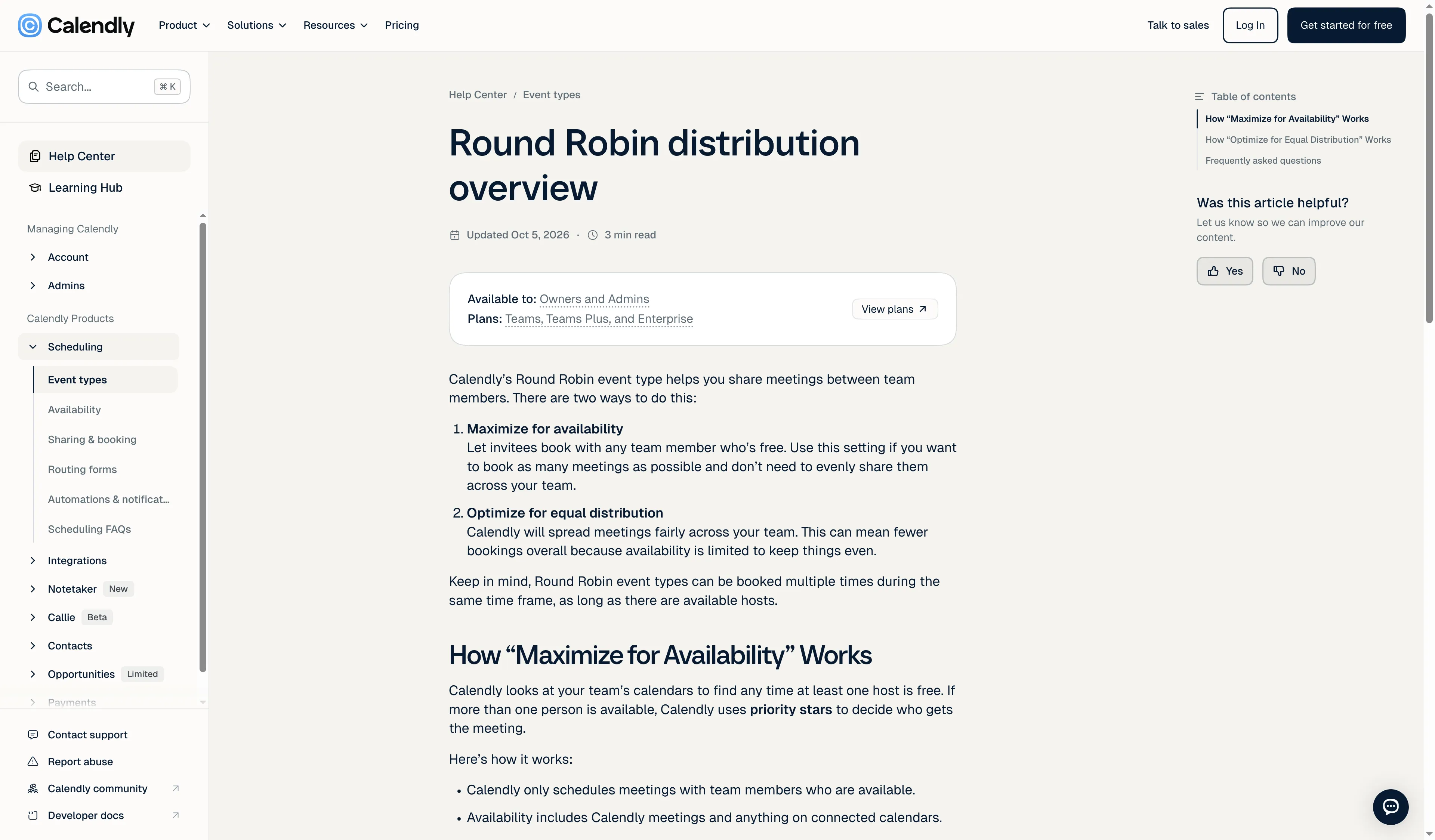
Calendly separates maximizing availability from optimizing for equal distribution.
Product pricing — Calendly
Teams starts at $16 per seat per month billed annually ($192 per host per year) or $20 monthly for the first 30 seats. Salesforce lookup routing requires Enterprise pricing.
2. Cal.com: Best for teams that need adjustable weights or host groups
Cal.com fits teams that need to tune how the pool assigns meetings: it can weight or prioritize hosts, add fixed hosts, and split roles into separate groups. Its round-robin links can prioritize hosts, weight their expected share, add fixed hosts to every meeting, and use separate host pools for roles such as a sales rep and a solutions engineer.
Load balancing gives the next booking to the available host furthest behind; Maximize Availability offers any slot when at least one host can take it. A team can also enable or disable weights and priorities depending on the desired split. When a meeting changes, the booking can be reassigned, or the team can enable same-host rescheduling.
Teams includes round robin. Organizations adds company-wide controls such as attribute-based routing and unlimited subteams. Both tiers advertise a 14-day free trial.
Editor setup and routing complexity
I prefer Cal.com for teams that need adjustable weights, priorities, and routing; for a fixed three-person pool, that setup feels like more work than it earns. I inspected the upgrade path and an existing event editor. The Teams trial reached checkout with $0 due for one user; I exited without adding payment details. Booking limits sat beside a live preview, which was easy to scan. Finding my existing links took more hunting: they were under Links, while Events was a separate navigation item.
A July 2026 five-star G2 reviewer praised Cal.com’s API flexibility but flagged a missing call ID in a webhook. If a booking triggers your CRM workflow, check that your integration gets the fields it needs.
Pros — Cal.com
- Weights and priorities can reflect unequal rep capacity or seniority.
- Round-robin groups can cover two roles on the same meeting, with a fixed host included.
- Teams includes routing forms; Organizations adds attribute-based routing and subteams.
Cons — Cal.com
- Teams doesn't include every organization-wide routing control.
- Equal turns still depend on availability and the weight/priority configuration.
- Setup and plan choices take more thought than a single pooled booking link.
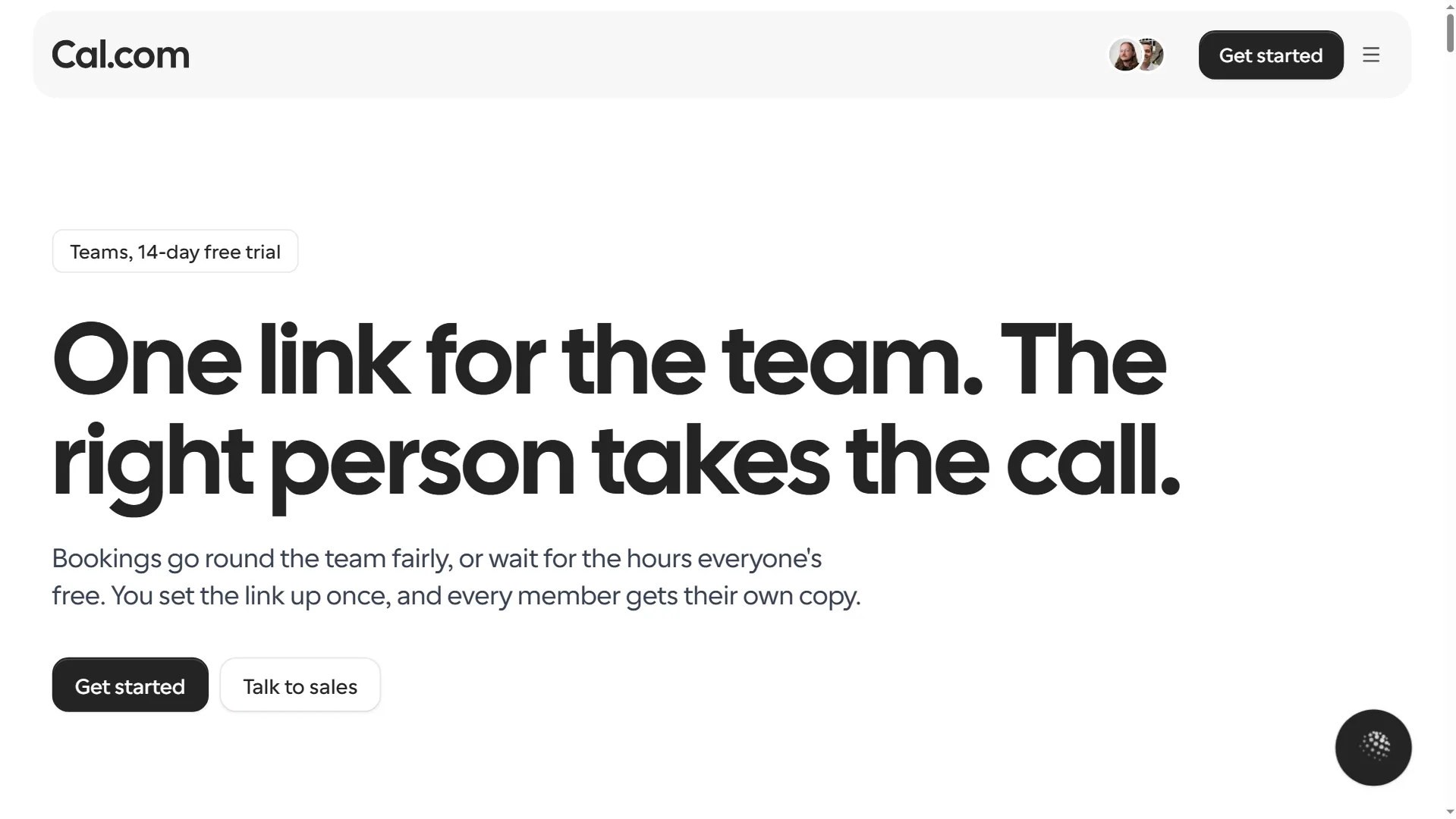
Cal.com’s Teams page shows its shared scheduling setup and 14-day trial.
Product pricing — Cal.com
Teams is $12 per user per month billed annually ($144 per user per year); Organizations is $28 per user per month billed annually ($336 per user per year).
3. SavvyCal: Best for strict turns and per-host booking limits
SavvyCal gives teams strict turns and separate per-host booking limits, though Evenness shows only the next host’s open times. Optimize for Evenness assigns the next booking in the order teammates were added and displays only that host’s available times. Optimize for Availability shows any time at least one person is free and assigns the first eligible person in line, using priorities when configured.
Evenness makes the host rotation predictable, while availability-first gives the booker more choices. A cancellation doesn't change whose turn comes next; a manual reassignment does. Each person in the rotation needs a paid seat, and a daily, weekly, or monthly link limit counts separately for each host.
Round-robin links are included in Basic. Free accounts can set up links, but those links can't accept bookings. SavvyCal doesn't offer a self-serve trial, and its booking form can't route a meeting to a person based on an answer.
A five-star G2 review from October 2026 praises its preferred and secondary availability windows. That fits the product’s control over when people can be booked, but it doesn't verify round-robin performance.
I prefer SavvyCal's clear queue when fairness matters more than showing every open slot. A team that can't let the next host's calendar narrow the choices should use availability-first instead.
Pros — SavvyCal
- Strict turns are easy to understand and audit.
- Per-host frequency limits can prevent one person from taking too many meetings.
- Availability-first mode supports priorities and broader slot coverage.
Cons — SavvyCal
- Evenness mode can show fewer times because only the next host’s slots appear.
- Every host needs a paid seat; free links can't take bookings.
- Booking form answers can't route a lead to another person or team.
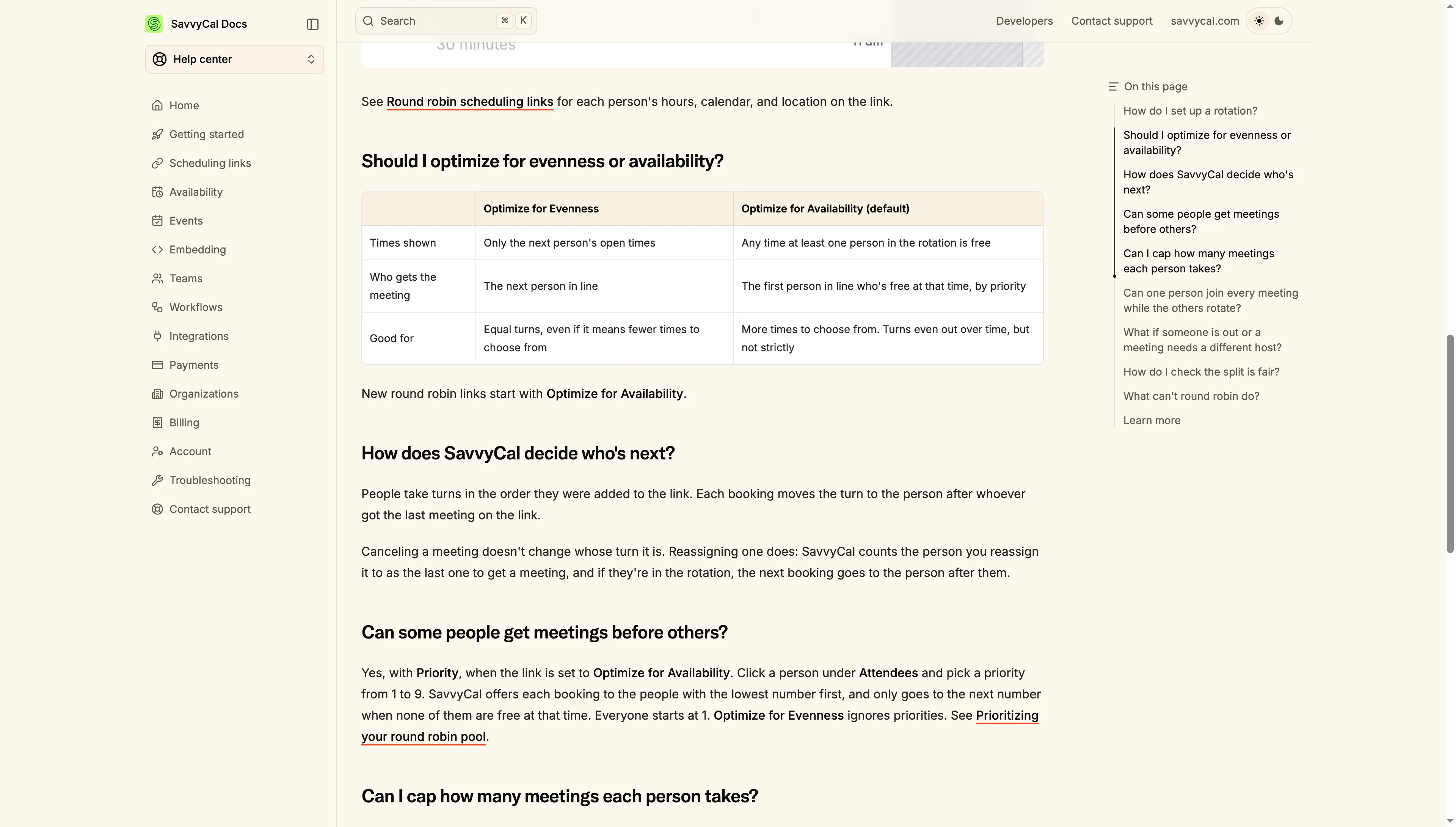
SavvyCal contrasts evenness, which shows the next host’s times, with availability mode, which shows any slot with a free host.
Product pricing — SavvyCal
Basic is $10 per user per month billed annually ($120 per user per year) or $12 monthly. Free links aren't bookable.
4. YouCanBookMe: Best for teams that want a rolling fairness window
YouCanBookMe's Team plan spreads bookings by a rolling 28-day count; choose it when recent workload matters more than fixed list order. It also offers random assignment and priority by list order as separate choices. Within Round Robin, you can optimize for booker availability or equal distribution.
Equal distribution shows pooled times for the hosts with the fewest bookings, then selects from the least-booked hosts who are available for that slot. Each booking page keeps its own count; it doesn't pool bookings from the rest of the account. Canceled meetings remain in the 28-day total, so canceling doesn't immediately return a person’s turn. The vendor’s setup guide also says a rescheduled booking can move to another available team member when the original person can't take the new time.
Team includes Round Robin, centralized billing, team roles, and 10 calendar connections per user. SMS is optional and not included: US credits cost 7¢ per message of up to 160 characters, and longer or Unicode messages can use more than one credit.
Editor controls and page-level workload counts
YouCanBookMe keeps a separate fairness count for each booking page. I liked seeing its one-booking-per-day limit beside the preview; the setting to preserve participants on reschedule sat in a separate panel.
A June 2026 G2 reviewer praised YouCanBookMe’s free setup and criticized the interface. That complaint is broad; I found the Team editor’s page-level count the detail worth checking against your workflow.
I wouldn't use YouCanBookMe when one workload spans multiple booking pages; its counters stay separate.
Pros — YouCanBookMe
- Separate modes prevent random assignment from being mistaken for equal Round Robin.
- The equal-distribution rule uses a rolling 28-day window.
- Booking-page preview, limits, and reschedule controls are visible in the editor.
Cons — YouCanBookMe
- A canceled booking still counts toward the 28-day total.
- The fairness count is per booking page, so separate pages don't create one shared rotation.
- The Team plan is required; the price shown in an older help-center image is higher than the current live pricing page.
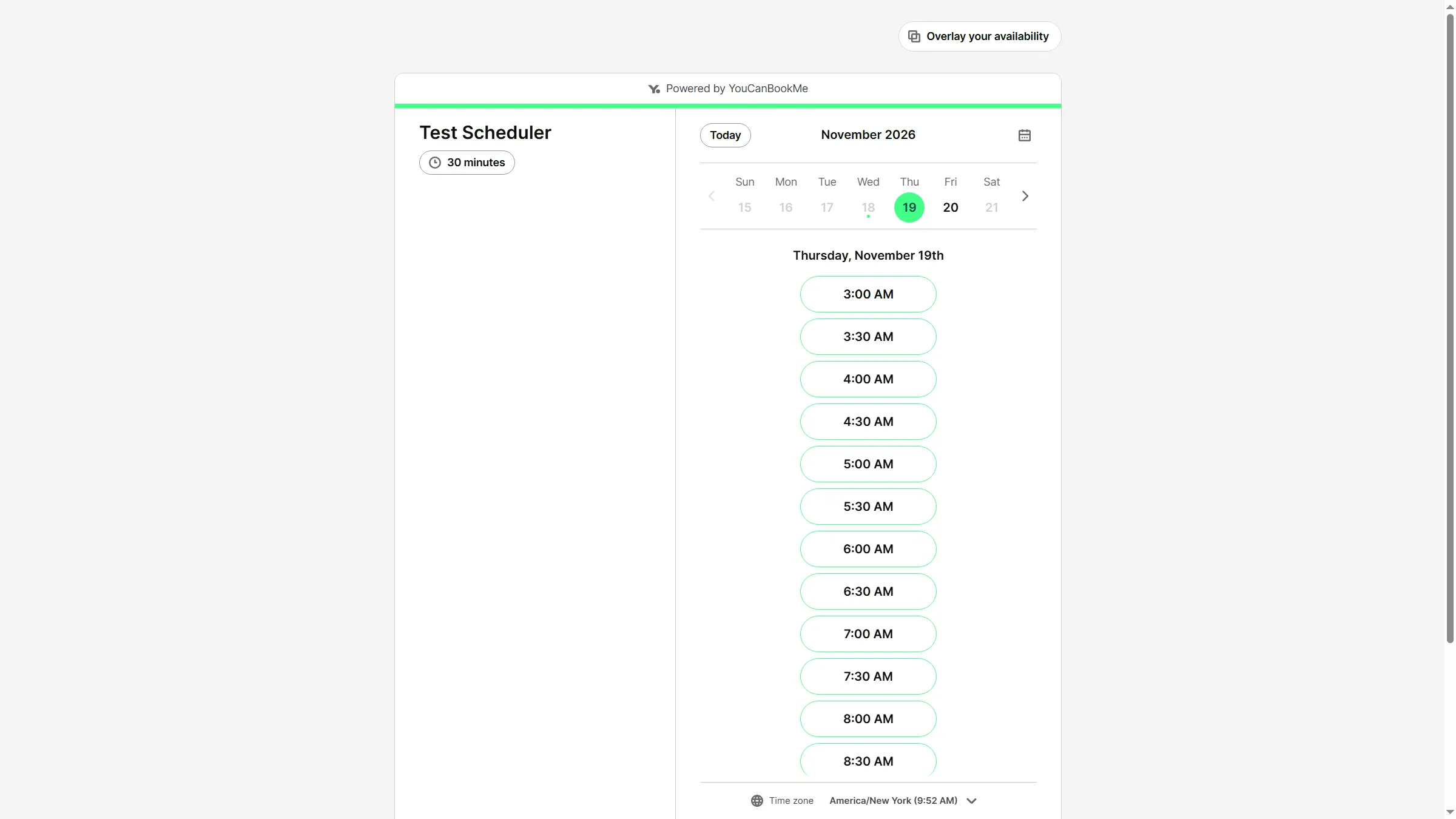
YouCanBookMe’s booking page shows available dates and appointment times before a visitor books.
Product pricing — YouCanBookMe
Team is $14.40 per member per month billed annually ($172.80 per member per year) or $18 monthly. Optional US SMS costs 7¢ per 160-character credit; longer or Unicode messages can use more than one credit.
5. Chili Piper: Best for qualified inbound leads and CRM routing
Chili Piper is for revenue teams that qualify leads and route meetings through CRM rules; a calendar-only team would be paying for unused routing capacity. Its Growth product combines form-to-meeting booking, lead ownership, team distributions, and CRM integrations. The scheduler is one part of a larger routing platform, so its starting price is much higher than a calendar-only team plan.
I read Chili Piper's guide to its Strict and Flexible Round Robin modes. Strict aims to keep the distribution close to even; Flexible shows more possible time slots and uses recent assignment levels among hosts available for the chosen time. Admins can change weights and caps, group distributions across related teams, and decide how cancellations and no-shows affect rep credits. On rescheduling, the link can show availability for any team member or retain the original assignee’s availability.
The plan includes 45,000 annual AI credits; check the current credit rules if your use of enrichment or agents will draw on them. Chili Piper is sales-led, so you need a demo to evaluate the configuration; I didn't request one.
Two October 2026 G2 reviews gave me questions for a demo. An incentivized five-star reviewer on October 27 reported that a rotation sometimes assigned only one rep; an invited five-star reviewer on October 29 mentioned duplicate Salesforce invitations and said the issue was fixed. Ask to see distribution history, the tie-break rule, and how booking updates sync back to Salesforce.
I wouldn't put a calendar-only team through Chili Piper's demo and 15-seat commitment; its routing layer needs to earn its keep.
Pros — Chili Piper
- Connects lead qualification, CRM ownership, and meeting distribution in one routing flow.
- Supports strict and flexible rotation, weights, per-person limits, and distribution groups.
- Admins can account for cancellations, no-shows, and vacations in distribution calibration.
Cons — Chili Piper
- The 15-seat annual entry plan is expensive for a three- or five-person scheduling need.
- All plans are billed annually, and a team needs a demo to evaluate its setup.
- The breadth of routing options adds configuration and CRM-maintenance work.
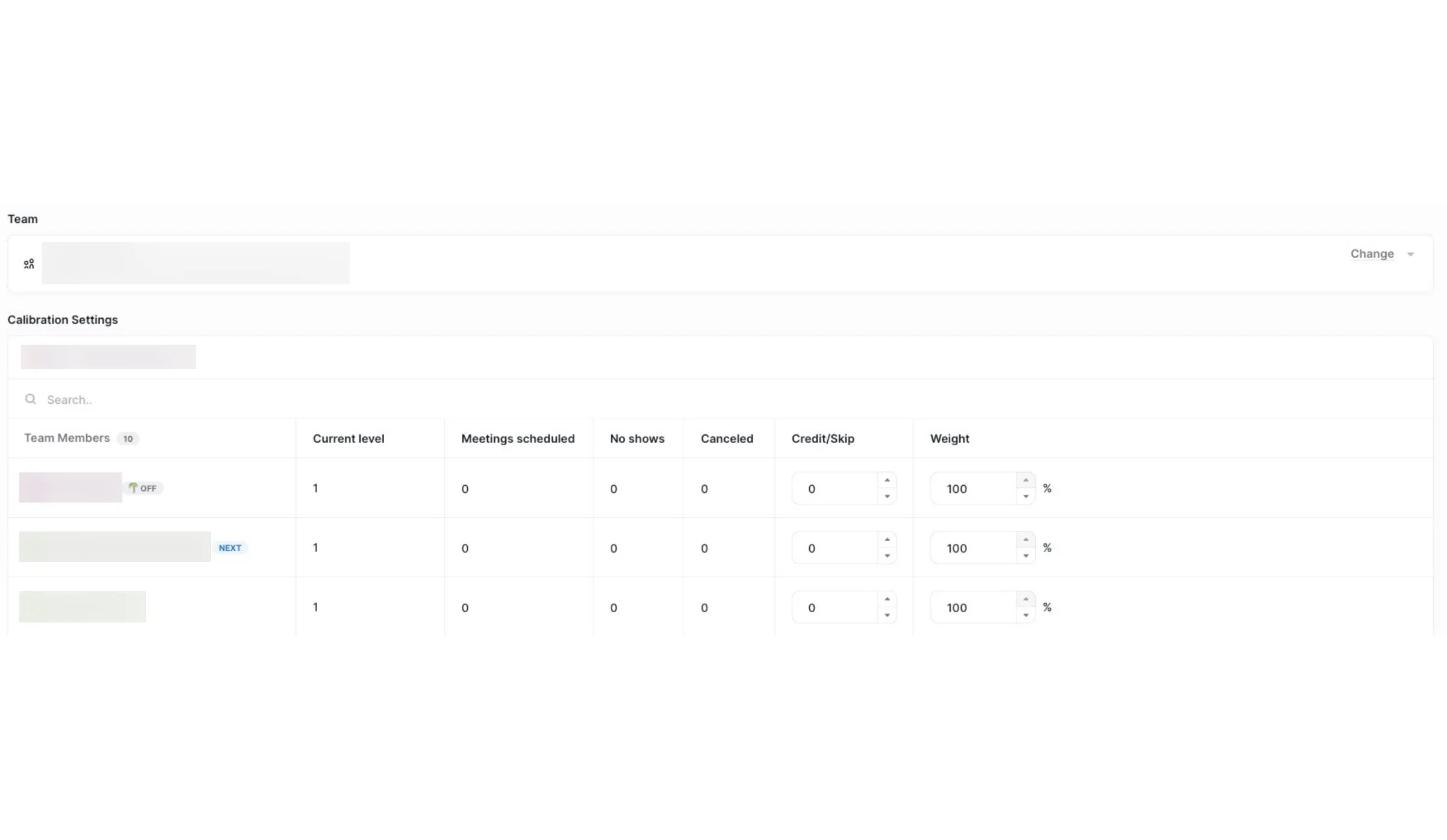
Chili Piper’s calibration table tracks each rep’s booking level, scheduled meetings, and weight.
Product pricing — Chili Piper
Growth starts at $1,250 per month billed annually for 15 seats; additional seats are $45 per month each. There's no monthly billing option.
Compare round-robin scheduling prices by team size
SavvyCal has the lowest listed annual total among the four per-seat schedulers for both the three- and five-host examples. These estimates assume annual billing and a paid seat for every host; they exclude taxes and optional add-ons. Chili Piper’s included 15-seat minimum is shown as a floor, not converted into a fictional three- or five-seat price.
| Product | Three hosts: one shared meeting link | Five hosts: evenness and workload controls | 15-seat qualified inbound routing |
|---|---|---|---|
| Calendly | $576/year, Teams | $960/year, Teams | Teams lists lead qualification/routing; Salesforce lookup routing requires Enterprise, so verify the required configuration and quote |
| Cal.com | $432/year, Teams | $720/year, Teams or $1,680/year, Organizations | Organizations is $5,040/year for 15 seats; confirm that its attribute-based routing matches the CRM workflow |
| SavvyCal | $360/year, Basic | $600/year, Basic | No booking-form answer routing; separate configuration |
| YouCanBookMe | $518.40/year, Team | $864/year, Team | Booking questions alone don't route against CRM ownership; separate configuration |
| Chili Piper | $15,000/year minimum; 15 seats included | $15,000/year minimum; 10 seats beyond a five-host team | $15,000/year for 15 seats; Growth includes form routing and CRM ownership tools |
The three- and five-host columns compare the same paid host counts for the four calendar schedulers. Chili Piper’s 15-seat minimum represents a different capacity. The routing column checks features; it isn't a price ranking. Calendly and Cal.com need plan-level confirmation. SavvyCal and YouCanBookMe don't offer the same form or CRM routing path.
Already-paid calendar and CRM tools
HubSpot offers built-in team rotation on eligible plans; Google Calendar and Microsoft Bookings cover simpler booking, while Pipedrive Scheduler stays tied to individual availability.
| Already-paid tool | What it can assign | Where it stops |
|---|---|---|
| Google Calendar appointment schedules | A booking page for your calendar; eligible Workspace accounts can add co-hosts | Co-hosts receive the booking, but this isn't a host rotation. Their calendars aren't checked by default, so add them to availability checks if their time should block a slot |
| Microsoft Bookings | A randomly selected available staff member when the booker chooses “Anyone” | Microsoft says the assignment can't guarantee equal shares or a per-person cap |
| HubSpot Meetings | Round-robin booking pages are available on Sales or Service Hub Starter and above | You need a Sales or Service seat on Professional or Enterprise for a configured meeting rotation that shows only the next host’s availability |
| Pipedrive Scheduler | A booking link for the individual user’s availability on Growth and higher; separate CRM rules can rotate new leads and deals among reps | The CRM assignment rule doesn't make Scheduler a multi-host meeting rotation, and Pipedrive says there is no maximum open-lead cap |
If an existing option matches the job, Google and Microsoft cover simple booking, while HubSpot and Pipedrive add CRM context. Use them for strict team rotation only when the plan and routing setup support it.
Other tools considered
OnceHub’s Route tier offers round-robin distribution, maximum availability, and priority distribution, but its current package is aimed at sales routing. TidyCal is a lower-cost alternative: its Pro plan includes team round-robin booking, but assignment follows priority order and uses random selection to break ties rather than maintaining a fixed, even turn count. Those different mechanics are why the main comparison focuses on the five selected tools.
Which round-robin scheduler should you choose?
Choose SavvyCal when strict turns and per-host caps matter more than showing every available time. Choose Calendly or YouCanBookMe when you want an explicit fairness-versus-availability setting and a familiar booking page. Choose Cal.com when weighted shares, role-based host groups, or adjustable routing matter. Choose Chili Piper when inbound lead qualification and CRM ownership are part of the booking flow and the 15-seat annual minimum makes financial sense.