

 23 min read

TL;DR: staffing agency software for different agency models
- Integrated operations: Avionté connects recruiting with pay and billing. Its portal for client invoices depends on BOLD-generated invoices.
- Small placement teams: Manatal starts at $15/user/month with annual billing, but Professional's job allowance applies across the account.
- Temp staffing: Zoho Workerly charges by temp count and includes unlimited recruiters on Premium. Payroll processing stays with your payroll system.
- Mixed desks: Recruit CRM combines client and candidate records with contractor billing. Timesheets consume shared credits, so seats alone won't cover the bill.
- Own test: Our October 26, 2026 Recruit CRM contract showed 28.57% margin and 40% markup for the same pay/bill rates. Setting up a contract and approving its hours are separate steps.
I explain the trial work and source-based evaluations in How we tested.
Staffing agency software at a glance: choose by operating model
Choose Avionté for integrated temp operations, Recruit CRM for a mixed permanent and contract desk, and Manatal for a small team watching its placement-software budget. These eight choices cover different parts of the work your agency needs to finish.
| Tool | Best for | Workflow to evaluate | Main constraint |
|---|---|---|---|
| Avionté | Integrated temp operations | Recruiting through pay and billing | Invoices must come from BOLD |
| Bullhorn | Configurable operations | Placement through payable and billable charges | Separately priced modules |
| Zoho Workerly | Smaller temp agencies | Availability, shifts, and approved time | Separate payroll system |
| Recruit CRM | Mixed permanent and contract desks | Candidate records through contractor billing | Shared credit balance |
| Zoho Recruit | Configurable agency ATS/CRM | Client-linked jobs and submissions | Separate Workerly product |
| Manatal | Budget-conscious placement teams | Clients, candidates, and agency pipelines | Account-wide job cap |
| TempWorks | Choosing how to run the back office | Software plus optional operating services | Services need separate scope |
| JobAdder | Keeping an existing back office | Recruiting with accounting/payroll partners | Connector-specific behavior |
What makes the best staffing agency software?
Choose staffing agency software by the service model you run, the access clients need, and the handoff to finance. Staffing agency software connects candidates to client accounts, job orders, and placements, with some products continuing into assignments, timesheets, payroll handoffs, and invoices. Manatal and Zoho Recruit concentrate on the recruitment and client-management side. Workerly puts availability and hours closer to the centre of the workflow.
Before comparing subscriptions, write down what happens after a candidate accepts. Who assigns the worker? Who approves corrected hours? Which system creates the invoice? A permanent-placement boutique can stop much earlier in that chain than a temp agency running weekly payroll.
I used these buying criteria:
- Service model: Permanent placements, temp shifts, and longer contracts need different records. A vacancy with several openings still needs a way to track each worker's assignment.
- Client access: Candidate review, time approval, and invoice access come with different permissions. Check what clients can see as well as what they can approve.
- Finance handoff: Name the system responsible for pay calculations, tax processing, and invoices. Include the person who reconciles imports and corrections.
- Exceptions: Test a rejected timecard or a changed placement rate. Your team may encounter both after the demo.
- Billing unit: Recruiter seats, active temps, credits, and licenses for client portals can all affect the subscription.
If LinkedIn is one of your candidate sourcing channels, consider Linked Helper's LinkedIn profile export to download candidate data as a CSV.
Specialist IT agencies working through VMS/MSP programs should also evaluate CEIPAL or JobDiva for those requirements. This shortlist focuses on general agency operations.
1. Avionté: Best for integrated temp staffing operations
Avionté is my pick for a temp agency that wants recruiting, payroll, and client billing to belong to the same operating process. Its pay-and-bill tools handle assignment-based pay and variable rates, while Contact Experience gives client contacts a place to follow jobs and approve time. That's a more relevant starting point for a busy staffing operation than a prettier candidate board.
Avionté pros
- Assignment-based pay and client-specific billing
- Client portal combines jobs, time, and invoice access
- US and Canadian payroll-related support material
Avionté cons
- Visibility of client invoices requires BOLD back-office billing
- Applicant Tracker permissions expose full candidate contact details
- Suite pricing requires a quote
What I like most is the connection between the client relationship and the financial work. A contact can get portal access if assigned as a job's Time Approver, so your team isn't rebuilding the same client relationship in a separate approval tool. In the Contact Experience help walkthrough, the portal brings job activity, timesheets, and expense approvals together.
Avionté's View Company Invoices permission only displays invoices generated through BOLD's back-office workflow. External invoices won't appear there, even with the permission enabled. That makes the portal less useful if finance plans to keep another invoice engine.
Avionté's Applicant Tracker permission exposes full candidate profiles and contact details. Hiring Manager access offers a more limited view, though the permissions aren't granular. Start with the least access your clients need and preview a candidate before sending an invitation.
Skip Avionté if you want a lightweight permanent-placement database and have no reason to change your financial operations. Its strongest case is the connected staffing workflow; buying only the front end leaves much of that case unused.
Avionté pricing
Avionté pricing: Custom. Scope recruiting, time capture, payroll, billing, client access, and implementation together; no verified public total covers that configuration.
2. Bullhorn: Best for configurable staffing operations
Bullhorn is worth evaluating when your agency needs a configurable recruiting and operations platform, with separate teams owning different parts of pay and billing. It's a substantial implementation decision. The cheapest ATS package won't cover the whole operation.
Bullhorn pros
- Separate payable and billable charge workflows
- Ecosystem of payroll and staffing partners
- Starter and Core have visible entry prices
Bullhorn cons
- Sales-pipeline CRM starts above the entry packages
- Onboarding and Back Office are separate components
- Time processing depends on placement synchronization
Bullhorn Starter includes applicant tracking and client management. For a sales pipeline, you need Pro's recruitment CRM. Back Office and Onboarding are separate components, so build the quote around the work your team needs rather than carrying the entry ATS price into a payroll project.
Bullhorn's Middle Office Field Guide gives operations a concrete dependency to check: the ATS placement must sync into Bullhorn Time & Expense before time can be entered or processed. Approved time then feeds payable charges for payroll and billable charges for invoices. Someone on your team still has to reconcile gross-pay and invoice totals with the downstream systems.
Bullhorn's separate pay and bill streams suit a team keeping its payroll platform, provided the implementation assigns responsibility for the handoff. Its Greenshades payroll offering targets US employers. Scope the country where your workers are paid before choosing a payroll connection.
Skip Bullhorn if three recruiters mainly need client records and a submission pipeline, with no appetite for a broader implementation. For that desk, I'd start with Manatal, Zoho Recruit, or Recruit CRM and test the workflow before taking on more machinery.
Bullhorn's CSV export also needs a migration check. The export guide limits linked data, including recent candidate submissions, and access depends on permissions. Check attachments and activity history alongside a client, job, and candidate before accepting the export as your complete agency database.
Bullhorn pricing
Bullhorn pricing: From $99/user/month for Starter; the public page doesn't specify the billing commitment.
- Core — $165/user/month; marketplace access and custom workflows
- Pro/Max — custom; Pro adds the sales-pipeline recruitment CRM
- Onboarding and Back Office — separately scoped; free implementation is advertised for Starter, Core, and Pro
3. Zoho Workerly: Best for smaller temp staffing operations
Zoho Workerly is my pick for a smaller temp agency that needs to organize shifts and hours alongside an existing payroll system. Its subscription follows temp count. With unlimited recruiters on Premium, adding another dispatcher doesn't automatically add another paid seat.
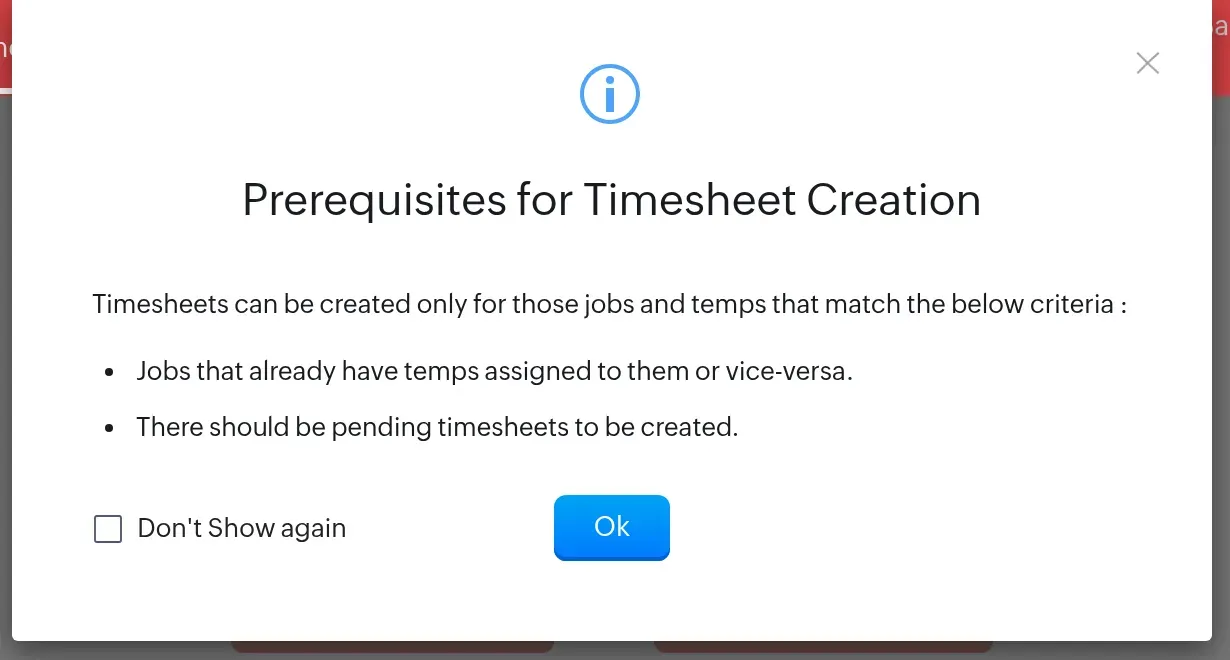
Inside Workerly, Create Timesheet checks for an assigned job and pending time before you can proceed.
Zoho Workerly pros
- Unlimited recruiters and jobs on Premium
- Temp availability, shifts, and timesheet approval
- One license for the client portal included
Zoho Workerly cons
- Paid pricing starts at 25 temps
- Additional licenses for the client portal cost extra
- Payroll export requires a separate payroll system
In the Workerly trial, I created a synthetic temp with an hourly base-pay field. Create Timesheet then stopped at a prerequisite screen: the job needed an assigned temp and pending time. That sequence is useful for a dispatcher learning the product, because the worker record and the assignment have distinct jobs to do.
Workerly covers availability, assignments, and timesheets, with client review and an invoicing workflow through Zoho Books. My trial showed a notice that a Books account would be enabled at no extra cost as part of Workerly (check the Books features your invoice process needs). Keep your payroll system in the project scope too.
Zoho Workerly includes one license for the client portal on Premium. Count the clients who need approval access as well as the workers on assignment. Recruiter seats may be unlimited, but additional portal licenses still add to your bill.
Skip Workerly as your only system if your main business is building permanent-placement sales pipelines and presenting candidate shortlists. Zoho Recruit handles that recruiting work. Workerly earns its place when dispatchers need availability, shifts, and hours together.
Zoho Workerly pricing
Zoho Workerly pricing: From $52/month, billed annually, for Premium covering 25 temps; a 14-day trial is available.
- Free — five temps and two active jobs
- Additional temps 26–500 — $1.33/temp/month with annual billing
- Monthly billing — $59 for 25 temps, then $1.50 per additional temp through 500
- Additional license for the client portal — $3/license/month
4. Recruit CRM: Best for mixed permanent and contract desks
Recruit CRM is my pick for an agency that wants permanent-placement work and contractor billing close to the same recruiter workflow. It combines candidate and job records with client submissions, deal pipelines, and invoicing, then adds Timesheets for contract staffing. That's a useful middle ground between an ATS alone and a larger payroll implementation.
Recruit CRM pros
- Candidate, client, and deal records in one system
- Timesheets connect contractor hours to billing
- Client and contractor portals accompany Timesheets
Recruit CRM cons
- Timesheets share credits with other paid features
- Pro has one hiring pipeline
- Assisted migration carries additional charges
In Recruit CRM's trial, I saved a synthetic contract job with a $25 hourly pay rate and a $35 bill rate. When I reopened it, I saw 28.57% margin and 40% markup: the same $10 difference measured against revenue and cost. I then assigned a synthetic candidate and checked the linked client. I could see the rate calculation on the job before anyone entered time.
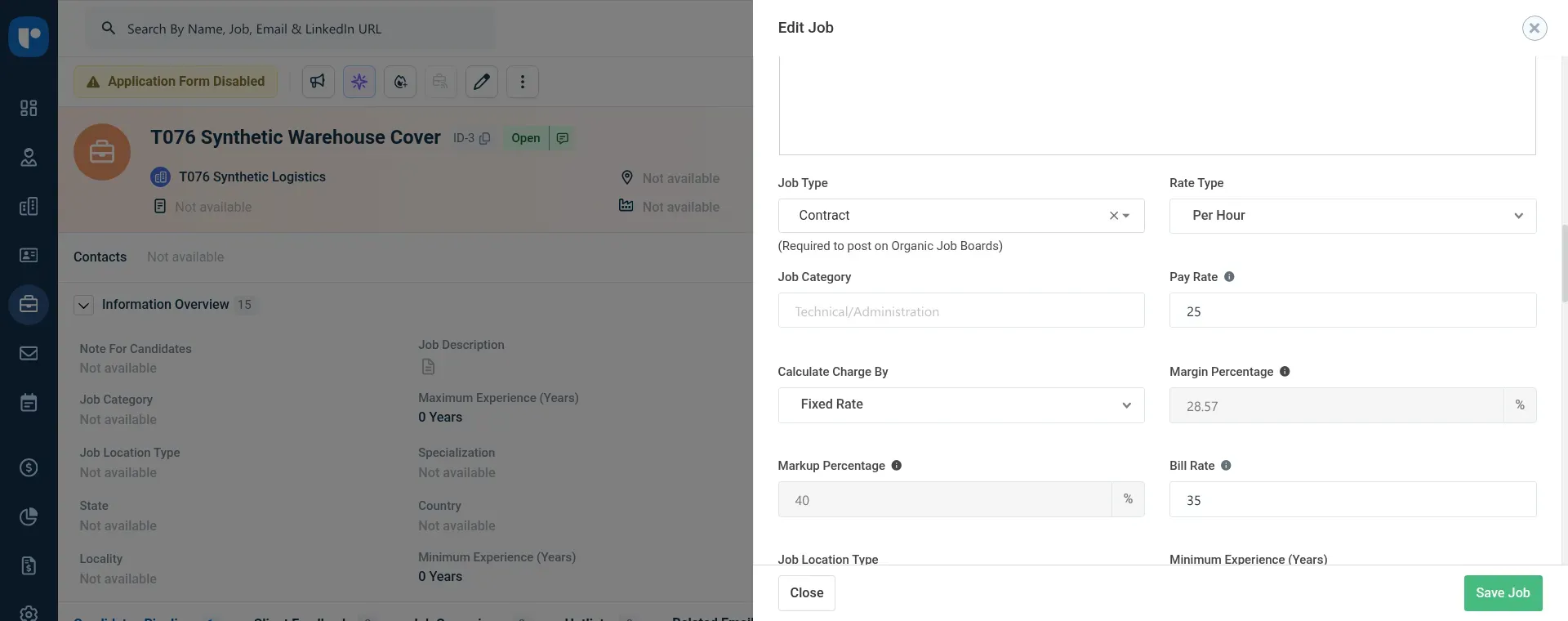
Inside Recruit CRM, my synthetic contract's $25 pay rate and $35 bill rate produce a 28.57% margin and 40% markup.
Recruit CRM's Bill & Pay walkthrough follows rates and rules through expenses, approval queues, and invoices from approved time. I like having the margin-versus-markup choice on the job, where the recruiter sets the commercial terms. Carry the local payroll-processing requirement separately when scoping this billing workflow.
Recruit CRM Timesheets draw from the same credit balance as sourcing and other paid features. A low balance can block submission, so an operations owner needs to watch it before the time deadline.
Recruit CRM Timesheets charge on submission
Recruit CRM charges when the first timesheet is submitted for a contractor's period-start month. Rejection or deletion doesn't refund those credits, and another job for the same contractor in that month doesn't create an additional contractor charge. Count contractor-months when you estimate usage.
Skip Recruit CRM if you're expecting a flat seat subscription to cover unlimited contractor billing. It can still make sense, but you'll need the usage calculation beside the seat total.
Recruit CRM pricing
Recruit CRM pricing: $95/user/month for Pro, $135 for Business, and $215 for Enterprise with annual billing. Monthly billing is $109, $159, and $259 respectively; 30-day free trial.
Recruit CRM Pro includes 100 credits per user on monthly billing or 1,200 per user on annual billing. Business includes 200/2,400 and Enterprise 2,000/24,000, respectively. Annual allowances arrive as a yearly pool shared with other credit-based features. Extra-credit dollar pricing remains unpriced in the comparison.
5. Zoho Recruit: Best for agencies wanting a configurable ATS and CRM
Zoho Recruit is worth evaluating when you want to configure agency client and candidate workflows without a high starting seat price. Choose the Staffing Agency edition. Corporate HR serves an employer's own hiring and has different prices and job allowances.
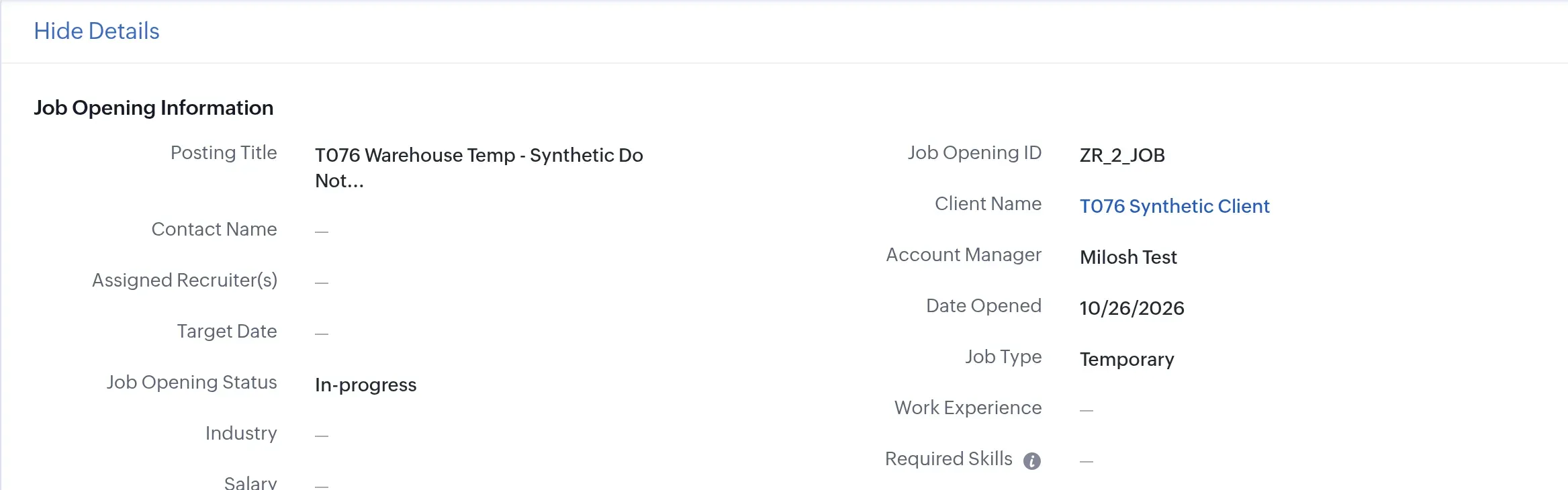
Inside Zoho Recruit, I saved a synthetic vacancy as Temporary and linked it to a separate test client.
Zoho Recruit pros
- Staffing Agency edition includes clients and contacts
- Standard supports 100 active jobs
- Client submission and review tools
Zoho Recruit cons
- Corporate HR is a different edition
- Temp scheduling and time operations need separate scope
- Workerly requires a separate product decision
I saved an unpublished temporary vacancy against a synthetic client, then reopened it to check the Temporary label and Standard Pipeline. The client stayed attached to the job. My small gripe was that the operational fields sat behind Show Details, so I needed another click to check the job type after saving.
Zoho Recruit Standard includes formatted resumes and candidate review forms. A boutique can use those client-facing recruiting tools without starting on the highest tier. The active-job allowances increase with the paid plans.
Zoho Recruit handles candidate selection, client submissions, and interviews. Ongoing temp availability, shifts, and timesheets belong in Workerly. Map those responsibilities before treating two Zoho product names as one subscription.
Skip Zoho Recruit as a standalone answer to weekly temp payroll. If your team already has payroll and scheduling settled, though, it's a sensible candidate for the recruitment and client-management layer.
Zoho Recruit pricing
Zoho Recruit pricing: From $25/recruiter/month, billed annually, for Staffing Agency Standard; free plan and 15-day trial available.
- Standard — 100 active jobs and tools clients can use to review candidates
- Professional — $50/recruiter/month, billed annually; forecasts and pre-screening
- Enterprise — $75/recruiter/month, billed annually; higher limits and customization
- Monthly billing — $30/$60/$90 per recruiter for those three plans
6. Manatal: Best for budget-conscious placement teams
Manatal is my pick for a small placement team on a budget that needs client and candidate records in order. In the trial, I created an unpublished warehouse vacancy for a synthetic client, saved five openings with Temporary and Hourly attributes, and attached a dummy candidate.
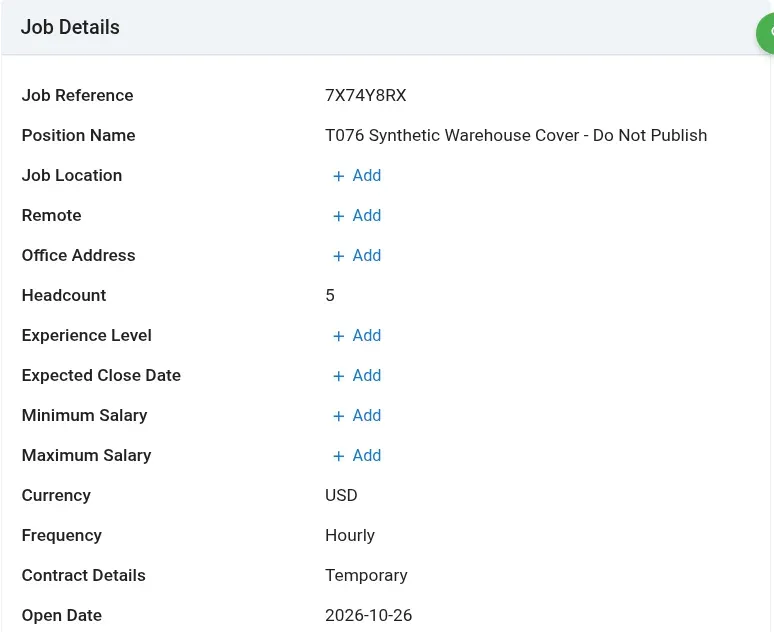
Inside Manatal, I saved five openings and an hourly, temporary contract type on an unpublished test vacancy.
Manatal pros
- Low entry price for an agency ATS/CRM
- Temporary, hourly, and headcount fields on jobs
- Unlimited hiring managers on paid plans
Manatal cons
- Professional's 15-job limit is shared across the account
- Open API requires Enterprise Plus
- A temporary job record isn't a pay-and-bill workflow
Manatal placed the candidate in New Candidates, alongside Client Submission and Client Interview stages. That gave me a recognizable agency pipeline without rebuilding the job as a generic sales opportunity. Keep the staffing assignment and payroll requirements separate when evaluating those vacancy fields.
My small UI gripe was how I had to create a candidate. The job's Create Candidate tab led to resume upload; I used the global create menu to enter a candidate by name. Once linked, the candidate was in the right vacancy pipeline. It's a small extra step, but one you'll notice if you often create records before receiving a resume.
A Reddit discussion adds a useful counterpoint to the trial. User u/rolldemdice wrote that they had switched their agency “from an expensive, nothing crazy ATS, to Manatal about 2 years ago.” They praised its value and new features, while u/febstars criticized the usefulness of their sales demo in the same thread. I trust a working trial more than either sales promises or a single customer verdict.
Manatal's account-wide job cap deserves attention as recruiters join the team. Skip Professional when several recruiters will regularly exceed 15 live roles. And settle the workflow before committing annually: purchased subscriptions and add-ons are nonrefundable for the committed term under Manatal's terms.
Manatal pricing
Manatal pricing: From $15/user/month, billed annually, for Professional; 14-day trial.
- Professional — 15 jobs/account and 10,000 candidates
- Enterprise — $35/user/month, billed annually; unlimited jobs/candidates
- Enterprise Plus — $55/user/month, billed annually; open API and advanced reporting
- Monthly billing — $19/$39/$59 per user for those three plans
7. TempWorks: Best for choosing between in-house and outsourced back-office work
TempWorks is worth evaluating when the purchase includes deciding who will run your back office. Its software connects recruiting to payroll and billing, with separate back-office services available for agencies that want operational help. Software and service contracts solve different staffing problems.
TempWorks pros
- Connected recruiting, payroll, and client billing
- WebCenter gives workers and clients self-service access
- Optional back-office services alongside software
TempWorks cons
- Manually entered timecards bypass WebCenter approval
- Software, funding, and services require separate scope
- No verified public all-in subscription price
A small agency struggling with payroll administration may need help from people as much as another screen. A larger agency may prefer to keep its payroll team and give it connected software. TempWorks lets you evaluate those choices separately, including funding as its own service. Don't assume funding comes with a software seat.
TempWorks WebCenter lets workers see assignments and submit time, while clients handle timecards and access invoices. But according to its report guide, regular timecards entered or imported by payroll bypass WebCenter approvals. If your team uses manual entries for late hours or corrections, give those entries a separate client sign-off process.
A customer comment captures the appeal and the limitation. On April 17, 2025, u/trupathpaul wrote on r/Recruitment that Tempworks “makes entering and approving time cards easier, but that is about it.” They preferred Loxo's adaptability and found TempWorks rigid in the same comment. Time approval is a sensible demo focus, though your own configuration will decide how much that complaint applies.
Skip TempWorks if you only need an inexpensive candidate CRM for permanent placements. Its value is in the agency's operational work, especially when payroll and client billing need the same implementation discussion.
TempWorks pricing
TempWorks pricing: Custom. Keep software, implementation, optional back-office services, and funding on separate lines in the scope so you can compare the work each quote includes.
8. JobAdder: Best for agencies retaining their existing back office
JobAdder is worth a look when recruiters need a new front office but finance wants to keep the systems it trusts. It connects recruiting with accounting and payroll partners, giving you a way to change the recruiter workflow without replacing the whole back office.
JobAdder pros
- Accounting connections include Xero and QuickBooks
- Payroll partner choices
- Retained-search fee events can be scheduled
JobAdder cons
- Hiring Manager Portal appears as an add-on
- API access isn't available on Recruiter Lite
- Placement amendments depend on the selected connector
The useful detail is how it handles different commercial events. Its back-office material covers invoices syncing to Xero or QuickBooks and fees split across stages of retained search. That gives you a better starting question than “Does it integrate?” You want to know whether the exact placement and fee event your agency uses reach the right downstream record.
JobAdder's flexibility makes the connector part of the evaluation. For example, the Oncore help guide says amendments and files added after the initial submission don't automatically resync through that connection. Test a changed placement as well as the first export, using the actual partner you plan to buy.
JobAdder's Timesheet Portal partner page covers UK PAYE, AWR, and HMRC reporting. A US agency needs a connection scoped to its own payroll requirements. Keep the country and chosen payroll partner together in the implementation brief.
Skip JobAdder if you want one vendor to supply an already-defined recruiting, payroll, and billing package with a single public price. Its appeal is the choice of connections; you'll get the most from it when your existing back office is an asset you want to keep.
JobAdder pricing
JobAdder pricing: Custom for Recruiter Lite, Essential, and Pro. Confirm the required portal and connector configuration together; Recruiter Lite excludes API access.
How staffing agency software costs are calculated
Staffing agency software totals here use annual list prices before tax, with temp billing and external payroll connections priced separately where needed. Manatal seats, Workerly temps, and Recruit CRM credits measure different purchases. These are annualized list-price calculations checked October 26, 2026, in USD before tax. Annual billing means a yearly commitment where stated. Optional advertising, messaging, implementation, and migration services are excluded unless a row identifies them; custom configurations stay unpriced.
Three placement recruiters: Manatal, Zoho Recruit, and Recruit CRM
For three placement recruiters on annual billing, Manatal Professional costs $540 a year, Zoho Recruit Staffing Standard costs $900, and Recruit CRM Pro costs $3,420. The following annual totals cover that placement workflow, excluding payroll and a separate sales-forecasting pipeline.
| Tool | Suitable configuration | Annual subscription | Additional scope | Limit to watch |
|---|---|---|---|---|
| Manatal | 3 × Professional, annual billing | $540 | Optional usage/services | 15 jobs across the account |
| Zoho Recruit | 3 × Staffing Standard, annual billing | $900 | Optional portal/add-ons | 100 active jobs |
| Recruit CRM | 3 × Pro, annual billing | $3,420 | Credit-based features | One hiring pipeline |
| Bullhorn | Matched agency configuration | Custom | Confirm client-submission scope | Full sales-pipeline CRM requires Pro |
Manatal has the lowest seat total here. Zoho Recruit buys more active-job room, while Recruit CRM adds a more direct route into contractor billing. Bullhorn needs a matched configuration quote before its cost belongs alongside these totals.
Workerly and Recruit CRM: five recruiters and 50 temps
For five recruiters and 50 active temps, Zoho Workerly costs $1,023 a year, while Recruit CRM costs $5,700 for seats plus extra timesheet credits. Statutory payroll stays separate. The comparison shows the subscription arithmetic and the remaining costs to price.
| Tool | Suitable configuration | Annual cost | Required extras or unknowns | Limit to watch |
|---|---|---|---|---|
| Zoho Workerly | Premium, 50 temps, annual billing | $1,023 Workerly subscription | Extra portal licenses; payroll system separate | One license for the client portal included |
| Recruit CRM | 5 × Pro plus timesheet credits | $5,700 seats + credit top-up | Credit top-up; other credit usage extra | 4,650 timesheet credits/month |
| Avionté | BOLD time, approval, and billing | Custom | Matched implementation scope | Portal invoices need BOLD billing |
| TempWorks | Time approval and back-office billing | Custom | Software/services priced separately | Manual timecards use another approval path |
| Bullhorn | ATS + Time & Expense + Back Office | Custom | Modules and payroll handoff | Placement must sync before time processing |
Workerly's subscription comes to ($52 + 25 × $1.33) × 12. Recruit CRM's graduated timesheet charge is 15 × 100 + 35 × 90 credits each month for the 50 contractors. Over 12 identical months, that consumes 55,800 credits, against 6,000 included with five annual Pro seats. At least 49,800 extra credits are needed if the entire allowance goes to Timesheets. You must add their dollar cost to the seat subscription.
Workerly's total excludes payroll services and implementation. Keep those costs beside the subscription when comparing it with a larger suite quote.
Bullhorn and JobAdder: ten recruiters keeping payroll
Bullhorn and JobAdder need custom configuration quotes for a ten-recruiter desk keeping external payroll, as do the Avionté and Recruit CRM configurations compared here. The table identifies what needs an implementation quote and an amendment test.
| Tool | Configuration to scope | Annual total | Operational dependency |
|---|---|---|---|
| Bullhorn | ATS + BTE + Back Office + payroll connection | Custom | Placement sync and pay-total reconciliation |
| JobAdder | Recruiting plus the selected payroll/accounting partner | Custom | Test amendments, not just first export |
| Avionté | Recruiting and matched finance workflow | Custom | External invoices won't appear in BOLD's client portal |
| Recruit CRM | Business API access plus time/billing and payroll handoff | Custom combined cost | Seat price doesn't price the external payroll connection |
Keep a payroll system that already works. Finance needs a reason to move, and a useful implementation test is to change an assignment rate, submit corrected time, and follow the pay and invoice records through the connection.
Which staffing agency software should you choose?
Manatal and Zoho Recruit are the starting points for a small permanent-placement desk. Recruit CRM adds a route into contractor billing, while Workerly fits a temp operation that needs shifts and approved hours alongside an existing payroll system. For a broader payroll-and-billing implementation, compare Avionté, Bullhorn, and TempWorks with the required modules and services in scope.
Keep a working finance system in the comparison. JobAdder's partner approach and Bullhorn's configurable handoff are worth examining when recruiters need new software but finance wants to stay put. Replacing payroll just to consolidate screens can create more work than it removes.
An existing general CRM may already hold your client opportunities. Decide which application owns the client, job, and candidate relationship before adding another place to update the same records. For the final demo, bring a changed assignment or corrected timecard and follow it through to pay and the client invoice.
How we tested
In October 2026, I tested staffing agency software with synthetic records in four trials and researched the other four products through vendor documentation and customer accounts. I didn't run payroll.