
 Updated: September 20, 2026
 28 min read
Key takeaways
- The seven-day trial provides Unlimited access rather than the lower-tier entitlement a buyer may retain. Retest Starter, Pro, or Advanced before paying because trial features can disappear on the retained plan.
- Keeping the LinkedIn session token local does not keep lead data local. Our inspection of the published extension found that scraped profiles and results went to the vendor API. Meanwhile, the Privacy Policy does not publicly establish a storage region, named subprocessors, a DPA, or security certifications. A privacy review should assess session custody and vendor storage separately.
- Email Finder's 500 credits per 30 days are lookup attempts, not promised addresses. Failed lookups consume credits, and unused credits expire, so estimate demand based on attempts before choosing Unlimited.
- Activity Control is an Unlimited-only alert, not an automatic stop. Our inspection of the published extension found daily-cap, delay, and working-hours settings but did not establish live enforcement. The top tier should not be treated as proof that limits enforce themselves.
This review is published by Linked Helper and written by Milosh Potikj, a member of its team. I've made every effort to represent Octopus CRM accurately using verified data from our dated public-surface research, an extension source-code inspection, Octopus CRM's own documentation, and independently sourced reviews.
Octopus CRM is a Chrome extension for supervised LinkedIn connection, profile-visit, endorsement, and messaging workflows. The advertised entry price is $9.99 per month, but campaign creation and CSV import/export begin with Advanced at $21.99 per month. It may suit solo operators who can keep Chrome open and monitor replies in LinkedIn. The local-session design avoids sending the LinkedIn login cookie to the vendor, yet an August 2026 static inspection rated the extension's risk Medium because it remains visible and active inside LinkedIn pages. It does not provide cloud continuity, conditional workflows, or reply-aware automation.
| Question | Finding |
|---|---|
| Architecture | Local-execution Chrome extension |
| Campaign entry tier | Advanced · $21.99/month |
| Browser dependency | Automation stops when Chrome closes |
| Reply handling | No in-tool reply visibility or automatic reply stop |
Octopus CRM at a glance
As of July-August 2026 · Octopus CRM public product pages and the package published through its Chrome Web Store listing
Verdict
Verdict: Octopus CRM is a workable choice for simple, supervised LinkedIn outreach, but its browser dependency and linear workflow model rule it out for several common operating requirements.
The operating model is narrow: One operator can build linear campaigns, work from a local LinkedIn session, and pay $21.99 per month for the first campaign-capable tier. It assumes a browser-on workflow and manual checks for LinkedIn replies.
The condition matters more than the headline price. Octopus CRM says automation stops when Chrome closes, so an unattended campaign requires user-supplied always-on infrastructure. Campaigns do not support branching, A/B tests, or suppressing later steps after a reply. One subscription also covers one LinkedIn account rather than providing a central team workspace. These boundaries need to match the actual process; otherwise, the lower sticker price buys the wrong operating model.
Pros
- Low public entry prices: Starter costs $9.99 per month, while the campaign-capable Advanced tier costs $21.99 per month. Advanced is the relevant entry point for sequence users.
- Local session custody: The inspected extension did not request cookie permission or upload the LinkedIn session token, though it still sent scraped results to the vendor backend.
- Compact action set: Connect, message, visit, and endorse cover the product’s documented LinkedIn automation scope without implying a broader multichannel system.
- Full-tier trial: The seven-day, no-card trial provides access to Unlimited features before payment. Starter is materially smaller afterward.
- Account-local duplicate prevention: Processed profiles enter History and cannot be added again until History is cleared. This limit does not extend across accounts.
- No mandatory paid LinkedIn plan: The vendor documents compatibility with free LinkedIn and paid surfaces. However, the live grid and FAQ conflict over which plan unlocks Premium/Recruiter compatibility.
Cons
- Chrome must remain open: Closing the browser stops automation on every plan, so the subscription price alone does not provide unattended operation. Any always-on setup requires user-supplied infrastructure.
- Replies require manual monitoring: The product does not display inbound replies or automatically stop scheduled follow-ups, so the operator must monitor the LinkedIn inbox.
- Campaigns are linear: Conditional branches and A/B tests are absent from the documented campaign model, so every prospect follows the same path.
- Material features sit behind higher tiers: Campaigns and export begin with Advanced at $21.99. The two named integration endpoints, Activity Control, Premium/Recruiter compatibility, and capped Email Finder require Unlimited at $39.99.
- Account scaling stays fragmented: One subscription covers one LinkedIn account, while the vendor’s own review documents no team-management layer or cloud dashboard.
- Exit terms are narrow: Monthly purchases are non-refundable, annual refunds have a 24-hour window, and subscriptions auto-renew until canceled. Review complaints about billing remain observations rather than proof of universal failure.
Octopus CRM Pricing: Plans, Traps, and Hidden Costs
The headline and the campaign floor differ. The July 2026 pricing grid showed four public plans.
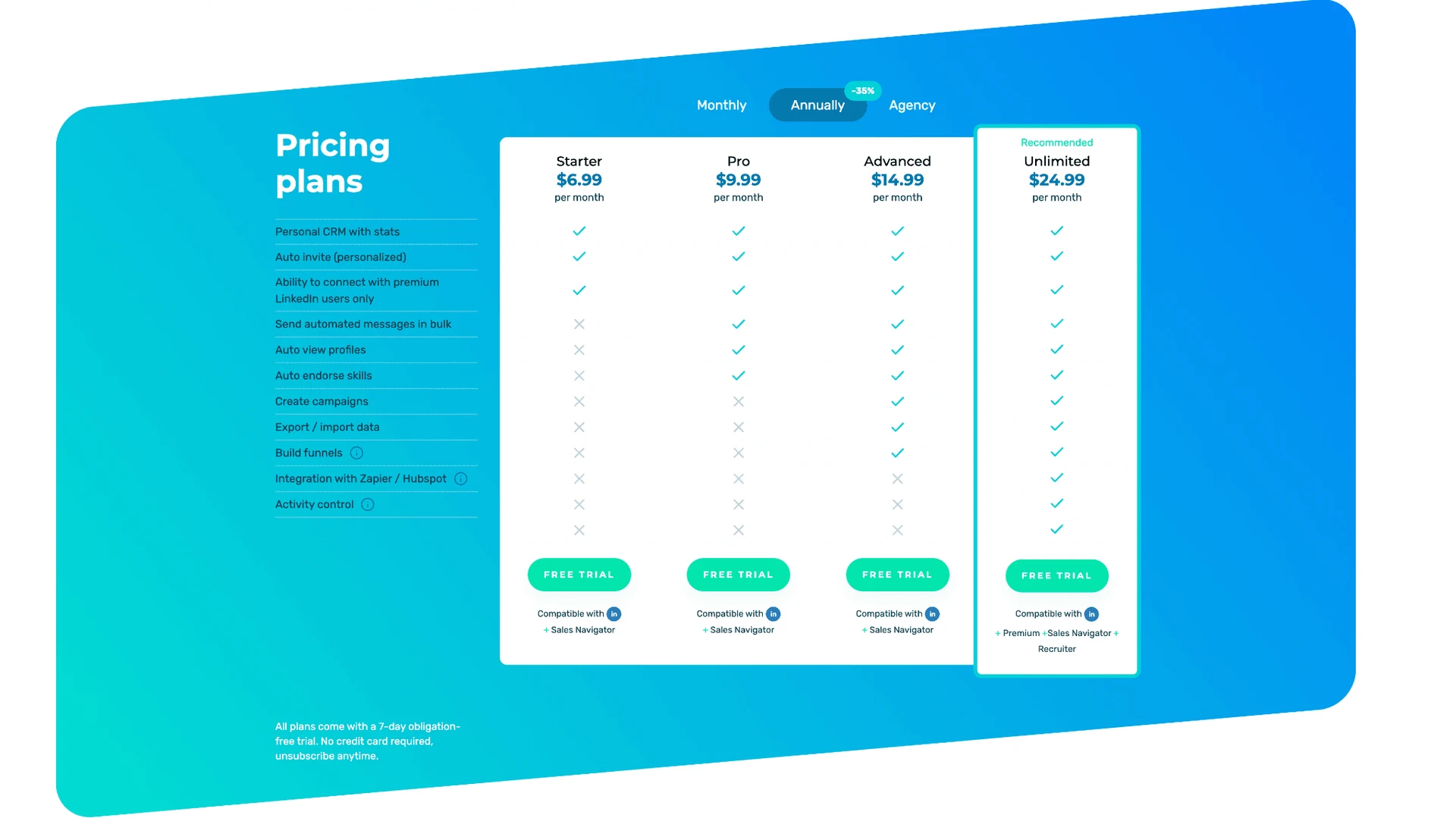
Starter costs $9.99 per month but includes only three of the 11 listed capabilities: Personal CRM/statistics, personalized auto-invites, and the listed connection compatibility. It does not include campaigns, funnels, bulk messaging, or import/export. Advanced, at $21.99 per month, is therefore the campaign-and-CSV floor.
| Plan | Price | What's included | What's NOT included |
|---|---|---|---|
| Starter | $9.99 monthly · $6.99/month annual equivalent ($83.88/year) | Personal CRM/stats · personalized auto-invite · listed connection compatibility | Bulk messages · campaigns/funnels · import/export · integrations · Activity Control |
| Pro | $14.99 monthly · $9.99/month annual equivalent ($119.88/year) | Starter features · bulk messaging · profile visits · endorsements | Campaigns/funnels · import/export · integrations · Activity Control |
| Advanced | $21.99 monthly · $14.99/month annual equivalent ($179.88/year) | Campaigns/funnels · CSV import/export · lower-tier actions | Zapier/HubSpot · Activity Control · Email Finder · grid-listed Premium/Recruiter compatibility |
| Unlimited | $39.99 monthly · $24.99/month annual equivalent ($299.88/year) | Integrations · Activity Control · Email Finder · grid-listed Premium/Recruiter compatibility | Always-on cloud execution · centralized team workspace · automatic reply stop |
Octopus CRM pricing tiers
As of July 2026 · Octopus CRM pricing and plan entitlements
Pricing trap: The $9.99 card is not a campaign tier. A sequence-and-export workflow starts at $21.99, while the named integration, alerting, and Email Finder features require the $39.99 Unlimited plan.
The annual badge is approximate. The site advertised a single 35% discount label, but the supplied monthly and annual-equivalent prices result in discounts of 30.0% on Starter, 33.4% on Pro, 31.8% on Advanced, and 37.5% on Unlimited. Buyers should compare the displayed annual total for the chosen tier rather than assume a flat 35% discount.
Per-account licensing multiplies quickly. The FAQ maps one subscription to one LinkedIn account. At public list prices, one Advanced account costs $21.99 monthly or $179.88 yearly; five Advanced accounts cost $109.95 monthly or $899.40 yearly. Twenty Unlimited accounts cost $799.80 monthly or $5,997.60 yearly. The vendor directs buyers with 20+ accounts to contact sales, so the last figure is a public-list scenario, not a promised agency quote. External compute, Zapier, tax, and optional paid LinkedIn products are separate.
Trial and exit terms belong together. The seven-day trial requires no card and grants Unlimited access, but there is no permanent free plan. The current Terms state that monthly purchases are non-refundable, annual refunds are limited to 24 hours, sales tax may be added, and subscriptions auto-renew unless cancelled. Buyers should therefore test the exact lower-tier entitlement they expect to keep, not just the top-tier trial experience.
Email Finder has its own cap. The Email Finder credit rules state that Unlimited includes 500 credits every 30 days. Unused credits do not roll over, and both successful and unsuccessful lookup attempts consume one credit. Extra packages are available, but their public prices were not established.
Browser Execution, Session Handling, and Data Flow
Octopus CRM is a local-scrape extension. It operates inside the user’s Chrome session rather than creating a separate vendor-hosted LinkedIn session. The vendor’s own review states that the product is not cloud-based and stops when Chrome closes. In practice, the user’s machine and browser must remain available for every scheduled step, regardless of plan.
The session and collected data follow separate paths. Our August 2026 static inspection of the package from the published extension listing found no cookies permission and no upload of the LinkedIn session cookie. JSESSIONID was used locally to form the anti-forgery token for same-origin requests to Voyager, LinkedIn’s internal web API. Scraped profiles and results were then sent to api.octopuscrm.io, so local session custody does not mean the product works offline or keeps all lead data on the device.
LinkedIn page → injected extension code → same-origin Voyager requests → scraped results → Octopus CRM API
| Data class | Observed handling | Operational meaning |
|---|---|---|
| LinkedIn session material | Stayed in the local browser; no cookie permission or session upload found | Removes the vendor-cloud session-transfer axis |
| LinkedIn requests | Same-origin Voyager calls from the authenticated browser | Actions still depend on the open local browser |
| Scraped profiles/results | Sent to api.octopuscrm.io | Collected data leaves the machine even though the login stays local |
| Service data | Privacy Policy names service-provider servers; region is not disclosed | Local execution and vendor data storage are separate questions |
Octopus CRM session and data flow
As of August 2026 · package from the Octopus CRM Chrome Web Store listing and the Octopus CRM Privacy Policy
Execution boundary: Keeping the LinkedIn session local removes one cloud risk axis, but Chrome uptime remains mandatory, and scraped results still reach the vendor backend.
That distinction matters in a privacy review. The policy discloses service-provider storage but does not establish a region, named subprocessors, or a DPA. These are disclosure gaps, not proof that the underlying controls are absent.
Automation, Campaigns, and Personalization
The documented action set is closed and compact: send connection requests, send messages, visit profiles, and endorse skills. Connection requests begin on Starter; bulk messaging, visits, and endorsements appear on Pro; campaign funnels and CSV movement begin on Advanced. The vendor's product review and action documentation support this scope, while the endorsement page documents up to seven skills per contact.
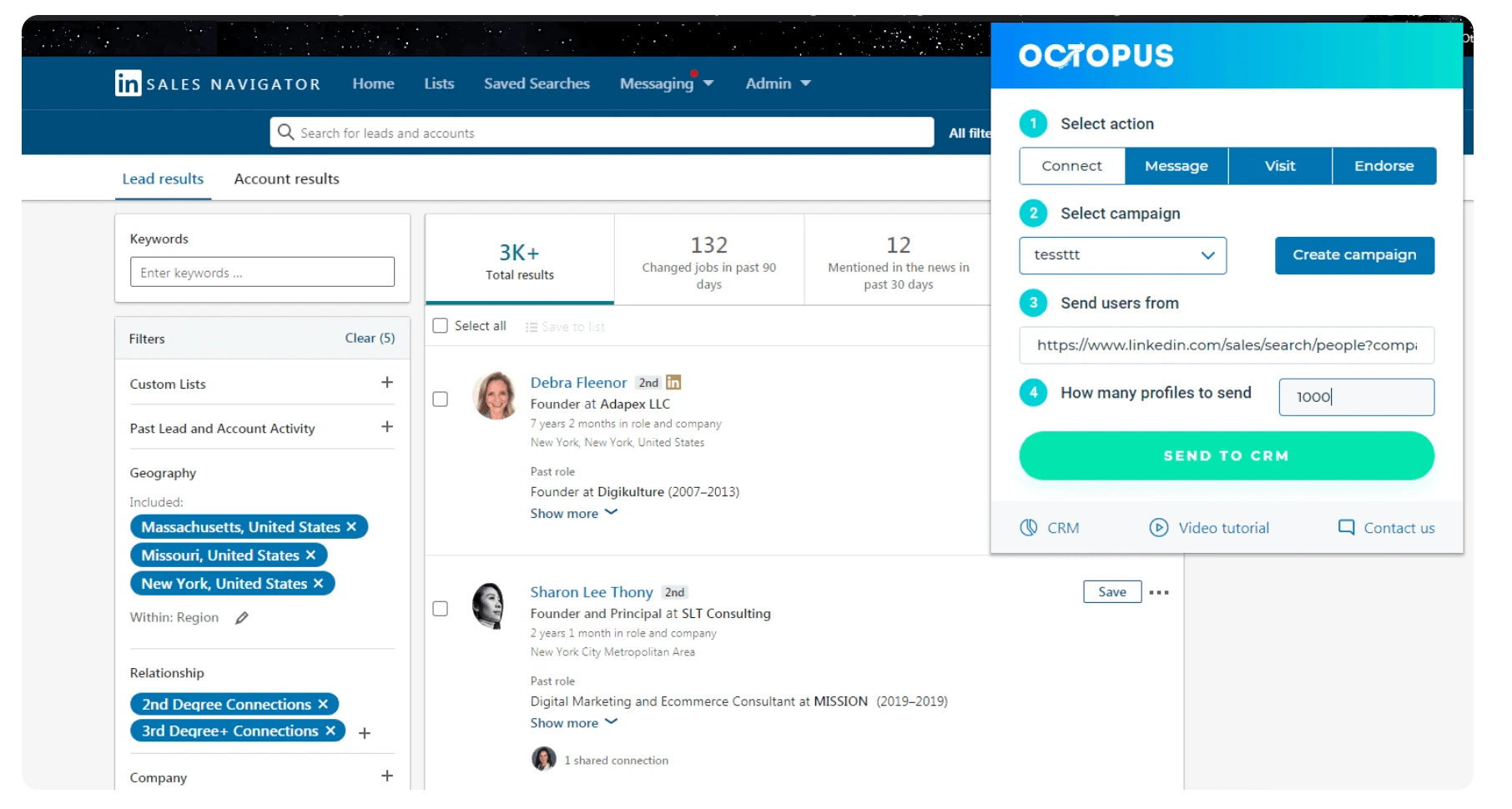
A representative Advanced sequence follows a linear path:
Visit → Connect → Wait → Endorse → Message → Follow-up → manual LinkedIn inbox check
Every prospect follows that ordered path. The vendor explicitly documents no conditional logic or A/B testing, and the verified surface contains no auto-chaining between branches. A multi-step funnel is therefore not a decision tree. It cannot route an accepted connection, missing field, or other prospect state to a different campaign path.
Reply handling creates the sharper operational gap. An independent technical review reports that inbound replies are not visible in Octopus CRM and do not automatically stop later steps. The operator must therefore monitor LinkedIn and manually stop follow-ups to anyone who replies. The product also has no in-app inbox. Its Message area manages outbound recipient lists.
Personalization is limited to basic static fields in the documented templates. The verified first-party feature surface did not establish any of the following:
- product AI message generation or ICP scoring;
- spintax, nested message conditions, or image/video personalization;
- an AI review gate;
- reply-based filters or a generic-reply ignore rule;
- message-content or regular-expression deduplication;
- post, event, or group engagement actions;
- AI comments, batch comment mentions, or late-reply CRM resync.
These are boundaries of the verified action model. We do not treat any mechanism as absent simply because it was not checked.
Campaign boundary: A linear sequence does not react to a reply. Without an automatic reply stop, every scheduled follow-up depends on the operator checking their LinkedIn inbox.
History provides a narrower safeguard. Once a profile is processed, it cannot be re-added within that account until History is cleared. This safeguard helps prevent repeat processing, but it is based on profiles rather than message content and does not span accounts. For background on the distinction, see how campaign duplicate prevention works.
Lead Targeting, Lists, and Email Finder
Octopus CRM builds lists from four documented inputs:
- LinkedIn search results;
- My Network;
- Sales Navigator;
- CSV files containing profile URLs, with import/export starting on Advanced.
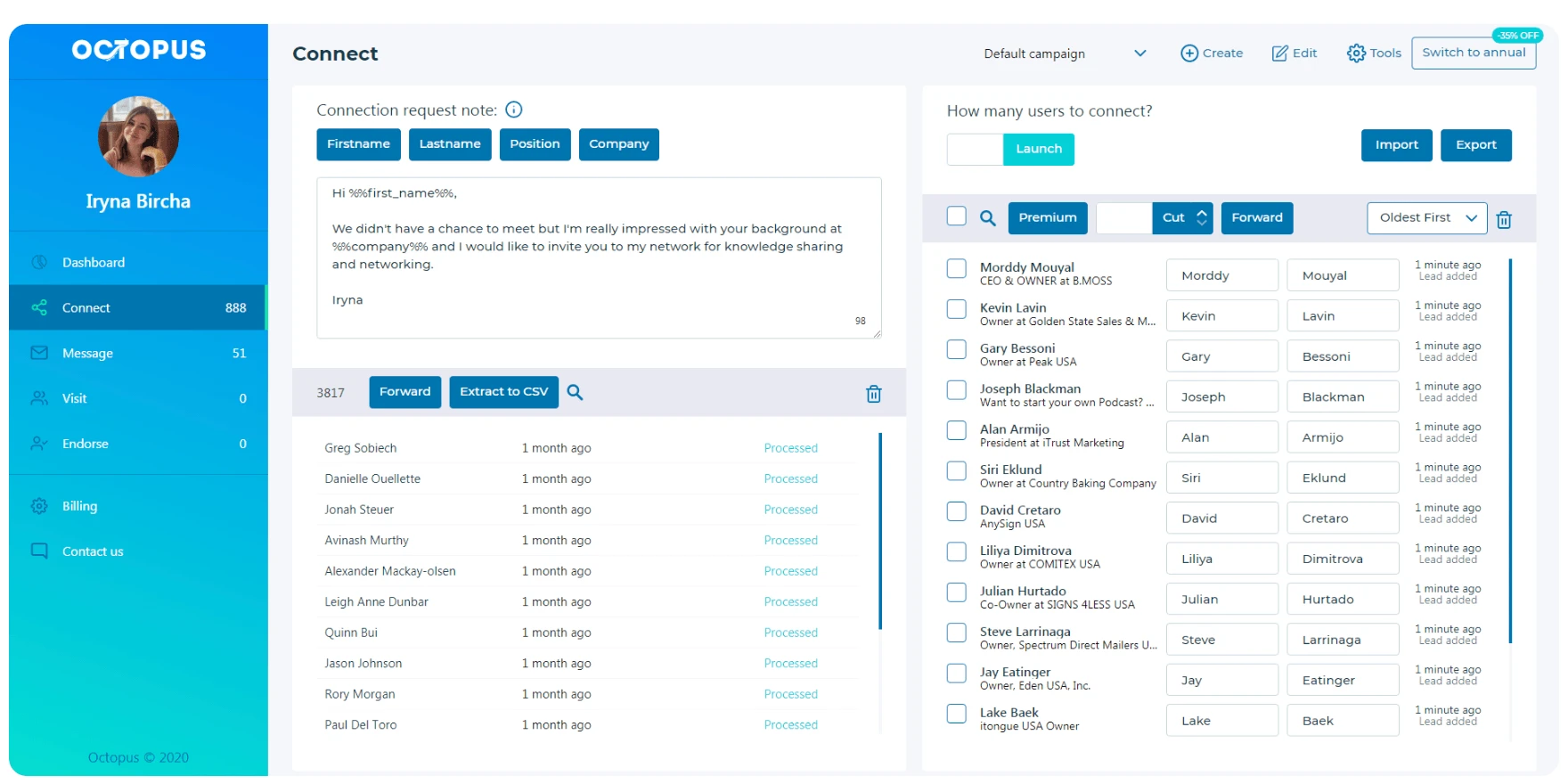
The how-it-works documentation shows these leads in the Personal CRM and History. This provides account-local duplicate blocking, not cross-client deduplication or native ICP scoring. The current first-party feature surface also does not establish collection from post engagers, employee extraction from organization URLs, badge scraping, or broader company/industry enrichment. However, badge scraping was not checked, so it should not be treated as a confirmed absence.
Email Finder is a narrow enrichment layer. On Unlimited, it attempts to return a verified corporate email for second- and third-degree profiles. The vendor’s credit guide states that the plan includes 500 credits per 30-day cycle.
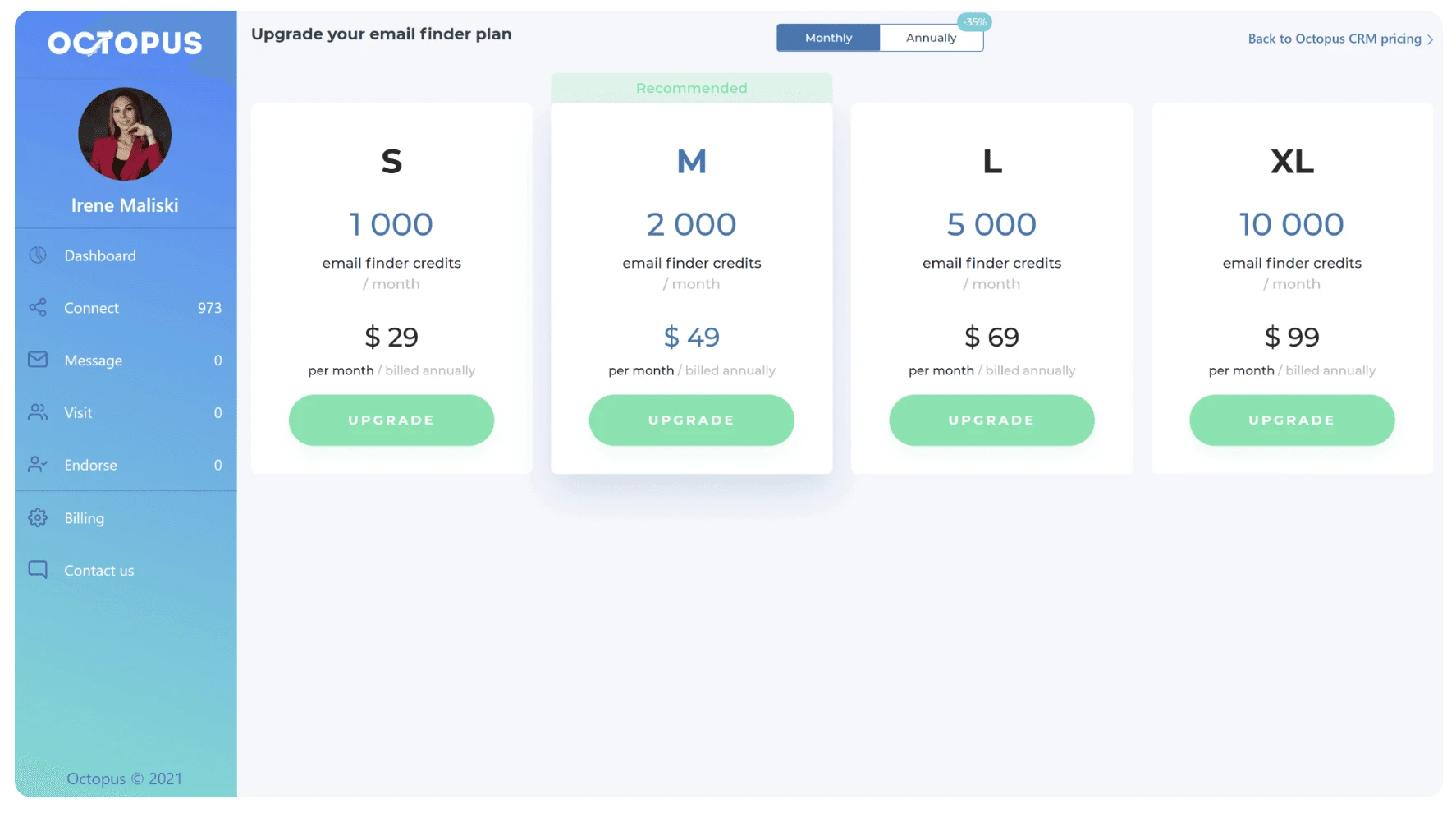
Credits do not roll over, and each attempt consumes one credit, whether it succeeds or fails. Extra packages are sold separately, but their prices were not publicly documented. For buyers, the 500-credit allowance is an attempt budget, not a guarantee of 500 email addresses.
| Event | Credit effect | Boundary |
|---|---|---|
| Successful find-and-verify attempt | Consumes 1 credit | Returns a corporate email when found |
| Unsuccessful attempt | Consumes 1 credit | A failed lookup still reduces the monthly pool |
| 30-day reset | Unused credits expire | No rollover is documented |
| Extra package | Separate subscription | Public package price was not established |
Octopus CRM Email Finder credit events
As of July 2026 · Octopus CRM Email Finder credit rules
Count attempts, not emails: Base the 500-credit monthly budget on every lookup attempt because unsuccessful searches consume credits and unused credits expire when the cycle resets.
“Connect by Email” is not an email campaign channel. It provides an email for a LinkedIn invitation path, while Octopus CRM remains LinkedIn-only. The documented product surface did not confirm a freshness-date field, full company-data enrichment, or a named Snov.io email-campaign handoff.
Integrations and Workflow Handoffs
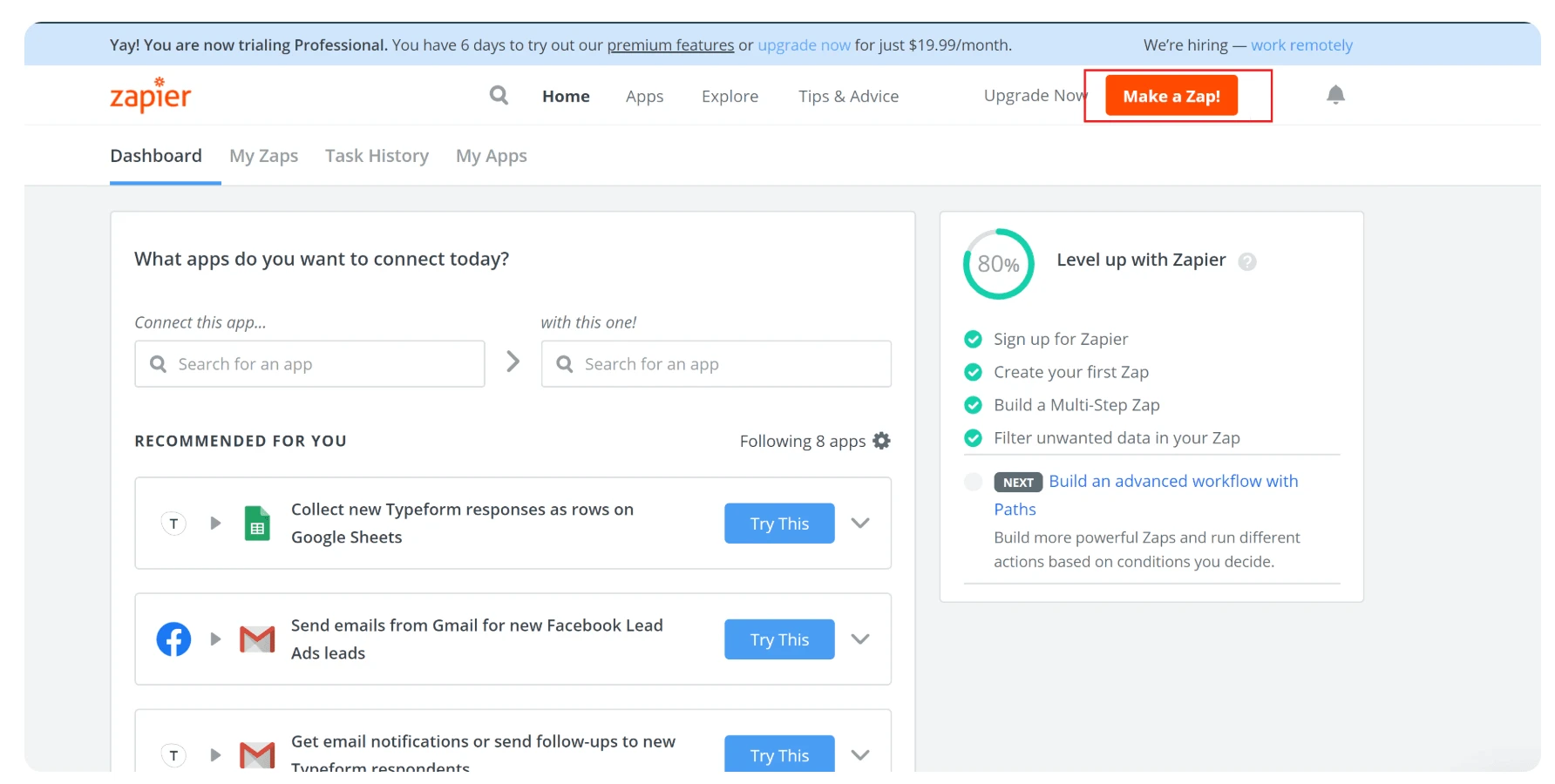
The dated public product surface names two integration endpoints: Zapier and HubSpot. The pricing grid limits that route to Unlimited. This is a small, plan-gated handoff layer. Downstream apps reached through Zapier should not be counted as additional native Octopus CRM integrations.
The documented flow is:
Octopus CRM → Zapier webhook route → HubSpot or another configured Zapier destination
The vendor’s Zapier guide describes a webhook-style transfer handled through Zapier. It does not establish a separately marketed native webhook product. For general context on this distinction, see how a webhook-based Zapier integration differs from a direct connector.
Our static package inspection found *.make.com among the permitted hosts, but a host permission does not prove support for a Make connector or establish its plan entitlement. Likewise, we found no public developer API documentation during the dated vendor sweep. This is a documentation gap, not proof that no private API exists.
Integration boundary: The confirmed public layer is Zapier and HubSpot on Unlimited. A downstream Zapier catalog, a permitted Make host, and a public native integration are not interchangeable.
The verified pages did not establish an incoming webhook product or a broad set of native CRM connectors. We did not check the CRM identifier cascade or fill-empty merge rule. Both remain unresolved rather than confirmed absences.
Team, Agency, and Multi-Account Operations
Octopus CRM scales by adding separate subscriptions. The FAQ states that each LinkedIn account requires its own subscription, while the official multi-account guide describes logging out of one LinkedIn account before logging into another in Chrome.
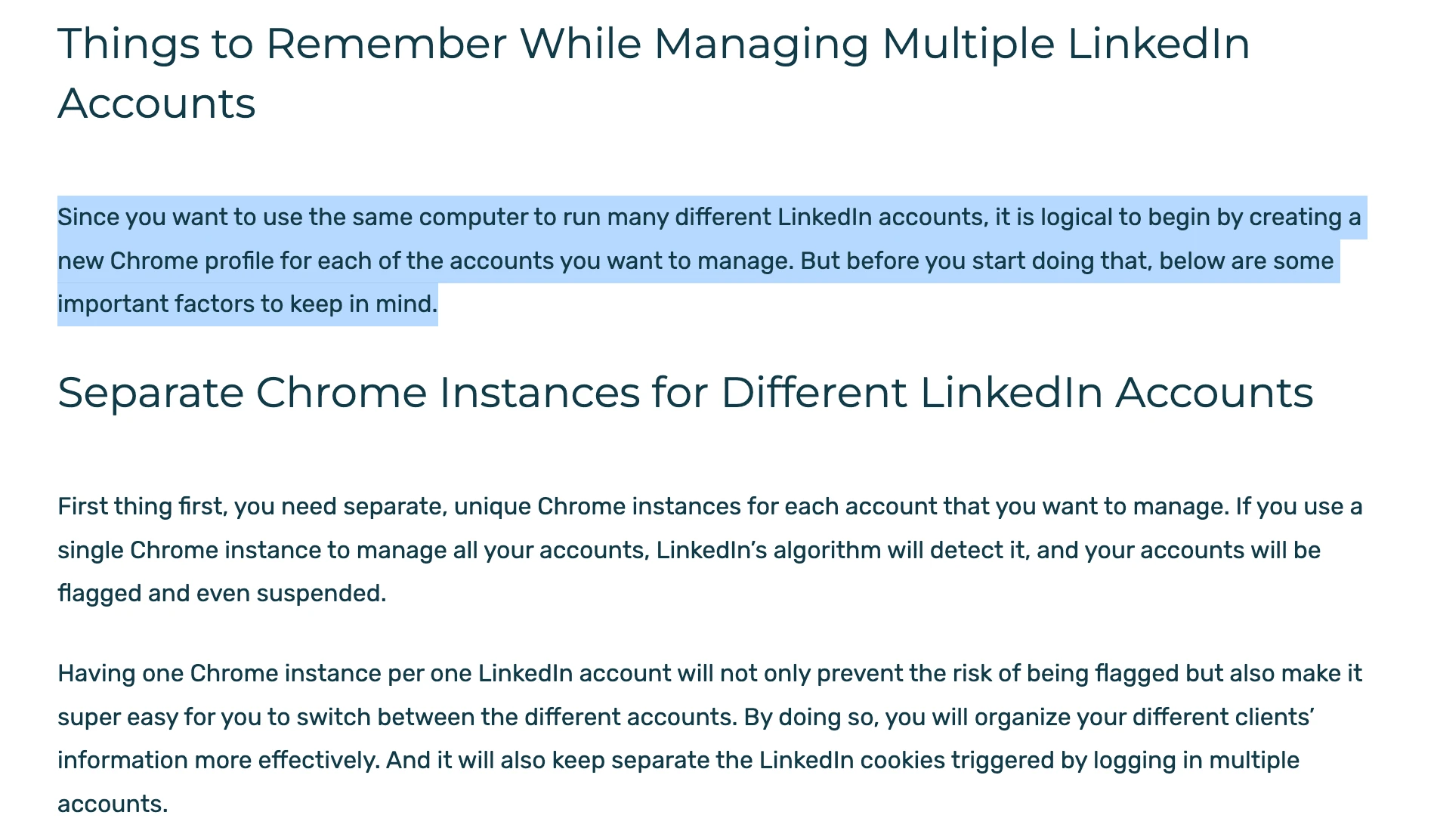
Buyers can therefore purchase separate subscriptions for several accounts, but the product does not combine those accounts into one operating workspace.
| Area | Documented result | Operational consequence |
|---|---|---|
| Licensing | One subscription per LinkedIn account | Seat count follows account count |
| Switching | Manual LinkedIn relogin in Chrome | No central account switcher was documented |
| Workspace | Vendor review says no team-management layer or cloud dashboard | Campaigns remain separate browser contexts |
| Volume pricing | Contact sales at 20+ accounts; rate undisclosed | A negotiated invoice does not establish new admin controls |
What multiple Octopus CRM subscriptions create
As of July 2026 · Octopus CRM account licensing and vendor-documented topology
Agency boundary: Twenty licenses still correspond to twenty browser/account contexts. The public quote for 20+ licenses changes the commercial terms, but it does not document a central workspace, roles, or consolidated reporting.
The vendor’s own review confirms there are no team-management features or separate cloud dashboard. Current public evidence did not establish:
- shared templates or role permissions;
- client-facing reporting or white-label controls;
- cross-account deduplication.
These are documentation gaps rather than individually tested negative findings. The defensible conclusion is about the documented topology: it is per-account and browser-local, not a centralized agency system.
Analytics, CRM History, and Export
Octopus CRM’s Personal CRM provides account-level reporting, not consolidated client reporting. The vendor’s how-it-works page documents connections, pending invitations, profile views compared with the prior week, Social Selling Index, endorsements, and recent activity. These figures allow an operator to inspect one account.
| Recorded | Boundary |
|---|---|
| Personal CRM activity statistics | Account-local; no cross-account dashboard documented |
| Processed-profile History | Supports duplicate blocking until History is cleared |
| CSV import/export on Advanced+ | Lead/contact fields and a replied flag; no full message text |
| Inbound replies | No in-app inbox or automatic reply analytics |
| Failure diagnostics | No named current diagnostic surface was established |
Octopus CRM records and export boundaries
As of July 2026 · Octopus CRM Personal CRM and History and reply-visibility review
Reporting boundary: A replied flag in CSV is not a reply inbox, and account-local History is not cross-client deduplication or consolidated agency reporting.
CSV import/export begins with Advanced, and the verified pages disclose no numeric cap on rows or exports. The lack of a published cap is not evidence of unlimited exports. The product surface also does not establish a full message-history export, late-reply resync, or reply analytics because the tool does not expose inbound replies. We did not establish a named sleeping-campaign diagnosis, so it should remain an evidence gap.
Is Octopus CRM Safe?
We assessed Octopus CRM as Medium risk based on its local session custody and several extension-detection surfaces.
For my first-hand check, I inspected the August 2026 package for Octopus CRM v3.7.19, published through the Chrome Web Store as a Manifest V3 extension. I found no cookie permission and no upload of the LinkedIn session token. I also found code injection on LinkedIn pages, synthetic events, same-origin Voyager calls without a corresponding visible UI action, and the extension ID on LinkedIn’s detection target list. This static inspection cannot prove that LinkedIn detected the extension or restricted an account, nor can it prove that a campaign behaved in a particular way.
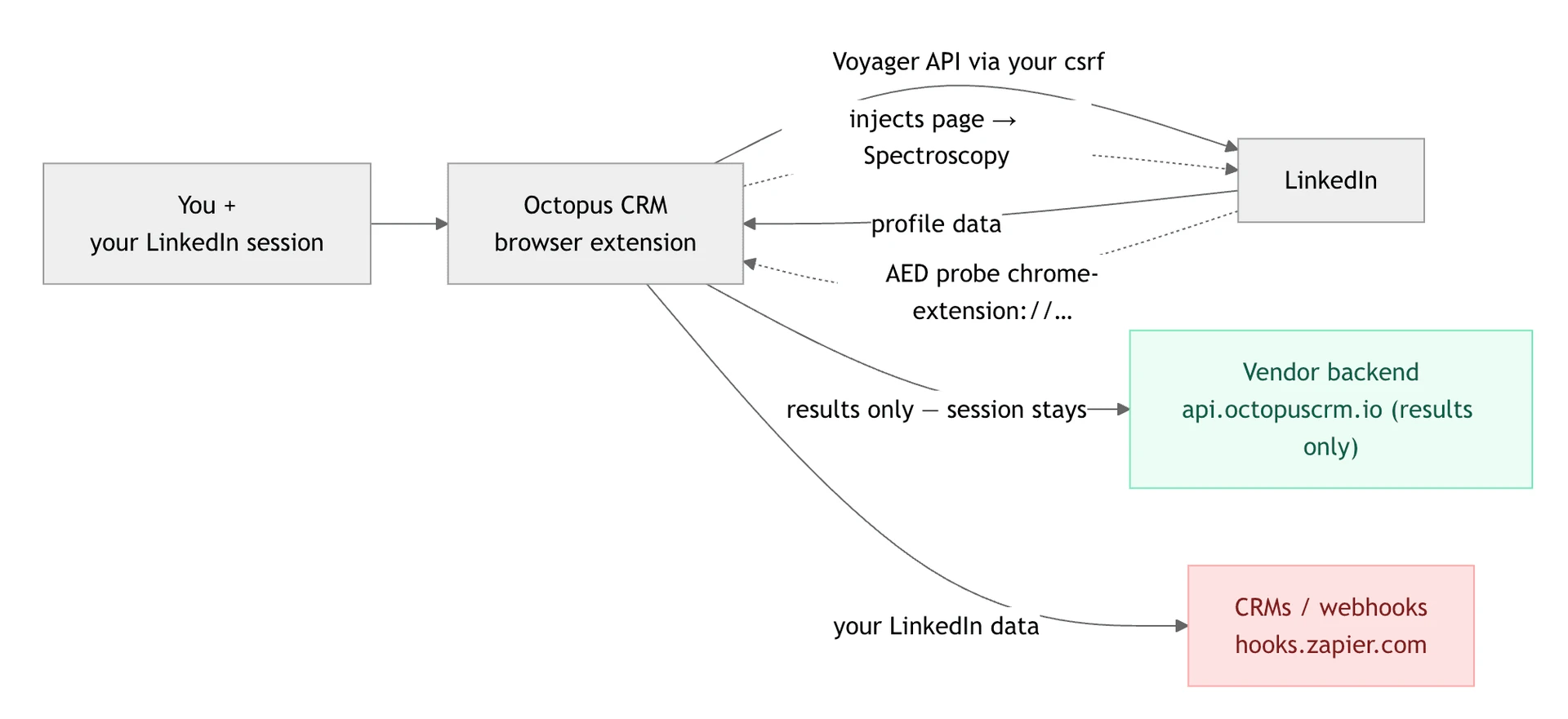
In the inspected LinkedIn production JavaScript, Active Extension Detection (AED) is the visible label for a system that probes specific extension IDs and sends the result as an AedEvent. It is not an official LinkedIn product name. During that static inspection, Octopus CRM’s extension ID appeared on the probe-target list. The finding has a limited implication. The installed extension can be visible to LinkedIn, but its presence on the list alone does not prove an account outcome.
| What was checked | Result |
|---|---|
| Architecture | Local-scrape Chrome extension; Medium static risk rating |
| Session custody | No cookie permission; LinkedIn session token stayed local |
| Vendor data flow | Scraped profiles/results sent to api.octopuscrm.io |
| LinkedIn page footprint | Code injected at document start |
| AED status | Listed; installed-extension probe target present |
| Request pattern | Direct same-origin Voyager calls observed |
| Event pattern | Synthetic events and programmatic clicks observed |
| Traffic blocking | No blocking behavior established |
| Safety settings | Daily-cap, delay, and working-hours controls visible; enforcement behavior not established |
Octopus CRM extension safety checks
As of August 2026 · package published through the Octopus CRM extension listing
What local does not mean: Keeping the session cookie local avoids a cloud-session transfer, but it does not make an injected extension invisible or remove behavioral and policy risk.
The controls require precise wording. Octopus CRM publishes action recommendations and describes random delays. The static package contained daily-cap, delay, and working-hours settings, but the non-authenticated inspection did not establish how those controls enforce limits during a live campaign. Activity Control is an Unlimited-only alert, and the independent review states that it does not automatically stop an over-limit run. For neutral background, see how action-limit concepts work and how working hours relate to limits. Those pages explain the concepts, not Octopus CRM’s mechanics.
Privacy is a separate axis. The Privacy Policy states that service-provider servers store product information but does not disclose a storage region, named subprocessors, a DPA, or security certifications. These omissions mean the controls have not been publicly established, not that they have been proven absent. No per-account proxy control or proxy-quality gate is documented for normal local execution. This is a boundary of the documented architecture, not evidence that the user needs a proxy.
LinkedIn’s Terms of Service prohibit third-party automation, and behavioral detection can also affect manual activity, such as unusually fast actions or opening many profiles directly by URL. Restriction-prevention guidance provides general context, but no tool eliminates LinkedIn restriction risk.
What Reviews and Social Mentions Actually Show
Treat support, billing, reliability, and restriction counts as prompts for testing. The public Terms corroborate refund and renewal boundaries, not execution; restriction reports do not provide causal evidence or a safety rate. One Waalaxy preference and one unnamed account of switching away do not establish a migration trend.
G2 averaged 4.37★ across 115 reviews in the stored 2020-2026 corpus snapshot as of August 2, 2026.
Capterra averaged 4.56★ across 273 reviews in that platform's stored 2020-2026 corpus snapshot as of August 2, 2026.
Trustpilot averaged 4.23★ across 202 reviews in its stored 2020-2026 corpus snapshot as of August 2, 2026.
The combined corpus mean was 4.41★ across all 590 stored G2, Capterra, and Trustpilot reviews spanning 2020-2026, as of August 2, 2026.
Trustpilot also had a different live public measure: a 3.6 TrustScore across 201 public reviews on July 12, 2026. This measure is not interchangeable with the 4.23 arithmetic mean across 202 stored Trustpilot reviews as of August 2. Different snapshots, calculation methods, and denominators mean the figures must remain separate.
| Evidence lane | Sample and dates | Observed pattern | What it cannot prove |
|---|---|---|---|
| Stored review corpus | 590 reviews across G2, Capterra, and Trustpilot; 2020-2026 | Ease and basic outreach praise coexist with support, reliability, billing, and restriction complaints | Current prevalence or universal outcomes |
| Recent tail | 1 rated review from February 2-August 2, 2026 | Too few observations to print a recent mean or direction | A 2026 satisfaction trend |
| Historical volume scan | Five flagged weeks in 2020: 84, 84, 66, 44, and 32 reviews | Unusually concentrated review volume; no negative-date cluster detected | Cause, intent, or review authenticity |
| Complaint coding | 43 negative support mentions and 28 pricing-transparency mentions across the 2020-2026 corpus analysis | Recurring questions for verification | A measured support SLA or universal billing failure |
| Billing examples | At least 5 post-cancellation charge cases and 6 refund-denial complaints within the 590-review corpus across years/platforms | A repeated issue hypothesis | That every cancellation or refund fails |
| Chrome Web Store | 4.3★ across 158 ratings and 70,000 users on July 12, 2026; outside the 590-review corpus | A separate extension-user population, plus one 2025 spinning-state report | A cross-platform rating or current reliability rate |
| 5 exact-name matches; only 1 visible-body mention | Too sparse for product sentiment | A reliable positive or negative percentage |
Octopus CRM review evidence and issue hypotheses
Corpus snapshot: August 2, 2026 · public platform pages: G2, Capterra, Trustpilot, and the Chrome Web Store
The anomaly is a pattern, not a conclusion. All five high-volume weeks occurred in 2020, and the scan found no negative-date cluster. Nothing in that distribution establishes manipulation, fraud, or causation. The single trailing-six-month review is also too thin to tell us whether the historical complaint mix persists in 2026.
Who Octopus CRM Is For — and Who Should Look Elsewhere
The documented operating model assumes the following simple, supervised conditions:
- one LinkedIn account per subscription is acceptable;
- Chrome can stay open during every run;
- a linear visit-connect-wait-endorse-message sequence is enough;
- the operator already checks LinkedIn replies and can stop follow-ups manually;
- Advanced at $21.99 covers the needed campaign and CSV scope, or Unlimited's gates are acceptable;
- local session custody matters more than cloud continuity.
A solo founder or SDR may run this type of bounded workflow from a free or paid LinkedIn account. Suitability depends on supervision and topology, not company size. Even one user is poorly served if campaigns must continue after the browser closes.
Look elsewhere when the workflow requires any of the following:
- unattended/browser-off execution without user-supplied infrastructure;
- reply-aware suppression, an in-app inbox, conditional routing, or A/B testing;
- centralized multi-account operation, client isolation, roles, or consolidated reporting;
- a public API, a documented native-webhook product, or a broader direct integration layer;
- current public disclosure of data region, named subprocessors, DPA, or security certification;
- a campaign tier at the $9.99 headline price.
The seven-day Unlimited trial is useful for checking the top-tier interface, but buyers should then test the tier they plan to retain. Otherwise, the trial can validate features that disappear on Starter, Pro, or Advanced.
How Octopus CRM Compares to Alternatives
The architecture determines what the operator must supply. Octopus CRM's $9.99 headline plan runs locally and stops with Chrome; its first campaign tier is $21.99. The alternatives snapshot below is a dated orientation, not a recommendation. Cloud execution removes the open-browser dependency but places operation on vendor infrastructure and carries a higher listed entry price in every supplied row.
| Tool | Architecture | Entry price | Best known for |
|---|---|---|---|
| Linked Helper | Desktop + VPS/Web Version | $15/month Standard · $8.25/month equivalent for 12 months | Own browser engine; remote control through Web Version on user-supplied VPS compute |
| HeyReach | Cloud + Chrome extension for login | $79/month | Runs without the user's browser staying open; login still uses an extension |
| Dripify | Cloud | $59/month | Runs on vendor infrastructure rather than an open local browser; higher entry sticker |
| Expandi | Cloud | $99/month | Runs on vendor infrastructure rather than an open local browser; $99 entry sticker |
| Salesforge | Cloud | $48/month | Runs on vendor infrastructure rather than an open local browser; $48 entry sticker |
| Waalaxy | Chrome extension; cloud option offered | $42/month | Offers extension-led and cloud paths; $42 entry sticker |
How Octopus CRM compares to alternatives
Alternative architecture and price snapshots: April-May 2026 · linked pages were confirmed in the July 2026 sitemap; unlinked comparison pages were not established. Row-one architecture context: published security study.
HeyReach, Dripify, Expandi, Salesforge, and Waalaxy all had listed entry prices above Octopus CRM’s $21.99 campaign floor in the supplied snapshots. That price difference pays for a different execution topology in the cloud rows, but it does not by itself prove better outcomes, safety, or value. One direct migration record favored Waalaxy because Octopus was not cloud-based and felt limited, but a single record cannot support a market-wide switching claim.
See all LinkedIn automation alternatives →
Where Linked Helper Fits
If Octopus CRM’s specific combination of an AED-listed extension, a dependence on keeping Chrome open, and no automatic reply stop conflicts with the required workflow, a standalone-browser architecture is worth evaluating.
Linked Helper is a desktop application for Windows, macOS, and Ubuntu with its own browser engine. LinkedIn actions run on the user’s machine or a user-supplied VPS.
Web Version provides login-based browser access to that VPS instance, allowing campaigns to be controlled remotely while the LinkedIn session remains in an environment the user controls. This arrangement still requires paid VPS compute for 24/7 operation.
- No Chrome-extension footprint: The standalone browser has no Chrome Store ID and does not inject extension code into LinkedIn pages, addressing the exact AED and page-injection surfaces identified earlier. See the published architecture study.
- Reply-aware controls: Built-in reply handling can stop follow-ups, while generic acknowledgments can be ignored so they do not end a sequence prematurely. This addresses Octopus CRM’s manual burden of stopping follow-ups after a reply.
- Message-level variation: Templates support spintax and nested IF/THEN/ELSE logic based on variable presence. Campaign workflows remain linear, so this is message logic, not a claim that the workflows branch.
- A wider documented handoff layer: There are 11 direct CRM connectors, plus Zapier and Make through webhooks. This goes beyond the two-name public integration surface documented for Octopus CRM without implying a public developer API.
- Failure visibility: A sleeping campaign can display one of seven named reasons, and repeated identical failures can trigger a four-hour pause for the affected action. This provides a documented diagnostic and circuit-breaker layer that the current public surface for Octopus CRM does not establish.
The direct price comparison is $9.99 per month for Octopus CRM Starter and $21.99 for its first campaign tier, compared with $15 for one month of Linked Helper Standard or a monthly equivalent of $8.25 on a 12-month license. Linked Helper’s 24/7 setup also requires a user-supplied VPS, so the license price does not represent the full cost of unattended operation.
Teams prioritizing a standalone browser, reply-aware follow-up, message-level variation, and a wider CRM handoff layer may also want to evaluate Linked Helper. No automation tool removes LinkedIn restriction risk.
Compare the two operating models See Octopus CRM's extension workflow alongside Linked Helper's desktop, VPS, and Web Version setup.