

 23 min read

Replacing Workday Recruiting doesn't have to mean replacing Workday HCM. I'd start with the recruiting problem you need to fix: inconsistent interviews, fragmented candidate relationships, reporting work, or a process that's too much for your hiring team. Then price the connection back to your employee records.
Workday Recruiting alternatives are applicant tracking systems that manage job openings, applications, interviews, and offers outside Workday's recruiting module. Some can connect to Workday HCM for employee handoffs; others suit companies moving to a smaller hiring stack. They don't automatically replace Workday payroll, finance, employee records, or every talent-management function.
I created test records in Breezy, Workable, and Zoho Recruit, checked pricing calculators, and compared vendor tours, official guides, and recruiter reviews for the other ATS options.
Workday alternatives at a glance
| Your priority | ATS | Why I'd consider it | Main trade-off |
|---|---|---|---|
| Consistent interviews across hiring teams | Greenhouse | Core includes structured interview kits and scorecards | Workday Hire Link costs extra and excludes contingent-worker processes |
| Recruiting operations and analytics together | Ashby | ATS, scheduling, and analytics in one platform | Keeping Workday connected requires Enterprise |
| Relationships with candidates who aren't ready to apply | Lever | ATS and candidate CRM in the core offering | Workday integration needs additional fees and setup |
| Complex recruiting while retaining Workday HCM | iCIMS | Explicit two-way Workday integration option | Module scope and implementation need a tailored quote |
| Conversational, high-volume applications | SmartRecruiters | Winston Chat adds web, SMS, and WhatsApp journeys | Chat is an add-on to the recruiting platform |
| A recruiter-led rollout with accessible trial access | Workable | Recruiting, sourcing, and a no-card trial | Pricing changes with company headcount |
| A small in-house recruiting team | Zoho Recruit | Corporate HR edition with recruiter-based licensing | Hiring-manager access and job limits affect the configuration |
| Predictable subscription costs as the hiring team grows | Breezy HR | Unlimited users and positions on paid plans | Scorecards start on Growth; HRIS integrations need Business |
Start with the workflow you need to keep. A low-cost standalone ATS and an ATS connected to your existing Workday setup can be very different purchases.
What makes the best Workday Recruiting alternatives?
I use five checks to narrow the shortlist:
-
The hiring constraint. Identify the problem: reporting, application flow, interview consistency, or candidate follow-up. A longer feature list won't make that decision for you.
-
Handing off an employee. Check which subscription supports the Workday connection, what the connector costs, which records it transfers, and who completes the hire.
-
Past hiring records. A candidate CSV isn't the same as keeping applications, interview feedback, and stage history. Include those records in your migration acceptance checks.
-
Annual cost that can be compared. Use the same recruiter count, active jobs, and required features. Then separate headcount billing, user billing, add-ons, and implementation.
-
Routine administrative work. Check the tasks recruiters and hiring managers repeat: changing permissions, filtering candidates, finding a scorecard, and rescheduling an interview.
Check what you already have before buying. Workday's current Talent Acquisition suite includes conversational features, candidate engagement, and scheduling, with access depending on the package. If one poorly configured workflow is the problem, fixing its settings may take less work than replacing the ATS. I'd migrate only when the new workflow is worth the transition and ongoing upkeep.
Related reading:
1. Greenhouse: Best for consistent interviews across hiring teams
I'd choose Greenhouse when hiring managers assess the same role differently. Structured interview kits and scorecards give them a shared process instead of separate checklists. Both come with Core, so you don't need the top tier to make feedback consistent.
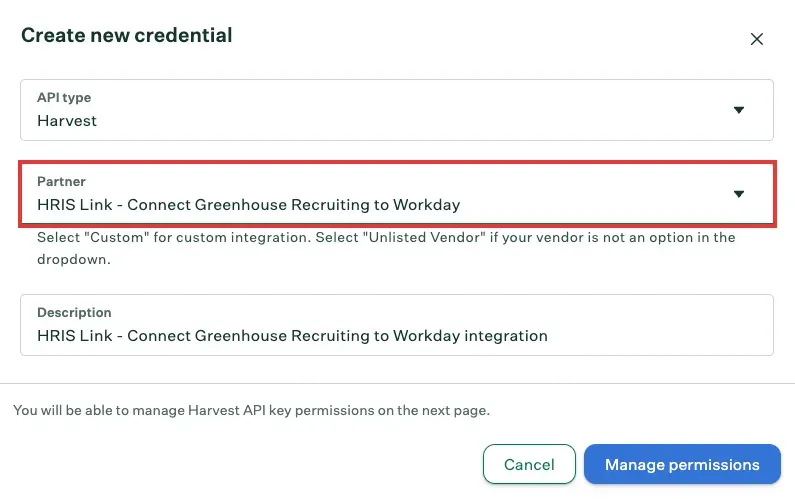
Inside Greenhouse, the Harvest credential setup identifies the Workday HRIS Link partner. (Image source: Greenhouse)
Greenhouse pros
-
Core includes structured interview kits and scorecards
-
Core includes SSO; higher tiers add governance controls
-
Hire Link supports new hires, transfers, and rehires
Greenhouse cons
-
Workday Hire Link requires a separate add-on
-
Hire Link excludes contingent-worker business processes
I like having a clear reason to upgrade. Plus adds sourcing automation and a BI connector; Pro adds an audit log and a developer sandbox. If your team won't use those extras, you have a reason to stay on Core.
Those controls still need someone to set them up. Dan G., a Head of People who gave Greenhouse 4.5/5 on G2, put it plainly: “It can feel overwhelming to set up email templates, offer letter templates, rules, approval queues, etc.” His incentivized review was updated in October 2026. I'd give one person ownership of the templates and approvals before rolling them out to every hiring manager.
Greenhouse: Hire Link requirements and supported worker types
You can keep Workday HCM through Hire Link, but the connector has limits. It needs an add-on, activation by the account team, and a Workday administrator to set up the integration user. It can transfer resumes, cover letters, and signed offers; it doesn't support contingent-worker business processes.
That limit matters more than an integration badge. If contractors make up much of your hiring, I'd confirm another connector path before choosing this configuration. Greenhouse can still help recruit those workers; the limit applies to this particular handoff.
Product pricing: Custom quote for Core, Plus, or Pro; Workday Hire Link is an additional paid configuration.
2. Ashby: Best for bringing recruiting operations and analytics together
I'd choose Ashby to bring hiring operations and analytics into one platform. For an ATS replacement, you need its recruiting platform, not the standalone Analytics product. Foundations serves companies with up to 100 employees, but keeping Workday connected requires Enterprise.
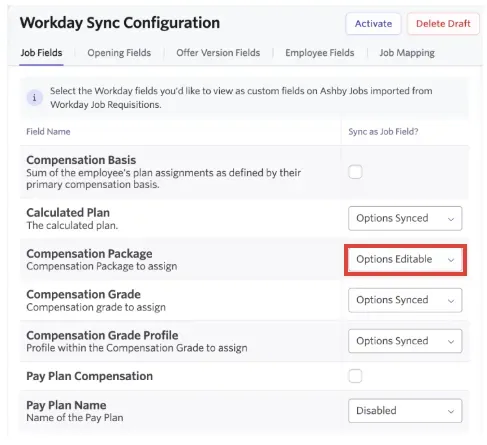
Inside Ashby, the Workday configuration distinguishes synchronized field options from editable ones. (Image source: Ashby)
Ashby pros
-
ATS, scheduling, and analytics share one platform
-
Workday is a supported source for API migration
-
Enterprise supports an ongoing Workday connection
Ashby cons
-
Foundations and Plus exclude the Workday integration
-
The connector doesn't sync generic file uploads
The catch is an unusually important plan boundary: the ongoing Workday integration requires Enterprise. A Foundations starting price won't tell you what this configuration costs. I'd settle that entitlement before comparing Ashby with another vendor's connected enterprise quote.
A broad feature set doesn't make every setting easy to find. Marcus D. gave Ashby 5/5 on G2 on October 30, 2026, but wrote: “I also find editing template scorecards a little too nestled.” He also praised candidate tracking and custom scorecards. I'd use that feedback to check where hiring managers make routine adjustments.
Ashby: Workday migration and ongoing integration
Ashby's migration guide helped me separate two jobs within “move from Workday.” It lists Workday API migration, while self-service CSV imports usually don't carry the full candidate lifecycle. The ongoing connector runs every 20 minutes. Sending a hire starts a Workday business process that someone still needs to complete there.
The connector doesn't sync generic file uploads, but it does support a specific route for signed offer letters. That doesn't settle what historical migration includes; check the two scopes separately. I'd choose Ashby to consolidate recruiting tools, but I wouldn't use Foundations as the price reference for an ongoing Workday connection.
Product pricing: Foundations $450/month for 26–50 employees, billed annually ($500 month-to-month); Plus and Enterprise require quotes. Workday integration requires Enterprise.
3. Lever: Best for nurturing candidates alongside active hiring
I'd consider Lever when recruiting includes people who aren't ready to apply. Its ATS and CRM let you keep those relationships going, then bring that context into an active hiring process when the timing is right.
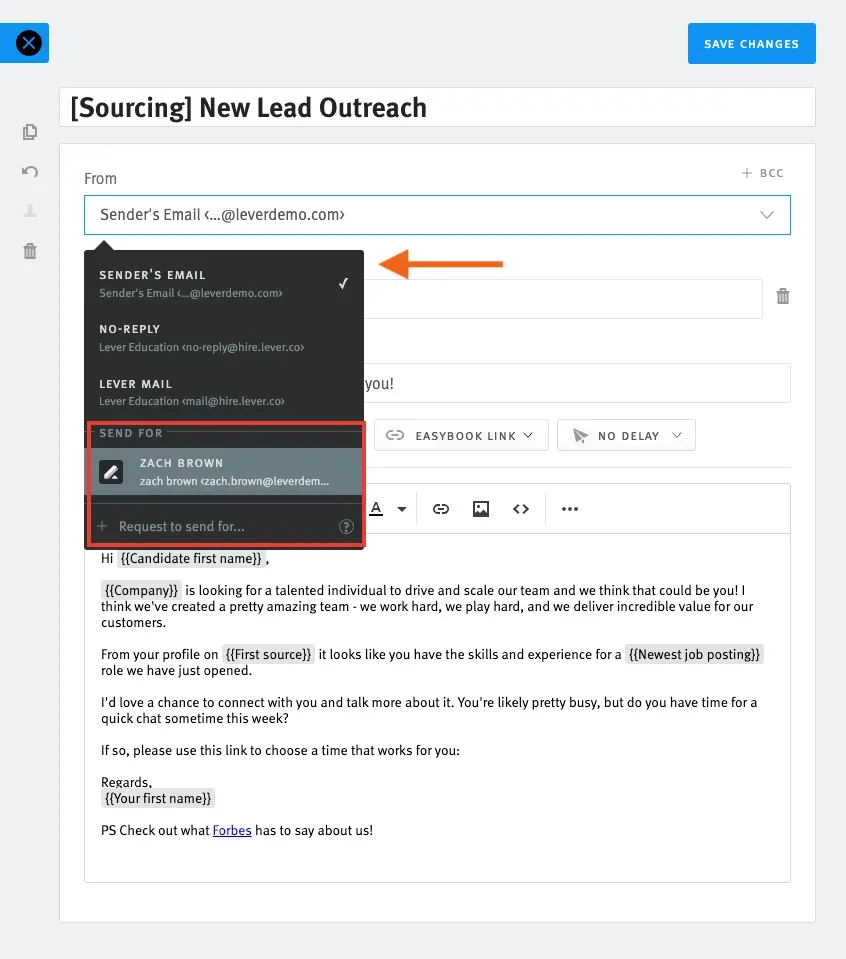
Inside Lever, Send For lets recruiters select a sender identity; shared templates still require the corresponding user permission. (Image source: Lever)
Lever pros
-
ATS and candidate CRM are combined in core
-
Workday route covers multiple hire types
-
The connector can transfer resumes and offer letters as PDFs
Lever cons
-
Workday integration requires extra fees and setup
-
Candidate Insights and VONQ screening are separate add-ons
A strong candidate who declines an offer doesn't have to become a forgotten record. One small permission rule caught my attention in Lever's template guide: sharing a team template with a Send For identity doesn't give everyone permission to use that identity. I'd map those permissions before building a shared outreach library, or recruiters may inherit templates they can't use.
Lever's core also includes reporting, screening, and interview transcripts and summaries. Check the named add-ons, though: Candidate Insights, AI Screening from VONQ, and Onboarding are separate. “It has screening” doesn't tell you whether the specific screening product you need is included.
For organizations that rely on Workday HCM, Lever's own marketplace lists a paid integration covering new hires, rehires, internal transfers, and contingent workers. It also lists transfers of offer letters and resumes as PDFs. I value that specificity because broad promises of “two-way sync” are hard to assess for worker types and attachments.
The catch is implementation. This route requires extra fees and setup; the marketplace also explicitly disclaims Workday endorsement. Its stated synchronization frequency of up to every five minutes is a capability claim, not an end-to-end hiring speed I measured. Have the quote identify who configures and supports your particular workflow.
I'd pick Lever for candidate continuity, especially if CRM is part of your daily recruiting work. If your team handles occasional applications and rarely builds longer-term candidate relationships, you may not need that extra scope.
Product pricing: Custom quote based on hiring needs; Workday integration and optional modules carry additional charges.
4. iCIMS: Best for complex recruiting alongside Workday HCM
I'd start with iCIMS if you want to change recruiting while keeping Workday as your employee system. Its ATS page explicitly lists Workday among supported HCM and payroll platforms, with two-way data flow. That gives teams keeping their HR systems a concrete integration option to investigate.
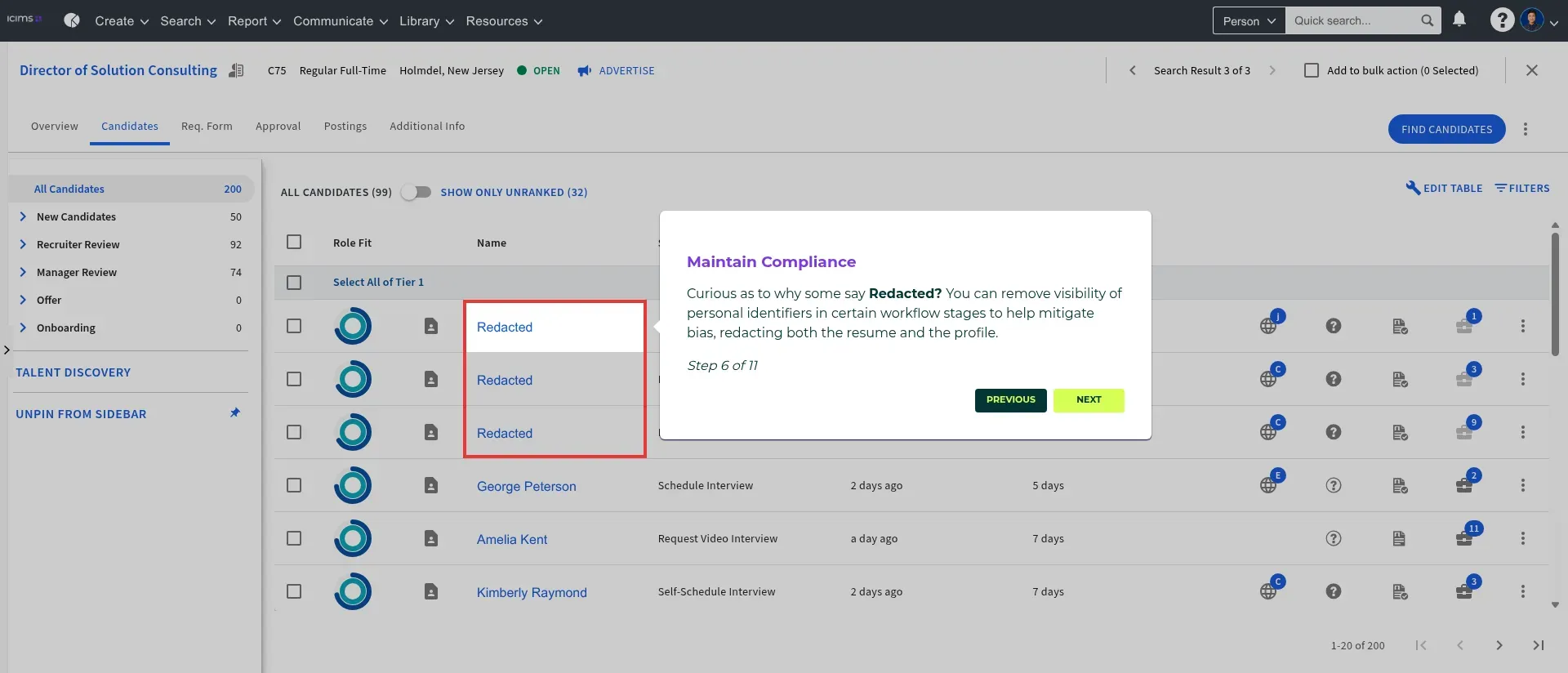
Inside iCIMS, selected review stages can hide personal identifiers in candidate profiles and resumes. (Image source: iCIMS)
iCIMS pros
-
ATS page explicitly supports two-way Workday integration
-
Separate hiring and engagement products support broader recruiting needs
-
Enterprise workflows can be tailored to recruiting requirements
iCIMS cons
-
Pricing and implementation require a custom quote
-
Full export access defaults to admins; grouped reports export only to Excel
In iCIMS' self-guided tour, the candidate queue separates recruiter review from manager review and shows the time since the last action for each application. Stage-specific redaction caught my attention: you can hide personal identifiers in profiles and resumes at selected review stages. I'd value that control for an initial evaluation without identifying details.
The reporting limit is less flexible: grouped reports export only to Excel, and only user admins have access to all export formats by default. If recruiters depend on CSV reports, check formats and permissions before rollout. Also specify which hiring, engagement, and employer-branding modules your quote needs to include.
Reviews reinforce the need to assign an administrator. A May 12, 2026 Capterra reviewer rated iCIMS 4/5, praised its customization for call-center recruiting, and reported a substantial learning curve. That experience is a reason to plan training and ownership; it doesn't prove your rollout will follow the same path.
The harder questions sit behind the two-way Workday connection: which fields transfer, when failed transfers retry, and who fixes a failed handoff. I'd put a sample hire and an exception case in the implementation acceptance criteria, with a named owner on each side.
Choose iCIMS when those enterprise requirements justify the project. If one recruiter needs a handful of vacancies and a straightforward application pipeline, I'd begin with the lighter options on this list. You shouldn't have to buy an enterprise operating model to solve a small hiring problem.
Product pricing: Custom quote; identify required modules, Workday integration, implementation, and support in the proposal.
5. SmartRecruiters: Best for conversational high-volume hiring
I'd consider SmartRecruiters when a long application process holds up high-volume hiring. Its main recruiting platform manages hiring, while Winston Chat adds conversational candidate journeys across web, SMS, and WhatsApp.
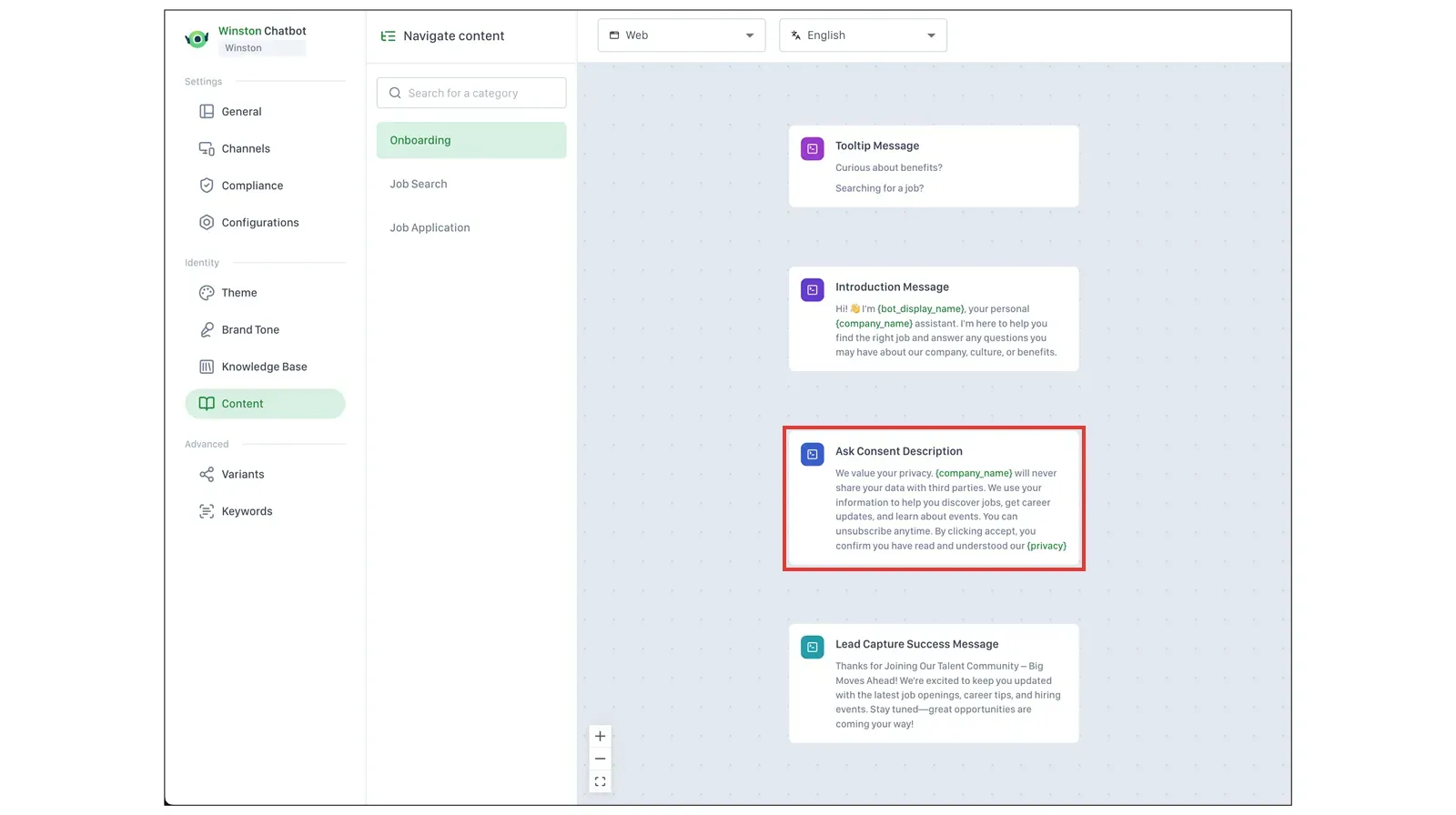
Inside SmartRecruiters' Winston settings, consent prompts sit alongside introduction and lead-capture messages in the Content editor. (Image source: SAP Learning)
SmartRecruiters pros
-
Core combines ATS, CRM, scheduling, and analytics
-
Winston Chat adds web, SMS, and WhatsApp journeys.
-
Core includes a sandbox and an agency portal
SmartRecruiters cons
-
Winston Chat is an add-on
-
Current standalone pricing requires a quote
I like being able to assess the candidate conversation alongside the recruiting workflow. A chatbot won't fix a slow process if recruiters still move every application manually. Here, you can assess how the conversation feeds into scheduling, messaging, matching, and the ATS.
The Winston configuration screen in SAP training gave me a better question than whether the chatbot sounds friendly. Greetings, consent prompts, and lead-capture messages have their own Content controls, separate from the knowledge base. I'd review those fixed messages on every enabled channel before rollout.
The catch is packaging. Winston Chat costs extra, so a quote for the core ATS alone misses the feature that makes this option relevant here. Current pricing requires a quote; older four-tier pricing pages don't match the main offering. I'd budget for core plus Chat and specify the channels needed.
A September 17, 2026 Capterra reviewer gave SmartRecruiters 5/5 while asking for more candidate-portal and status customization. I'd turn that into a specific demo question: which statuses and messages can your administrator change without a services project?
I'd choose SmartRecruiters when conversational hiring solves a real workflow problem. It may be more than a small team filling a few specialist roles needs. Workday also has conversational features, so compare the current products and eligible packages before switching.
Product pricing: Custom quote for SmartRecruiters core; Winston Chat is an add-on with separate pricing.
6. Workable: Best for a recruiter-led ATS rollout
Workable is worth considering when your recruiters want to try the hiring workflow before committing to an enterprise rollout. In its no-card trial, I saved my own draft job and opened Workflow: Phone Screen offered interview kits, video interviews, and assessments side by side.
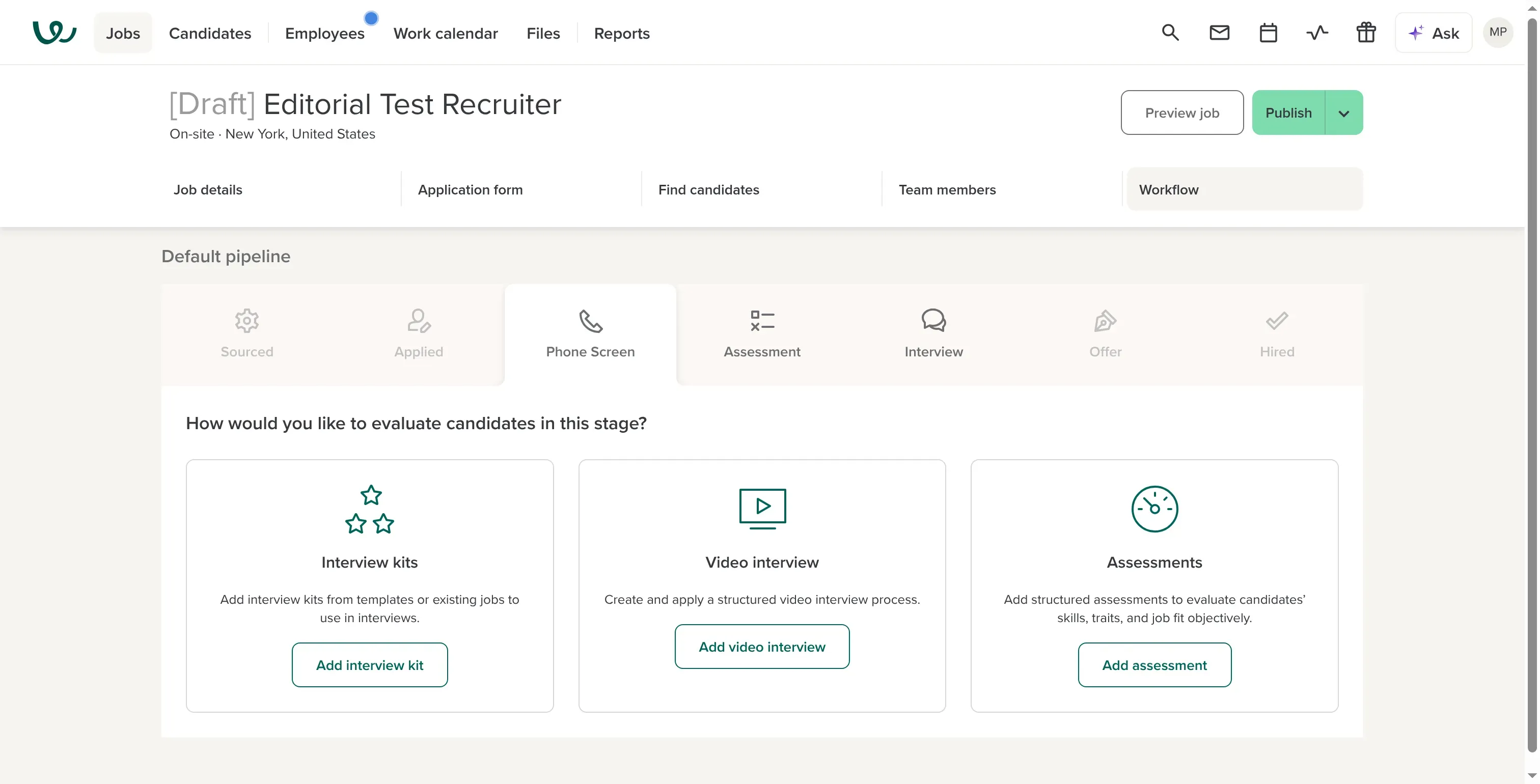
Inside Workable, the draft job’s Phone Screen stage offers interview kits, video interviews, and assessments together. Own trial capture.
Workable pros
-
Interview kits and scorecards are available on all plans
-
Standard covers essential hiring analytics plus CSV exporting
-
No credit card required for a 15-day trial
Workable cons
-
Standard pricing rises with company headcount
-
Custom report builder requires Enterprise
I checked prices with Recruiting enabled and HR disabled. For 50 employees, Standard cost $5,028 annually; for 1,000 employees, it cost $33,588. The plan name stays the same, but the bill changes considerably. Your recruiter count isn't the billing unit.
One small frustration: Save draft required a location even for an unfinished job. After I added one, the job saved. All paid plans include scorecards and interview kits, but the trial opens a broader set of Enterprise features.
Reporting is where I'd check the plan carefully. Standard includes core reporting and CSV exports, but not every reporting feature you may see in the trial. Custom report builder requires Enterprise; scheduled report delivery and advanced report filters have their own higher-plan requirements.
Workable: Reporting limits and plan pricing
The pricing page lists unavailable features in the plan columns too. When I checked, Custom report builder was grayed out for both Standard and Premier. Seeing a feature name beside a price isn't enough; check whether the tier actually includes it.
I'd choose Workable when the standard recruiting workflow fits and your headcount-based quote still makes sense. If detailed custom reporting is the reason you're leaving Workday, price Enterprise from the start. Otherwise, you'll be comparing a baseline subscription with the feature you actually need left out.
Product pricing: Standard starts at $299/month with annual billing for 1–20 employees; $419/month for 21–50. Larger employee bands cost more; higher tiers and optional add-ons are separate.
7. Zoho Recruit: Best for small in-house recruiting teams
I'd choose Zoho Recruit for a small in-house team that wants to pay per recruiter rather than by company headcount. Corporate HR Standard costs $25 per recruiter/month on annual billing and allows ten active jobs per license. In the trial, I created a fictional candidate and found the record at the New stage.
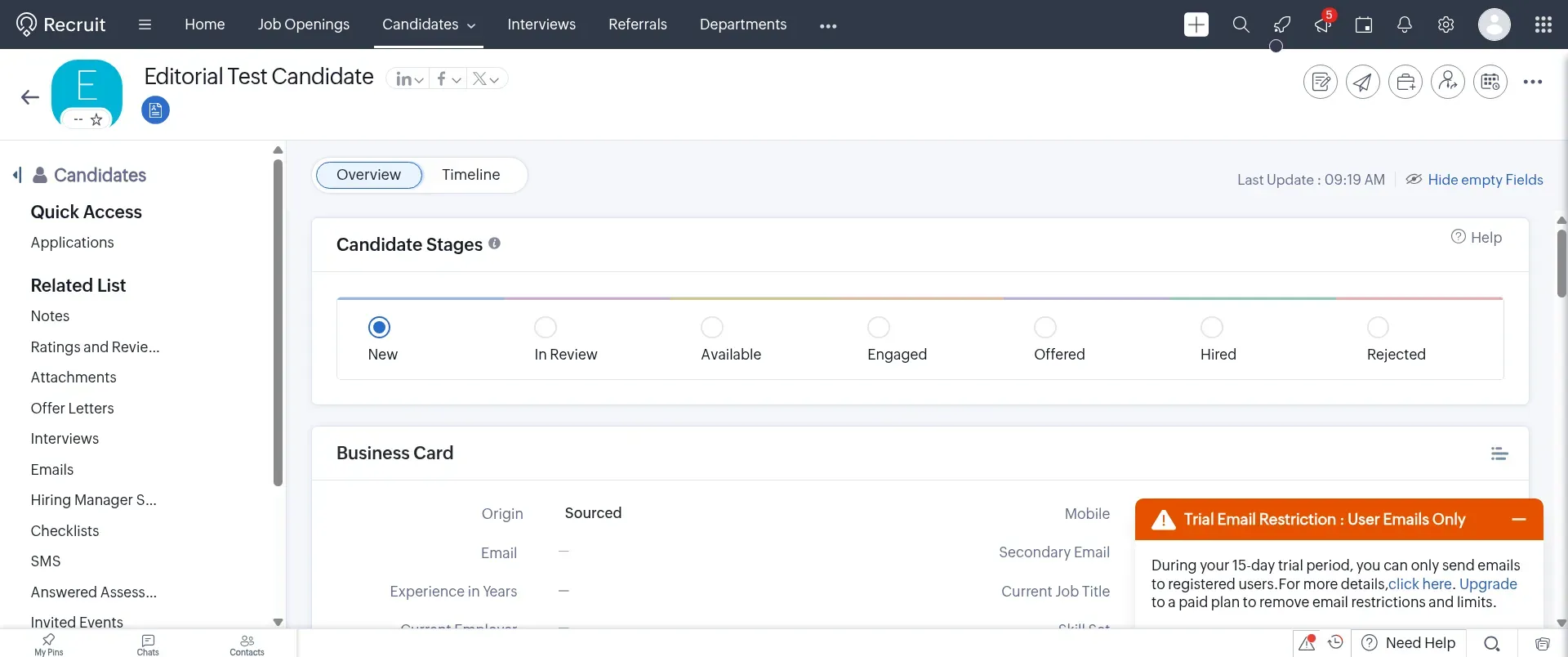
The candidate I added appears at the New stage in Zoho Recruit. Own trial capture, November 5, 2026.
Zoho Recruit pros
-
Corporate HR plans use recruiter-based licensing
-
Standard includes the pipeline, careers site, and reporting
-
Enterprise adds Blueprint automation and analytics
Zoho Recruit cons
-
Hiring-manager licenses come in packs of ten
-
Active-job allowances depend on both plan and recruiter licenses
In the US pricing selector, Enterprise rises to $50 per recruiter/month on annual billing and doubles the active-job allowance to twenty per license. Recruiter seats and simultaneous vacancies are separate inputs in your calculation.
The plans differ in more than capacity. Enterprise adds Blueprint automation, matching, and analytics. If you need those features, compare Enterprise with equivalent competitor plans. Don't assume a cheaper paid plan includes everything you see in a trial of the higher tier.
I like recruiter-based pricing for a small recruiting team inside a larger company. Five recruiter seats can make more sense than billing for several hundred employees. But include hiring managers: the calculator charges $8.34 monthly, billed annually, for each block of ten manager/employee licenses. One recruiter plus that block costs $400.08 yearly, compared with $300 for the recruiter alone.
The low seat price doesn't remove setup work. You still need to decide on fields, automation, access, and linked mailboxes. Karen O. rated Zoho Recruit 4.5/5 in an October 24, 2026 G2 review and reported email integration and customization problems. I'd build one representative hiring process in the trial before assuming the whole team can work comfortably in it.
I'd choose Zoho if you want that control and have someone to maintain it. If you need a fully defined handoff into Workday HCM, settle the integration scope first. The recruiter-license price doesn't answer that question.
Product pricing: Corporate HR Standard $25 or Enterprise $50 per recruiter/month, billed annually; hiring-manager access costs extra. A 15-day trial is available.
8. Breezy HR: Best for predictable pricing as the hiring team grows
I'd pick Breezy HR for subscription costs that stay predictable as the hiring team grows. Paid plans include unlimited users and positions, so another recruiter doesn't automatically add a license charge. Growth includes custom scorecards at $273 per month on annual billing, or $3,276 annually. The cheaper Startup plan doesn't provide the same interview workflow.
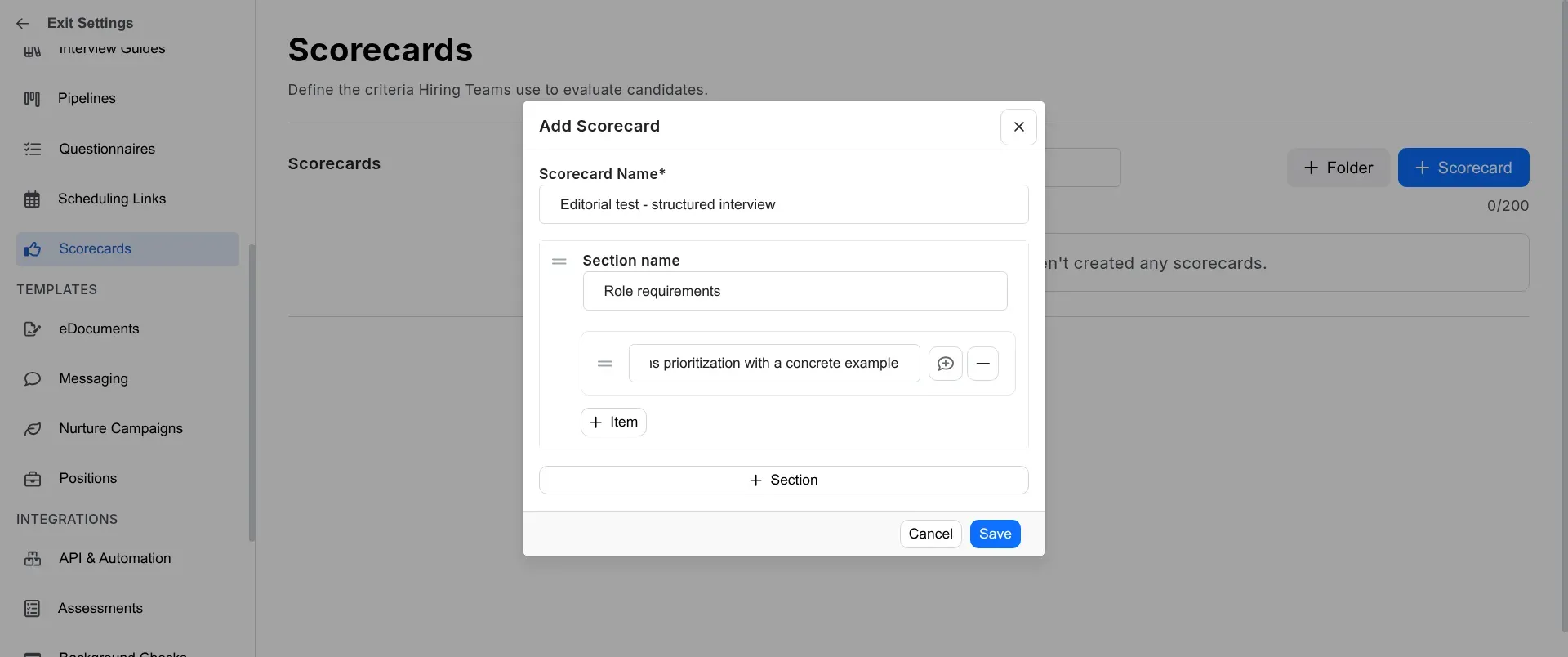
Breezy's scorecard builder separates interview criteria into sections and individual items. Own trial capture, November 5, 2026.
Breezy HR pros
-
Paid plans include unlimited users and positions.
-
Growth offers interview guides and customizable scorecards.
-
No card required for a 14-day trial with every feature
Breezy HR cons
-
Startup excludes customizable scorecards
-
Custom roles and HRIS integrations require Business or higher
In Breezy's trial, I created and saved a custom interview scorecard with a role-requirements section and one criterion. The editor kept sections and individual items separate, which I found easy to follow. I'd consider it a useful starting point for repeatable interviews without a large setup project.
My small gripe was finding the editor. Scorecards sits under Recruiting Preferences, while Templates initially opened eDocuments. Once I found the right section, building the scorecard was straightforward; the navigation took the detour.
I switched the billing screen to monthly, where Growth showed $329, or $3,948 over twelve months. The nearby savings badge showed a slightly different figure. I'd use the $672 difference calculated from the displayed prices.
Breezy HR: Scorecard changes and enterprise fit
Breezy's guide warns that editing scorecard settings deletes existing feedback in custom sections. I didn't test that deletion, but I'd lock in the criteria before collecting interview feedback. A template cleanup shouldn't unexpectedly change historical feedback.
I'd check the enterprise requirements before choosing Breezy. Business adds custom roles and HRIS integrations, but that feature label doesn't confirm a Workday connector. I'd choose Breezy for predictable subscription costs and a straightforward hiring process. If you need complex Workday handoffs and governance, confirm those before treating unlimited users as an enterprise recommendation.
Product pricing: Startup $157, Growth $273, or Business $439/month, billed annually; monthly billing is $189, $329, or $529 respectively. No free plan; optional services and add-ons cost extra.
What do Workday Recruiting alternatives cost for the same workload?
For standalone recruiting, Breezy's flat subscription and Zoho's recruiter licenses stay below Workable's headcount-based subscription in these configurations. Keeping Workday connected changes the comparison: connector eligibility, implementation, and maintenance need their own scope and price.
I ran the numbers for three fixed workloads: 50 employees, one recruiter, and five active jobs; 250 employees, five recruiters, and 20 active jobs; 1,000 employees, ten recruiters, and 50 active jobs. An ATS pipeline, career page, structured interview feedback, and core reporting are required in every case. The figures are annual-subscription calculations in USD, verified November 5, 2026, before taxes.
| Product and baseline | 50 employees / 1 recruiter / 5 jobs | 250 / 5 / 20 | 1,000 / 10 / 50 | What changes the total |
|---|---|---|---|---|
| Greenhouse Core | Quote required | Quote required | Quote required | Workday add-on and implementation; advanced governance may require another tier |
| Ashby Foundations / eligible larger plan | $5,400 | Quote required | Quote required | Foundations excludes ongoing Workday integration; Enterprise is required for it |
| Lever core | Quote required | Quote required | Quote required | Workday connection, setup, and selected add-ons |
| iCIMS configured ATS | Quote required | Quote required | Quote required | Required modules, connector, implementation, and support |
| SmartRecruiters core | Quote required | Quote required | Quote required | Winston Chat is additional to the baseline ATS |
| Workable Standard, Recruiting only | $5,028 | $15,588 | $33,588 | Headcount band; advanced reporting, integration, or paid extras |
| Zoho Recruit Corporate HR Standard | $300 | $1,500 | $3,000 | Hiring-manager packs, optional integrations, and Enterprise-only features |
| Breezy Growth | $3,276 | $3,276 | $3,276 | Business for HRIS/custom roles; implementation and optional add-ons |
The arithmetic uses licensed recruiters, not extra hiring-manager-only seats. Zoho's ten active jobs per recruiter gives these configurations capacity for 10, 50, and 100 jobs respectively. Breezy includes unlimited users and positions. Workable includes unlimited active jobs subject to fair use. Fixed subscription totals don't prove that a product meets a large employer's governance requirements.
In Ashby's calculator, I selected 26–50 employees and annual billing: $450 × 12 = $5,400. For Breezy, I used Growth at $273 × 12 because Startup lacks custom scorecards. Business raises the base to $5,268 for HRIS eligibility, before any Workday-specific requirements that remain unverified.
“Quote required” means the comparable total isn't publicly available. It doesn't mean free implementation, an included connector, or a higher price than every numbered option. I'd collect those missing items in one quote before declaring a cost winner for a Workday-connected deployment.
Which Workday Recruiting alternative should you choose?
Start with the change your recruiting team will notice each week. I'd begin with Greenhouse for consistent interview assessments, Ashby for recruiting operations and analytics together, or Lever for keeping relationships with passive candidates.
For complex enterprise requirements, compare iCIMS and SmartRecruiters against your actual workflow, including the candidate journey and required modules. For a smaller hiring setup, Workable, Zoho Recruit, and Breezy let you compare three billing models: employees, recruiters, and a flat subscription.
If you're keeping Workday HCM, narrow the list a second time. An otherwise attractive ATS can lose its price advantage once you add the eligible plan, connector, and implementation. I'd make the buying decision after a representative hire has an agreed route into Workday, with a clear owner for failures and remaining manual steps.
Other Workday alternatives we considered
I'd also consider Tellent Recruitee for collaborative hiring. Its current Advance plan includes structured evaluation forms, unlimited jobs, and multi-location features. It overlaps with several main-list scenarios, but remains worth considering if those are your priorities.
BambooHR is worth considering if you already use it or want to replace your employee-management system too. It bundles employee administration with an ATS. Buying another HRIS while keeping Workday is a broader decision than replacing the recruiting module alone.