

 17 min read

TL;DR: Agency ATS picks in October 2026
- Small agency: Manatal starts at $15/user/month on annual billing. Its Professional plan fits a small permanent-placement desk; account-wide capacity limits determine when you upgrade.
- Client access: Zoho Recruit Staffing Agency Enterprise includes 10 portal users across the organization. Choose it when client visibility and permitted actions need separate controls.
- Branded submissions: Recruit CRM Business adds resume branding and redaction at $135/user/month on annual billing. Formatting still consumes credits.
- Workflows that repeat: Recruiterflow Platform merges sales automation with recruiting at $119/user/month when billed annually. Budget separately for AIRA AI agents.
- Contractor operations: Bullhorn One covers the time, invoicing, and pay/bill brief. Get a scoped quote; differing packages are covered by Starter and Core seat prices.
I linked sample candidates to jobs in Manatal, Zoho Recruit, and Recruit CRM, read Recruiterflow's guides, and followed Bullhorn's interactive tour. Linked Helper publishes this blog; the testing scope separates trial actions from guide and demo reviews.
The best agency ATS at a glance
Manatal suits a compact placement desk, whereas Zoho Recruit provides more structure for client access, and Recruit CRM stresses branded submissions. Recruiterflow handles recurring workflows, and Bullhorn covers contractor operations.
| Tool | Best for | Feature to evaluate | Main trade-off |
|---|---|---|---|
| Manatal | Small permanent-placement agencies | Free guest collaboration | Account-wide capacity limits on Professional |
| Zoho Recruit | Controlled client access | Portal roles and profiles | Client login requires agency Enterprise |
| Recruit CRM | Branded client submissions | Resume formatting and redaction | Formatting consumes credits |
| Recruiterflow | Repeatable agency workflows | Recruiting and sales automation | AIRA costs extra |
| Bullhorn | Agencies adding contractor operations | Bullhorn One front-to-back workflow | Smaller ATS packages cover less |
What makes the best agency ATS worth buying?
An agency ATS earns its place by keeping client submissions connected to candidate records, with access controls and capacity that fit your workload. Manatal and Zoho Recruit let you evaluate that relationship in a trial, while a contractor-heavy agency also needs to follow what happens after placement.
A client asks for candidates by Friday. Your recruiters can find them, but the shortlist is scattered across email and nobody is sure which resume version went out. Start with that handoff when you evaluate an ATS.
Client collaboration: Decide whether clients need a shared submission, a guest account, or a permission-controlled portal. Check what an external reviewer can see and change without a recruiter license.
Candidate ownership: Bring a fictional candidate and separate client companies to the demo. Follow each submission's stage and feedback, including what happens when you withdraw from a search.
Capacity: Count active jobs, candidate records, recruiters, and external reviewers separately. Adding seats won't necessarily increase an account-wide allowance.
Automation: Name a recurring task you want to remove, such as assigning follow-up after a submission. Check its trigger and conditions in a sandbox, including what happens when a stage changes again.
Migration and exit: Bring a sanitized sample with a duplicate, an attachment, an old submission, a client contact, and an inactive job. Ask for an import and export that preserves their relationships. Your agency's history deserves more attention than a clean spreadsheet of names.
1. Manatal: Best for a small permanent-placement agency
Manatal is my starting pick for a small permanent-placement agency that needs to organize candidates and share progress with clients. You can keep the purchase fairly modest while you're running a small desk, then move up when the workload demands it.
Manatal pros
- Professional comprises a client workflow plus a candidate database.
- Unlimited free hiring-manager guests
- Enterprise removes job and candidate caps
Manatal cons
- Professional capacity limits apply across the account
- API access and custom permissions require Enterprise Plus
When I opened Create Guest for my fictional client, the Access Level dropdown offered a choice between all that client's jobs and specific jobs. I like having the decision there, while you're preparing the invitation and thinking about exactly what this hiring manager needs to see.
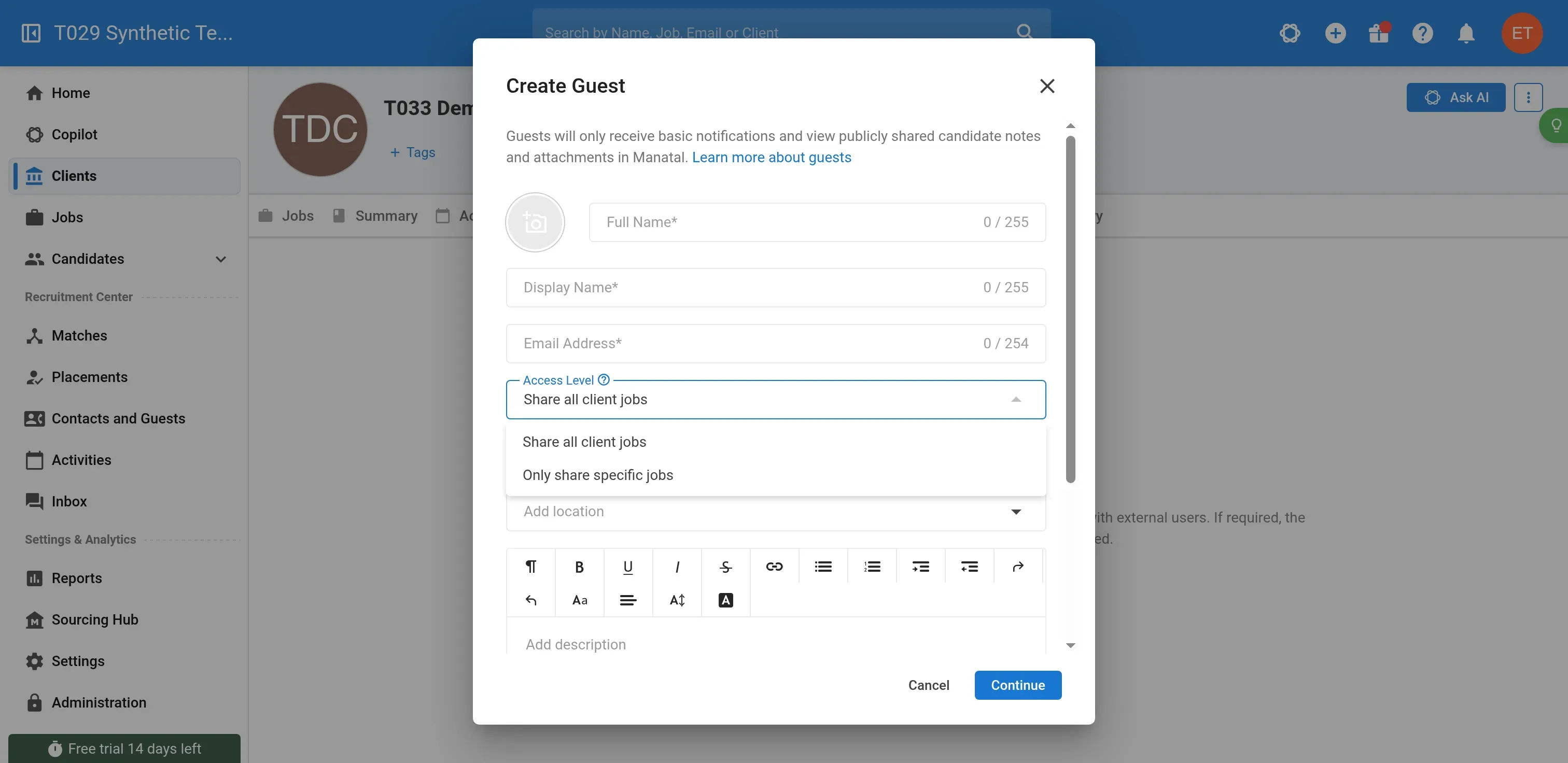
Manatal lets you choose the scope of a guest's job access before inviting them. Own trial capture.
Professional caps the account at 15 jobs and 10,000 candidates. Adding a recruiter doesn't expand those allowances. Skip that tier if your existing workload already exceeds them. Enterprise removes both caps.
A March 2026 discussion captures both the value and a useful buying caution:
“I switched my agency from an expensive, nothing crazy ATS, to Manatal about 2 years ago.” — u/rolldemdice, r/RecruitmentAgencies, March 7, 2026.
“I demo’d Manatal. The salesperson knew nothing about recruiting workflows.” — u/febstars, r/RecruitmentAgencies, March 10, 2026.
Those comments concern different experiences (a switch and a sales demo). The thread's original poster later praised support responsiveness. Bring your own submission workflow to the demo so you can judge how well the salesperson understands your desk.
Things I Noted — Manatal
Manatal made me complete the candidate-to-job association explicitly. I created an unpublished client job, then used the global form to create a fictional candidate. When I opened the candidate's Jobs tab, it was empty. Add to job fixed that. The job's pipeline then showed one candidate in New Candidates, ready for the next part of the workflow.
Manatal won't refund fees for the purchased term, and halting renewal won't earn you a midterm downgrade credit. Monthly billing makes sense while you're still settling the workflow (and deciding how much of a commitment you're ready to make).
Manatal pricing
14-day free trial; from $15/user/month, billed annually, for Professional.
- Enterprise — $35/user/month, billed annually; unlimited jobs and candidates
- Enterprise Plus — $55/user/month, billed annually; API and custom permissions
- Monthly billing — $19, $39, and $59/user/month respectively
2. Zoho Recruit: Best for controlled client access
Zoho Recruit is my pick when you want clients to participate in hiring without letting every client contact see everything. Choose the Staffing Agency edition: the Corporate HR edition serves a different buyer, and its pricing isn't a shortcut to the agency portal.
Zoho Recruit pros
- Separate visibility and action controls
- Standard already supports client submissions and feedback
Zoho Recruit cons
- Extra portal users add to the recruiter-seat bill
During the Staffing Agency trial, I created a fictional candidate and an unpublished job, then linked that candidate to the opening. The resulting application retained its own stage alongside the candidate and job names. That's the relationship I want an agency ATS to make easy to follow. The wide application table was my small gripe: I still had to scroll sideways on a large screen.
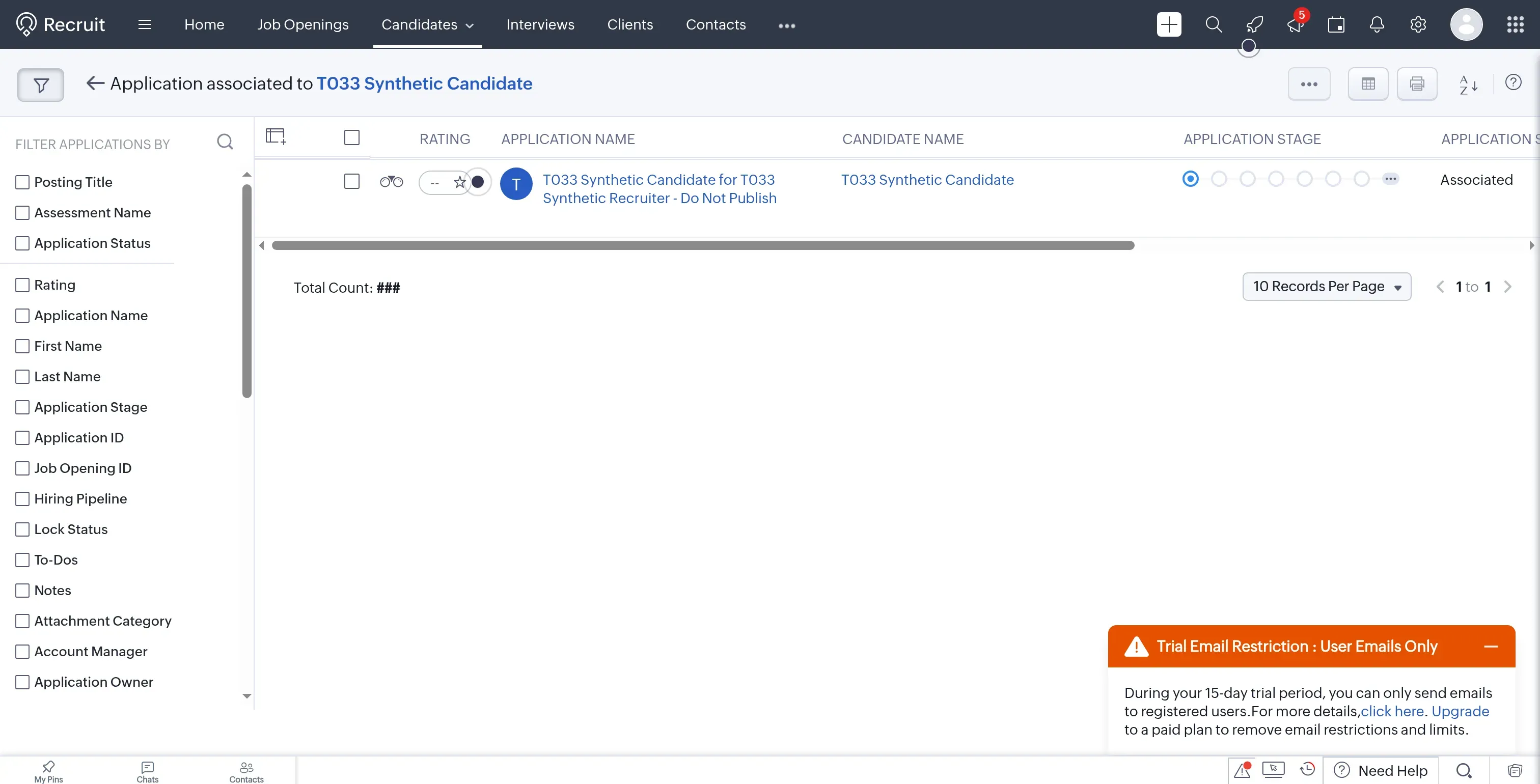
Zoho Recruit creates an application linking the candidate to the job, with a separate application stage. Own trial capture.
For client access, roles control visible records and profiles control permitted actions. I like that separation: you can decide which records a reviewer sees independently of the actions they're allowed to take.
Client login requires Enterprise. But if your clients happily review a submission without logging in, you can skip that upgrade and keep the process they already use. A more elaborate portal won't make an unresponsive hiring manager more responsive.
Things I Noted — Zoho Recruit
Zoho Recruit counts pending invitations toward the organization-wide portal allowance. Count each client's reviewers before comparing recruiter-seat prices. If you use Zoho One or PeoplePlus, check the Recruit entitlement in your bundle before buying a separate license.
Zoho Recruit pricing
$75/recruiter/month, billed annually, for Staffing Agency Enterprise and its client portal.
- Standard — $25/recruiter/month, billed annually; submissions without the dedicated portal
- Professional — $50/recruiter/month, billed annually; two-way IMAP email
- Extra portal users cost $6/user/month beyond the included 10.
3. Recruit CRM: Best for branded client submissions
Recruit CRM Business adds resume branding, redaction, and executive-search reports for agencies selling client-ready shortlists. It's worth a close look when presentation is part of your service and forwarding a candidate's attachment won't do.
Recruit CRM pros
- Pro includes client submissions and the hiring-manager portal
- Business adds branded resume formatting and redaction
Recruit CRM cons
- Resume formatting consumes credits even on an eligible plan
- Official pages disagree on candidate-record limits
In the Recruit CRM trial, I created a fictional client, job, and candidate, then assigned the candidate to the job. The pipeline showed one Assigned candidate. Opening Set Candidates Visibility brought up On and Off controls for showing the pipeline's candidates to contacts (a setting to review before preparing a client shortlist).
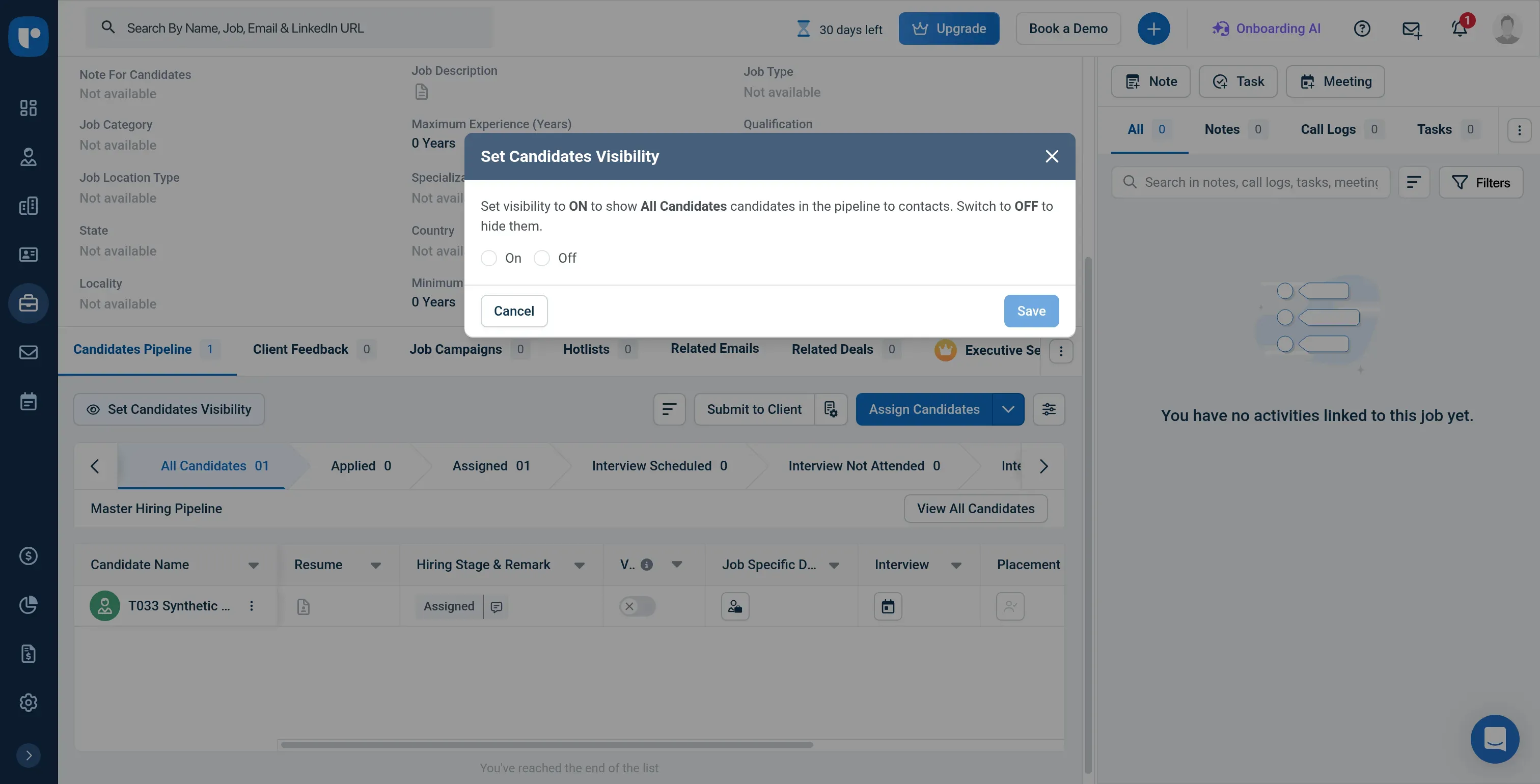
Recruit CRM separates assigning a candidate to a job from choosing whether contacts can see the pipeline. Own trial capture.
Business earns its price through presentation controls. Basic client feedback is already in Pro.
Formatting consumes credits even when your plan includes the feature, so estimate how many resumes you'll format alongside any other work drawing on that pool. Skip Business if basic submissions already give your clients everything they need.
Things I Noted — Recruit CRM
Recruit CRM required a contact on the job before I could use Submit to Client. Assigning the candidate had left that prerequisite unresolved.
Recruit CRM's invitation guide flags a problem for clients who work with multiple agencies: another agency may already own the portal relationship for the client's email address. Your invitation then won't go through. Include such a client in the demo if you expect to use the portal for every submission.
I found a capacity disagreement worth resolving before a large migration. The pricing comparison lists unlimited candidates and contacts; the subscription guide gives Pro 10,000 records per user, pooled across the account. A solo recruiter importing 80,000 records exceeds the help guide's allowance, even though the pricing comparison says unlimited. Put your actual record count in the order confirmation.
After canceling Recruit CRM, you keep access until the paid period ends. Retrieving data after that requires reactivation. Export while the subscription is still live. Unused seat time doesn't earn a refund, although you can reassign a seat to another recruiter.
Recruit CRM pricing
$135/user/month, billed annually, for Business and its branded-submission features.
- Pro — $95/user/month, billed annually; basic client feedback and portal
4. Recruiterflow: Best for repeatable agency workflows
Recruiterflow is worth a close look when your agency needs consistent follow-up across recruiting and client development. If you can name the manual handoffs your recruiters repeat, you've got a useful brief for its automation demo.
Recruiterflow pros
- Platform merges workflow automation, CRM, and agency ATS
- Unlimited jobs, candidates, contacts, and companies
- API included in Platform
Recruiterflow cons
- AIRA AI agents need separate pricing
- Renewal notice matters when planning a switch
I followed Recruiterflow's product guides through the workflow controls, where the Eye icon beside a candidate's job entry caught my attention. It lets you keep a backup candidate in the internal pipeline while hiding that person from the client's portal. I like the separation. You can keep working on the search without presenting every possible candidate to the client.
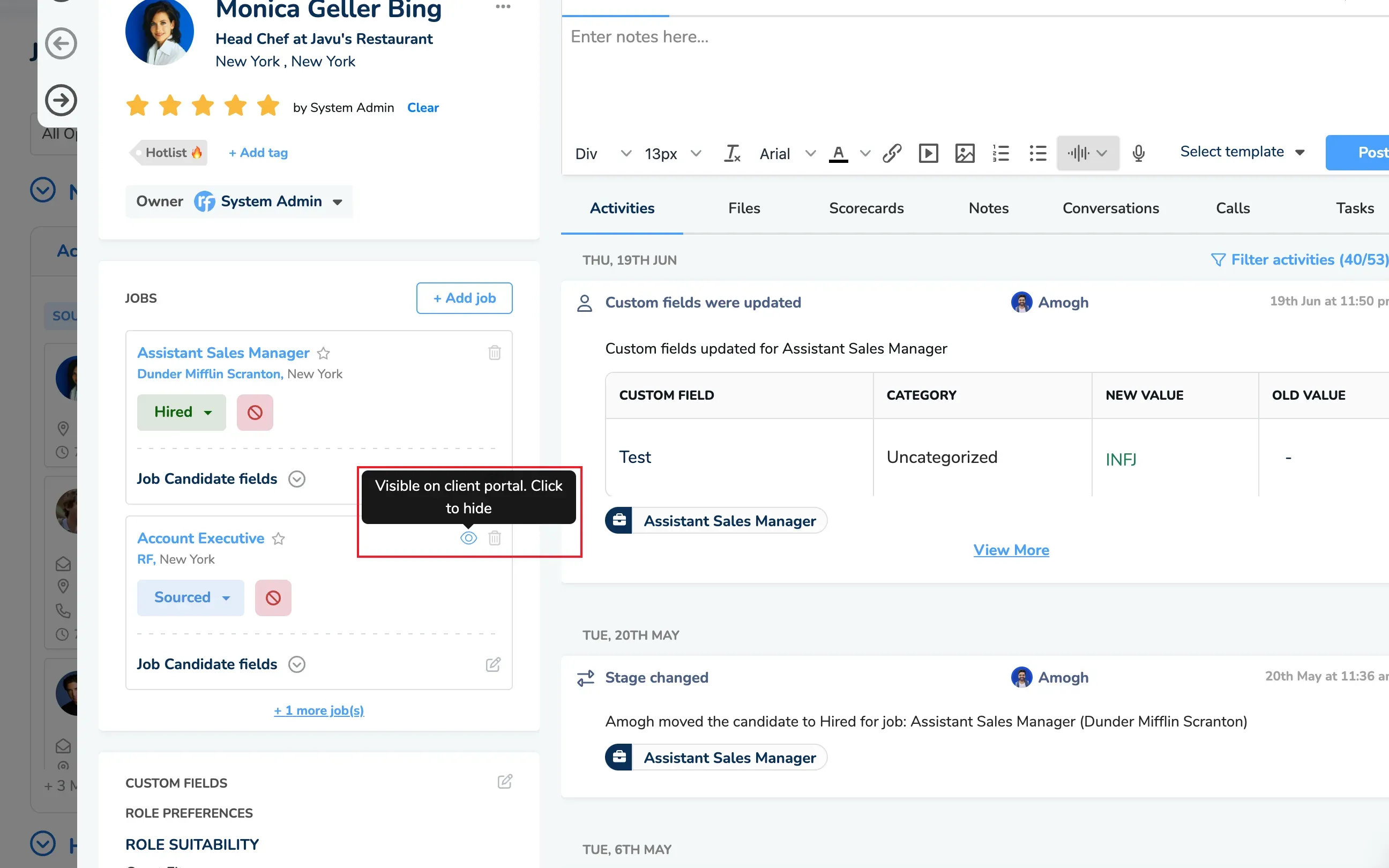
Inside Recruiterflow, the Eye control hides a candidate from the client portal while keeping the profile visible to your team. (Image source: Recruiterflow)
Platform includes sequences and access controls, while the AI submission agent, matching, and other AIRA capabilities need separate pricing. Keep AIRA out of a budget based on the Platform seat rate. Recruiterflow is overkill if you mainly want an inexpensive database and won't use the connected workflows.
Two agency users in the same Reddit discussion put that fit question well:
“I like it, I don't use all its features, but I find it expensive for what I get.” — u/5x0uf5o, r/RecruitmentAgencies, March 8, 2026, reporting five years with Recruiterflow.
“We've been using Recruiterflow for 2 years now. It's been working very well for us.” — u/Only_Soup_5462, r/RecruitmentAgencies, March 9, 2026, also praising support's response to problems.
Both comments make a useful demo prompt: which recurring work will you automate, and what support will you need to keep it running?
Things I Noted — Recruiterflow
Subject to your order form, Recruiterflow's master agreement calls for at least 30 days' notice to avoid renewal. Put that deadline in the calendar when you sign. Its cancellation guide directs you to email support and obtain confirmation, so leave time for that exchange and have your export plan ready before the notice window.
Recruiterflow pricing
$119/user/month, billed annually, for Platform.
- Monthly billing — $149/user/month
- AIRA — custom pricing, separate from Platform
5. Bullhorn: Best for agencies expanding into contractor operations
Bullhorn One belongs on your shortlist when placements lead into timesheets, invoicing, and paying contractors. That broader operational brief earns it a place here. The smaller ATS plans cover a narrower purchase, which is easy to miss when you're comparing the first seat prices on vendor pages.
Bullhorn pros
- Bullhorn One connects recruitment with time, invoicing, and pay/bill
- Core supports LinkedIn integrations and a partner marketplace
- Small-agency plans include implementation
Bullhorn cons
- Bullhorn One needs a scoped quote
- LinkedIn integrations can require separate LinkedIn licenses
In Bullhorn's guided Payable Charges demo, I followed the route from Pay & Bill to the export-status screen. The tour filters by worker type and Ready to Pay status before showing the export (W2 payroll and 1099 accounts payable follow separate routes). Bring your operations manager into this part of selection, especially if finance is still reconciling the recruiting team's work in spreadsheets.
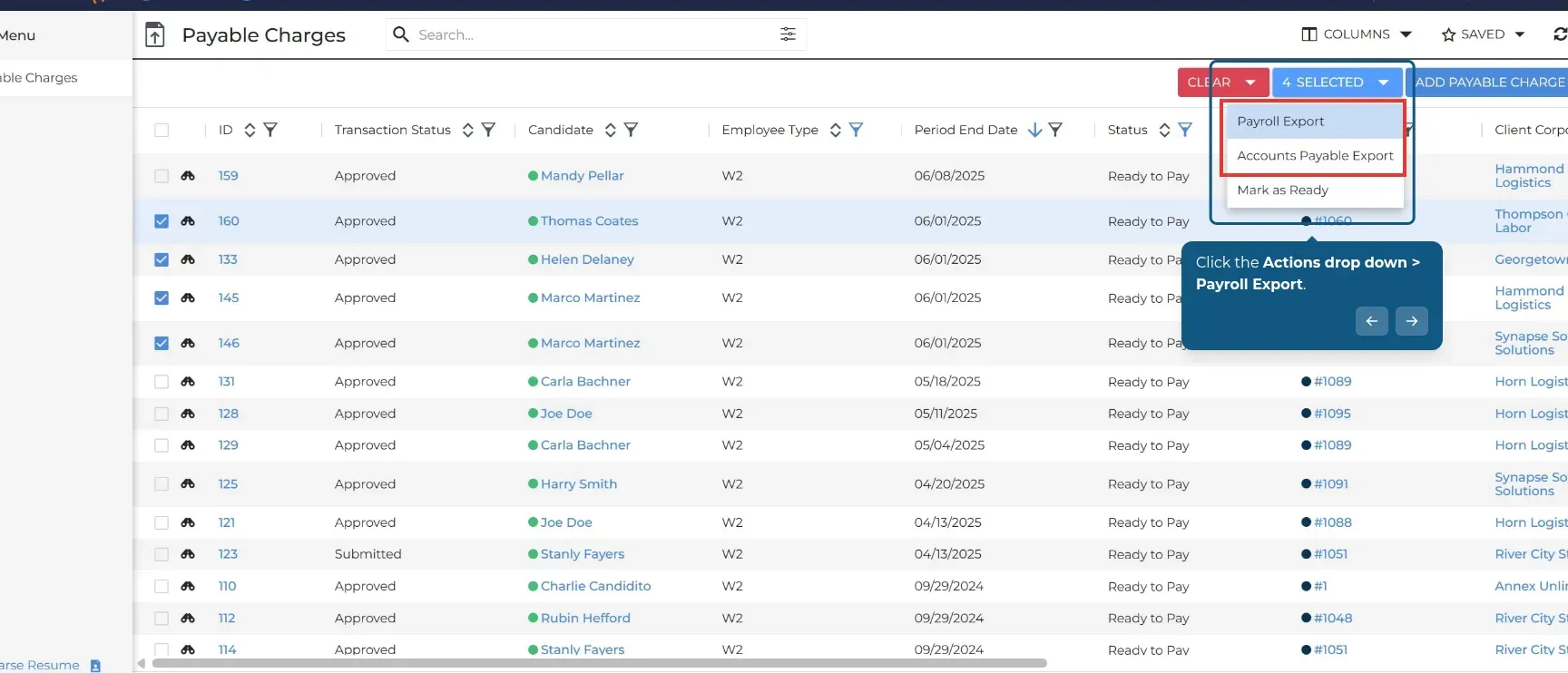
Inside Bullhorn's vendor walkthrough, W2 payable charges use Payroll Export; 1099 payments use Accounts Payable Export. (Image source: Bullhorn)
Starter covers applicant tracking and client management, Core adds customization and integrations, and Bullhorn One adds the back-office scope. Skip the Bullhorn One evaluation if your permanent-placement agency only needs a shortlist and interview pipeline. You're buying more than you need.
Things I Noted — Bullhorn
Bullhorn's LinkedIn integrations require attention to the licenses you already own. Bullhorn's Apply Connect guide requires an agency account with Job Slots and a qualifying Recruiter Professional subscription for Easy Apply. If you already pay for that stack, Core is worth evaluating. If you don't, include the LinkedIn prerequisites in your comparison before treating the integration as a saving.
On Bullhorn's public pricing page, the billing term, client-reviewer licensing, and full contractor package aren't specified. Before you convert a monthly seat label into an annual budget, obtain those details in a scoped quote that includes renewal and export terms.
Bullhorn pricing
Custom for Bullhorn One and the contractor-operation scope.
- Starter — $99/user/month; billing term isn't specified on the pricing page
- Core — $165/user/month; billing term isn't specified on the pricing page
- Pro and larger-agency packages — custom pricing
Which agency ATS should you price for client access or contractors?
Manatal Enterprise and Zoho Recruit Agency Enterprise are my starting points for client access, while Bullhorn One is the contractor option to price. The workload tables separate complete subscriptions from base calculations, with external-user allowances for Recruit CRM and Recruiterflow still unresolved. Annual-billing figures are seat rate × seats × 12, before tax, optional sourcing, messaging, job-board spend, and assisted migration. The calculations assume attachments fit the included storage (record counts alone don’t determine storage needs).
Scenario 1: A solo permanent-placement recruiter
Manatal and Zoho Recruit cover this solo workload: one recruiter, 10 active jobs, and 5,000 candidate records, with ordinary candidate submissions and no client login, branded redaction, paid sourcing, or contractor processing required.
| Tool | Plan | Annual subscription | Mandatory extras or unknowns | Limit to watch |
|---|---|---|---|---|
| Manatal | Professional | $180 | None identified for this scope | Account-wide capacity |
| Zoho Recruit | Agency Standard | $300 | None identified for this scope | Job allowance |
| Recruit CRM | Pro | $1,140 | Credit-consuming extras excluded | Record allowance conflict |
| Recruiterflow | Platform | $1,428 base calculation | Minimum purchase commitment unverified | AIRA excluded |
| Bullhorn | Starter candidate | Unknown | Term and scenario entitlement need quote | Billing term needs confirmation |
Manatal and Zoho Recruit are the economical starting points for this workload. Recruit CRM and Recruiterflow need to earn their higher seat cost through work you'll actually use. Automation that stays switched off won't help a solo desk.
Scenario 2: Five recruiters and ten client reviewers
Manatal and Zoho Recruit offer priced configurations for five recruiters, 30 active jobs, 20,000 candidate records, and 10 external client contacts who need to review submissions and leave feedback. Basic client collaboration is required; custom internal permission groups, API access, branded redaction, and AI agents are not.
| Tool | Suitable configuration | Annual subscription | External-user cost | Boundary |
|---|---|---|---|---|
| Manatal | Enterprise | $2,100 | Free hiring-manager guests | Guest rights depend on admin settings |
| Zoho Recruit | Agency Enterprise | $4,500 | Scenario reviewers included | Allowance is organization-wide |
| Recruit CRM | Pro | $5,700 base | Portal included; reviewer allowance requires confirmation | Existing portal relationship can block invitation |
| Recruiterflow | Platform | $7,140 base | Client-contact licensing unverified | Not a confirmed complete configuration |
| Bullhorn | Scoped package | Unknown | Client-reviewer licensing unverified | Obtain complete scope and term |
Manatal and Zoho Recruit include the external access this scenario requires. Before comparing their totals with Recruit CRM or Recruiterflow, resolve the reviewer allowance in the latter products' quotes, because an extra access requirement could change the bill.
Manatal's bill changes because the workload exceeds Professional's job and candidate limits. Zoho Recruit requires an upgrade for client login. Neither upgrade is explained by adding recruiters alone.
Scenario 3: Ten recruiters and 100 active contractors
Bullhorn One is the starting point for approved timesheets flowing into invoicing and pay/bill operations. A recruiter-seat total cannot price this scope on its own.
| Tool | Configuration to evaluate | Annual total | Cost or scope that remains open |
|---|---|---|---|
| Manatal | ATS plus separate back office | Unknown | Contractor processing and integration |
| Zoho Recruit | Agency ATS plus separate back office | Unknown | Time, invoicing, and payroll stack |
| Recruit CRM | ATS plus Timesheets & Billing | Unknown | Contractor credits and full pay/bill scope |
| Recruiterflow | Platform plus back-office arrangement | Unknown | Time, invoicing, and payroll stack |
| Bullhorn | Bullhorn One | Custom quote | Implementation scope, modules, and term |
Compare Bullhorn One with keeping your current back office connected to an ATS. Recruit CRM meters timesheets by active contractor and uses progressive credit tiers, so multiplying its first displayed contractor rate by 100 would be misleading. Get the complete operational quote before choosing.
Before committing, put the edition, paid seats, external access, usage allowances, migration scope, billing term, and renewal notice in the order confirmation. Include the feature that made you choose the ATS. If your existing CRM already handles client prospecting, decide which system owns companies and contacts and how a won job enters recruitment before buying overlapping functionality.
If you source candidates on LinkedIn, consider Linked Helper's Zoho Recruit LinkedIn integration to send profiles into Zoho Recruit as candidates.
How we tested
I tested recruiting agency workflows in ATS trials and reviewed official guides and vendor demos in October 2026. I didn't test candidate submissions to clients.