

 13 min read

TL;DR: LinkedIn CRM tools in November 2026
- For LinkedIn prospecting that should reach a CRM: Linked Helper sends processed profiles to supported CRM destinations, including HubSpot, Pipedrive, and Close.
- For Sales Navigator context inside a CRM: HubSpot combines Sales Hub Professional or Enterprise with Sales Navigator Advanced Plus, and it doesn't import LinkedIn contacts.
- For an existing Pipedrive account: Surfe adds profile capture, with Essential at $468 per user per year. Pipedrive plus Surfe requires two subscriptions.
- For a calling-first sales team: Close Solo costs $108 per year for one user, while Essentials starts at $420 per seat per year for team sharing.
- For manual LinkedIn contact capture: folk Standard costs $288 per member per year and includes its LinkedIn extension, but automatic LinkedIn sync isn't included.
What the best LinkedIn CRM tools do
LinkedIn CRM tools connect profile capture, handoff of campaign leads, Sales Navigator context, or message logging to customer records. I treat those as separate jobs: creating a contact, updating an existing record, saving a conversation, or displaying information beside a CRM record.
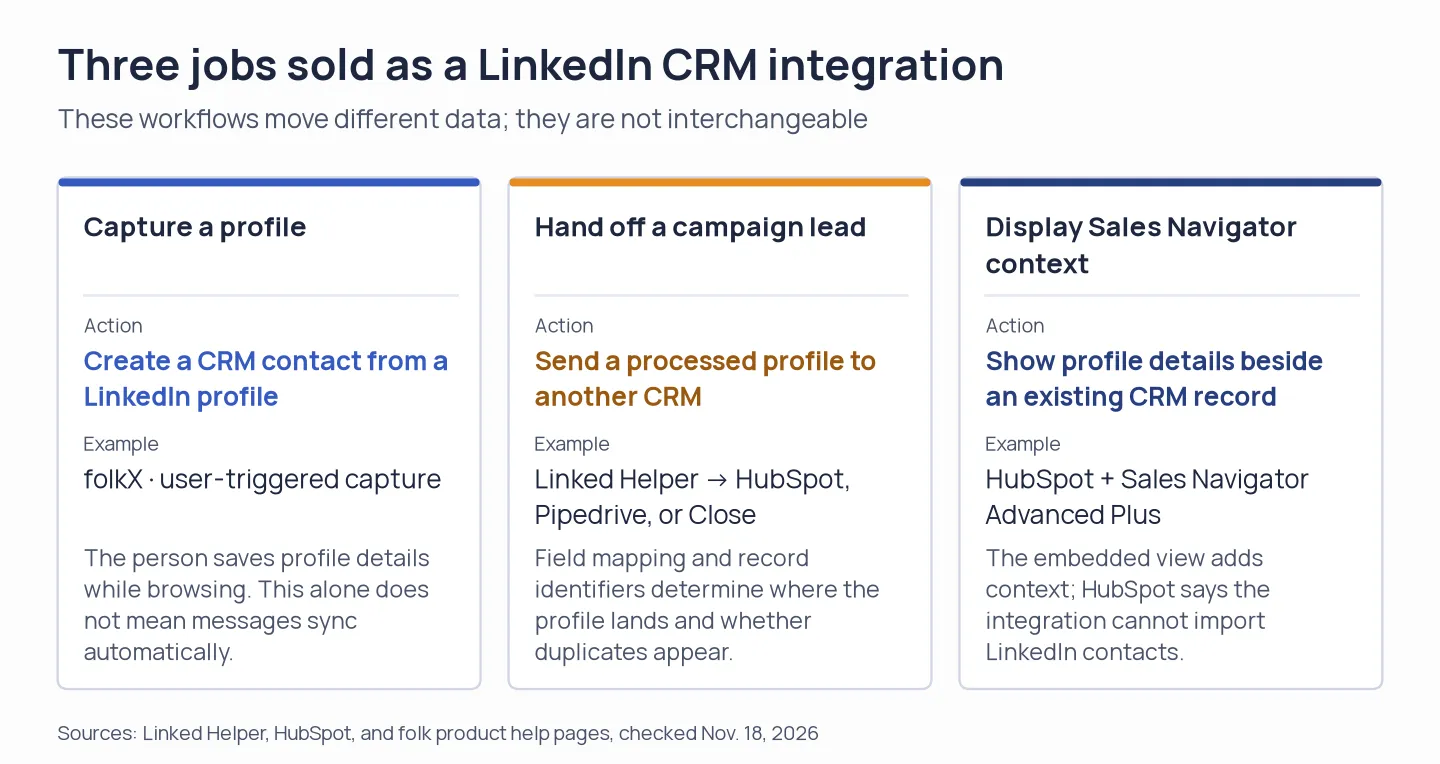
Choose by the data movement your team needs: capture a profile, hand off a campaign lead, or display Sales Navigator context.
Use LinkedIn CRM tools to save profiles into a pipeline, send campaign leads to a separate CRM, or view Sales Navigator data on existing records. Check what data moves and which plan includes the workflow you need.
What to compare in the best LinkedIn CRM tools
Compare profile capture, which creates a contact from LinkedIn, with CRM writeback, which sends campaign leads into an existing record system. Check message history to see whether conversations save automatically or after a user action, confirm the required Sales Navigator tier, and review record matching to see whether a new profile updates a contact or creates a duplicate. B2B teams should also check lead routing and spam controls, since a captured profile still needs qualification and follow-up. Choose the workflow before comparing annual prices.
At a glance: LinkedIn CRM tools by workflow
For me, Linked Helper fits LinkedIn prospecting with a CRM handoff, HubSpot shows Sales Navigator context on records, Pipedrive with Surfe captures profiles, Close supports calling-led sales, and folk suits manual relationship tracking. The table compares these workflows and flags the limit most likely to affect your choice.
| Tool | LinkedIn workflow | Good fit | Price to start | Main catch |
|---|---|---|---|---|
| Linked Helper | Sends processed profiles to supported external CRMs and includes a local CRM | LinkedIn prospecting with CRM handoff | $99/year Standard, $297/year Pro | License is tied to one LinkedIn account |
| HubSpot | Shows Sales Navigator context on HubSpot records | Teams already using HubSpot Sales Hub and Sales Navigator | $2,580 first-year Professional subtotal for one seat, plus Sales Navigator | Cannot import LinkedIn contacts, Advanced Plus required |
| Pipedrive + Surfe | Captures profiles and transfers CRM data from LinkedIn | Pipedrive users who want a LinkedIn side panel | $636/year per seat for Lite + Surfe Essential | Message sync and plan eligibility need checking for the exact workflow |
| Close | Receives people from Linked Helper, full sales CRM with calling and email | Calling-led sales teams using CRM pipelines | $108/year Solo, $420/year Essentials | Solo is one user, calling and SMS can add usage costs |
| folk | folkX captures profiles and manually logs LinkedIn interactions | Small relationship-focused teams | $288/year Standard | No native automatic LinkedIn sync, full history is Premium |
Prices exclude tax and any separate Sales Navigator subscription.
1. Linked Helper: Best for LinkedIn prospecting with a direct CRM handoff
Linked Helper is my pick for LinkedIn prospecting that needs to pass processed profiles into a separate CRM. Its “Send person to external CRM” action sends campaign leads to supported destinations, while its local CRM keeps records inside Linked Helper.
I like the direct handoff because a team can keep LinkedIn campaign work and its sales pipeline in separate tools. Current integration guides explain how to connect LinkedIn to HubSpot, Pipedrive, Close, Salesforce, HighLevel, Zoho CRM, Zoho Recruit, ActiveCampaign, Streak, Capsule, and Instantly. Check the guide for your CRM, supported fields, and product version before you choose a destination.
Before a team rollout, I'd check record matching. Linked Helper can match by identifiers, and its guide covers mapping LinkedIn member or public IDs. Relying on email alone can create duplicates when a profile has no matching email. Each integration has its own field and matching rules.
Linked Helper runs on your own desktop and uses your IP address and LinkedIn session, so the “Desktop. Safety first.” line refers to local execution. Standard costs $99 for 12 months and Pro costs $297 for 12 months.
Pros — Linked Helper
- Keeps LinkedIn prospecting on your computer and passes campaign leads into supported CRM destinations.
- Supports field mapping and identifiers to match a profile to an existing CRM record.
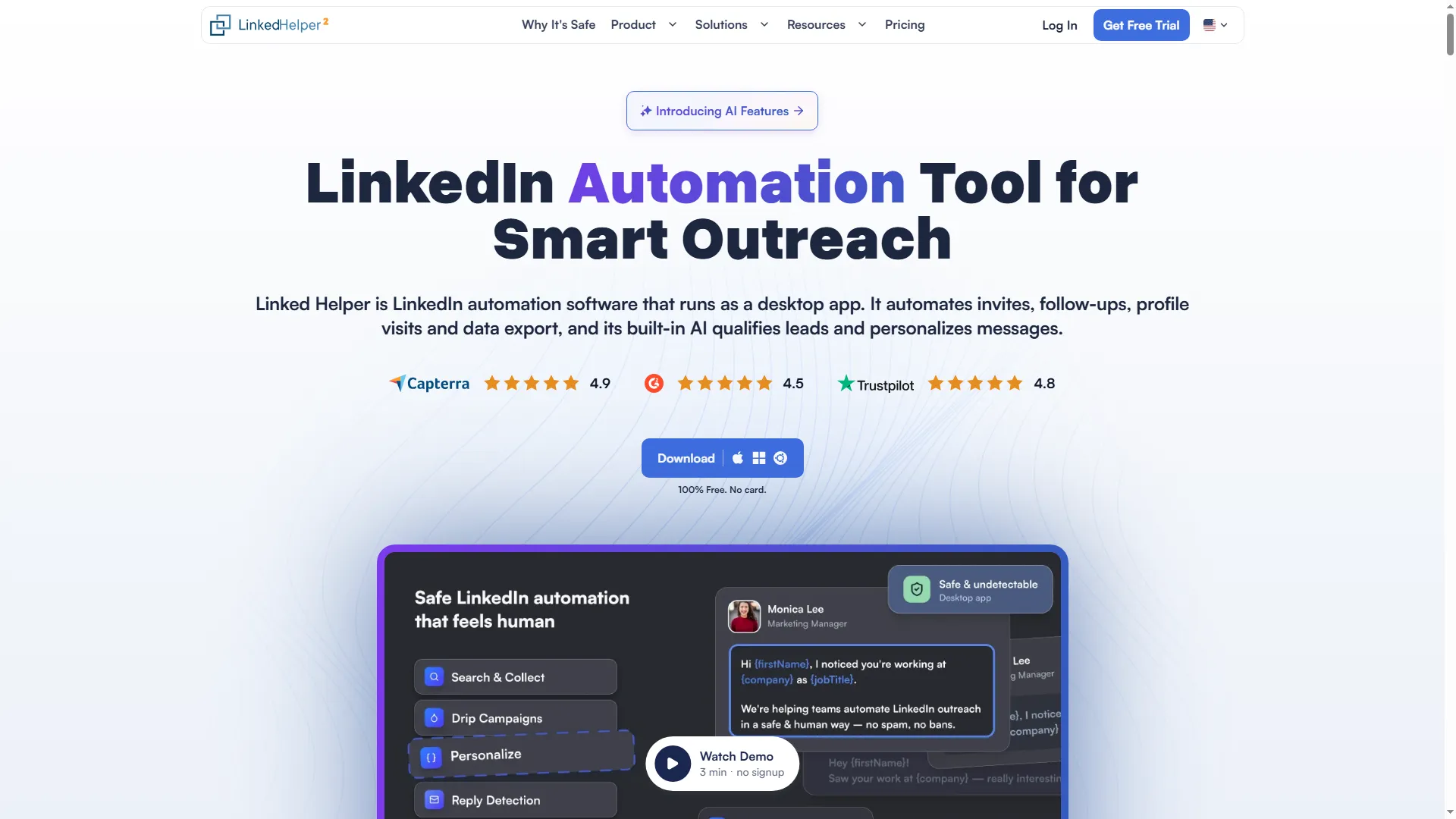
Linked Helper runs its LinkedIn prospecting workflow on the user's desktop.
Product pricing — Linked Helper
Standard: $99 per 12 months, Pro: $297 per 12 months. A 14-day Pro trial is available without a card.
2. HubSpot: Best for Sales Navigator context on CRM records
HubSpot makes sense to me when your team already pays for Sales Hub Professional or Enterprise and wants Sales Navigator context beside CRM records. Its integration shows LinkedIn profile details, shared connections, and account updates, and supports Sales Navigator actions from HubSpot records.
HubSpot's Sales Navigator integration can't import contacts from LinkedIn. It adds context to records your team already has. You'll need a Sales Hub Professional or Enterprise seat and a LinkedIn Sales Navigator Advanced Plus subscription, so the free CRM isn't enough for this use case.
The first-year price for one Professional seat is $2,580 before Sales Navigator and tax: $90 per seat per month on annual billing ($1,080 for 12 months), plus a required $1,500 onboarding fee. Five Professional seats total $6,900 in year one before Sales Navigator and tax. If HubSpot is already your system of record, embedded context can justify the extra license. I wouldn't buy it just to copy LinkedIn profiles into a list.
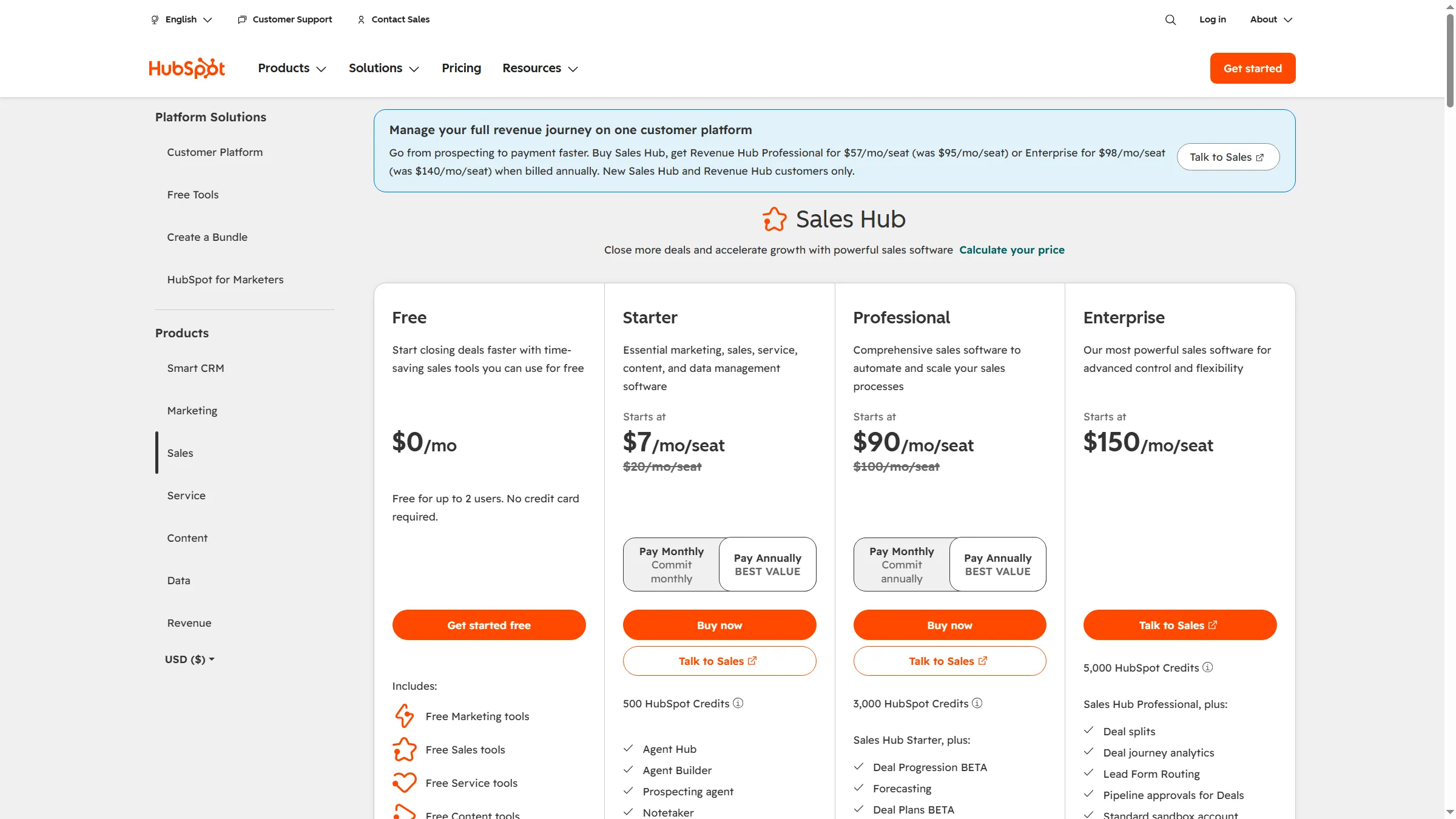
Sales Navigator context in HubSpot requires a paid Sales Hub Professional or Enterprise seat.
Pros — HubSpot
- Shows profile and account context on HubSpot records.
- Keeps Sales Navigator actions close to the team's existing CRM workflow.
Cons — HubSpot
- HubSpot can't import LinkedIn contacts.
- Requires Advanced Plus and a paid Sales Hub seat. Professional also has a $1,500 onboarding fee.
Product pricing — HubSpot
Sales Hub Professional: $90 per seat per month with annual billing, plus $1,500 one-time onboarding. Enterprise: $150 per seat per month. Sales Navigator Advanced Plus is extra.
3. Pipedrive + Surfe: Best for LinkedIn capture in an existing pipeline
Pipedrive with Surfe appeals when you want to keep your current CRM and add LinkedIn profile capture. Surfe's marketplace listing covers adding contacts, editing CRM data and deals from LinkedIn, and exporting Sales Navigator lists. That workflow differs from HubSpot's embedded Sales Navigator view.
The combined first-year list price is $636 per seat before tax: with annual billing, Pipedrive Lite is $14 per seat per month and Surfe Essential is $39 per user per month. If you need full email sync and automation, Growth is $39 per seat per month, so Growth plus Surfe Essential comes to $936 per seat per year. Surfe Free limits CRM additions to one contact per day, enough for occasional capture rather than a high-volume workflow.
Message handling is the point to verify. Surfe's marketplace and regional pages describe message capabilities, but its current main pricing page doesn't clearly tie each function to a tier. At $636 per seat, the Lite stack is expensive for profile capture alone. I'd choose it when Pipedrive is already your CRM, then confirm the message-sync plan before you budget for it.
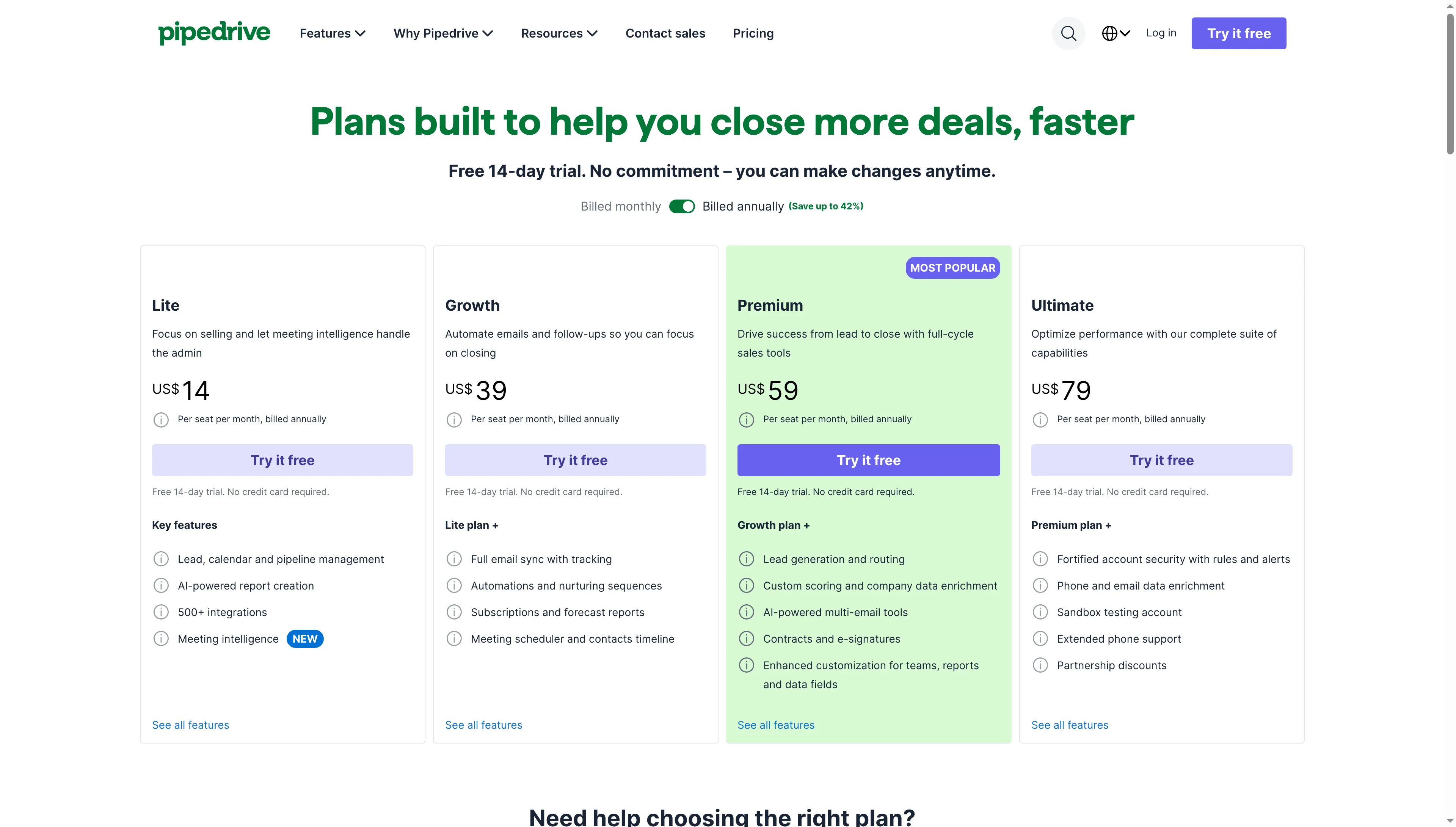
Pipedrive's annual selector makes it easier to compare per-seat CRM cost before adding a connector.
Pros — Pipedrive + Surfe
- Adds a LinkedIn side panel to a Pipedrive workflow instead of replacing the CRM.
- Surfe Free handles very light use: you can add up to one contact to your CRM per day.
- Growth adds email sync, automations, and nurturing sequences if you need them.
Cons — Pipedrive + Surfe
- Before tax, Lite plus Surfe Essential costs $636 per seat per year.
- Message-sync coverage depends on the connector plan, so confirm it before you buy.
Product pricing — Pipedrive + Surfe
Pipedrive Lite: $14 per seat per month, billed annually ($168/year). Surfe Essential: $39 per user per month, billed annually ($468/year). Combined: $636/year per seat.
4. Close: Best for LinkedIn lead handoff to a calling CRM
I like Close for calling-led sales teams that want leads, opportunities, tasks, email, and calling inside one CRM. The documented Close CRM LinkedIn integration sends Linked Helper campaign profiles into a Close pipeline.
I noticed a team-size price break on Close's pricing page: Solo is $9 per month on annual billing, but it's limited to one user and 10,000 leads. Essentials is $35 per user per month and supports shared team leads. That makes the practical annual price $108 for a solo user or $420 per seat for a team using Essentials. Calling and SMS usage are billed separately, so budget for usage if your team makes a lot of calls.
The integration guide covers OAuth or API-key setup, field mapping, and optional messaging-history storage. It also calls for a company Lead record. If email is missing and you haven't mapped extra identifiers, duplicate records can result. I'd pick Close for the calling workflow, but its LinkedIn handoff doesn't promise automatic sync for every CRM field.
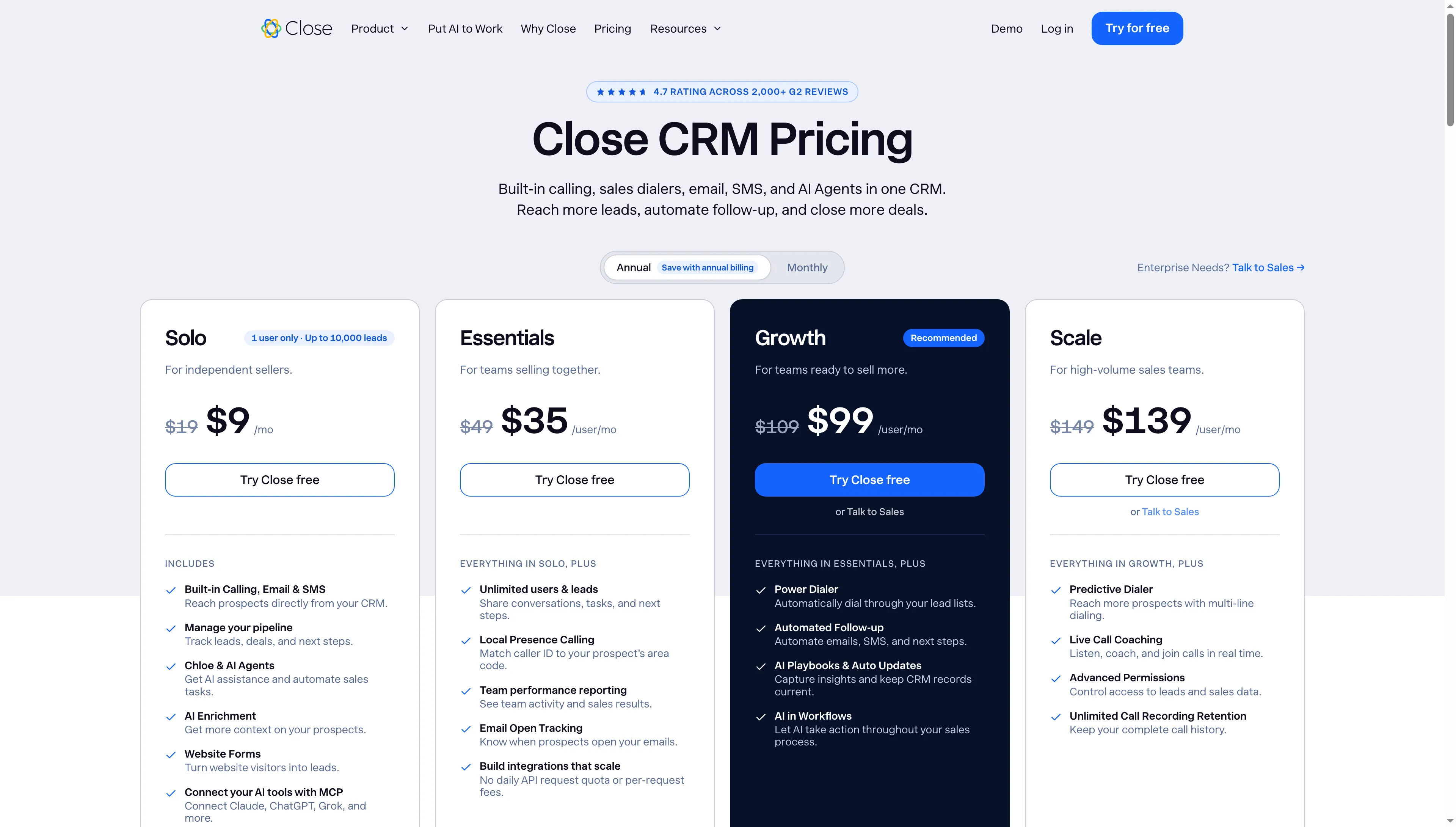
Close Solo is priced for one person, team sharing starts with Essentials.
Pros — Close
- Brings calling, email, leads, opportunities, and tasks into one sales workspace.
- Linked Helper's guide covers field mapping and optional messaging-history storage.
- A 14-day trial is available without a card.
Cons — Close
- Solo can't serve a multi-user team. Essentials is $420 per seat per year.
- Calling and SMS usage can increase the bill.
- The integration's duplicate behavior depends on which identifiers are mapped to records.
Product pricing — Close
Solo: $9 per user per month billed annually ($108/year, one user, up to 10,000 leads), Essentials: $35 per user per month billed annually ($420/seat/year). Calling and SMS are usage-based.
5. folk: Best for manual LinkedIn capture and relationship tracking
I like folk for a small team that wants a lightweight contact list and is comfortable capturing LinkedIn profiles and logging interactions manually. Its folkX extension can create a contact from a profile. To log a conversation, open a LinkedIn thread, add it as an interaction, and click Create.
I checked folk's annual and monthly pricing side by side: Standard is $24 per member per month billed yearly ($288/year), compared with $30 month to month. Standard includes the LinkedIn extension, one account sync per member, and a limited interaction history. Premium is $48 per member per month annually ($576/year). It adds Deals, sequences, dashboards, and full interaction history.
The tradeoff is manual upkeep. folk's Help Center says it has no native automatic LinkedIn sync, so you'll need to capture profiles and log threads yourself. I like folk as a personal contact book, but its manual message logging makes it a poor fit for teams that expect automatic capture.
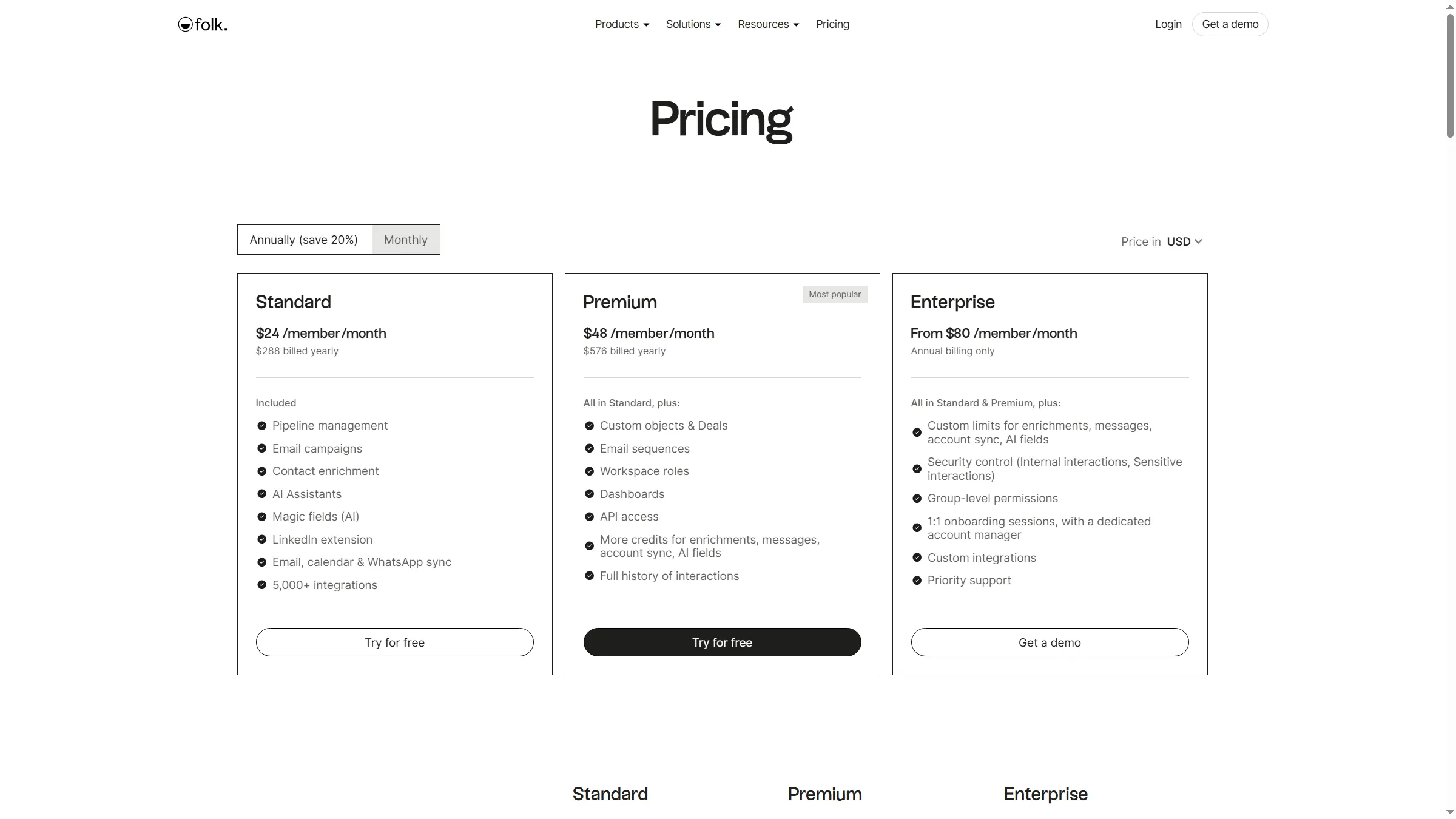
folk Standard includes the LinkedIn extension, Premium adds Deals and full interaction history.
Pros — folk
- Includes the LinkedIn extension in the Standard plan at $24 per month, billed annually.
- The two-week trial doesn't require a card.
- Premium adds Deals and full interaction history for teams that need those records.
Cons — folk
- You have to capture LinkedIn profiles and conversations manually. There's no native automatic sync.
- Full interaction history and Deals require Premium at $576 per member per year.
Product pricing — folk
Standard: $24 per member per month billed yearly ($288/year). Premium: $48 per member per month billed yearly ($576/year).
LinkedIn CRM costs for a five-person contact-capture team
For a five-person contact-capture team, annual costs range from $1,440 with folk Standard to $1,794 with Nimble, while Salesflare Growth totals $1,740. These amounts assume five seats, exclude taxes, and include no optional enrichment. For an existing Pipedrive team, count Surfe as an add-on and show the full stack separately.
| Scenario | Configuration | Annual cost | Included and excluded |
|---|---|---|---|
| Five people saving profiles into a relationship CRM | folk Standard: $1,440, Salesflare Growth: $1,740, Nimble: $1,794 | $1,440–$1,794 | Five seats at each plan rate, profile capture and CRM seats included, no enrichment add-ons assumed |
| Five people adding LinkedIn capture to Pipedrive | Surfe Essential add-on: $2,340, new Pipedrive Lite + Surfe Essential stack: $3,180 | $2,340–$3,180 | Add-on assumes the Pipedrive subscription is paid. The new stack includes five Lite seats and five Surfe seats, without Growth email sync. |
Though CRM depth differs by product, the first row compares annual costs for five seats capturing contacts. The second row separates the incremental connector cost from a new five-seat CRM stack. HubSpot's Sales Navigator setup solves a different job, with its licensing requirements and seat price detailed in its card.
Which LinkedIn CRM setup should you choose?
Choose Linked Helper when LinkedIn prospecting is the starting point and you need a campaign-to-CRM handoff. Choose HubSpot when Sales Navigator context belongs on existing records and your team already has the paid seats. Pipedrive with Surfe adds profile capture to an existing pipeline. Close fits a calling-centered team, and folk suits a smaller contact list that can tolerate manual capture.
If your company already pays for HubSpot or Pipedrive, check what that subscription and its supported connector cover. HubSpot's Sales Navigator view doesn't replace contact import, and Pipedrive Lite doesn't include the full email sync listed on Growth. Avoid paying twice for overlapping contact storage before confirming which tool owns records, messages, and follow-up.