

 29 min read

TL;DR: intent data providers in October 2026
- Starting picks: Choose Bombora for an independent off-site research feed, Apollo for a small team seeking topic intent within its prospect database, and G2 Buyer Intent for software-comparison activity on review marketplaces.
- Cheapest paid route: With annual billing, one Apollo Basic seat covers six organization-wide topics for $588 per year. During my October 2026 trial, the free workspace's single topic yielded 81 High-intent companies.
- Topic ceilings: Standard plans from Apollo cap out at 12 topics, while HubSpot Buyer Intent stops at 20 predefined topics. Therefore, a 25-topic requirement calls for 6sense (a 37-topic Bombora entitlement), ZoomInfo Marketing Demand, Bombora direct, or Demandbase. Every one of these is quote-priced.
- Programs built on accounts: 6sense rates how likely an account is to open an opportunity inside 90 days, and Demandbase measures intent strength according to company size. An owner is required for setup in both cases.
- Identity boundary: all vendors on this list surface company-level signals. Who actually performed the reading goes unnamed in Apollo's people data, G2's Marketo contacts, and Bombora's company profiles.
- Your own website: Leadfeeder Lite comes at no cost for the last 100 companies with seven days of history. Discover runs €79 per month when billed annually, covering as many as 50 recognized companies, and €109 for 51–100.
What is an intent data provider?
You can determine which accounts merit attention first because an intent data provider delivers behavioral signals revealing which companies are researching a topic, comparing products, or visiting your site. Publisher networks are the basis for Bombora and 6sense, software-marketplace activity underlies G2 Buyer Intent, and visitors to your own site inform Leadfeeder or HubSpot Buyer Intent. What you get is evidence regarding a company's activity. A human still has to read it for purchase readiness.
The best intent data providers at a glance
Bombora works best when you want to add a standalone research feed; G2 Buyer Intent suits software-comparison activity; and for budget-friendly topic-led prospecting, Apollo is the pick. All eight providers get lined up in the table by signal, by intent-enabled pricing, and by the trade-off you'll run into first.
| Provider | Best for | Standout feature | Intent-enabled pricing | Main trade-off |
|---|---|---|---|---|
| Bombora | Adding an independent research feed | Company Surge topic clusters | Custom | Company-level research, separate activation |
| G2 Buyer Intent | Software comparison activity | Product-specific marketplace signals | Custom add-on | Professional/Enterprise; subscription per product |
| 6sense | Predictive account prioritization | Opportunity-opening intent model | Custom | Model and source refresh differ |
| Demandbase | Coordinated account-based programs | Keyword sets and account engagement | Platform fee plus users; custom | Partner feeds cost extra |
| ZoomInfo | Intent beside prospect records | Intent clusters and contact intelligence | Copilot Advanced or higher; custom | Streaming/custom requirements change the quote |
| Apollo | Affordable topic-led prospecting | Bombora filters inside company search | Free: 1 topic; Basic: $49/seat/month annually | Topics shared across the organization |
| HubSpot Buyer Intent | Using an existing HubSpot stack | Research plus visitor context | Free preview; paid subscription/credits for activation | 20 research topics; company-level matching |
| Leadfeeder | Prioritizing your website visitors | Company visits and custom feeds | Free Lite; Discover from €79/month annually | Traffic-volume tiers; own-site scope |
What makes the best intent data providers useful?
From Bombora through Leadfeeder, useful intent data providers reveal the origin of a signal, which identity it stands for, its freshness, how tightly you can narrow it, and the cost you must bear before the workflow activates. I weigh that above how many signals a vendor advertises in its headline (such figures aren't necessarily comparable, and they're seldom clarified). Before I let any platform close to a rep's call list, these are the checks I perform.
Where did the signal originate? Your website activity is first-party to you. G2's marketplace activity is first-party to G2 and shared with you as partner data. A publisher co-op like Bombora's covers research neither of you can see. Buy two interfaces to the same upstream feed and you've bought one observation twice.
What does the identity represent? A company domain, a suggested employee, and an identified researcher are three different outputs, and a product should keep them visibly apart before you write a message claiming to know what someone read. Most products don't keep them apart.
What does “fresh” mean? A model can update daily while one of its inputs arrives weekly. A file can hold daily activity but reach your warehouse once a week. Pick the cadence your reps will act on, because a Monday list that nobody opens until Thursday isn't fresh either.
Can you narrow the signal? Topic selection, recency, company size, region, and existing-customer exclusions do more for a shortlist than an unexplained “high intent” badge. Broad categories are easy to misread.
What switches the workflow on? Count topic allowances, seats, data credits, partner licenses, and delivery requirements. A free contact search isn't automatically a free intent subscription, and identifying a company is a different step from exporting it or tracking it every month.
My recommendations address what you can observe from the outside: signals, controls, and buying conditions. Which actions I took, and which I didn't, is set out in the method section.
1. Bombora: Best for adding an independent research feed
If you already operate a prospecting plus marketing stack and want an off-site research feed that surfaces accounts before those accounts ever hit your website, start with Bombora. Content-consumption activity gets pooled from participating publishers by Data Co-op, while Company Surge flags research exceeding a given company's normal level.
Bombora pros
- Company Surge compares the research with every company’s individual baseline.
- At once, topic clusters allow you to require multiple related signals.
- Direct delivery via feed, plus delivery through partner platforms
Bombora cons
- Corporate overviews fail to name specific investigators.
- Direct pricing requires a quote
- Separate tools are required for activation and contact discovery.
What I like in this detail is combining a score with a topic threshold. A minimum score of 60 plus a threshold of no fewer than 25% of your chosen topics is what Bombora advises, meaning that when you have 12 topics, three among them must surge before an account qualifies. That approach lets you construct a hypothesis around connected research rather than pursuing each company that grazed one wide subject.
The piece nobody pitches you? What occurs once the account shows up. Since Bombora aggregates activity into company profiles, somebody must determine which roles matter and how to reach those individuals, and the contact a rep selects isn't necessarily the reader who drove the spike. I rely on it for ranking accounts, and then I look into the buying group on my own.
Bombora thresholds change by platform: 60 direct, 70 in 6sense, 75 in Apollo
Guidance from Bombora begins at a score of 60; 6sense segments Bombora data using a fixed threshold of 70; and Apollo marks 75–100 as High. The very same underlying data can yield three distinct shortlists (you'd never infer that from the marketing pages). Examine the cutoff when two tools disagree on an account before concluding that one of them has inferior data.
Bombora's Company Surge analytics guide (dated 2022) likewise shows an estimation step before you generate a report, and that buying question appeals to me: how many companies make it through the topic combination you intend to purchase? Forgo a standalone Bombora feed if your team requires contact records that are ready to work with and lacks any process for converting account research into a list.
Bombora pricing
Custom; compare topic scope, delivery rights, and activation costs in the proposed configuration.
2. G2 Buyer Intent: Best for software-comparison activity
G2 Buyer Intent suits software vendors whose purchasers evaluate tools via review marketplaces, since it distinguishes category exploration from engagement on your own product, pricing, and comparison pages. That's a more pointed question than “Is this company reading about our category?”
G2 Buyer Intent pros
- Splits activities related to category, profile, and comparison
- Buying Stage and Activity Level update daily
- The marketplace context supports retention research and competitor analysis.
G2 Buyer Intent cons
- Buyer Intent is a Professional/Enterprise add-on
- Every listed product requires a separate subscription of its own.
- CRM contact mapping doesn't identify the researching person.
This distinction alters how I handle the alert, and it's my favorite aspect of the product. When a category is visited, it points to a company worth researching. If a comparison includes your product, a rep gains a reason to get a competitive explanation ready before anyone calls. The present guide from G2 also addresses signals originating from Capterra, Software Advice, and GetApp; therefore, you'd want to examine the marketplaces and signal types you'd be subscribing to rather than assuming that every event derives from the one site.
Where G2 Buyer Intent becomes costly is packaging, and that's the piece that frustrates me. For a software firm offering multiple listed products, each product requires its own Buyer Intent subscription, and the intent workflow doesn't cost what the cheap brand-profile plan does. Before I compare the yearly quote against anything else, I put product coverage and the precise signals on the buying checklist.
G2 Buyer Intent maps company signals to contacts by domain
Against a person, a G2 Buyer Intent event may appear in Marketo, even if the underlying observation is owned by a company, because the integration maps by domain, and one signal can therefore be attached to multiple contacts. I wouldn't make that display an opener such as “I saw you comparing us”; it merely points you toward a company to investigate, and that's all it does.
Before the service term ends, G2's master agreement requires 30 days' written notice of non-renewal, so get that date onto the procurement calendar right away. If your buyers seldom use G2 Buyer Intent's marketplaces or your product has no presence there, skip it, since broad topic intent addresses a separate need.
G2 Buyer Intent pricing
Custom add-on to Professional or Enterprise; allow for each subscribed product and any implementation support.
3. 6sense: Best for predictive account prioritization
6sense suits a sales-and-marketing group seeking one account score spanning CRM, web, and outside research, since its intent model gauges how probable an account is to open an opportunity in the coming 90 days. That target's more precise than a generic “ready to buy” label.
6sense pros
- An intent model merges CRM, web, and external signals.
- The daily score forecasts how likely an opportunity is to open.
- Bombora-associated topic entitlements may grow past the built-in 12.
6sense cons
- Predictive score isn't a purchase probability
- Bombora input refreshes weekly
- Intent Data Packs need platform access plus setup services
I favor the account-level view for B2B lead scoring whenever you've got sufficient CRM plus marketing context for it to carry real meaning. A research spike appears alongside current engagement and fit, rather than arriving as yet another unconnected list that a rep must decipher. However, if a few topics for one seller are all that's required, then 6sense is excessive.
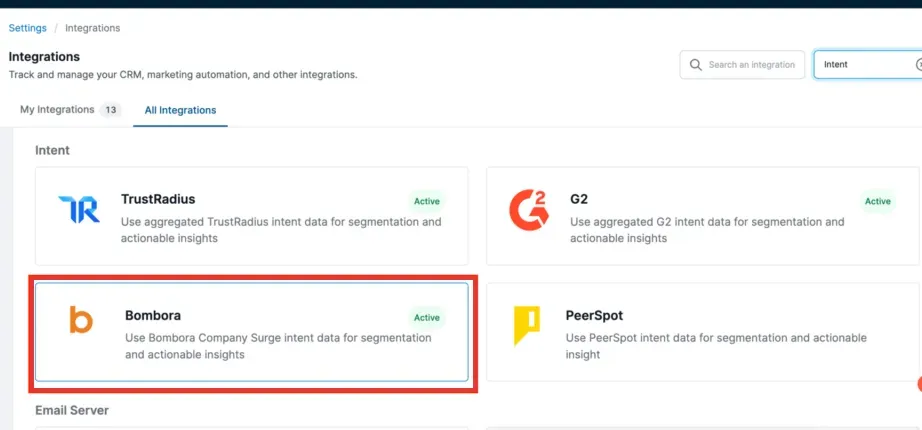
Inside 6sense, Bombora is a separate intent integration alongside G2 and TrustRadius. (Image source: 6sense)
6sense refreshes its score daily and its Bombora feed on Sundays
6sense updates the predictive score daily; yet the Bombora integration refreshes each Sunday, with a set threshold at 70 or higher. Topic packages presently offered are 12, 37, 62, or unlimited. Accordingly, a 25-topic requirement won't match the default 12, no matter how many users you add.
Delivery is yet another layer, and that's where the quote expands. With the existing Data Packs guide, keyword records at daily granularity can be delivered weekly or monthly. For current customers, 15 professional-services hours are needed per Keyword Intent or Web Visits pack (30 for both), while a fresh data-only purchase requires 30 hours, along with the applicable platform. Since the hourly rate isn't public, I wouldn't label a warehouse export “included” merely because the data sit in the interface.
Customer accounts show how much the configuration decides. On r/sales in June 2025, u/Squidssential wrote:
“Yes I have closed new enterprise logos off 6sense intent signals. Look for people consistently pulling your technical documentation.”
In the same discussion, u/jezarnold reported:
“We were getting "hot lead" alerts when people were coming to our website to unsubscribe from all our marketing emails.”
I interpret that difference as grounds for distinguishing productive page engagement from admin-related visits, rather than counting each visit as interest. The inputs must be maintained by someone, and someone has to determine what a stage change ought to set off. For a mature account-based process, 6sense earns its place. For a team seeking a self-serve list with a price posted on the website, leave it out.
6sense pricing
Custom; topic entitlement, platform access, credits, and Data Packs setup depend on the configuration.
4. Demandbase: Best for coordinated account-based programs
Demandbase fits when intent needs to guide an account-based program covering advertising plus coordinated sales work. Native keyword intent draws on signals from its B2B ad infrastructure along with other content activity, and context from partner feeds may be layered in, subject to their own licenses.
Demandbase pros
- Keyword sets support category and competitor research.
- Company scale is factored into intent strength.
- Engagement views relate research to account programs.
Demandbase cons
- The per-user fees are accompanied by a platform fee.
- Bombora and G2 require separate paid licenses
- Existing keyword sets can't be renamed.
What I particularly like: Demandbase scales intent strength by company size. At a company of one to ten employees, its guidance treats four or more readers as high, and it needs 38 or more above 10,000 employees. Its Trending label looks for a rise against an eight-week baseline. A raw reader count would be far easier to misread.
Before comparing topic allowances, pay attention to the keyword setup. Demandbase suggests about 40–100 keywords for each set (at minimum 25–35); as a result, five Demandbase keywords don't constitute the same configuration as five Bombora topics. First map the business questions, and afterward choose the terms that convey them.
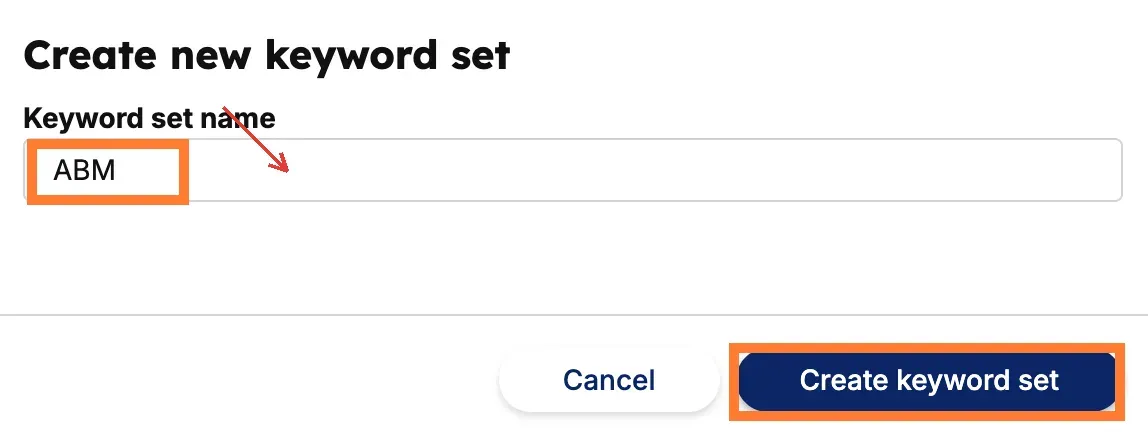
Inside Demandbase, you name a keyword set before creating it; changing that name later requires a duplicate or replacement. (Image source: Demandbase)
Demandbase keyword sets can't be renamed, and partner intent is licensed separately
In Demandbase, the Bombora and G2 feeds each need their own paid license, and an existing Demandbase keyword set can't be renamed: you duplicate it or recreate it instead. One consequence of the naming rule for teams: before separate groups build overlapping sets, settle on the convention. The engagement guide also requires you to assign points for intent so that intent shows up in Analytics; thus, getting a signal and then seeing it reflected in the account score constitute two setup steps.
The implementation experience varies. In a September 2025 r/sales discussion, u/ftwin called their Demandbase rollout “the most cumbersome, overly-complex, overly-expensive tool.” Replying, u/ThunderCorg wrote:
“I worked at a large company with a ton of salesforce data and spent a lot of time refining demandbase.”
They also noted that the intent data suited their requirements, and that's approximately my position: Demandbase compensates a team that has somebody owning the configuration. For its users, its own intent is included; the partner feeds, meanwhile, are the additional line on the invoice. I prefer it when the broader program is going to use the platform. Skip a full deployment if all you want is one narrow research feed and you already have somewhere to act on it.
Demandbase pricing
Custom platform fee plus per-user fees; separately licensed partner intent can add to the total.
5. ZoomInfo: Best for intent beside prospect records
For reps already depending on ZoomInfo's company and contact records, one database offers the shortest route from an account with activity to the people your team could approach. Rather than reconciling two systems, you assess the account and its potential contacts in one place.
ZoomInfo pros
- Intent clusters are located alongside contact intelligence and company information.
- Copilot packages offer a set path for upgrading.
- Marketing packages specify topic allowances
ZoomInfo cons
- Pricing that is enabled by intent relies on quotes.
- Custom intent, along with streaming intent, can alter the package.
- Person-Level Intent attribution needs separate evaluation
The package is the buying distinction, so read it twice. Copilot Advanced contains Buyer Intent signals, plus clusters, while real-time and custom intent come with Copilot Enterprise. Turning to marketing, 25 custom or streaming topics are part of Demand; broader ABM packages raise that limit. Before comparing any seat quote, work out the workflow you're purchasing.
ZoomInfo also promotes Person-Level Intent now, so the outdated blanket assertion that all of its intent is account-only no longer holds. Still, I wouldn't take a contact's presence beside a signal as proof they did the research unless the attribution method, accessible coverage, and entitlement align with what's on the order form.
ZoomInfo signals in Outreach refresh every seven days
Inside Outreach, signals powered by ZoomInfo get checked for freshness every seven days, and they require an active ZoomInfo Copilot subscription, so the delivery channel can alter how fresh the intent appears to your reps. A streaming source gives up its advantage if the downstream process refreshes less frequently, because that process determines what your reps actually see.
The quote's shaped by a lot (users, features, credits, topic coverage, and integrations), and that's what makes pricing it versus a plain feed so frustrating. When its contact workflow already pays for itself, I keep ZoomInfo on the shortlist; if you won't use the broader prospecting environment, I'd skip it as a substitute for a standalone feed.
ZoomInfo pricing
Custom for Copilot Advanced or an appropriate intent-enabled marketing package; streaming, custom topics, and integrations require configuration-specific pricing.
6. Apollo: Best for affordable topic-led prospecting
Apollo is the least expensive route here for testing topic intent: keeping Sales Automation as the one topic in my no-cost workspace, I filtered Companies down to High intent and got 81 matching companies. You can pick up the workflow on the free tier before spending a cent, and six org-wide topics come with Basic.
Apollo pros
- The free plan provides one intent topic across the entire organization.
- Basic includes six topics and intent filters
- Company search links prospecting criteria to intent.
Apollo cons
- Team-wide, saved topics remain locked for 24 hours.
- Professional keeps the same six-topic limit as Basic
- People results aren't identified researchers
The part I like is how close the intent filter sits to ordinary prospecting. You narrow the account list, then look for the right people at those companies, all on one screen (and you'll be tempted to export them straight away). Keep the identity boundary straight, though: Apollo's own buying-intent guide says those people may not be the ones doing the research.
In Apollo's newest release notes, the intent source shifts from LeadSift to Bombora, and the present guide relies on weekly company scores: High spans 75–100, and Medium spans 61–74. When you're assessing the product, consult the recent guide (certain marketing pages continue to feature the older provider wording).
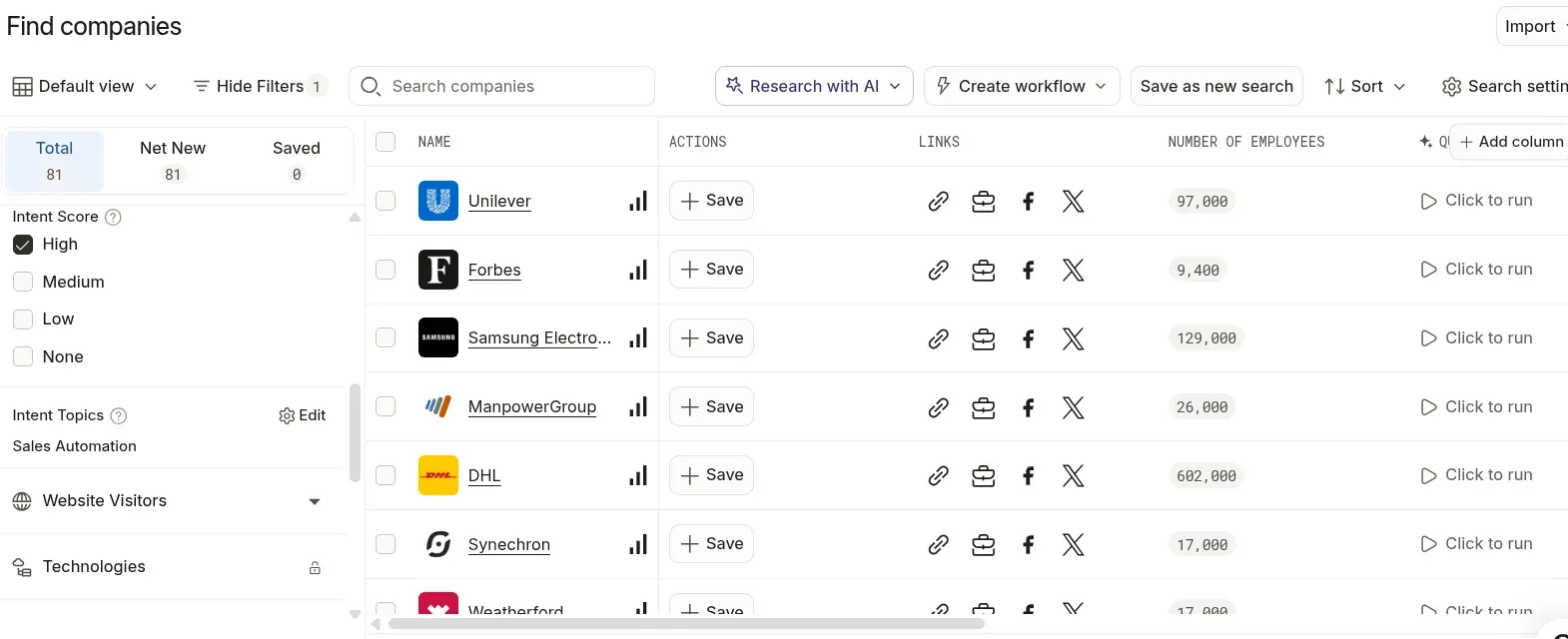
Inside Apollo, I filtered companies to High intent after selecting Sales Automation as the workspace's topic. Captured October 26, 2026.
Apollo locks saved topics for 24 hours and shares them across seats
Saving the topic in Apollo set off a team-wide 24-hour lock, and when I reopened the settings, the countdown displayed 23 hours plus 57 minutes. So my free test became more consequential than a typical search filter: settle on the underlying topic before various reps begin experimenting, or somebody will burn a day staring at the incorrect one.
Topics belong to the organization, so five Basic seats mean six topics, and there's no way around that on the standard tiers. Professional doesn't raise that allowance, and Organization stops at 12. Basic is my pick for one operator researching five topics. Skip the standard tiers if you need 25 independently selected topics.
If LinkedIn is one of your channels, Linked Helper's Apollo.io integration looks up emails for the same prospects inside its Find Profile Emails action, and it spends Apollo credits only when its own enrichment finds nothing.
Apollo pricing
Free plan with one topic; Basic from $49/seat/month, billed annually, with six topics.
- Professional — $79/seat/month annually; still six topics
- Organization — $119/seat/month annually, three-seat minimum; 12 topics
7. HubSpot Buyer Intent: Best for an existing HubSpot stack
When your marketing and account records are already in HubSpot, HubSpot Buyer Intent is the first spot to check, since activity on your website, research across the rest of HubSpot's opted-in network, and continuing signals for chosen companies are all covered by its Visitors, Research, and Signals views, with no second database needed.
HubSpot Buyer Intent pros
- Website activity, along with CRM context, sits beside Research.
- Viewing and filtering don't consume credits.
- Existing paid subscriptions can provide included credits.
HubSpot Buyer Intent cons
- Research is limited to 20 predefined topics
- You consume credits each month when you monitor companies.
- You must install the tracking code to enable website identification.
I prefer the contrast between activation and browsing. In HubSpot Buyer Intent, saving views, filtering, and viewing cost no credits, but monitoring or adding companies may. So a company appearing in a research result doesn't trigger a tracking charge.
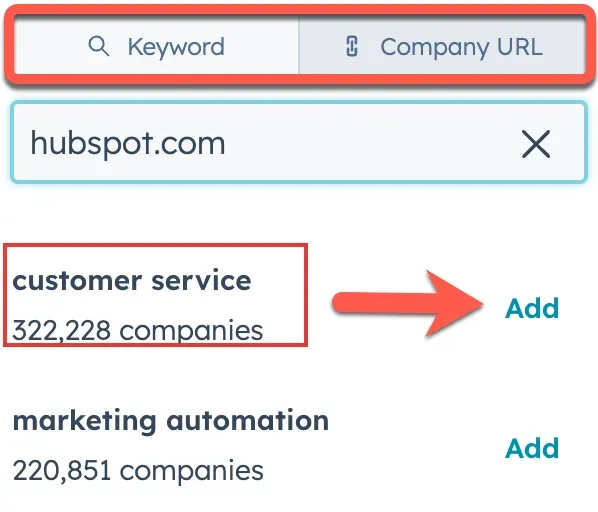
Inside HubSpot, a company URL suggests research topics you can add to your selection. (Image source: HubSpot)
HubSpot Buyer Intent caps research at 20 topics and charges 10 credits per monitored company
HubSpot Buyer Intent permits choosing as many as 20 preset research topics, and activating intent to build or watch a company runs 10 credits each month under the standard credit schedule. Topics that classify sites across HubSpot's network are surfaced by the Keywords tab (it doesn't track search queries), so before picking HubSpot for a narrow technical category, read that taxonomy. A cap of 1,000 companies applies to every view, too. Should you alter the filters, you'll receive a different subset. That behavior fits an operator assembling a focused list and frustrates anyone who wanted the entire market visible on one screen.
The recurring cost is activation. Usage can be offset by an allowance of Starter that already exists, but other eligible work shares those credits. My setup stays focused on accounts that someone will review, and if you need 25 topics or person-level research that's independently verified, I wouldn't rely on HubSpot Buyer Intent alone.
When LinkedIn outreach feeds the same CRM, Linked Helper's HubSpot integration sends the profiles your campaigns collect to HubSpot as contacts with linked company records, so the research view and the outreach history sit on the same record.
HubSpot Buyer Intent pricing
Free preview; eligible paid subscription and credits for activation. Standard additional credits cost $0.01 each; flexible-pricing accounts have a separate rate sheet.
8. Leadfeeder: Best for prioritizing your website visitors
When I set up a free account, Leadfeeder proved to be the pick for your own site: setup led me directly to installing the tracking script, and that settles its scope as activity on your website. With Additional script configuration, Track form submissions came enabled by default. I didn't install the script; I opened its confirmation dialog and left the setting as it was.
Leadfeeder pros
- Lite includes a limited company-visitor view
- Unlimited users share the account
- Tailored feeds direct focus toward pertinent site activity.
Leadfeeder cons
- You need to set up the tracking script to obtain visitor data.
- Lite retains just seven days of visitor history.
- Since volume from identified companies grows, Discover pricing goes up.
Review that form-tracking control alongside whoever handles your site tracking, since named form submitters constitute a separate output from company visits (and a distinct discussion with your privacy lead). Leadfeeder assists you in sorting companies already on your pages, whereas Bombora or G2 Buyer Intent reveal research that never touched your domain. I'd begin with Leadfeeder when a site has meaningful inbound traffic, and skip it as the sole signal source for a company with little traffic.
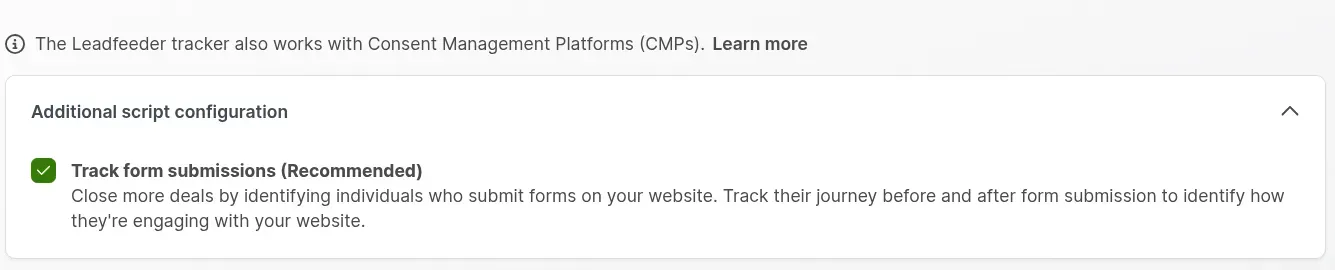
Inside Leadfeeder, additional script settings let you control form tracking before installing the website script. Captured October 26, 2026.
Leadfeeder prices Discover by identified companies: €79 for 50, €109 for 100
Leadfeeder's advertised price conceals a volume ladder: with annual billing, Discover starts at €79 per month for up to 50 recognized businesses, and the 51–100 band costs €109 per month. Since the help-center overview combines the smallest price with a far bigger top tier, you'd better use the detailed pricing selector to model your own traffic.
Even so, the formal sales process relies on bespoke feeds for trimming the account roster, and that appeals to me more than giving a rep each identified visit. You still need to qualify the account, plus a company match does not identify the employee who paid the visit. Identifying a company falls under the volume allowance; however, exporting or syncing it may use credits, and to cancel an annual subscription, you must give notice at least 30 days before renewal. Base the plan on the accounts you'll examine and bring into your workflow. Total page views are an incorrect unit for such a decision.
Leadfeeder pricing
Free Lite plan; Discover from €79/month, billed annually, under the displayed EUR schedule. Billing currency depends on company location.
What the same intent workload costs
Apollo Basic is the only list-priced option for one operator and five off-site topics, at $588 annually. The 25-topic and website scenarios direct you toward quotes or Leadfeeder's EUR tiers. Derived from the Apollo, HubSpot, and Leadfeeder cards, these figures are list prices and documented limits, multiplied out pre-tax, while custom-priced providers remain at “quote required.” Since a topic is defined by whatever the vendor says it is, you'd additionally need to confirm, for the off-site scenarios, that your five or 25 business concepts exist within the provider's taxonomy.
One operator following five off-site research topics: Apollo Basic at $588 a year
For $588 annually, Apollo Basic satisfies this requirement; a quote, though, is required by Bombora, 6sense, Demandbase, and ZoomInfo. The requirement is a shortlist of US companies spanning five chosen business topics, reviewed each month, without contact exports and without automated outreach. Each provider's attached condition, along with the qualifying configuration, appears in the table.
| Provider | Qualifying configuration | Annual subscription cost | Mandatory extras or limits |
|---|---|---|---|
| Apollo | One Basic seat; six available topics | $588 (12 × the annual-billing seat rate) | Weekly Bombora data; topics shared team-wide |
| Bombora | Company Surge quote covering five concepts | Quote required | Confirm topic mapping and delivery rights |
| 6sense | Intent-enabled package with suitable topic access | Quote required | Default 12 Bombora topics cover the count; mapping still needs checking |
| HubSpot Buyer Intent | Research access with five matching predefined topics | Depends on eligible subscription | Viewing differs from credit-consuming activation |
| Demandbase | Keyword sets mapped to the five concepts | Quote required | Several keywords per concept; counts aren't interchangeable |
| ZoomInfo | Intent-enabled quote covering the concepts | Quote required | Topic and delivery entitlements must be specified |
G2 Buyer Intent doesn't offer a random five-topic publisher feed, and website visitors identified by Leadfeeder answer a different question, so neither one fits into this comparison. The most straightforward starting estimate for a small team comes from Apollo, even though a custom feed might still span a wider range of research.
Five operators following 25 off-site topics with CRM activation: Apollo and HubSpot drop out
HubSpot Buyer Intent's research caps out at 20 pre-defined topics, and Apollo's standard tiers top out at 12 org-wide topics, so on its own, neither one qualifies for 25 independently chosen concepts, with CRM activation, for a five-person team. What's left, and what each quote must spell out, appears in the table.
| Provider | Suitable configuration or obstacle | Annual total | Extras and conditions |
|---|---|---|---|
| Apollo | Standard tiers stop at 12 organization-wide topics | No qualifying standard-plan total | Five seats don't multiply topic access; custom scope unknown |
| HubSpot Buyer Intent | Research stops at 20 predefined topics | No qualifying configuration | Extra seats or credits don't remove that cap |
| 6sense | 37-topic Bombora entitlement covers the requested count | Quote required | Five-user access, CRM workflow, and platform scope must match |
| Bombora | Direct feed with 25 matching topics and activation rights | Quote required | CRM/contact tooling may remain separate |
| Demandbase | Native keyword sets mapped to 25 concepts | Quote required | Platform plus five users; external Bombora/G2 licenses extra |
| ZoomInfo | Marketing Demand lists 25 topics | Quote required | Verify five-user access, CRM charges, and selected signal types |
Before you compare enterprise quotes, remove Apollo and HubSpot Buyer Intent from this requirement: if the organization still can't select enough topics, a cheaper five-seat plan doesn't matter. Demandbase's keyword approach might fit, but a “25 topics” checkmark alone isn't proof of equivalent coverage.
One operator identifying 100 website companies per month: Leadfeeder Discover at €1,308 a year or Apollo Basic at $588
On the 51–100 tier, Leadfeeder Discover runs €1,308 annually in this scenario, whereas Apollo Basic advertises that same 100-company allowance for $588 annually, and Leadfeeder Lite comes free when seven days of history suffices. The scenario is company-level website identification, with no contact reveals, no exports, no CRM sync, and no person-level tracking. It requires your own tracking installation plus enough identifiable traffic (an allowance doesn't promise that 100 companies will be found), and the table isolates each provider's identification allowance.
| Provider | Configuration | Annual subscription | Limit or added cost |
|---|---|---|---|
| Apollo | Basic; 100 website companies/month in the checked plan | $588 | Website setup required; contact-level options separate |
| Leadfeeder | Discover, 51–100-company volume tier | €1,308 (12 × the 51–100 monthly rate) | Displayed EUR schedule; export/sync credits separate |
| Leadfeeder | Lite, if seven-day history is sufficient | €0 | Limited history makes this a narrower alternative |
| HubSpot Buyer Intent | Existing Buyer Intent visitor access | Exact scenario entitlement not priced | Viewing and recurring company tracking use different rules |
Those currencies can't be swapped for one another; Leadfeeder's broader visitor workflow and Apollo's included prospecting cater to distinct teams. Accordingly, the table reflects only the entry-level price.
For HubSpot Buyer Intent, the useful number is the separate monitoring sum: 100 companies × 10 credits × 12 months = 12,000 credits annually. Standard pay-as-you-go overage, given 500 otherwise-unused Starter credits monthly, totals $60 per year, plus the eligible subscription. A capacity pack, by contrast, adds $10 monthly, or $120 yearly. That's the recurring monitoring cost. Examining 100 visitors costs nothing.
Check your existing stack for intent data first
Before adding a further intent license, check Apollo's topic allowance plus HubSpot Buyer Intent's Research and Visitors views, since a subscription you already pay for might carry the first useful signal. Your CRM history can likewise reveal whether an account is already a customer, holds an open opportunity, or lately asked you to stop writing. Any feed costs more than that.
Verify the upstream source before purchasing a second research tool. Apollo's present intent employs Bombora, 6sense backs Bombora, and Demandbase can connect a separately licensed Bombora feed. Usability or activation may be enhanced by another interface, yet no second independent observation gets added.
For LinkedIn follow-up, begin with a relevant role plus a defensible reason to reach out. Our LinkedIn outreach guide covers turning buying signals into contextual messages. Keep account-level research separate from any claim about a named person's activity.
Which intent data provider should you choose?
When your existing tools require an external research feed, pick Bombora; if one seller needs an inexpensive method to filter businesses by a handful of subjects, choose Apollo. The Apollo fee is straightforward, and the trade-off is the organization-wide topic limit.
Choose G2 Buyer Intent if activity involving software comparisons matters for your market. If the objective involves predictive account scoring, choose 6sense; alternatively, select Demandbase when the research must support a coordinated account-based program. Each of those requires an owner for setup and follow-through as much as funding for data; within one quarter, you'll know whether you have that owner.
When your reps already revolve around the contact workflow, ZoomInfo is what I'd choose. If you're already using HubSpot, check HubSpot Buyer Intent for inbound activity, and weigh Leadfeeder whenever a dedicated website-company perspective is what you're after.
If LinkedIn is where the follow-up happens, Linked Helper's AI ICP Detection compares each profile with your ideal customer description before any invite goes out, which keeps an intent spike from an unsuitable company out of the sequence.
Regardless of which option you pick, assign the first list a specific destination: a named owner, a review window, and an action matching the signal. Better a brief account list that someone actually works than a bigger feed that no one opens.
How we tested
I researched eight intent data providers in October 2026, including hands-on checks of Apollo and Leadfeeder. I didn't measure whether their signals improved conversion rates.