Expandi Review 2026: Features, Pricing, Pros & Cons & the Best Alternative
Wordless illustration of a cloud workflow, desktop monitor, branching nodes, and pricing token

TL;DR: Is Expandi Worth It in 2026?

In 2026, Expandi is worth trying if you need a cloud platform for conditional branching across LinkedIn and email campaigns. At $99/mo ($79/mo annually), it suits sales teams that value always-on automation over a lower entry price or the ability to keep sessions on their own devices.

The plan includes 9 IF-conditions × 11 actions, native LinkedIn + email sequencing, and no feature-gating between plans. Left out of the headline price: VAT at checkout, a paid add-on for the image/GIF personalization, and a fully no-refund policy. Expandi gives you 7 days to test it, but still asks for a card upfront — Linked Helper's 14-day free trial needs none.

Because Expandi runs in the cloud, your LinkedIn session moves to its servers and data center IPs. During our Expandi review and testing in July 2026, we tested two of these assigned IPs on the IPQualityScore. One came back clean, but the other one scored 100/100, flagged for both proxy use and recent abuse.

This does not automatically mean that LinkedIn will ban half of the Expandi-assigned IP. Like every automation tool, Expandi carries LinkedIn ban risk depending on usage. But its cloud architecture, moving LinkedIn sessions from your computer to the tool's servers, means a different risk profile compared to a tool that runs on your own desktop or a VPS you control.

Linked Helper vs Expandi at a Glance

Session location is one part of the picture. Here's Linked Helper vs Expandi across pricing, features, and operation:

DimensionLinked HelperExpandi
ArchitectureDesktop app + optional cloud storage; LinkedIn session stays on your machine or your own VPSCloud platform; your session is handed to Expandi's servers, which then run automation from their own datacenter IPs 24/7
Entry price$15/mo (Standard, Local)$99/mo (single tier, no cheaper option)
Annual price$8.25/mo Standard ($99/yr), $24.75/mo Pro ($297/yr)$79/mo equivalent ($948/yr) — VAT added separately at checkout
Trial14 days, full Pro features, no card required7 days, full features, card required
Conditional branchingReply handling is binary (reply → pauses; no reply → continues); IF-THEN-ELSE varies message text, not workflow routingReal branching: 9 IF-conditions × 11 post-condition actions in Builder Campaign
LinkedIn + email in one sequenceHandoff template to a separate Snov.io drip campaign, not a unified sequenceNative — one sequence, though auto-stop-on-reply doesn't apply to the email steps
Safety controlsIP quality check before assigning custom user proxy to account; time zone set up to match proxy location; 150 actions/rolling-24h pool, ±10% working hours randomization, 4h auto-pause on suspicious errors; URL navigation limit (40/24h), invitation limit (50/24h), Load LinkedIn search results (100/24h) — same on both tiersDaily Limit ranges with randomization, Warm-Up ramp, Activity Schedule — same on its one tier; no adaptive response to LinkedIn risk signals beyond static thresholds

Linked Helper can also run on a self-managed VPS through its built-in remote control. The tool does not use LinkedIn API, it emulates a human by mouse movements, button clicks, typing, and scrolling. This automation method is much safer as it is identical to what a human does, and every click is assigned with ‘isTrusted===true’ attribute.

What is Expandi?

Expandi LinkedIn automation tool is a cloud-based platform designed for sales specialists, agencies, and small teams aiming to generate more leads through smart outreach. Positioned as a leader in cold outreach tools, Expandi combines LinkedIn and email automation with advanced features like smart sequences, personalization, and scraping.

One of Expandi's key features is its campaign triggers. These allow users to build dynamic workflows based on actions like “If connected,” “If followed you,” or “If email was opened.” Expandi pricing starts at $99 per month ($79/month annually) per LinkedIn account.

Compared to Expandi alternatives like Linked Helper, it’s easier to use for teams and offers better multi-user permission management, making it ideal for agencies focused on measurable ROI.

Expandi Key Features

One of the standout Expandi features is the ability to run smart automated sequences that combine LinkedIn and email steps.

Smart Campaigns & AI Analyzer
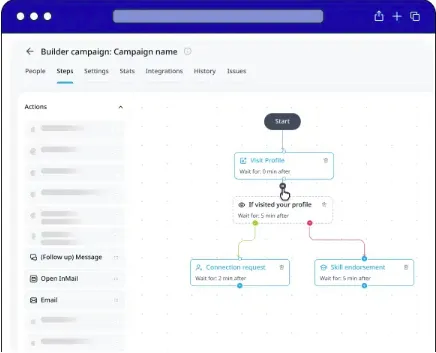
Expandi Builder campaign showing conditional branches in a LinkedIn workflow

The service supports 11+ LinkedIn outreach campaign types.

Expandi smart campaigns include:

  • Connector (send invites to 2nd/3rd-degree leads)

  • Messenger (message 1st-degree connections)

  • Builder (create custom flows with conditions)

  • Open InMail (send free InMails to open profiles)

  • Group (message users from shared LinkedIn groups)

  • Event Invite & Event Participants (engage leads around LinkedIn events)

  • Inbound (auto-respond to people who viewed your profile)

  • Mobile Connector (send 50–100 extra requests weekly)

  • Recovery (restore deleted campaign data)

  • Company Follow Invite (boost your LinkedIn company page)

Expandi's drag-and-drop smart campaign builder lets you design highly customized workflows for any outreach scenario. Use if/then logic, timed delays, and multi-step flows to automate complex cold outreach messages with ease.

Its AI Analyzer adds campaign goal setting, AI-drafted messages and replies, as well as reply sentiment analysis (Interested, Maybe, Not Interested). All are running on daily credits that reset without carrying over.
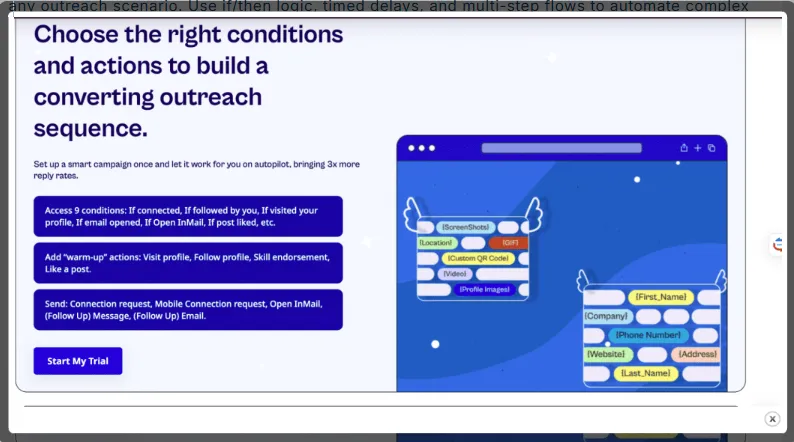
Expandi graphic explaining how conditions and actions build a campaign sequence

Multichannel Outreach (LinkedIn + Email)

Expandi combines LinkedIn and email automation in one sequence. Email runs through your own SMTP account, not a dedicated service, so standard providers cap volume and require warm-up before cold sending, and give no visibility into opens or clicks. Unsubscribes and bounces then need manual tracking, which adds compliance risk under laws like GDPR and CAN-SPAM.

Personalization (Hyperise Images & GIFs)
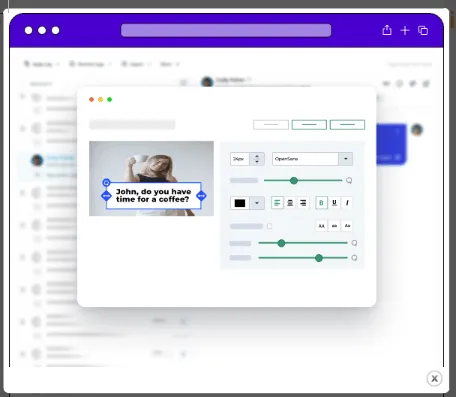
Expandi campaign editor previewing a personalized Hyperise image in a LinkedIn message

Personalization adds custom images and GIFs to messages via Hyperise, a separate, paid third-party integration. Expandi Hyperise usage is not included in the base price, raising the total cost of personalization.

Smart Lead Scraping & Filtering
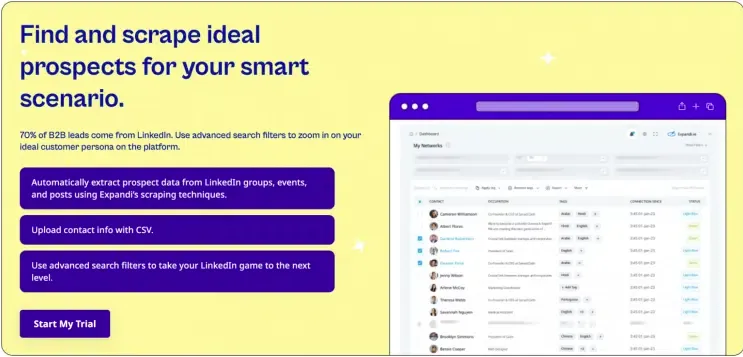
Expandi graphic showing lead scraping and prospect filtering for a smart campaign

Expandi LinkedIn automation tool allows scraping leads directly from Sales Navigator, but requires an active SN subscription, a premium LinkedIn account, and 2FA enabled. Without all three, lead targeting falls back to standard LinkedIn search. The subscription requirement holds even for uploaded search URLs. Each LinkedIn account connected to Expandi needs its own active Sales Navigator subscription to process a SN lead list, so a team cannot cut costs by using one subscription for several free accounts.

Dedicated IP & Auto Warm-up

Each LinkedIn account gets a dedicated, country-based datacenter IP, and new accounts go through a gradual activity warm-up. However, Expandi doesn't offer a way to check if that assigned IP is flagged as a VPN or proxy, or previously marked for spam or abuse.

Expandi Pricing (2026)

The Expandi pricing structure includes a 7-day free trial, but bulk discounts for agencies or teams require a consultation with their sales department.
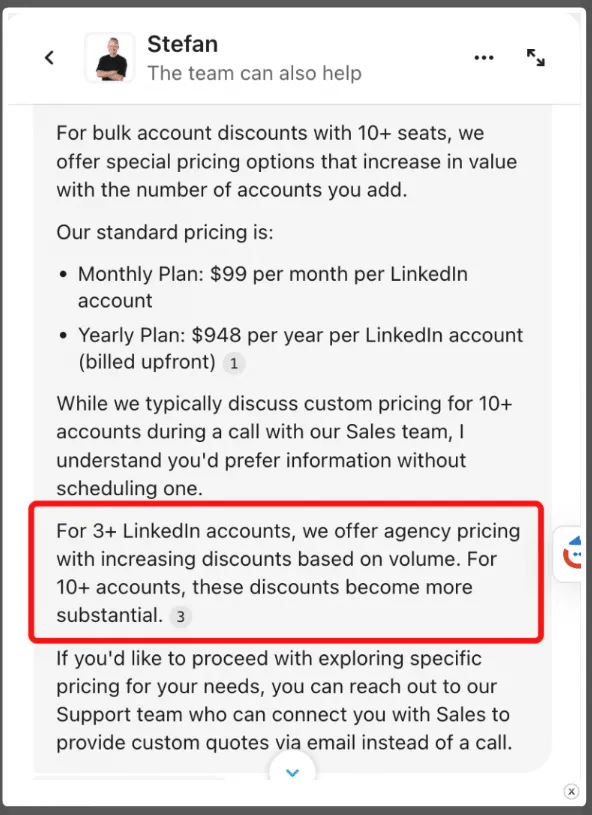
Expandi support message explaining monthly, annual, and volume pricing

Pricing summary:

PlanCostBest ForIncludes
Business (Monthly)$99/month per LinkedIn accountIndividual users, startupsAll features, no lower-cost tier available
Business (Annual)$948/year per LinkedIn account ($79/month equivalent)Growth-focused professionalsSame features, ~20% savings
AgencyCustom, for 10+ seatsAgencies, white-label needsCentralized team management, dedicated customer success manager, white-labeling
  • Free trial: 7 days, full-feature access, credit card required.

  • Refund policy: none advertised — billing issues go through support.

  • Volume discounts: available only via a direct sales team call.

Compared to Linked Helper pricing, Expandi costs more; it also bundles cloud-based campaign management and dedicated IPs into its single plan.
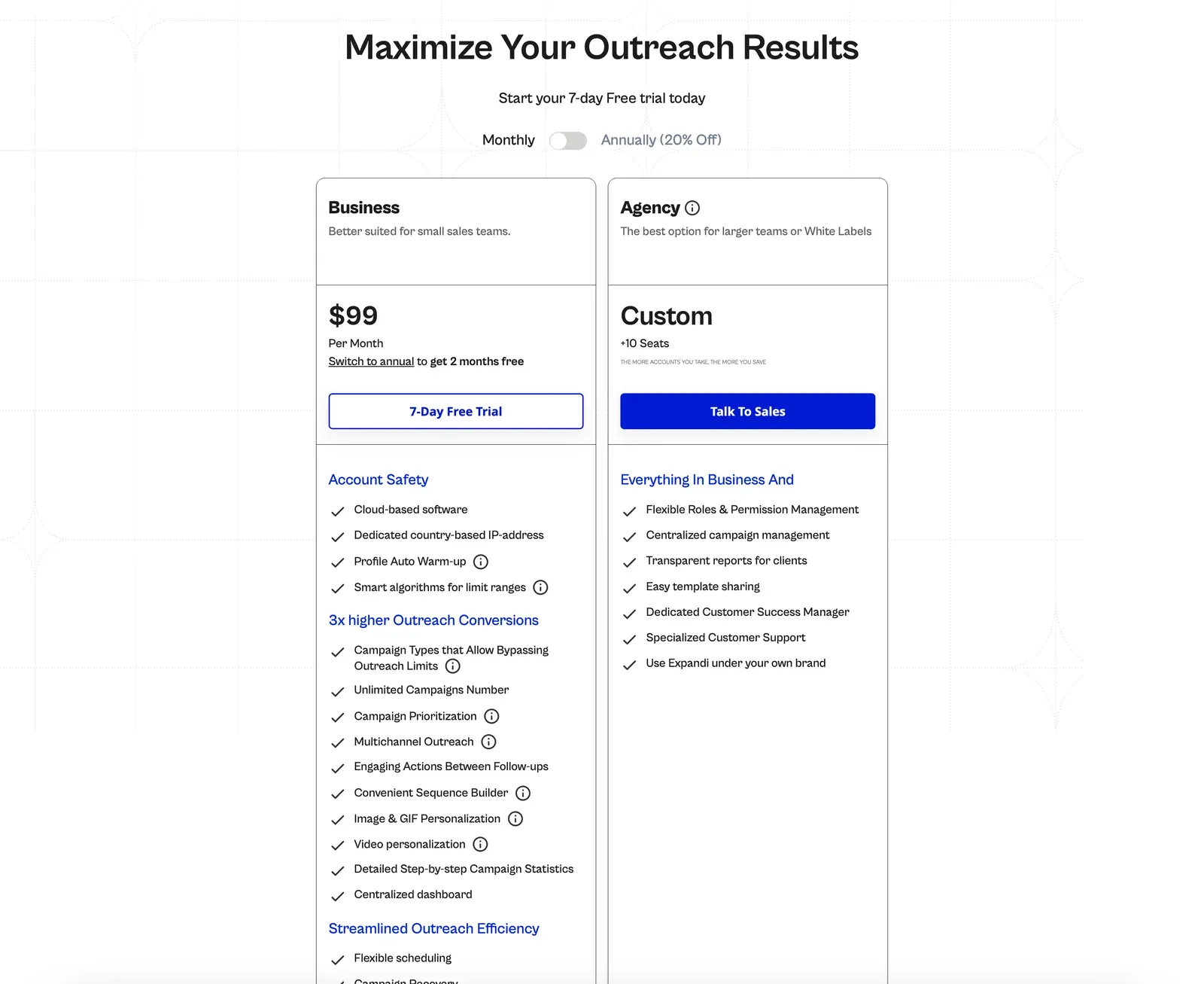
Expandi pricing page showing the $99 Business plan and custom Agency plan

One Expandi account grants access to smart automated sequences, campaign triggers, as well as cloud-based LinkedIn and email outreach.

Is Expandi Safe? Account-Ban Risk

Expandi's cloud architecture means your LinkedIn session leaves your device. You connect either by direct login or through Expandi's browser connector, which hands your session to the tool's servers; from there, automation runs from Expandi's own datacenter IPs.

In our own testing (two accounts, July 2026), those accounts received different datacenter exit IPs from different French ISPs. One of those IPs scored 100/100 on IPQualityScore, a third-party reputation tool, flagged there for proxy use and recent abuse.
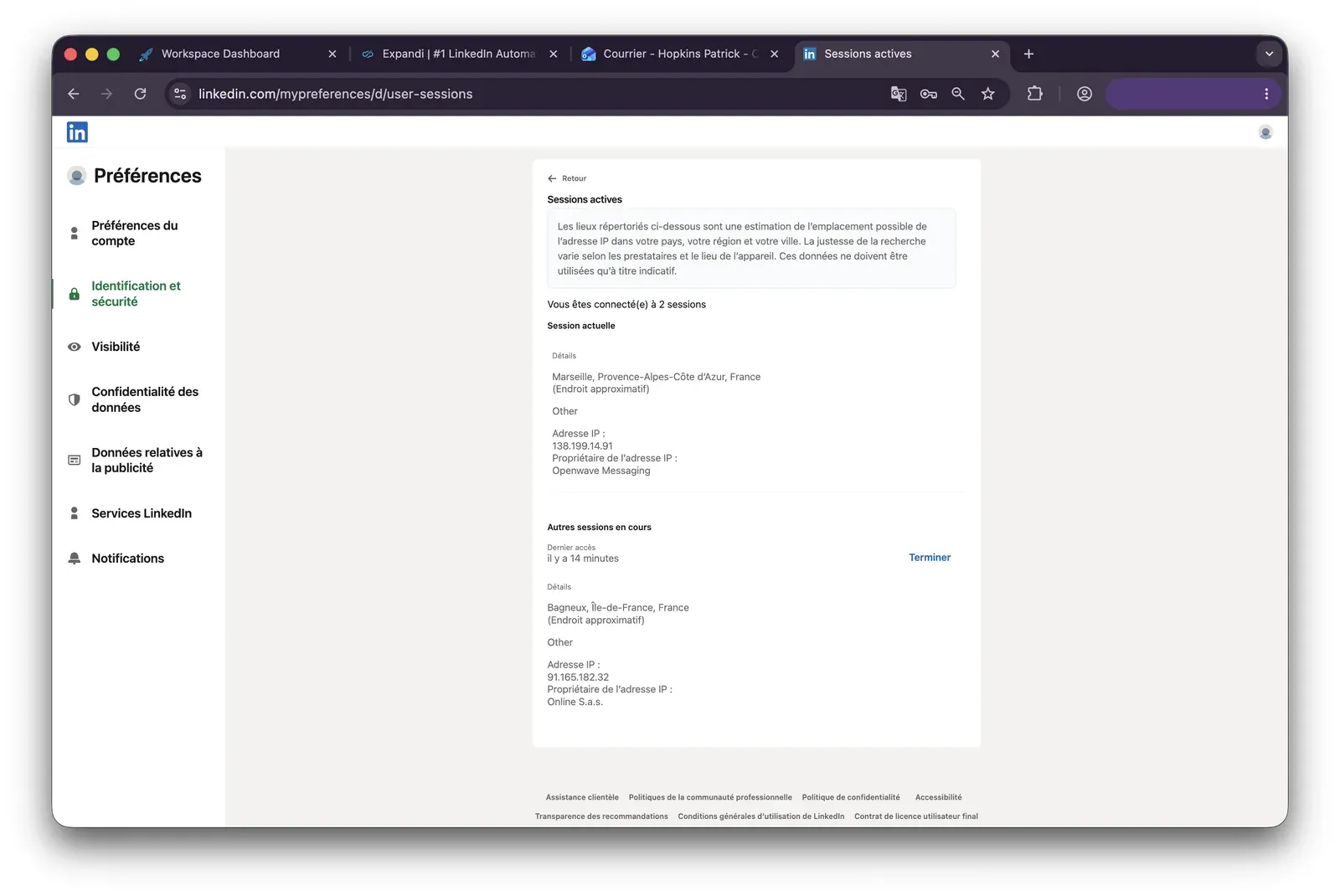
LinkedIn active sessions showing local and Expandi datacenter IP locations during testing

That score doesn't mean LinkedIn detected anything — IPQualityScore checks an IP's general reputation, not LinkedIn's own systems. But it confirms the IP carries a documented pattern of proxy and abuse activity, and that kind of pattern is the sort of signal LinkedIn's detection is known to weigh, regardless of which tool is driving the account.

Another thing to consider is how the automation is implemented. Automation methods fall into two types: direct API requests and browser click emulation. Each interacts with LinkedIn differently. Raw API requests can produce traffic patterns that are easier to flag, while browser click emulation demands specific tricks to mimic human behavior and avoid technical exposure — for example, every click needs an isTrusted===true attribute. Expandi does not disclose how actions are performed in the cloud.

However, Expandi does include real safety controls, available on its one tier:

  • Configurable Daily Limit ranges with built-in randomization,

  • A one-click Safe Preset,

  • An Account Warm-Up ramp (5 actions on day one, +3 every 2 days, up to 21/day),

  • And an Activity Schedule for working hours.

None of these features are gated to a pricier plan. But even with these controls active, LinkedIn safe automation is not a guarantee — with this or any other tool. Account-safety risk here depends on configuration and usage across the board, the same as it does for every vendor in this space.

Expandi Pros & Cons

Pros

  • Deep feature set in one plan, including real 9×11 conditional branching and native LinkedIn + email sequencing;

  • Global Inbox aggregating conversations across workspace accounts;

  • 100+ permission settings with client- and account-level access scoping;

  • Full white-label option for agencies (arranged via sales, not self-service);

  • Dedicated IP and warm-up ramp included at no extra cost.

Cons

  • $99/month entry price, with no cheaper tier;

  • VAT excluded from the headline price;

  • Image, GIF, and video personalization are paid add-ons;

  • No built-in email finder or verifier;

  • No refund policy;

  • Recurring user reports (2022–2026) about a hard-to-find cancellation flow;

  • No public pricing above 9 seats; a plan with 10+ seats requires a sales call;

  • Your LinkedIn session runs from Expandi's servers, not your device;

  • No way to check your assigned IP for prior VPN/proxy or abuse flags.

Expandi Reviews From Real Users (2026)

Expandi reviews often praise the platform’s ease of use and powerful campaign personalization, though users sometimes cite issues with customer support and billing.

As of July 2026, Expandi holds 4.3/5 on G2 (152 reviews) and 4.5/5 on Trustpilot (229 reviews).
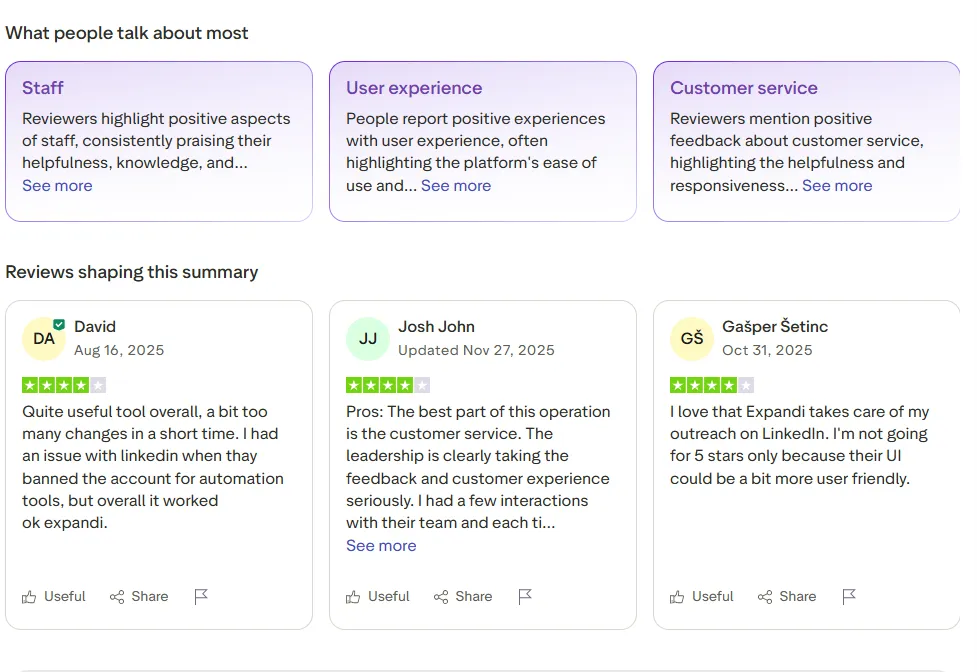
Trustpilot summary of Expandi review themes

Expandi reviews from Trustpilot

What users like most

  • Support quality: reviewers consistently highlight responsive, helpful onboarding and support calls.

  • Ease of use: many describe the platform as intuitive once past the initial learning curve.

  • Always-on automation: campaigns keep running even when a device is off, since Expandi is cloud-based.

Most common complaints in Expandi reviews include:

  • Account restrictions: some users report LinkedIn restricting or banning accounts after weeks of active use, sometimes with no way to recover them.

  • Technical issues: occasional campaign failures, slow-loading pages, and inconsistent answers from support on data limits.

  • Cancellation friction: a recurring complaint about subscriptions that are hard to cancel or that auto-renew unexpectedly.

Sentiment is mixed but leans positive overall, with restriction risk remaining the most serious recurring concern.

Expandi vs Other Tools

As seen from user reviews, even a tool with largely positive reviews cannot satisfy everyone. If you're weighing a more affordable option, the Expandi vs Waalaxy mostly comes down to price and volume: Waalaxy's Pro plan costs far less, but it caps invites and email credits per month, while Expandi charges more for unlimited campaigns and no invite ceiling.

If multichannel sequencing matters more than price, Expandi vs Dripify is the closer comparison, since both run in the cloud and at similar price points.

ToolArchitectureEntry price (monthly)Annual equivalentRating (Trustpilot, July 2026)
Linked HelperDesktop + optional VPS and bult-in remote control for running 24/7$15/mo (Standard), $45/mo (Pro)$99/mo (Standard), $297/mo (Pro)4.5
DripifyCloud$59/mo (Basic), $99/mo (Advanced)$468/mo (Basic), $948/mo (Advanced)4.6
WaalaxyCloud$19/mo (Pro), $69/ (Business)$192/mo (Pro), $660/mo (Business)4.7
HeyReachCloud$79/mo (Growth), $999/mo (Agency)$756/mo (Growth),$9,590 /mo (Agency)4.0
PhantomBusterSession cookie-based, spans 15+ platforms beyond LinkedIn€69/mo (Start), €439/mo (Scale)€672/mo (Start),€4,224 /mo (Scale)3.3

Of these five tools, Linked Helper is the only one that has the user's residential IP when opened on a local computer. So LinkedIn is accessed from the same address used in everyday life.

HeyReach also advertises a dedicated proxy that mimics a real device, but our testing in July 2026 found a cloud-bridge login uploading the LinkedIn cookie jar to HeyReach's own servers. These were running from datacenter IPs that scored 100/100 on IPQualityScore — a result this Linked Helper vs HeyReach comparison covers in more detail.

Best Expandi Alternative: Linked Helper

Sales reps looking for the best Expandi alternatives don't all have the same goals or budget. Based on the comparison table above, Linked Helper comes out ahead on value for the money. It also gives you more control over campaign setup and runs sessions on your own computer or a VPS, which Expandi's cloud-based tool doesn't offer.

Getting Started (Trial & Signup)

  • Linked Helper: 14-day free trial, no credit card needed.

  • Expandi: 7-day free trial, requires a card at signup.

Winner: Linked Helper (longer trial, zero commitment).

Linked HelperExpandi
Downloading and RegistrationDownloadable desktop appWeb-based and cloud tool
Free trial period14 days. Activates from the moment the campaign starts7 days since sign-up. You'll need to link a card for activation
In-app onboarding tour++
Demo & onboarding callsFriday group demos for users+
Email follow-ups with timely resources and tips++
License switching between accountsYes, can be done in the Account Manager windowYes, you can manage seats within one license

Collecting & Filtering Leads

Lead collection optionLinked HelperExpandi
In-app redirects to LinkedIn search pagesYesNo
LinkedIn search URLSupportedSupported
CSV uploadSupportedSupported
Profile URLsSupportedSupported
Additional LinkedIn sourcesFollowers<br>Who's viewed my profile<br>School alumni<br>My event/groups<br>My network<br>Sent invitations<br>Post likers and commenters<br>Sales Navigator search<br>Sales Navigator lists<br>Recruiter Project<br>Recruiter searchWho's viewed my profile page (Inbound campaign)<br>People you may know<br>My network<br>Post likers and commenters<br>SN search<br>Sales Navigator lists<br>LinkedIn search<br>Recruiter Project<br>Recruiter search
  • Linked Helper supports redirects to LinkedIn search pages and lets you gather leads from Alumni, Sent Invites, and Followers.

  • Expandi requires manual search + URL insertion and lacks these options.

Expandi’s lead search menu only works with inserted links.

Bonus: In Linked Helper, you can scrape profiles from “People You May Know” or any other unsupported page that has LinkedIn URLs, using an HTML file upload — not available in Expandi.

✅ Winner: Linked Helper (more flexible LinkedIn prospecting).

Linked Helper’s lead search menu offers redirects to various sources.

For a comprehensive guide on this process, please consult the article in the Help Center on profile collection (adding profiles from HTML file).

Filtering leads

  • Linked Helper includes CRM-like lead filtering (e.g., by tags or LinkedIn profile picture), plus an optional List Manager plugin to avoid overlapping campaigns.

  • Expandi has strict duplication rules and basic tag filters.

✅ Winner: Linked Helper (manual filtering, CRM features).

Linked HelperExpandi
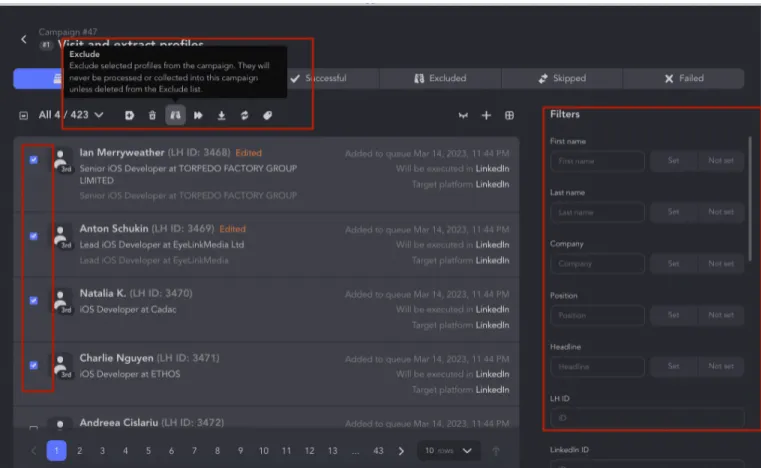
Exclude unwanted profilesAny selected profiles before launchingBlack list to exclude from all campaigns. Pause the campaign for selected contacts.
Remove intersections between campaignsyesyes
Exclude by companyyesno
By profile photoyesyes
Open profile filteryesyes
Open to work filteryesno
Hiring filteryesno
Premium filteryesno
Influence filteryesno

Read about the List manager plugin.

For instance, you can choose to keep only the leads with “Job seeker” or “Open profile” status.

Linked Helper campaign list with selected leads, exclusion action, and profile filters

Cross-Platform Processing (Sales Navigator & Recruiter)

Linked HelperExpandi
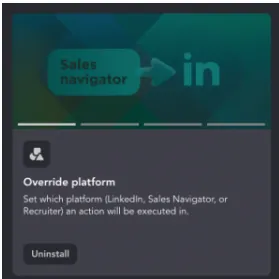
Override platformYesNo
Ability to process Sales Navigator links on a free LinkedIn account*YesNo
Connect any LinkedIn planYesYes
Set up group/event ID*YesNo

Both support Sales Navigator, but only Linked Helper allows dynamic switching between platforms using the Override Plugin and handles group/event IDs for advanced segmentation.

✅ Winner: Linked Helper (multi-platform depth).

Linked Helper Override platform plug-in for choosing LinkedIn, Sales Navigator, or Recruiter

Next, the option to Set up a group/event ID offers flexibility in collecting leads from groups using Sales Navigator.

After collecting the leads and assigning an ID, you can send messages through the basic profile using that group/event ID. For example, you can share a portion of the collected leads with a colleague, using the assigned ID as a reference for outreach purposes.

Video preview

Drip Campaigns & Templates

Linked HelperExpandi
Creating drip campaignsUnlimitedUnlimited
Campaign templates2411
Custom delays & time-outsYesYes
Campaign priorityNoYes
Retry failed profilesYesYes
Workflow triggersNoYes
  • Both tools offer drip sequences and smart campaigns, but Linked Helper includes twice as many templates and unique workflows: message sequences via events, invite to follow a page, and even profile email finders.

✅ Winner: Linked Helper (more templates).

For instance, only in Linked Helper, unlike Expandi, you’ll find templates like:

  • “Export profile information”

  • “Message sequence via event”

  • “Invite 1st to follow Organization (Company / School)”

  • “Inmail sequence”

  • “Find profile emails”

  • “Remove 1st connections”

  • …and more.

Scope of Automation & Messaging

Video preview
Linked HelperExpandi
Connection requestYesYes
Follow profilesYesYes
Profile viewsYesYes
Follow companyNoYes
Message to 1st-degree contactsYesYes
Like posts and articlesYesYes
InMailsYes, including open profilesOnly to Open Profiles
Add automatic AI or generic comment under liked postYes, automatic AI or generic commentNo
Send message to group membersYesYes
Send message to event attendeesYesNo
Invite to groupYesNo
Invite to follow organizationYesYes
Remove from 1st connectionsYesNo
Invite person to eventYesYes, only within a dedicated campaign
Cancel pending invitesYesYes
Extract organization employeesYesNo
Mention (tag) person under postYesNo
Extract companies dataYesNo

Only Linked Helper supports AI comments or generic comments with variables, tagging users under posts, and auto-invites to pages/groups.

Expandi mimics human behavior well but lacks these outreach features.

✅ Winner: Linked Helper (more interaction options).

Linked Helper Boost post workflow with comment configuration and optional plug-ins

Linked Helper Boost post action editor with post URL, mention limit, and comment text

Linked Helper Boost post delay settings for navigation, scrolling, mentions, and posting

If your goal is to create a database of customer emails, choosing Linked Helper over Expandi is the better option.

Linked Helper allows you to search for emails from people at the 2nd and 3rd degree of connection, even if their email isn’t mentioned in their profile.

In contrast, Expandi only provides publicly available emails. Even though Expandi syncs with your email service internally, it may not be sufficient for outreach campaigns.

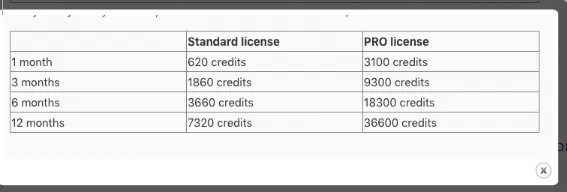
Linked Helper provides 620 monthly credits with the Standard license and 3100 credits with the Pro license. These credits do not expire, and you can also buy extra if you need more.

For more detailed information, please refer to this link:

Linked Helper Data Credits

Linked Helper Standard and Pro email finder credit totals

Email searches can be conducted using two methods:

  • Internal Data Enrichment Database

Linked Helper’s internal Data Enrichment database enables you to find emails through connections of other Linked Helper users.

Messaging

Linked HelperExpandi
Reply detectionYesYes
Custom variablesAny information can be turned into a custom fieldAny information can be turned into a custom field
Alternative message for Invite messageWith If-Then-ElseYes
Built-in variables (based on LinkedIn data)7<br>First name<br>Last name<br>Mutual first name<br>Mutual second name<br>Company<br>Position<br>Mutual total industry (for scraped with Sales Navigator)4<br>First name<br>Last name<br>Company name<br>Position
IF-THEN-ELSEApplied only inside message templatesYes, one level
Message analyzer (Filter by content)Allows setting key words and creating rules to send/not send a message (filter by content)No
Reply to messages directly in appYesYes

Linked Helper supports free and paid InMails, event/group messaging to 3rd-degree contacts, and advanced variables (like mutual connections).

Expandi supports event outreach to 1st-degree connections, paid InMails and messages to group members, but event outreach is not available.

✅ Winner: Linked Helper (more flexible campaigns + better personalization).

While Expandi does have a reply detection, only in Linked Helper can you set a few “stop” words (e.g., “Key account manager,” “be interested,” “a new role”) as a condition not to send the message if any of such words are found in earlier messages with this contact. The feature is available both in Messages and InMails.

Action Limits

Linked Helper Pro, dayExpandi, day
CampaignsUnlimitedUnlimited
Invites50+ (within LinkedIn weekly limit)100 (within LinkedIn weekly limit)
Messages150+*100
InMails150+*~25 (free Open InMails capped at 800/mo); paid InMails also supported
Profiles' views150*100
Endorse150*100
Likes150*100
Follow150*100

Linked Helper gives more flexibility for managing daily limits than Expandi. You can customize action limits and even go beyond 100 per day, though exceeding that isn’t recommended.

The key benefit is control — you choose which actions to prioritize.

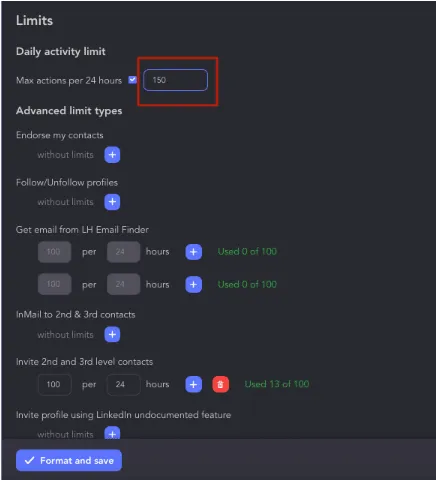
Linked Helper settings showing a 150-action daily limit and advanced controls

In Linked Helper, you can manually set daily activity limits for campaigns.

Expandi also allows manual limit settings but caps them at 100 per day.

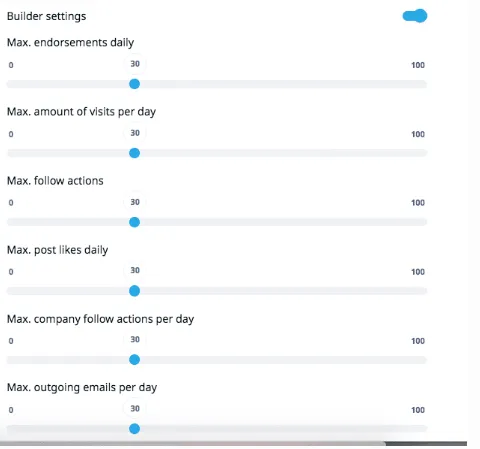
Expandi Builder settings with daily limits for endorsements, visits, follows, likes, and emails

In Expandi, you can manually set daily limits, but only up to 100 actions.

Data Export

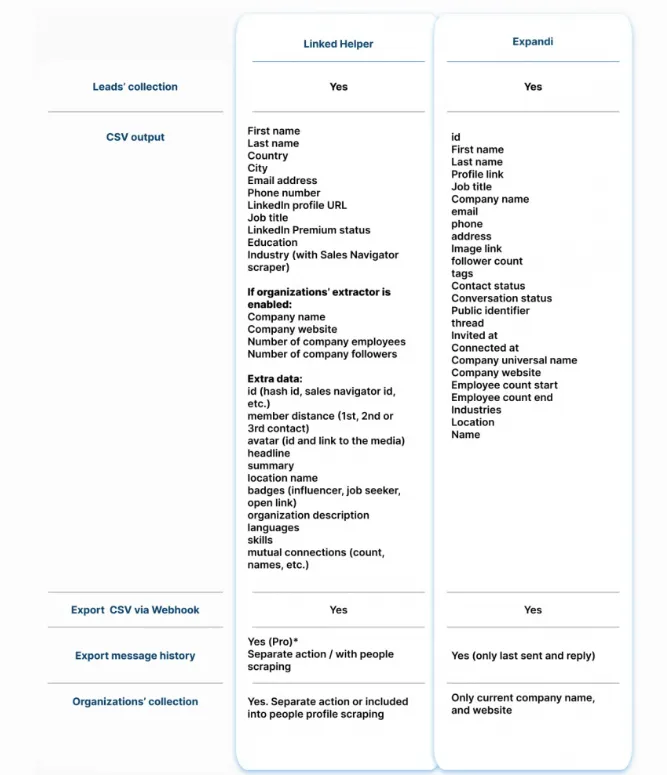
Comparison of Linked Helper and Expandi CSV fields, webhooks, and message-history exports

Expandi limits export options — data is only available via email or webhook and includes only partial info (no bios, full work history, or non-public emails). CSVs are missing key details like summaries, skills, and headlines.

Linked Helper exports a full dataset:

Private and public emails (via built-in Data Enrichment or Snov.io and Apollo.io integration)

Headlines, bios, skills, education & work history

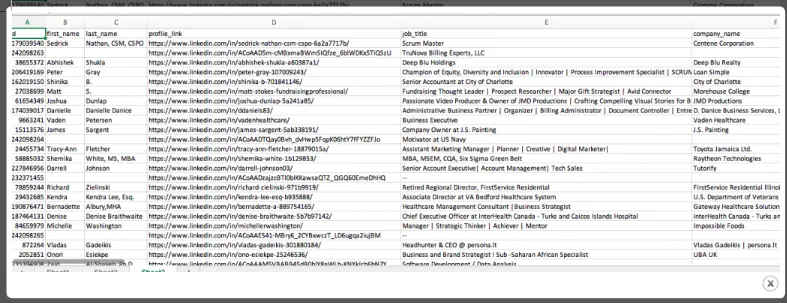
Linked Helper CSV export with profile names, LinkedIn URLs, job titles, and companies

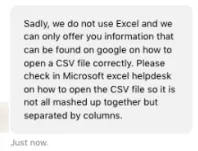
It also offers clear instructions on opening exports. Expandi’s CSVs can be hard to open, with little support available.

Expandi support response explaining how to separate CSV data into columns

Expandi lacks instructions on how to open CSV files, and customer support couldn’t provide an answer.

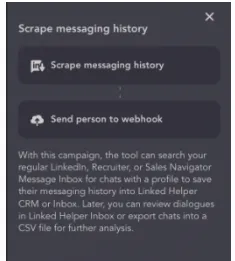
Only Linked Helper allows exporting message history with a template. Expandi limits this to just the latest messages.

Linked Helper actions to scrape messaging history or send a person to a webhook

Linked Helper campaign template to export message history to a file or another service.

Customer Support & Resources

Both tools offer 24/7 support, help centers, and blogs.

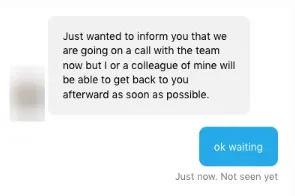
Linked Helper’s team includes technical specialists who provide in-depth, visual responses. Expandi’s team is responsive but may delay replies if staff are unavailable.

Expandi also created a Facebook user group and Expandi Academy with structured tutorials.

Expandi support chat saying the team is on a call and will respond later

Customer support in Expandi may not always be readily available.

Scheduling, Dashboard & Team Management

Linked HelperExpandi
Delayed campaign startYesYes
Set action working hoursYesNo
Set working tool scheduleYesYes (works in cloud)
Set time zoneYesYes

Both tools support delayed starts, tool scheduling, and time zone settings. However, only Linked Helper lets you set specific action working hours (e.g., no weekends or late nights). Also, Linked Helper allows you to randomize start time within a 15-minute range, delaying the start time by a random number of minutes.

Expandi runs in the cloud, while Linked Helper requires your device or a remote server.

🟢 Linked Helper offers finer timing control per action.

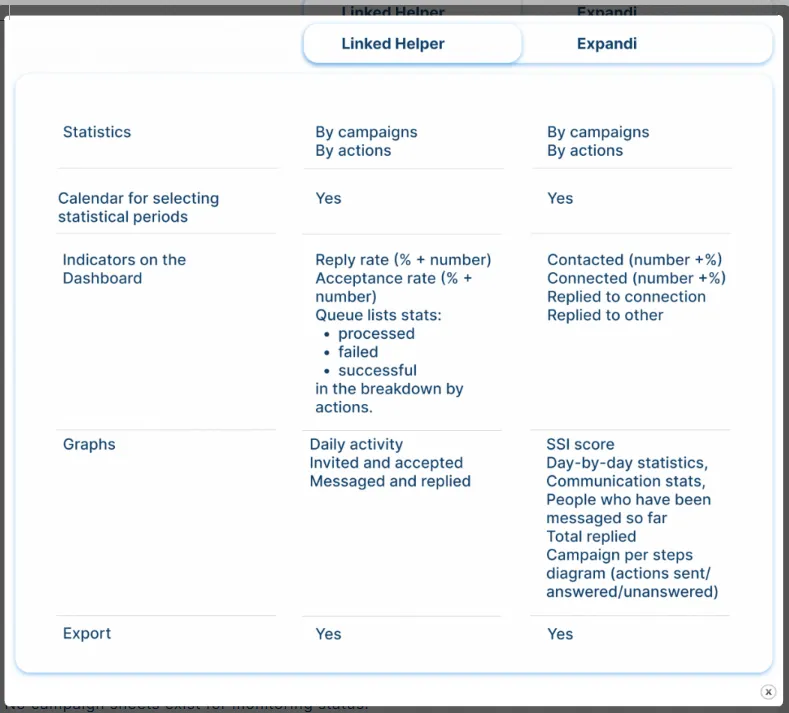
Dashboard and campaign stats

Linked Helper categorizes leads by stage: “Processed,” “Successful,” “Failed,” etc., giving full campaign visibility and reprocessing options.

Comparison of Linked Helper and Expandi statistics, dashboard indicators, graphs, and exports

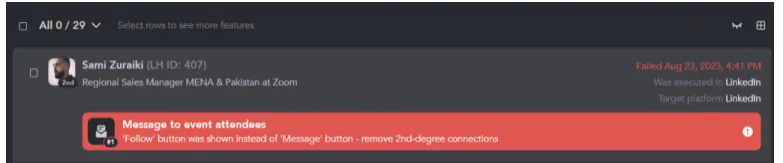
Expandi lacks visibility into why profiles fail or succeed. You can’t re-send or track progress clearly. No campaign sheets exist for monitoring status.

Linked Helper campaign row showing a failed action and its specific reason

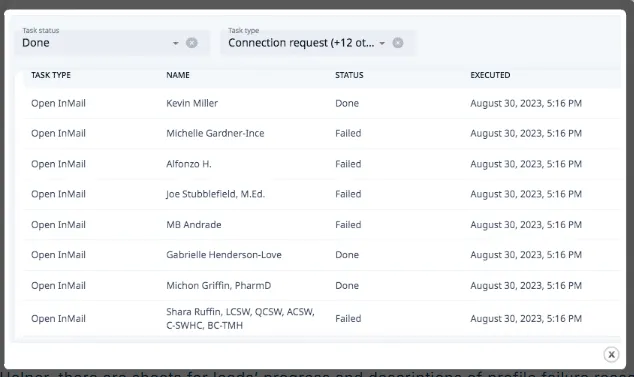
Additionally, Expandi doesn’t provide a dedicated list of successfully processed profiles, making it challenging to assess the tool’s performance.

Expandi task list showing completed and failed Open InMail actions

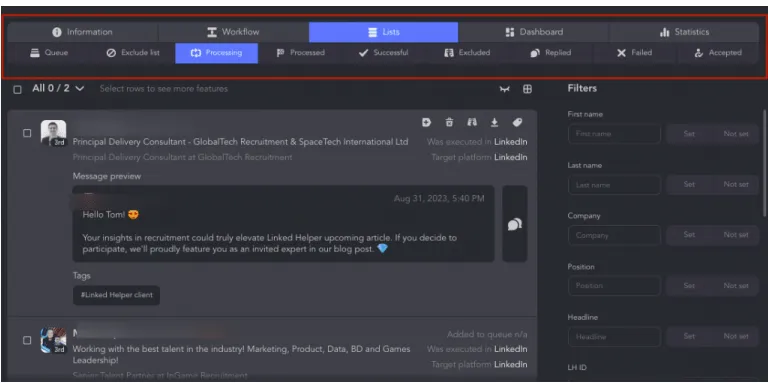
In Linked Helper, there are sheets for leads’ progress and descriptions of profile failure reasons.

These categorized lists have better visibility and give you more control over how each person is progressing through your campaign.

Linked Helper tabs for processing, successful, excluded, replied, failed, and accepted leads

Managing accounts in teams

Linked HelperExpandi
Managing accounts in teamsYes, via Workspaces — granular access to accounts for team members, with built-in remote control so users can view their colleagues' LinkedIn account progressYes
Invite colleagues via email++
Team data sharing- possible on a dedicated server — if you’re using the same Linked Helper 2 credentials across sessions<br>Soon to be available via cloud-based storage (gradually rolling out) — shared within one workspace, no dedicated server or VPS needed+

Expandi offers team access and data sharing via email invites.

Linked Helper only supports team collaboration through dedicated remote desktop servers.

Integrations & Pricing Value

Linked HelperExpandi
Webhooks (Zapier, Make.com) Hyperise Snov.io HighLevel CRM<br>Streak CRM<br>Capsule CRM<br>Salesforce CRM<br>Zoho Recruit<br>Zoho CRM<br>ActiveCampaign CRM<br>Close CRM<br>HubSpot CRM<br>Pipedrive CRM<br>Google SheetsWebhooks (Zapier, Make.com) Email providers Hyperise

Linked Helper has native integrations with 10+ CRMs like HubSpot, Pipedrive, and Close, letting you sync lead data, message history, and custom fields at any stage of the funnel.

Expandi supports tags, filtering, and webhooks, but lacks true CRM integration.

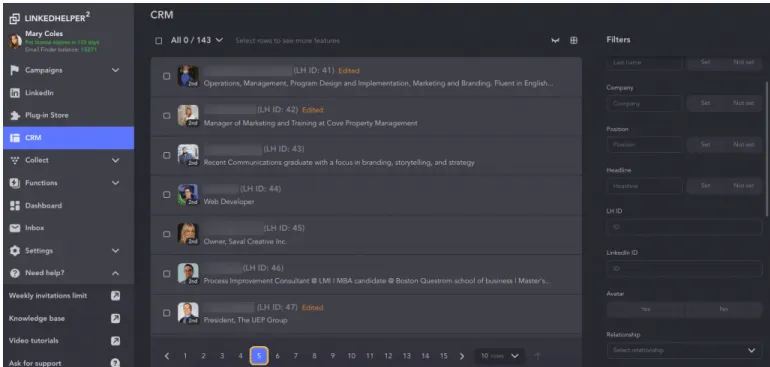
Linked Helper’s built-in CRM lets you view, sort, and manage leads with filters like “Job seeker” or “Open profile.”

Expandi shows basic lead cards and opens LinkedIn profiles but lacks campaign-wide lead visibility or deep filters.

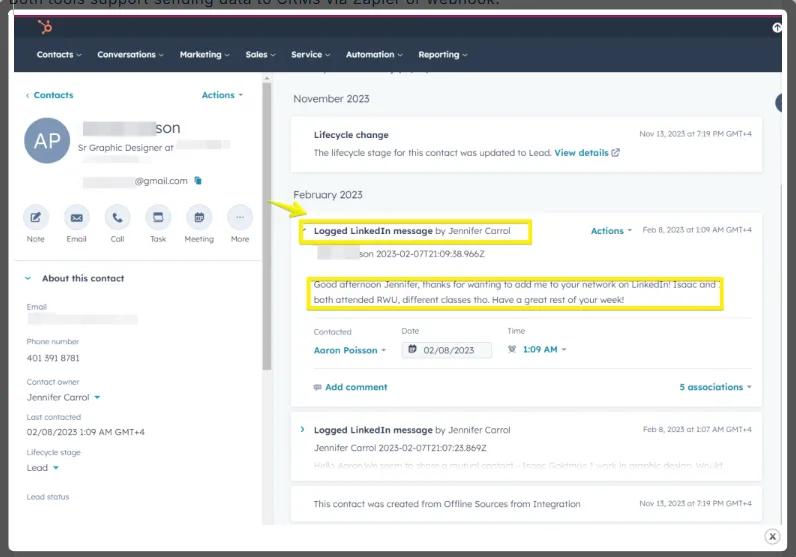
Both tools support sending data to CRMs via Zapier or webhook.

HubSpot contact timeline with a LinkedIn message logged from an integration

Expandi allows convenient lead filtering and keyword searches, along with assignment of tags.

An example of how the lead list looks in Expandi without a CRM

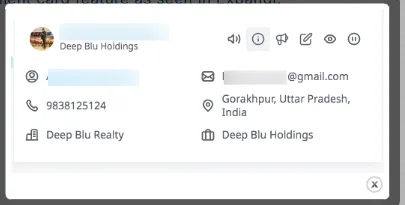
Here’s something like a client card feature as seen in Expandi:

Expandi lead card with email, phone, location, and company details

An example of what the contact card for leads looks like in Expandi.

Linked Helper’s unified system functions like an internal CRM, capturing leads across all campaigns. It goes beyond tag assignment, allowing note-taking and using CRM filters such as “Job seeker,” “Open link,” and more.

Linked Helper CRM lead list with campaign contacts and profile filters

The Linked Helper CRM displays more comprehensive client data and filters.

For comparison, here’s what a client card looks like in the CRM of Linked Helper:

Linked Helper CRM contact card with cross-platform profile data and summary

Contact cards for leads in Linked Helper provide more information.

Pricing Value

Expandi has one pricing tier: $99/month per LinkedIn account. You must contact sales for bulk discounts, though buying 3 accounts gives 1 free.

Linked Helper pricing covers two flexible plans:

Standard: $15/month or $99/year. Great for budget users. Core actions are unlimited, but some advanced features (like webhook exports or invites to groups and events) have limits.

Pro: $45/month with full features and higher limits. Even with a dedicated server, it’s still ~55% cheaper than Expandi monthly. Yearly, Expandi is 3.2x more expensive.

Linked HelperStandardProExpandi
Monthly$15$45$99
Annual$99$297$948
Included, dayInvitations 50+<br>Invites to event/group/company page 20<br>Messages Unlimited<br>Profile views Unlimited<br>InMails Unlimited<br>Likes 20<br>Follows Unlimited<br>Endorsements Unlimited<br>Email finder credits: 620No limits<br>Email finder credits: 3100Invitations 100<br>Invite by email 100<br>Messages 100<br>Profile views 100<br>Open InMails 25<br>Likes 100<br>Follows 100<br>Endorsements 100

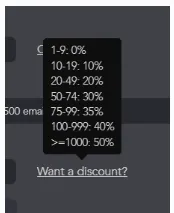
🔁 Both tools offer bulk discounts, but Linked Helper lists them transparently, while Expandi requires a call.

Linked Helper bulk discount menu showing discounts by number of licenses

Linked Helper offers a discount system for bulk license purchases.

Expandi chat offering three seats for the price of two

Expandi offers a discount for purchasing three licenses at the price of two.

Expandi competitors include Linked Helper, Waalaxy, and Zopto, each offering alternatives with stronger CRM integrations and more flexible pricing.

Final Verdict: Expandi or an Alternative?

Expandi is a good fit when:

  • You need a cloud-based tool for LinkedIn + email campaigns with multichannel automation.

  • Your focus is quick results and performance tracking with a centralized inbox and easy team access.

  • Ideal for agencies looking to improve their ROI without managing infrastructure.

📌 Best for: small teams, remote sales teams, growth hackers scaling outreach fast without a chrome extension.

You should consider Linked Helper or other alternatives when:

  • You prefer safer local execution software with advanced filtering.

  • You want more flexible smart sequences using IF-THEN-ELSE logic, message conditions, or profile tags.

  • You need powerful data scraping, bulk email discovery, and custom actions like auto-comments.

  • Your agency values lower cost, extensive export features, and higher ROI per license.

📌 Best for: solo users, recruiters, or agencies optimizing budgets and customizing every step of the funnel.

In short: Expandi's higher, single-tier price buys built-in conditional branching and cloud-native multichannel sequencing; Linked Helper trades those two capabilities for a lower entry price and keeping your LinkedIn session on your own device.

Regarding safety and compliance, every LinkedIn automation tool, including Linked Helper that runs sessions on desktop, carries some inherent ToS and account-restriction risk depending on configuration and usage. No vendor can guarantee otherwise.

The best way to know which fits your workflow is to try both: Expandi's trial requires a card, while Linked Helper's free trial doesn't.

FAQ

Expandi offers a single plan at $99/month per LinkedIn account. There are no cheaper tiers, but you get access to smart automated sequences, advanced tools, and cold outreach features for both LinkedIn and email.

Try Linked Helper free for 14 days

The most technically advanced platform for LinkedIn automation with a focus on security, a wide range of features, and exceptional customer support. Trusted by over 10,000 businesses worldwide.