

 16 min read

TL;DR: email warm-up tools in October 2026
-
Small setup: Warmup Inbox Basic starts at $19 per inbox monthly. Its trial includes Pro controls, so check the paid tier before choosing a setting you want to keep.
-
Placement testing: MailReach combines warm-up with 20 test credits shared across the subscription. Buying more inboxes doesn't multiply that allowance.
-
Mailbox fleets: Smartlead Base costs $39 monthly for unlimited connected accounts. The entry plan uses its Foundation pool.
-
Existing subscriptions: Instantly's paid plans include unlimited warm-up accounts. Check included access before paying for another service.
-
Test scope: I inspected Warmup Inbox and Warmy trial interfaces in October 2026. Recommendations compare setup and subscription costs; campaign delivery needs its own check.
The quick picks compare the different jobs these email warm-up tools cover. Starting prices use monthly billing.
| Tool | Best for | Starting price | Main constraint |
|---|---|---|---|
| Warmup Inbox | Small standalone setups | $19/inbox/month | Custom controls require Pro |
| MailReach | Warm-up with placement tests | $25/inbox/month | Test credits are shared |
| Warmbox | Recipes and schedules | $19/month, one inbox | Fixed mailbox bundles |
| lemwarm | Custom warm-up content | $29/email/month | Smart costs extra |
| Smartlead | Larger mailbox fleets | $39/month | Base uses Foundation |
| Instantly | Existing Instantly users | $47/month | Pool eligibility has limits |
| Warmy | Separate B2B and B2C workflows | $49/month, one mailbox | Larger totals need checking |
What email warm-up tools do: automate mailbox activity
Email warm-up tools automate sending and engagement between connected mailboxes, usually through a shared network. Services such as Warmup Inbox can ramp up activity step by step, produce replies, and pull network messages from spam. A placement test handles a separate task: it checks where a test message ends up.
Start with the problem you can observe. If authentication is broken, fix it. When replies stay low, look at the audience, the offer, and delivery too. Google's sender guidance advises you to send gradually and steadily to engaged users, and a warm-up subscription won't lift your provider's limits.
A reputation score monitors activity within a service, yet campaign placement calls for a distinct test. For this comparison, I put more weight on the connection you have to authorize, the controls you can modify, and the bill you'll get as you add mailboxes. You can assess these factors before committing to a long subscription.
1. Warmup Inbox: Best for a small standalone setup
Warmup Inbox is my pick for a small setup that needs warm-up and monitoring alongside an existing sending platform. You can buy it separately.
Warmup Inbox pros
-
Volume-based price breaks apply when more mailboxes are ordered.
-
Separate warm-up and monitoring options
Warmup Inbox cons
-
Custom content and scheduling require Pro
-
Canceling payment can leave activity running
When I opened the generic IMAP/SMTP form, it asked for incoming and outgoing server details and offered a separate IMAP login. That’s useful preparation for anyone connecting a mailbox outside the Google or Microsoft routes: bring both sets of settings, even if you normally think of the account as an SMTP sender. Warmup Inbox also has a separate Send Only option; the comparison’s cost table for existing mailboxes does not cover that configuration.
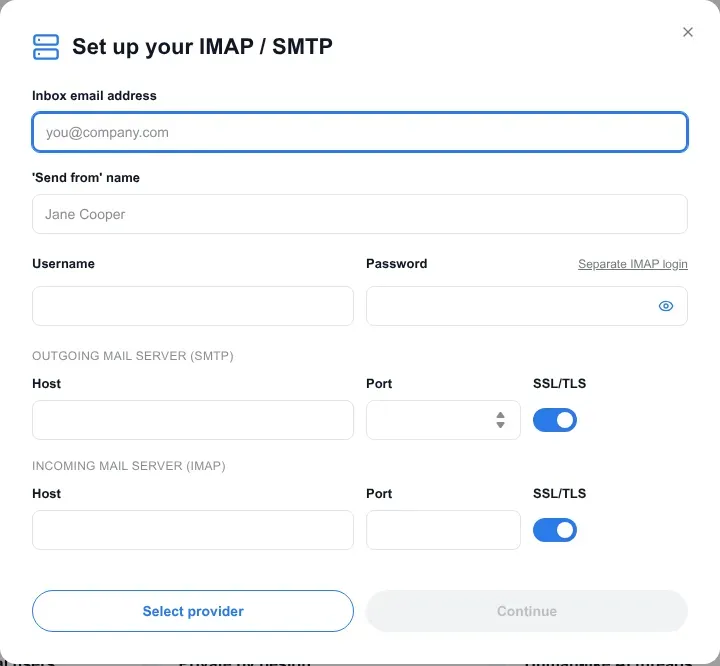
Within Warmup Inbox, the generic connection form has separate incoming and outgoing server settings.
My fresh trial showed one available Pro credit and no payment method. The distinction matters when you decide which paid plan to keep: Basic covers up to 75 warm-up messages per day per inbox, while Pro adds scheduling, templates, topics, languages, and email-provider targeting.
The exit controls warrant close attention. When you pause an inbox, its subscription remains active. If you cancel payment, a connected inbox may shift to Free Monitoring and continue sending five messages every day, with delayed data and no replies or spam-folder recovery. To stop traffic and leave the service, pause activity, cancel renewal, and remove the connection.
Warmup Inbox pricing
Basic starts at $19/inbox/month with monthly billing. Pro costs $59/inbox/month. Annual Basic is $15/inbox/month equivalent, paid upfront, with quantity discounts. The no-card trial lasts seven days.
2. MailReach: Best for warm-up with placement testing
MailReach combines mailbox warm-up with a separate placement-testing allowance. I prefer that combination when a purchase must answer both “is the warmer running?” and “where did this message arrive?”
MailReach’s public website presents its warm-up and spam-testing tools.
MailReach pros
-
Warm-up comes with placement-test credits.
-
Lower per-inbox rates above five mailboxes
MailReach cons
-
Test credits are shared across the subscription.
-
Admin access might be needed for organizational connections.
Included with the plan, the calculator provides 20 test credits. That allotment remains distinct from the mailbox count (it can be used up far sooner than expected by an agency that adds client inboxes). Warm-up supports up to 100 messages per day, so check the testing budget separately from the activity allowance.
Setup might need assistance from an administrator. A Super Admin is required for the organizational Google Workspace guide, which uses domain-wide delegation; tenant permissions are also involved in the bulk Microsoft connection. SMTP sending and a receiving inbox are paired in MailReach’s Resend setup. Such routes are specific connection options. Before purchasing seats, choose the route that your company can approve.
Aliases come with a billing nuance as well. Google Workspace aliases deliver into the main mailbox, yet MailReach bills for every connected address—an alias included. So a further address might add a paid seat and still not provide a standalone inbox.
Cancellation depends on your subscription type. Legacy accounts go through a separate process, while current seat-based accounts cancel via Billing. Since deleting mailboxes isn’t advice that applies to every cancellation, verify the renewal status before you close the account.
MailReach pricing
$25/inbox/month for one to five inboxes, or $19.50/inbox/month for six to twenty, with monthly billing. Annual billing for one to five inboxes is $20/inbox/month equivalent, paid upfront.
3. Warmbox: Best for configurable warm-up patterns
Warmbox includes recipes and schedules across its plans, making it a useful comparison for buyers who need those controls from the start. You don't need to shift into a separate customization tier to pick an activity pattern.
Warmbox’s public homepage.
Warmbox pros
-
Growth, Flat, and Random recipes
-
Scheduling and reply settings across plans
Warmbox cons
-
Fixed packages may leave unused slots.
-
Multi-inbox daily allowances need clarification.
The recipe names clarify the fundamental options: variation, steady activity, or gradual growth. DNS checks, blacklist checks, reports, replies, and spam-folder recovery round out the warm-up offering. I like having those controls at the entry tier, especially when you need activity to follow your working schedule.
Mailbox packaging is less flexible. Solo holds one inbox, Start-up three, and Growth six. If your team needs five addresses under one listed plan, Growth leaves a paid slot unused. That’s a reason to count the inboxes you’ll actually connect before comparing headline prices.
Daily labels need attention as well. Beside those packages, the pricing page shows 50, 250, and 500 emails per day, but it doesn’t clearly tie the multi-inbox allowances to each mailbox. Until the bundle label’s scope is confirmed, treat that label as the stated allowance. Multiplying the Growth figure by each connected inbox has no sound basis.
Warmbox pricing
Solo costs $19/month, Start-up $79/month, and Growth $159/month with monthly billing. Annual Solo is $15/month equivalent, paid upfront. Team requires a quote.
4. lemwarm: Best for tailoring warm-up content
lemwarm Smart gives you custom templates, along with tailored warm-up content, for the automated activity that comes with Essential. I like that option for buyers seeking greater control over what the network exchanges.
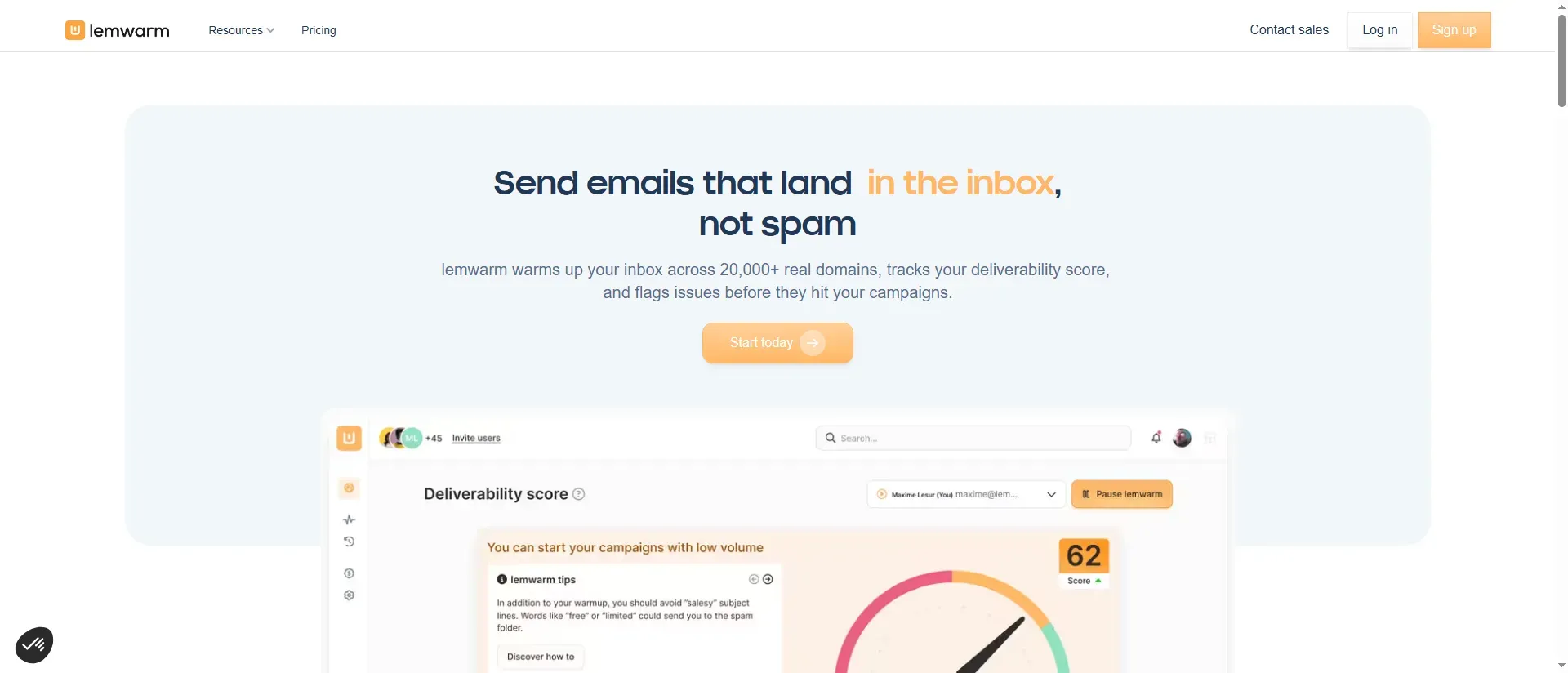
lemwarm’s public homepage with a preview of its deliverability dashboard.
lemwarm pros
-
Smart supports personalized templates
-
Existing lemlist plans can include warm-up
lemwarm cons
-
Standalone billing is per email address.
-
Warmup Score doesn't predict campaign placement
Smart offers personalized warm-up emails and a network tailored by industry. Essential handles automatic warm-up and technical checks. When a team requires merely background activity, then paying for Smart brings in capabilities it might never use; but if a team wants its own templates involved in the process, the upgrade serves a concrete purpose.
Should you already be paying for lemlist, verify your lemwarm entitlement before adding a separate subscription. Mailbox allowances that come included vary by plan. The warm-up product is what this card assesses; purchasing a wider outreach platform just to obtain bundled warm-up may shift the economics substantially.
The setup guide explains the Warmup Score: it measures warm-up quality and includes authentication checks. It does not predict campaign inbox placement. If a DNS correction improves the score, examine the underlying checks before assuming the offer has reached more recipients.
Also, billing demands attention when you leave. Distinct lemlist and lemwarm subscriptions call for distinct cancellations, and halting warm-up activity by itself leaves the renewal intact.
lemwarm pricing
Essential costs $29/email/month and Smart $49/email/month with monthly billing. Annual equivalents are $24 and $40 respectively, paid upfront. More than ten users require a volume quote.
5. Smartlead: Best for a lower-cost mailbox fleet
Smartlead Base offers warm-up for unlimited connected accounts at a fixed subscription price. It’s my pick on subscription cost for a fleet of existing mailboxes.
Smartlead’s public homepage.
Smartlead pros
-
No warm-up subscription charge applies to each inbox.
-
Controls for reply, ramp-up, and daily volume
Smartlead cons
-
Base limited to the Foundation pool
-
Placement testing sold separately
You don't improve the pool by adding addresses. Foundation is what Base uses, but higher plans bring in Growth and Premium tiers. Rather than assuming unlimited accounts cover every pool or testing feature, budget for the actual tier you need.
Every day, per the settings guide, Auto-adjust Warmup/Sending Ratio aims for about ten warm-up messages. Before you set up activity, check that against the daily-total field.
Customer reports give you specific failures to investigate. In a June 22, 2026 r/Coldemailing thread, u/Hungry-Package-9026 wrote:
It's not just one or two emails; there are dozens of failed messages in both inboxes, all showing that the recipient email addresses don't exist.
Another account, u/SurgeMail, reported using Smartlead with list verification and low sending volume in an April 30, 2025 r/LeadGeneration post. That poster sells inbox services. Neither account isolates warm-up’s effect. In your own account, look for failed network messages and investigate recipient errors.
Smartlead sets out conditional refund windows, excluding various scenarios and add-ons. Before you count on a refund to escape an annual commitment, read those conditions.
Smartlead pricing
Base costs $39/month and Pro $94/month with monthly billing; Pro includes the Growth pool. SmartDelivery Growth placement testing is a separate $49/month add-on. The no-card trial lasts fourteen days.
6. Instantly: Best for keeping warm-up inside Instantly
Instantly offers unlimited warm-up accounts on paid plans, so current customers can handle activity without adding a separate per-mailbox service. For a workspace with several addresses, I like the bulk enable and pause controls. Its generic connector requires both IMAP and SMTP. Warm-up doesn't count toward campaign allowances, yet it still generates mailbox traffic that counts against provider limits.
Instantly’s public email warm-up page.
Instantly pros
-
Warm-up included with paid outreach plans
-
On top of individual account settings, there are bulk controls.
Instantly cons
-
Eligibility for the Standard pool is constrained by an SMTP limit.
-
Purchased mailbox services renew separately
Its settings guide specifies a default target of ten messages daily, an increase of one per day, and a configurable reply rate. Warm-up limited to weekdays halts outbound sending during the weekend; inbound network mail, however, may keep arriving. That explains why network messages may be waiting in the inbox on Monday despite a weekday-only setting.
The Standard pool for Growth permits 100 SMTP accounts. Should you go past that limit, the whole workspace—Google and Outlook accounts included—shifts into the Basic pool. When you're planning an expansion, count SMTP accounts on their own (the effect reaches past the addresses that push you over the cap).
Provider-specific results deserve attention too. In an October 1, 2026 r/Coldemailing discussion, u/boringhamza reported:
They all show that when the recipient is gmail -> inbox. But when it is Microsoft -> spam. Every single one.
Instantly’s technical addendum treats warm-up analytics as estimates and makes no guarantee of a particular provider mix or delivery improvement. When you're evaluating a campaign, compare your own recipient providers. The quoted report gives you a provider-specific problem to investigate.
Instantly pricing
Growth starts at $47/month with monthly billing. The fourteen-day trial permits two warm-up accounts. Placement testing, purchased mailboxes, and credits are separate products; cancel purchased mailbox services separately from Outbound.
7. Warmy: Best for separating B2B warm-up from B2C testing
Warmy separates a Warm-up suite for B2B senders from a Seed list suite for B2C senders. I prefer this separation for buyers whose work covers both business mailboxes and consumer audiences.
Warmy pros
-
Warm-up and seed-list suites are kept apart.
-
Provider-specific connection guidance
Warmy cons
-
An administrator can be involved in setting up Google Workspace.
-
Give advance notice to cancel renewal
When I opened the connection wizard, the default Google Workspace route asked an administrator to configure a new app in App Access Control. Individual providers and bulk connections had separate entries. Have the person who manages your email involved before you reach that screen; a company’s permissions can determine which connection route is practical.
The public starting price gave less detail than the in-app pricing selector. After choosing Monthly and setting the mailbox count to one, I found that Unified Credits and Starter’s daily allowance appear as separate items. Don’t combine those units when you’re calculating the testing budget: the credit allowance on its own doesn’t reveal how many placement tests you can run.
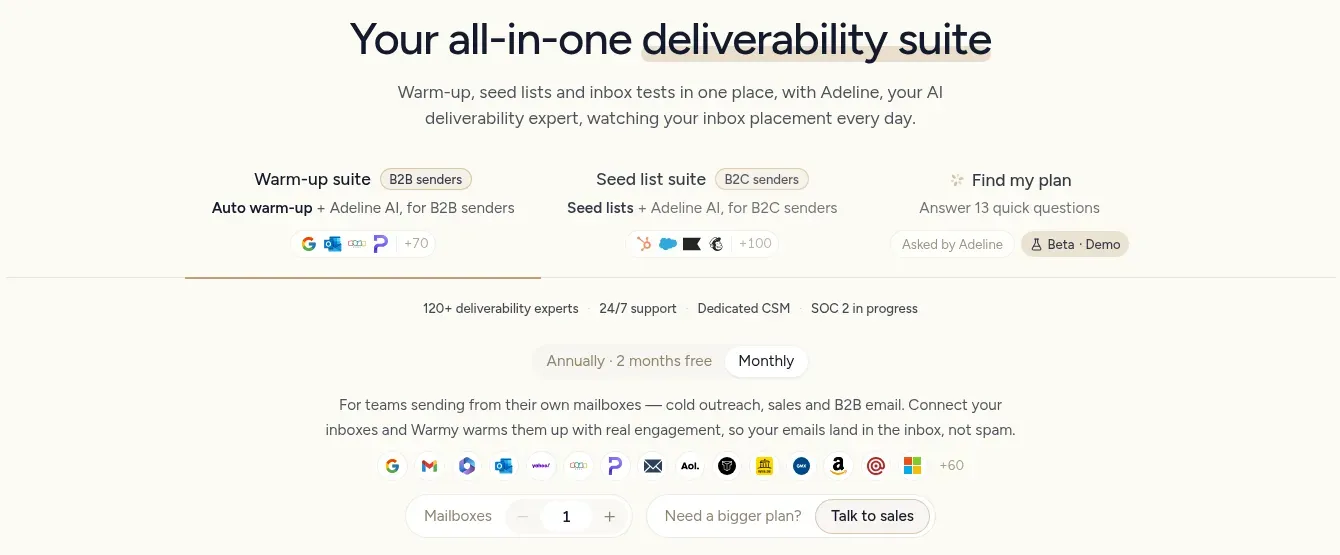
Inside Warmy, I selected Monthly with the mailbox count at one. B2B warm-up and B2C seed lists have separate tabs.
To avoid the next charge, give Warmy at least five business days' notice prior to renewal. Its no-card trial is advertised as seven days; my new account showed six days remaining. Check billing before you add a card because terms permit automatic conversion once a payment method is designated.
Warmy pricing
At one mailbox on monthly billing, Starter costs $49 with 100 daily warm-up emails and 200 Unified Credits. Business costs $129 with 300 daily warm-up emails; Premium costs $189 with 1,000 daily warm-up emails.
What the same mailbox workload costs
For more mailboxes in this comparison, Smartlead and Instantly carry the smallest fixed subscription totals. A single address costs less with Warmbox and Warmup Inbox.
For twelve monthly payments in USD — tax excluded — the table presents my calculations. Every scenario relies on compatible mailboxes already present in the one workspace, set up for ten outgoing warm-up messages per mailbox each day once ramp-up finishes. Not included in the totals: mailbox hosting, domains, and optional independent tests. The packages differ in their controls, testing allowances, and networks.
| Tool and plan | One mailbox: twelve payments | Five mailboxes: twelve payments | Twenty mailboxes: twelve payments |
|---|---|---|---|
| Warmup Inbox Basic | $228 | $1,080 | $3,060 |
| MailReach | $300 | $1,500 | $4,680 |
| Warmbox | $228 Solo | $1,908 Growth | Team quote |
| lemwarm Essential | $348 | $1,740 | Volume quote |
| Smartlead Base | $468 | $468 | $468 |
| Instantly Growth | $564 | $564 | $564 |
| Warmy Starter | $588 | Unverified | Unverified |
Standalone bills shift when quantity discounts apply. For five, Warmup Inbox’s calculator returns $18 per inbox and $12.75 for twenty. MailReach’s lower per-inbox rate starts after five inboxes. Warmbox’s mid-tier case relies on its six-slot plan, leaving the one slot idle. Bigger totals from Warmy call for checking the mailbox selector separately.
If you pay yearly, you can cut the price even more. For twenty Warmup Inbox Basic mailboxes, annual prepayment costs $2,340 compared with $3,060 across monthly payments. It's a commitment you'd do well to put off until the connection and the reporting fit your setup.
Which email warm-up tool should you choose?
For a small standalone setup, Warmup Inbox is my initial pick; MailReach suits placement testing, and Smartlead fits a larger fleet. Pick according to the job that's missing in your workflow before you compare how big anyone's network is.
Compare Warmup Inbox’s monitoring with Warmbox’s recipes for a single address. Warmbox gives you more reason to look past the entry price if you need a specific schedule immediately. MailReach’s shared testing allowance deserves a budget of its own for agencies checking client messages.
Already using Instantly? Check your included warm-up before moving accounts. That same entitlement check covers lemwarm within an active lemlist subscription. If custom content is a must, purchase lemwarm Smart on its own — not as an upgrade you may use afterward. When warm-up and seed-list testing need scoping as one, Warmy is the better fit.
If LinkedIn is one of your prospecting channels, consider Linked Helper’s Instantly integration to send collected contacts into your email campaign.
Yet a further subscription won't fix an authentication failure, nor will it turn an unwanted message into a welcome one. Should the score appear healthy while replies stay low, look into the campaign first. When enough data exist, Google Postmaster Tools can assist with Gmail traffic. If you send newsletters or transactional mail via an ESP, begin with that provider's ramp-up guidance.
How we tested
In October 2026, I explored Warmup Inbox and Warmy trials and compared the tools using their documentation and customer discussions. I didn't run warm-up experiments, so this comparison doesn't measure delivery results.