

 22 min read
TL;DR: Instantly in November 2026
- Workspace ceiling: Instantly’s Terms cap Connected Accounts at 100 per workspace, despite the “Unlimited Email Accounts” plan wording.
- Base pricing: Growth is $47/month; Hyper Growth is $107/month and includes CRM, 25,000 uploaded contacts, and 125,000 monthly emails. Annual billing averages $37.60/month for Growth, $85.58/month for Hyper Growth, and $286.30/month for Light Speed.
- Capacity add-ons: Each stackable Outbound Add-On is $87/month for another 25,000 contacts and 125,000 emails; Hyper Growth plus three add-ons totals $368/month, compared with Light Speed at $358/month for the same 100,000 contacts and 500,000 monthly emails.
- Trial: The no-card trial lasts 14 days and includes 2 connected accounts, 250 leads, 1,000 campaign emails, and 1,000 welcome credits.
Instantly handles cold-email campaigns in the cloud. You connect sending inboxes, build email sequences, and then add lead data or AI tools when the team requires them. Pricing for Growth begins at $47 per month. Additional workspaces, domains, managed inboxes, Inbox Placement, and credits incur separate charges. Sending can also be capped per campaign or per account through Instantly, and campaigns exceeding a 5% bounce rate can be paused. Those controls limit activity. Inbox placement and sender reputation are nonetheless shaped by campaign execution and setup.
Verdict: Instantly Fits Email-First Teams That Can Model Add-On Costs
Instantly fits email-first teams that need coordinated sending inboxes and can budget for optional data, AI, and deliverability tools. Look elsewhere if native LinkedIn execution or one all-in price is essential. The platform combines outbound inboxes, email sequences, reply handling, account and campaign limits, and optional lead-data or AI tools.
Growth includes entry-level email outreach only. Charges can come from credits, Inbox Placement, domains, managed inboxes, and extra workspaces, while team invites and CRM begin at higher tiers. Growth users can preview Unibox, though they can't reply there or invite teammates. Instantly can hand leads off to LinkedIn partners; the invitations and messages get sent by those paid tools. This won't replace a LinkedIn automation tool if LinkedIn is your main channel.
Before buying, map the inbox volume and team access you need to the plan, then price the separate products your workflow requires.
Pros
Instantly’s strengths are its email controls, modular lead and AI tools, and agency options.
- Multiple sending inboxes: You can connect your own Google, Microsoft, or SMTP/IMAP accounts without a per-inbox slot charge.
- Concrete volume controls: Per-account and per-campaign limits, multiple schedules, sender rotation, and a default high-bounce pause give operators several ways to constrain sending.
- Conditional email automation: Automation Builder supports if/else paths with AND/OR conditions, while reply, company-reply, and auto-reply controls can stop follow-ups.
- Modular lead and AI functions: SuperSearch, verification, enrichment, sequence writing, reply handling, and sales-agent actions are available, with separate credit economics.
- Centralized reply view: Like many tools in this category, Unibox gathers replies; the plan comparison places replying inside it at Hyper Growth rather than Growth.
- Agency controls: Custom branding and client access, roles, workspace groups, and audit logs are documented, with separate workspaces available when real client isolation is required.
Cons
- LinkedIn execution is external: Automations hand actions to paid partners such as HeyReach, Aimfox, or Valley; Instantly does not send native LinkedIn invitations or messages.
- Growth gates collaboration: The plan comparison says Growth cannot invite teammates and allows Unibox preview without in-app replies.
- Credit demand is shared: Search, enrichment, verification, and AI actions draw from Instantly Credits. Feature availability alone does not reveal effective usage cost.
- Exit paths are fragmented: Subscriptions follow separate cancellation paths, and data should be exported before the main subscription expires.
- One plan detail remains unclear: First-party pages do not settle Growth API V2 access.
Instantly Pricing: $47 to $358 per Month, Plus $87 Capacity Add-Ons
Monthly Email Outreach starts at $47 for Growth and tops out at $358 for Light Speed. Hyper Growth costs $107, and each eligible capacity add-on is another $87 a month. The annual column spreads each yearly charge across the year as a monthly average; those equivalents are separate from month-to-month rates. Credits, Inbox Placement, inboxes, domains, and extra workspaces can raise the bill.
| Plan | Monthly billing | Annual billing equivalent | Fixed uploaded-contact limit | Monthly emails | Included boundary |
|---|---|---|---|---|---|
| Growth | $47/month | $37.60/month equivalent | 1,000 total | 5,000 | No teammate invites; Unibox reply is not included |
| Hyper Growth | $107/month | $85.58/month equivalent | 25,000 total | 125,000 | CRM included; Unibox replies and teammate access |
| Light Speed | $358/month | $286.30/month equivalent | 100,000 total | 500,000 | Includes SISR plan features |
| Enterprise | Custom | Custom | Custom | Custom | Contact Instantly for a quote |
Instantly Email Outreach plans and capacity (checked November 15, 2026)
Instantly Account Limit: 100 Connected Accounts Per Workspace
Instantly's Terms limit Connected Accounts to 100 per workspace, even though its plans say “Unlimited Email Accounts.” Every Outbound Add-On additionally boosts the standard warmup-pool allowance by 500 SMTP accounts, subject to fair use. The docs don't clarify how that allowance interacts with the Terms cap (so don't treat the two figures as interchangeable).
Uploaded contacts draw on a total across the entire workspace (campaigns may be active, paused, or still in draft). You free space when you remove leads from a campaign, but not when you remove those same people from Lists.
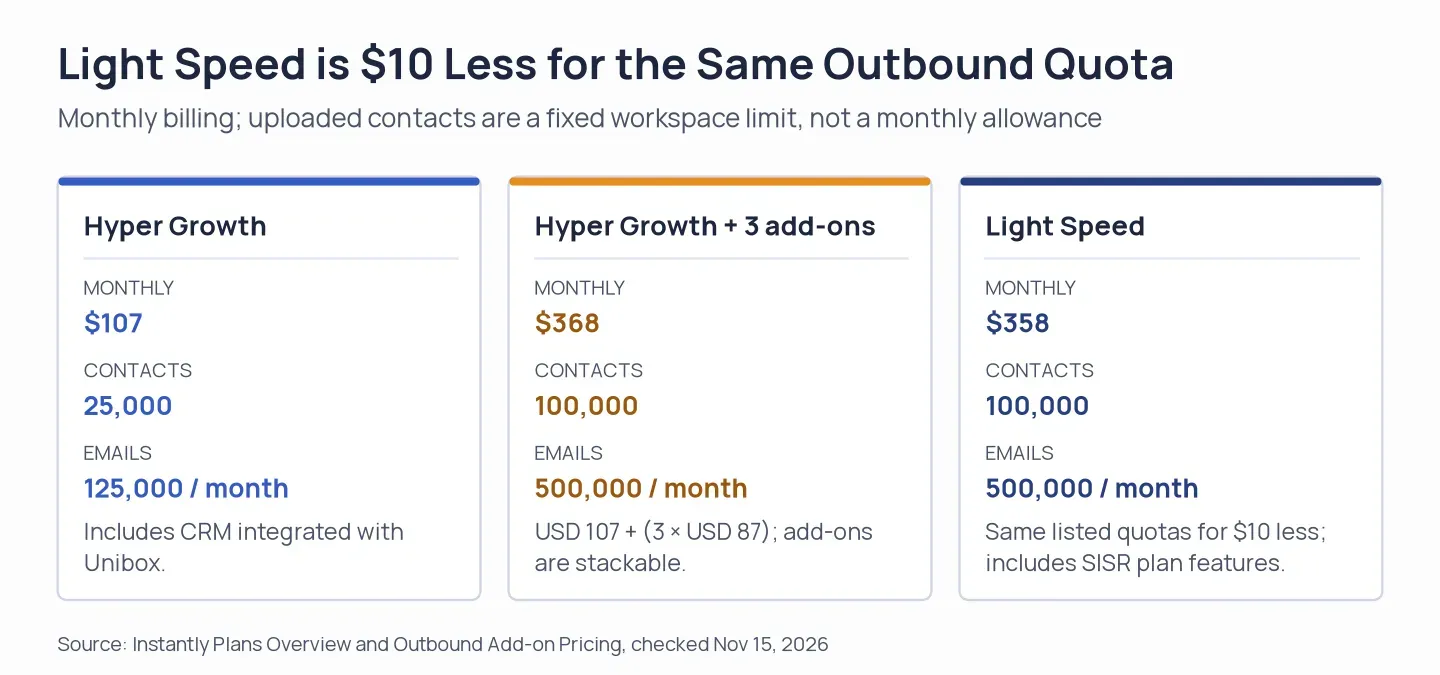
Light Speed is $10 less than Hyper Growth plus three stackable add-ons at the same listed contact and email limits.
Instantly Add-On Costs, Credits, and Trial
Instantly charges $87 per Outbound Add-On, $9/month and up for credits, and separately for inboxes, domains, and placement tests; its no-card trial lasts 14 days and includes campaign and data allowances. Data Credits range from $9/month for 150 credits to $1,700 for 200,000, and eligible Hyper plans can add 50,000 credits for $425. After two months, monthly credits expire; annual credits endure a year. 0.25 credit is consumed by a verification, whereas 5 is used by an AI reply or a generated lead. Separate from email volume, budget these actions.
The table lists recurring add-on prices, credit allowances, cancellation routes, and included boundaries.
| Module or service | Price or credit basis | Separate cancellation? | Boundary |
|---|---|---|---|
| Instantly Credits | $9/month for 150 credits through $1,700/month for 200,000 credits | Yes | Search, enrichment, verification, and AI share the credit system |
| Outbound Add-On | $87/month per add-on | Monthly recurring; contact support to remove | Adds 25,000 contacts, 125,000 monthly emails, and 500 SMTP accounts in the standard warmup pool, subject to fair usage |
| CRM | Included with Hyper Growth and Light Speed | Included with eligible plan | Not included in Growth |
| Inbox Placement | $47/month Growth or $97/month Hypergrowth | Separate product | Includes one-time or automated tests by tier |
| Managed sending inboxes | AirMail $4/mo; Google $5/mo; pre-warmed Google $10/mo | Separate service path | Own inboxes have no per-inbox slot charge |
| Domains | $15/year | Separate service path | Taxes are excluded from displayed fees |
Instantly optional subscriptions and capacity add-ons (checked November 15, 2026)
No card is needed for the 14-day trial. The trial includes 2 email accounts, 250 uploaded leads, 1,000 campaign emails, 1,000 welcome credits, 2 Inbox Placement tests, and CRM for 14 days. When that period ends, Instantly states the trial account is deleted if you don’t upgrade. After that, there’s no free tier.
Instantly’s Cancellation and Data-Export Terms
Instantly’s Terms say fees, Credits, and add-ons can’t be refunded or cancelled, subject to applicable local law. Each product follows its own documented cancellation path, and an active main subscription is required to export data.
Before cancellation: Export required data while the main subscription is active and cancel each product family through its documented path.
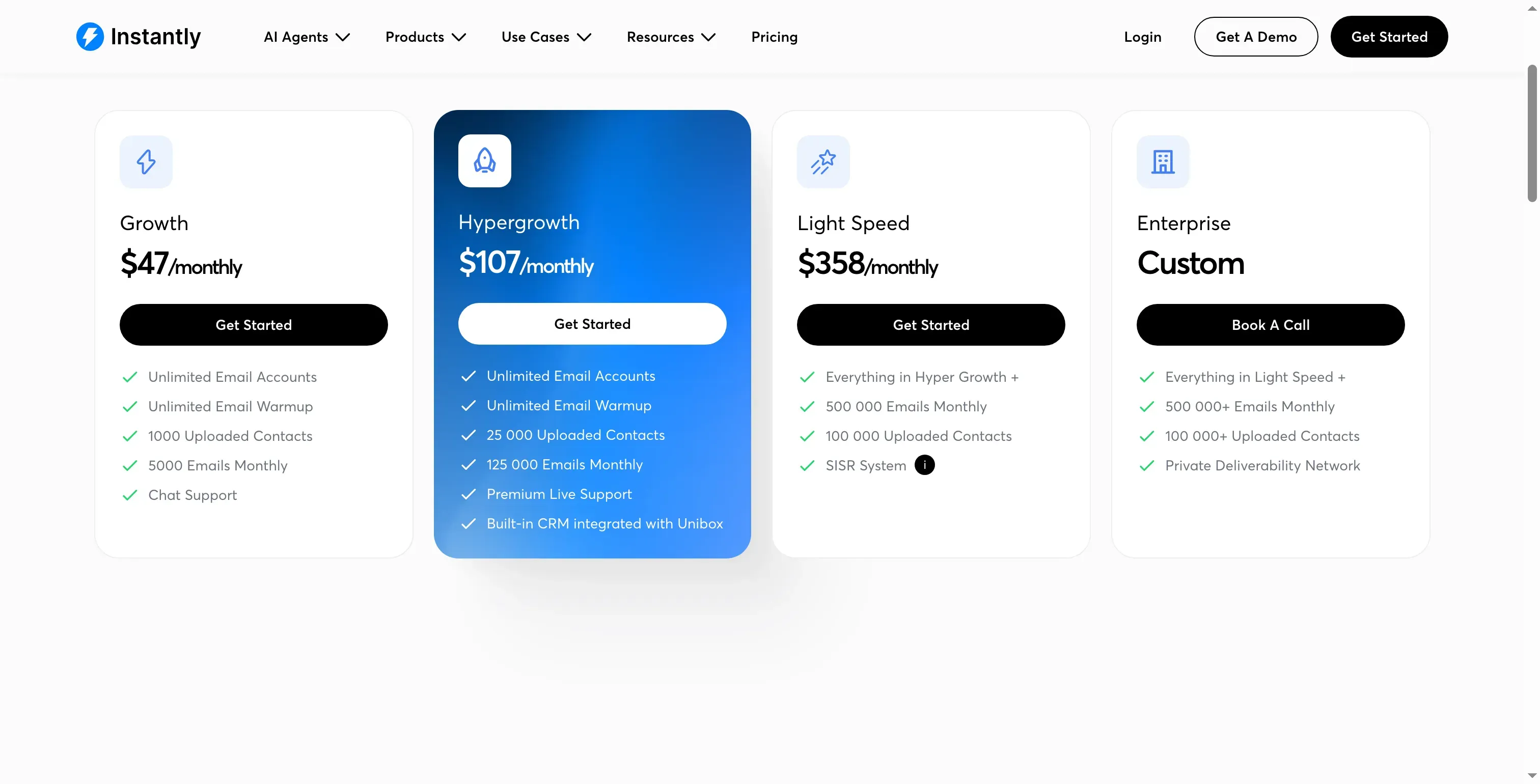
Instantly’s monthly Outreach plans show the current prices, contact limits, email quotas, and CRM inclusion.
Instantly Features: Email Campaigns, Data, and Workspaces
Instantly offers email campaign controls, warmup, inbox placement, AI agents, lead search and enrichment, visitor data, Unibox, CRM integrations, and agency workspaces. Access and usage depend on plan tier and separately purchased credits or services.
- Automation & Campaign Controls
- Email Warmup, Deliverability Controls, & Inbox Placement
- AI Agents & Instantly Credits
- SuperSearch, Enrichment, & Website Visitors
- Unibox, CRM, & Integrations
- Team, Agency, & Workspace Controls
Automation & Campaign Controls
Instantly automates multistep follow-ups, conditional email branches, reply stops, variant testing, schedules, sender rotation, and account or campaign limits:
- Multistep email follow-ups.
- Automation Builder supports if/else branches with several AND/OR conditions and triggers based on replies, status, and list changes.
- Higher-tier Subsequences.
- Stop-on-reply, stop-company-on-reply, and stop-on-auto-reply controls.
- Supports as many as 26 variants alongside optional automatic optimization, using A/Z testing.
- Multiple schedules, sender rotation, and per-account or per-campaign limits.
Follow-ups can be branched around replies, account status, or list changes. The builder still handles email; it doesn’t run LinkedIn actions.
| Control | Verified behavior | Plan gate | Risk boundary |
|---|---|---|---|
| Account and Campaign Limits | Separate daily-email controls at account and campaign level | Documented across Email Outreach plans | Warmup email is excluded from these counters |
| Automation Builder | If/else paths with AND/OR conditions and reply/status/list-change triggers | Across Email Outreach plans | Requires an eligible account to configure |
| Subsequences | Conditional in-campaign follow-up behavior | Higher tiers | Runs within email campaigns |
| A/Z testing | Up to 26 variants with optional auto-optimization | Capability confirmed; Growth entitlement conflicted | Tests email variants |
| Reply stops | Stop on reply, company reply, or auto-reply | Documented | Applies to the listed reply events |
| High Bounce Auto-Pause | Pauses above 5% bounce rate and is enabled by default | All users | Pauses campaigns; it does not assess list quality |
Instantly campaign controls
Instantly automates email sequences, conditional branches, reply stops, and sending limits; LinkedIn invitations, messages, profile scraping, and engagement remain outside its native campaign controls. It also leaves out Sales Navigator execution, Recruiter automation, post-engager collection, canceled-invite re-engagement, and “Save as lead” control.
Channel boundary: The automation engine executes email actions. LinkedIn invitations, messages, profile collection, and engagement actions are not native Instantly steps.
Email Warmup, Deliverability Controls, & Inbox Placement
Instantly pairs warmup with schedules, sender rotation, and sending limits. Its Warmup Health Score has a published formula and a target above 90%, but the score is Instantly’s benchmark; it doesn’t report campaign inbox placement.
| Mechanism | What is verified | What remains unverified |
|---|---|---|
| Warmup | Built-in warmup and a published Health Score formula with a >90% target | Comparative warmup performance and delivery outcomes |
| High Bounce Auto-Pause | Campaign pauses above 5% bounce rate by default | Whether the underlying list or domain recovers |
| Account/campaign limits | Operators can constrain sending at two levels | A safe volume for every mailbox, domain, or jurisdiction |
| Inbox Placement | A separately priced testing module exists | Primary-inbox rate in actual campaigns |
| Company Send Limits and hostile-prospect filtering | Higher-tier controls are documented | Effect on complaint or conversion rates |
| SISR | Dedicated/private server and IP blocks are allocated and rotated on higher tiers | Comparative reputation or inboxing outcomes |
Instantly deliverability mechanisms and evidence limits
Instantly’s advanced-deliverability guide states that HyperSend prioritizes speed above standard checks — consider this a throughput decision. Though warmup, placement tests, SISR, and automatic pauses exist as controls, we didn't conduct a campaign or seed-panel test to gauge their impact.
Mechanism is not outcome: Warmup, Inbox Placement, SISR, and bounce pausing are documented controls. None measures whether a campaign reaches the primary inbox.
AI Agents & Instantly Credits
Instantly includes AI Sales Agent, AI Sequence Writer, spam-word checks, AI Reply Agent, custom prompts, and Spintax Writer. Some prompt and reply features let you use your own model key, while Instantly Credits covers other actions. We didn’t test output accuracy, message quality, or conversion impact.
| Action | Credits | Additional limit |
|---|---|---|
| AI-generated reply | 5 per generated reply | Shared Instantly Credits pool |
| AI-generated Sales Agent lead | 5 per generated lead | Shared daily send/enrich limit |
| Sales Agent send/enrich | Credit use varies by action | Daily limit 10–10,000; default 10 |
| Custom AI prompt / sequence functions | Shared credits or BYOK, depending on feature | Output depends on prompt and selected model |
| Score leads (ICP fit) | Custom AI-prompt operation | Scoring criteria depend on the configured prompt |
Instantly AI credit consumption
The Sales Agent has two limits: it uses shared credits and follows its own daily cap on sends and enrichment. Even when a plan includes the feature, either meter can constrain how much you use it. The same broader credit system supplies search, enrichment, verification, and other AI actions—so before picking a tier, estimate your activity.
No documentation turned up for a hold-for-review step on AI messages; consequently, whether it's available is still unclear. On LinkedIn, Instantly neither generates post comments nor runs other native engagement actions.
Two usage constraints: AI actions can consume shared Instantly Credits while the Sales Agent also enforces a separate daily send/enrich limit.
SuperSearch, Enrichment, & Website Visitors
Instantly’s SuperSearch, enrichment, and visitor tools provide contact lookup, work-email discovery, company fields, and visitor resolution; usage spans different products or credits. SuperSearch queries a database of contacts that the vendor says holds more than 450M B2B entries. Inventory is what that figure reflects. No figure for freshness or match quality is published by Instantly. Email finding is offered by Instantly too, along with verification, enrichment via company, job, technology, news, and funding fields, and Website Visitors. A number of these actions draw on distinct products or credits.
Instantly does not identify the providers in its email-finding waterfall or publish coverage by geography, field, or record age.
| Module | Documented scope | Credit use | Evidence boundary |
|---|---|---|---|
| SuperSearch | Vendor-stated 450M+ B2B database | Credit-metered search and lead access | The database count describes inventory, not match accuracy |
| Email finder | Waterfall work-email discovery | 1–2+ credits for a verified work email | Coverage depends on provider and market |
| Email verifier | Built-in verification | About 0.25 credit per lead | Mailbox status indicates whether an address can receive mail; it does not confirm current job fit |
| Enrichment | Company, job, technology, news, and funding fields | Credit-metered | Public pages do not show a per-record freshness date |
| Website Visitors | Visitor-resolution module is separately productized | Rate not listed on public pricing pages | Resolution depends on the visitor data available |
| AI Sales Agent | Generated lead creation | 5 credits per generated lead | Output depends on the configured criteria |
Instantly lead-data modules and credit use
Instantly offers contact search, work-email finding, verification, company enrichment, and visitor resolution. Its listed data features exclude LinkedIn profile scraping, employee harvesting from LinkedIn organization URLs, Open-to-Work badge gathering, post-engager collection, inline company extraction, and Recruiter execution overrides. Public pages do not specify per-message full export, regex-based message-history deduplication, or record-level enrichment freshness.
Inventory versus fit: Instantly lists a 450M+ database and built-in verification. Its public pages give no accuracy, freshness, or ICP-fit rate.
Unibox, CRM, & Integrations
Instantly’s Unibox collects email replies, while Hyper Growth and higher tiers include in-app replies and CRM; integrations use direct CRM connections, workflow apps, webhooks, APIs, and partner routes. Inbox previewing is possible for Growth users through the plan comparison, yet replying from it isn't. Reply access plus CRM come with Hyper Growth and higher tiers; neither benefit is part of Growth.
HubSpot and Pipedrive link straight to Instantly. Separate pathways serve the Zapier app, outgoing webhooks, and API V2, though Salesforce relies on paid OutboundSync middleware. You'd obscure that distinction if you labeled every one of those as a native connector.
The webhook action lets Linked Helper send a LinkedIn-side profile to a different system. However, that transfer doesn't turn Instantly into a native LinkedIn connector.
| Function | Mechanism | Native or partner | Plan or verification status |
|---|---|---|---|
| CRM connectors | HubSpot and Pipedrive | 2 confirmed direct CRM connectors | Confirmed |
| HighLevel | Automation action | Native action | Confirmed |
| Salesforce | OutboundSync | Paid middleware | Paid middleware route |
| Close | Zapier recipe | Partner automation | Partner automation route |
| Zapier | Native Zapier app | Native app | Confirmed |
| Make | Generic webhook/API recipes | Native Make app not established | Evidence gap; do not infer absence |
| Outgoing webhooks | Event POSTs with custom headers | Native webhook | Dedicated article gates at Hyper Growth+ |
| API V2 | Scoped API with multiple keys | Native API | Exists; Growth/trial entitlement remains conflicted |
| LinkedIn actions | HeyReach, Aimfox, or Valley handoff | Paid partner execution | Instantly does not execute the LinkedIn action |
Instantly integration mechanisms
Integration Routes and Partner Handoffs
Instantly routes external connections through direct CRM links, workflow apps, APIs, outgoing webhooks, and paid partners. Instantly does not execute LinkedIn invitations or messages natively. Confirm API and webhook access against the plan details before relying on those integrations.
The public pages reviewed do not cover inbound webhooks, late-reply CRM resync, complete message-content export, or how record merges cascade. Outgoing webhooks are documented as a separate feature from inbound webhooks.
Team, Agency, & Workspace Controls
According to Instantly’s workspace guide, separate workspaces isolate client data. The bill rises fast with the number of clients, since every workspace requires its own subscriptions.
- Roles: Owner, Admin, Editor, View-VA, and Client differentiate access at the workspace level.
- Client portal: Agency White Labeling on Hyper Growth and Light Speed supports custom domain/logo branding and per-module client access. Clients given Campaigns access can see every campaign in that workspace.
- Workspace Groups: Groups organize workspaces but provide no consolidated dashboard, so portfolio reporting remains distributed.
- Billing unit: Team invitations add no per-seat charge on a qualifying tier; the paid unit is the workspace/product subscription.
- Exit administration: Several product families have separate cancellation paths, and some managed services require support to cancel.
For 20 clients, Instantly offers the one Agency bundle at $555/month, yet its client portal won't separate campaigns per tenant. Under the listed scenario, that's $555 for one shared portal, $940 for 20 Growth workspaces, or $1,940 for 20 Hyper Growth workspaces. Current prices apply to those examples; an agency's real quote could vary.
We reviewed public pages but found no listed workspace-volume discount or resolution of SSO access. Instantly calls its product a cloud app, with data processing in the US. It won't run locally.
Isolation multiplies subscriptions: Client portal access and branding don’t create campaign-level tenant isolation. Separate workspaces do, and each requires its own subscription set.
Is Instantly Safe for Cold Email?
Instantly provides sending limits and bounce pausing, but those controls cannot make cold email safe on their own: list quality, legal basis, domain setup, and campaign execution still matter. We reviewed the account and campaign limits, bounce pause, and other published email controls.
| Risk area | Documented control | Practical limit |
|---|---|---|
| Sending volume | Per-account and per-campaign daily limits; multiple schedules | The operator still needs to set volume for the mailbox, domain, list, and jurisdiction |
| Bounce exposure | Automatic high-bounce pause, enabled by default | Pausing does not repair list quality or sender reputation |
| Warmup | Built-in warmup and published Health Score formula with a >90% target | The Health Score is Instantly’s benchmark, not a campaign placement result |
| Placement testing | Separately priced Inbox Placement module | Tests are a separate paid module |
| Higher-speed sending | HyperSend warns that speed takes priority over standard checks | The documented trade-off prioritizes speed over standard checks |
| Higher-tier infrastructure | SISR assigns and rotates dedicated/private server and IP blocks | Dedicated infrastructure does not guarantee inbox placement |
| Data handling | US processing, a public DPA, GDPR representatives, and a subprocessor list | Confirm the SSO tier and security certifications during procurement |
| Connected accounts | “Unlimited Email Accounts” billing model with a 100-Connected-Accounts Terms ceiling | The terms set a fixed workspace ceiling |
Instantly sender-risk controls and practical limits
Instantly’s sending limits, warmup, and bounce pausing reduce some operational risks; they cannot guarantee legal compliance, inbox placement, or sender reputation. A pause can stop activity after a bounce threshold is crossed, while account limits cap volume. Operators still control list quality, legal basis, copy, and domain setup.
Higher tiers add SISR, hostile-prospect filtering, HyperSend, and Company Send Limits. Since HyperSend favors speed over standard checks, per Instantly, teams ought to determine if such a trade-off fits their campaigns.
Instantly’s Privacy Policy, DPA, and related materials cover US processing, GDPR representatives, and a subprocessor roster. No public verification of SOC 2 or ISO certification turned up, and which SSO tier applies is still unclear.
Your team still controls its list, legal basis, copy, domain configuration, and sending volume. Even if the platform provides warmup and bounce controls, those decisions influence spam and reputation risk.
Risk can’t be outsourced: Instantly supplies limits, warmup, bounce pausing, and testing controls. No cold-email platform eliminates spam, compliance, or sender-reputation risk.
What Instantly Reviews Say: Current Scores and a Trustpilot Warning
G2’s profile lists 4.8/5 over 4,165 reviews. A guideline-breach warning appears on Trustpilot, and its score is suppressed—even though 1,188 reviews are shown on that profile. Trustpilot conceals the score; I’m relying on the rating that readers can see.
From May to October, I tallied 135 public Trustpilot reviews. Monthly means went from 3.48 during May and 3.64 during June, to 1.06 in August, 1.14 in September, and 1.14 in October. Of these, 84 carried one or two stars. Such figures represent averages over the monthly posts that could be accessed — not the profile's overall rating — and the profile warning along with removals constrains the sample.
Recent G2 reviews give setup high marks and reference domain controls, access to paid features, and dashboard speed. When I paged through, the page duplicated reviews, and so I couldn't calculate a six-month trend. Capterra displayed 0.5 from one review even though its filters listed zero reviews; that rating I've excluded.