

 10 min read

TL;DR: Linked Helper vs lemlist in November 2026
Linked Helper keeps LinkedIn execution on your computer; lemlist ties it to cloud access and a Multichannel subscription. The November 8, 2026 checks establish these differences:
| Criterion | Linked Helper | lemlist |
|---|---|---|
| LinkedIn entry price | Local Standard: $15 per license monthly | Multichannel: $109 per user monthly. The Email plan excludes LinkedIn automation |
| Account access | Desktop. Safety first. Your computer, IP, and session | The extension sends LinkedIn session data to lemlist |
| Campaign detail | Specialized collection and processing for LinkedIn audiences | Comment last post requires manual submission; Like last post skips leads without a post in the chosen window |
| Team purchasing | Workspaces, roles, and shared data options | Five email senders per Multichannel user in total. Credit add-ons need a separate budget |
| Trial | 14-day Pro trial without a card | 14-day Multichannel trial. Check setup, allowances, and cancellation before paying |
Linked Helper vs lemlist pricing: LinkedIn access starts at different prices
Linked Helper Local Standard starts at $15 per license per month. With lemlist, you'll need the $109-per-user Multichannel plan to automate LinkedIn. Its cheaper Email plan starts at $69 per month for 50,000 emails with unlimited users and senders, but you can't add LinkedIn automation on that plan. Existing customers may have legacy terms.
The table compares USD subscription prices (before applicable taxes). You'll have to pay annually to get the annual rates.
| Product and plan | Monthly payment | Annual option |
|---|---|---|
| Linked Helper Standard, Local Storage | $15 per license | $99 for 12 months ($8.25/month equivalent) |
| Linked Helper Pro, Local Storage | $45 per license | $297 for 12 months ($24.75/month equivalent) |
| Linked Helper Standard, Cloud Storage | $29.90 per license | $198 for 12 months ($16.50/month equivalent) |
| Linked Helper Pro, Cloud Storage | $59.90 per license | $396 for 12 months ($33/month equivalent) |
| lemlist Multichannel | $109 per user | Advertised $87/user/month billed annually ($1,044 calculated for 12 months) |
We calculated lemlist's annual total from its advertised monthly equivalent. Enterprise pricing is custom. You may also have to pay for mailboxes, domains, extra enrichment, and calling usage or add-ons, so leave room for those costs in your Multichannel budget.
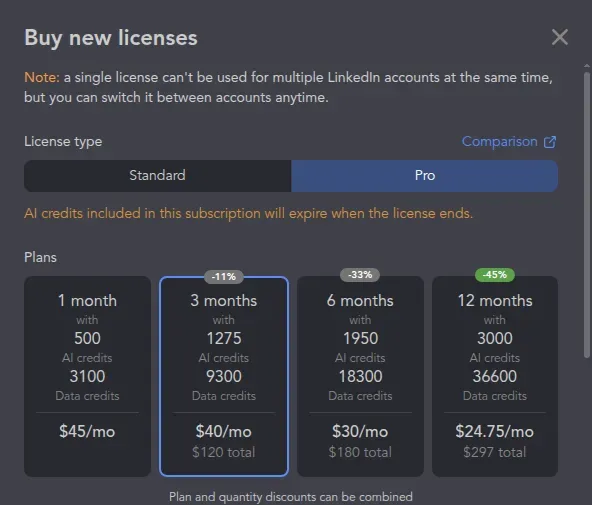
Inside Linked Helper, the license selector shows each term's total and separates included Data credits from AI credits.
Linked Helper Local Pro costs $747 less per year than lemlist's advertised annual Multichannel rate: $1,044 − $297. As confirmed in the license selector, ten annual Local Pro licenses for ten simultaneous accounts cost $2,673 with the eligible 10% bulk discount. Ten lemlist Multichannel users at the advertised annual rate total $10,440 before a negotiated offer.
These are software license costs. If you're also buying lemlist for email and calls, include those channels and their infrastructure when you work out your total budget.
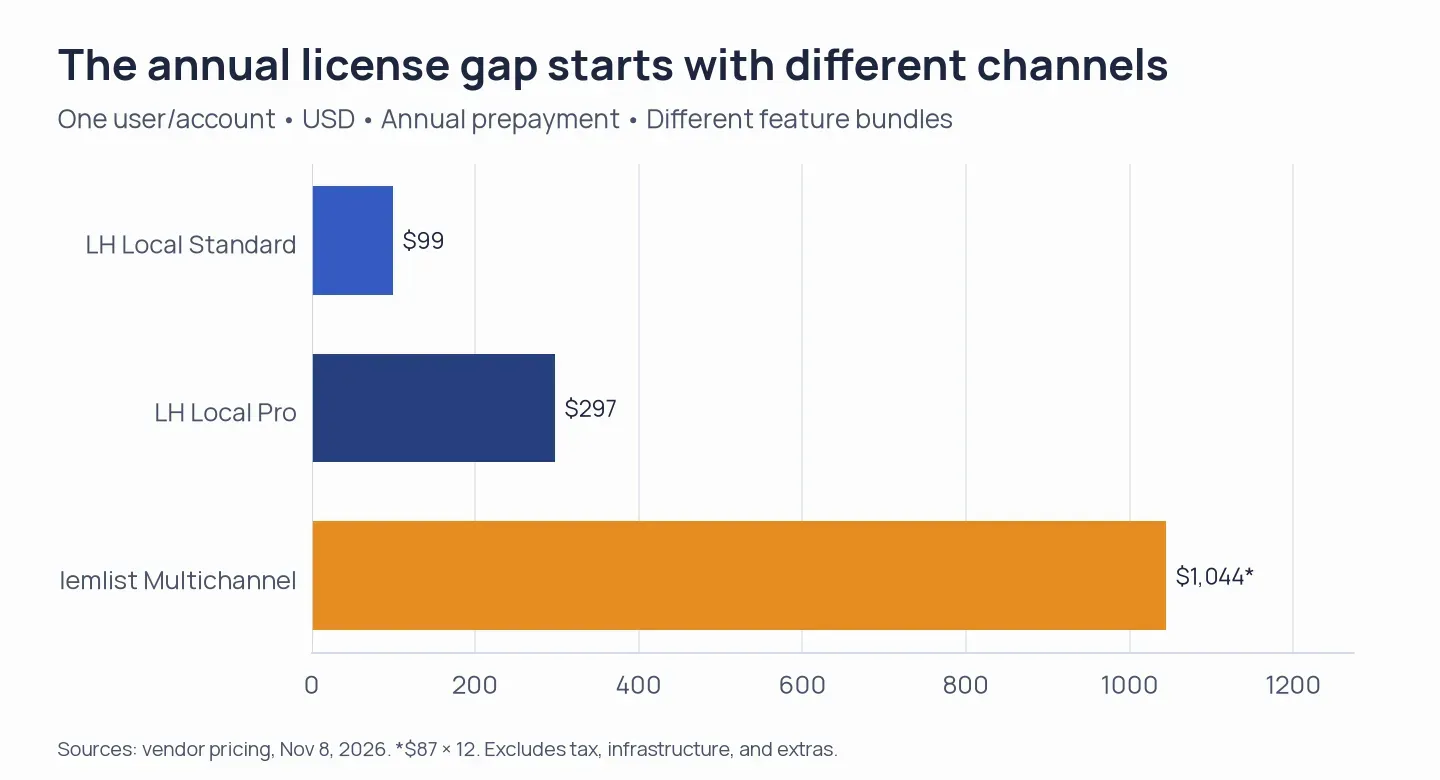
Annual software license costs at the checked rates. lemlist's total is calculated from its advertised monthly equivalent; taxes, infrastructure, and extras are excluded.
Trial and cancellation: check the enrichment subscription separately
lemlist's enrichment add-on needs a separate cancellation. Cancel your main subscription and you could still be paying for enrichment, so check both before you leave. Don't assume cancellation means a refund, either.
Linked Helper offers a 14-day Pro trial without a card. lemlist offers a 14-day Multichannel trial. Once you're paying for lemlist, you can cancel through Settings → Billing & Users → Manage and keep access through the term you've paid for.
Linked Helper vs lemlist safety: desktop control versus a cloud session
Linked Helper runs LinkedIn automation on your computer, with your IP and session, while lemlist transfers LinkedIn session data to its cloud service. Linked Helper takes a desktop, safety-first approach: your LinkedIn password doesn't go to another automation provider's cloud.
Linked Helper's Local Storage and Cloud Storage versions differ in where campaign data are stored. Cloud Storage supports shared records, while automation still runs in the desktop application on the customer-controlled computer or server.
The team inspected lemlist extension version 5.0.24 and found code that sends LinkedIn session cookies and selected request headers to lemlist, giving the service access to an authenticated LinkedIn session when you connect. That's access to your account.
lemlist's recommended LinkedIn automation limits are 20 invitations, 30 profile visits, and 30 messages per working day (voice messages count toward that message allowance), with a 100-action daily maximum. LinkedIn hasn't approved those settings as a safe activity allowance. Lowering them won't change who has access to your session.
Linked Helper vs lemlist campaigns: manual comments and import gaps matter
Linked Helper supports specialized LinkedIn collection and processing. With lemlist, you'll have to submit comments manually and you can't import from Recruiter or event pages through its extension. A feature list that marks both products as supporting comments and imports hides those differences.
Both tools support invitations, messages, InMail, follows, likes, and endorsements. lemlist also offers invitation withdrawal and voice-message options. But its InMail step still needs an eligible LinkedIn Premium subscription and available LinkedIn InMail credits. You're paying for those separately from Multichannel.
The team saved a Like last post step in the lemlist trial, then reloaded and reopened the draft. The 14-day lookback was still there. If a lead hasn't posted within that window, the sequence skips the like and moves on, so don't count every lead passing through this step as a post engagement.
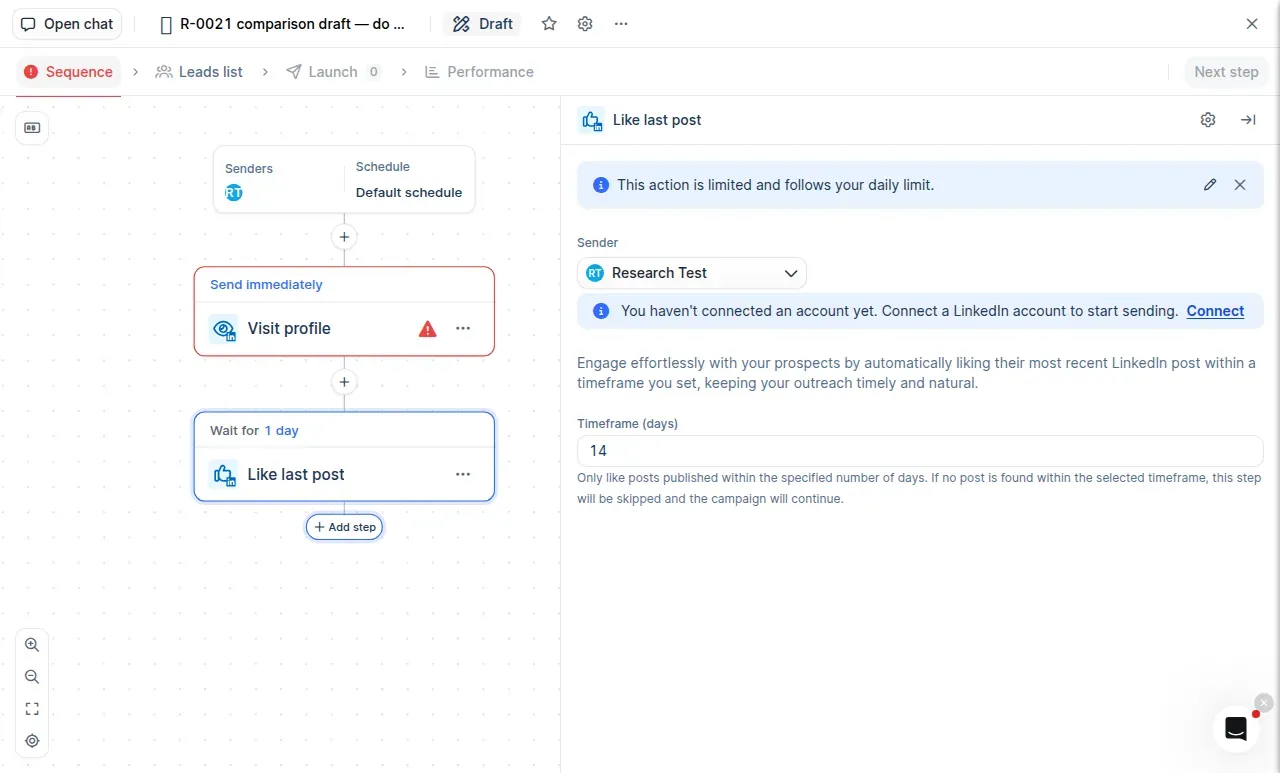
Inside lemlist, Like last post lets you choose the post's age; the sequence continues when no matching post is found.
lemlist's Comment last post step creates an AI draft and a task for you to review and submit. You'll still need someone to post it. Linked Helper supports AI-personalized comments within its like/comment workflow.
Linked Helper collects from searches, Sales Navigator, Recruiter, groups, events, and people interacting with posts, with specialized invitation and messaging actions for supported group and event contexts. lemlist's Recruiter and event-page restriction applies to its extension's importing paths. Its other lead sources include its database, CSV imports, and CRM data.
Linked Helper vs lemlist enrichment: compare operations before credit balances
Linked Helper charges 1 Data credit per found email. lemlist charges 5 credits for finding and verification, so you can't compare the balances without checking what each credit buys.
The credit schedules break down email, phone, and profile charges as follows:
| Operation | Linked Helper | lemlist |
|---|---|---|
| Email finding | 1 Data credit per found email | 5 credits for finding and verification |
| Phone finding | 10 Data credits per found number | 20 credits per found number |
| Database profile enrichment | Profile information: 1 Data credit. Company data: 2 | LinkedIn enrichment: 1 credit |
| Included monthly allocation | Standard: 620 Data credits. Pro: 3,100 | Multichannel: 400 credits per user |
Linked Helper's paid database enrichment is separate from scraping a LinkedIn profile you visit. Check the allocation for the license term you're buying: the Local Pro selector shows 36,600 Data credits for 12 months. Included AI credits expire with your license, but Data credits don't expire.
lemlist has included credits, recurring credit add-ons, and one-time top-ups, each with its own prices and expiry rules. Before you buy more, check which balance will pay for the operation you need. Finding a phone number and verifying it are separate operations, too.
Linked Helper's current changelog includes ideal customer profile (ICP) checks, per-recipient message generation, and personalized comments. lemlist offers AI-assisted writing and voice-message options. Review generated content for the intended recipient before using it.
Linked Helper vs lemlist teams: count users and senders separately
lemlist Multichannel includes five email senders per user in total. Linked Helper Workspaces organize roles, permissions, and shared data. Don't budget for another set of mailboxes on top of lemlist's allowance: those five are the total. You'll also need to count paid users and LinkedIn identities separately from mailboxes.
Linked Helper supports CRM connections, outgoing webhooks, data export, and export of message history with Pro. Both products connect with HubSpot, Pipedrive, and Salesforce. lemlist's Email plan already includes API and CRM access. You don't need to buy its LinkedIn plan just to get those integrations.
If you've already got a CRM sequence tool or email sender, you may have the email part covered. Linked Helper can connect your LinkedIn work through integrations or exports. Before you replace the CRM or email setup you're already using, check where replies and opt-outs will go when you connect the tools, then try the handoff in a small draft.
Linked Helper vs lemlist reviews: setup and billing complaints shape the trial
lemlist reviewers describe trouble with setup, sender allowances, and cancellation. Though individual accounts can't show how often a problem occurs across all customers, use their complaints to plan your trial checks.
Brigitte Sachse–Bee Video's August 2026 five-star Trustpilot review described a substantial learning curve for beginners. Victor Jambers's September two-star review raised confusion over the number of email senders and weekend support. Borut Markel's October one-star review criticized cancellation; lemlist acknowledged that the flow had been hard to find and said it had contacted him. The reply did not establish the outcome.
During your trial, build the sequence you intend to use, check how many senders you're allowed to connect, and find the cancellation controls before you commit to a paid subscription. The broader lemlist review covers the product beyond this two-tool comparison.
Linked Helper vs lemlist verdict: choose desktop control for LinkedIn outreach
Linked Helper is my choice if you want LinkedIn outreach to run in your own desktop session. You can collect prospects from LinkedIn searches, communities, and recruitment workflows, then connect that work to the email or CRM subscription you already use.
lemlist requires you to accept cloud access to your LinkedIn session and a per-user bill to put email, LinkedIn, and calling steps into one sequence. Some steps still need manual work. If you're considering lemlist for those combined channels, build your intended campaign during the trial and check how much operator time it needs before you commit to a paid term.
For options beyond this pair, see the lemlist alternatives guide.
How we tested
The team checked Linked Helper's account and license screens and saved and reopened a lemlist trial draft on November 8, 2026. We combined those observations with the Linked Helper changelog, product documentation, the audit of the lemlist extension code, and user reviews. We didn't run live campaigns or a matched email-finding test, so we can't compare delivery or account-restriction rates.