
 Updated: September 29, 2026
 14 min read
LinkedIn automation pricing pages rarely tell the whole story. This roundup compares what five of the cheapest LinkedIn automation tools in 2026 cost you for real outreach beyond the number listed under "starting at."
What “Cheap” Actually Means for LinkedIn Automation
Many people evaluate the cheapest LinkedIn automation tools based on one number: the lowest tier, billed monthly. That number typically doesn’t match what you'll have to pay to set up a comprehensive campaign and actually run it.
To determine the cheapest LinkedIn automation tool, you need to analyze the value of the free trial, the features you get at the starting price, how much your budget will need to grow as you scale, as well as what the real usable price and the total cost of ownership are.
The real usable price is particularly important because many tools limit helpful features to higher-tier plans while actively advertising their lowest tiers. The plan that offers actual usable features is your starting point for evaluating the price.
If a tool doesn’t have direct integrations that you need to run a campaign, your total cost of ownership (TCO) needs to include the price of middleware or other services. To calculate the TCO, get a list of all the features you need to run your LinkedIn automation campaign, and check whether some of them need additional payment.
For example, Octopus CRM does not have direct integrations, so you need to pay extra for Zapier. Thus, TCO will be $39.99 + $19.99 = $60.
Related reading:
How We Compared Pricing
Every tool on this list gets checked against these four criteria:
-
Free trial length: A seven-day trial barely covers your first batch of connection requests. A 14-day trial gives you enough time to watch replies come in and judge whether the default settings feel safe.
-
Starting price: The headline figure in the tool's ads and meta descriptions, useful as a starting point and nothing more.
-
Price at scale: Most of these tools charge per LinkedIn account, not per company. Buying for a five-person team usually means paying five times the advertised rate unless the vendor offers a bulk or workspace discount.
-
Real usable price: What a plan costs once you add whatever tier includes campaigns, data export, or basic safety controls. Most people assume those come standard on any LinkedIn automation tool they find.
That last point rarely shows up in a pricing table, which is exactly why it matters so much. Four of the five tools here gate core outreach automation (campaigns, message sequences, or data export) behind a tier priced well above the advertised entry price. Linked Helper is the one LinkedIn automation tool here where the advertised price already includes full campaign automation, so there's no separate "real" tier above it to budget for.
Cheapest LinkedIn Automation Tools at a Glance
Here's an overview of how the cheapest LinkedIn automation tools on this list compare:
| Tool | Starting Price | Free Trial | Price at 5 Accounts/Seats | Real Usable Price | Increase From Starting Price |
|---|---|---|---|---|---|
| Linked Helper | $15/mo (annual: $8.26/mo) | 14 days, no card | $75 (5 × $15); bulk discounts from 10 licenses; teammates are free in a shared workspace | Same $15; core outreach isn't gated | 0% — no difference |
| Octopus CRM | $9.99/mo (annual: $6.99/mo) | 7 days, no card | $49.95 (5 × $9.99); bulk discounts start at 20 accounts | $39.99/mo | 300% (4x more expensive) |
| Dux-Soup | $14.99/mo (annual: $11.25/mo) | 14 days, no card | $74.95 (5 individual accounts × $14.99); dedicated team plans start at $55 per seat (Turbo) | $55/mo | 267% (3.67x more expensive) |
| Waalaxy | $19/user/mo (annual: $16/mo) | 14 days (if you choose annual billing)/7 days (for monthly billing), card required | $95 (5 × $19); bulk discounts from 40 accounts | $49/mo | 158% (2.58x more expensive) |
| Dripify | $59/mo (annual: $39/mo) | 7 days, no card | $295 (5 × $59) | $79–$99/mo | 34%–68% (1.34x–1.68x more expensive) |
Cheapest LinkedIn automation tools compared by real usable price
Sources: Linked Helper pricing; Octopus CRM; Dux-Soup; Waalaxy; Dripify. All checked in July 2026.
1. Linked Helper — Cheapest Overall with Best Value
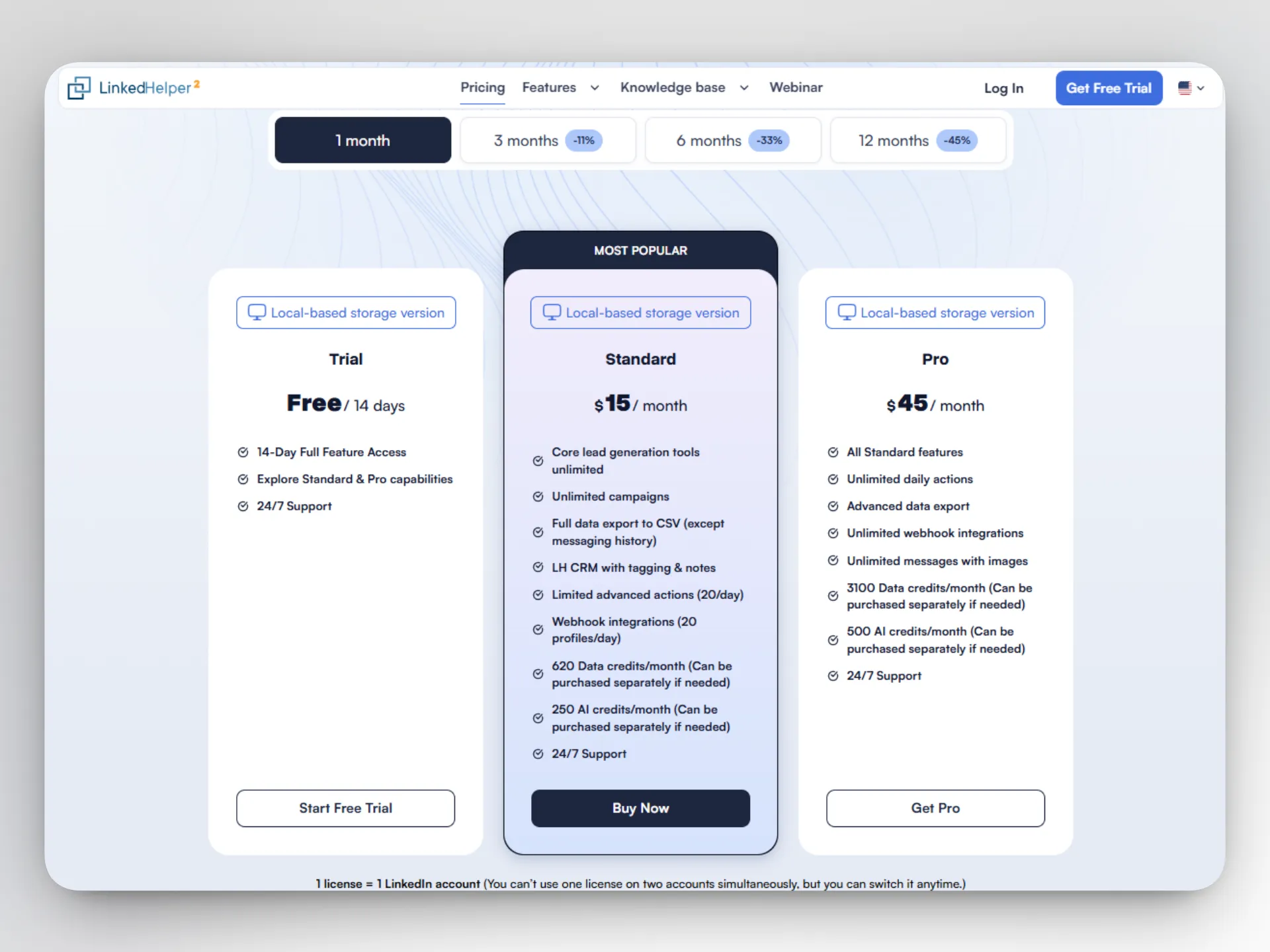
Linked Helper stands out among automation tools thanks to its desktop application automation and cost-effectiveness. Linked Helper pricing starts at $15 a month for the Standard plan, billed monthly, or $8.25 a month if you pay for a year upfront, a 45% discount for committing that far in advance. A Pro plan costs $45 a month ($24.75 annually), and a separate cloud-storage version runs higher on both tiers ($29.90 and $59.90 for Standard and Pro) since it adds cloud-based storage and cross-device access on top of the local app.
Unlike in other tools, the difference between Standard and Pro is narrower than the price gap suggests. Both plans give you unlimited campaigns, first-degree messaging, and second/third-degree connection invites, the core mechanics of cold outreach.
On Standard, about a dozen secondary actions (including group and event messages, image messages, post-boost tagging) cap out at 20 per day, and messaging history cannot be exported. Pro removes those caps and adds CSV and CRM webhook data export, unlimited webhook integrations, and a bigger monthly allowance of data and AI credits: 3,100 data credits and 500 AI credits a month on Pro vs. 620 and 250 on Standard. Data credits don’t expire; AI credits assigned with a license expire together with it. You can buy more credits separately — AI credits purchased this way do not expire.
Billing runs per LinkedIn account, not per person on your team, and teammates you add to a shared workspace setup don't cost anything extra. Only the number of active LinkedIn accounts does. Bulk pricing starts at 10 licenses (10% off) and scales up to 50% off above 1,000, stacking with whatever term discount already applies.
The trial runs 14 days, asks for no card, and gives you full access to both Standard and Pro features so you can compare them directly before paying anything.
Linked Helper's safety features are identical on the cheapest and priciest plan. Upgrading buys you more throughput and export access, not a safer setup.
If you want to see how that plays out on a real account, you can start your free trial and test the tool's full capabilities.
2. Octopus CRM — Browser Extension Pricing
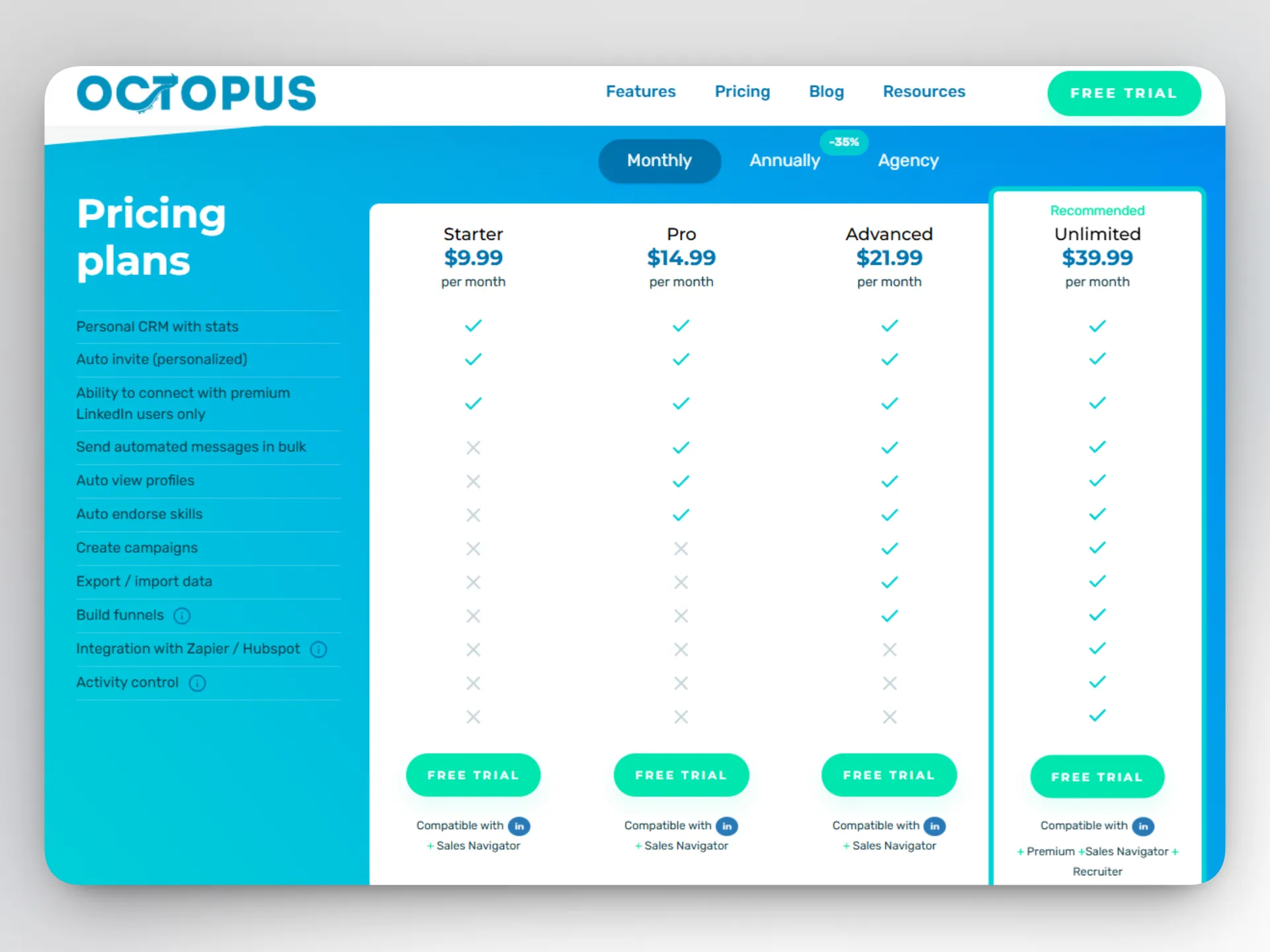
Four pricing tiers make up Octopus CRM, a Chrome extension, and most of the useful functionality sits behind the second-priciest one. The Starter plan costs $9.99 a month and gets you a personal CRM view, personalized connection invites, and the ability to message LinkedIn Premium users, but not bulk messaging, campaigns, data export, or any integration. A $14.99 Pro step adds bulk messaging and profile auto-visits, but campaigns still aren't part of the deal.
Campaigns and CSV export first show up on the $21.99 Advanced plan, more than double the advertised entry price. The additional safety feature, Activity Control, along with Zapier and HubSpot integration and compatibility with LinkedIn Premium or Recruiter accounts, needs the top $39.99 Unlimited plan, four times the Starter price. Activity Control itself works as a notification system: it flags unusual activity after the fact rather than pausing a campaign automatically for you.
Billing is based on LinkedIn accounts, not seats or users. Octopus CRM's free trial runs seven days with no card required, shorter than most of the tools on this list.
3. Dux-Soup — Entry-Tier Prices
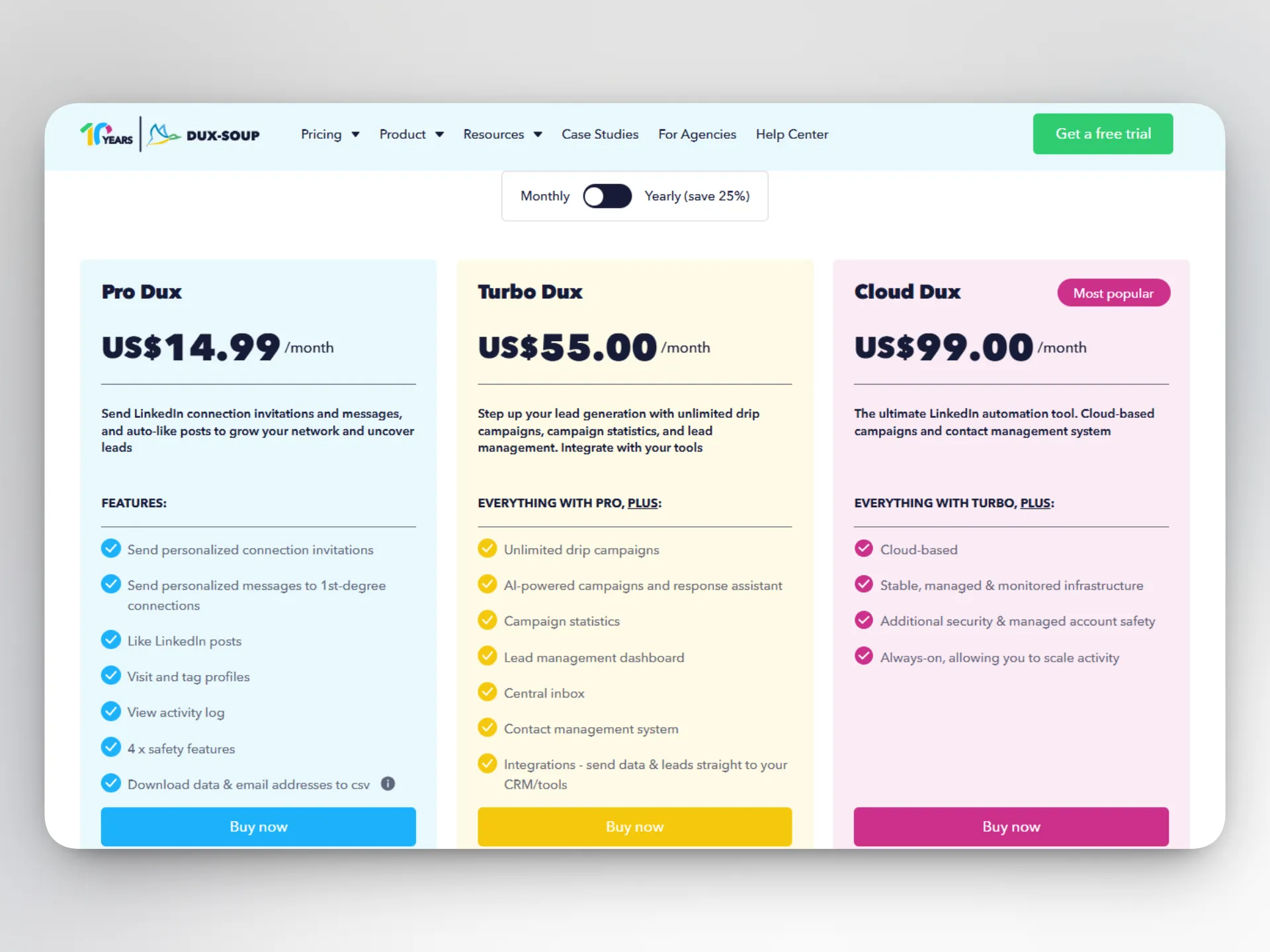
Dux-Soup pricing starts at $14.99 a month for the Pro Dux plan, or $11.25 a month if you're billed annually. At that price, you get a single-action tool run through a Chrome extension: it sends connection invites, messages first-degree connections, likes posts, visits and tags profiles, and exports contact data to CSV, with four safety features built in even at this cheapest tier.
What Pro Dux leaves out is any form of drip campaign, campaign statistics, a contact-management dashboard, or integrations with outside tools. Those arrive at Turbo Dux, priced at $55 a month ($41.25 annually), 3.7 times the Pro price. A Cloud Dux plan at $99 a month adds hosted infrastructure, so your campaigns keep running without a computer staying switched on.
The tool offers a 14-day free trial with no card required, matching Linked Helper's trial length. If you decide to upgrade, be careful with the marketing claims on the website: public pages promise a 25% annual-billing discount, while the subscription management page inside the user account shows a 20% discount. The prices themselves remain the same, but the differences in claims may be confusing.
Some materials on the official website and within the tool’s interface mention a “Starter (Free) Edition” as a subscription tier. This most likely refers to the free trial, not a separate plan.
4. Waalaxy — Core Automation on the Entry Tier
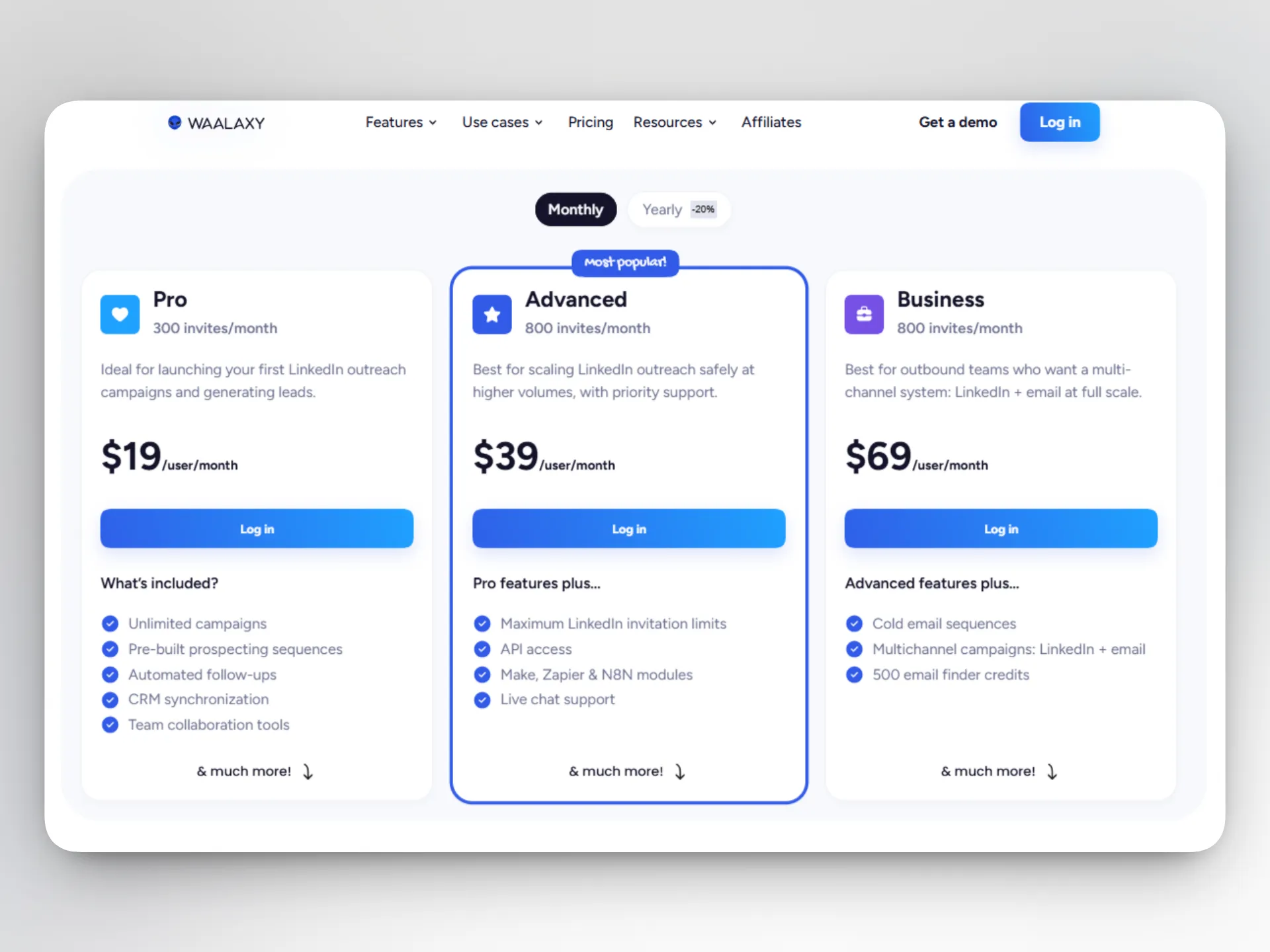
Waalaxy’s pricing page lists three paid tiers, each backed by a 14-day free trial. However, trial terms are quite different from those of other tools. You have to provide card details, and the type of billing you choose (monthly vs. annual) determines the duration of your free trial. You only get 14 days free if you go for annual billing; monthly payments mean seven days to test the tool.
Pricing runs in euros rather than dollars, which is worth factoring in before you compare it directly against the rest of this list.
The Pro plan costs you €19 per user per month and covers 300 LinkedIn invites monthly, unlimited campaigns, pre-built sequence templates, automated follow-ups, and CRM syncing with more than 2,000 outside tools. All of that comes bundled with the cheapest tier, unlike Octopus CRM or Dux-Soup.
Step up to Advanced, at €49 per user per month, and your invite ceiling rises to 800 a month, with API access, Zapier/Make/N8N modules, and live chat support added in. The €69 Business plan adds cold email sequences and a combined LinkedIn-plus-email setup on top of everything in Advanced.
When registering for a free trial, you can continue with a freemium version of the tool if you refuse to provide your billing information. According to Waalaxy’s help center, freemium accounts can’t use any automation features. You can only access your data and import prospects from a CSV file, so it’s mainly for keeping and viewing your data between paid subscriptions.
5. Dripify — Mid-Tier Option
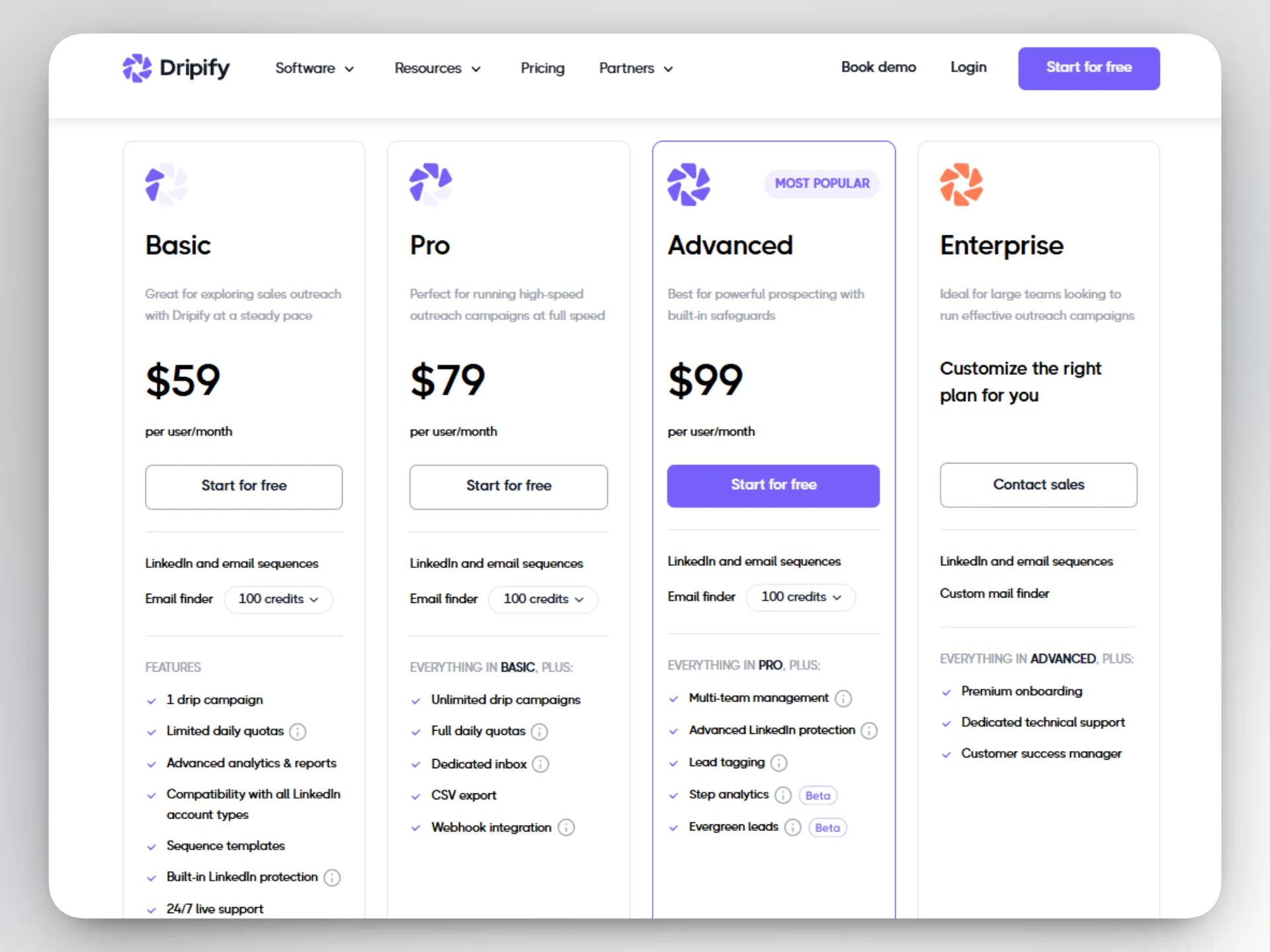
Basic is Dripify's entry plan: $59 a month, or $39 if you pay for a full year upfront ($468 in one charge). That plan runs one drip campaign at a time with reduced daily quotas, which caps how much outreach it can realistically handle.
The plan most people end up needing (Pro) costs $79 monthly or $59 billed annually: unlimited campaigns, full daily quotas, a dedicated inbox, CSV export, and webhook integration. Dripify's own “most popular” label sits one tier higher, on Advanced, at $99 monthly or $79 annually, adding multi-team management and a more advanced LinkedIn safety algorithm on top of everything in Pro.
A seven-day free trial with no card covers Dripify's onboarding, shorter than the two-week window Linked Helper and Dux-Soup both give you.
Related reading:
Are the Cheapest Tools Actually Worth It?
Cheap and unsafe aren't the same thing, but a low advertised price does point you toward something worth checking: whether daily-action safety limits ship on a tool's cheapest tier or only on its most expensive one. LinkedIn also enforces its own automation limits, regardless of which tool you use, so a tool's internal safety cap only helps you if it sits below what LinkedIn itself tolerates.
Linked Helper and Dux-Soup both build safety controls into every price point. Linked Helper's recommended cap, 150 actions per rolling 24 hours, is identical on Standard and Pro. Paying more buys export and integration headroom, not a safer default. Dux-Soup bundles four safety features into its $14.99 Pro Dux tier, the same tier that skips campaigns entirely.
Octopus CRM and Dripify handle it differently. Octopus CRM's activity control only shows up on its $39.99 Unlimited plan, four times the advertised Starter price. Dripify's auto-adjusting safety algorithm is tied to the $99 Advanced plan.
It's worth saying plainly, too: neither the most expensive nor the cheapest LinkedIn automation tool can guarantee your account stays untouched. Daily-limit discipline reduces the odds of a restriction but doesn't remove them. A longer trial doubles as a safety check in its own right. 14 days gives you enough time to watch a tool's default limits in action before any money changes hands; seven days mostly covers setup.
How to Choose on a Budget Without Sacrificing Safety
Picking a cheap plan without a costly surprise later comes down to a handful of checks, not a single price comparison.
-
Find out what the advertised price leaves out: Campaign automation, data export, and outside-tool integrations are the three features most often missing from a cheap tier's first rung. Linked Helper is rather an exception here: most capabilities are available in the Standard plan, even if limited.
-
Confirm the daily-limit control lives on the cheap tier itself: It must not only be on the flagship one. For example, Linked Helper builds safety and security into its cheapest paid tier.
-
Check the trial length and whether it asks for a card upfront: A 14-day no-card trial (Linked Helper, Dux-Soup) gives you more room to see real replies than a seven-day one (Octopus CRM, Dripify). Waalaxy is a good example of a condition-bound trial that requires more consideration.
-
Ask whether the price scales per account or per workspace: A per-account model means a five-person team pays five times the sticker price with no discount at that size. Bulk discounts matter here. Linked Helper's bulk pricing starts kicking in at 10 licenses. Octopus CRM offers discounts from 20 accounts, while Waalaxy can shed up to 30% of the price if you buy 40 accounts or more.
None of this rules out picking the cheapest option on your list. It just means running through these four points before assuming the sticker price is the real price. If you care about more than cost alone, the full roundup of the best LinkedIn automation tools covers the wider category beyond price.