
 Updated: September 18, 2026
 38 min read
Dux-Soup has been part of LinkedIn automation since 2015, and it still works for basic profile visits, connection requests, post likes, and follow-ups. Teams usually start comparing Dux-Soup alternatives when the Chrome-extension setup feels too limited for serious outreach. The common triggers are workflow depth, CRM handoff, multi-account control, proxy assignment, email steps, and a clearer answer to where the LinkedIn session runs.
Linked Helper is our disclosed recommendation for that stage. It starts at $15 per month, includes a 14-day free trial, has served 500,000+ users since 2016, and runs as a desktop application through its own built-in browser engine instead of Chrome or a vendor cloud browser.
This guide compares 9 Dux-Soup alternatives by architecture, session handling, workflow depth, CRM support, proxy control, channel scope, and price. For the safety notes, we used vendor research, shipped extension-code review, and live IP checks from June 2026.
Quick Answer: The Best Dux-Soup Alternative in 2026
Linked Helper is the recommended Dux-Soup alternative in this guide for users leaving Chrome-extension automation because of browser dependency, workflow limits, or account-control concerns. It runs locally through its own built-in browser engine on Windows, macOS, Ubuntu, or a VPS. LinkedIn activity uses the authenticated session and the user’s IP address, or a proxy assigned per account. Cloud alternatives such as Dripify, Skylead, SalesRobot, HeyReach, Expandi, PhantomBuster, and Meet Alfred can add email, AI, shared inboxes, or agency dashboards. The trade-off is vendor-side infrastructure, session custody, proxy setup, and per-seat pricing.
Key Takeaways
- Dux-Soup starts at $14.99/month, but the plans most teams compare against alternatives are usually Turbo Dux at $55/month and Cloud Dux at $99/month.
- Linked Helper starts at $15/month, includes a 14-day free trial, and has been used by 500,000+ users since 2016.
- Linked Helper runs on Windows, macOS, and Ubuntu through its own built-in browser engine, while Dux-Soup is mainly built around a Chrome extension with a separate Cloud Dux tier.
- In our June 2026 research, we reviewed 9 Dux-Soup alternatives and used first-hand checks for 7 tools through extension teardown, live IP checks, or both.
- Cloud alternatives in this article range from $56/month to $100/month+, while agency-focused options like HeyReach can start much higher depending on sender count.
- No tool removes LinkedIn restriction risk, but architecture changes the setup. Desktop, cloud, and Chrome extension tools differ in where the session runs, which IP LinkedIn may see, and who controls the account environment.
What Is Dux-Soup, and Why Look for Alternatives?
 Dux-Soup is a LinkedIn automation tool built mainly around a Chrome extension. It automates repetitive LinkedIn actions such as profile visits, connection requests, follow-up messages, tagging, lead exports, and basic lead data collection.
For simple outreach, that may be enough. A solo user who only needs profile visits, light follow-ups, and CSV exports may not need a heavier platform.
The comparison changes when LinkedIn becomes a sales, recruiting, or agency channel. At that point, teams usually need deeper campaign logic, reply tracking, CRM handoff, multi-account control, proxy planning, or a clearer view of where the LinkedIn session runs.
Dux-Soup is a LinkedIn automation tool built mainly around a Chrome extension. It automates repetitive LinkedIn actions such as profile visits, connection requests, follow-up messages, tagging, lead exports, and basic lead data collection.
For simple outreach, that may be enough. A solo user who only needs profile visits, light follow-ups, and CSV exports may not need a heavier platform.
The comparison changes when LinkedIn becomes a sales, recruiting, or agency channel. At that point, teams usually need deeper campaign logic, reply tracking, CRM handoff, multi-account control, proxy planning, or a clearer view of where the LinkedIn session runs.
Dux-Soup Pricing
Dux-Soup pricing checked: June, 2026
| Plan | Monthly Price | Annual Equivalent | What You Get | CRM and Workflow Support | Cloud Automation |
|---|---|---|---|---|---|
| Pro Dux | $14.99/month | $11.25/month, billed annually | Personalized connection invitations, first-degree messages, post likes, profile visits, tagging, activity log, and CSV downloads. | Limited compared with higher tiers. | No |
| Turbo Dux | $55/month | $41.25/month, billed annually | Everything in Pro, plus unlimited drip campaigns, campaign statistics, lead management dashboard, central inbox, response tracking, and contact management. | Integrations for CRM and workflow tools, including options shown for Salesforce, Pipedrive, HubSpot, Make, and Zapier. | No |
| Cloud Dux | $99/month | $74.17/month, billed annually | Everything in Turbo, plus cloud-based operation, stable managed infrastructure, monitoring, and always-on execution. | Included through the higher-tier workflow setup. | Yes |
The price gap matters because many switchers do not leave Dux-Soup after comparing only the cheapest tier. Teams start comparing alternatives when the workflow needs to sit closer to Turbo or Cloud pricing.
Where Dux-Soup Starts to Feel Limited
Dux-Soup still works for basic LinkedIn automation, especially if you want a low-cost Chrome-extension setup. The limits show up when outreach becomes a repeatable sales, recruiting, or agency workflow.
- Workflow depth: Pro Dux covers basic actions, while drip campaigns, campaign statistics, lead management, central inbox, and CRM integrations sit on Turbo or Cloud.
- Browser and session model: Pro and Turbo depend on the Chrome extension, while Cloud Dux changes the setup by moving execution into Dux-Soup’s cloud environment.
- Cost jump: Cloud Dux solves the always-on problem, but it moves the monthly price from $14.99 to $99.
- Scale and channel limits: Agencies may need stronger workspace separation, proxy planning, shared inboxes, and client controls, while multichannel teams may want LinkedIn plus email closer to the campaign builder. For a solo user, those gaps may not matter. For teams using LinkedIn as a pipeline channel, they affect cost, control, and campaign quality.
First-Hand Dux-Soup Extension Findings
We unpacked the published Dux-Soup Chrome extension in June 2026. The key finding was plan-dependent architecture. The package shipped separate editions for Free, Pro, Turbo, Cloud, and Trial, with plan logic branching through config.getEdition().
On Free, Pro, and Turbo, automation runs locally through the user’s Chrome environment and active LinkedIn session. In the package we reviewed, Dux-Soup injected content scripts into LinkedIn pages and made direct LinkedIn API calls from the browser. That does not prove an account will be restricted, but it creates browser-side automation signals.
Cloud Dux used a different model. In the reviewed package, the Cloud edition synced the LinkedIn cookie jar, including li_at and JSESSIONID, plus local storage and browser data, to Dux-Soup’s cloud. That gives users always-on execution, but it moves session custody away from the local browser.
We also found Dux-Soup’s companion extension and a related probe file on a known-extension scan list in the browser-side environment we reviewed. That means the installed extension may be one observable signal before any outreach action runs.
These findings describe the code surface we saw in June 2026. Account outcomes still depend on account age, action volume, targeting, message quality, session consistency, pending invitations, and how aggressively automation is used.
Best Dux-Soup Alternatives Compared
Use this table as a fast scan before reading the detailed reviews. It compares architecture, starting price, free trial, LinkedIn scope, email or extra-channel scope, proxy control, and the best-fit audience for each tool.
Dux-Soup Alternatives Comparison Table
| Tool | Architecture | Starting Price | Free Trial | LinkedIn Scope | Custom Proxy | G2 Rating | Trustpilot Rating | Capterra Rating |
|---|---|---|---|---|---|---|---|---|
| Linked Helper | Desktop app with its own built-in browser engine | $15/month | 14 days | LinkedIn, Sales Navigator, Recruiter, and Recruiter Lite workflows | Yes, per account | 4.5★ (149) | 4.8★ (447) | 4.9★ (263) |
| Dripify | Cloud | $59/month | 7 days | LinkedIn campaigns, sequences, quotas, analytics, and inbox management | No | 4.5★ (338) | 4.6★ (469) | 4.7★ (477) |
| Skylead | Cloud | $100/month | 7 days | Cloud LinkedIn automation, smart sequences, Smart Inbox, and LinkedIn warm-up | Yes | 4.5★ (127) | 2.9★ (2) | 4.8★ (17) |
| SalesRobot | Cloud | $59/month | 14 days | LinkedIn outreach, AI messaging, and campaign dashboard | Yes | 4.8★ (57) | 2.3★ (9) | 5.0★ (1) |
| HeyReach | Cloud with login extension | $79/sender/month | 14 days | Multi-account LinkedIn outreach, sender management, unified inbox, and workspaces | Yes | 4.6★ (70) | ~4.0★ (51) | 5.0★ (2) |
| Expandi | Cloud | $99/month | 7 days | LinkedIn outreach, conditional flows, campaign prioritization, and warm-up controls | No | 4.3★ (152) | 4.4★ (217) | 4.4★ (31) |
| Waalaxy | Chrome extension | €19/month | 14 days | LinkedIn prospecting, automated follow-ups, imports, and reply detection | No | 4.5★ (1,315) | 4.7★ (1,286) | 4.4★ (253) |
| PhantomBuster | Cloud | $56/month billed annually | 14 days | LinkedIn and Sales Navigator automation, extraction, enrichment, and lead warming | No | 4.3★ (139) | ~3.8★ (100) | 4.5★ (64) |
| Meet Alfred | Cloud | $59/month | 7 days | LinkedIn automation, Smart Inbox, LinkedIn CRM, Sales Navigator, InMail, groups, and events | Yes | 3.4★ (37) | 4.5★ (924) | 2.8★ (13) |
| Dux-Soup | Chrome extension with Cloud tier | $14.99/month | Free trial available | LinkedIn, Sales Navigator, and Recruiter automation | No | 4.4★ (88) | ~4.6★ (43) | 4.0★ (16) |
How We Researched Dux-Soup Alternatives
This comparison started with Dux-Soup’s architecture split. Pro and Turbo run through the Chrome extension, while Cloud Dux moves execution into Dux-Soup’s cloud environment. That shaped how we reviewed every alternative.
We used four evidence groups:
- Official vendor pages, pricing pages, and product documentation
- Linked Helper product documentation and maintained competitor research
- Review signals from G2, Capterra, Trustpilot, Reddit, and switching-related discussions
- First-hand technical checks from June 2026, where testing was possible Pricing, trial lengths, deployment labels, CRM claims, and feature coverage were checked against vendor sources in June 2026. We treated review data as user-experience evidence, not as proof of safety architecture. Reviews can show setup friction, billing complaints, support delays, reliability issues, or daily-limit complaints, but they rarely prove where a LinkedIn session runs or what IP LinkedIn sees. For the first-hand safety layer, we used two checks:
- Live cloud/IP test: for selected cloud tools, we connected test LinkedIn accounts from the same declared location, France, and recorded assigned IPs, browser or device signals, location controls, timezone controls, BYO proxy support, and IPQualityScore results.
- Chrome extension teardown: for tools with public Chrome extensions, we downloaded the shipped package and checked permissions, cookie access, li_at and JSESSIONID handling, session transfer, LinkedIn API calls, page injection, endpoint blocking, and safety-related defaults. Where a finding comes from our own test, the tool section says so. Where we did not test a product end to end, we do not present IP behavior, extension behavior, or session custody as first-hand evidence.
Live IP and Cloud Session Test
For selected cloud tools, we tested the account-facing environment separately from the feature list. In June 2026, we connected two test LinkedIn accounts from the same declared location, France, and checked what appeared in LinkedIn’s active-session view. The live cloud test shows what appears when the account is operated from vendor-side infrastructure.
For each tested setup, we recorded:
- assigned IP and country
- browser, OS, device, or user-agent signals where visible
- desired-location and timezone controls
- number of selectable locations, where available
- bring-your-own-proxy support
- proxy-quality checker availability
- IPQualityScore results for connection type, proxy/VPN flags, and abuse, spam, or fraud-risk signals
Using two accounts helped us see whether the setup produced shared IPs, the same /24 range, or the same provider block. Those patterns do not prove restriction risk, but they matter for teams running several LinkedIn profiles through one vendor-side environment.
IPQualityScore is an independent IP-quality signal. It is not LinkedIn’s enforcement system and should not be treated as a prediction for any specific account.
Chrome Extension Teardown
For tools with public Chrome extensions, we downloaded the Chrome Web Store package, unpacked it, and reviewed the shipped code. This mattered for Dux-Soup because its lower plans run through the browser, while Cloud Dux uses a different session model. In the extension review, we checked:
- manifest version and requested permissions
- host permissions and LinkedIn page access
- cookie access, including li_at and JSESSIONID
- whether session data stayed local or moved to vendor infrastructure
- content-script injection into LinkedIn pages
- direct LinkedIn API calls, including Voyager-style calls
- vendor endpoint communication
- externally connectable access from vendor domains
- endpoint blocking, including logout-related behavior
- captcha-related handling, where visible
- safety-related defaults, such as delays, caps, and working-hour controls
The teardown shows what the extension does with the browser session and LinkedIn page environment.
What Our Tests Can and Cannot Prove
These tests describe what we observed in June 2026. Vendors can change extension code, login flows, cloud infrastructure, proxy providers, pricing, and default settings after publication. The tests can show extension behavior, visible cloud-session signals, assigned IPs, location and timezone controls, proxy options, and IPQualityScore results from the tested setup. They cannot show everything inside a vendor’s cloud, predict how LinkedIn will treat a specific account, or explain why one user’s account was restricted. That is why we avoid ranking tools as “safe” or “unsafe.” Restriction risk can come from session custody, IP reputation, same-network clustering, browser-side signals, page injection, API-call patterns, pacing, account age, targeting, message quality, pending invitations, and manual activity. When we measure something directly, we say so. Where we infer cloud-side behavior from login flow, extension code, active-session evidence, or IP behavior, we keep the wording cautious.
Top 9 LinkedIn Automation Alternatives to Dux-Soup
Linked Helper appears first because this article is published by Linked Helper and it is our disclosed recommendation. The other tools are compared by fit, strengths, trade-offs, and safety-relevant setup details. We tested 7 tools first-hand through extension teardown, live IP checks, or both. SalesRobot was reviewed from official product information, pricing data, and public review signals, so we avoid first-hand claims about its session handling or IP behavior.
1. Linked Helper
 Linked Helper is the main Dux-Soup alternative for users who want to move away from Chrome-extension automation without moving LinkedIn execution into a vendor cloud browser.
It runs as a desktop app on Windows, macOS, or Ubuntu through its own built-in browser engine. Campaigns use the authenticated LinkedIn session and the user’s IP address, or a proxy assigned per account.
That setup fits Dux-Soup switchers who care about session origin, proxy control, deeper campaign logic, CRM handoff, and account separation. Linked Helper is still LinkedIn-first, so teams that need native cold-email sequencing should pair it with a dedicated email tool.
Linked Helper is the main Dux-Soup alternative for users who want to move away from Chrome-extension automation without moving LinkedIn execution into a vendor cloud browser.
It runs as a desktop app on Windows, macOS, or Ubuntu through its own built-in browser engine. Campaigns use the authenticated LinkedIn session and the user’s IP address, or a proxy assigned per account.
That setup fits Dux-Soup switchers who care about session origin, proxy control, deeper campaign logic, CRM handoff, and account separation. Linked Helper is still LinkedIn-first, so teams that need native cold-email sequencing should pair it with a dedicated email tool.
Pricing
| Plan | Monthly Price | Annual Equivalent | Best For |
|---|---|---|---|
| Trial | Free for 14 days | Free for 14 days | Testing the app before paying. |
| Standard | $15/month | $8.25/month | Core LinkedIn automation, campaigns, CRM, and data export. |
| Pro | $45/month | $24.75/month | Higher limits, advanced actions, enrichment, and heavier workflows. |
Key Features
- Desktop app with its own built-in browser engine
- Local LinkedIn execution through your machine or a VPS
- Optional HTTP, HTTPS, SOCKS, or SOCKS5 proxy assignment per account
- Custom campaign builder with reply detection and stop conditions
- Built-in CRM with tags, notes, auto-tagging, and CSV export
- Sales Navigator, Recruiter Lite, Recruiter, groups, events, and post engagement support
- Data Enrichment credits, AI Messages, and AI-assisted reply editing
- Webhooks, Zapier, Make, and direct CRM integrations
What Reviewers Highlight
G2 reviewers often mention time savings, campaign control, follow-up automation, and value for money. Positive reviews also point to the ability to pace invitations and follow-ups without tracking every step manually.
First-Hand Research Notes
Linked Helper was not part of the Chrome extension teardown because it does not ship a Chrome extension for LinkedIn automation. It also was not part of the live cloud/IP test because LinkedIn actions do not run from Linked Helper’s vendor-side cloud infrastructure.
Instead, Linked Helper runs as a desktop application through its own built-in browser engine on the user’s machine, VPS, or dedicated server. The LinkedIn session is created inside that app environment and does not need to be uploaded to a vendor cloud for campaign execution.
That gives users more control over session origin than a Chrome extension or a cloud-first setup. Activity can run through the user’s own IP address or through a dedicated HTTP, HTTPS, SOCKS, or SOCKS5 IPv4 proxy assigned to a specific LinkedIn account.
Linked Helper includes daily limits, smart daily limits, randomized delays, working hours, click and mouse-movement emulation, per-account proxy assignment, and a built-in proxy checker. These controls help users keep pacing, session origin, and account separation more visible before campaigns scale.
Try Linked Helper free for 14 days
2. Dripify
 Dripify is a cloud LinkedIn automation platform for teams that want LinkedIn and email sequences in a managed dashboard instead of a Chrome-extension workflow.
It supports campaign templates, analytics, inbox management, quotas, and team features. For Dux-Soup switchers, the trade-off is cloud execution: campaigns can run without keeping Chrome open, but LinkedIn activity runs through Dripify’s vendor-side environment.
Dripify is a cloud LinkedIn automation platform for teams that want LinkedIn and email sequences in a managed dashboard instead of a Chrome-extension workflow.
It supports campaign templates, analytics, inbox management, quotas, and team features. For Dux-Soup switchers, the trade-off is cloud execution: campaigns can run without keeping Chrome open, but LinkedIn activity runs through Dripify’s vendor-side environment.
Pricing
| Plan | Monthly Price | Annual Equivalent | Best For |
|---|---|---|---|
| Basic | $59/user/month | $39/user/month | One drip campaign, limited quotas, templates, analytics. |
| Pro | $79/user/month | $59/user/month | Unlimited campaigns, full quotas, dedicated inbox, CSV export. |
| Advanced | $99/user/month | $79/user/month | Multi-team management, lead tagging, step analytics, stronger team controls. |
Key Features
- Cloud-based LinkedIn and email sequences
- Sequence templates and LinkedIn action quotas
- Dedicated inbox on Pro
- Advanced analytics and campaign reports
- CSV export and webhook integration on Pro
- Multi-team management on Advanced
- Email finder credits
- Integrations with tools such as HubSpot, Google Sheets, Zapier, and Make
What Reviewers Highlight
G2 reviewers often praise Dripify for ease of use, quick setup, smart delays, follow-ups, conditions, and cloud-based operation.
Limitations
Reviewers report friction when changing live sequences, and some mention shallow personalization beyond basic variables, missing AI reporting, or weaker notifications.
First-Hand Research Notes
Dripify did not have a public LinkedIn Chrome extension to inspect in our teardown pass, so we treated it as a cloud tool and focused on the live cloud/IP test.
In our June 2026 test from France, two fresh LinkedIn accounts received datacenter IPs in the same /24 range: 209.20.164.225 and 209.20.164.94. That does not prove a restriction risk by itself, but same-network placement matters for teams running several LinkedIn accounts through one vendor-side setup.
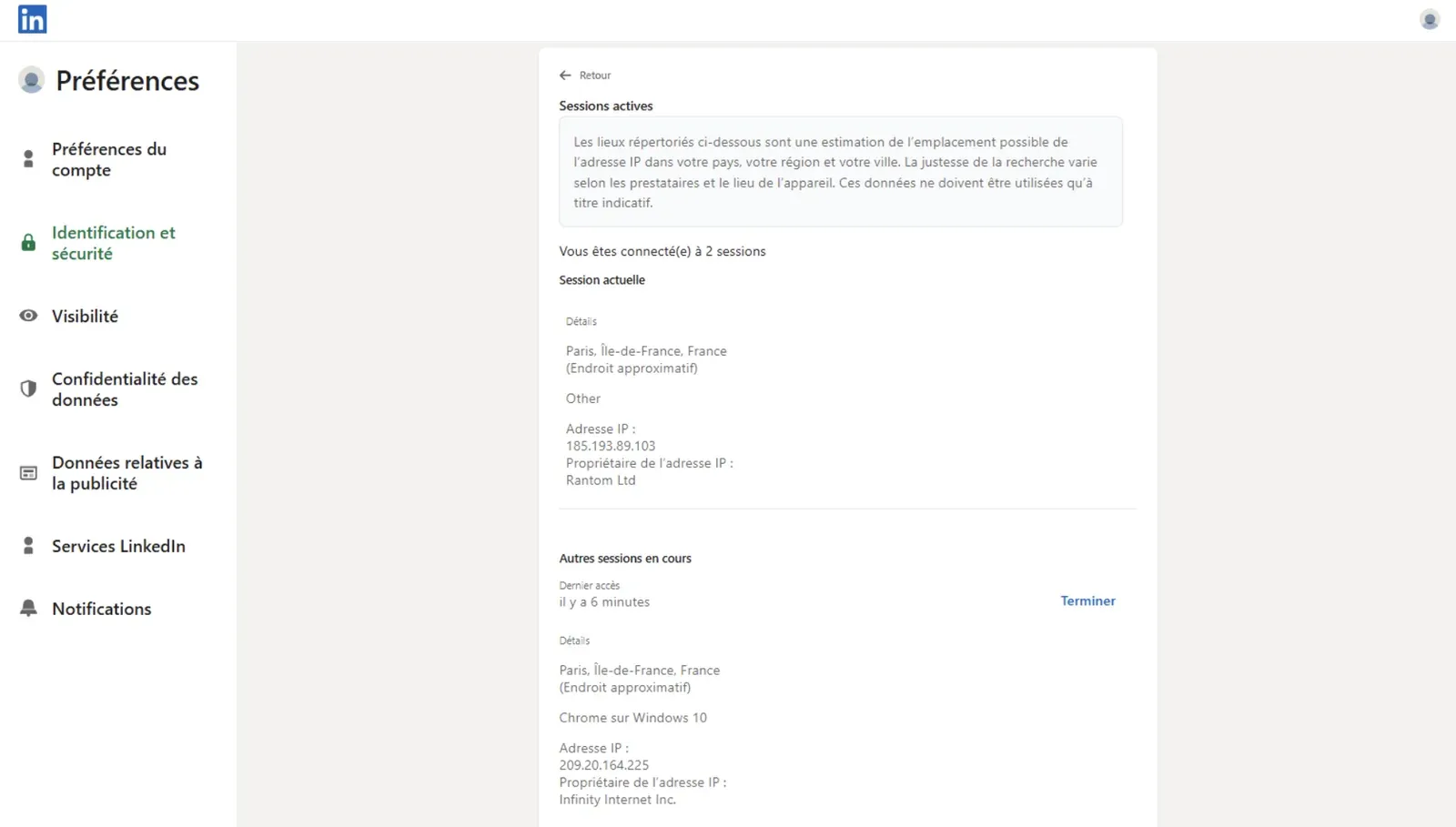
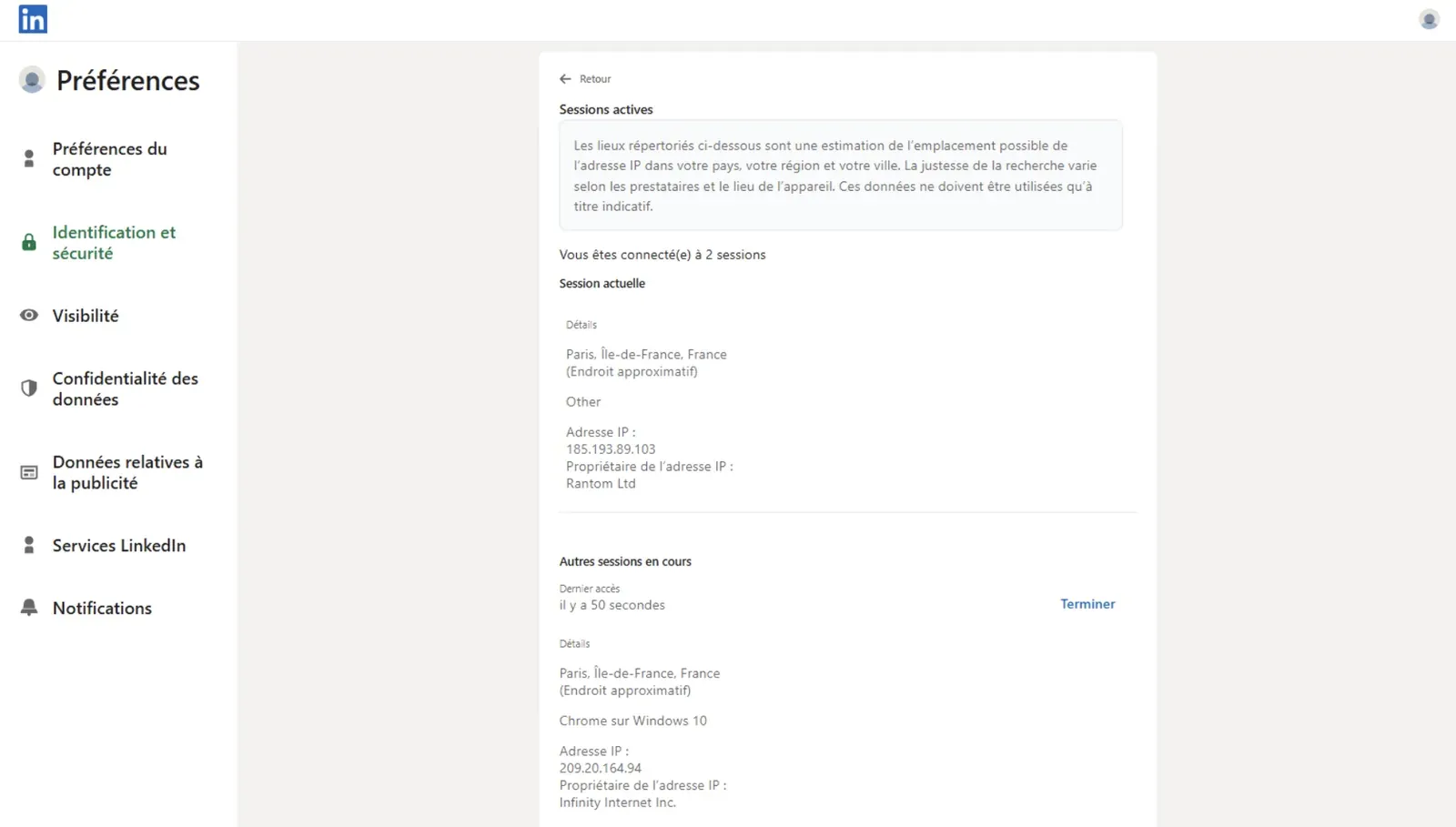
We checked both observed IPs through IPQualityScore. IPQS classified the tested IPs as datacenter/proxy IPs and showed high spam or abuse-risk signals (84/100 for both IPs). This describes the default footprint we observed in that test setup, not a permanent verdict on every Dripify account.
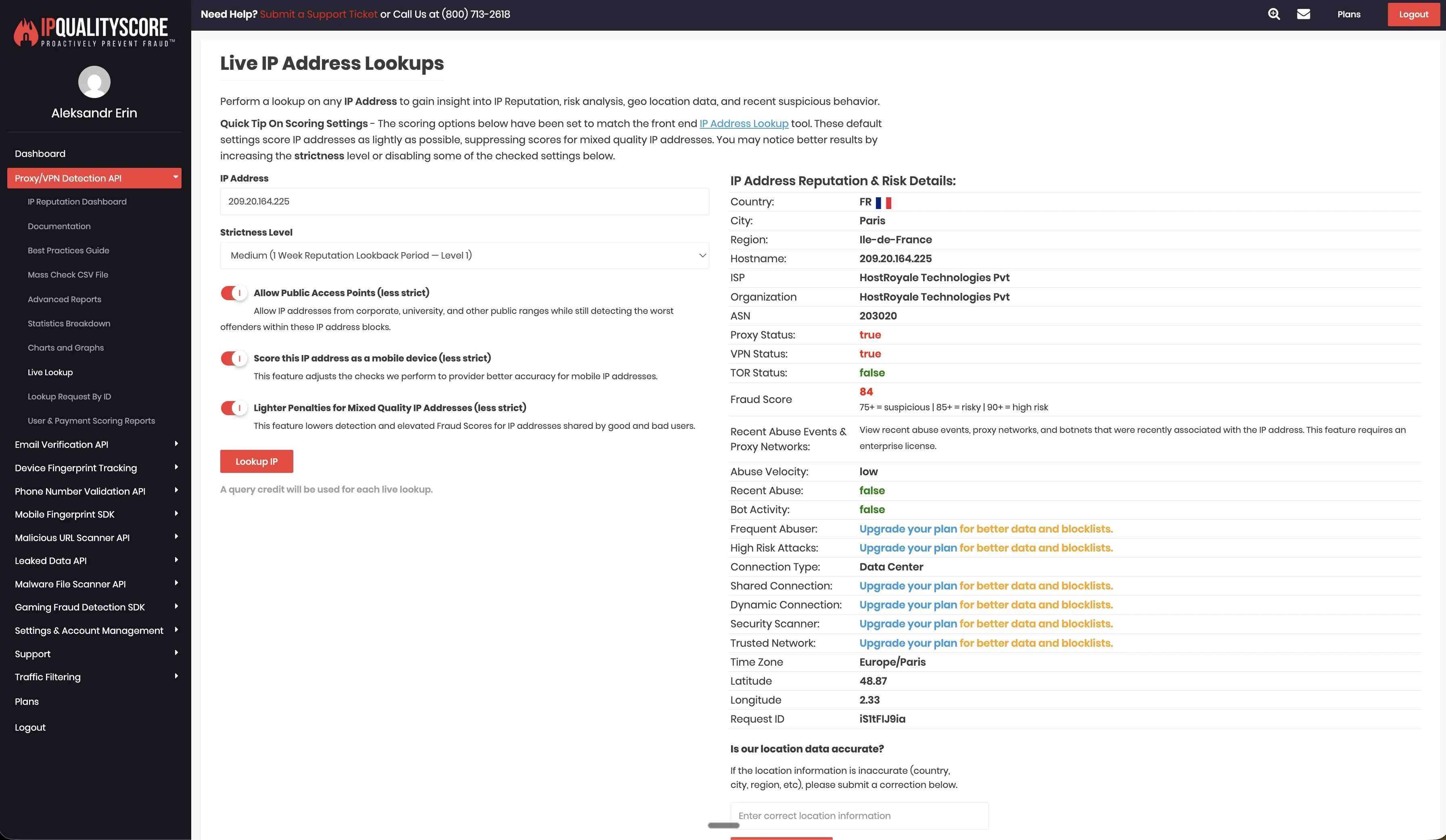
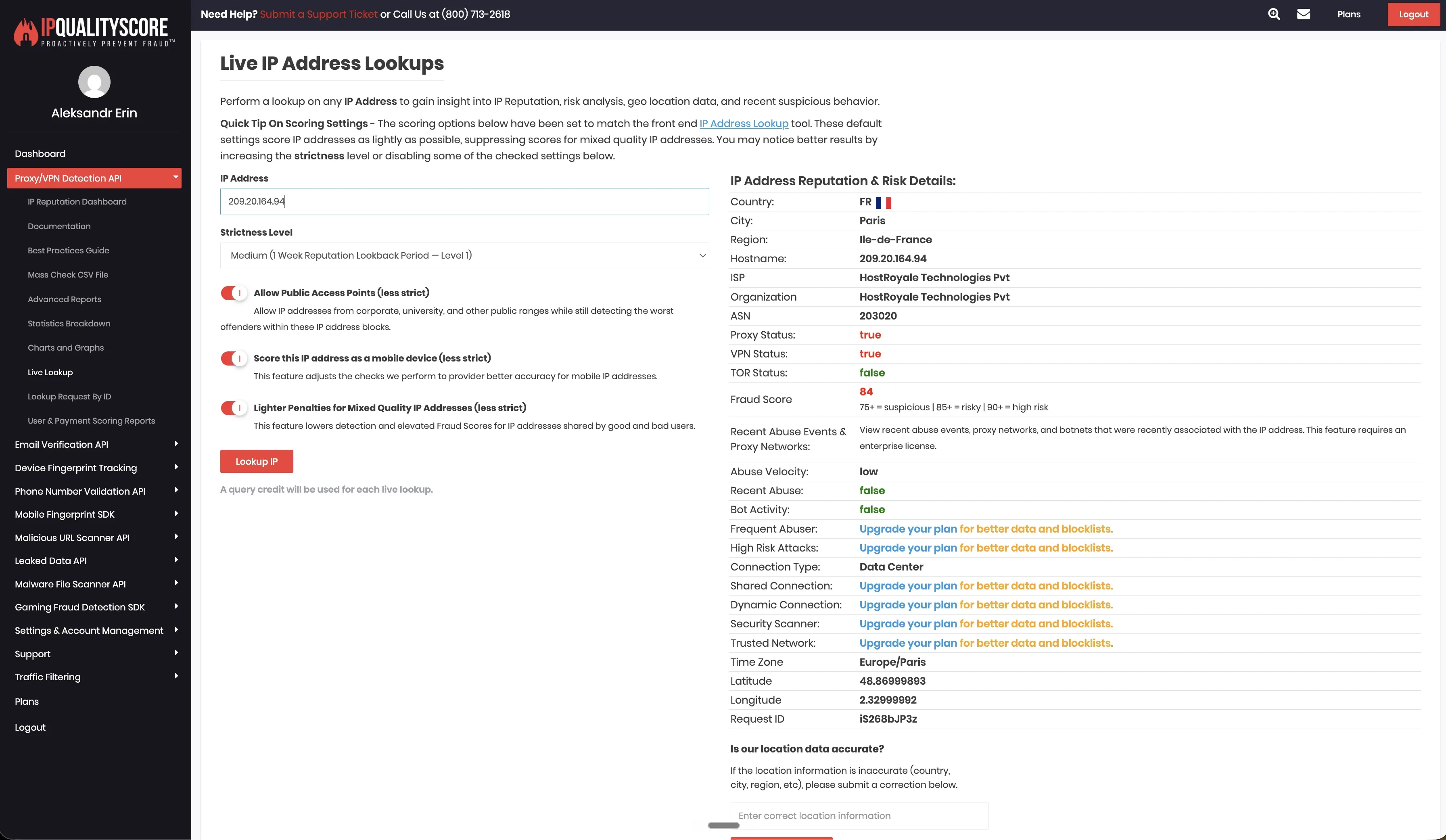
We did not find bring-your-own-proxy support in the tested setup. That means the default account environment depended on Dripify’s vendor-side infrastructure rather than a proxy selected and verified by the user.
3. Skylead
 Skylead is a cloud LinkedIn and email automation platform for teams that need stronger multichannel sequencing than Dux-Soup’s Chrome-extension workflow.
It combines LinkedIn automation, email automation, email finder and verifier features, smart sequences, image and GIF personalization, spintax, Liquid syntax, webhooks, and CRM sync. The price makes more sense for teams using LinkedIn and email together than for users who only need basic profile visits and follow-ups.
Skylead is a cloud LinkedIn and email automation platform for teams that need stronger multichannel sequencing than Dux-Soup’s Chrome-extension workflow.
It combines LinkedIn automation, email automation, email finder and verifier features, smart sequences, image and GIF personalization, spintax, Liquid syntax, webhooks, and CRM sync. The price makes more sense for teams using LinkedIn and email together than for users who only need basic profile visits and follow-ups.
Pricing
| Plan | Price | Best For |
|---|---|---|
| All-in-one | $100/month | LinkedIn plus email automation with personalization. |
| Annual | 10 months paid, 2 months free | Teams with a stable seat count. |
| White label | Custom | Agencies that want Skylead under their own brand. |
Key Features
- Cloud-based LinkedIn automation
- Unlimited email automation
- Email finder and verifier
- Infinite email warm-up
- Smart sequences and Smart Inbox
- Spintax and Liquid syntax
- Unlimited image and GIF personalization
- Real-time sync with HubSpot, Pipedrive, and Salesforce
What Reviewers Highlight
G2 reviewers often praise Skylead for combining LinkedIn and email in one outreach flow. The review summary highlights the interface, LinkedIn/email integration, and time-saving automation. Will Yates said Skylead was easy to navigate and helped them create campaigns without heavy technical effort.
Limitations
Skylead’s price is the first filter. At $100 per month, it is harder to justify if your workflow is mostly LinkedIn connection requests and simple follow-ups. Khawaja Furqan mentioned delayed email delivery, while another reviewer wanted a stronger internal CRM structure with custom tags for LinkedIn contacts.
First-Hand Research Notes
Skylead did not have a public LinkedIn Chrome extension to inspect in our teardown pass, so our first-hand review focused on the live cloud/IP test. In the June 2026 test from France, two fresh LinkedIn accounts appeared behind the same observed IP address: 58.97.254.1. IPQualityScore classified that address as a datacenter connection and flagged proxy and spam signals in the tested setup.
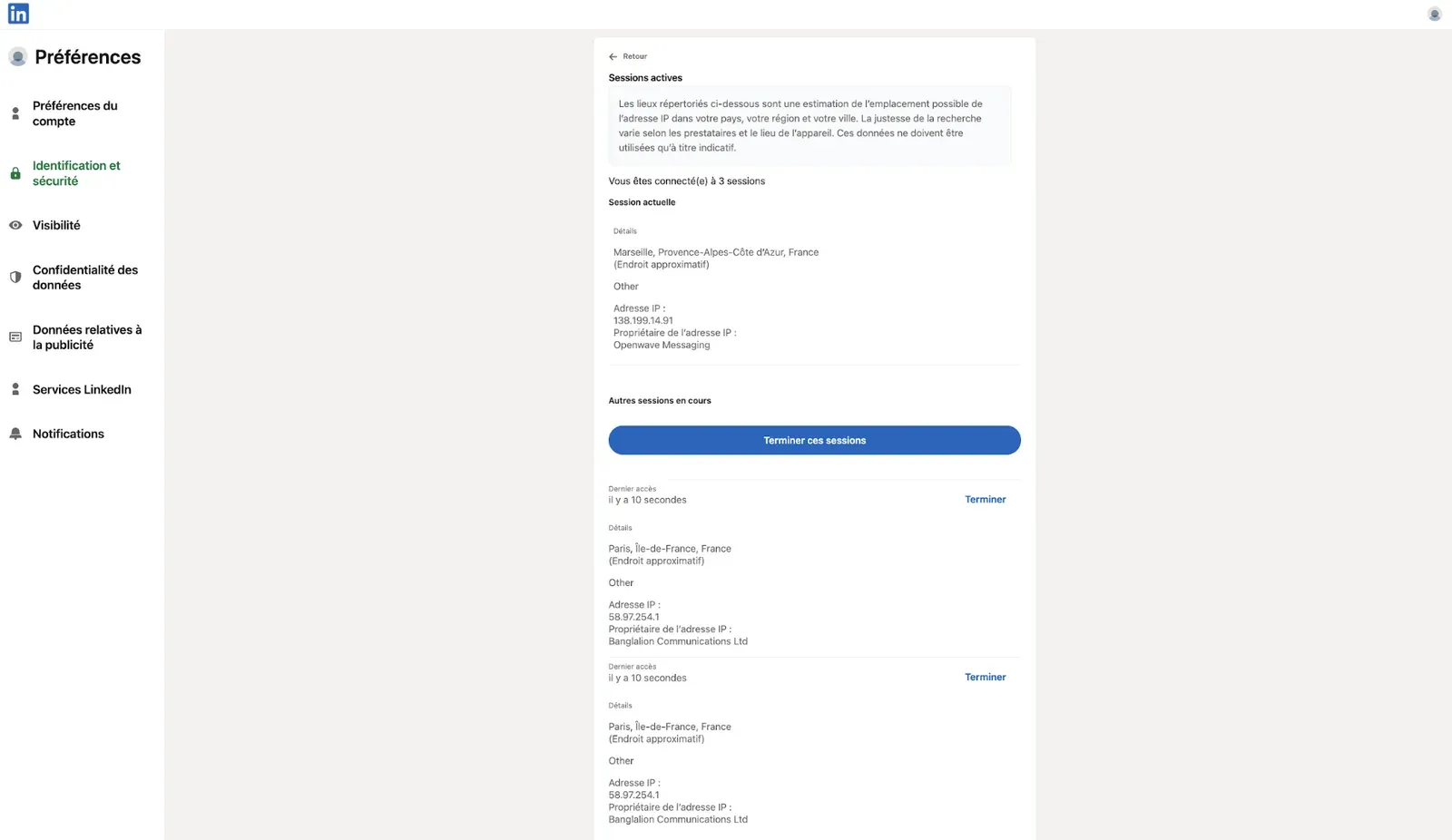
One shared IP does not prove LinkedIn will restrict an account. It does show a clustering signal that matters for teams running several LinkedIn profiles through the same cloud tool, especially when those accounts are expected to look separate.
Skylead supported bring-your-own-proxy setup across 91 locations in our research matrix. That gives users a way to replace the default cloud IP setup, but proxy quality becomes part of the user’s responsibility. A custom proxy only helps if its location, reputation, and stability match the LinkedIn account’s normal pattern.
4. SalesRobot
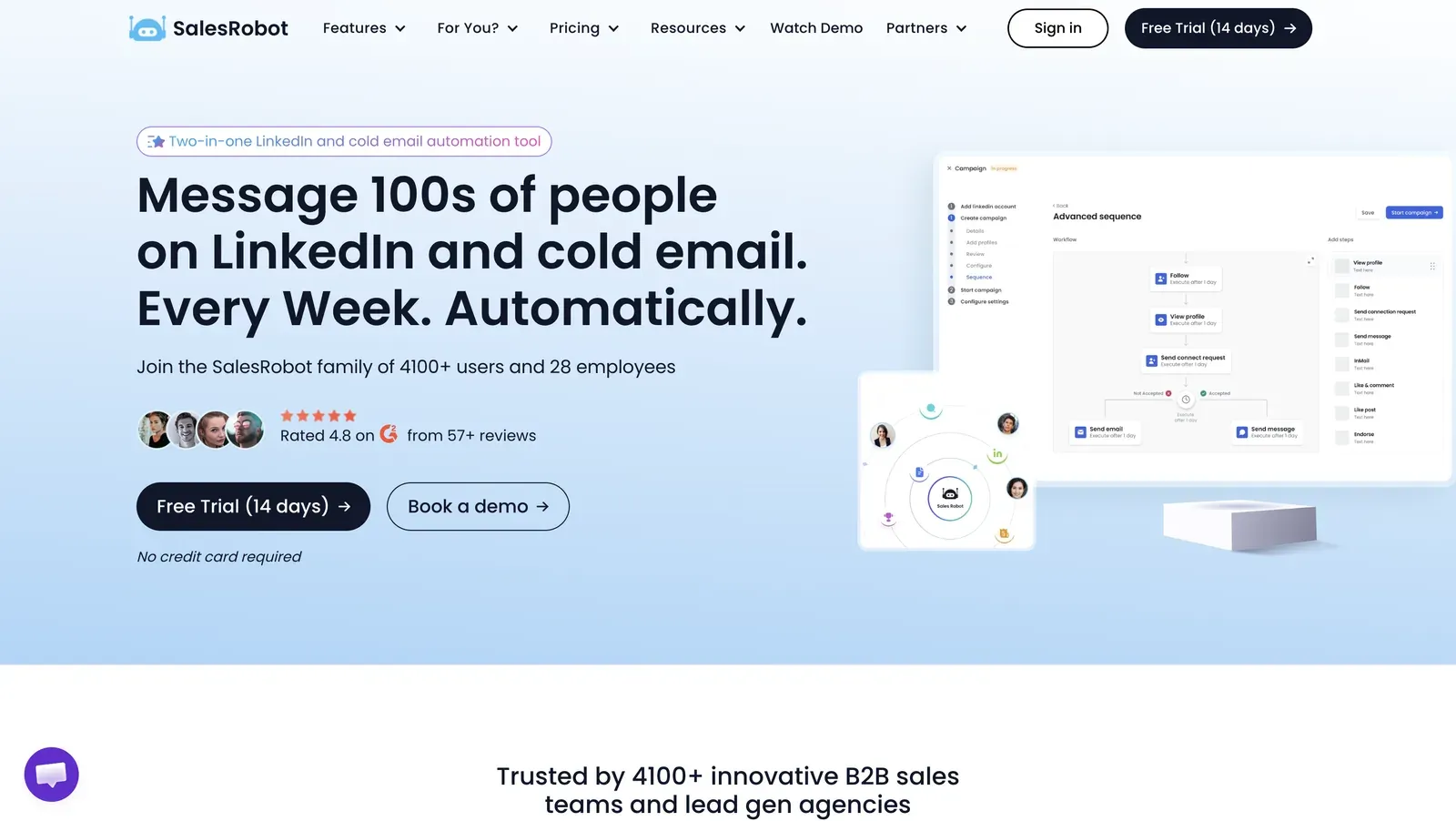 SalesRobot is a cloud outreach platform for LinkedIn and email campaigns. It combines LinkedIn automation, email sequences, AI-assisted messaging, voice notes, video messages, smart reply detection, API/webhook support, and team management.
For Dux-Soup switchers, the main point to verify is cloud setup: LinkedIn login flow, session origin, assigned IPs, proxy configuration, timezone controls, and account separation.
SalesRobot is a cloud outreach platform for LinkedIn and email campaigns. It combines LinkedIn automation, email sequences, AI-assisted messaging, voice notes, video messages, smart reply detection, API/webhook support, and team management.
For Dux-Soup switchers, the main point to verify is cloud setup: LinkedIn login flow, session origin, assigned IPs, proxy configuration, timezone controls, and account separation.
Pricing
| Plan | Monthly Price | Annual Equivalent | Best For |
|---|---|---|---|
| Basic | $59/account/month | $39/account/month | Low-volume outreach with one active campaign. |
| Advanced | $79/account/month | $59/account/month | Unlimited campaigns, A/B testing, inbox, webhooks, Zapier. |
| Professional | $99/account/month | $79/account/month | Agency and team features, including team management and activity control. |
Key Features
- Cloud-based LinkedIn automation
- LinkedIn plus email sequences
- AI Appointment Setter Agent
- Voice notes and video messages
- Smart reply detection
- LinkedIn Search, Sales Navigator Search, Recruiter, and CSV imports
- Webhooks, Zapier, and API support
- Team management on Professional
What Reviewers Highlight
Reviewers often praise the easy setup, AI-driven personalization, support, and time saved on LinkedIn outreach.
Limitations
Shawn Johnson liked the AI-personalized messaging concept but found the interface hard to figure out, reported bugs, and said lead processing could be slow. Another reviewer said agency administration was limited because only one super admin was available, even though workarounds existed.
Research Notes
SalesRobot appears in our research matrix as a cloud-based LinkedIn and email outreach tool, so we treated it differently from browser-extension products such as Dux-Soup or Waalaxy. We did not run a Chrome extension teardown for SalesRobot, and we should not describe extension behavior unless a public LinkedIn extension was reviewed. The buying question is cloud setup: how SalesRobot handles login, session origin, assigned IPs, proxy configuration, timezone controls, and account separation.
Because the tool runs from a cloud environment, users should verify the account-facing setup before connecting a high-value LinkedIn account. In practice, that means checking whether they can choose the session location, assign their own proxy, match timezone to the account’s normal location, and confirm the quality of any proxy or default IP used for outreach.
5. HeyReach
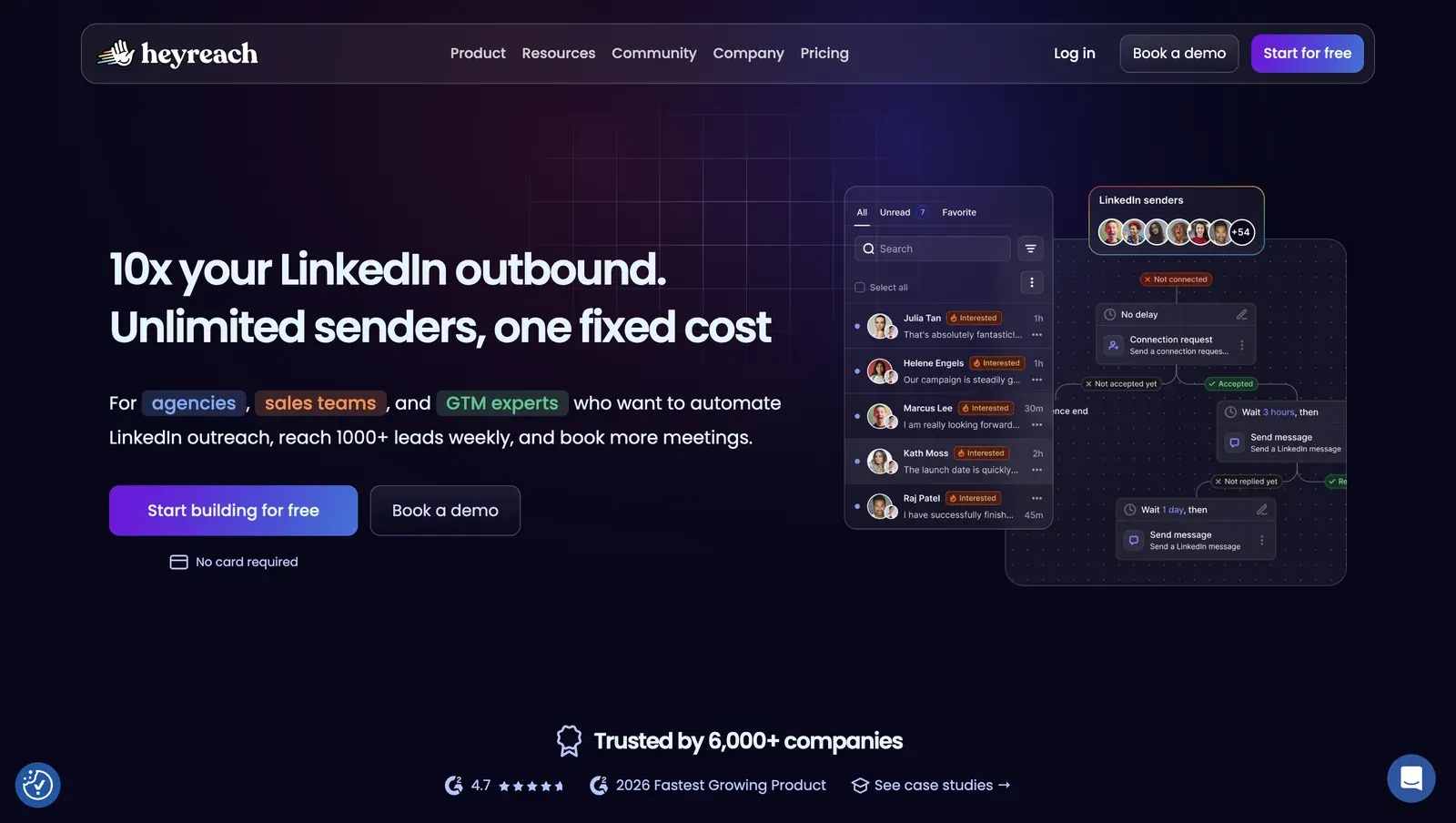 HeyReach is built for agencies and outbound teams that manage several LinkedIn senders from one workspace.
It focuses on sender management, unified inboxes, workspaces, permissions, client separation, API access, webhooks, and integrations with tools such as Clay, Make, Zapier, HubSpot, Instantly, and Smartlead. It is a stronger fit for agency-scale sender management than for solo users looking for the cheapest Dux-Soup replacement.
HeyReach is built for agencies and outbound teams that manage several LinkedIn senders from one workspace.
It focuses on sender management, unified inboxes, workspaces, permissions, client separation, API access, webhooks, and integrations with tools such as Clay, Make, Zapier, HubSpot, Instantly, and Smartlead. It is a stronger fit for agency-scale sender management than for solo users looking for the cheapest Dux-Soup replacement.
Pricing
| Plan | Starting Price | Best For |
|---|---|---|
| Growth | From $79/sender/month | Small teams running LinkedIn outreach through one or more senders. |
| Agency | From $999/month | Agencies managing client accounts and higher sender volume. |
| Unlimited | From $2,999/month | Larger outbound teams with heavy sender needs. |
Key Features
- Multi-account LinkedIn outreach
- Unlimited campaigns
- Connection requests, messages, follows, and profile views
- Unified Inbox
- Workspaces and permissions for client separation
- API and custom webhooks
- Integrations with Clay, Make, Zapier, HubSpot, Instantly, and Smartlead
- Email and enrichment credits depending on plan
What Reviewers Highlight
Trustpilot reviews often praise HeyReach for agency-scale sender management. Luka Anicic said sender rotation and a unified inbox helped their team scale outreach without constant account switching.
Limitations
Kazi Islam said support had become slower and described unresolved tickets, while another said recurring bugs and refund friction made the product harder to trust for client work.
First-Hand Research Notes
We unpacked HeyReach’s login extension in June 2026. The extension ID was fnfjobgkepeolimkplmkpifohdabioho, version 1.0.6, Manifest V3. In the package we reviewed, the extension acted as a cloud bridge. It requested cookie permission, read the li_at cookie, and sent LinkedIn cookie data to api.heyreach.io, where the vendor cloud can operate the account. We also found a declarativeNetRequest rule that blocked LinkedIn’s /uas/logout endpoint, direct Voyager calls, and an externally connectable entry that allowed the vendor site to communicate with the extension. We did not find content-script injection into LinkedIn pages.
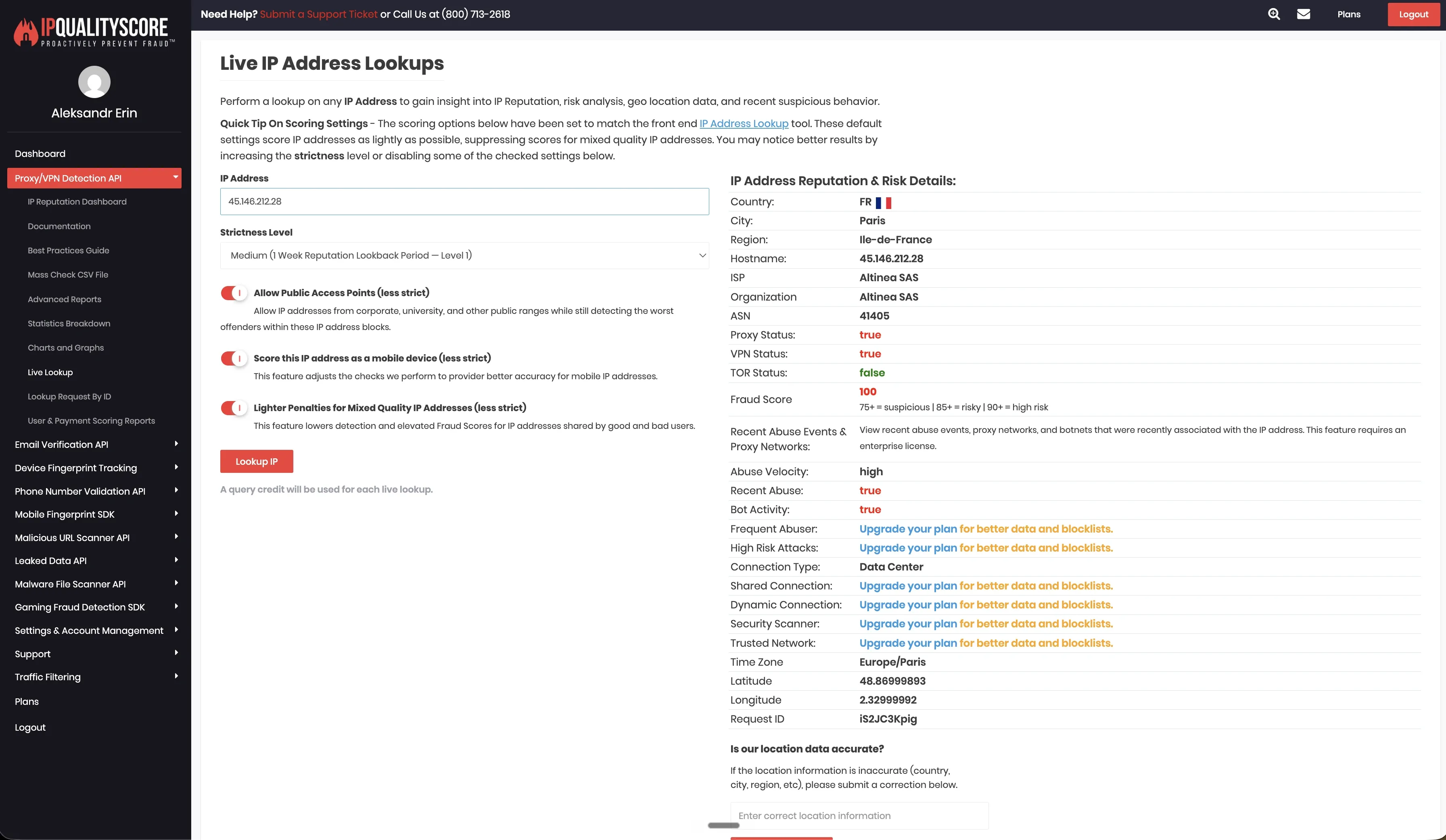
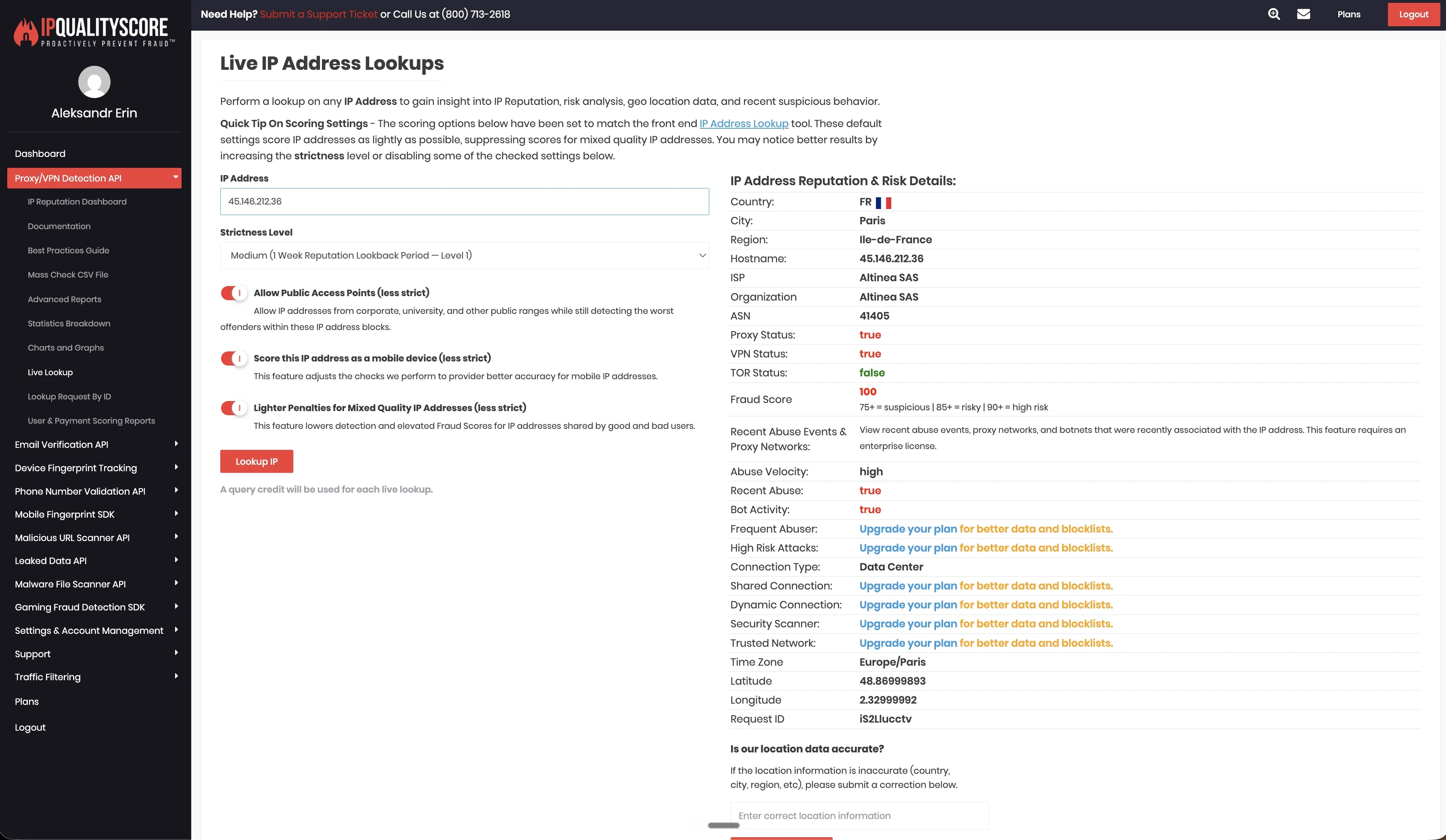
We also ran a June 2026 live cloud test from France with two test LinkedIn accounts. In the default setup, the accounts appeared on 45.146.212.28 and 45.146.212.36, which were in the same /24 datacenter range.
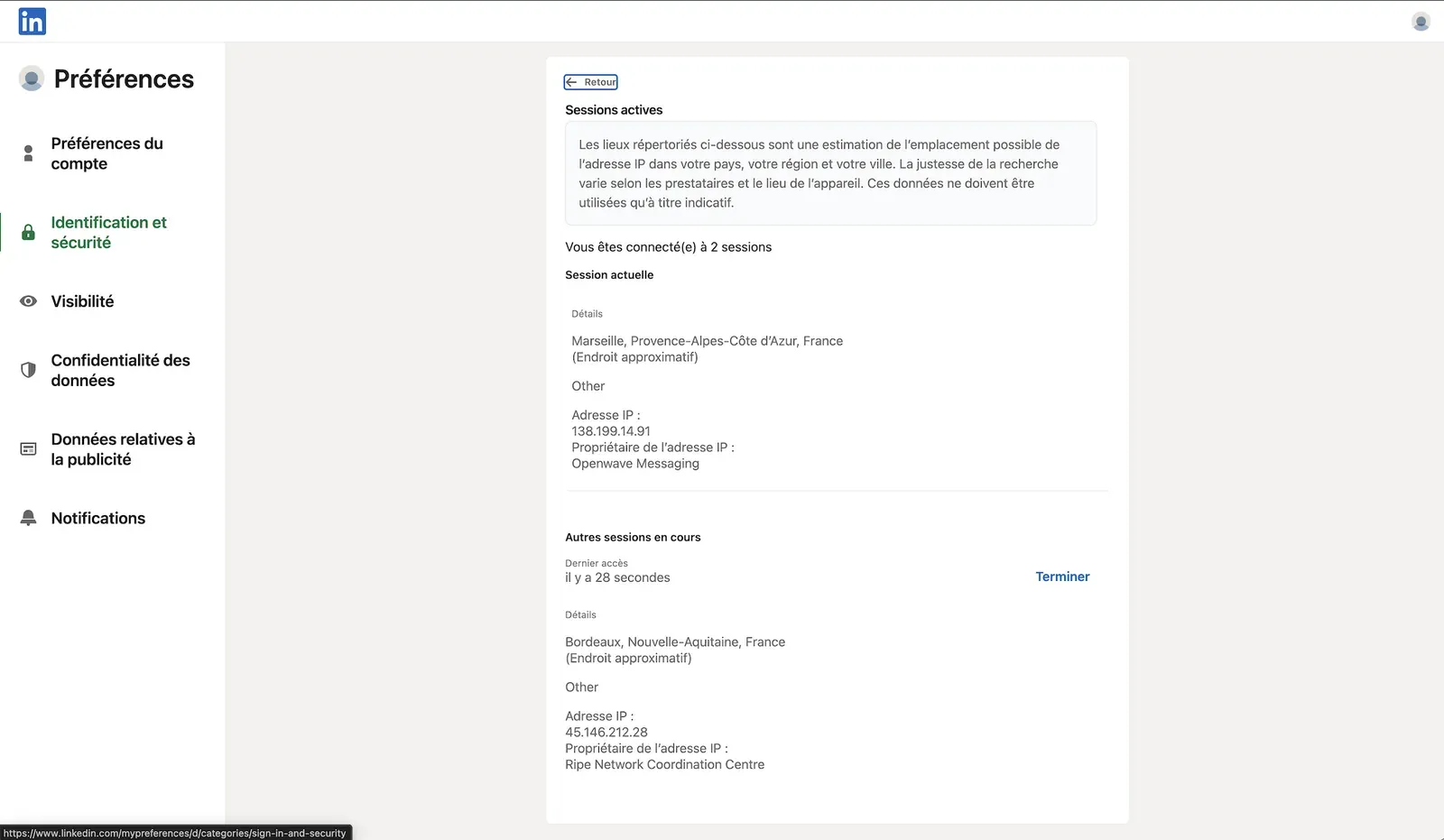
For 45.146.212.28, IPQualityScore returned Altinea SAS, ASN 41405, Paris, France, with Data Center as the connection type. It also marked Proxy and VPN as positive and returned a fraud score of 100/100. IPQualityScore is an independent IP-quality signal, not LinkedIn’s own enforcement verdict.
HeyReach supported bring-your-own proxy setup, desired-location selection, and 154 listed proxy locations in our review. That gives users more location choice than tools with no proxy controls, but proxy quality becomes the user’s responsibility. Timezone selection was not exposed when adding an account, so location choice can still leave a mismatch between session geography, working hours, and the account’s normal pattern.
6. Expandi
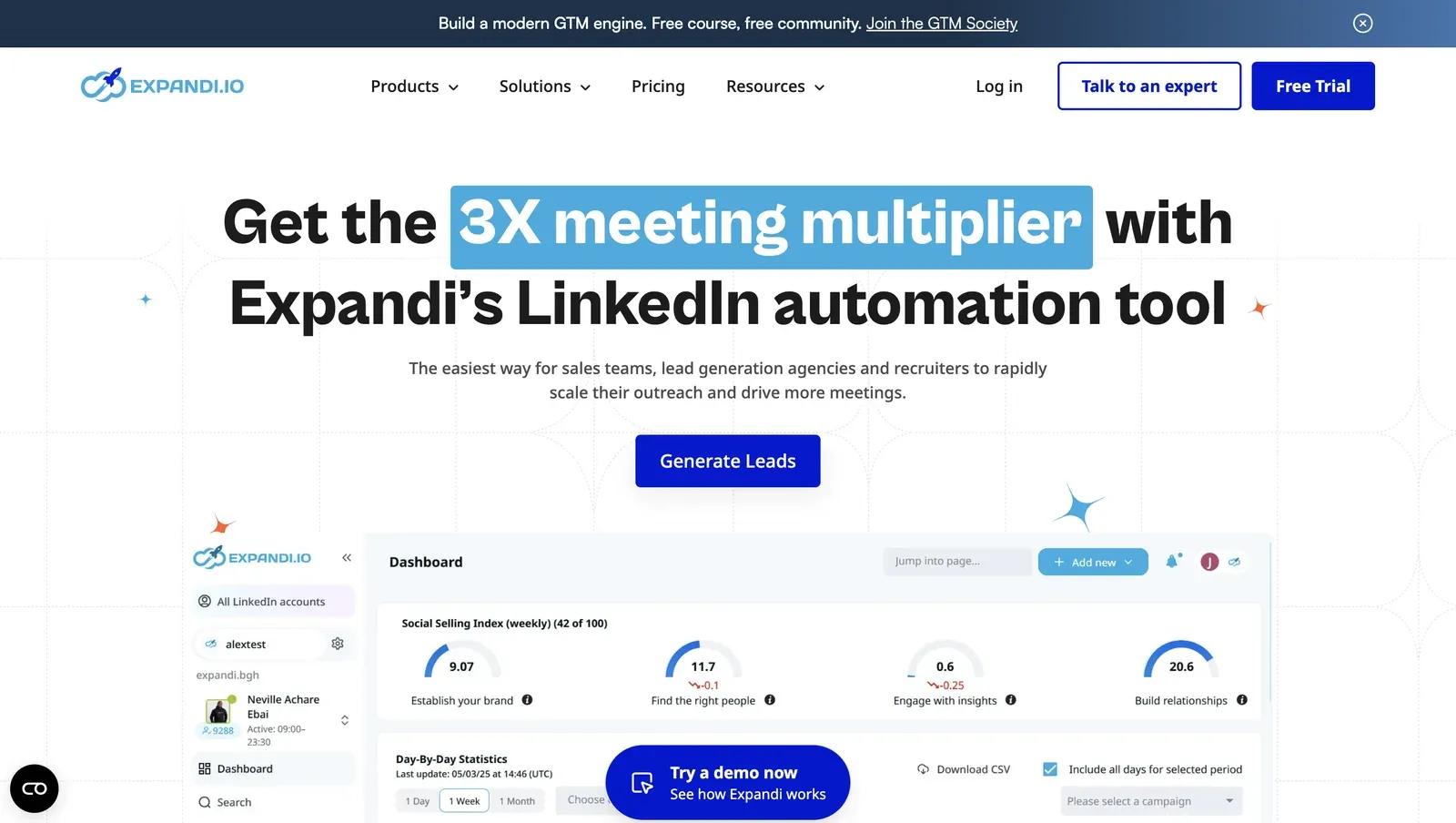 Expandi is a cloud LinkedIn outreach platform for teams that want conditional campaign logic and LinkedIn plus email follow-up in one place.
It is relevant for sales teams and agencies that need smart sequences, dynamic placeholders, scheduling controls, blacklists, roles, permissions, and client reporting. If the reason for switching is local session control, Expandi still needs to be evaluated as a cloud setup.
Expandi is a cloud LinkedIn outreach platform for teams that want conditional campaign logic and LinkedIn plus email follow-up in one place.
It is relevant for sales teams and agencies that need smart sequences, dynamic placeholders, scheduling controls, blacklists, roles, permissions, and client reporting. If the reason for switching is local session control, Expandi still needs to be evaluated as a cloud setup.
Pricing
| Plan | Monthly Price | Annual Equivalent | Best For |
|---|---|---|---|
| Business | $99/month | $79/month | Small sales teams using cloud LinkedIn outreach. |
| Agency | Custom | Custom | Agencies with 10+ seats and client reporting needs. |
Key Features
- Cloud-based LinkedIn outreach
- Dedicated country-based IP positioning
- Profile auto warm-up
- Smart sequences and conditional flows
- LinkedIn plus email follow-up
- Dynamic placeholders, tags, notes, and templates
- Blacklist and duplicate prevention
- Agency roles, permissions, reports, and white-label options
What Reviewers Highlight
Brandon Gingras said a support call helped them get more value from the platform, while another praised the depth of personalization and step-by-step help.
Limitations
G2’s review summary also notes slowdowns, technical issues, delays, integration issues, credit limitations, and complexity as recurring cons.
First-Hand Research Notes
We unpacked the Expandi Connector extension in June 2026. The extension ID was ohcplcfdejgopgcaegjlkkacoaplnaam, version 1.1, Manifest V3. Expandi has two relevant connection paths: users can connect through the cloud login flow, and Expandi also provides a Cloud Bridge Extension. In the extension package we reviewed, the connector requested cookie permission, read the li_at cookie, stored it in profileData, read JSESSIONID for CSRF handling, injected a content script into LinkedIn pages, intercepted Voyager-style API responses, made a direct contact-info call, and sent session data to app.expandi.io.
We did not find a /uas/logout block in the reviewed package. The connector is optional because users can also enter credentials directly in the cloud, but both paths still move LinkedIn execution into Expandi’s vendor-side environment.
We also ran a June 2026 live cloud test from France. In that setup, the two accounts received different types of IPs: one French IPv4 address from Scaleway cloud hosting and one IPv6 address from Orange. IPQualityScore results were mixed: one observed IP was flagged, while the other returned fewer risk signals in that lookup. IPQualityScore is an independent IP-quality signal, not LinkedIn’s own enforcement verdict.
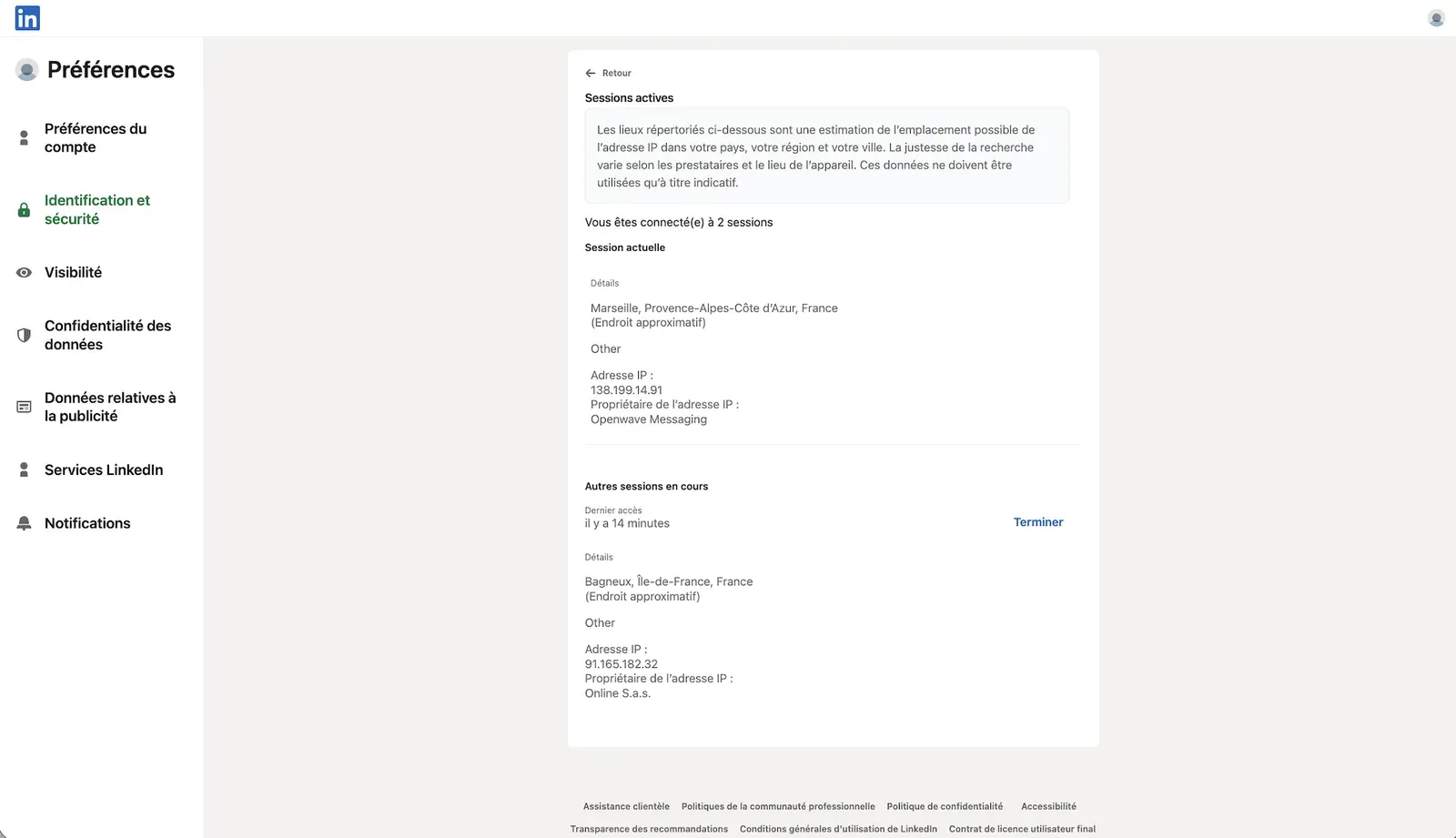
We checked the observed IPs through IPQualityScore. The result was mixed: one IP showed higher-risk (100/100) hosting or datacenter signals, while the other appeared cleaner in that lookup. This describes the footprint we observed in our test setup, not a verdict on every Expandi account.
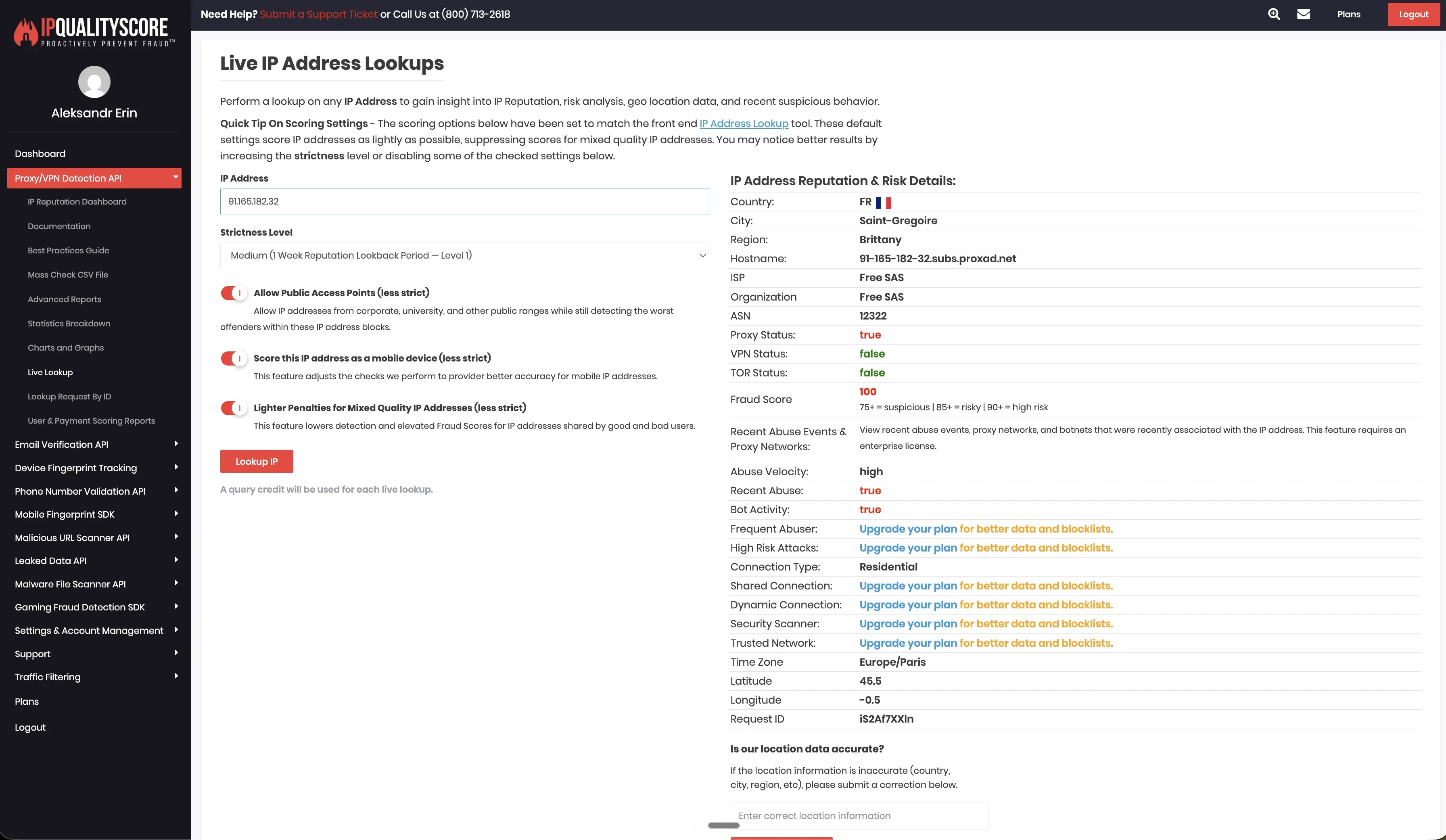
Expandi exposed more account-environment controls than some cloud tools in our review. It supported desired-location selection, listed 96 locations, supported bring-your-own proxy setup, and exposed timezone selection. Those controls can help teams keep session geography and working hours more consistent, but they do not remove the cloud-custody trade-off.
7. Waalaxy
 Waalaxy is a Chrome-extension-led LinkedIn prospecting tool with cloud-supported workflows. It is one of the lower-cost Dux-Soup alternatives and fits users who want quick setup, LinkedIn imports, follow-ups, reply detection, and simple prospecting workflows.
For Dux-Soup switchers, Waalaxy is closest to the lightweight extension side of the market. The trade-off is that it remains an extension-led setup rather than a desktop app with its own built-in browser engine.
Waalaxy is a Chrome-extension-led LinkedIn prospecting tool with cloud-supported workflows. It is one of the lower-cost Dux-Soup alternatives and fits users who want quick setup, LinkedIn imports, follow-ups, reply detection, and simple prospecting workflows.
For Dux-Soup switchers, Waalaxy is closest to the lightweight extension side of the market. The trade-off is that it remains an extension-led setup rather than a desktop app with its own built-in browser engine.
Pricing
| Plan | Monthly Price | Best For |
|---|---|---|
| Pro | €19/user/month | First LinkedIn outreach campaigns. |
| Advanced | €49/user/month | Higher LinkedIn volume, API access, Make, Zapier, and n8n modules. |
| Business | €69/user/month | LinkedIn plus email campaigns and email finder credits. |
Key Features
- Chrome extension-led LinkedIn prospecting
- Cloud mode
- Unlimited campaigns
- Pre-built prospecting sequences
- Automated LinkedIn follow-ups
- CRM sync with 2,000+ tools
- CSV import and export
- LinkedIn Basic, Sales Navigator, and Recruiter Lite imports
What Reviewers Highlight
Paolo F. said Waalaxy’s UX is straightforward and easy to use, while another praised the balance between automation and control for scalable LinkedIn outreach.
Limitations
Jacobo J. wanted more customization for complex scenarios, while John L. said integrating Waalaxy with tools like Apollo created extra operational work.
First-Hand Research Notes
We unpacked the Waalaxy Chrome extension in June 2026 and reviewed the shipped source code. Waalaxy is a Chrome-extension-led product with cloud mode, so the safety question is both browser-side behavior and how the browser session connects to the cloud backend. In the code we reviewed, the extension requested Chrome cookies permission, read LinkedIn cookie data, mapped JSESSIONID for CSRF handling, and synced browser-session data with Waalaxy’s cloud backend. The package also included local extension behavior, content-script injection into LinkedIn pages, cloud-mode hooks, login-related handling, and references to third-party captcha-solving services.
From the account-control side, Waalaxy did not provide bring-your-own proxy support in our review. We did not run a live cloud/IP test on Waalaxy, so we do not make claims here about assigned session IPs, IPQualityScore results, default proxy behavior, location count, or timezone behavior.
8. PhantomBuster
 PhantomBuster is a cloud automation and data extraction platform rather than a direct LinkedIn campaign builder.
It is useful when the job is LinkedIn scraping, enrichment, workflow automation, or connecting LinkedIn actions with other data tools. For Dux-Soup switchers, it makes more sense as a data automation layer than as a full replacement for guided LinkedIn outreach campaigns.
PhantomBuster is a cloud automation and data extraction platform rather than a direct LinkedIn campaign builder.
It is useful when the job is LinkedIn scraping, enrichment, workflow automation, or connecting LinkedIn actions with other data tools. For Dux-Soup switchers, it makes more sense as a data automation layer than as a full replacement for guided LinkedIn outreach campaigns.
Pricing
| Plan | Price | Best For |
|---|---|---|
| Trial | Free | Testing small workflows with limited exports. |
| Start | $69/month | Lightweight outbound workflows. |
| Grow | $159/month | Multiple outbound workflows at once. |
| Scale | $439/month | Always-on automation with higher execution time. |
Key Features
- Cloud automation across 15+ platforms
- LinkedIn and Sales Navigator workflows
- Profile and email enrichment
- AI filtering and writing
- LinkedIn outreach campaigns
- Lead warming
- Multiple LinkedIn account connection
- HubSpot, n8n, Zapier, and Make integration options
What Reviewers Highlight
G2 reviewers praise PhantomBuster for ease of use, time savings, and automation without heavy coding.
Limitations
A G2 reviewer said workflows sometimes break when LinkedIn updates policies, and that managing multiple Phantoms can feel clunky.
First-Hand Research Notes
We unpacked PhantomBuster’s Chrome extension in June 2026. The extension ID was mdlnjfcpdiaclglfbdkbleiamdafilil, version 1.3.9, Manifest V3. The manifest description said “Retrieve session cookies,” which matched the extension’s main role in the setup we reviewed. The extension read the LinkedIn li_at cookie and uploaded it into PhantomBuster’s setup flow so cloud Phantoms could run as the user. We also found direct Voyager calls and broad cookie access across LinkedIn and other supported platforms. We did not find a /uas/logout block in the reviewed package.
9. Meet Alfred
 Meet Alfred is a cloud outreach platform that combines LinkedIn automation, email, X outreach, a Smart Inbox, and lightweight CRM features.
It fits teams that want a broader multichannel workspace instead of a Chrome-extension workflow. For users switching mainly because of session control, Meet Alfred should still be reviewed as a vendor-side cloud setup.
Meet Alfred is a cloud outreach platform that combines LinkedIn automation, email, X outreach, a Smart Inbox, and lightweight CRM features.
It fits teams that want a broader multichannel workspace instead of a Chrome-extension workflow. For users switching mainly because of session control, Meet Alfred should still be reviewed as a vendor-side cloud setup.
Pricing
| Plan | Monthly Price | Annual Equivalent | Best For |
|---|---|---|---|
| Basic | $59/user/month | $29/user/month | LinkedIn automation, CRM, Smart Inbox, and templates. |
| Pro | $99/user/month | $49/user/month | LinkedIn, email, X, Sales Navigator, InMail, groups, and events. |
| Team | $79/user/month | $39/user/month | Larger teams that need team inbox and admin settings. |
Key Features
- Cloud-based LinkedIn automation
- Smart LinkedIn Inbox
- Built-in LinkedIn CRM
- Sales Navigator support on Pro
- LinkedIn, email, and X automation on Pro
- InMail, groups, events, CSV campaigns, and content retargeting
- Zapier and webhook integrations
- Team inbox, white label, onboarding, and priority support on larger setups
What Reviewers Highlight
Trustpilot reviews often praise Meet Alfred’s ease of use, customer support, and multichannel outreach.
Limitations
A June 2026 review said the main feature had been down for two weeks, while another review described stalled campaign steps and slow technical follow-up.
First-Hand Research Notes
Meet Alfred did not have a public LinkedIn Chrome extension to inspect, so our first-hand review focused on the June 2026 live cloud/IP test. In the France test, two connected LinkedIn accounts appeared on 109.238.196.65 and 158.46.140.148. Both sessions presented mobile browser signals: one as Chrome Mobile on iOS, the other as Chrome Mobile on Android.
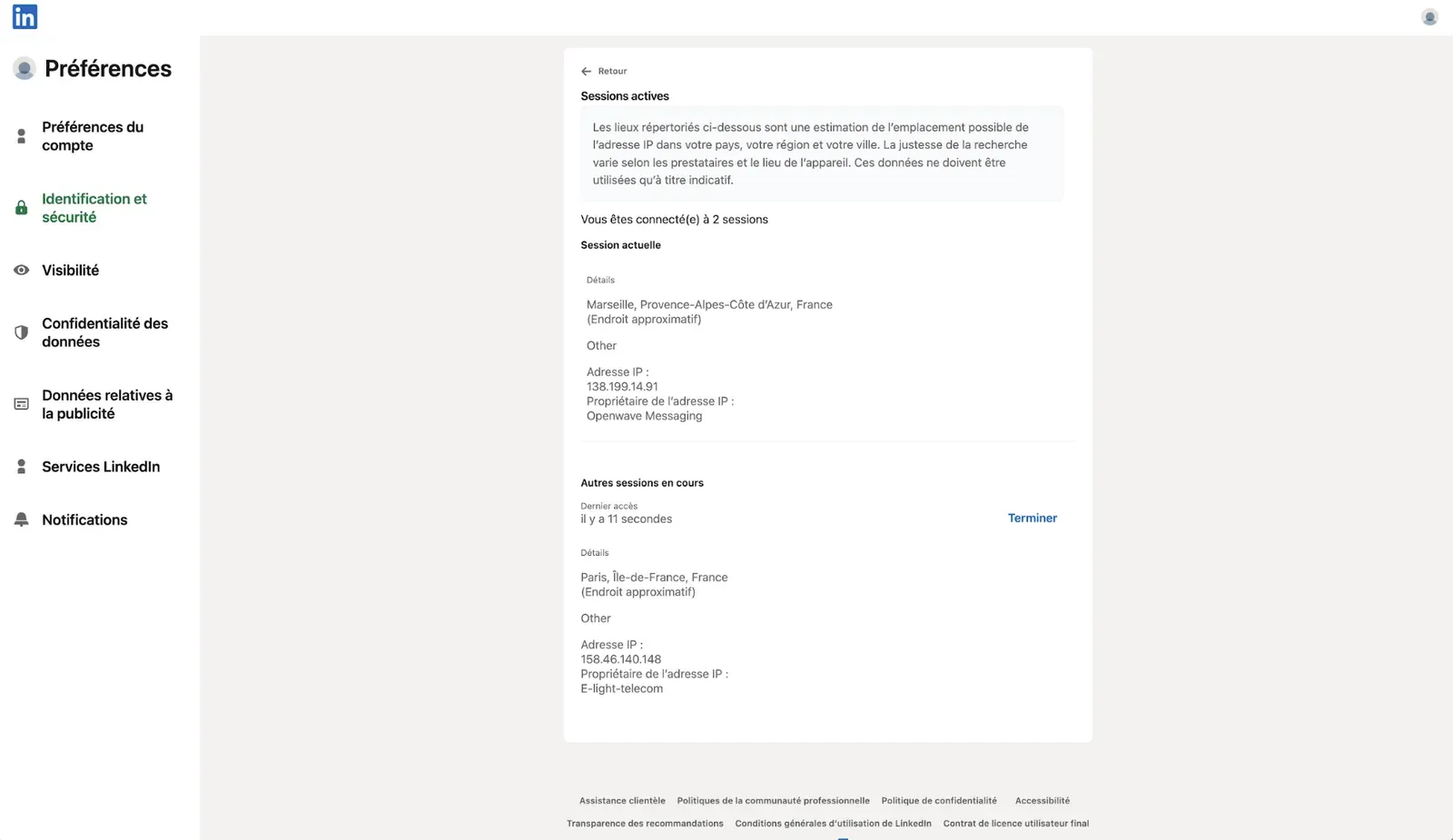
We checked the observed IPs through IPQualityScore to record connection type, proxy/VPN flags, and abuse or fraud-risk signals. IPQualityScore is an independent IP-quality signal, not LinkedIn’s own enforcement verdict.
Meet Alfred supported custom proxies in our research matrix, along with desired-location selection, 247 listed locations, and timezone selection. Those controls can help with account-environment consistency, but they still depend on the quality of the assigned or user-provided proxy and how closely the session setup matches the account’s normal pattern.
Cloud vs. Browser Extension vs. Desktop: Why Architecture Matters
Architecture affects three things before a campaign starts: where LinkedIn activity runs, which IP LinkedIn may see, and who controls the session environment. Chrome extensions run inside the browser session. Cloud tools run from vendor infrastructure. Desktop tools such as Linked Helper run locally on the user’s machine, VPS, or dedicated server. No model removes restriction risk. The practical question is which setup gives your team enough control over session origin, IP quality, account separation, limits, and working hours.
Desktop, Cloud, and Extension Trade-Offs Compared
| Factor | Desktop App | Cloud Tool | Browser Extension |
|---|---|---|---|
| Where it runs | On your computer, VPS, or dedicated server. | On vendor infrastructure. | Inside your Chrome browser. |
| 24/7 operation | Yes, with a VPS or always-on machine. | Yes. | Usually only with Chrome open, unless cloud mode exists. |
| Computer required | Yes for local use. | No after setup. | Usually yes. |
| IP LinkedIn may see | Your machine IP or assigned proxy. | Vendor IP, server IP, or proxy. | Your browser IP or cloud IP, depending on plan. |
| Session custody | Local app session. | Often vendor-hosted or vendor-controlled. | Browser session, unless synced to vendor infrastructure. |
| Main risk area | Poor limits, weak targeting, or unstable proxy use. | IP quality, session custody, and cloud browser signals. | Extension behavior, page exposure, and browser-side automation. |
| Examples | Linked Helper. | Dripify, Skylead, SalesRobot, HeyReach, Expandi, Meet Alfred. | Dux-Soup, Waalaxy extension components. |
How to Choose the Best Dux-Soup Alternative
Choose the next tool based on the problem that made Dux-Soup feel limited. If the issue is Chrome dependency, start with architecture. If the issue is pipeline handoff, look at CRM and webhooks. If the issue is multi-account work, check proxy assignment, workspace separation, and permissions before comparing small feature differences.
| Use case | What matters most | Tools to compare first |
|---|---|---|
| Solo founders and freelancers | Low cost, reply tracking, simple lead management, conservative limits | Linked Helper, Waalaxy, Dux-Soup |
| Sales teams | CRM handoff, repeatable workflows, reporting, reply tracking, Sales Navigator support | Linked Helper, Dripify, Skylead, Expandi |
| Agencies | Multi-account control, proxy assignment, workspace separation, permissions, client reporting | Linked Helper, HeyReach, Expandi |
| Recruiters | Sales Navigator or Recruiter support, candidate tracking, follow-up control, careful InMail wording | Linked Helper, Dux-Soup, Meet Alfred |
| LinkedIn plus email outreach | Native email steps, shared inboxes, campaign sequencing, CRM sync | Dripify, Skylead, Expandi, SalesRobot, Meet Alfred |
| Safety-sensitive accounts | Session custody, IP control, proxy quality, working hours, limits, activity pacing | Linked Helper, then compare cloud tools carefully |
For Dux-Soup switchers, the main question is simple: do you want to stay close to a browser-extension workflow, move into vendor-side cloud execution, or use a desktop app with more control over session origin and proxy setup?
LinkedIn Automation Safety Before Switching Tools
The switching period is usually the sensitive part because several signals can change at once: tool architecture, browser environment, session location, IP address, timezone, daily volume, and message pattern. Use the first two to four weeks as a controlled migration period:
- Export lead lists, tags, notes, CSV files, and CRM mappings before canceling Dux-Soup.
- Pause Dux-Soup campaigns before starting the new tool.
- Do not run two LinkedIn automation tools on the same account at the same time.
- Keep daily limits conservative, especially on new, inactive, or recently warned accounts.
- Increase volume slowly instead of copying limits from the previous tool.
- Use randomized delays and working hours instead of fixed, all-day activity.
- Keep IP location, timezone, and account activity patterns consistent.
- Stop automation when a lead replies, then handle the conversation manually.
- Pause campaigns if LinkedIn shows a warning or the account starts behaving unusually. No LinkedIn automation tool removes restriction risk. A better setup can give you more control over session origin, pacing, proxy quality, and account separation, but account age, targeting, message quality, pending invitations, and manual activity still matter.
Our Recommendation: Linked Helper
Linked Helper is our recommended Dux-Soup alternative for users who want more control than a Chrome-extension workflow without moving LinkedIn execution into a vendor cloud browser. The main difference is architecture. Dux-Soup Pro and Turbo run through Chrome, while Cloud Dux moves execution into Dux-Soup’s cloud environment. Linked Helper runs as a desktop app on Windows, macOS, or Ubuntu through its own built-in browser engine, using the authenticated LinkedIn session and the user’s IP address or assigned proxy. That setup is strongest when the buyer cares about session origin, proxy control, workflow depth, CRM handoff, and account separation. Linked Helper starts at $15/month, Pro costs $45/month, and the 14-day trial lets users rebuild one campaign before moving the rest of their outreach.
Linked Helper Features Compared to Dux-Soup
| Area | Dux-Soup | Linked Helper |
|---|---|---|
| Architecture | Chrome extension, with Cloud Dux for cloud execution. | Desktop app with its own built-in browser engine. |
| Starting price | Pro Dux starts at $14.99/month. | Standard starts at $15/month. |
| Session model | Browser session on Pro/Turbo, cloud infrastructure on Cloud Dux. | Local app session on your machine or VPS. |
| 24/7 operation | Available on Cloud Dux. | Available with an always-on computer, VPS, or dedicated server. |
| Proxy control | No desktop-style per-account proxy control in the lower Chrome-extension setup. Cloud setup depends on Dux-Soup’s infrastructure. | Optional HTTP, HTTPS, SOCKS, or SOCKS5 proxy assignment per LinkedIn account. |
| Campaign depth | Drip campaigns and campaign statistics on Turbo and Cloud. | Custom campaign builder, reply detection, stop conditions, working hours, and limits. |
| CRM and data | CRM integrations on higher Dux-Soup tiers. | Built-in CRM, tags, notes, CSV export, webhooks, Zapier, Make, and direct CRM integrations. |
| Agency control | Team and agency plans available. | Workspaces, roles, permissions, licenses, proxies, and account separation. |
| Personalization | Personalization features depend on the plan. | Custom variables, spintax, AI Messages, AI Reply Assistant, and in-chat AI editor. |
| Main limitation | The lower tier is basic; Cloud Dux changes the session model. | LinkedIn-first; not a native cold-email sequencer. |
The main trade-off is straightforward: Dux-Soup is familiar for Chrome-extension users, while Linked Helper gives more control over session origin, proxy setup, workflow depth, and CRM handoff.
Start your free trial with Linked Helper - no credit card required!
How to Cancel Dux-Soup and Switch Tools Smoothly
Do not cancel Dux-Soup before you export the data your next workflow needs. A clean switch starts with lists, tags, notes, CSV files, and CRM mappings. Use this process:
- Pause active Dux-Soup campaigns.
- Export leads, tags, notes, CSV files, and CRM fields.
- Check which plan you are leaving: Pro, Turbo, or Cloud.
- Rebuild one priority campaign in the new tool before moving everything.
- Keep daily limits conservative for the first two to four weeks.
- Do not run Dux-Soup and the new tool on the same LinkedIn account at the same time.
- Add CRM handoff, webhooks, or email steps only after the LinkedIn workflow is stable. If the main reason for Cloud Dux was 24/7 operation, compare that against a VPS setup before changing the whole session model. A VPS can keep a desktop tool running without moving execution into a vendor cloud browser.
Try Linked Helper free for 14 days and rebuild your first campaign with a cleaner desktop setup!