

 11 min read

TL;DR: Dux-Soup in October 2026
- Verdict: Dux-Soup STACKED only suits LinkedIn-oriented workflows provided you're okay with its billing, account-access, and execution limitations.
- Price: Dux-Soup's October 28, 2026 prices are $55 a month for one local Fixed Seat or $99 for cloud. Annual upfront bills are $495 and $890.
- Account access: Dux-Soup cloud transfers your active LinkedIn session onto its infrastructure, and session-transfer code is also included in the archived extension.
- Reply control: After a response that's read as neutral, the ChatGPT integration in Dux-Soup can continue a campaign. When a reply is handled normally, though, the sequence gets paused.
- Trial and exit: Dux-Soup promotes a no-card 14-day trial. To cancel, you must reach support; the first period for requesting a refund lasts 31 days.
Verdict: who Dux-Soup fits and who should skip it
Dux-Soup STACKED suits purchasers centered on LinkedIn who're okay with its billing and account-access conditions. Don't choose it when you require a built-in email-and-LinkedIn sequence builder, or when you'd like outreach to keep running while your computer's off yet won't hand your LinkedIn session over to a cloud provider.
Seats you aren't using, plus what happens after a reply—those you'd need to check before paying, since a redesigned interface alone wouldn't persuade us to buy. Nor would unlimited campaigns settle either matter.
What Dux-Soup is in 2026: STACKED separates the app from execution
Dux-Soup STACKED is a Mac and Windows app that executes LinkedIn automation either on Dux-Soup's infrastructure or locally. STACKED was announced by the company in September 2026. Looking at the desktop interface won't let you judge where your account runs.
When you select how to execute, you change which machine you rely on:
| Decision | STACKED local | STACKED cloud |
|---|---|---|
| Where automation runs | Your computer | Dux-Soup's managed infrastructure |
| Computer availability | Must stay awake while scheduled actions run | Can be off after the cloud session starts |
| Main application | Windows or Mac desktop app | The same desktop app, with remote execution |
STACKED pulls campaigns, prospects, activity queues, reporting, and integrations into the app. Per Dux-Soup, existing licenses, campaigns, and queued activity can carry over. If you're already a customer, verify what carried over before you rebuild your campaigns.
The Chrome extension isn't needed anymore for the main workflow. Dux-Soup still maintains an alternative setup combining the web and an extension for Chromebook and Linux users, and legacy Pro support stays too. Don't treat an outdated extension tutorial as if it covers the current STACKED workflow.
Dux-Soup pricing: annual invoices and seat minimums determine the bill
Fixed Seat plans from Dux-Soup begin at one seat; however, with Flexible Seat plans, you're required to prepay for a minimum quantity. If you choose annual billing, you'll pay the full amount upfront — even if the pricing page displays a monthly equivalent.
The following USD prices don't include taxes or services that are billed separately:
| Billing item | STACKED local | STACKED cloud |
|---|---|---|
| One Fixed Seat, monthly billing | $55 | $99 |
| One Fixed Seat, annual upfront payment | $495 | $890 |
| Annual plan's displayed monthly equivalent | $41.25 | $74.17, rounded |
| Flexible plan's prepaid minimum | Ten seats | Five seats |
| Flexible plan's monthly starting commitment | $412.50 | $371 |
| Additional Flexible seat, monthly rate | $41.25 | $74.25 |
For the cloud invoice, rely on the stated annual total. A different figure results when the rounded monthly equivalent is multiplied by 12. Extra Flexible seats are prorated according to active days and billed afterward, but the prepaid minimum still applies if included seats remain unused.
If your team remains at three accounts, what would you pay? The yearly cloud cost for three Fixed Seats comes to $2,670. Meanwhile, five-seat Flexible cloud's minimum runs $4,452 across 12 equal monthly bills—meaning you're covering two seats that go unused for however long the team keeps that size.
Set aside separate funds for third-party workflow services, usage of the AI API, and optional LinkedIn subscriptions. The connected service won't appear on your Dux-Soup bill just because an integration shows up on the list.
Dux-Soup trial: 14 days without a credit card
For Dux-Soup, the getting-started guide provides a STACKED trial lasting 14 days and no credit card is required. You'll need to install the Windows or Mac app, sign in through Google, and link your LinkedIn account to the execution environment you plan to use.
Use the trial to check how replies affect your sequence before locking in a plan.
Dux-Soup account access: cloud receives a copy of your LinkedIn session
Dux-Soup cloud transfers the current local LinkedIn session to the provider's infrastructure, and once that copy exists, the provider can act through your account even after you've turned your computer off.
When you start a cloud session, it duplicates whichever session is presently open in STACKED. Stop Session halts cloud automation. Capture Local Session swaps the saved copy for the session you've got open locally — therefore verify the account displayed before using it. Cloud automation also stops if you log out of the LinkedIn session.
LinkedIn forbids automated activity that isn't authorized. According to Dux-Soup's own limits guide, no setting guarantees freedom from account restrictions. Going with local execution doesn't mean LinkedIn has given you permission to automate.
Archived Dux-Soup extension: session-transfer code and header changes
Our static audit found that Dux-Soup extension version 10.2.1 reads LinkedIn cookies, constructs session data, and sends it to a Dux-Soup endpoint. These cookies are your session credentials, not your account password. Rules that alter LinkedIn response headers are also included in the package.
Don't mix up this archived Chrome package with the STACKED desktop app. The transfer logic checks an interaction role but doesn't check the subscription edition.
Dux-Soup campaigns: shared action limits can leave steps waiting
When other actions use up the shared profile-visit allowance, Dux-Soup campaign steps may wait. Up to 12 actions per campaign are supported by STACKED, yet a daily allowance can still be reached before the sequence completes. Delays can be set for profile visits, follows, endorsements, connection requests, messages, InMails, and post likes.
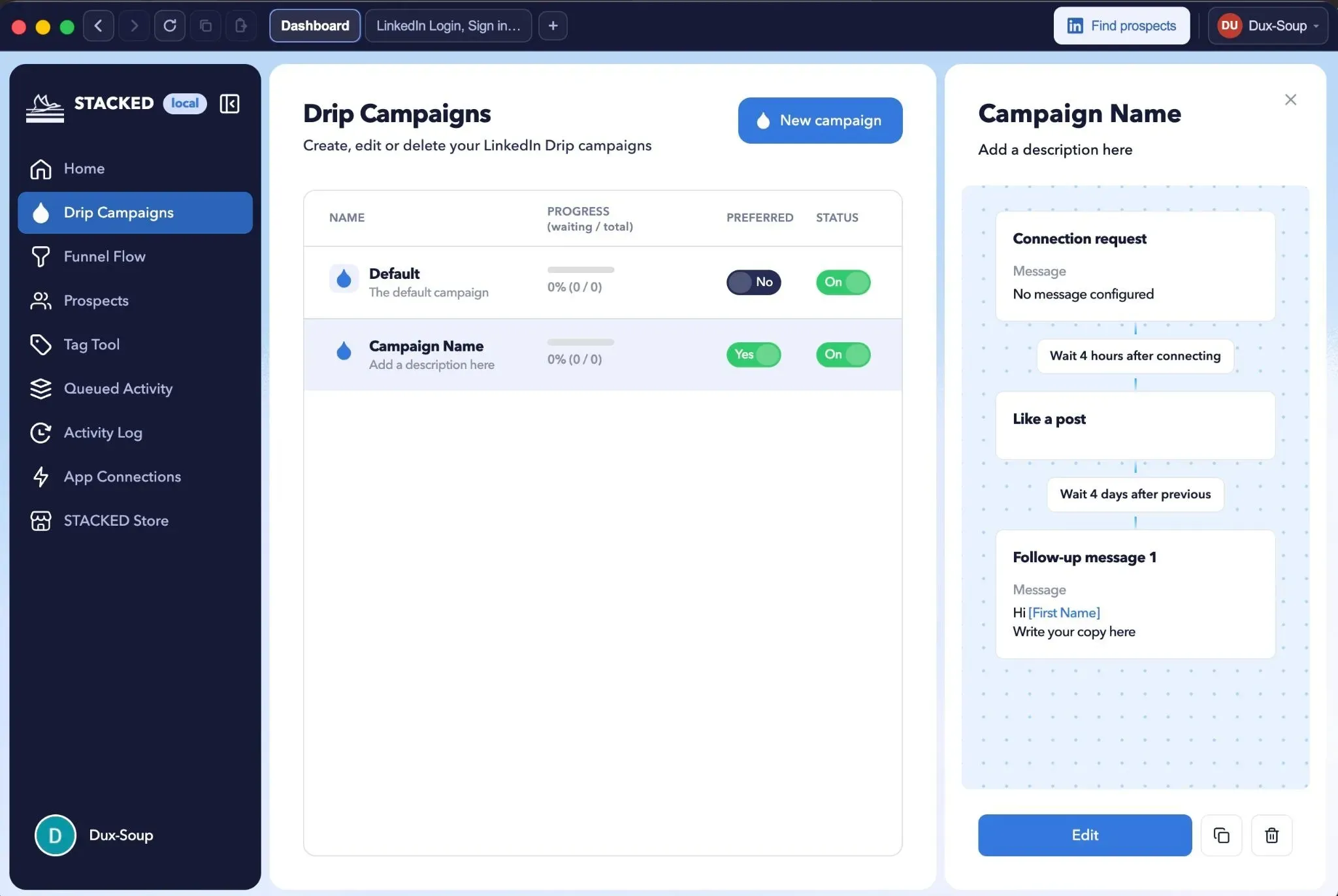
In STACKED's campaign view, actions and their delays sit next to the campaign list. (Image credit: Dux-Soup)
By default, Dux-Soup permits 20 connection requests and 50 direct messages each day; meanwhile, for a free LinkedIn account, the message recommendation that's published is 25. The profile-visit allowance may likewise be used up by other actions. Don't sum the advertised allowances and then expect the campaign to carry out that combined total.
Under Settings → User, switch from Regular to Expert to access Throttling controls. Check the queue before an allowance gets raised. A stalled action may be waiting for capacity that another step already used.
Dux-Soup takes candidates from LinkedIn, Sales Navigator, or Recruiter lookups; CSV documents; clipboard rosters; and CRM pipelines. Funnel Flow tracks progress, Queued Activity displays pending tasks, and Activity Log displays actions that finished or failed. Should replies be scarce, verify the steps truly executed before reworking the message.
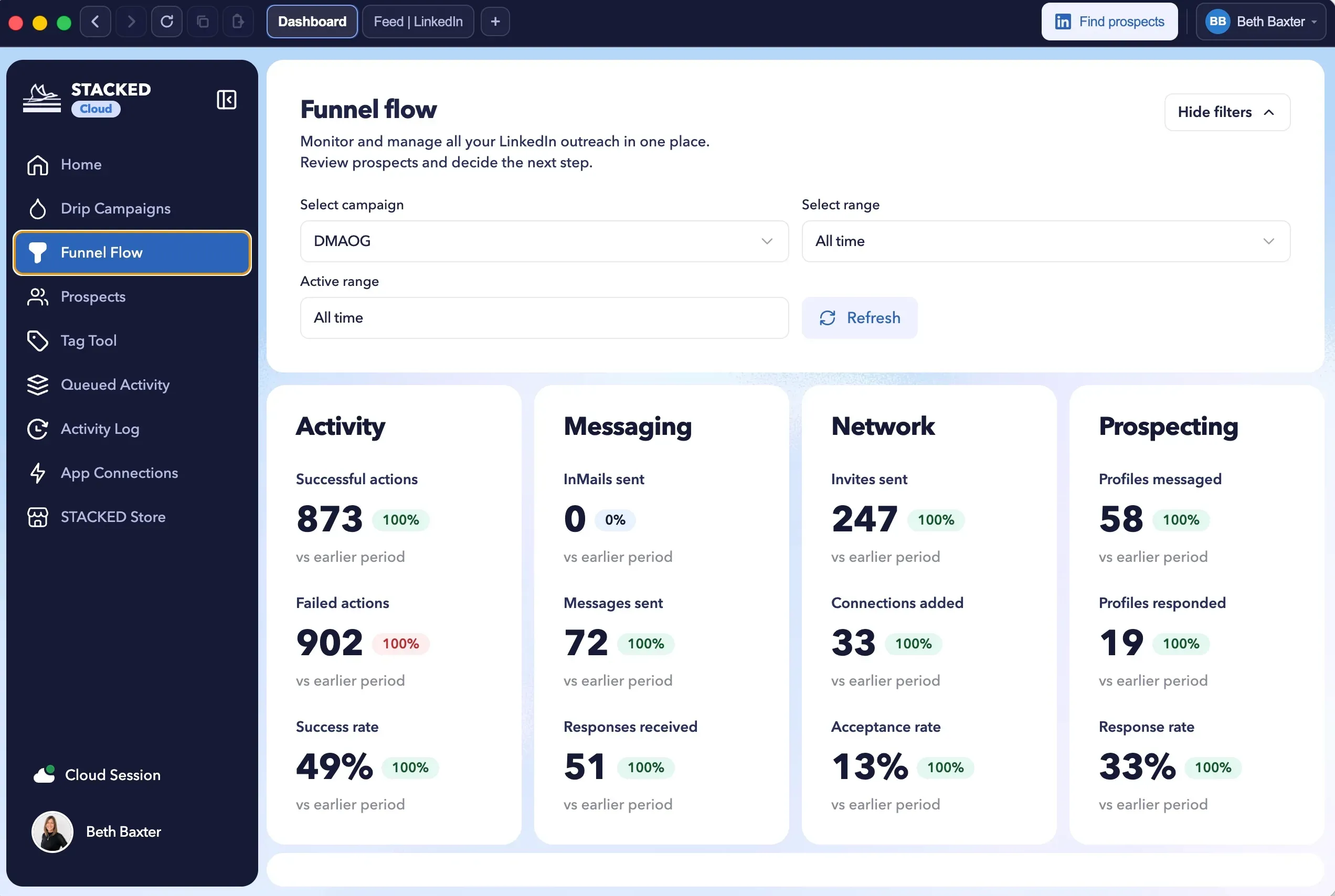
Within STACKED, Funnel Flow divides execution statistics from invites, messages, and replies. Those numbers come from the vendor's example. (Image credit: Dux-Soup)
Dux-Soup AI: a reply can leave the sequence running
Dux-Soup's ChatGPT integration may keep a campaign going after a reply it reads as neutral, rather than applying the usual stop-on-reply behavior. Handling of AI replies can likewise qualify a prospect as in or out. You shouldn't turn it on just to rewrite messages: you're also altering when the campaign stops.
When requests to connect, direct messages, and InMails need rewriting, the connector draws on profile information. Should recently viewed profiles be unavailable, AI Preview can rely on sample profiles while displaying examples. Before allowing the sequence to proceed, review the reply decision along with the generated message.
For this connector, Dux-Soup requires an OpenAI API key and API credits. Should credits or billing be unavailable, it dispatches the original campaign message minus AI personalization. Your original template must be ready for sending. Separately, budget for API usage.
Dux-Soup integrations: check CRM fields and client permissions
Before rolling out Dux-Soup integrations, verify client permissions, company matching, and contact fields. Dux-Soup links with CRMs but isn't a native builder for email-and-LinkedIn sequences. Its connections can transfer information about LinkedIn into other tools or start actions from those tools. HubSpot, Pipedrive, Salesforce, Freshsales, SharpSpring, and HighLevel appear on the integration list, together with Slack, Microsoft Teams, Zapier, and Make.
Shared campaigns, duplicate-prospecting controls, and an administrative dashboard are among the team features. According to Dux-Soup's client-access guide, clients view only their own workspace; the agency's admin dashboard and other clients' accounts stay outside their access. If you're operating an agency, verify those roles against the access you plan to grant.
Use a limited set of CRM records to verify updates before and after synchronization. Data quality becomes a tangible trial question thanks to the customer-review evidence.
Dux-Soup reviews: complaints raise CRM and interface questions
Dux-Soup customer complaints pinpoint errors in CRM data, processor use, and account-management visuals as spots to examine. Public scores merge multiple product generations, so keep the review date tied to every complaint.
On October 28, 2026, these platform scores were recorded:
| Platform | Public score | Total reviews |
|---|---|---|
| G2 | 4.4/5 | 91 |
| Capterra | 4.0/5 | 16 |
| Trustpilot | 4.6/5 | 44 |
On May 2, 2026, John Collins left Dux-Soup 2/5 on Trustpilot. After he connected Pipedrive, he reported organization data that were wrong or kept changing, manual checks he had to repeat, and support escalation that was uneven. Before you turn on synchronization, verify that workflow against your own CRM records.
On May 27, 2024, Liam K. gave Dux-Soup a 4/5 rating on Capterra, noting freezing along with heavy processor use. Dux-Soup answered on August 31, stating that the cloud plan operates on its own infrastructure. This complaint predates STACKED. Dux-Soup's reply explains where processing occurs but doesn't say that the freezing was resolved.
Don't skip the complaints inside high-scoring reviews. On July 14, 2026, a G2 reviewer gave Dux-Soup 5/5 and called the web interface visually dated. Chris T.'s October 12 G2 review, also 5/5, asked for better visuals for multiple people or teams. Inspect those account-management screens before you add clients.
For April–September 2026, every available Capterra record was checked and no reviews were found in that period. Trustpilot's newest-first records crossed the period boundary and included one May review. G2 provided at least two individually verified reviews, with incomplete coverage. A six-month satisfaction trend cannot be established by that sample.
Dux-Soup cancellation: uninstalling leaves billing active
Canceling Dux-Soup means you must email support at info@dux-soup.com. Billing won't stop if you uninstall STACKED or remove the extension. When you cancel, renewal halts and access still continues for the paid period.
You need to request a refund separately. Under Dux-Soup's policy, you must both terminate and submit a refund request within 31 days of the original purchase. Refunds are available for eligible individual subscriptions and prepaid seats. Excluded are partial refunds and post-paid charges. Where an account carries both charge types, refunds are limited to the eligible prepaid portion.
Retain the initial purchase date along with the invoice and submit the cancellation request prior to renewal. Even when it isn't being used, the subscription continues to run.
Dux-Soup alternatives: start with where the LinkedIn session runs
When evaluating Dux-Soup options, you should weigh them by where execution happens, how sessions are accessed, and the workflow you're replacing. Begin with Linked Helper; Octopus CRM and Meet Alfred are lesser-known names worth adding to your own comparison.
Linked Helper: Desktop. Safety first.
For purchasers departing Dux-Soup, Linked Helper adopts a safety-first desktop strategy: it operates on your machine, using your IP and your session. Your LinkedIn password never enters another party's cloud.
Octopus CRM and Meet Alfred: questions for your comparison
Prior to shifting an account to Octopus CRM or Meet Alfred, verify what access you're granting the provider and where the session operates. Next, read the cancellation terms and test how replies halt campaigns. Whatever problem caused you to leave Dux-Soup ought to get resolved by a switch.