

 11 min read
TL;DR: Closely in November 2026
- Verdict: Closely requires you to hand over LinkedIn session access and check what's included in its multichannel bundle before you buy.
- Price: Closely starts at $65 monthly, but its public pricing grid and signed-in upgrade screen disagree on Starter credits.
- Trial: The November 8 Closely trial ran for 14 days without a card, but enrichment required separate activation.
- Account access: Closely offers credentials or extension sync; the inspected Assistant package sends LinkedIn session data to Closely.
- Billing: Closely's Cancel button opens a support request. You'll need confirmation that cancellation is complete before renewal.
Closely verdict: remote account access and billing need scrutiny
Closely asks you to accept remote LinkedIn access, conflicting plan details, and support-assisted cancellation. If you want your session on your own computer or expect to cancel a subscription yourself, I'd skip it.
Before paying, ask Closely to confirm the enrichment allowance and sending inboxes included in your plan, along with the renewal terms you'll have to follow if you leave. Get the answers in writing. They're harder to recover once you've paid for a year.
Linked Helper publishes this review and sells a competing LinkedIn automation product.
What Closely is in 2026: cloud outreach with shared allowances
Closely combines LinkedIn automation, email sequences, enrichment, and AI-assisted research in a cloud workspace. Its servers run the LinkedIn actions, and you'll spend credits on data and AI tasks.
When you buy the bundle, you accept different rules for campaigns, contact data, and account access. You'll also need to reconcile the pricing screen with the help guides: the allowances and credit rates don't always agree.
Closely pricing: $65 to $259 monthly, with conflicting Starter credits
Closely's monthly bundles cost $65, $159, and $259 (the price covers the bundle). The table compares monthly billing with paying for a year upfront:
| Plan | LinkedIn accounts | Monthly billing | Annual equivalent | Annual payment upfront | Monthly credits |
|---|---|---|---|---|---|
| Starter | 1 | $65 | $39/month | $468 | 1,000 in app; omitted on public card |
| Growth | 3 | $159 | $95/month | $1,140 | 3,000 |
| Essential | 5 | $259 | $155/month | $1,860 | 5,000 |
Closely's Starter offers conflict: its signed-in offer equates its credits to 250 emails, 50 phones, or 500 AI personalizations, while the public Starter feature grid excludes enrichment and AI from the same plan. Which allowance would you actually receive? Ask support before checkout.
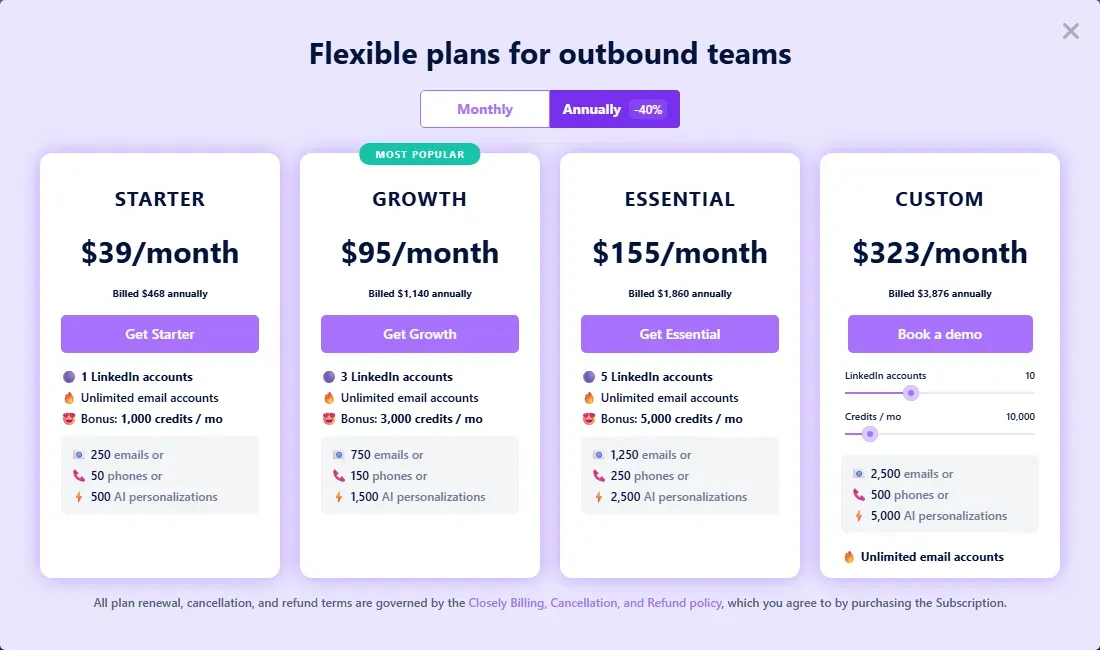
Inside Closely, the Starter upgrade offer includes credits that the public plan card omits.
If you pay annually, you'll save about 40% on the same bundle compared with twelve monthly payments. You'll owe the full amount upfront (taxes, add-ons, and promotional codes are excluded from this comparison).
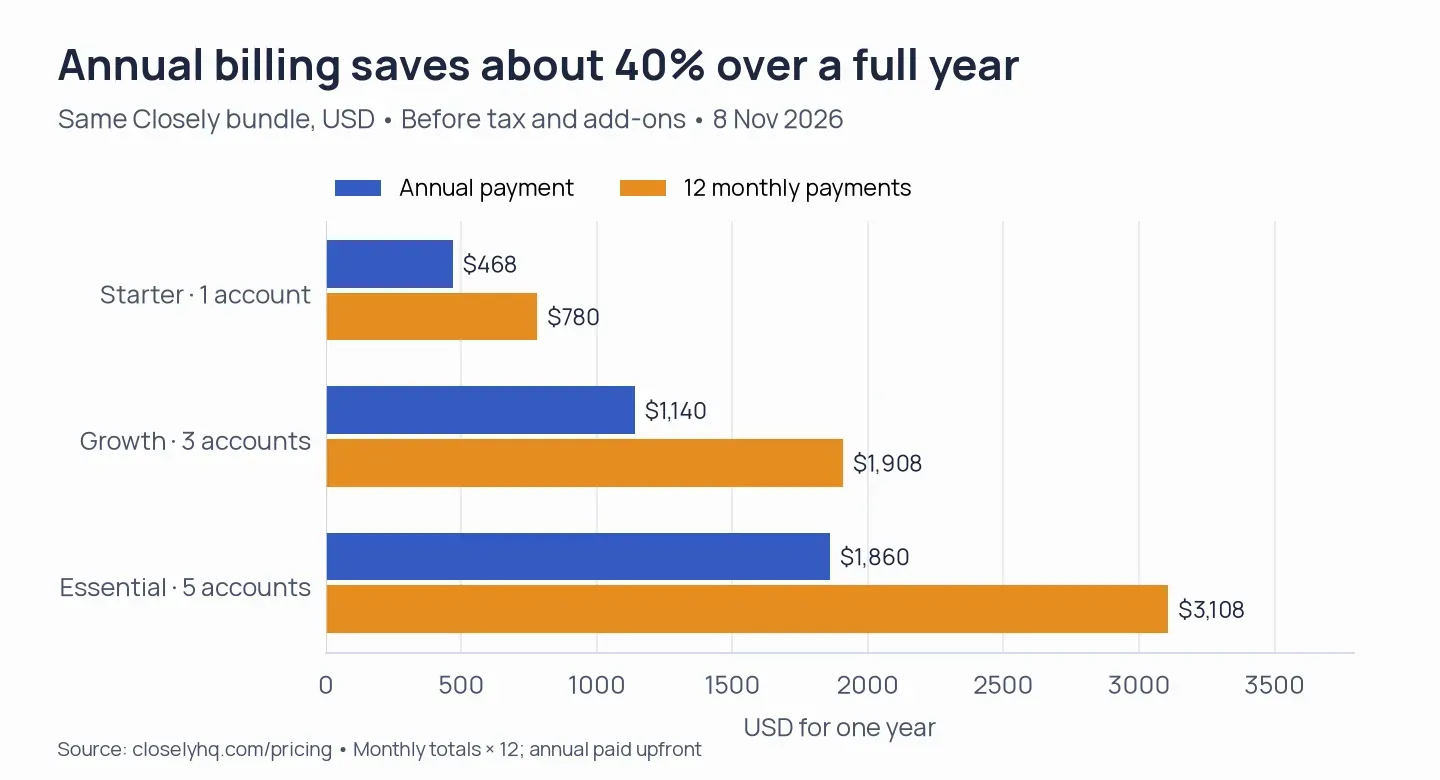
Closely annual and monthly billing compared over a full year.
Credits depend on the operation
Closely's Growth allowance buys 750 email lookups, 150 phone lookups, or 1,500 AI personalizations at the pricing-card equivalents. But they all draw from the same pool (you can't spend the allowance on each category independently). Spend it on phones and you'll use as much per lookup as you would on five email lookups.
And the workflow guides complicate that calculation. Email Finder charges two credits for a successful find, while the pricing-card equivalent implies four. AI Web search costs five credits per row, and Offline Intelligence Data Task costs one. So check the rate for the operation you'll actually run before estimating how long your balance will last.
White-label capacity has a contractual ceiling
Closely's Terms cap white-label access at 100 LinkedIn and 100 email accounts, with additional access subject to approval. The offer costs $1,499 per month with no setup fee, but the sales page promises uncapped seats. An agency planning to sell that capacity to clients needs a written agreement resolving the conflict before it commits.
Closely free trial: 14 days, with enrichment behind activation
Closely let me activate its 14-day trial without a payment card. When I opened the workspace, it showed one seat and the offer listed one LinkedIn account, one email account, and 100 AI credits.
Then I opened Enrichment and reached a request to activate it. I couldn't start the data workflow from there. If enrichment is why you're trying Closely, get that access enabled while you still have time to evaluate it.
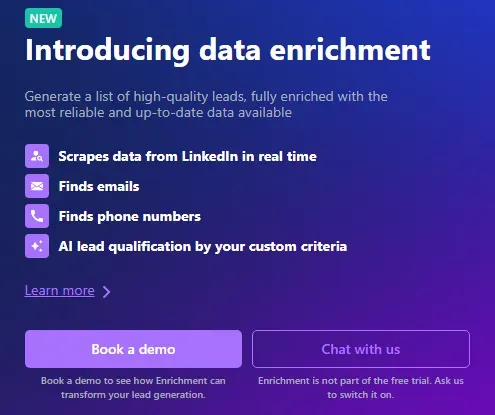
Inside Closely, enrichment requires separate activation during the trial.
Closely safety: credentials, remote sessions, and provider-assigned IPs
Closely runs connected LinkedIn accounts remotely, whether you connect with credentials or use the Closely Assistant extension. With credentials, you're giving Closely your LinkedIn login and password. With the extension, you're handing over session access.
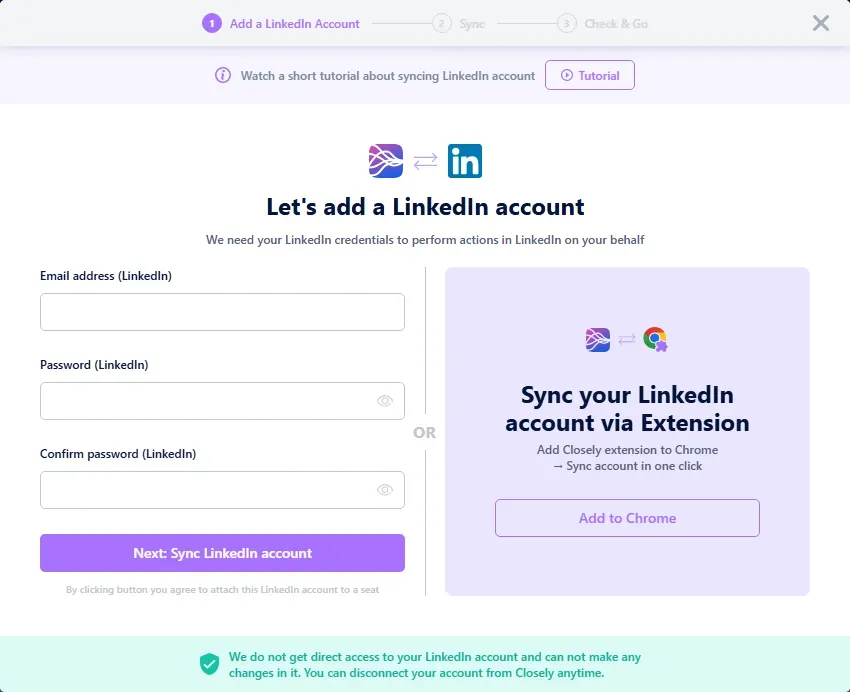
Inside Closely, account connection offers credentials or extension-based session sync.
Assistant transfers LinkedIn session data
The inspected Closely Assistant v2.0.4 package contains code that sends a LinkedIn session cookie or cookie set and a user agent to Closely's account endpoints. You can avoid typing your password into Closely and still send it the session data needed to access your account remotely.
I wouldn't connect my personal LinkedIn account this way. The session leaves your browser, and another service can operate your LinkedIn account.
Trial and paid proxy arrangements differ
Closely calls its assigned IP residential in its marketing. But its older proxy guide discusses US proxies, and the trial guidance says you won't receive the same dedicated proxy type as a paying subscriber. The guide recommends sticking to warm-up activity during the trial.
Before you pay, ask which IP your paid account will use. You can't make Closely's remote LinkedIn actions use your home or office IP by opening the dashboard on your own computer.
Randomized activity limits don't enforce an exact daily ceiling
Closely also randomizes daily activity limits. Its guide says a setting of five connections can produce four to six in a day, so you can't use that setting to enforce an exact daily ceiling.
Closely features: conditions affect the outreach workflow
Closely's campaign rules can keep LinkedIn follow-ups running after an email fails, while its schedule for refreshing the inbox can delay a reply appearing in the workspace. Check both before you move daily outreach into it.
Campaign replies and bounces stop different actions
Closely stops a contact's sequence when they reply. An email autoreply or bounce stops only the email actions, so LinkedIn actions can continue even after the email fails. If you're combining channels, check that the follow-up still makes sense for someone whose mailbox bounced.
Closely sequences can include profile views, connection requests, messages, post likes, skill endorsements, and email finding. Messages and endorsements require an existing connection. Four conditions route contacts by connection status, email opens, link clicks, and whether an email was found.
Sourcing limits depend on the LinkedIn search type
Closely accepts CSV audiences and supported LinkedIn pages (searches, posts, events, and groups), with its guide listing up to 2,500 contacts from Sales Navigator and 1,000 from standard or Recruiter search, depending on the results available. Check your search type.
Those limits govern how many contacts you can collect. You'll still need to check whether the emails and phone numbers belong to the people you intended to reach.
AI output still needs a human decision
Closely saves AI-generated personalization into a variable you select. Prompts can clean company names or draft opening sentences from lead data, but you'll need to check the source data and read the wording before sending it to prospects.
And if you're using a qualification score, decide what earns a message before relying on the number.
Capacity for email accounts conflicts with the seat definition
Closely advertises unlimited email accounts. But its seat guide defines a seat as one LinkedIn account plus one email account. Its campaign guide also ties the email account to a selected LinkedIn account. How would several standalone sending inboxes fit that setup? Get support to explain the configuration before buying for it.
The email guide sets the default daily sending limit at 50 and the maximum at 200. You'll have to plan around those limits even if you can add more accounts.
Smart Inbox refresh can delay time-sensitive exchanges
Closely Smart Inbox updates hourly (you can refresh manually after 30 minutes). You can filter conversations by account, campaign, and tags and export them as TXT. For a time-sensitive exchange, open LinkedIn directly rather than wait for the next update.
Integrations require a defined event and field mapping
Closely lists CRM guides for HubSpot, Salesforce, Pipedrive, Zoho CRM, and GoHighLevel. Before connecting one, choose which event should create or update a record and check how the fields map. Webhooks can send all campaign contacts, accepted connections, or people who replied, and tags and notes have triggers too.
In the Closely trial, I also found API and MCP settings. The API screen had a Create key control and a link to the documentation.

Inside Closely, API settings include key creation and a documentation link.
But the Zapier guide uses Webhooks by Zapier. Don't assume that means there's a dedicated native Closely app in Zapier.
Sharing and exports need deliberate setup
Closely sets inbox visibility to Only Me by default, but you can give the team owner or all team members access if that's how you intend to handle conversations in your sales workspace. Check the audience first.
You can export prospects to CSV and Google Doc with contact fields and action statuses. Campaign-step and chart exports are available too. Check whether the files contain the fields your reporting needs before adding another dashboard to maintain.
Closely reviews: platform ratings and billing complaints
Closely's overall platform ratings were 4.6/5 from 196 G2 reviews and 1.4/5 from 79 Trustpilot reviews when I checked. The platforms give very different impressions of the same product.
The three Trustpilot reviews published from May through October 2026 concerned billing or cancellation. In his one-star August 12 review, Aaron Corkin reported that an upgrade charged an unintended card and that Closely refused to reverse it. Greg Ulitsky's one-star October 5 review alleged continued charges after he'd requested discontinuation. Keep written confirmation when you cancel.
Roselle P. raised problems with CSV editing and changing paused campaigns in an incentivized G2 review rated 4/5 and updated February 2025. It's an older report, so use those tasks as trial checks rather than assume you'll encounter the same problems today.
Closely cancellation: support must complete the request
Closely requires support to complete cancellation: Subscription → Cancel opens a support request. Start before renewal and keep confirmation that it's complete. The white-label page separately requires 30 days' notice.
Closely generally treats payments as nonrefundable. It allows a discretionary exception for requests within two calendar days of a first purchase and for some service issues. Don't rely on that first-purchase exception for a renewal payment.
The cancellation guide says you'll retain features until the listed end date. But the policy warns that cancellation can deactivate access, and even the further five-day period for retrieving your records is discretionary (you can't rely on it when arranging your exit). Export your records before the agreed end date.
How we tested
We tested Closely's trial in November 2026 and reviewed the code of its Chrome extension. We didn't run a paid campaign, so delivery and data accuracy are judged from Closely's docs and customer reviews.
Closely alternatives: start with account control
When choosing a Closely alternative, decide whether keeping the LinkedIn session on your own computer is a requirement. Then check what the subscription adds to your workflow: if your CRM already handles email sequences, paying for them again may add little.
Linked Helper: Desktop. Safety first.
Linked Helper runs on your own desktop, safety first: it uses your IP and session, and your LinkedIn password doesn't go to another provider's cloud. Standard starts at $15 for a one-month license and PRO at $45.
The Linked Helper vs. Closely comparison covers the products directly. Choose where your account runs before comparing bundle prices.
Meet Alfred and Salesflow: check account access before switching
Before considering a move to Meet Alfred or Salesflow, check how each accesses your account, where it runs, and what the subscription includes. Both appear in the Closely alternatives comparison. Read the cancellation terms too.